Show temperature and humidity from DTH11 to smartphone over Net
Show temperature and humidity from DTH11 to smartphone over Net
0
Components
Hardware componentsArduino UNO board
x 1
Ethernet W5100 shield
x 1
DTH11 sensor
x 1
Project description
This example will show how easily display the values of temperature and humidity from DTH11 sensor to smartphone or tablet use the service RemoteXY. The sensor is connected to the Arduino board. Sensor values transmits via network to the smartphone. On smartphone must install?RemoteXY mobile app. As a communication module used Ethernet W5100 shield for Arduino. However, you can choose the most suitable communication module, which is supported by RemoteXY service, such as Bluetooth or Wi-Fi.
To build the project will need:
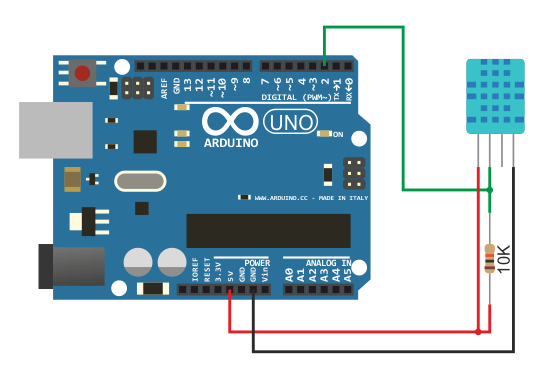
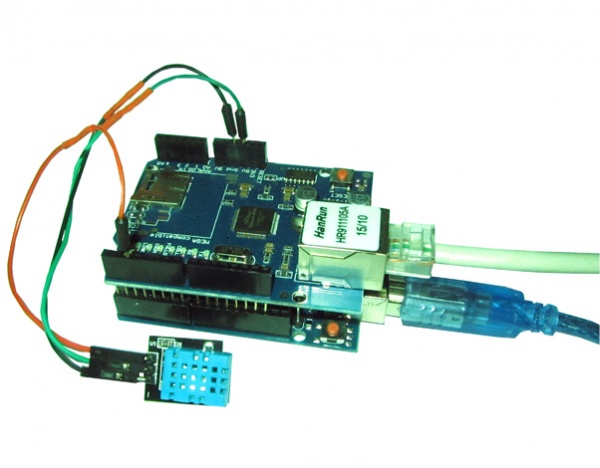 The sensor output is connected to pin 2 of the Arduino board. The sensor is powered by 5V on Arduino board. How to connect the sensor shown on image below.
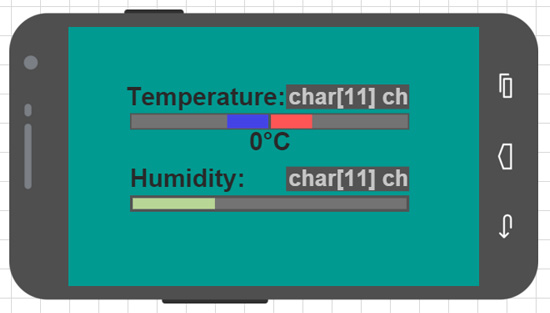
 Use RemoteXY GUI editor need to develop the graphical interface, and place temperature and humidity indicators to it. Each indicator is presented as a text field and a level indicator. In the text field will display a numeric value of the temperature in degrees celsius and the humidity percentage. Level indicator will complement the numerical value.
Level indicator of temperature consists of two indicators, separately for positive (red color) and negative (blue color) temperature. For negative temperature indicator set the setting center position "Right". It setting will fill indicator from right when increasing negative temperature.
Humidity level indicator is green.
For convenience, can override the names of interface elements. These names will later be assigned to a variable in the source code of interface. The GUI shows on image below.
Use RemoteXY GUI editor need to develop the graphical interface, and place temperature and humidity indicators to it. Each indicator is presented as a text field and a level indicator. In the text field will display a numeric value of the temperature in degrees celsius and the humidity percentage. Level indicator will complement the numerical value.
Level indicator of temperature consists of two indicators, separately for positive (red color) and negative (blue color) temperature. For negative temperature indicator set the setting center position "Right". It setting will fill indicator from right when increasing negative temperature.
Humidity level indicator is green.
For convenience, can override the names of interface elements. These names will later be assigned to a variable in the source code of interface. The GUI shows on image below.
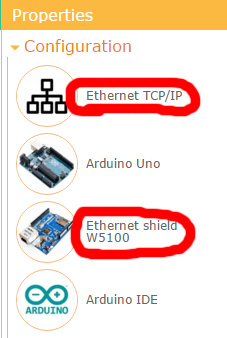
 Also must select the Ethernet as communication method and select the Ethernet W5100 shield as module in project configuration settings of RemoteXY editor.
 After go to by link "source code" is necessary to download the source code that implement the interface. The downloaded source code can compile and load into the Arduino board. So will already be able to connect to the interface from a smartphone, using RemoteXY app. However, the interface is not displaying the values of temperature and humidity. Next need to modify the code of interface and integrate our task as read the sensor and transmission of the values to display.
For read from DHT11 sensor used "DHT.h" library. This can download?by link. This library is included in source code of interface. Connect and configure the sensor to the Arduino to pin 2 in the same method, which write in tutorial of library.
Must read sensors and transform data to display GUI is executed in each cycle loop() function. Below is a example of code.
Converting sensor values into a text string for display in the GUI is performed using dtostrf() function from standard library.
The next code converts the sensor value to be displayed on a humidity level indicator.
The code to display the temperature on the two level indicators look as little harder. Depending on the sign of the readed temperature is activated one level indicator, while the other is sets to 0. If the temperature is equal to zero, then both level indicators sets to 0.
Below is the full code for sketch. You can copy it to the IDE Arduino, compile and download to the controller. Do not forget to install?RemoteXY library?for Arduino IDE.
To connect to the Arduino from smartphone or tablet must use a mobile app RemoteXY. In app need to choose Net connection. In the open window must enter the IP address that was got Ethernet shield by DHCP server of your router. This IP address can be found in the web-panel of router settings from the table of connected network devices. The device can be identified by MAC address, which was set in the sketch.
If your router, which is connected to the built sensor, has an internet connection and white or a dynamic IP address of the global Internet, in this case, it is possible to watch for temperature and humidity from anywhere in the world where there is Internet. In the router must configure the virtual server, which will open the external port and redirects requests to the internal IP address and port of your device. In mobile app need to enter external IP address of your router.
If you have a dynamic address it require to use one of the dynamic addresses services, such as DynDNS. Setting up the use of this service is supported by most router models. Many routers manufacturers offer own similar service, such as service DLink located at dlinkddns.com. In the mobile application need to enter the URL of your dynamic address instead of the IP address.
After go to by link "source code" is necessary to download the source code that implement the interface. The downloaded source code can compile and load into the Arduino board. So will already be able to connect to the interface from a smartphone, using RemoteXY app. However, the interface is not displaying the values of temperature and humidity. Next need to modify the code of interface and integrate our task as read the sensor and transmission of the values to display.
For read from DHT11 sensor used "DHT.h" library. This can download?by link. This library is included in source code of interface. Connect and configure the sensor to the Arduino to pin 2 in the same method, which write in tutorial of library.
Must read sensors and transform data to display GUI is executed in each cycle loop() function. Below is a example of code.
Converting sensor values into a text string for display in the GUI is performed using dtostrf() function from standard library.
The next code converts the sensor value to be displayed on a humidity level indicator.
The code to display the temperature on the two level indicators look as little harder. Depending on the sign of the readed temperature is activated one level indicator, while the other is sets to 0. If the temperature is equal to zero, then both level indicators sets to 0.
Below is the full code for sketch. You can copy it to the IDE Arduino, compile and download to the controller. Do not forget to install?RemoteXY library?for Arduino IDE.
To connect to the Arduino from smartphone or tablet must use a mobile app RemoteXY. In app need to choose Net connection. In the open window must enter the IP address that was got Ethernet shield by DHCP server of your router. This IP address can be found in the web-panel of router settings from the table of connected network devices. The device can be identified by MAC address, which was set in the sketch.
If your router, which is connected to the built sensor, has an internet connection and white or a dynamic IP address of the global Internet, in this case, it is possible to watch for temperature and humidity from anywhere in the world where there is Internet. In the router must configure the virtual server, which will open the external port and redirects requests to the internal IP address and port of your device. In mobile app need to enter external IP address of your router.
If you have a dynamic address it require to use one of the dynamic addresses services, such as DynDNS. Setting up the use of this service is supported by most router models. Many routers manufacturers offer own similar service, such as service DLink located at dlinkddns.com. In the mobile application need to enter the URL of your dynamic address instead of the IP address.
- Arduino UNO board;
- Ethernet W5100 shield;
- DTH11 sensor.
The sensor output is connected to pin 2 of the Arduino board. The sensor is powered by 5V on Arduino board. How to connect the sensor shown on image below.
Use RemoteXY GUI editor need to develop the graphical interface, and place temperature and humidity indicators to it. Each indicator is presented as a text field and a level indicator. In the text field will display a numeric value of the temperature in degrees celsius and the humidity percentage. Level indicator will complement the numerical value.
Level indicator of temperature consists of two indicators, separately for positive (red color) and negative (blue color) temperature. For negative temperature indicator set the setting center position "Right". It setting will fill indicator from right when increasing negative temperature.
Humidity level indicator is green.
For convenience, can override the names of interface elements. These names will later be assigned to a variable in the source code of interface. The GUI shows on image below.
Also must select the Ethernet as communication method and select the Ethernet W5100 shield as module in project configuration settings of RemoteXY editor.
After go to by link "source code" is necessary to download the source code that implement the interface. The downloaded source code can compile and load into the Arduino board. So will already be able to connect to the interface from a smartphone, using RemoteXY app. However, the interface is not displaying the values of temperature and humidity. Next need to modify the code of interface and integrate our task as read the sensor and transmission of the values to display.
For read from DHT11 sensor used "DHT.h" library. This can download?by link. This library is included in source code of interface. Connect and configure the sensor to the Arduino to pin 2 in the same method, which write in tutorial of library.
Must read sensors and transform data to display GUI is executed in each cycle loop() function. Below is a example of code.
float?temp?=?dht.readTemperature();
float?hum?=?dht.readHumidity();
dtostrf(temp,?0,?1,?RemoteXY.text_temp);
dtostrf(hum,?0,?1,?RemoteXY.text_hum);
RemoteXY.level_hum?=?hum;
if?(temp<0)?{
RemoteXY.level_temp_up?=?0;
RemoteXY.level_temp_down?=?min?(-temp*2,100);
}
else?if?(temp>0)?{
RemoteXY.level_temp_up?=?min(temp*2,100);
RemoteXY.level_temp_down?=?0;
}
else?{
RemoteXY.level_temp_up?=?0;
RemoteXY.level_temp_down?=?0;
}
//////////////////////////////////////////////
//????????RemoteXY?include?library??????????//
//?????use??library??version?2.1.3?or?up????//
//???use?ANDROID?app?version?3.4.1?or?up????//
//////////////////////////////////////////////

/*?RemoteXY?select?connection?mode?and?include?library?*/
#define?REMOTEXY_MODE__W5100_SPI
#include?<Ethernet.h>
/*?Ethernet?shield?used?pins:?10(SS)?*/
#include?<SPI.h>
/*?SPI?interface?used?pins:?11(MOSI),?12(MISO),?13(SCK)?*/

#include?<RemoteXY.h>

/*?RemoteXY?connection?settings?*/
#define?REMOTEXY_ETHERNET_MAC?"DE:AD:BE:EF:EF:ED"
#define?REMOTEXY_SERVER_PORT?6377


/*?RemoteXY?configurate??*/
unsigned?char?RemoteXY_CONF[]?=
{?0,25,88,0,4,5,67,4,53,14
,30,6,0,11,67,4,53,34,30,6
,0,11,66,193,15,21,34,4,6,66
,129,49,21,34,4,1,66,129,15,41
,68,4,4,129,0,14,14,38,6,0
,84,101,109,112,101,114,97,116,117,114
,101,58,0,129,0,15,34,28,6,0
,72,117,109,105,100,105,116,121,58,0
,129,0,44,25,10,6,0,48,194,176
,67,0?};

/*?this?structure?defines?all?the?variables?of?your?control?interface?*/
struct?{

/*?output?variable?*/
char?text_temp[11];??/*?string?end?zero?UNICODE?*/
char?text_hum[11];??/*?string?end?zero?UNICODE?*/
signed?char?level_temp_down;?/*?=0..100?level?position?*/
signed?char?level_temp_up;?/*?=0..100?level?position?*/
signed?char?level_hum;?/*?=0..100?level?position?*/

/*?other?variable?*/
unsigned?char?connect_flag;??/*?=1?if?wire?connected,?else?=0?*/

}?RemoteXY;

/////////////////////////////////////////////
//???????????END?RemoteXY?include??????????//
/////////////////////////////////////////////

#include?"DHT.h"
#define?DHTPIN?2
DHT?dht(DHTPIN,?DHT11);

void?setup()
{
RemoteXY_Init?();


//?TODO?you?setup?code

}

void?loop()
{
RemoteXY_Handler?();


//?TODO?you?loop?code
//?use?the?RemoteXY?structure?for?data?transfer
float?temp?=?dht.readTemperature();
float?hum?=?dht.readHumidity();
dtostrf(temp,?0,?1,?RemoteXY.text_temp);
dtostrf(hum,?0,?1,?RemoteXY.text_hum);

if?(temp<0)?{
RemoteXY.level_temp_up?=?0;
RemoteXY.level_temp_down?=?min?(-temp*2,100);
}
else?if?(temp>0)?{
RemoteXY.level_temp_up?=?min(temp*2,100);
RemoteXY.level_temp_down?=?0;
}
else?{
RemoteXY.level_temp_up?=?0;
RemoteXY.level_temp_down?=?0;
}
RemoteXY.level_hum?=?hum;
}

