Web Cloud : Send Arduino sensor information to Dweet.io
Build your own server to manage and store the received sensor information along with Dweet.io cloud services
4
Components
Hardware componentsWIZnet - WizFi310
x 1

Project description
circuit configuration
[Use WIFI]
Board: Arduino Mega 2560 + WizFi310 [Use Ethernet ]
Board: WizArduino (or Arduino Board + Ethernet Shield2 )And the following shield was used. Since this part is optional, you can configure the circuit separately without using this shield. Also, since it is a tutorial that does not depend on devices, you can proceed without additional circuit configuration.
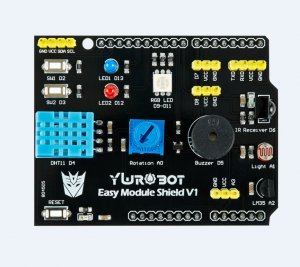
If the upper shield is used, the circuit configuration is as shown below.
A0 : Variable resistance
A1 : CDS sensor
A2 : Temperature sensor (LM35)
If you are using WizFi310 (WIFI), connect with Serial3.
The full source is below.
Some corrections are needed, so please refer to the comments carefully or check the next section before proceeding.
[WizFi310] – WIFI
https://create.arduino.cc/editor/OpusK/c80cbe35-4798-4771-84fd-035ca275dd13/preview
[WizArduino] -Ethernet https://create.arduino.cc/editor/OpusK/0b92d1a6 -cae4-4c57-8aec-3cda547bcfc1/preview
