esphome-sensostar
Custom ESPHome component use with SensoStar module
0
Project description
PROJECT DESCRIPTION
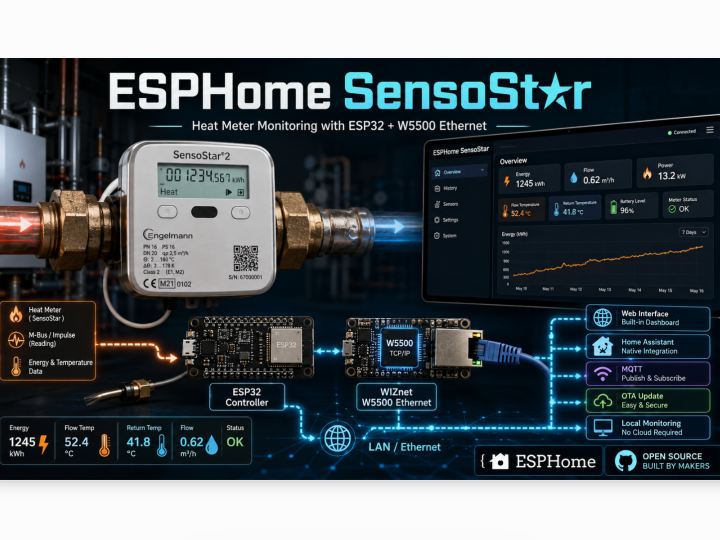
ESPHome SensoStar는 Engelmann SensoStar 계열의 열량계에서 난방 에너지 사용 데이터를 읽어 ESPHome과 Home Assistant에서 모니터링할 수 있도록 만든 오픈소스 프로젝트입니다.
열량계 내부에 저장되는 누적 에너지, 유량, 공급수와 환수 온도, 순간 열출력 등의 데이터를 ESP32가 주기적으로 읽고, 이를 Wi-Fi 또는 WIZnet W5500 기반 유선 Ethernet을 통해 Home Assistant, Web Interface 및 MQTT 시스템으로 전달합니다.
일반적으로 열량계의 데이터는 장치 화면을 직접 확인하거나 별도의 전용 리더기를 사용해야 합니다. 이 프로젝트는 열량계 내부 통신 포트와 ESP32를 연결하여 기존 계량기를 네트워크 기반의 스마트 에너지 모니터링 장치로 확장합니다.
WHAT IS A HEAT METER?
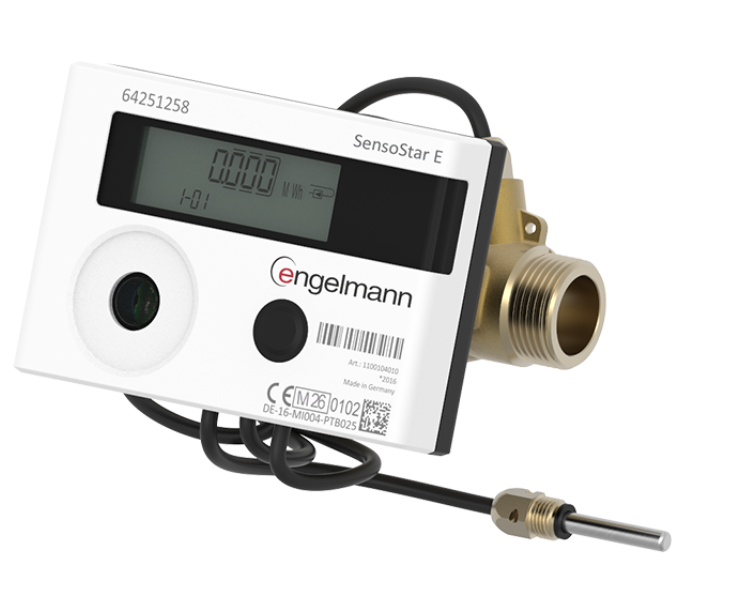
열량계는 난방 배관을 통과하는 물의 유량과 공급·환수 온도 차이를 이용하여 실제 소비된 열에너지를 계산하는 장치입니다.
이 프로젝트는 SensoStar 열량계에서 다음 데이터를 읽을 수 있습니다.
- 누적 열에너지 사용량: kWh
- 누적 난방수 사용량: m³
- 현재 열출력: W
- 난방수 유량: m³/h
- 공급수 온도: °C
- 환수 온도: °C
- 공급·환수 온도 차이: ΔT
- 열량계 동작 및 오류 상태
- 열량계 배터리 전압
ESPHome에서는 누적 에너지와 체적을 Total Increasing 값으로, 온도·유량·출력은 실시간 측정값으로 등록합니다. 따라서 Home Assistant의 Energy Dashboard나 장기 통계 기능과 연결하여 난방 에너지 소비 변화를 분석할 수 있습니다.
KEY FEATURES
Real-time Heating Data Monitoring
열량계를 직접 확인하지 않고 웹 브라우저나 Home Assistant에서 난방 에너지 상태를 확인할 수 있습니다.
Wired and Wireless Connectivity
설치 환경에 따라 ESP32 Wi-Fi 또는 W5500 Ethernet 버전을 선택할 수 있습니다.
Local Operation
Cloud Service에 의존하지 않고 로컬 네트워크의 Home Assistant, Web Interface 또는 MQTT Broker에서 데이터를 관리할 수 있습니다.
OTA Firmware Update
장치를 분리하지 않고 네트워크를 통해 ESPHome Firmware를 업데이트할 수 있습니다.
Runtime MQTT Configuration
Firmware를 다시 빌드하지 않고 Web Interface나 Home Assistant에서 MQTT Broker 정보를 변경할 수 있습니다.
Meter Error Monitoring
열량계의 센서 단선, 단락, 유량 측정 오류 및 배터리 부족 상태를 문자 형태로 확인할 수 있습니다.
Open-source Hardware Expansion
ESPHome Component, YAML 설정, 회로 구성 자료 및 LAN Housing STL 파일이 공개되어 있어 사용 환경에 맞게 수정할 수 있습니다.
SYSTEM ARCHITECTURE

전체 데이터 흐름은 다음과 같습니다.
SensoStar Heat Meter
→ Internal Communication Connector
→ ESP32-S3 또는 ESP32-C6
→ Wi-Fi 또는 W5500 Ethernet
→ ESPHome API / MQTT
→ Home Assistant 및 Web Interface
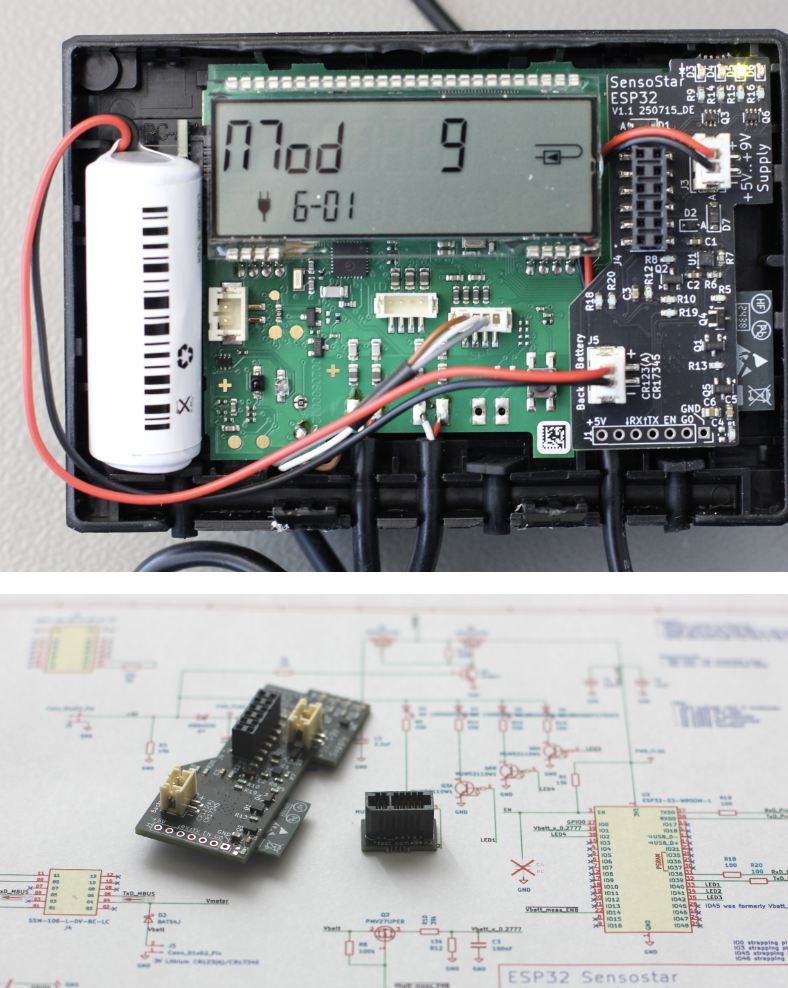
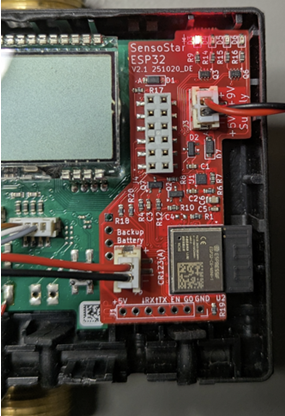
열량계와 ESP32는 내부 12핀 커넥터의 RX, TX, GND 핀을 이용해 연결됩니다.
프로젝트의 ESPHome 설정에서는 열량계 통신을 위해 UART를 다음과 같이 구성합니다.
Baud Rate: 2400bps
Parity: Even
Data Bits: 8bit
Update Interval: 10초
ESP32는 열량계에 데이터 요청 프레임을 전송하고, 수신한 M-Bus 형식의 응답 데이터를 해석합니다. 수신 프레임의 시작 값, 길이, 종료 값 및 Checksum도 검사하여 비정상적인 데이터가 센서값으로 등록되는 것을 방지합니다.
CUSTOM ESPHOME COMPONENT
이 프로젝트의 핵심은 직접 제작된 SensoStar_MBus ESPHome Component입니다.
해당 Component는 열량계에서 전달되는 M-Bus 데이터의 DIF와 VIF 정보를 분석하여 데이터 종류와 단위를 판별합니다.
이를 통해 다음과 같은 계량기 데이터를 각각의 ESPHome Sensor로 변환합니다.
- Energy
- Volume
- Power
- Flow
- Flow Temperature
- Return Temperature
- Temperature Difference
- Meter Status
열량계에서 오류 상태가 수신되면 단순한 숫자가 아니라 다음과 같은 사람이 읽을 수 있는 상태 메시지로 변환합니다.
- Temperature Sensor Cable Break
- Temperature Sensor Short Circuit
- Flow Measurement Error
- Electronic Defect
- Reset
- Low Battery
정상 상태에서는 OK가 표시되며, 일정 시간 동안 열량계에서 응답을 받지 못하면 No readout from heat meter 상태와 함께 센서값을 유효하지 않은 값으로 처리합니다.
HARDWARE VARIANTS
프로젝트는 여러 ESP32 하드웨어 구성을 지원합니다.
Wi-Fi Version
ESP32-S3 또는 ESP32-C6의 Wi-Fi 기능을 사용하여 Home Assistant와 연결합니다.
Wi-Fi 정보가 설정되지 않은 첫 부팅 상태에서는 Sensostar라는 Access Point를 생성하고 Captive Portal을 통해 네트워크 정보를 입력할 수 있습니다.
Wired Ethernet Version
유선 LAN 버전은 다음과 같이 구성됩니다.
MCU: ESP32-C6
Ethernet Controller: WIZnet W5500
Interface: SPI
Connection Board: FFC Adapter Board
Network Interface: RJ45 Ethernet
ESP32-C6 메인 보드와 W5500 확장 보드는 FFC Adapter를 통해 연결됩니다. 펌웨어는 Wi-Fi용 설정 대신 별도의 sensostar_eth.yaml Connectivity Package를 불러오도록 구성되어 있습니다.
프로젝트에는 유선 LAN 장치용 상단과 하단 3D 프린팅 Housing STL 파일도 포함되어 있어, 단순한 Breadboard 예제가 아니라 실제 열량계 주변에 설치할 수 있는 장치 형태로 제작할 수 있습니다.
ROLE OF WIZNET W5500
W5500은 ESP32-C6 기반 LAN 버전에서 열량계 데이터를 안정적으로 네트워크에 연결하는 역할을 합니다.
W5500은 ESP32-C6와 SPI로 연결되며 다음 신호를 사용합니다.
- SPI Clock
- MOSI
- MISO
- Chip Select
- Interrupt
- Reset
Ethernet Link가 연결되면 상태 LED가 켜지고, MQTT 기능이 활성화되어 있을 경우 설정된 MQTT Broker와의 연결도 시작합니다. Ethernet 연결이 해제되면 Link Status LED가 꺼지도록 구현되어 있습니다.
W5500을 사용하면 열량계가 설치되는 보일러실이나 기계실처럼 Wi-Fi 신호가 약하거나 무선 연결이 불안정한 환경에서도 유선 네트워크를 이용할 수 있습니다.
특히 열량계와 같은 설비 계측 장치는 한 번 설치하면 장기간 계속 운용되는 경우가 많기 때문에, 고정된 Ethernet 연결을 사용하면 무선 비밀번호 변경이나 신호 간섭으로 인한 연결 문제를 줄일 수 있습니다.
다만 이 프로젝트는 Wi-Fi와 Ethernet을 동시에 사용하는 Hybrid Network 방식은 아닙니다. 펌웨어 파일을 선택하여 Wi-Fi 또는 W5500 Ethernet 중 하나의 네트워크 방식을 사용하는 구조입니다.
WEB INTERFACE


ESPHome의 내장 Web Server를 통해 별도의 Home Assistant 서버 없이도 웹 브라우저에서 열량계 데이터를 확인할 수 있습니다.
Web Interface에서는 다음 정보를 확인할 수 있습니다.
- Battery Level
- Calculated Power
- Energy
- Flow
- Flow Temperature
- Power
- Return Temperature
- Meter Status
- Temperature Difference
- Volume
또한 배터리 전압을 즉시 다시 측정하는 버튼과 OTA Firmware Update 기능도 제공합니다. Wi-Fi 버전에서는 현재 Wi-Fi 신호 세기를 확인하는 기능도 사용할 수 있습니다.
이 기능을 통해 사용자는 같은 로컬 네트워크에 연결된 PC나 스마트폰에서 ESP32의 IP 주소로 접속하여 열량계 상태를 직접 확인할 수 있습니다.
HOME ASSISTANT INTEGRATION
ESPHome Native API를 사용하면 장치가 Home Assistant에 자동으로 등록됩니다.
등록된 장치는 Home Assistant에서 다음과 같은 Sensor Entity로 표시됩니다.
- Battery Level
- Calculated Power
- Energy
- Flow
- Flow Temperature
- Power
- Return Temperature
- Status
- Temperature Difference
- Volume
각 Entity를 Dashboard에 추가하거나 자동화 조건으로 사용할 수 있습니다. 예를 들어 난방 소비량이 평소보다 급격하게 증가하거나, 열량계에서 배터리 부족 또는 센서 오류가 발생할 경우 알림을 보내도록 구성할 수 있습니다.
MQTT SUPPORT
ESPHome Native API 외에도 MQTT를 선택적으로 사용할 수 있습니다.
MQTT는 기본적으로 비활성화되어 있으며, Web Interface나 Home Assistant의 Control Entity에서 다음 정보를 설정할 수 있습니다.
MQTT Broker Address
MQTT Port
MQTT Username
MQTT Password
MQTT Enable/Disable
기본 MQTT Port는 1883이며, 입력한 설정은 ESP32의 NVS에 저장되어 재부팅 이후에도 유지됩니다. Broker Address가 입력되지 않았거나 Port가 올바르지 않으면 MQTT가 활성화되지 않도록 검증 과정도 포함되어 있습니다.
MQTT를 사용하면 Home Assistant뿐만 아니라 Node-RED, InfluxDB, Grafana 또는 자체 에너지 관리 서버와도 열량계 데이터를 연동할 수 있습니다.
POSSIBLE APPLICATIONS
이 프로젝트는 다음과 같은 환경에 활용할 수 있습니다.
- 가정용 난방 에너지 모니터링
- 아파트 세대별 열사용량 확인
- 보일러 및 Heat Pump 효율 분석
- 건물 에너지 관리 시스템
- 지역난방 열량계 원격 모니터링
- 기계실 및 보일러실 설비 감시
- Home Assistant 기반 난방 자동화
- MQTT 기반 에너지 데이터 수집
- 장기간 난방 사용량 기록 및 분석
- 열량계 오류 및 배터리 상태 알림
CONCLUSION
ESPHome SensoStar는 기존 열량계의 내부 데이터를 ESP32와 ESPHome 환경으로 가져오는 오픈소스 난방 에너지 모니터링 프로젝트입니다.
단순히 온도 센서를 추가하는 방식이 아니라 열량계가 실제로 측정한 누적 에너지, 유량, 열출력, 공급·환수 온도 및 오류 상태를 직접 읽는다는 점이 특징입니다.
또한 Home Assistant Native API, Web Interface, MQTT, OTA Update를 지원하여 수집된 데이터를 다양한 스마트홈 및 에너지 관리 시스템과 연동할 수 있습니다.
특히 ESP32-C6와 WIZnet W5500을 결합한 유선 LAN 버전은 Wi-Fi 연결이 불안정한 보일러실이나 기계실에서도 열량계 데이터를 안정적으로 수집할 수 있도록 하며, 기존 계량기를 로컬 네트워크 기반의 스마트 에너지 계측 장치로 확장할 수 있다는 점에서 활용 가치가 높은 프로젝트입니다.
Custom ESPHome component use with SensoStar module
PROJECT DESCRIPTION
ESPHome SensoStar is an open-source project designed to read heating energy usage data from Engelmann SensoStar series calorimeters and enable monitoring via ESPHome and Home Assistant.
The ESP32 periodically reads data such as accumulated energy, flow rate, supply and return water temperatures, and instantaneous heat output stored inside the calorimeter, and transmits this to Home Assistant, Web Interface, and MQTT systems via Wi-Fi or wired Ethernet based on WIZnet W5500.
Generally, calorimeter data must be viewed directly on the device screen or using a separate dedicated reader. This project extends existing meters into network-based smart energy monitoring devices by connecting the calorimeter's internal communication port to an ESP32.
WHAT IS A HEAT METER?
A calorimeter is a device that calculates the actual thermal energy consumed by utilizing the flow rate of water passing through heating pipes and the temperature difference between the supply and return water.
This project can read the following data from the SensoStar calorimeter.
- Cumulative thermal energy usage: kWh
- Cumulative heating water usage: m³
- Current thermal output: W
- Heating water flow rate: m³/h
- Supply water temperature: °C
- Return water temperature: °C
- Supply-return temperature difference: ΔT
- Calorimeter Operation and Error Status
- Calorimeter battery voltage
In ESPHome, accumulated energy and volume are registered as Total Increasing values, while temperature, flow rate, and output are registered as real-time measurements. Therefore, you can analyze changes in heating energy consumption by connecting with Home Assistant's Energy Dashboard or long-term statistics functions.
SYSTEM ARCHITECTURE
The overall data flow is as follows.
SensoStar Heat Meter
→ Internal Communication Connector
→ ESP32-S3 or ESP32-C6
→ Wi-Fi or W5500 Ethernet
→ ESPHome API / MQTT
→ Home Assistant and Web Interface
The calorimeter and ESP32 are connected using the RX, TX, and GND pins of the internal 12-pin connector.
In the project's ESPHome settings, configure the UART for calorimeter communication as follows.
Baud Rate: 2400bps
Parity: Even
Data Bits: 8bit
Update Interval: 10 seconds
The ESP32 transmits a data request frame to the calorimeter and interprets the received response data in M-Bus format. It also checks the start value, length, end value, and checksum of the received frame to prevent abnormal data from being registered as sensor values.
CUSTOM ESPHOME COMPONENT
The core of this project is the custom-made SensoStar_MBusESPHome Component.
This component analyzes the DIF and VIF information of M-Bus data transmitted from the calorimeter to determine the data type and unit.
This converts the following meter data into each ESPHome Sensor.
- Energy
- Volume
- Power
- Flow
- Flow Temperature
- Return Temperature
- Temperature Difference
- Meter Status
When an error status is received from the calorimeter, it is converted into a human-readable status message such as the following, rather than a simple number.
- Temperature Sensor Cable Break
- Temperature Sensor Short Circuit
- Flow Measurement Error
- Electronic Defect
- Reset
- Low Battery
In the normal state, OKit is displayed, and if no response is received from the calorimeter for a certain period of time, No readout from heat meterthe sensor value is treated as an invalid value along with the status.
HARDWARE VARIANTS
The project supports various ESP32 hardware configurations.
Wi-Fi Version
Connect to Home Assistant using the Wi-Fi function of the ESP32-S3 or ESP32-C6.
In the first boot state where Wi-Fi information is not configured, Sensostaryou can create an Access Point named and enter network information through the Captive Portal.
Wired Ethernet Version
The wired LAN version is configured as follows.
MCU: ESP32-C6
Ethernet Controller: WIZnet W5500
Interface: SPI
Connection Board: FFC Adapter Board
Network Interface: RJ45 Ethernet
The ESP32-C6 main board and the W5500 expansion board are connected via an FFC Adapter. The firmware sensostar_eth.yamlis configured to load a separate Connectivity Package instead of the Wi-Fi settings.
The project also includes STL files for the top and bottom 3D printed housings for wired LAN devices, so it can be manufactured as a device that can be installed around an actual calorimeter, rather than just a simple breadboard example.
ROLE OF WIZNET W5500
The W5500 serves to reliably connect calorimeter data to the network in the ESP32-C6-based LAN version.
The W5500 is connected to the ESP32-C6 via SPI and uses the following signals.
- SPI Clock
- MONEY
- MISO
- Chip Select
- Interrupt
- Reset
When the Ethernet Link is connected, the status LED turns on, and if the MQTT function is enabled, it initiates a connection with the configured MQTT Broker. The Link Status LED is implemented to turn off when the Ethernet connection is disconnected.
With the W5500, you can use a wired network even in environments where Wi-Fi signals are weak or wireless connections are unstable, such as boiler rooms or machine rooms where heat meters are installed.
In particular, since equipment measuring devices such as calorimeters are often operated continuously for a long period once installed, using a fixed Ethernet connection can reduce connection problems caused by wireless password changes or signal interference.
However, this project does not use a hybrid network method that utilizes both Wi-Fi and Ethernet simultaneously. It is structured to use either Wi-Fi or W5500 Ethernet as the network method by selecting a firmware file.
WEB INTERFACE
You can check calorimeter data in a web browser without a separate Home Assistant server through ESPHome's built-in Web Server.
You can check the following information in the Web Interface.
- Battery Level
- Calculated Power
- Energy
- Flow
- Flow Temperature
- Power
- Return Temperature
- Meter Status
- Temperature Difference
- Volume
It also provides a button to instantly re-measure the battery voltage and an OTA Firmware Update function. The Wi-Fi version also offers a feature to check the current Wi-Fi signal strength.
This feature allows users to directly check the status of the calorimeter by accessing the ESP32's IP address from a PC or smartphone connected to the same local network.
HOME ASSISTANT INTEGRATION
Using the ESPHome Native API, the device is automatically registered with Home Assistant.
Registered devices are displayed as Sensor Entities in Home Assistant as follows.
- Battery Level
- Calculated Power
- Energy
- Flow
- Flow Temperature
- Power
- Return Temperature
- Status
- Temperature Difference
- Volume
You can add each Entity to the Dashboard or use it as an automation condition. For example, you can configure it to send notifications if heating consumption increases sharply above normal, or if the heat meter runs low on battery or a sensor error occurs.
MQTT SUPPORT
In addition to the ESPHome Native API, MQTT can be used optionally.
MQTT is disabled by default, and you can configure the following information in the Web Interface or the Home Assistant Control Entity.
MQTT Broker Address
MQTT Port
MQTT Username
MQTT Password
MQTT Enable/Disable
The default MQTT port is 1883, and the entered settings are saved to the ESP32's NVS and retained even after a reboot. A verification process is also included to prevent MQTT from being enabled if the Broker Address is not entered or the Port is incorrect.
Using MQTT, you can link calorimeter data not only with Home Assistant but also with Node-RED, InfluxDB, Grafana, or your own energy management server.
LED STATUS INDICATORS
The device also features an LED function to check the current operating status.
Firmware Programming Status
Wi-Fi or Ethernet Link Status
Device Heartbeat
New SensoStar Data Received
The Heartbeat LED blinks periodically to indicate that the device firmware is operating normally.
When new data is received from the calorimeter, a separate Data LED blinks briefly, allowing you to check the communication status on-site without connecting to the network.
COMPATIBLE HEAT METERS
The storage explains that the following calorimeter has been confirmed to be working.
Engelmann SensoStar U
Engelmann SensoStar E
Water appliances Volumess VI E
Maddalena microCLIMA EVO
Maddalena microCLIMA U
Brummerhoop F90U3
Molline Wingman C3
However, since only calorimeters that support an internal communication module can be used, models without a communication module may not be compatible even if they have the same appearance.
KEY FEATURES
Real-time Heating Data Monitoring
You can check the heating energy status in a web browser or Home Assistant without checking the heat meter directly.
Wired and Wireless Connectivity
You can select the ESP32 Wi-Fi or W5500 Ethernet version depending on the installation environment.
Local Operation
You can manage data on your local network using Home Assistant, Web Interface, or MQTT Broker without relying on Cloud Services.
OTA Firmware Update
You can update ESPHome Firmware via the network without disconnecting the device.
Runtime MQTT Configuration
You can change MQTT Broker information from the Web Interface or Home Assistant without rebuilding the firmware.
Meter Error Monitoring
You can check the calorimeter's sensor open circuit, short circuit, flow measurement error, and low battery status in text form.
Open-source Hardware Expansion
The ESPHome Component, YAML settings, circuit configuration data, and LAN Housing STL file are publicly available, so you can modify them to suit your usage environment.
POSSIBLE APPLICATIONS
This project can be utilized in the following environments.
Home heating energy monitoring
Check heat usage per apartment household
Boiler and Heat Pump Efficiency Analysis
Building energy management system
Remote monitoring of district heating heat meters
Monitoring of machine room and boiler room facilities
Home Assistant-based heating automation
MQTT-based energy data collection
Long-term heating usage records and analysis
Calorimeter Error and Battery Status Notifications
CONCLUSION
ESPHome SensoStar is an open-source heating energy monitoring project that brings internal data from existing calorimeters into the ESP32 and ESPHome environment.
It is characterized by the fact that, rather than simply adding a temperature sensor, it directly reads the accumulated energy, flow rate, heat output, supply and return temperatures, and error status actually measured by the calorimeter.
In addition, it supports Home Assistant Native API, Web Interface, MQTT, and OTA Updates, enabling integration of collected data with various smart home and energy management systems.
In particular, the wired LAN version combining the ESP32-C6 and WIZnet W5500 is a project with high utility value, as it enables stable collection of heat meter data even in boiler rooms or machine rooms where Wi-Fi connections are unstable, and allows existing meters to be expanded into local network-based smart energy metering devices.
