ESP32-S3 + WIZnet: Keep MQTT Alive with Wi-Fi ↔ Ethernet Failover
MQTT over WIZnet Ethernet with automatic Wi-Fi failover, on ESP-IDF.
0
Project description
A Production Line Hanging on a Single Cable — ESP32-S3 MQTT with Ethernet + Automatic Wi-Fi Failover
No-Downtime MQTT on ESP32-S3 — WIZnet Ethernet with Automatic Wi-Fi Failover
Running ESP-IDF's standard MQTT example across two interfaces — Ethernet and Wi-Fi — without ever dropping the session.
Code: https://github.com/Wiznet/ESP32_DevKit_SoM_MQTT_Failover
1.A Production Line Hanging on a Single Cable
Out in the field, there are sessions that simply cannot go down. With Ethernet, someone bumps a cable behind the rack. With Wi-Fi, interference from any number of sources can drop the link. To handle exactly these cases, we built a dual-network setup capable of switching over instantly.
Here we demonstrate it with MQTT.
2. What it does
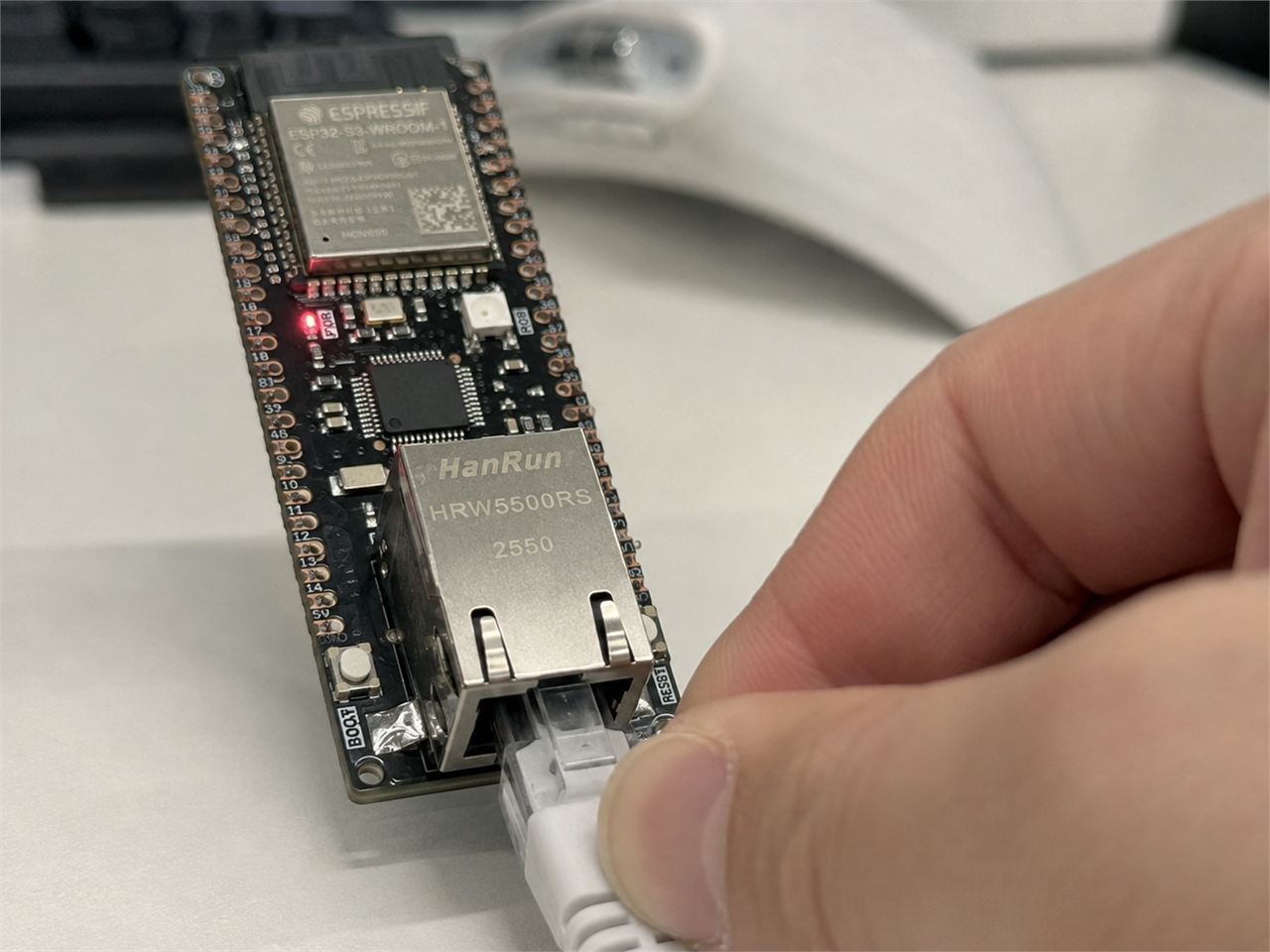
We took ESP-IDF's examples/protocols/mqtt example and changed just two things.
- Ethernet is brought up through the WIZnet
wsm_drivercomponent instead ofexample_connect()(W5500 or W6300). - A Wi-Fi STA is brought up alongside it, and the MQTT session automatically moves to whichever interface is alive.
The MQTT code itself is untouched from the original. The same mqtt_event_handler switch, the same mqtt_app_start(), the same esp_mqtt_client API. On this backend the WIZnet chip is just an Ethernet MAC hanging off SPI, and TCP/IP is owned by the ESP32-S3's own LwIP — so both interfaces are ordinary esp_netifs, and ESP-MQTT runs on top of them unmodified.
Normally traffic goes out over Ethernet. Pull the cable and it moves to Wi-Fi. Plug it back in and it returns to Ethernet. Which path it's currently taking is visible right at the broker:
3. Boards Used
WIZnet has just released four new boards — SoM and development kit models that combine the ESP32-S3 with WIZnet's own Ethernet chips (W5500/W6300). A single module now gives you both reliable wired Ethernet and Wi-Fi, and these are the boards this article works with.
The specifications of the released Dev-kits and SoMs are as follows:
| MCU | Flash | ethernet Chip | Interface | |
|---|---|---|---|---|
| ESP32-W5500-Dev-kit | ESP32-S3 | 16MB | W5500 | SPI |
| ESP32-W6300-Dev-kit | ESP32-S3 | 16MB | W6300 | QSPI |
| EOD-W55 | ESP32-S3 | 8MB | W5500 | SPI |
| EOE-W63 | ESP32-S3 | 8MB | W6300 | QSPI |
All of these boards can run this example.
WIZnet has already taken care of this inside the component. Just pick your board under idf.py menuconfig → Component config → WIZnet WSM Driver → Board, and the chip type and the entire SPI pin map are configured automatically.
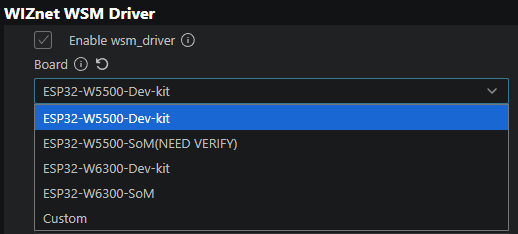
So the hardware setup comes down to a single dropdown — all that's left is the broker address and the Wi-Fi SSID.
4. Half of the Failover: route_prio
esp_netif picks the default netif — the interface that carries any traffic without a more specific route — as the one with the highest route_prio among the interfaces that are up. When one goes down, it moves automatically. That's the entire failover mechanism.
There's one trap here. The IDF defaults are:
| Interface | Default route_prio |
|---|---|
Wi-Fi (ESP_NETIF_INHERENT_DEFAULT_WIFI_STA) | 100 |
Ethernet (ESP_NETIF_INHERENT_DEFAULT_ETH) | 50 |
With the defaults, Wi-Fi wins. So "prefer Ethernet" is not something you get by just enabling Ethernet — it means raising Ethernet's value above 100. Miss this, and both interfaces look perfectly healthy while traffic quietly leaves through the wrong one.
Which interface to prefer is selected under Preferred interface in menuconfig:
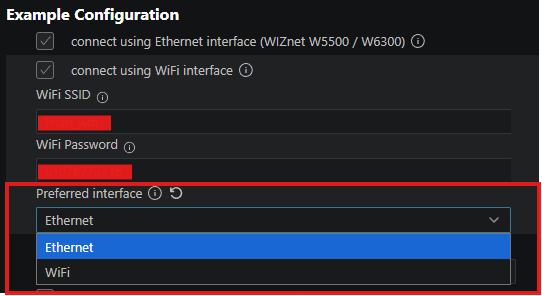
Picking one from the dropdown is all it takes — the example maps that choice to the right route_prio values at startup.
5. Two Interfaces Up Doesn't Mean the Connection Moves on Its Own
One-line summary: the two interfaces are fully independent network endpoints with different IPs, and a TCP connection is bound to its source IP. So a session can never be "moved" — only reopened.
First, some background. Ethernet and Wi-Fi are not two branches of one line — they are separate interfaces, each with its own IP. In this example, Ethernet has a static IP (e.g. 192.168.11.2) and Wi-Fi gets a different one over DHCP (e.g. 192.168.0.42). From the broker's point of view, these are simply two different client addresses.
And a TCP connection's identity is the four-tuple: (source IP, source port, destination IP, destination port). The source IP is baked in the moment the connection opens, and it cannot change. Send a connection opened on the Ethernet address out through Wi-Fi and the source IP changes — which makes it not the same connection, but a different one. What route_prio moves is only the default route — that is, "where the next socket will go out" — it never touches sockets that are already open.
And the two directions behave differently:
- When a link goes down: LwIP aborts the pcbs using that address (
netif_set_addr→tcp_netif_ip_addr_changed). ESP-MQTT sees the dropped connection and reconnects on its own, and the new socket opens on the surviving interface. This part takes care of itself. - When a link comes back: nothing happens. The socket opened over Wi-Fi is alive and well, so LwIP has no reason to kill it. The session settles on the backup, and even with Ethernet back, it never returns on its own.
So we give the client a nudge on both link-up events.
static void nudge_reconnect(const char *why)
{
    if (s_client == NULL) return;    /* event arrived before mqtt_app_start() */
    ESP_LOGI(TAG, "%s — reconnecting MQTT so it picks the current route", why);
    esp_mqtt_client_reconnect(s_client);
}

static void iface_event_handler(void *arg, esp_event_base_t base, int32_t id, void *data)
{
    if (base == ETH_EVENT  && id == ETHERNET_EVENT_CONNECTED)  nudge_reconnect("Ethernet link up");
    if (base == WIFI_EVENT && id == WIFI_EVENT_STA_CONNECTED)  nudge_reconnect("Wi-Fi associated");
}
The reconnect costs a brief outage, but it's the only way back to the preferred interface.
And One Thing NOT to Do: network.if_name
The ESP-MQTT config has a network.if_name field that binds the socket to a specific interface. This example deliberately leaves it empty. Fill it in, and SO_BINDTODEVICE pins the session to that interface — killing failover entirely. Leave it empty, and every new socket follows whatever the default route is at that moment. Which is exactly what we want.
6. How Fast Does It Notice — and the Knobs That Tune It
The interesting case is not the cable getting pulled. It's when the link stays UP but the path behind it dies — the upstream router goes down, the broker host dies, a firewall rule changes. No netif event fires. Neither the route nor the socket moves on its own. Only timers notice.
All of those timers are exposed in menuconfig under Example Configuration, so you can tune them yourself without touching the code.
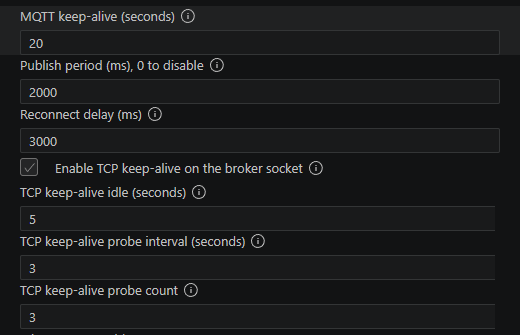
Going down the list:
MQTT keep-alive (seconds) — default 20
The liveness check at the MQTT protocol level. The client pings the broker at half this interval, and gives up on the connection if there's no response within the full interval. In other words, this value is "how long you tolerate silence from the broker." ESP-MQTT's own default is 120 seconds — meaning a dead path goes unnoticed for two minutes — so it's shortened to 20 here.
Publish period (ms) — default 2000
Not for failover detection — this one is for observation. It publishes a numbered message every 2 seconds, so when a switchover happens, it shows up at the broker as a gap in the sequence (more in the Demo section). Set it to 0 to turn periodic publishing off, like the original example.
Reconnect delay (ms) — default 3000
How long to wait before retrying after a lost connection. Fixed delay, no backoff. The library default is 10000 — recovery would arrive 10 seconds late every time, so it's pulled down to 3.
TCP keep-alive — default on, idle 5 / interval 3 / count 3
The liveness check below MQTT, at the transport layer. Why it's needed separately: MQTT keep-alive only measures "the broker is quiet," while a half-open TCP connection can survive for minutes on retransmissions alone. TCP keep-alive works independently of MQTT traffic — once the socket sits idle past 5 seconds, it sends a probe every 3 seconds, 3 times, and kills the socket if all of them fail. Detection takes roughly idle + interval × count ≈ 14 seconds.
In short, the two layers catch two different kinds of death. MQTT keep-alive catches a silent broker; TCP keep-alive catches a dead path. That's why both are used.
7. Backends: MACRAW and TOE — Both Work
wsm_driver offers two backends, and this example supports both.
| esp_eth MACRAW | TOE | |
|---|---|---|
| TCP/IP processing | ESP32's LwIP (software) | WIZnet chip (hardware) |
| Strength | Runs on standard BSD sockets, so every ESP-MQTT feature works as-is — including TLS and hostname DNS | TCP/IP runs in the chip's silicon, consuming none of the MCU's CPU or RAM. Network processing stays steady no matter how heavy the application gets |
| Trade-off | The TCP/IP stack occupies ESP32 CPU cycles and RAM | Within this example's current integration: mqtt:// with an IP-address broker (TLS and DNS need to go through the software stack) |
Hardware TCP/IP is the reason WIZnet chips exist — offloading the entire stack onto the chip. MACRAW is the mode that uses that same chip as a standard Ethernet MAC. Which one is right depends on your application: MACRAW if you need every ESP-MQTT feature, TOE if you want to save MCU resources.
TOE took some integration work. ESP-MQTT expects a standard socket API, while TOE works by intercepting socket calls and handing them to the chip — and that left two gaps: a few functions ESP-MQTT uses were not intercepted, and if every socket goes to the chip, there is no place for a Wi-Fi socket to exist. So the example adds one thin intermediate layer. It fills in the missing functions, and each time a new socket opens, it decides on the spot whether it goes to the chip (Ethernet) or to the software stack (Wi-Fi). Since ESP-MQTT opens a fresh socket on every reconnect, failover is simply that decision running one more time.
8. Demo: The Moment Failover Happens
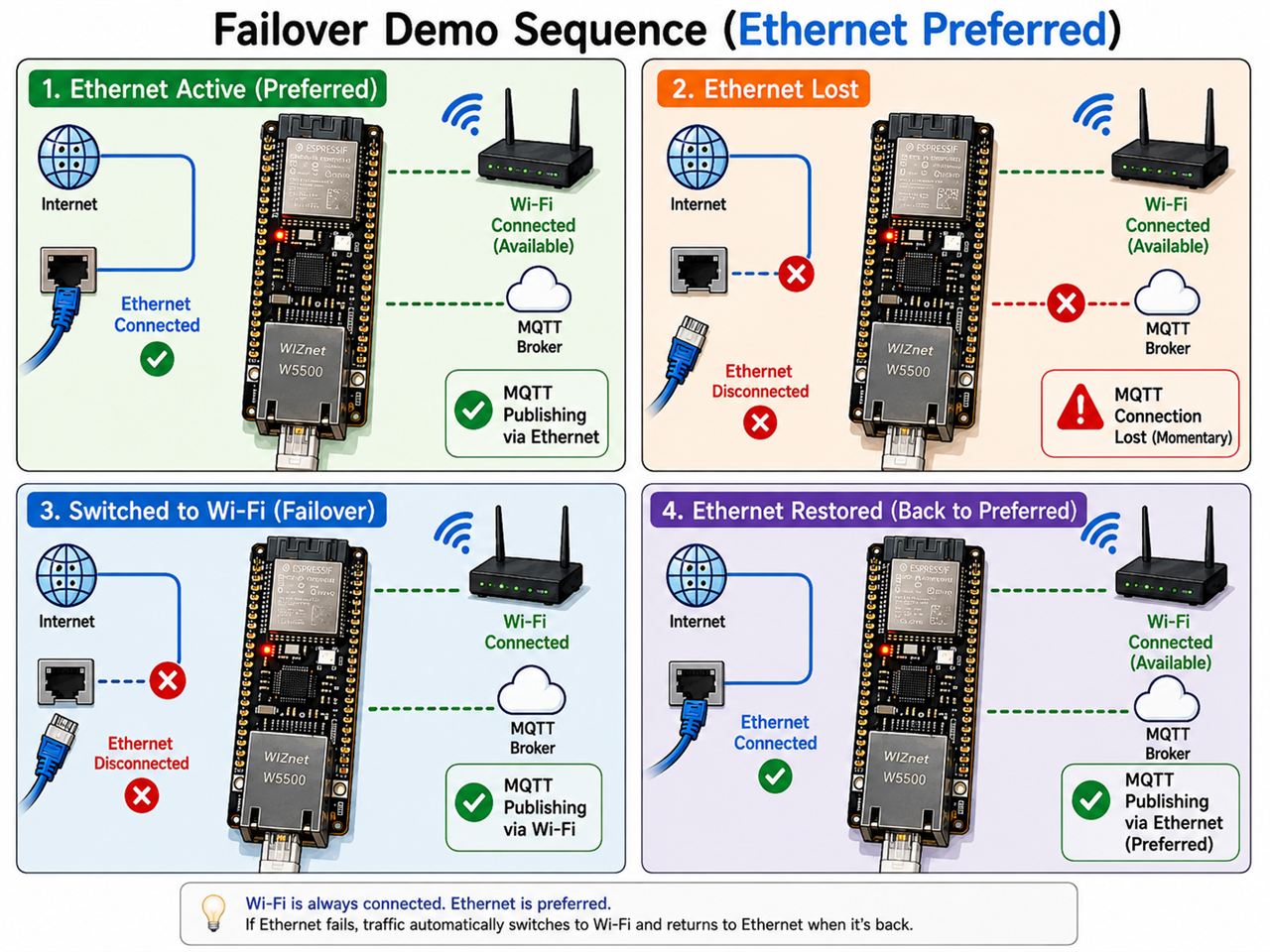
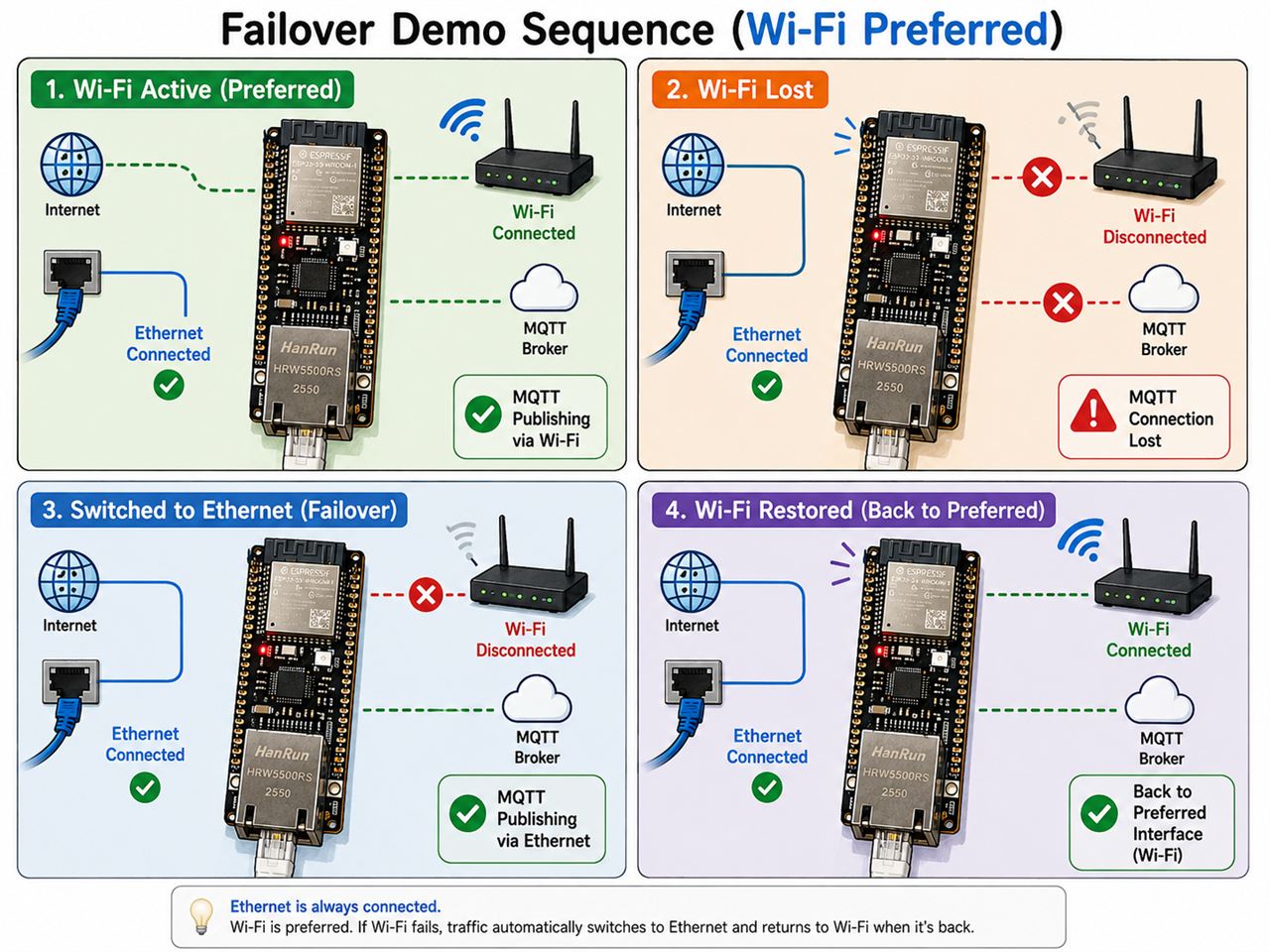
In Case of: Ethernet Preferred
The image above is the entire demo. The board has both Ethernet and Wi-Fi connected, with Ethernet as the preferred interface. Every 2 seconds it publishes a numbered message, and each message carries the name of the interface the traffic is currently leaving through. So just by watching the messages arrive at the broker — do the numbers skip? does the interface name change? — you can see the whole failover unfold.
① Ethernet Active — normal operation. Traffic goes out over the wire. Messages stamped with the Ethernet address pile up at the broker every 2 seconds.
② Cable Unplugged — the incident. A cable gets knocked loose during maintenance, or a connector gives out. Link-down is detected immediately, the Ethernet socket is torn down, and the client goes into reconnect.
③ Switched to Wi-Fi — automatic switchover. The new connection opened by the reconnect follows the default route at that moment — Wi-Fi. At the broker, two messages go missing — about 4–6 seconds of silence — and then messages start arriving again, now stamped with the Wi-Fi interface. That's all. Nobody touched the board.
④ Restore Ethernet — recovery. When the cable is plugged back in, the client reconnects once on link-up (the nudge from section 5), and the session returns to the wire. Again, no intervention.
There is one more scenario the image doesn't show: the cable is fine, but something beyond it dies — an upstream switch loses power, a router reboots, a firewall rule changes. The link LED stays on, so no event ever fires; what catches this is TCP keep-alive (≈14 seconds). Once the connection drops, the same mechanism carries the session over to Wi-Fi. That's why the silence runs longer than in ②, and it's exactly why the timers were tuned down from their defaults earlier.
9. Results
Ethernet was given the higher priority, making it the main interface with Wi-Fi as the backup. The board publishes a numbered message every 2 seconds, and the serial log was used to confirm when the switchover happened and whether anything was lost.
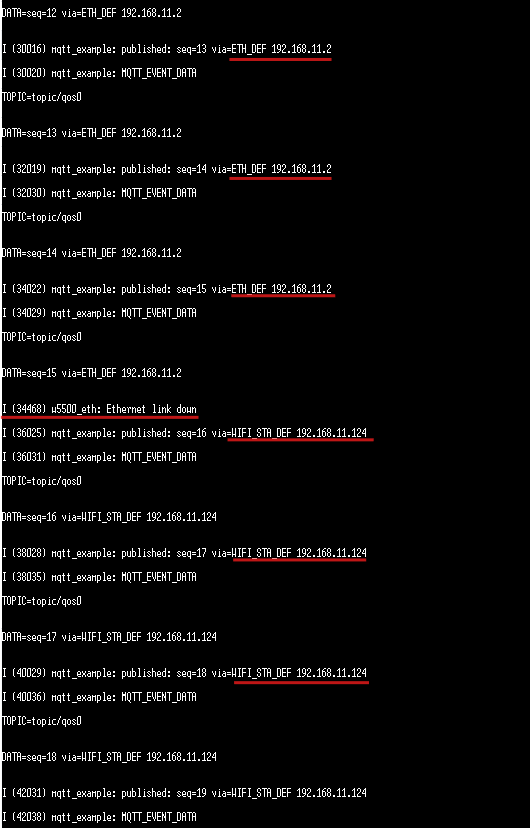
Cable pulled → switched to Wi-Fi: ~1.6 seconds, zero messages lost. Link-down is logged at 34.47 s, and the very next publish (seq=16) already went out over Wi-Fi. The sequence runs 15 → 16 with no gap — the switchover completed within a single publish period.
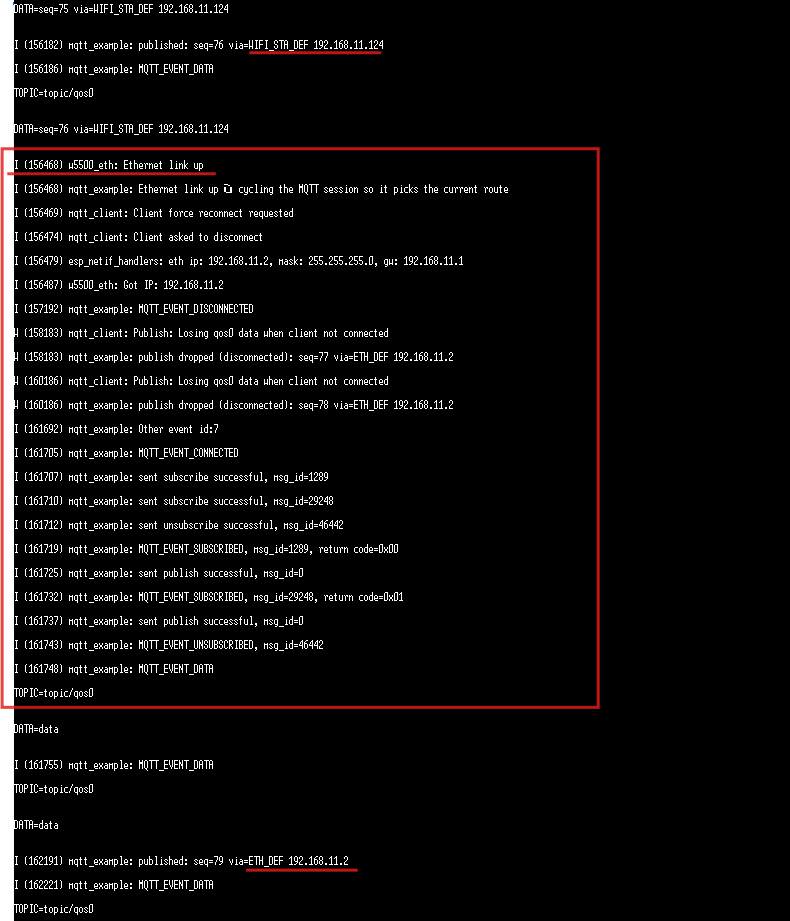
Cable restored → back on Ethernet: ~5.7 seconds, 2 messages lost (seq 77–78). Right after link-up, the log prints "cycling the MQTT session so it picks the current route" — the nudge from section 5. While the perfectly healthy Wi-Fi session is deliberately torn down and reconnected, two publishes are dropped (QoS 0), and from seq=79 on, traffic leaves over the wire again.
In summary:
| Transition | Time | Lost |
|---|---|---|
| Failure (ETH → Wi-Fi) | ~1.6 s | 0 messages |
| Recovery (Wi-Fi → ETH) | ~5.7 s | 2 messages |
The asymmetry is worth noticing: failure is fast, recovery is slow. The failure switchover is nearly free — a dead socket forces an immediate reconnect. The recovery switchover is a planned cost — a live session is deliberately dropped — but that cost is paid at the moment the backup line is still healthy. The messages aren't lost to an outage; they're spent on getting back to the better line.
10. Things to Know Before You Try This
- Init order —
wiznet_net_init()callsesp_netif_init()andesp_event_loop_create_default()itself. When wiring the component into your own project, delete those two lines fromapp_main()and bring up Ethernet before Wi-Fi. Otherwise the boot aborts. - TOE + TLS won't build — If you need
mqtts://, use the MACRAW backend. On TOE, an#errorstops the build and explains why. - Porting to TOE? Take the shim along — TOE support lives in
main/toe_socket_shim.cand the linker flags inmain/CMakeLists.txt. Copying onlyapp_main.cis not enough. - Ethernet runs on a static IP — The backend stops the DHCP client unconditionally. Set the address in menuconfig, on the broker's subnet.
- The MAC address trap — A first octet with its lowest bit set is a multicast address, which a station cannot use. The link comes up but nothing routes. Checked and rejected at boot. The default
00:08:DCis WIZnet's OUI. - Address typos are caught at boot — A malformed IP/MAC string stops the boot and names the field that's wrong.
- Dependencies are pinned —
wsm_drivertracks its main branch, withdependencies.lockpinning the exact commit. ESP-MQTT is a managed component as of IDF v6.0.
13. Where This Fits
Anywhere a session can't afford to drop and there's room for a second path — which one you make primary is up to the environment.
- Production-line telemetry — wired primary, covers the gap during cabling work
- AGVs and mobile equipment — Wi-Fi primary, wired when docked
- Remote metering — one truck roll costs more than the hardware
- Unattended kiosks — downtime is lost revenue
- Equipment gateways — takes everything beneath it down
Things used in this project
Hardware
- ESP32-S3 development board
- One of: WIZnet W5500 Dev-kit / W5500 SoM / W6300 Dev-kit / W6300 SoM
- Ethernet cable, 2.4 GHz Wi-Fi AP (WPA2-PSK or better)
Software / Components
- ESP-IDF v6.0.2
wiznet/wsm_driver(main branch, commit pinned viadependencies.lock)espressif/mqtt(ESP-MQTT, managed component)- mosquitto (broker, plus
mosquitto_sub/mosquitto_pub)
Code
Full source: https://github.com/Wiznet/ESP32_DevKit_SoM_MQTT_Failover


