ESP32 + W5500 (SPI Ethernet) TCP Client Example — Full Guide
A complete ESP32 + W5500 TCP client example using SPI Ethernet, static IP, and ESP-IDF 5.5.x. Reliable wired networking for industrial IoT.
0
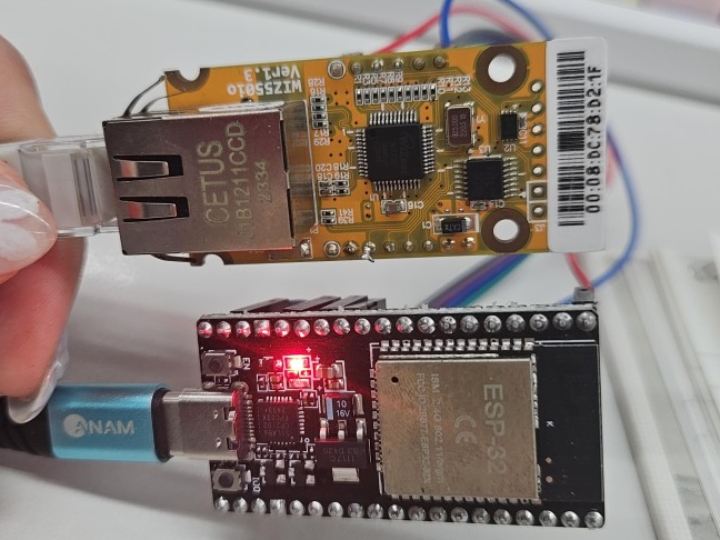
Components
Hardware components
WIZnet - W5500
x 1

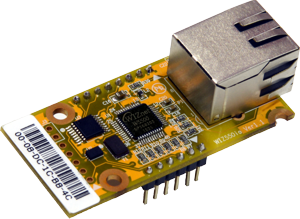
WIZnet - WIZ550io
x 1
Espressif - ESP32
x 1

microsoft - Visual Studio 2015
x 1
Project description
1️⃣ Overview
ESP32 includes built-in Wi-Fi, but for industrial, high-noise, or secure environments,
wired Ethernet (W5500) is more stable and predictable.
This guide explains how to use ESP32 + WIZ550io(W5500) with ESP-IDF 5.5.x,
covering:
- Example project creation command
- Hardware wiring
- Full menuconfig settings
- Ethernet initialization
- Build & flash
- Testing (TCP/iperf)
Everything is aligned with your exact GPIO configuration.
2️⃣ Install ESP-IDF
- After installing ESP-IDF Tools:
install.bat
export.bat- Check version:
idf.py --version- Expected:
ESP-IDF v5.5.13️⃣ Create an Example Project (TCP Client)
ESP-IDF provides ready-to-use examples for the W5500 component.
✔ Create TCP Client Example
idf.py create-project-from-example "espressif/w5500=1.0.0:common_examples/tcp_client" - Or create the iperf example:
idf.py create-project-from-example "espressif/w5500=1.0.0:common_examples/iperf" - Move into project directory:
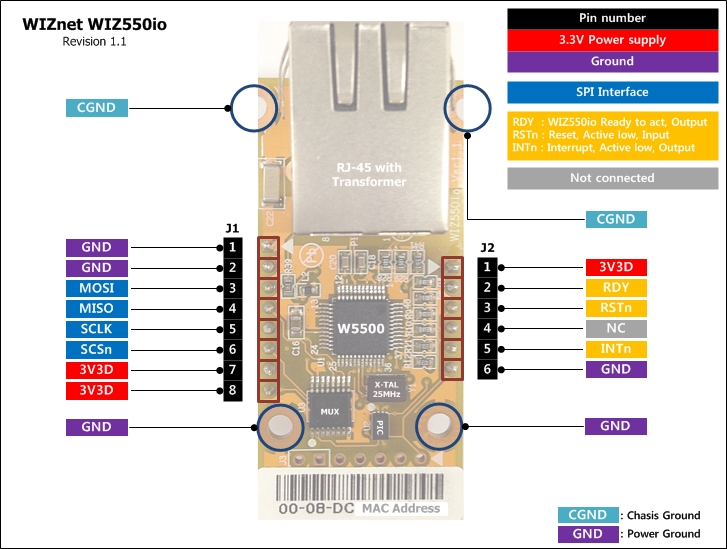
cd tcp_client4️⃣ Hardware Wiring (Your exact GPIO pins)
| W5500 Pin | ESP32 GPIO | Notes |
|---|---|---|
| SCLK | GPIO14 | SPI Clock |
| MOSI | GPIO13 | SPI MOSI |
| MISO | GPIO12 | SPI MISO |
| CS | GPIO15 | Chip Select |
| INT | GPIO4 | Optional interrupt |
| RESET | Not connected (set to -1) | |
| 3.3V | 3.3V | Power |
| GND | GND | Ground |
5️⃣ Configure ESP-IDF (menuconfig)
- Run the config menu:
idf.py menuconfig✔ 5.1 Enable Ethernet
Component config  --->
    Ethernet  --->
        [*] Enable Ethernet
✔ 5.2 Disable Internal EMAC
(W5500 SPI Ethernet cannot be combined with internal EMAC)
Component config → Ethernet →
    [ ] Internal EMAC
✔ 5.3 Enable SPI Ethernet (W5500)
Component config → Ethernet →
    [*] SPI Ethernet
✔ 5.4 Configure SPI Ethernet Module #1 (W5500)
Component config → Ethernet →
    SPI Ethernet Driver --->
        (1) Number of SPI Ethernet modules
        SPI Ethernet module #1 (W5500 Module) --->
            (1)  SPI Host Number (SPI2_HOST)
            (14) SPI SCLK GPIO number
            (13) SPI MOSI GPIO number
            (12) SPI MISO GPIO number
            (16) SPI clock speed (MHz)
            (15) SPI CS0 GPIO number
            (4)  Interrupt GPIO number
            (-1) PHY Reset GPIO number
            (1)  PHY Address
            [*] Auto-configure MAC address
6️⃣ Code Example
- iperf : https://components.espressif.com/components/espressif/w5500/versions/1.0.0/examples/common_examples/iperf?language=en
- tcp_client : https://components.espressif.com/components/espressif/w5500/versions/1.0.0/examples/common_examples/iperf?language=en
- simple_ethernet : https://components.espressif.com/components/espressif/w5500/versions/1.0.0/examples/common_examples/iperf?language=en
- tcp_server : https://components.espressif.com/components/espressif/w5500/versions/1.0.0/examples/common_examples/iperf?language=en
7️⃣ Build & Flash
idf.py set-target esp32
idf.py build
idf.py flash
8️⃣ Full Workflow Summary
- Install ESP-IDF (install/export)
- Create W5500 example project
idf.py create-project-from-example "espressif/w5500=1.0.0:common_examples/tcp_client" - Wire ESP32 ↔ W5500
- Configure in menuconfig
idf.py menuconfig- Enable SPI Ethernet, disable internal EMAC
- Build & flash
- Test TCP/iperf

