How Does DigiKey Demonstrate STM32 Ethernet and Wi-Fi Networking with W5500 and WizFi360?
How Does DigiKey Demonstrate STM32 Ethernet and Wi-Fi Networking with W5500 and WizFi360?
0
Project description
How Does DigiKey Demonstrate STM32 Ethernet and Wi-Fi Networking with W5500 and WizFi360?
Overview
A November 2024 technical training presentation, IoT Designs Using STmicro Microcontrollers, demonstrates how to add wired Ethernet and Wi-Fi networking to an STM32 development board using WIZnet-based communication hardware.
The presentation was delivered by Fred Eady, organized by Design News / Informa Markets, and sponsored by DigiKey.
Day 4 of the training series focuses on NUCLEO-C071RB Networking.
Two practical networking projects are presented:
- An Ethernet application using MIKROE ETH WIZ Click with WIZnet W5500
- A Wi-Fi application using WIZnet WizFi360io-H
The Ethernet example covers SPI communication, hardware initialization, DHCP address assignment, TCP socket creation, server connection, and reception of network data.
The Wi-Fi example demonstrates how the STM32 can communicate with a WizFi360io-H module using AT commands over UART.
The training provides a useful engineering reference because it includes actual STM32 HAL code, WIZnet library functions, hardware photographs, and networking test results.
What Problem Does This Training Address?
Many STM32 microcontrollers are well suited for embedded control applications but do not provide integrated Ethernet or Wi-Fi connectivity.
Adding networking functionality often requires additional hardware and software integration.
For Ethernet applications, developers must configure the communication interface, initialize the network controller, obtain an IP address, and establish socket connections.
For Wi-Fi applications, additional tasks include configuring the wireless module, connecting to an access point, and establishing communication with a remote server.
The training demonstrates two approaches to solving these problems using external communication modules.
W5500 provides wired Ethernet communication with a hardwired TCP/IP stack.
WizFi360io-H provides wireless networking through an AT-command interface.
Both approaches allow the STM32 to remain responsible for the main application while dedicated communication hardware provides network connectivity.
What Hardware Is Used?
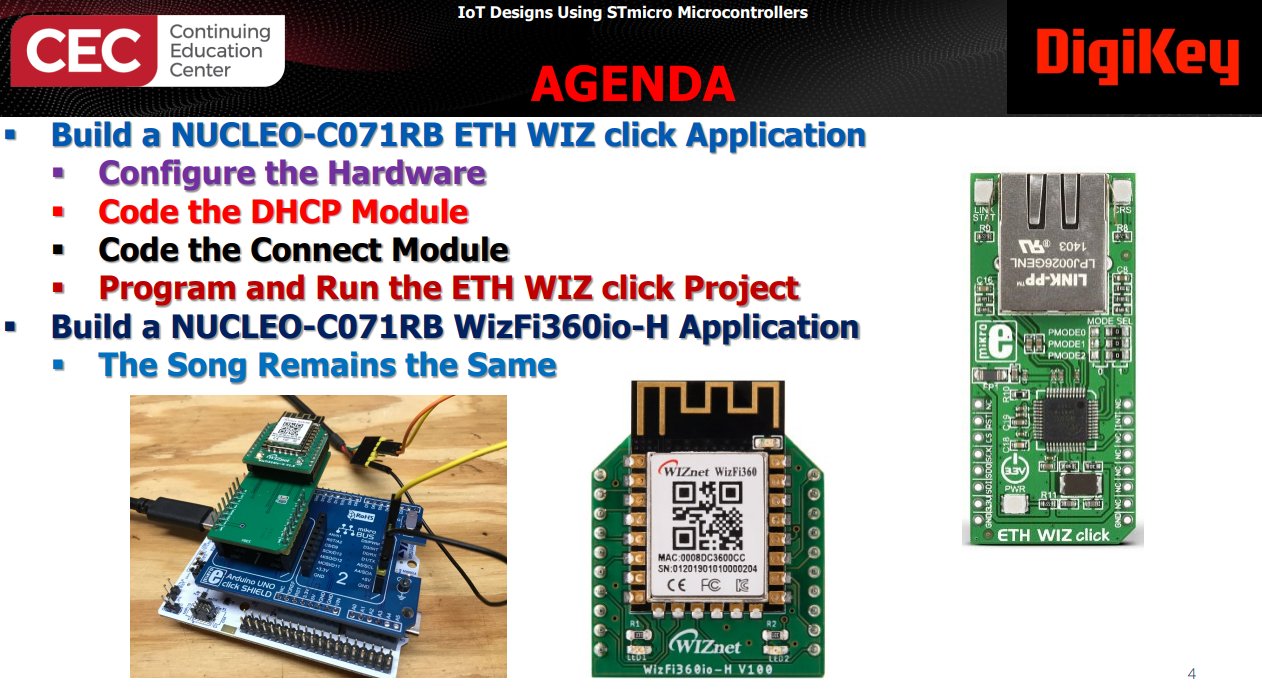
The demonstration is based on STMicroelectronics' NUCLEO-C071RB development board.
A MIKROE Arduino UNO Click Shield is used to connect the networking modules.
| Component | Function |
|---|---|
| STM32 NUCLEO-C071RB | Main microcontroller development board |
| STM32C071RBTx | Application MCU |
| MIKROE ETH WIZ Click | Ethernet expansion board |
| WIZnet W5500 | Hardwired TCP/IP Ethernet controller |
| WizFi360io-H | Wi-Fi communication module |
| MIKROE Arduino UNO Click Shield | Expansion-board interface |
| STM32 HAL | Peripheral configuration and communication |
| WIZnet ioLibrary | Ethernet socket and DHCP functions |
The ETH WIZ Click is identified by MIKROE as product MIKROE-1718.
It contains the W5500, an RJ45 Ethernet connector, and supporting hardware.
The module operates with a 3.3 V supply and connects to the host MCU using SPI.
How Is the W5500 Ethernet System Structured?
The first project connects the STM32 NUCLEO-C071RB to the ETH WIZ Click board.
The STM32 handles application logic and controls the W5500 through SPI.
The W5500 provides Ethernet communication and manages supported TCP/IP operations in hardware.
The functional architecture is:
Remote TCP Server
       |
       | Ethernet / TCP
       |
      RJ45
       |
       v
MIKROE ETH WIZ Click
   WIZnet W5500
       |
       | SPI1
       |
STM32 NUCLEO-C071RB
       |
       | UART
       |
Serial Debug Output
The example obtains a network address through DHCP.
After the network configuration is complete, the application opens a TCP socket and connects to a remote server.
Data received from the server is transferred to the STM32 application's receive buffer and then sent to the UART for output.
What Does W5500 Add to the STM32?
The W5500 is a dedicated Ethernet controller featuring a hardwired TCP/IP stack.
Its main capabilities include:
- 10/100 Mbps Ethernet
- Integrated Ethernet MAC and PHY
- SPI host interface
- Eight independent hardware sockets
- 32 KB internal TX/RX buffer memory
- TCP and UDP communication
- IPv4, ICMP, ARP, IGMP, and PPPoE support
- Wake-on-LAN and power-down functions
The STM32C071 does not need to implement all Ethernet protocol processing in application software.
Instead, the host MCU communicates with W5500 registers and sockets through SPI.
This allows the embedded application to use Ethernet communication while leaving many networking functions to dedicated hardware.
How Is SPI Communication Implemented?
One of the most useful parts of the training is the actual SPI driver integration.
The presentation defines chip-select functions using STM32 HAL GPIO operations.
For example:
void wiz_csLO(void)
{
    HAL_GPIO_WritePin(
        CS_D10_GPIO_Port,
        CS_D10_Pin,
        GPIO_PIN_RESET
    );
}

void wiz_csHI(void)
{
    HAL_GPIO_WritePin(
        CS_D10_GPIO_Port,
        CS_D10_Pin,
        GPIO_PIN_SET
    );
}
The application also defines SPI transmit and receive functions.
void ReadBuf(uint8_t* buf, uint16_t len)
{
    HAL_SPI_Receive(
        &hspi1,
        buf,
        len,
        HAL_MAX_DELAY
    );
}

void WriteBuf(uint8_t* buf, uint16_t len)
{
    HAL_SPI_Transmit(
        &hspi1,
        buf,
        len,
        HAL_MAX_DELAY
    );
}
These functions allow WIZnet's Ethernet driver to communicate with the W5500 using STM32 HAL.
The example demonstrates a reusable pattern for connecting W5500 to STM32 microcontrollers through SPI.
How Is WIZnet ioLibrary Initialized?
After defining the SPI and chip-select functions, the application registers them with WIZnet's ioLibrary.
The training provides the following initialization sequence:
reg_wizchip_cs_cbfunc(
    wiz_csLO,
    wiz_csHI
);

reg_wizchip_spi_cbfunc(
    ReadByte,
    WriteByte
);

reg_wizchip_spiburst_cbfunc(
    ReadBuf,
    WriteBuf
);

wizchip_init(
    bufSize,
    bufSize
);

setSHAR(netInfo.mac);

DHCP_init(
    0,
    dhcpBuf
);
Each step has a specific function.
reg_wizchip_cs_cbfunc()registers the chip-select handlers.reg_wizchip_spi_cbfunc()registers byte-level SPI communication.reg_wizchip_spiburst_cbfunc()registers burst transfers.wizchip_init()initializes the socket buffers.setSHAR()configures the MAC address.DHCP_init()initializes the DHCP client.
This is important because the source code demonstrates the actual integration between STM32 HAL and WIZnet ioLibrary.
The lecture does not simply describe Ethernet connectivity conceptually. It shows the functions required to initialize the controller.
How Does DHCP Work?
The Ethernet example uses DHCP to obtain network settings automatically.
The presentation defines a wiz_NetInfo structure with DHCP enabled.
wiz_NetInfo netInfo = {
    .mac = {
        0x00, 0x04, 0xA3,
        0x06, 0xE7, 0x48
    },
    .dhcp = NETINFO_DHCP
};
This MAC address is an example value from the presentation and must not be reused across multiple deployed devices without ensuring uniqueness.
The application uses a state machine with two modes:
MODE_DHCPMODE_CONNECT
During MODE_DHCP, the application executes DHCP_run().
The DHCP library reports different events, including:
- DHCP_FAILED
- DHCP_RUNNING
- DHCP_IP_ASSIGN
- DHCP_IP_CHANGED
- DHCP_IP_LEASED
- DHCP_STOPPED
When DHCP_IP_LEASED occurs, the application reads the assigned network information and proceeds to the connection state.
This demonstrates a complete workflow from Ethernet controller initialization to obtaining a usable IP address.
How Does the TCP Client Connect to a Server?
After DHCP is complete, the application enters MODE_CONNECT.
The training provides a TCP socket example using WIZnet's socket API.
retVal = socket(
    0,
    Sn_MR_TCP,
    5000,
    0
);

if (retVal == 0)
{
    retVal = connect(
        0,
        serverIP,
        8088
    );
}
The documented example uses the following connection parameters:
| Parameter | Value |
|---|---|
| Socket number | 0 |
| Protocol | TCP |
| Local port | 5000 |
| Remote server IP | 192.168.1.244 |
| Remote server port | 8088 |
| DHCP | Enabled |
Once the TCP connection is established, the application checks the W5500 receive buffer.
The sample code uses getSn_RX_RSR() to determine whether data has arrived.
It then calls recv() to read the data.
The received data is forwarded through UART using HAL_UART_Transmit().
This shows the communication path from a remote TCP server through W5500 to the STM32 application.
How Is the Ethernet Communication Tested?
The training includes screenshots of the completed Ethernet setup and software debugging environment.
A TCP server application running on a PC listens on port 8088.
The STM32 application connects to the server through the W5500 Ethernet controller.
The presenter sends a test message from the PC.
The STM32 receives the message and stores it in the application receive buffer.
The debugging screenshot shows the received data as individual ASCII characters inside sktRxBuf.
This provides evidence that the Ethernet connection, TCP socket handling, and STM32 data reception are working together.
The example verifies more than just physical Ethernet link establishment.
It demonstrates application-level communication between an STM32 microcontroller and a remote TCP server.
How Does the WizFi360io-H Example Differ?
The second half of the training introduces a Wi-Fi networking project using WIZnet WizFi360io-H.
Unlike W5500, which communicates with the STM32 over SPI, WizFi360io-H uses a UART-based AT-command interface.
The STM32 sends commands to configure the Wi-Fi module and establish network communication.
The presentation includes functions for:
- Sending AT commands
- Checking AT responses
- Configuring station mode
- Configuring single-connection mode
- Enabling DHCP
- Connecting to a wireless access point
- Connecting to a remote server
- Sending data to the server
An example command is:
AT+CIPMUX=0This command configures the Wi-Fi module for single-connection mode.
The training also discusses commands for connecting to an access point and opening a server connection.
The main difference between the examples is the host interface and software control model.
| Feature | ETH WIZ Click | WizFi360io-H |
|---|---|---|
| WIZnet product | W5500 | WizFi360 |
| Network | Wired Ethernet | Wi-Fi |
| STM32 interface | SPI | UART |
| Software interface | ioLibrary socket API | AT commands |
| IP address configuration | DHCP example | DHCP via AT commands |
| Main application | TCP client | Wireless server connection |
The presentation treats these as two separate networking approaches rather than a single combined Ethernet/Wi-Fi gateway.
Why Is This a Useful STM32 Networking Reference?
The training provides several details that are particularly useful for embedded developers.
First, it identifies an actual hardware combination: STM32 NUCLEO-C071RB + MIKROE ETH WIZ Click + W5500.
Second, it includes real STM32 HAL code for configuring the communication interface.
Third, it demonstrates how to connect WIZnet ioLibrary to the STM32 hardware abstraction layer.
Fourth, it provides the DHCP implementation required to obtain network settings automatically.
Fifth, it shows a TCP socket application with documented local and remote port numbers.
Finally, the training verifies the communication using a PC TCP server and the STM32 debugging environment.
These details make the material more useful than a general explanation of Ethernet or Wi-Fi technology.
What Applications Could Use This Architecture?
The architecture demonstrated in the training can be adapted to many embedded networking applications.
Potential applications include:
- STM32 Ethernet development
- Industrial IoT prototypes
- Network-connected sensor devices
- Remote monitoring systems
- Embedded TCP clients
- Ethernet-enabled controllers
- Laboratory data acquisition
- Test and measurement equipment
- IoT gateway prototypes
- Network interface evaluation
The W5500 example is particularly useful for developers who want to add wired Ethernet to an STM32 without implementing a full software TCP/IP stack.
The WizFi360 example provides an alternative when wireless connectivity is required.
These are potential applications of the demonstrated networking architectures, not separate commercial deployments documented in the presentation.
Why Is This a Valuable WIZnet Application?
This training is noteworthy because WIZnet technology is used as the foundation of a practical STM32 networking exercise.
The material was presented as part of a structured technical education program sponsored by DigiKey.
The Ethernet project includes several concrete implementation details:
- STM32 NUCLEO-C071RB development board
- MIKROE ETH WIZ Click using W5500
- STM32 HAL SPI functions
- WIZnet ioLibrary callback registration
- Hardware socket initialization
- DHCP address assignment
- TCP client connection to port 8088
- Actual received data verified through debugging
The additional WizFi360io-H example demonstrates a different approach to network integration using Wi-Fi and AT commands.
Together, these examples show how WIZnet products can help developers add either wired or wireless communication to STM32-based embedded systems.
Conclusion
The November 2024 IoT Designs Using STmicro Microcontrollers training demonstrates practical Ethernet and Wi-Fi networking with the STM32 NUCLEO-C071RB development board.
For wired networking, the presentation uses MIKROE ETH WIZ Click, which incorporates the WIZnet W5500 hardwired TCP/IP Ethernet controller.
The example shows SPI initialization, DHCP configuration, TCP socket creation, remote server connection, and reception of network data.
For wireless networking, the training introduces WizFi360io-H and demonstrates UART-based AT-command communication.
This provides developers with two practical methods for extending STM32 networking capabilities.
The W5500 example is especially valuable because the presentation includes working initialization routines, connection parameters, socket functions, and debugging evidence.
It demonstrates how WIZnet's hardwired TCP/IP technology can simplify Ethernet integration in STM32-based embedded systems.
References
Design News / DigiKey — IoT Designs Using STmicro Microcontrollers
Day 4: Nucleo-C071RB Networking
November 2024
https://informaengage.sirv.com/DesignNews_Digikey_Archives/2024/Nov/day4_stm32_IoT.pdf
MIKROE — ETH WIZ Click
Product ID: MIKROE-1718
https://www.mikroe.com/eth-wiz-click
WIZnet — W5500 Official Documentation

