Rewrite the MAC address of W5500 from the terminal
There is an Ethernet controller IC from WIZnet called W5500.
It is also used in the official Arduino Ethernet shield, making it a
very conve
2
Components
Hardware components
WIZnet - W5100 ethernet shield
x 1

Arduino - Arduino IDE
x 1
Project description
Introduction
There is an Ethernet controller IC from WIZnet called W5500.
It is also used in the official Arduino Ethernet shield, making it a
very convenient chip for prototyping with a browser.
I have to pass the MAC address, IP address, subnet, etc. from the microcomputer to the W5500, but since the
sample code assumes direct input of the source, it is quite difficult to get out of the realm of prototyping.
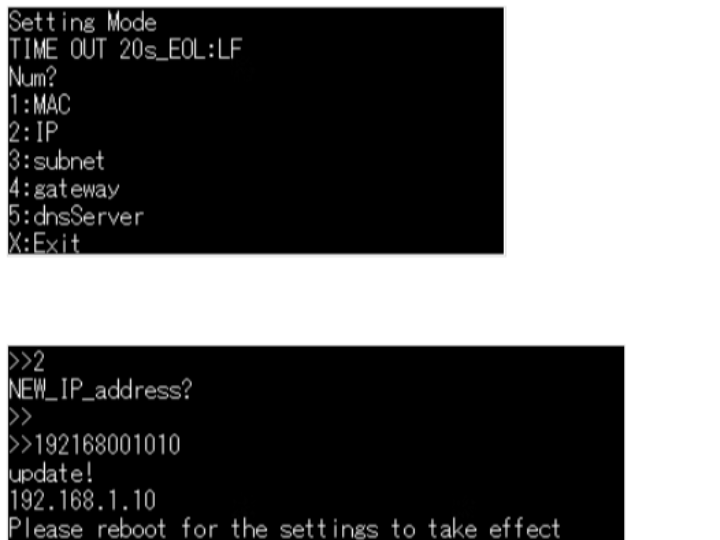
Therefore, I wrote a code that stores the MAC address, IP, etc. in the EEPROM inside the Arduino and can be rewritten from a terminal such as TeraTerm, so I
will share it. Please for your reference.
Code (excerpt)
Environment: Arduino Leonardo, Ethernet Shield 2
#include <SPI.h>
#include <Ethernet2.h>//Ver.1.0.4
#include <EEPROM.h>

byte mac[] = {EEPROM[0x00], EEPROM[0x01], EEPROM[0x02], EEPROM[0x03], EEPROM[0x04], EEPROM[0x05]};
byte ip[] = {EEPROM[0x06], EEPROM[0x07], EEPROM[0x08], EEPROM[0x09]};

IPAddress subnet{EEPROM[0x0A], EEPROM[0x0B], EEPROM[0x0C], EEPROM[0x0D]};
IPAddress gateway{EEPROM[0x0E], EEPROM[0x0F], EEPROM[0x10], EEPROM[0x11]};
IPAddress dnsServer{EEPROM[0x12], EEPROM[0x13], EEPROM[0x14], EEPROM[0x15]};

// ***********割愛***********

void loop()
{

// ***********割愛***********
  Serial_setting();//何か入力があればSettingモードへ
}
void Serial_setting() {
  if (Serial.read() != -1) {
    String scan_string;
    scan_string = Serial.read();
    scan_string = "";
    Serial.println();
    Serial.println(F("Setting Mode"));
    Serial.println(F("TIME OUT 20s_EOL:LF"));

    Serial.println();
    Serial.println(F("Num?"));
    Serial.println(F("1:MAC"));
    Serial.println(F("2:IP"));
    Serial.println(F("3:subnet"));
    Serial.println(F("4:gateway"));
    Serial.println(F("5:dnsServer"));
    Serial.println(F("X:Exit"));

    while (!Serial.available()); //入力があるまで待機
    scan_string = Serial.readStringUntil('\n');
    scan_string.trim();
    Serial.print(F(">>"));
    Serial.println(scan_string);

    //***選択肢1***MACアドレス書き換えモードへ(6バイトの配列)*/
    if (scan_string.equals("1")) {
      Serial.println(F("NEW_MAC_address?"));
      Serial.println(F(">>"));
      while (!Serial.available()); //入力があるまで待機
      scan_string = Serial.readStringUntil('\n');//入力内容の表示
      scan_string.trim();
      Serial.print(F(">>"));
      Serial.println(scan_string);

      if (scan_string.length() == 12) { //文字数がOKか
        Serial.println(F("update!"));

        //12文字のHEXを表している文字列を2文字ずつ結合しEEPROMへ格納
        String i_string;
        char char_buf[5];
        i_string = "0x";
        i_string += scan_string[0];
        i_string += scan_string[1];
        i_string.toCharArray(char_buf, 5);
        EEPROM[0x00] = strtol(char_buf, NULL, 16);

        i_string = "0x";
        i_string += scan_string[2];
        i_string += scan_string[3];
        i_string.toCharArray(char_buf, 5);
        EEPROM[0x01] = strtol(char_buf, NULL, 16);

        i_string = "0x";
        i_string += scan_string[4];
        i_string += scan_string[5];
        i_string.toCharArray(char_buf, 5);
        EEPROM[0x02] = strtol(char_buf, NULL, 16);

        i_string = "0x";
        i_string += scan_string[6];
        i_string += scan_string[7];
        i_string.toCharArray(char_buf, 5);
        EEPROM[0x03] = strtol(char_buf, NULL, 16);

        i_string = "0x";
        i_string += scan_string[8];
        i_string += scan_string[9];
        i_string.toCharArray(char_buf, 5);
        EEPROM[0x04] = strtol(char_buf, NULL, 16);

        i_string = "0x";
        i_string += scan_string[10];
        i_string += scan_string[11];
        i_string.toCharArray(char_buf, 5);
        EEPROM[0x05] = strtol(char_buf, NULL, 16);

        //EEPROMからMAC_addressを読む
        for (int i = 0; i < 6; i++) {
          if (EEPROM[i] <= 16 )Serial.print("0"); //16以下(1桁)であれば0埋め
          Serial.print(EEPROM.read(i), HEX);
          if (i < 5)Serial.print(":");//区切り文字表示
        }
        Serial.println();

      } else {                         //文字数が合わなければエラー
        Serial.println(F("length_Error!"));
      }


// ***********割愛***********

    } else {//***選択肢以外***抜ける
      Serial.println(F("Setting Mode Exit"));
    }
    Serial.println(F("Please reboot for the settings to take effect"));
    Serial.println(F("bye.Resume after 5 seconds"));
    Serial.println();
    delay(5000);

  }
}
How it works
Please pay attention to the line feed code setting on the terminal side

in conclusion
This source code was written for the browser switch DIO of our product.
Due to open source hardware, the code omitted above is also published on github.
https://github.com/bit-trade-one/ADBSDIO_BrowserSwitchDIO

