Early Seismic Warning.
During an earthquake, 3 types of waves are produced: the primary or P, which is important for this project, travels between 8 and 13 km/s an
3
Components
Hardware components
WIZnet - W5100 ethernet shield
x 1

Project description
Brief explanation
During an earthquake, 3 types of waves are produced: the primary or P, which is important for this project, travels between 8 and 13 km/s and is recorded by seismograph equipment.
There are homemade sensors that give us an alert by detecting these P waves, giving us a few seconds before the earthquake happens.
This project seeks to create an early seismic warning system on twitter.
The materials to use
- 1 Arudino UNO (Cost approx. $25usd)
- 1 Arduino Shield Ehternet (Costo Aprox $24 usd)
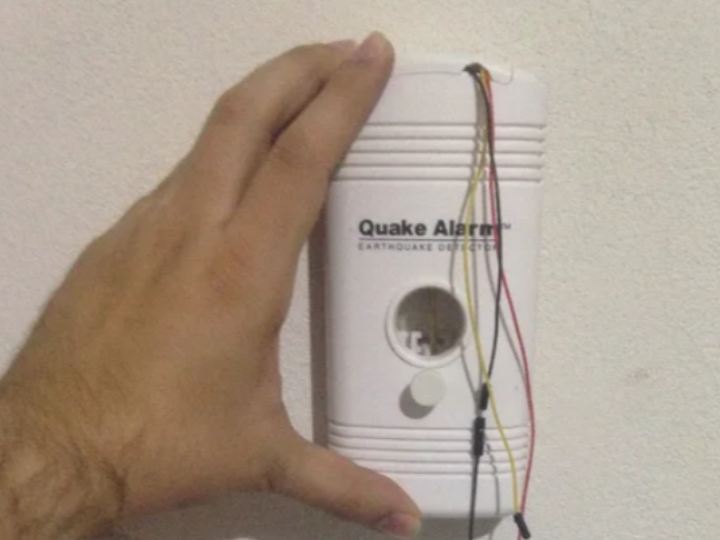
- 1 Quake Alarm (Costo Aprox. $30 usd)
- 1 Printed Circuit Board for prototypes (Approx. Cost $0.60 usd) or a breadboard
- 3 Jumper Cables of different colors (Approx. Cost $0.30 usd)
- 1 9V battery connector (Approx. Cost $0.30 usd)
- Soldering iron and welding
Step 1: How To Place The Cables.


In order to do our project without having to open the "Quake Alarm" sensor, we are going to use its 9v battery connector.
The Arduino will give 5v to the sensor with which it will be able to work fine.
The "Quake Alarm" has a speaker to emit an alert if it detects P waves, if this speaker sounds the voltage drops, so we will use Pin A0 to monitor a change in voltage.
The cables must be placed in the following order:
- 5v - A0 - Black wire from the battery connector.
First the 5V cable that will power the sensor, then the A0 that will monitor the voltage, and finally the black cable from the connector.
In another row we connect the Black cable that comes from the Arduino and the red cable that comes from the connector.
once we have them in this order we weld so that the electricity passes between them.
It is important that when connecting the 9V connector to the sensor, the black cable becomes positive and the red cable becomes negative, be very careful with this.
Step 2: Arduino Code
In the Arduino we are going to create a code that will allow us 2 things:
- Read voltage to look for changes
- If there is a variation in the voltage make a call to a web service
We are going to explain the code a bit, if you do not want to understand it in depth, after the explanation is the complete code and where to download it.
To start we are going to include the necessary libraries to be able to use the ethernet shield and the serial.
#include <SPI.h>
#include <Ethernet.h>
Then we are going to create a constant that will have the Analog PIN that we are going to use
#define QUAKEALARM A0
Next we define the variables that will help us to process the voltage variation and the time to call the web service.
static int difference;
int qaVal = 0;<br>int qaPreVal = 0;
int threshold = 10;
int timeInterval = 5000; // Time interval between two calls to the web service
long
lastConnection = 0; // Time in milliseconds since the last connection to the web service
Now create the variables for the use of the ethernet, where we define the MAC of the network card, the IP that this card will use and the EthernetClient type class to be able to use the network card. We are also going to define the IP of the server that will receive the data.
byte mac[] = { <br> 0xDE, 0xAD, 0xBE, 0xEF, 0xFE, 0xED }; byte ip[] = { 192,168,15,120 }; // IP address of the Arduino
byte server[] = { 192,168,15,111 }; // IP address of the serverEthernetClient client;
With the variables, libraries and classes ready, we can start the program that our Arduino will have:
- We initialize the serial to 57600
- Then we tell the arduino that we are going to use pin A0 (QUAKEALARM constant) as an input pin.
- Finally we start the network card.
void setup () {   <br>  Serial.begin(57600);
  pinMode(QUAKEALARM, INPUT);
Ethernet.begin(mac, ip); // Inicializamos el Ethernet Shield
}
And to finish the program, we put in a cyclic function that checks the voltage if it is less than 5v that makes a call to the server and by means of GET it sends the value 1 to the "earthquake" variable. It also filters so that there is a 5-second time lapse between one sending of information and another.
void loop () { qaVal = analogRead(QUAKEALARM);<br> diferencia = qaPreVal - qaVal;
if ((diferencia > 0) and (diferencia >= threshold) and ((millis() - ultimaConexion) > intervaloTiempo) ) { counter = counter + 1;
Serial.print("Sismo! "); Serial.println(contador);
ultimaConexion = millis();
if (client.connect(server, 5002)>0) { Serial.println("Conecto"); client.print("GET /?earthquake=1"); // We send the data by GET client.println(" HTTP/1.0"); client.println("User-Agent: Arduino 1.0"); }
client.stop();
client.flush();
}
qaPreVal = qaVal;
}
You can download the code at github.com/bettocr/alertasismo
Full code:
#include <SPI.h>
#include <Ethernet.h>
// QuakeAlarm
#define QUAKEALARM A0
// Variable that holds the previous value of the QuakeAlarm
static int difference;
int qVal = 0;
int qaPreVal = 0;
int threshold       = 10;
int timeInterval = 5000; // Time interval between two calls to the web service
lastConnection long = 0; // Time in milliseconds since the last connection to the web service
// Variables Ethernet
//The values corresponding to MAC, local IP, Gateway and Network Mask are entered
byte mac[] = {
0xDE, 0xAD, 0xBE, 0xEF, 0xFE, 0xED };
byte ip[] = { 192,168,8,20 }; // IP address of the Arduino
byte server[] = { 192,168,8,11 }; // IP address of the server
EthernetClient client;
void setup () {
Serial.begin(57600);
pinMode(QUAKEALARM, INPUT);
// ethernet
Ethernet.begin(mac, ip); // Inicializamos el Ethernet Shield
} void loop () {qaVal = analogRead(QUAKEALARM); diferencia = qaPreVal - qaVal;
  if ((diferencia > 0) and (diferencia >= threshold) and ((millis() - ultimaConexion) > intervaloTiempo) ) {
     counter = counter + 1;
     Serial.print("Sismo! ");
     Serial.println(contador);
     ultimaConexion = millis();
     if (client.connect(server, 5002)>0) {
       Serial.println("Conecto");
       client.print("GET /?key=1122334455&sismo=1"); // Enviamos los datos por GET
       client.println(" HTTP/1.0");
       client.println("User-Agent: Arduino 1.0");
     }
     client.stop();
     client.flush();


  }
  qaPreVal = qaVal;
}
Step 3: Python code

This code basically creates a web service on port 5002 of the server (I use it on a Raspberry Pi at home), which receives the message from the Arduino and then sends a Tweet.
I did it this way to be able to implement statistics and in the future to be able to use it in a PUSH notification service for mobiles.
In order for you to tweet, you must create an application on apps.twitter.com and obtain the Consumer Key (API Key), Consumer Secret (API Secret), Access Token and Access Token Secret data. and in the tweet function, change the xxxxx to their respective values.
You can download the complete code at github.com/bettocr/alertasismo or copy it below:
#!/usr/bin/python2.7
# -*- coding: utf-8 -*-
import requests, urllib2, urllib, tweepy
from flask import Flask, request
from StringIO import StringIO
from datetime import datetime, timedelta
def tweet(mensaje):<br>
CONSUMER_KEY = 'xxxxxxx'
CONSUMER_SECRET = 'xxxxxxxx'
ACCESS_KEY = 'xxxxxxxx'
ACCESS_SECRET = 'xxxxxxxx'
auth = tweepy.OAuthHandler(CONSUMER_KEY, CONSUMER_SECRET)
        auth.set_access_token(ACCESS_KEY, ACCESS_SECRET)
api = tweepy.API(auth,parser=tweepy.parsers.JSONParser())
tweetid = api.update_status(status=mensaje)
app = Flask(__name__)<br>
@app.route("/",methods=['GET']) def seism():
try:
sismo = request.args.get("sismo") if (str(sismo) == "1" ):
t = datetime.now()
hora = t.strftime("%-I:%M %p") tweet("[In Tests] Possible earthquake in the next few seconds ("+hour+")")except IOError as err:<br> print 'Fallo'
pass
except Exception as e:
print "Exception "+str(e)
pass
return "OK"


