


Extending nRF52840 BLE SoC with W5500 Ethernet Connectivity
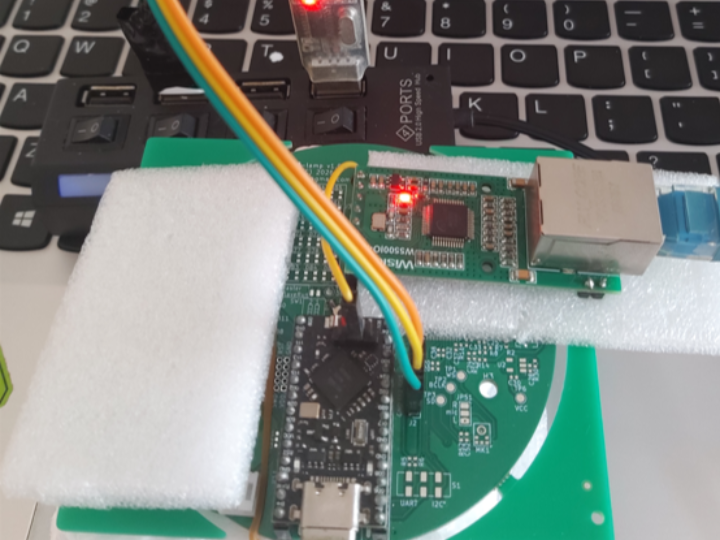
Leverages the ProMicro52840 with the WIZnet W5500 to implement an Internet application that pings Google DNS every 5 seconds.
COMPONENTS
Hardware components

 Software Apps and online services
www.nologo.tech - ProMicro nRF52840
x 1
WIZnet - W5500
x 1
nordic-semiconductor - nRF Connect SDK
x 1
PROJECT DESCRIPTION
Code modification 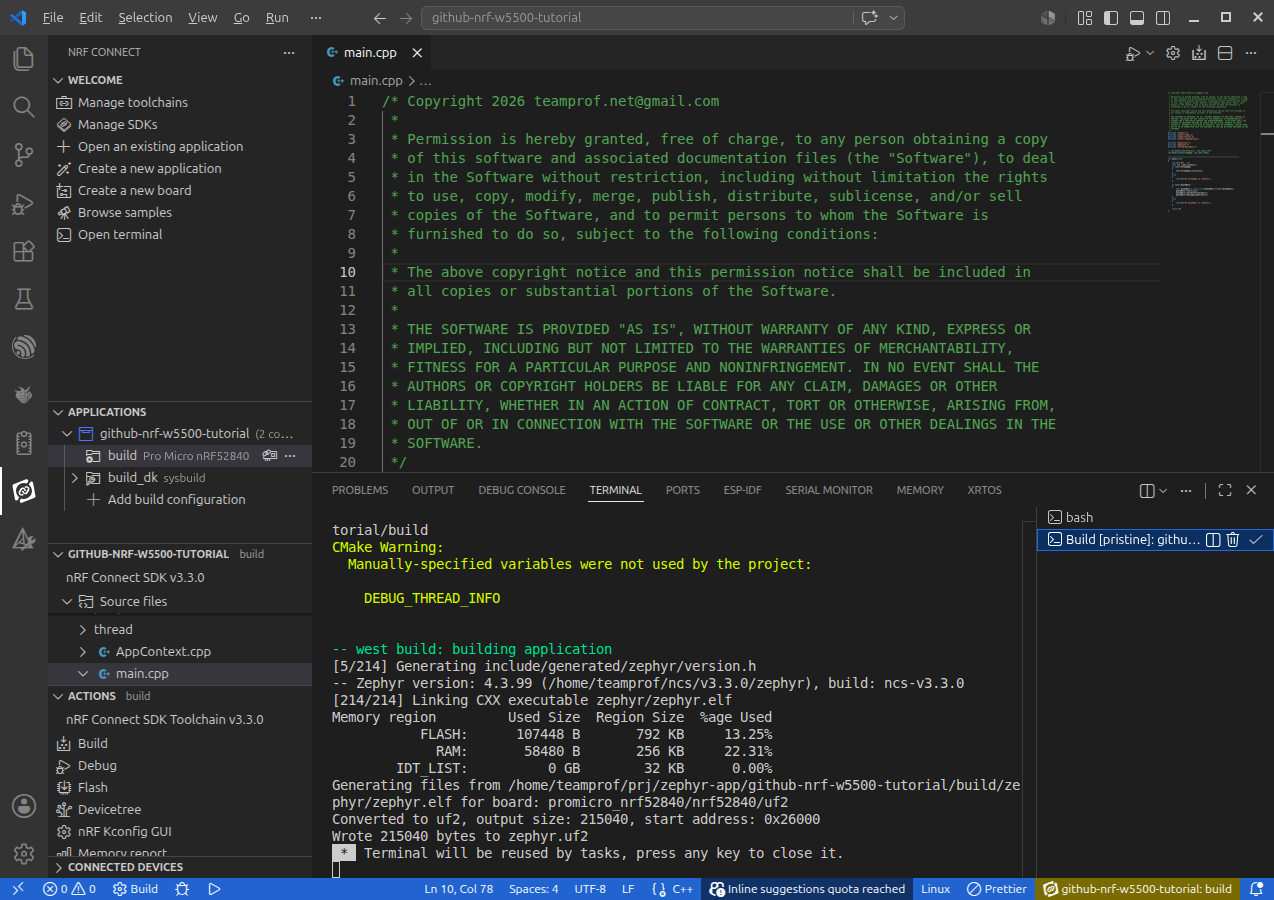
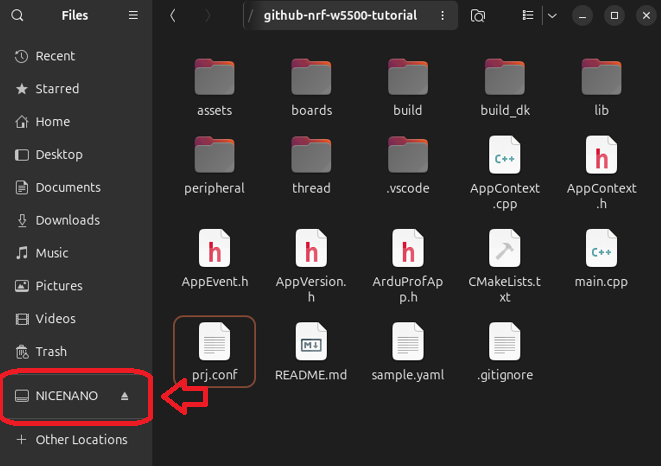
- Copy the firmware "build/zephyr/zephyr.uf2" to the disk "NICENANO"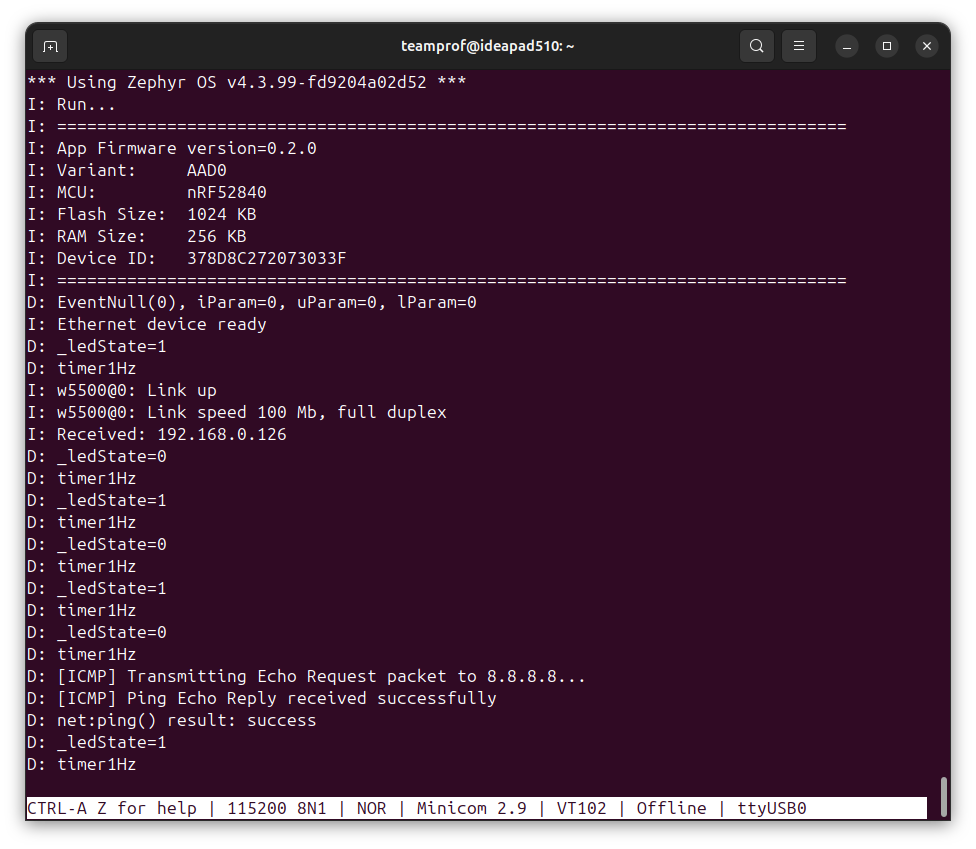
Extending the nRF52840 BLE SoC with Ethernet connectivity via the WIZnet W5500 offers significant advantages for IoT and embedded applications. By adding Ethernet, developers can achieve faster, more reliable, and lower‑latency communication compared to wireless links, which is critical for industrial and mission‑critical systems. Ethernet also provides stable power and data transfer, reducing interference issues common in BLE environments. This hybrid approach enables devices to maintain local BLE connections for sensors and peripherals while leveraging Ethernet for cloud integration, firmware updates, and secure data exchange. Ultimately, it enhances scalability, robustness, and versatility across diverse deployment scenarios.
This project leverages the ProMicro52840 with the WIZnet W5500 to implement an Internet application that pings Google DNS every 5 seconds.
This is a step‑by‑step tutorial for developers to create an Ethernet application in a short time.
Hardware component
- ProMicro nRF52840
- WIZnet W5500
- USB UART module
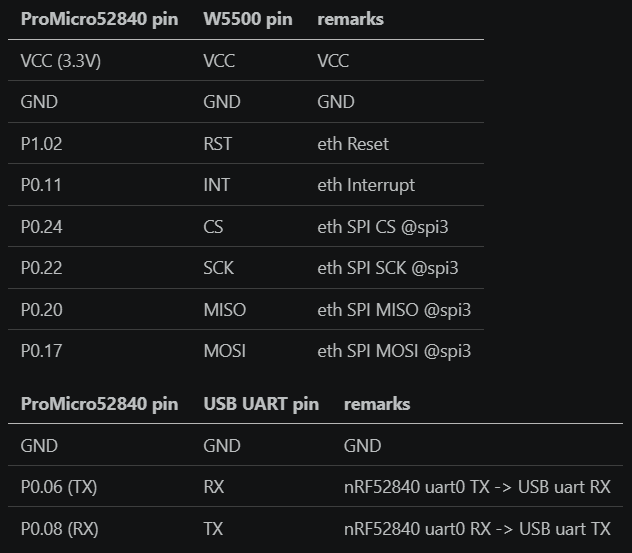
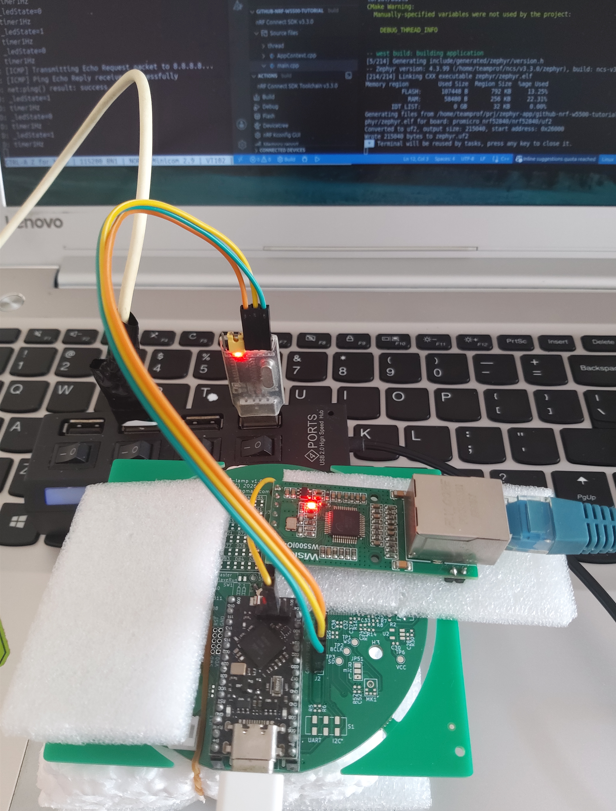
Wiring
Software setup
- clone this repo by
"git clone https://github.com/teamprof/arduprof-template.gif"
- cd arduprof-template
- download the submodule by
"git submodule update --init --recursive"
- Launch VS code and open the folder" nrf-zephyr-app"
Build reference code
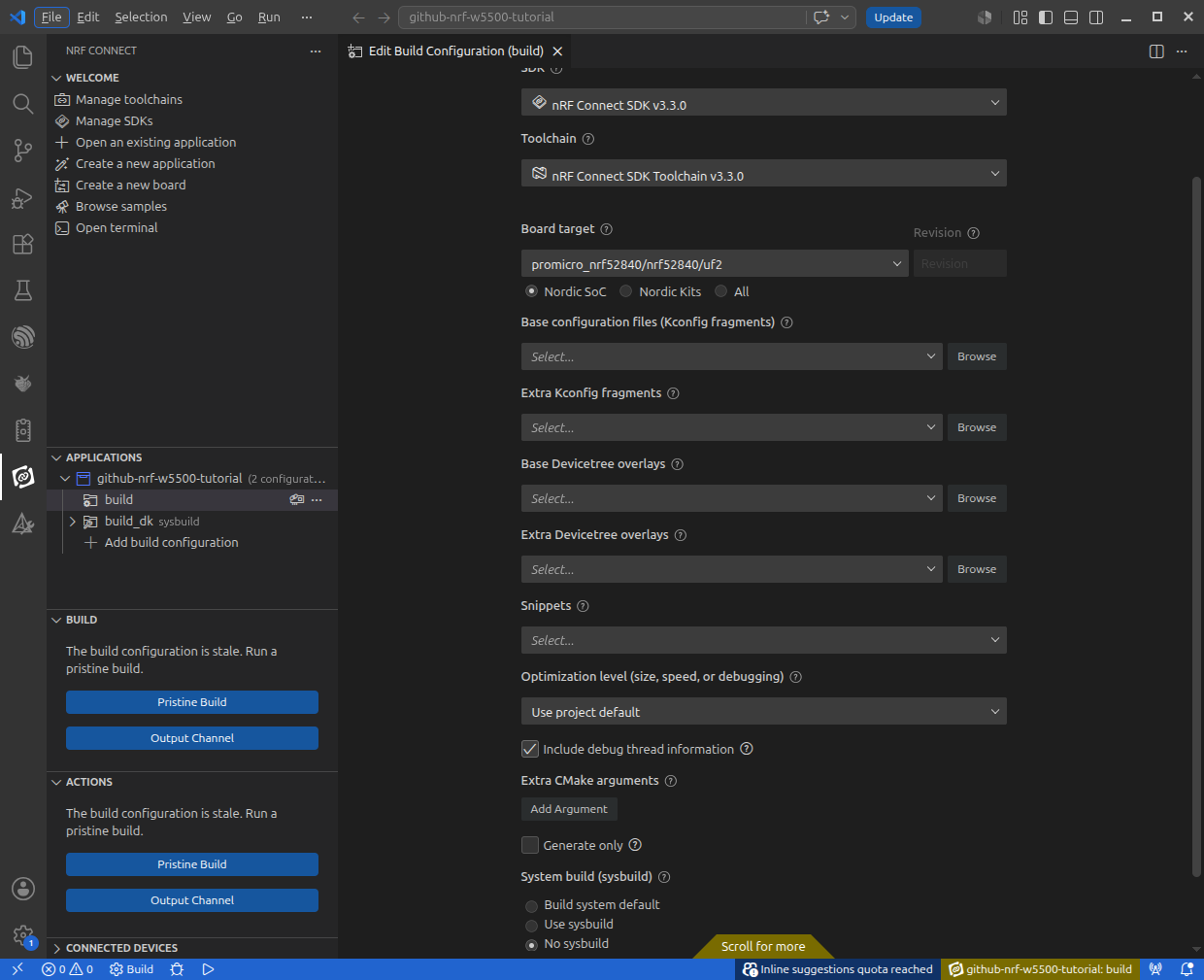
- Add or edit build config, as below
- Click "Generate and Build"
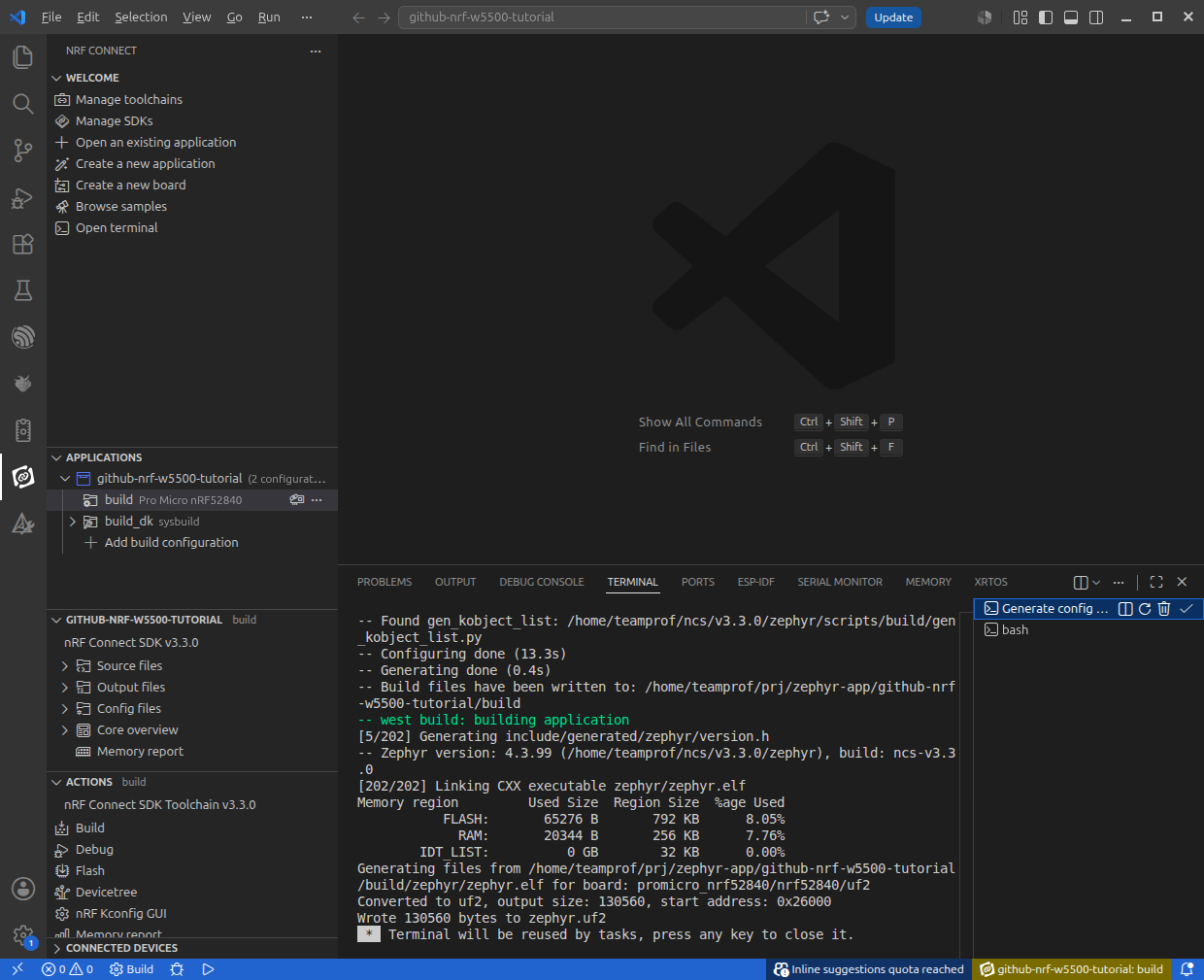
If everything goes smoothly, you should see the following screen.
Code modification
- Edit the Zephyr project configuration file, "prj.conf", as below
##############################################
# disable USB for ProMicro52840 board
CONFIG_USB_DEVICE_INITIALIZE_AT_BOOT=n
CONFIG_USB_DEVICE_STACK=n
CONFIG_USB_DEVICE_STACK_NEXT=n
CONFIG_USB_DEVICE_DRIVER=n

CONFIG_CONSOLE=y
CONFIG_UART_CONSOLE=y
CONFIG_UART_LINE_CTRL=n
##############################################

CONFIG_MAIN_STACK_SIZE=4096
CONFIG_HEAP_MEM_POOL_SIZE=16384


CONFIG_LOG=y
CONFIG_LOG_MODE_MINIMAL=y
CONFIG_NET_LOG=y


CONFIG_GPIO=y
CONFIG_SPI=y

CONFIG_NETWORKING=y
CONFIG_NET_L2_ETHERNET=y
CONFIG_ETH_W5500=y
CONFIG_ETH_DRIVER=y
CONFIG_NET_IPV4=y
CONFIG_NET_DHCPV4=y
CONFIG_NET_ARP=y


CONFIG_CPP=y
CONFIG_REQUIRES_FULL_LIBCPP=y
CONFIG_NEWLIB_LIBC=y
CONFIG_STD_CPP17=y

CONFIG_HWINFO=y
CONFIG_SYS_HEAP_RUNTIME_STATS=y
- Edit the devicetree extension file, "boards/promicro_nrf52840_nrf52840_uf2.overlay", as below
/ {
	model = "ProMicro nRF52840 UF2";
	compatible = "nordic,nrf52840-dk-nrf52840";

    aliases {
        //ledusr = &led0;
    };

    chosen {
        zephyr,console = &uart0;
        zephyr,shell-uart = &uart0;
    };
};

&pinctrl {
    spi3_default: spi3_default {
        group1 {
            psels = <NRF_PSEL(SPIM_SCK, 0, 22)>,
                    <NRF_PSEL(SPIM_MOSI, 0, 17)>,
                    <NRF_PSEL(SPIM_MISO, 0, 20)>;
        };
    };
    spi3_sleep: spi3_sleep {
        group1 {
            psels = <NRF_PSEL(SPIM_SCK, 0, 22)>,
                    <NRF_PSEL(SPIM_MOSI, 0, 17)>,
                    <NRF_PSEL(SPIM_MISO, 0, 20)>;
            low-power-enable;
        };
    };

    uart0_default: uart0_default {
        group1 {
            psels = <NRF_PSEL(UART_TX, 0, 6)>,
                    <NRF_PSEL(UART_RX, 0, 8)>;
        };
    };
    uart0_sleep: uart0_sleep {
        group1 {
            psels = <NRF_PSEL(UART_TX, 0, 6)>,
                    <NRF_PSEL(UART_RX, 0, 8)>;
            low-power-enable;
        };
    };
};

&spi3 {
    compatible = "nordic,nrf-spim";
    status = "okay";
    cs-gpios = <&gpio0 24 GPIO_ACTIVE_LOW>;
    pinctrl-0 = <&spi3_default>;
    pinctrl-1 = <&spi3_sleep>;
    pinctrl-names = "default", "sleep";

    w5500: w5500@0 {
        compatible = "wiznet,w5500";
        status = "okay";

        reg = <0x0>;
        spi-max-frequency = <20000000>;
        int-gpios = <&gpio0 11 (GPIO_ACTIVE_LOW | GPIO_PULL_UP)>;
        reset-gpios = <&gpio1 2 GPIO_ACTIVE_LOW>;

        local-mac-address = [00 AA BB CC DE 02];    // Optional static MAC
    };
};

&uart0 {
    status = "okay";
    current-speed = <115200>;
    pinctrl-0 = <&uart0_default>;
    pinctrl-1 = <&uart0_sleep>;
    pinctrl-names = "default", "sleep";
};

&pwm0 {
    status = "disabled";
};
&pdm0 {
    status = "disabled";
};
&pwm3 {
    status = "disabled";
};
&uart1 {
    status = "disabled";
};
&i2c0 {
    status = "disabled";
};
&i2c1 {
    status = "disabled";
};
&spi0 {
    status = "disabled";
};
&spi1 {
    status = "disabled";
};
&spi2 {
    status = "disabled";
};
&i2s0 {
    status = "disabled";
};
- Add header files and increase stack size to 4096 in "ThreadApp.cpp"
#include <zephyr/devicetree.h>
#include <zephyr/kernel.h>

#include "../peripheral/net_helper.h"

#define TASK_STACK_SIZE 4096
// #define TASK_STACK_SIZE 1024

```

- Ensure Ethernet device is available by adding the following code in "setup()" of "ThreadApp.cpp"
```
void CLASSNAME::setup(void)
{
    const struct device *eth = DEVICE_DT_GET(DT_NODELABEL(w5500));
    if (!device_is_ready(eth))
    {
        LOG_ERR("Ethernet device is not ready");
        _handlerMap.clear();
        return;
    }
    LOG_INF("Ethernet device ready");

    struct net_if *iface = net_if_lookup_by_dev(eth);
    if (iface)
    {
        net_if_up(iface);
        net_dhcpv4_start(iface);
    }

    k_timer_init(&_timer1Hz, CLASSNAME::_timerExpiryHandler, CLASSNAME::_timerStopHandler);
    k_timer_start(&_timer1Hz, K_MSEC(1000), K_SECONDS(1));

    // k_sleep(K_MSEC(1000));
}
- Modify code of "handlerSoftwareTimer()" in "ThreadApp.cpp", to ping Google DNS every 5 seconds
void CLASSNAME::handlerSoftwareTimer(k_timer *timer)
{
    if (timer == &_timer1Hz)
    {
        LOG_DBG("timer1Hz");
        static int count = 0;
        if (++count > 5)
        {
            count = 0;

            static constexpr const char DNS_IP[] = "8.8.8.8";
            auto ret = net::ping(DNS_IP, K_SECONDS(5));
            LOG_DBG("net:ping() result: %s", ret ? "success" : "failed");
        }
    }
    else
    {
        LOG_DBG("unsupported timer=%p", timer);
    }
}
- Finally, add the "net_helper.cpp" and "net_helper.h" files under peripheral folder
- peripheral/net_helper.cpp
#include <zephyr/kernel.h>
#include <zephyr/logging/log.h>
#include <zephyr/net/icmp.h>

#include "./net_helper.h"

// LOG_MODULE_REGISTER(net, LOG_LEVEL_INF);
LOG_MODULE_REGISTER(net, LOG_LEVEL_DBG);

namespace net
{
    K_SEM_DEFINE(ping_reply_sem, 0, 1);

    bool ping(const char *ip, k_timeout_t timeout, struct net_if *iface)
    {
        if (!ip)
        {
            LOG_WRN("IP must not be null");
            return false;
        }

        if (!iface)
        {
            iface = net_if_get_default();
        }

        struct net_icmp_ctx ping_ctx;
        struct sockaddr_in dest_addr;
        int err;

        // Initialize destination address struct
        dest_addr.sin_family = AF_INET;
        dest_addr.sin_port = 0; // ICMP does not utilize logical ports
        err = net_addr_pton(AF_INET, ip, &dest_addr.sin_addr);
        if (err < 0)
        {
            LOG_WRN("Parsing target IP string failed: %d", err);
            return false;
        }

        err = net_icmp_init_ctx(&ping_ctx,
                                AF_INET,
                                NET_ICMPV4_ECHO_REPLY,
                                0,
                                [](struct net_icmp_ctx *ctx,
                                   struct net_pkt *pkt,
                                   struct net_icmp_ip_hdr *ip_hdr,
                                   struct net_icmp_hdr *icmp_hdr,
                                   void *user_data) -> int
                                {
                                    // Verify the response type is an Echo Reply
                                    if (icmp_hdr->type == NET_ICMPV4_ECHO_REPLY)
                                    {
                                        LOG_DBG("[ICMP] Ping Echo Reply received successfully");
                                        k_sem_give(&ping_reply_sem);
                                    }
                                    return 0;
                                    //
                                });
        if (err < 0)
        {
            LOG_WRN("Failed to allocate ICMP context: %d", err);
            return false;
        }
        LOG_DBG("[ICMP] Transmitting Echo Request packet to %s...", ip);

        // Send the echo request packet using default interface mapping layers
        err = net_icmp_send_echo_request(&ping_ctx,
                                         iface,
                                         (struct sockaddr *)&dest_addr,
                                         NULL,  // Use default size/payload configurations
                                         NULL); // Optional token user_data field
        if (err < 0)
        {
            LOG_WRN("Failed to push ICMP packet out onto the wire: %d", err);
            net_icmp_cleanup_ctx(&ping_ctx);
            return false;
        }

        bool ret = k_sem_take(&ping_reply_sem, timeout) != -EAGAIN;
        // LOG_DBG("ret = %d", ret);

        // Unregister the context tracker from the system kernel tables to clean up memory
        net_icmp_cleanup_ctx(&ping_ctx);
        return ret;
    }
}
- peripheral/net_helper.cpp
#pragma once
#include <zephyr/kernel.h>
#include <zephyr/net/net_if.h>
#include <cstddef>
#include <stdbool.h>
#include <stdint.h>

namespace net
{
    bool ping(const char *ip, k_timeout_t timeout = K_SECONDS(5), struct net_if *iface = nullptr);
}; // namespace net
Build project and flash firmware
- Perform a "Pristine build"
If everything goes smoothly, you should see the following screen.
- Double click the reset button of ProMicro52840, a NICENANO disk should be available on FIles Explorer
- Copy the firmware "build/zephyr/zephyr.uf2" to the disk "NICENANO"
- Launch a serial terminal, connect to the USB UART at 8N1 115200 bps
If everything goes smoothly, you should see the following screen.
Demo photo
Documents
-
nrf-w5500-tutorial

Comments
Write


