Axpertino.. easy choice for DIY
Axpertino.. easy choice for DIY
0
Project description
Original : https://axpertino.webnode.sk/
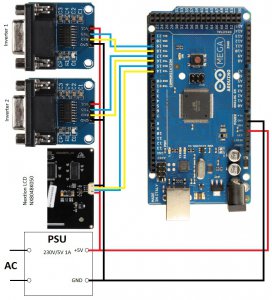
What you need?
- Arduino Mega 2560 1pcs
- RS232 to UART converter 1pcs, 2pcs for 2 invertors
- Wiznet W5100 Ethernet shield 1pcs
- As option, Nextion Enhanced TFT 5" Display NX8048K050 1pcs and for programming microSD card
- Power supply for powering all, 5V/1A
Software
Download software for Arduino. Use attached xLoader for load program into Arduino Mega. If you want use a TFT display, use microSD card to import tft file to device. It allow you setting inverter directly from touch panel.
Before DIY, please read the MANUAL
Configuration
Connect Ethernet shield to Arduino Mega, connect all components as wiring is displayed, such as one or two converters, ethernet cable to your router and power supply. For first power, you need load defaults. Connect wire between pin 40 of Arduino board and GND and restart Arduino. After 5 seconds, please remove this wire. You can use any pushbutton too. Connect your inverter to UART converter, and use webbrowser in a PC connected to the same network. Type URL IP adress 192.168.0.122 and open web interface. You can set another network parameters.Licensing
After first run, you have a 30 days trial mode, after this time, Axpertino will be working in basic mode as Lite version. Your data are not lost. Reset to defaults or erase eeprom not remove or reset license. Keying is in eeprom. Here are limits:
- Only one inverter
- Energy meters not working
- Command line not working


