Pico MicroPython MQTT Practice: Publish JSON Payloads to EMQX
Practical guide for Pico to publish JSON messages to EMQX broker.
0
Project description
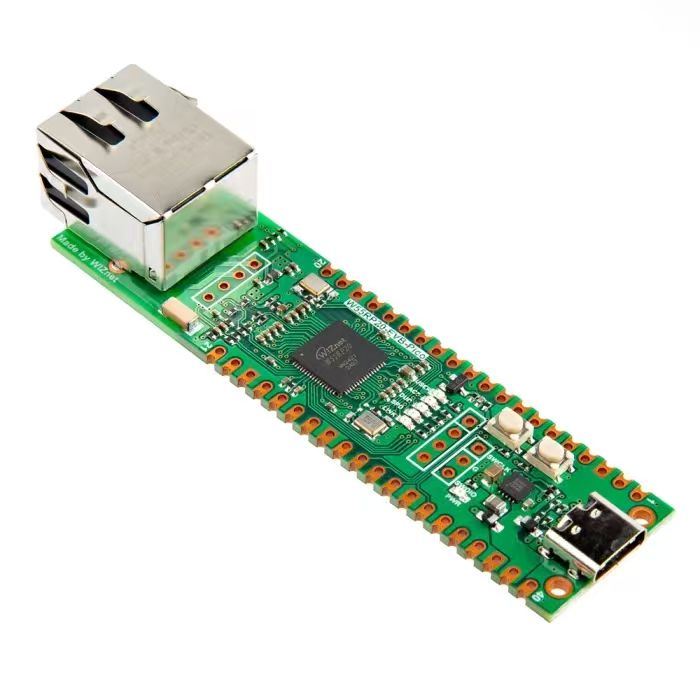
In the following code, we implement an MQTT client on the Wiznet W5500 module using MicroPython, which can communicate with the MQTT Broker provided by EMQX Cloud. After connecting to the network and initializing the W5500 module, the program connects to the MQTT server and uses a timer to send keep‑alive ping packets to maintain connection status. Afterwards, the client cyclically publishes predefined JSON messages to the specified topic. Finally, after completing all publish operations, it disconnects the MQTT connection and releases resources.
The source code below can be found in the provided resource package under elegance‑devkit v1\Demo\48 ETH_MQTT_Publish.
Sample code:
# Python env   : MicroPython v1.23.0 on Wiznet W5500
# -*- coding: utf-8 -*-
# @Time    : 2024/8/9 11:15 AM
# @Author  : Li Qingshui
# @File    : main.py
# @Description : Implement publish function for MQTT client
# ======================================== Import related modules ========================================
# Import hardware‑related modules
from machine import Pin,SPI,reset,Timer
# Import time‑related modules
import time
# Import network‑related modules
import network
# Import socket module for creating and managing network connections
from usocket import socket
# Import MQTT client
from umqttrobust import MQTTClient
# Import json encoding library
import json
# ======================================== Global variables ============================================
# Device IP address
ip = '192.168.1.20'
sn = '255.255.255.0'
gw = '192.168.1.1'
dns= '8.8.8.8'
# Tuple object for network configuration
netinfo=(ip, sn, gw, dns)
# MQTT configuration
mqtt_params = {
    'url': 'broker.emqx.io',           # MQTT server address
    'port': 1883,                      # MQTT server port
    'clientid': 'FreakStudioDevice',   # Local MQTT client ID
    'pubtopic': '/FreakStudio/pub',    # Publish topic
    'pubqos': 0,                       # Publish QoS level
    }
# Message content to be published
msg = { 'clientid' : 'FreakStudioDevice',
        'MQTT_Version' : 'v3.1.1',
        'Device' : 'raspberry pi pico',
        'Name' : 'FreakStudio MQTT Sub Test',
    }
# Encode message content into json format
topic_msg = json.dumps(msg)
# Record timer execution count
timer_count = 0
# MQTT client instance
client = None
# ======================================== Function definitions ============================================
def w5x00_init() -> network.WIZNET5K:
    '''
    Initialize network.WIZNET5K instance, set static IP and bring‑up network connection.
    Returns:
        network.WIZNET5K: Initialized and connected network interface instance.
    '''
    # Declare global variable
    global netinfo
    # Initialize SPI object
    spi = SPI(0, 2_000_000, mosi=Pin(19), miso=Pin(16), sck=Pin(18))
    # Instantiate network.WIZNET5K, pass chip‑select pin CS and reset pin RST
    nic = network.WIZNET5K(spi, Pin(17), Pin(20))
    # Activate network interface
    nic.active(True)
    try:
        print("\r\nConfiguring DHCP")
        # Try to acquire IP, subnet mask, gateway, DNS via DHCP
        nic.ifconfig('dhcp')
    except:
        print("\r\nDHCP fails, use static configuration")
        # Fallback to static IP configuration on DHCP failure
        nic.ifconfig(netinfo)
    # Block until network link becomes available
    while not nic.isconnected():
        time.sleep(1)
        # Print register debug information
        print(nic.regs())
    # Print applied network parameters
    print('ip :', nic.ifconfig()[0])
    print('sn :', nic.ifconfig()[1])
    print('gw :', nic.ifconfig()[2])
    print('dns:', nic.ifconfig()[3])
    # Return WIZNET5K instance
    return nic

def mqtt_connect() -> MQTTClient:
    '''
    Connect to MQTT server.
    Returns:
        MQTTClient: Successfully connected MQTT client instance.
    '''
    global client_id, mqtt_server
    # Create MQTT client instance, keep‑alive time set to 60 seconds
    client = MQTTClient(mqtt_params['clientid'], mqtt_params['url'], mqtt_params['port'],keepalive=60)
    # Connect to MQTT server
    client.connect()
    # Print connection success message
    print('Connected to %s MQTT Broker'%(mqtt_params['url']))
    # Return MQTT client instance
    return client

def timer_callback(t: Timer) -> None:
    '''
    Timer callback function for sending ping keep‑alive packets.
    Args:
        t (Timer): Timer instance.
    Returns:
        None
    '''
    # Declare global variable
    global timer_count, client
    # Increment timer counter
    timer_count = timer_count + 1
    # Trigger when counter reaches or exceeds 30
    if timer_count >= 30:
        # Reset timer counter
        timer_count = 0
        # Send MQTT ping packet
        client.ping()
# ======================================== Custom classes ============================================
# ======================================== Initialization ==========================================
# 3‑second power‑on delay for hardware stabilization
time.sleep(3)
# Print debug banner
print("FreakStudio : Using WIZNET5K Ethernet Device to connect to MQTT Broker as a Publisher")
# Initialize W5500 module
nic = w5x00_init()
try:
    # Try connecting to MQTT server
    client = mqtt_connect()
except OSError as e:
    # Print exception information
    print('raise exception : {}'.format(e))
    # Reconnect and reset upon connection failure
    client.reconnect()
# Create timer instance for periodic MQTT ping packets
timer = Timer(-1)
# Call timer_callback every 1 second
timer.init(freq=1, mode=Timer.PERIODIC, callback=timer_callback)
# ======================================== Main program ===========================================
# Publish messages 10 times in loop
for i in range(10):
    try:
        # Publish message to specified topic
        client.publish(mqtt_params['pubtopic'],topic_msg,qos = mqtt_params['pubqos'])
        # Print debug information
        print('Message Published: %s' % topic_msg)
        # Wait for 3 seconds
        time.sleep(3)
    except Exception as e:
        # Print exception information
        print("Failed to publish message")
        print('raise exception : {}'.format(e))
# Disconnect from MQTT server
client.disconnect()
# Stop timer
timer.deinit()
Here we set a timer which invokes the callback function every 1 second. When the timer counter reaches 30 (30 seconds elapsed), it sends an MQTT ping packet to the MQTT Broker to sustain the connection. In the main program, it loops 10 times, publishing JSON‑encoded messages to topic '/FreakStudio/pub' and printing debug logs each iteration.
Overall workflow diagram:
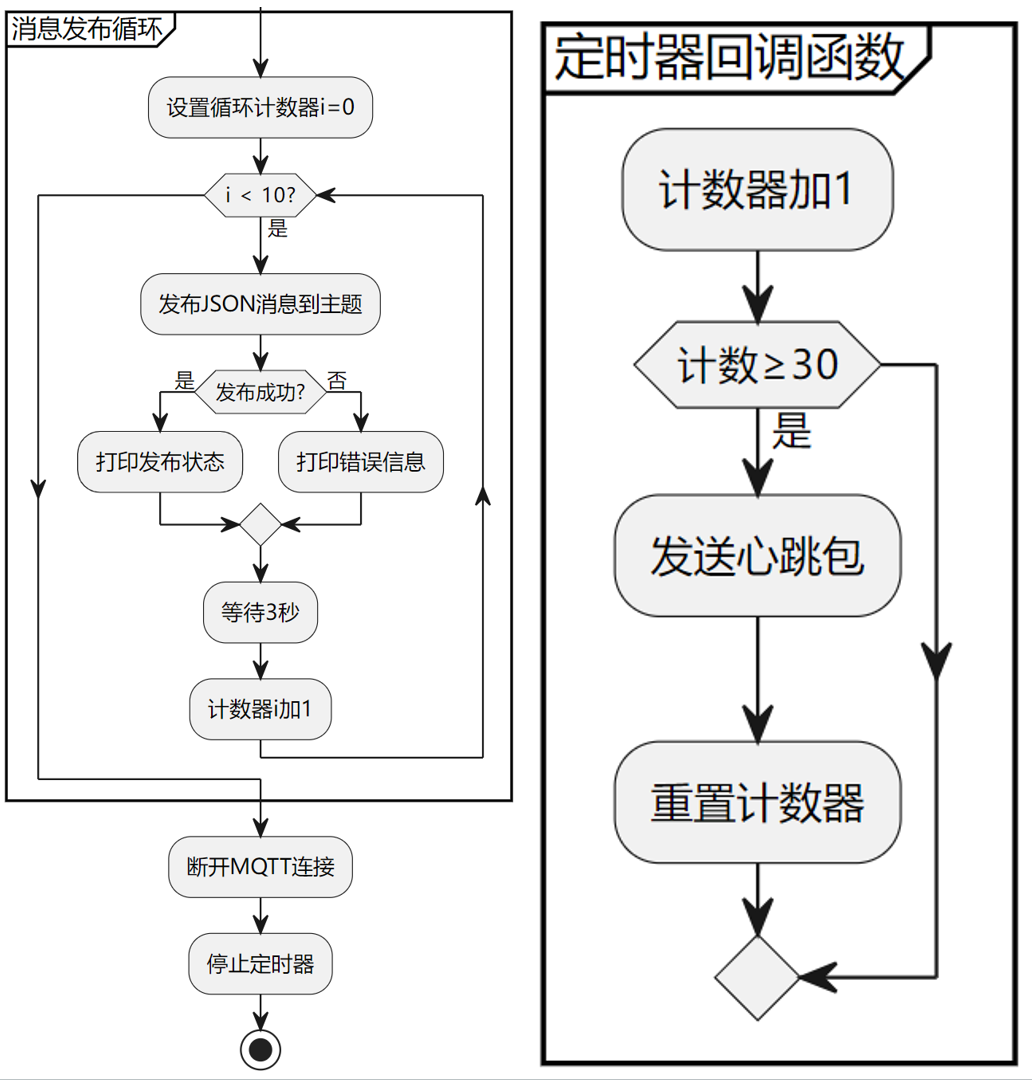
Meanwhile we need to configure MQTTX software to subscribe to topic '/FreakStudio/pub'. First establish connection between client and broker. Click the button in the lower‑left corner to quickly subscribe to a Topic. Once subscribed, the client immediately starts receiving incoming messages:
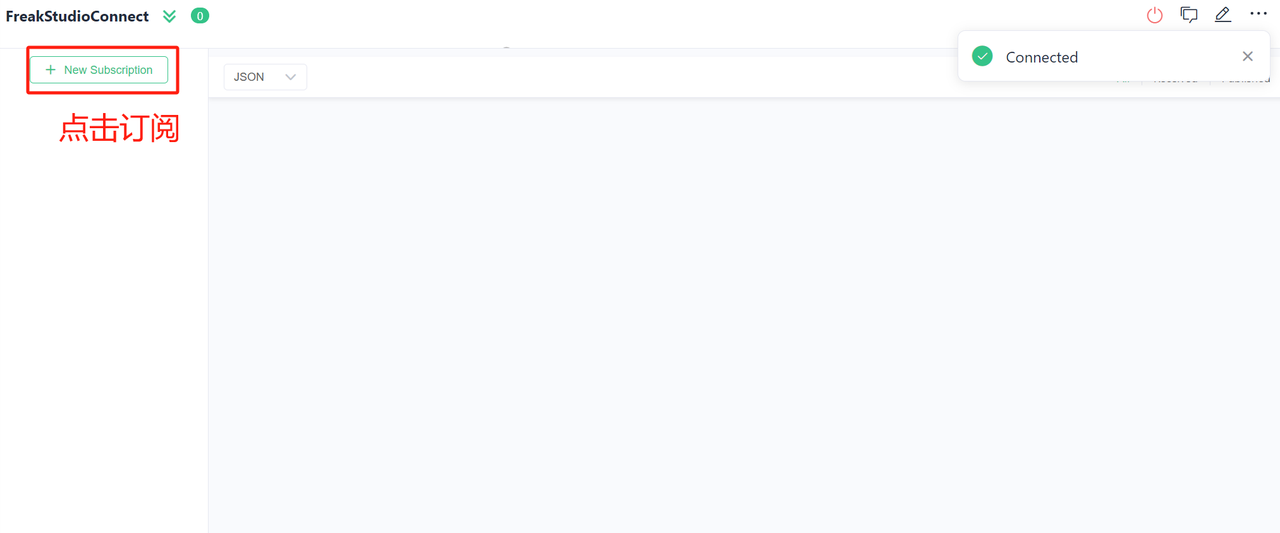
Topic parameters are set as shown below:
Each Topic gets a random color marker. You may also open the color‑picker to customize marker color. Click the far‑right button at the top of the subscription list to hide the list for more display space.
Since Raspberry Pi Pico sends data in JSON format, set message display format to Json:
Flash firmware and open serial terminal. You will see output as follows:
Inside MQTTX software, the PC client displays received messages for the corresponding topic:
You can also click buttons on the left sidebar to view MQTTX connection history records:

