



PanaProxy-ETH: A W5500-Based Home Assistant Controller for Panasonic Aquarea Heat Pumps
PanaProxy-ETH combines ESP32-C3, W5500 Ethernet, ESPHome, and Home Assistant to locally monitor, control, and automate Panasonic Aquarea heat pumps.
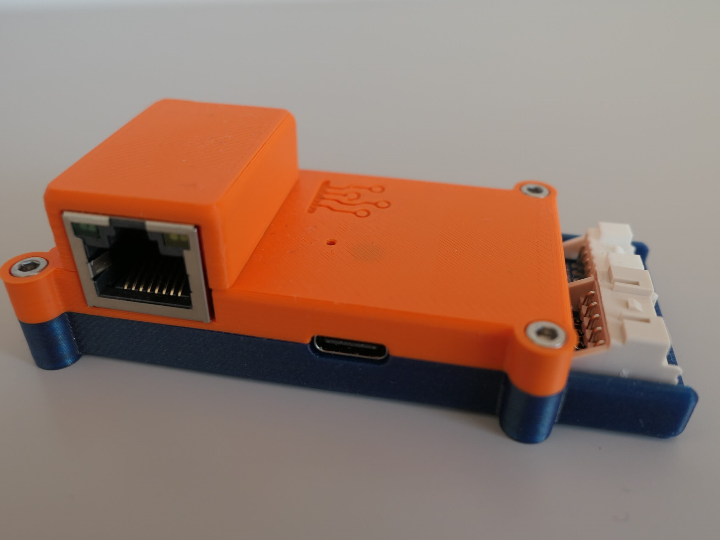
Overview
Heat pumps are major HVAC systems, and integrating them with Home Assistant can make their operating data and controls available to a broader home-automation system.
PanaProxy, developed by Polish IoT engineering company IoTLabs, is a third-party controller for Panasonic Aquarea heat pumps. It brings heat-pump operating data and controls into ESPHome and Home Assistant, allowing users to monitor temperatures, operating states, power-related data, and other entities from their local smart-home system.
A built-in web interface is also available, and IoTLabs emphasizes local operation without requiring an external cloud service.
The PanaProxy-ETH variant adds an RJ45 wired Ethernet interface. Its official firmware configuration directly identifies the Ethernet controller as a WIZnet W5500.
About IoTLabs
IoTLabs is a Poland-based IoT engineering team working across embedded hardware, software, automation, and Home Assistant integration.
Its public product portfolio includes more than PanaProxy:
| Product | Main Application |
|---|---|
| PanaProxy | Panasonic Aquarea heat-pump control |
| wM-Bus Gateway | 868 MHz utility-meter data collection |
| Sensio Air Monitor | Indoor air-quality monitoring |
| Smart Motor Driver | Blinds, awnings, and dual DC motor control |
| Web Tools | Firmware flashing and Improv BLE / Serial setup |
The company’s broader approach combines custom electronics, ESP32-based devices, ESPHome, Home Assistant, and local automation rather than relying only on proprietary cloud services.
What Is PanaProxy?
PanaProxy is an alternative controller and monitoring device for Panasonic Aquarea heat pumps.
IoTLabs describes two main installation approaches:
- Use PanaProxy as the heat pump controller.
- Keep the original Panasonic controller and use PanaProxy alongside it for monitoring and integration.
The device connects to the heat pump through the controller interface using the supplied CN-CNT cable. According to the project documentation, it can also receive power through that connection, while USB-C is available as an alternative power source.
PanaProxy builds on the existing HeishaMon project for Panasonic Aquarea heat pumps, but is a separate hardware and firmware product developed by IoTLabs. IoTLabs extends that foundation through its own ESPHome-based Panasonic Aquarea component, managed firmware, and dedicated Wi-Fi and Ethernet product variants.
Main Specifications
| Item | PanaProxy Family |
|---|---|
| Main MCU | ESP32-C3 |
| Framework | ESPHome on ESP-IDF |
| Heat-pump interface | Panasonic Aquarea controller interface / UART |
| Wi-Fi | 2.4 GHz |
| Bluetooth | BLE |
| Ethernet | RJ45 on PanaProxy-ETH |
| Ethernet controller | WIZnet W5500 |
| W5500 interface | SPI |
| Home automation | Home Assistant / ESPHome |
| Local interface | Embedded web interface |
| Firmware update | Managed update / OTA support |
| Alternative power | 5 V USB-C |
| Cloud dependency | Not required |
| Current firmware version in repository | v1.0.3 |
The current hardware configuration identifies the MCU as an ESP32-C3 running ESP-IDF and defines two UART interfaces for communication with the heat pump and external controller.
The current repository version file identifies PanaProxy v1.0.3 and IoTLabs ESPHome Components v1.2.0.
The reviewed PanaProxy-ETH configuration uses W5500 Ethernet. The public firmware does not establish simultaneous Wi-Fi and Ethernet operation on the Ethernet variant.
PanaProxy and PanaProxy-ETH
IoTLabs provides two network variants.
| Variant | Network |
|---|---|
| PanaProxy | Wi-Fi |
| PanaProxy-ETH | RJ45 wired Ethernet |
The standard model uses the ESP32-C3’s Wi-Fi capability, while PanaProxy-ETH adds a wired network interface for installations where Ethernet is preferred.
The WIZnet-based model discussed here is PanaProxy-ETH.
The firmware repository keeps the Ethernet version clearly separated from the standard configuration. panaproxy_eth.yaml imports the Ethernet HAL and explicitly sets the device name to PanaProxy ETH.
How It Works
Panasonic Aquarea Heat Pump
            │
            │ Controller / UART Interface
            ▼
      ┌──────────────┐
      │ PanaProxy-ETH│
      │              │
      │  ESP32-C3    │
      │      │ SPI   │
      │      ▼       │
      │    W5500     │
      └──────┬───────┘
             │ Ethernet
             ▼
       Local Network
             │
             ▼
       Home Assistant
The ESP32-C3 communicates with the Panasonic heat pump and exposes operating information as ESPHome entities.
Home Assistant can then use those entities for dashboards, monitoring, controls, and automations.
The PanaProxy documentation also describes a built-in web interface that provides direct access to heat-pump information without requiring Home Assistant for every interaction.
Role of the WIZnet W5500
The W5500 implementation in PanaProxy-ETH is directly confirmed in the official firmware configuration.
The repository file packages/hal/eth.yaml contains:
ethernet:
  type: W5500
It also defines the SPI clock, MOSI, MISO, chip-select, interrupt, and reset pins used between the ESP32-C3 and W5500.
The Ethernet-specific product package then imports this HAL:
PanaProxy ETH
     │
 ESP32-C3
     │ SPI
     ▼
 WIZnet W5500
     │
     ▼
Wired Home Network
     │
     ▼
 Home Assistant
The responsibilities can be summarized as follows:
| Responsibility | Component |
|---|---|
| Heat-pump communication | ESP32-C3 firmware |
| Panasonic protocol handling | IoTLabs ESPHome component |
| Home Assistant entities | ESPHome |
| Wired Ethernet interface | W5500 |
| Physical LAN connection | RJ45 |
| Dashboards and automations | Home Assistant |
In PanaProxy-ETH, W5500 provides the wired Ethernet path that connects the ESP32-C3-based controller to the local Home Assistant network. The reviewed implementation uses W5500 through ESPHome’s Ethernet integration rather than through direct WIZnet ioLibrary hardware-socket API calls.
What Can Be Done in Home Assistant?
PanaProxy is designed to make Panasonic Aquarea data available inside the Home Assistant ecosystem.
Documented use cases include:
- Heating-operation monitoring
- Temperature monitoring
- Power-related information
- Heat-pump control
- Home Assistant automations
- COP calculation
- Integration with other sensors and smart-home devices
- ESPHome native API
- MQTT support
- Local REST, TCP, or UDP integrations
- OTA firmware updates
This allows the heat pump to become part of broader household automation instead of remaining an isolated HVAC appliance.
For example, Home Assistant can combine heat-pump information with room sensors, energy meters, time schedules, or other automation conditions.
Firmware, Local Control, and Customization
PanaProxy is sold as a ready-to-use device, but its firmware configuration is also publicly available.
Devices ship with preloaded firmware, so ordinary users do not need to compile or flash software before use. Managed firmware updates are also part of the normal product experience.
Advanced users can take control of the device through ESPHome and customize the YAML configuration.
However, IoTLabs clearly warns that doing so removes the device from the managed-firmware path. The user then becomes responsible for maintaining the custom ESPHome configuration and keeping it compatible with ESPHome Core updates.
IoTLabs also provides web-based tools for factory firmware flashing and Improv BLE / Serial configuration.
This gives PanaProxy an interesting product model:
Ready-to-use Hardware
        +
Managed Firmware
        +
Public Configuration
        +
Advanced User Customization
Sales and Availability
PanaProxy is no longer best described as only an early or inquiry-based prototype.
IoTLabs currently directs customers to two purchasing routes:
- Tindie marketplace
- Direct ordering through IoTLabs
The Tindie listing provides a conventional marketplace purchase flow for the assembled device.
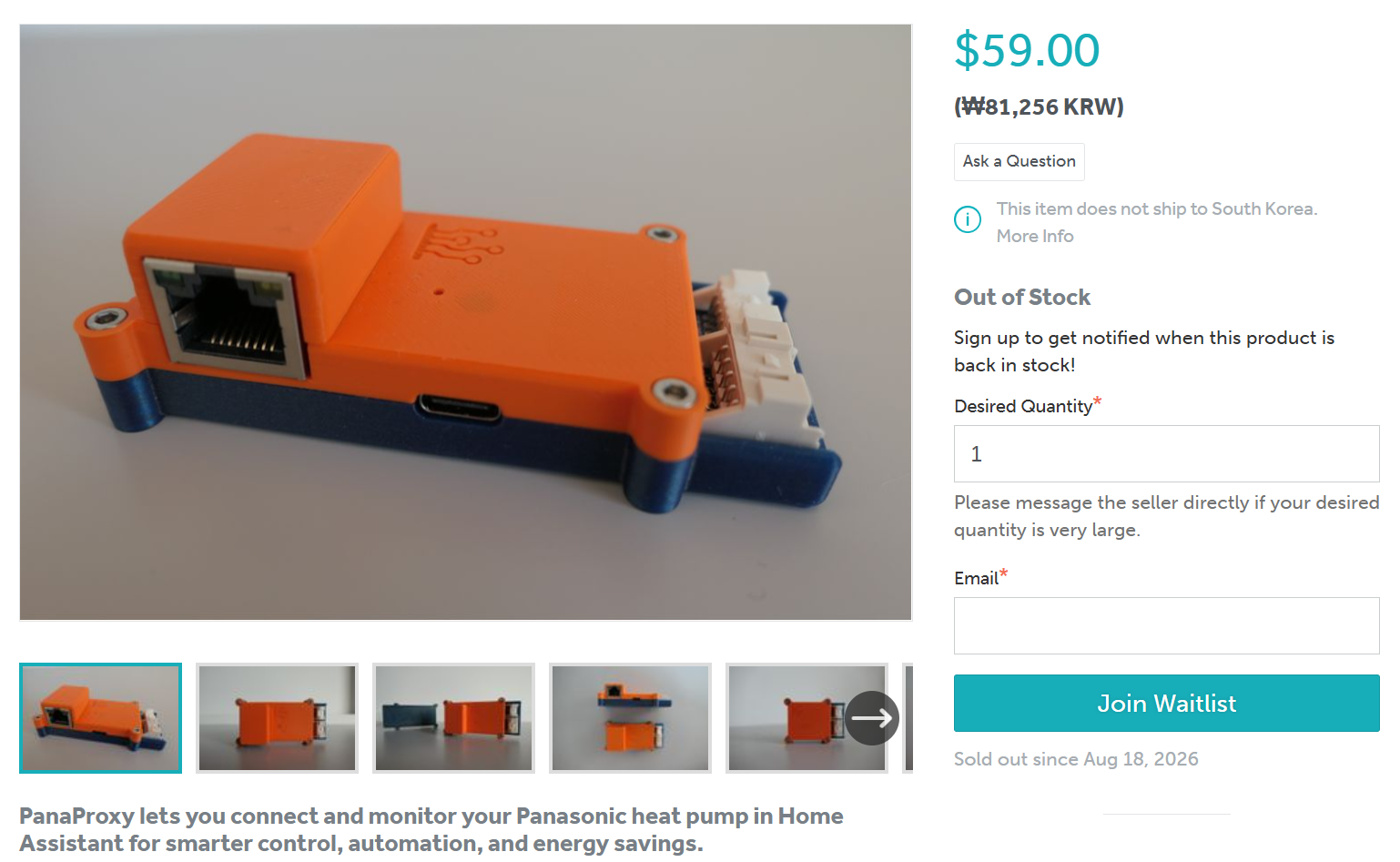
PanaProxy is sold as assembled hardware through Tindie, providing IoTLabs with a direct commercial sales channel for the product. Current pricing, stock, and shipping information are available on the live marketplace listing.
How IoTLabs Markets PanaProxy
IoTLabs brings PanaProxy to market through a combination of product education, technical transparency, marketplace sales, and third-party editorial coverage.
Product Website — Explain the Use Case
The IoTLabs product page focuses on what users can do with their Panasonic Aquarea system rather than simply presenting a list of hardware specifications.
It explains:
Home Assistant integration
Heat-pump monitoring and control
Use alongside or instead of the original Panasonic controller
Wi-Fi and Ethernet variants
Local operation without a required cloud service
ESPHome customization
This gives potential buyers a practical understanding of how PanaProxy fits into an existing smart-home system.
GitHub — Technical Transparency
The PanaProxy GitHub repository publishes the Wi-Fi and Ethernet configurations, Home Assistant entity definitions, firmware blueprints, hardware-related settings, and version information.
The repository has continued to receive updates in 2026, including firmware-component integration and documentation improvements.
For technically experienced users, GitHub provides a way to inspect how the product is implemented and how it can be customized beyond the factory configuration.
Tindie — Commercial Sales and Marketplace Visibility
PanaProxy is sold as assembled hardware through Tindie, a marketplace focused on specialist electronics, maker hardware, and independently developed products.
This gives IoTLabs a dedicated commercial sales channel outside its own website and places PanaProxy in front of an audience already interested in smart-home and embedded hardware.
Tindie Blog — Marketplace Editorial Exposure
Tindie also featured PanaProxy in a July 2026 article titled “Home Assistant Heat Pump Control.”
Home Assistant Heat Pump Control — Tindie Blog
Unlike IoTLabs’ own product page or GitHub repository, this article is published by Tindie, the marketplace where PanaProxy is also sold. It gives the product additional editorial visibility among readers interested in Home Assistant, smart-home hardware, and maker electronics.
Together, these channels create a straightforward path from product discovery to technical evaluation and purchase:
IoTLabs Product Website
        │
        ├─ Use cases
        ├─ Home Assistant integration
        └─ Wi-Fi / Ethernet options
        ↓
GitHub
        │
        └─ Firmware and technical transparency
        ↓
Tindie
        │
        └─ Commercial sales
        ↓
Tindie Blog
        └─ Third-party editorial exposure
The publicly verified marketing channels reviewed here show a clear emphasis on technical documentation, marketplace sales, and product-focused editorial coverage.
Why This Product Matters
W5500 in a Real Home-Energy Product
PanaProxy-ETH demonstrates W5500 use beyond development boards and generic Ethernet adapters.
It is applied to a commercial home-energy and HVAC product that connects a Panasonic Aquarea heat pump to a local smart-home system.
The W5500 therefore serves as the wired network interface between an HVAC controller and a local smart-home platform.
Wired Ethernet as a Product Option
IoTLabs offers both Wi-Fi and Ethernet models rather than forcing every installation to use the same network technology.
This is particularly relevant for fixed equipment such as HVAC systems, where users may prefer a wired LAN connection.
Product + Firmware + Ecosystem
PanaProxy brings several layers together:
Commercial Hardware
      +
ESPHome Firmware
      +
Home Assistant Integration
      +
Public GitHub Configuration
      +
Tindie Sales
This makes it a strong VAR example of a product that combines ready-to-use hardware with maker-oriented customization.
Current Status and Limitations
Public information currently confirms:
- Physical PanaProxy hardware
- Wi-Fi and Ethernet variants
- ESP32-C3
- W5500 in PanaProxy-ETH
- Panasonic Aquarea integration
- ESPHome and Home Assistant support
- Managed firmware updates
- Public GitHub configuration
- Tindie sales
- Direct-order availability
The following points were not publicly established in this review:
- Cumulative unit sales
- Percentage of Ethernet vs Wi-Fi sales
- Number of installed households
- Independent long-duration Ethernet uptime tests
- Independent energy-saving measurements
- Complete compatibility across every Panasonic Aquarea generation
- Public hardware schematic or PCB design
- Certification details
- A clearly identified repository license file
The firmware configuration is publicly available, but the reviewed materials do not establish PanaProxy as fully open-source hardware. It is more accurately described as a commercial device with publicly available firmware and configuration.
The Wi-Fi and Ethernet variants also use separate network configurations. The public configuration does not establish simultaneous wired-and-wireless operation on PanaProxy-ETH.
Related WIZnet Maker Projects
ESPHome W5500 Ethernet on ESP32 Boards
This project demonstrates the basic ESPHome configuration needed to connect W5500 Ethernet to an ESP32 platform.
PanaProxy-ETH takes the same general technology stack and applies it to a finished Panasonic heat-pump controller.
ESPHome Haier AC Ethernet
This project connects Haier air-conditioning hardware to Home Assistant through ESPHome and W5500 Ethernet.
Both examples bridge HVAC equipment into Home Assistant over wired Ethernet, while PanaProxy is specifically designed as a commercial controller for Panasonic Aquarea heat pumps.
ESP32 Controller — Wi-Fi and Ethernet Profiles
This project provides separate Wi-Fi and W5500 Ethernet configurations for Home Assistant applications.
That approach is conceptually similar to IoTLabs offering standard PanaProxy and PanaProxy-ETH variants for different installation environments.
Conclusion
PanaProxy is a commercial smart-home controller that brings Panasonic Aquarea heat pumps into the ESPHome and Home Assistant ecosystem.
The standard version uses Wi-Fi, while PanaProxy-ETH combines the ESP32-C3 with WIZnet W5500 and an RJ45 interface for wired networking.
W5500 use is directly confirmed by the official firmware configuration.
PanaProxy-ETH demonstrates how W5500 can provide the wired network interface for a commercial Home Assistant product that connects a Panasonic Aquarea heat pump to a local smart-home system.
IoTLabs combines several routes to bring PanaProxy to market: its own website explains the use case, GitHub provides technical transparency, Tindie provides a commercial sales channel, and the Tindie Blog adds marketplace editorial exposure.
This makes PanaProxy-ETH a useful VAR example of how a small IoT manufacturer can combine commercial hardware, the Home Assistant/ESPHome ecosystem, technical transparency, marketplace sales, and product-focused editorial coverage.
FAQ
Q. What is PanaProxy?
It is a third-party controller for Panasonic Aquarea heat pumps that provides monitoring, control, and automation through ESPHome and Home Assistant.
Q. What is the difference between PanaProxy and PanaProxy-ETH?
The standard model uses Wi-Fi. PanaProxy-ETH adds an RJ45 wired Ethernet interface.
Q. Is W5500 directly confirmed?
Yes. The official packages/hal/eth.yaml firmware configuration explicitly declares type: W5500 and defines its SPI, interrupt, and reset pins.
Q. Does PanaProxy require a cloud service?
No external cloud is required for its ESPHome/Home Assistant local-control workflow.
Q. Is it currently sold as assembled hardware?
Yes. IoTLabs directs buyers to its Tindie listing and also provides a direct-order route. Current price, stock, and shipping details should be checked on the live listing.
Source Snapshot
| Source | What It Confirms | Link |
|---|---|---|
| IoTLabs — PanaProxy | Product purpose, Panasonic Aquarea integration, Home Assistant, local operation | Official PanaProxy Page |
| IoTLabs — Product information | Wi-Fi and Ethernet variants, current purchasing routes | IoTLabs PanaProxy Information |
| IoTLabs — About | Company capabilities and Home Assistant / IoT engineering focus | About IoTLabs |
| IoTLabs — Devices | IoTLabs hardware portfolio | IoTLabs Devices |
| PanaProxy GitHub | Firmware, configuration, quick start, and customization | PanaProxy GitHub |
packages/hal/eth.yaml | Direct W5500 declaration and SPI pin configuration | W5500 Ethernet Configuration |
packages/hal/common.yaml | ESP32-C3 and Panasonic UART hardware configuration | Common Hardware Configuration |
panaproxy_eth.yaml | Ethernet-specific PanaProxy ETH firmware package | PanaProxy-ETH Configuration |
blueprint_eth.yaml | Home Assistant API/OTA customization blueprint for Ethernet model | PanaProxy-ETH Blueprint |
version.yaml | PanaProxy v1.0.3 and ESPHome Components v1.2.0 | Current Version |
| Tindie | Commercial sales channel | PanaProxy on Tindie |
| Tindie Blog | Third-party editorial coverage in July 2026 | Home Assistant Heat Pump Control |
| IoTLabs Web Tools | Factory firmware flashing and Improv configuration | IoTLabs Web Tools |