


s7comm-auditor-tool
s7comm-auditor-tool

WIZnet - W5500
x 1

Espressif - ESP32
x 1
프로젝트 개요
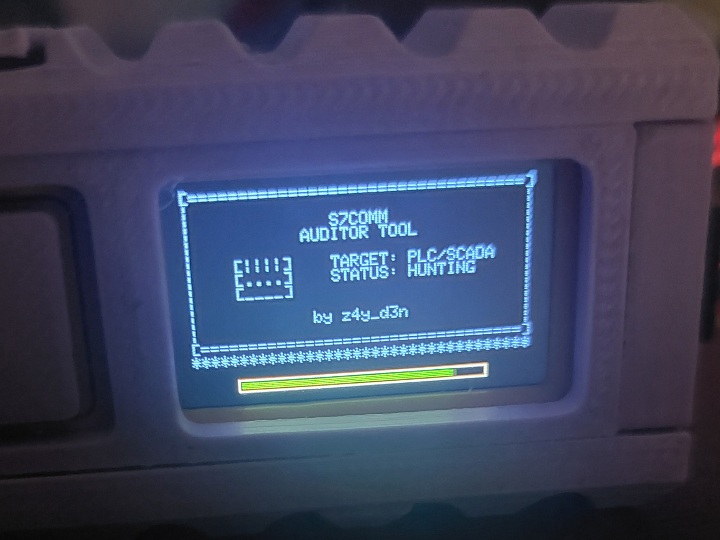
S7comm Auditor Tool은 M5StickC Plus2와 WIZnet W5500을 결합한 휴대형 OT·ICS (Operational Technology, Industrial Control System) 보안 감사 도구입니다.

이미지 출처 : https://github.com/z4y-d3n/s7comm-auditor-tool
주요 목적은 산업용 네트워크에서 Siemens S7 PLC를 찾고, 해당 장비가 실제로 S7 통신에 응답하는지 확인하는 것입니다.

이미지 출처 : https://www.siemens.com/ko-kr/products/simatic/s7-1200-g2/
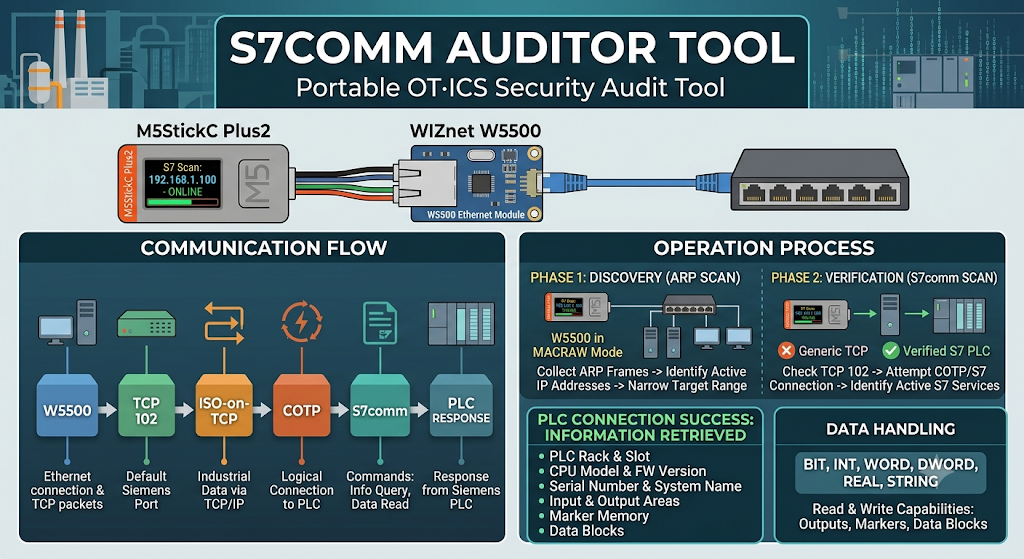
통신은 다음 순서로 진행됩니다.
W5500 → TCP 102 → ISO-on-TCP → COTP → S7comm → PLC 응답
각 단계의 역할은 다음과 같습니다.
- W5500: Ethernet 연결과 TCP 패킷 송수신을 처리합니다.
- ISO-on-TCP: 산업용 통신 데이터를 일반 TCP/IP 네트워크로 전달합니다.
- COTP: PLC와 통신하기 위한 논리적 연결을 설정합니다.
- S7comm: PLC 정보 조회와 데이터 읽기 같은 실제 명령을 전달합니다.
프로젝트는 먼저 W5500의 MACRAW 모드로 ARP 프레임을 수신합니다. 이를 통해 네트워크에서 사용 중인 IP 주소를 확인하고, 점검할 대상 범위를 좁힙니다.
그다음 각 IP 주소의 TCP 102 포트를 확인하고, 실제 COTP 및 S7 연결을 시도합니다. 이 과정을 통해 단순히 포트만 열린 장비와 실제 S7 서비스를 제공하는 장비를 구분할 수 있습니다.
PLC 연결에 성공하면 다음 정보를 확인할 수 있습니다.
- PLC 랙과 슬롯 위치
- CPU 모델과 펌웨어 버전
- 시리얼 번호와 시스템 이름
- 입력 및 출력 영역
- 마커 메모리
- 데이터 블록
- BIT, INT, WORD, DWORD, REAL, STRING 형식의 데이터
프로젝트에는 데이터 읽기뿐 아니라 출력, 마커, 데이터 블록을 변경하는 기능도 포함되어 있습니다.
따라서 반드시 승인을 받은 시험 환경이나 격리된 테스트베드에서 사용해야 합니다. 운영 중인 설비에서 쓰기 기능을 실행하면 공정 상태가 바뀌거나 장비가 중단될 수 있습니다.
이미지 출처 : AI 생성
S7comm, ISO-on-TCP, COTP란 무엇인가요?
처음 접하면 세 용어가 비슷해 보일 수 있습니다. 하지만 각각 담당하는 역할이 다릅니다.
쉽게 정리하면 다음과 같습니다.
S7comm
└─ PLC에 전달하는 실제 명령

COTP
└─ PLC와 통신 연결을 설정하는 절차

ISO-on-TCP
└─ 산업용 통신을 TCP/IP로 전달하는 방식

TCP 102
└─ 네트워크 연결과 데이터 전송

W5500
└─ Ethernet과 TCP 소켓 처리
S7comm
S7comm은 Siemens S7 PLC와 통신할 때 사용하는 명령 체계입니다.
PLC에 어떤 작업을 요청할지 정하는 역할을 합니다.
예를 들면 다음과 같은 작업이 S7comm으로 전달됩니다.
- CPU 정보 조회
- PLC 상태 확인
- 입력과 출력 데이터 읽기
- 마커 영역 읽기
- 데이터 블록 읽기
- 데이터 쓰기
S7comm 자체가 Ethernet 연결을 처리하는 것은 아닙니다. 아래 계층인 COTP와 TCP를 이용해 PLC에 명령을 전달합니다.
ISO-on-TCP
ISO-on-TCP는 산업용 ISO 통신을 TCP/IP 네트워크에서 사용할 수 있도록 만든 방식입니다.
기존 산업용 통신 구조를 일반적인 Ethernet과 TCP 네트워크 위에서 전달할 수 있도록 연결해 줍니다.
Siemens S7 통신에서는 일반적으로 TCP 102 포트를 사용합니다.
다만 TCP 102 포트가 열려 있다고 해서 반드시 Siemens PLC인 것은 아닙니다. 실제 COTP 연결과 S7comm 응답까지 확인해야 정확하게 판단할 수 있습니다.
COTP
COTP는 PLC와 논리적인 통신 연결을 설정하는 프로토콜입니다.
TCP 연결이 성공했다고 해서 바로 S7comm 명령을 보내는 것은 아닙니다. 먼저 COTP 연결 요청을 보내고, 상대 장비가 통신을 받아들이는지 확인해야 합니다.
COTP는 다음 작업을 담당합니다.
- 통신 상대 확인
- 연결 요청과 승인
- TSAP 값 전달
- S7comm 데이터 전달
TSAP
TSAP는 COTP 연결에서 통신 대상의 논리적인 접속 지점을 나타내는 값입니다.
Siemens PLC에서는 랙과 슬롯 정보가 TSAP 구성에 반영될 수 있습니다. 따라서 같은 IP 주소라도 TSAP 값에 따라 연결 성공 여부가 달라질 수 있습니다.
WIZnet W5500의 역할
이 프로젝트에서 W5500은 단순한 Ethernet 어댑터가 아닙니다.
다음 세 가지 역할을 담당합니다.
1. PLC와 TCP 102 통신
W5500은 PLC의 TCP 102 포트로 연결하고, COTP와 S7comm 패킷을 송수신합니다.
W5500 내부에는 TCP/IP 처리 기능과 하드웨어 소켓이 포함되어 있습니다. 따라서 ESP32는 네트워크 연결보다 다음 작업에 집중할 수 있습니다.
- S7comm 응답 분석
- PLC 정보 표시
- 사용자 입력 처리
- 스캔 결과 관리
2. MACRAW를 이용한 네트워크 탐색
프로젝트는 W5500의 Socket 0을 MACRAW 모드로 설정합니다.
MACRAW 모드에서는 일반적인 TCP 데이터가 아니라 Ethernet 프레임을 직접 읽을 수 있습니다.
이 프로젝트에서는 ARP 프레임을 관찰해 네트워크에서 사용 중인 IP 주소를 확인합니다. 이를 통해 무작정 전체 주소를 스캔하기 전에 실제 사용 중인 대상을 추정할 수 있습니다.
3. 하드웨어 소켓 직접 제어
펌웨어는 W5500의 소켓 기능을 직접 제어합니다.
주요 제어 항목은 다음과 같습니다.
- 소켓 모드 설정
- 목적지 IP 지정
- 목적지 포트 지정
- TCP 연결 시작
- 수신 데이터 확인
- 소켓 종료
- 인터럽트 상태 초기화
이 구조를 이용하면 하나의 W5500에서 네트워크 탐색, TCP 포트 확인, S7 세션 연결을 순서대로 처리할 수 있습니다.
M5StickC Plus2의 내장 Wi-Fi로도 기본적인 S7comm 연결은 가능합니다. 그러나 W5500의 MACRAW 모드와 하드웨어 소켓 레지스터 제어는 Wi-Fi 방식과 구조가 다릅니다.
구현 핵심
W5500 SPI 연결
파일: s7comm_auditor_tool.ino
const uint16_t S7_PORT = 102;

#define W5500_SCLK 0
#define W5500_MISO 36
#define W5500_MOSI 26
#define W5500_CS   32

WiFiClient wClient;
EthernetClient eClient;
Client* netClient = &wClient;

bool useEthernet = false;
S7Client s7client;
이 코드는 S7 통신에 사용할 TCP 102 포트와 W5500의 SPI 핀을 설정합니다.
W5500과 M5StickC Plus2는 다음과 같이 연결됩니다.
| W5500 신호 | M5StickC Plus2 |
|---|---|
| SCLK | GPIO 0 |
| MOSI | GPIO 26 |
| MISO | GPIO 36 |
| CS | GPIO 32 |
| 전원 | 5V |
| 접지 | GND |
코드에는 WiFiClient와 EthernetClient가 모두 선언되어 있습니다.
이를 통해 같은 S7comm 처리 코드에서 Wi-Fi와 W5500 Ethernet을 선택적으로 사용할 수 있습니다.
Settimino 네트워크 클라이언트 연결
파일: patched_dependencies/Settimino.h
void setClient(Client* client) {
    TCPClient = client;
}
저장소에는 수정된 Settimino 라이브러리가 포함되어 있습니다.
setClient() 함수는 외부에서 생성한 WiFiClient 또는 EthernetClient를 S7 클라이언트에 연결합니다.
이 구조를 사용하면 S7comm 처리 코드를 변경하지 않고 네트워크 인터페이스만 전환할 수 있습니다.
프로젝트를 빌드할 때는 일반 Settimino 라이브러리 대신 저장소에 포함된 패치 버전을 사용해야 합니다.
실제 S7 서비스 확인
파일: s7comm_auditor_tool.ino
함수: verifyS7Service()
if (s7client.ConnectTo(ip, 0, 2) == 0) {
    s7client.Disconnect();
    return true;
}

if (s7client.ConnectTo(ip, 0, 1) == 0) {
    s7client.Disconnect();
    return true;
}

s7client.SetConnectionParams(ip, 0x0100, 0x0100);

if (s7client.Connect() == 0) {
    s7client.Disconnect();
    return true;
}
이 함수는 여러 연결 조건으로 S7 세션을 확인합니다.
먼저 다음 순서로 연결을 시도합니다.
- 랙 0, 슬롯 2
- 랙 0, 슬롯 1
- TSAP 값을 직접 지정한 연결
TCP 102 포트가 열려 있다는 사실만으로는 해당 장비를 S7 PLC라고 판단할 수 없습니다.
COTP 연결과 S7 세션 설정까지 성공해야 실제 S7 서비스를 제공하는 장비로 볼 수 있습니다.
장치 모델이나 펌웨어 버전은 연결 성공만으로 확인되지 않습니다. 이후 SZL 요청을 보내고 PLC가 반환한 정보를 분석해야 합니다.
SZL
SZL은 System Status List의 약자입니다.
PLC가 보유한 시스템 정보를 조회할 때 사용합니다.
SZL을 통해 다음과 같은 정보를 확인할 수 있습니다.
- CPU 모델
- 펌웨어 버전
- 시리얼 번호
- 시스템 이름
- 장치 구성 정보
즉, S7 연결이 장비와 대화할 수 있는지 확인하는 과정이라면, SZL은 연결된 장비가 무엇인지 확인하는 과정입니다.
유사 프로젝트
STM32H750 + W5500 PLC TCP Server
유사점
| 항목 | 공통점 |
|---|---|
| 기능 분리 | 통신 처리와 응용 기능 분리 |
| 데이터 활용 | 수신 데이터를 산업 기능에 반영 |
| 연결 관리 | 소켓 상태와 재연결 관리 |
| 적용 환경 | PLC·HMI·SCADA 연동 |
| 오동작 영향 | 설비 상태에 영향 가능 |
차이점
| 항목 | S7comm Auditor Tool | STM32H750 PLC TCP Server |
| 장치 역할 | 보안 감사 클라이언트 | 산업용 TCP 서버 |
| 통신 목적 | PLC 정보 수집 | 원격 출력 제어 |
| 프로토콜 | S7comm·COTP | 사용자 정의 TCP |
| 대상 탐색 | ARP·포트·랙·슬롯 탐색 | 고정 IP 접속 대기 |
| 처리 결과 | 장치 정보와 메모리 분석 | LED·DAC 출력 |
| 정상 기준 | S7 세션과 정보 조회 성공 | 명령에 따른 출력 동작 |
| 주요 위험 | PLC 상태 변경 | 출력값 오동작 |
| 설치 형태 | 휴대형 점검 도구 | 고정형 제어 장치 |
실무 팁과 주의사항
처음에는 읽기 기능만 사용하십시오. 포트 확인, 연결 검사, 장치 정보 조회 순서로 점검하는 것이 안전합니다.
쓰기 기능은 별도 빌드로 분리하십시오. 실수로 출력이나 데이터 블록이 변경되는 상황을 줄일 수 있습니다.
SPI 배선은 짧게 구성하십시오. 배선이 길거나 접지가 불안정하면 간헐적인 통신 오류가 발생할 수 있습니다.
Ethernet 링크부터 확인하십시오. S7comm 점검 전에 링크 상태, IP 주소, 서브넷 마스크를 검증해야 합니다.
MACRAW 사용 후 Socket 0을 닫으십시오. 남아 있는 소켓 상태가 이후 TCP 연결에 영향을 줄 수 있습니다.
소켓 사용량을 관리하십시오. 네트워크 탐색과 S7 연결이 동시에 여러 소켓을 사용할 수 있습니다.
보안 장비 로그도 함께 확인하십시오. TCP 102 연결과 반복적인 S7 요청이 IDS·IPS에서 어떻게 기록되는지 확인하는 것이 좋습니다.
FAQ
Q: S7comm과 TCP는 같은 프로토콜인가요?
A: 아닙니다. TCP는 데이터를 전달하고, S7comm은 PLC에 어떤 작업을 요청할지 정의합니다. S7comm은 COTP와 ISO-on-TCP를 거쳐 TCP 102 위에서 전달됩니다.
Q: S7comm 보안 감사에 W5500을 사용하는 이유는 무엇인가요?
A: W5500은 TCP/IP와 소켓 처리를 하드웨어에서 수행합니다. 또한 MACRAW 모드를 지원하므로 TCP 통신과 ARP 기반 네트워크 관찰을 함께 처리할 수 있습니다.
Q: W5500은 M5StickC Plus2에 어떻게 연결하나요?
A: SPI 인터페이스로 연결합니다. 저장소 기준으로 SCLK는 GPIO 0, MOSI는 GPIO 26, MISO는 GPIO 36, CS는 GPIO 32를 사용합니다.
Q: W5500은 이 프로젝트에서 어떤 역할을 하나요?
A: PLC와 TCP 102로 연결하고, COTP와 S7comm 패킷을 전송합니다. 또한 MACRAW 모드로 ARP 프레임을 수신해 네트워크 탐색을 지원합니다.
Q: 초보자도 따라 할 수 있나요?
A: 기본 Arduino 프로젝트보다 난도가 높습니다. 먼저 IP 주소와 TCP 포트를 이해한 뒤 ISO-on-TCP, COTP, TSAP, S7comm 순서로 학습하는 것이 좋습니다. 실제 설비가 아닌 격리된 실습 환경에서 시작해야 합니다.
Project Overview
S7comm Auditor Tool is a portable OT/ICS security auditing device built with the M5StickC Plus2 and WIZnet W5500.
Image Source : https://github.com/z4y-d3n/s7comm-auditor-tool
Its main purpose is to discover Siemens S7 PLCs on an industrial network and verify whether each device responds to actual S7 communication.
Image Source : https://www.siemens.com/ko-kr/products/simatic/s7-1200-g2/
The communication flow is as follows:
W5500 → TCP Port 102 → ISO-on-TCP → COTP → S7comm → PLC Response
Each layer has a different role:
- W5500: Handles the Ethernet connection and TCP packet transmission.
- ISO-on-TCP: Carries industrial ISO communication over a standard TCP/IP network.
- COTP: Establishes a logical communication session with the PLC.
- S7comm: Delivers application commands such as device information queries and data reads.
The project first configures the W5500 in MACRAW mode to receive ARP frames. This allows it to identify active IP addresses on the network and narrow the range of devices that require further inspection.
It then checks TCP port 102 on each IP address and attempts to establish COTP and S7 sessions. This process distinguishes devices that merely have port 102 open from devices that provide an actual S7 service.
After a successful PLC connection, the tool can inspect the following information:
- PLC rack and slot
- CPU model and firmware version
- Serial number and system name
- Input and output areas
- Marker memory
- Data blocks
- BIT, INT, WORD, DWORD, REAL, and STRING values
The project supports not only data reading but also changes to outputs, marker memory, and data blocks.
It must therefore be used only in an authorized test environment or an isolated testbed. Running write operations on an active production system may alter the process state or interrupt equipment operation.
Image source: AI-generated
What Are S7comm, ISO-on-TCP, and COTP?
These terms may appear similar at first, but each belongs to a different part of the communication process.
Their relationship can be summarized as follows:
S7comm
└─ Carries the actual commands sent to the PLC

COTP
└─ Establishes the communication session with the PLC

ISO-on-TCP
└─ Carries industrial ISO communication over TCP/IP

TCP Port 102
└─ Provides the network connection and data transport

W5500
└─ Handles Ethernet communication and TCP sockets
S7comm
S7comm is the command protocol used to communicate with Siemens S7 PLCs.
It defines which operation should be requested from the PLC.
- Typical S7comm operations include:
- Querying CPU information
- Checking PLC status
- Reading input and output data
- Reading marker memory
- Reading data blocks
- Writing data
S7comm does not handle the Ethernet connection itself. It relies on lower communication layers, including COTP and TCP, to deliver commands to the PLC.
ISO-on-TCP
ISO-on-TCP allows ISO-based industrial communication to operate over a standard TCP/IP network.
It carries an established industrial communication structure over conventional Ethernet and TCP networking.
Siemens S7 communication generally uses TCP port 102.
However, an open TCP port 102 does not necessarily mean that the target is a Siemens PLC. A successful COTP connection and a valid S7comm response are also required for accurate identification.
COTP
COTP is the protocol used to establish a logical communication session with the PLC.
A successful TCP connection does not mean that S7comm commands can be sent immediately. The client must first send a COTP connection request and confirm that the target accepts the session.
COTP is responsible for:
- Identifying the communication endpoint
- Requesting and accepting a connection
- Carrying TSAP values
- Transporting S7comm data
TSAP
TSAP identifies a logical communication endpoint within a COTP session.
For Siemens PLCs, the rack and slot configuration may be reflected in the TSAP value. As a result, connection success can vary depending on the TSAP even when the target IP address remains the same.
Role of the WIZnet W5500
The W5500 is more than a basic Ethernet adapter in this project.
It performs three main functions.
1. TCP Port 102 Communication with the PLC
The W5500 connects to TCP port 102 on the PLC and transmits COTP and S7comm packets.
Because the W5500 includes hardware TCP/IP processing and socket support, the ESP32 can focus on higher-level tasks such as:
Analyzing S7comm responses
Displaying PLC information
Processing user input
Managing scan results
2. Network Discovery with MACRAW
The project configures Socket 0 of the W5500 in MACRAW mode.
In MACRAW mode, the firmware can read raw Ethernet frames instead of receiving only standard TCP data.
The tool monitors ARP frames to identify IP addresses that are active on the network. This helps estimate which targets are in use before performing a wider address scan.
3. Direct Hardware Socket Control
The firmware directly controls the socket functions of the W5500.
The main operations include:
- Setting the socket mode
- Assigning a destination IP address
- Assigning a destination port
- Starting a TCP connection
- Checking received data
- Closing a socket
- Clearing interrupt states
This structure allows a single W5500 to perform network discovery, TCP port verification, and S7 session establishment in sequence.
Basic S7comm communication is also possible through the built-in Wi-Fi interface of the M5StickC Plus2. However, the W5500 MACRAW mode and direct socket-register control use a different architecture from Wi-Fi networking.
Implementation Details
W5500 SPI Connection
File: s7comm_auditor_tool.ino
const uint16_t S7_PORT = 102;

#define W5500_SCLK 0
#define W5500_MISO 36
#define W5500_MOSI 26
#define W5500_CS   32

WiFiClient wClient;
EthernetClient eClient;
Client* netClient = &wClient;

bool useEthernet = false;
S7Client s7client;
This code defines TCP port 102 for S7 communication and assigns the SPI pins used by the W5500.
The W5500 and M5StickC Plus2 are connected as follows:
| W5500 Signal | M5StickC Plus2 |
|---|---|
| SCLK | GPIO 0 |
| MOSI | GPIO 26 |
| MISO | GPIO 36 |
| CS | GPIO 32 |
| Power | 5V |
| Ground | GND |
Both WiFiClient and EthernetClient are declared in the code.
This allows the same S7comm logic to operate through either Wi-Fi or W5500 Ethernet.
Settimino Network Client Integration
File: patched_dependencies/Settimino.h
void setClient(Client* client) {
    TCPClient = client;
}
The repository includes a modified version of the Settimino library.
The setClient() function connects an externally created WiFiClient or EthernetClient object to the S7 client.
This design allows the network interface to be changed without rewriting the S7comm processing logic.
The patched version included in the repository must be used instead of the standard Settimino library when building the project.
Verifying an Actual S7 Service
File: s7comm_auditor_tool.ino
Function: verifyS7Service()
if (s7client.ConnectTo(ip, 0, 2) == 0) {
    s7client.Disconnect();
    return true;
}

if (s7client.ConnectTo(ip, 0, 1) == 0) {
    s7client.Disconnect();
    return true;
}

s7client.SetConnectionParams(ip, 0x0100, 0x0100);

if (s7client.Connect() == 0) {
    s7client.Disconnect();
    return true;
}
This function tests an S7 session using several connection configurations.
The connection attempts are made in the following order:
- Rack 0, slot 2
- Rack 0, slot 1
A connection with an explicitly configured TSAP
An open TCP port 102 alone is not enough to identify the target as an S7 PLC.
The COTP connection and S7 session setup must also succeed before the device can be treated as an active S7 service.
The device model and firmware version cannot be determined from a successful connection alone. The tool must subsequently send an SZL request and analyze the information returned by the PLC.
SZL
SZL stands for System Status List.
It is used to query system information stored by the PLC.
An SZL request can return information such as:
- CPU model
- Firmware version
- Serial number
- System name
- Device configuration
In simple terms, an S7 connection confirms that communication with the device is possible, while an SZL request helps identify what the connected device actually is.
Similar Project
STM32H750 + W5500 PLC TCP Server
Similarities
| Category | Shared Characteristic |
|---|---|
| Functional separation | Communication and application logic separated |
| Data processing | Network data applied to industrial functions |
| Connection management | Socket state and reconnection management |
| Target environment | PLC, HMI, and SCADA integration |
| Operational impact | Incorrect behavior may affect equipment state |
Differences
| Category | S7comm Auditor Tool | STM32H750 PLC TCP Server |
|---|---|---|
| Device role | Security audit client | Industrial TCP server |
| Communication purpose | PLC information collection | Remote output control |
| Protocol | S7comm and COTP | Custom TCP protocol |
| Target discovery | ARP, port, rack, and slot discovery | Fixed-IP connection waiting |
| Processing result | Device and memory analysis | LED and DAC output |
| Success condition | S7 session and information query | Output matches received command |
| Main risk | PLC state modification | Incorrect output values |
| Installation type | Portable audit tool | Fixed control device |
Practical Tips and Precautions
Begin with read-only functions. Start with port checks, connection verification, and device information queries.
Separate write functions into a different build. This reduces the risk of accidentally changing outputs or data blocks.
Keep SPI wiring short. Long wires or unstable grounding may cause intermittent communication failures.
Verify the Ethernet link first. Check the link status, IP address, and subnet mask before troubleshooting S7comm.
Close Socket 0 after MACRAW use. A remaining socket state may interfere with later TCP connections.
Manage socket usage carefully. Network discovery and S7 communication may occupy multiple sockets.
Review security-device logs. Check how repeated TCP port 102 connections and S7 requests appear in IDS and IPS logs.
FAQ
Q: Are S7comm and TCP the same protocol?
A: No. TCP transports data, while S7comm defines which operation is requested from the PLC. S7comm is carried over TCP port 102 through ISO-on-TCP and COTP.
Q: Why is the W5500 used for S7comm security auditing?
A: The W5500 handles TCP/IP and socket processing in hardware. Its MACRAW mode also supports both TCP communication and ARP-based network observation.
Q: How is the W5500 connected to the M5StickC Plus2?
A: It uses an SPI interface. In this repository, SCLK is connected to GPIO 0, MOSI to GPIO 26, MISO to GPIO 36, and CS to GPIO 32.
Q: What role does the W5500 play in this project?
A: It connects to the PLC through TCP port 102 and transports COTP and S7comm packets. It also receives ARP frames in MACRAW mode to support network discovery.
Q: Can beginners follow this project?
A: This project is more advanced than a basic Arduino example. It is helpful to understand IP addressing and TCP ports first, followed by ISO-on-TCP, COTP, TSAP, and S7comm. Testing should begin in an isolated lab environment rather than on active production equipment.
-
Github Code


