


esphome-tailscale
esphome-tailscale

Espressif - ESP32
x 1


WIZnet - W5500
x 1
What the Project Does
이 프로젝트는 ESPHome용 외부 컴포넌트입니다. ESP32 장치를 Tailscale 노드로 등록해 Home Assistant가 Tailnet 주소로 직접 접근할 수 있게 합니다.
기존 원격 ESPHome 구성에서는 현장에 Raspberry Pi, VPN 라우터, NAS, 서브넷 라우터 같은 중간 장비가 필요한 경우가 많습니다. 이 프로젝트는 그 의존성을 줄입니다. ESP32 자체가 Tailnet에 참여하므로 운영자는 현장 LAN에 직접 들어가지 않아도 장치 상태 확인, OTA 업데이트, 재부팅, API 통신을 수행할 수 있습니다.
Industrial IoT 환경에서는 외부 창고, 설비실, 분전반, 시험 장비, 원격 계측 지점처럼 사람이 자주 접근하기 어려운 장소에 적합합니다. 장치별 접근 제어와 원격 유지보수를 Tailnet 중심으로 관리할 수 있기 때문입니다.
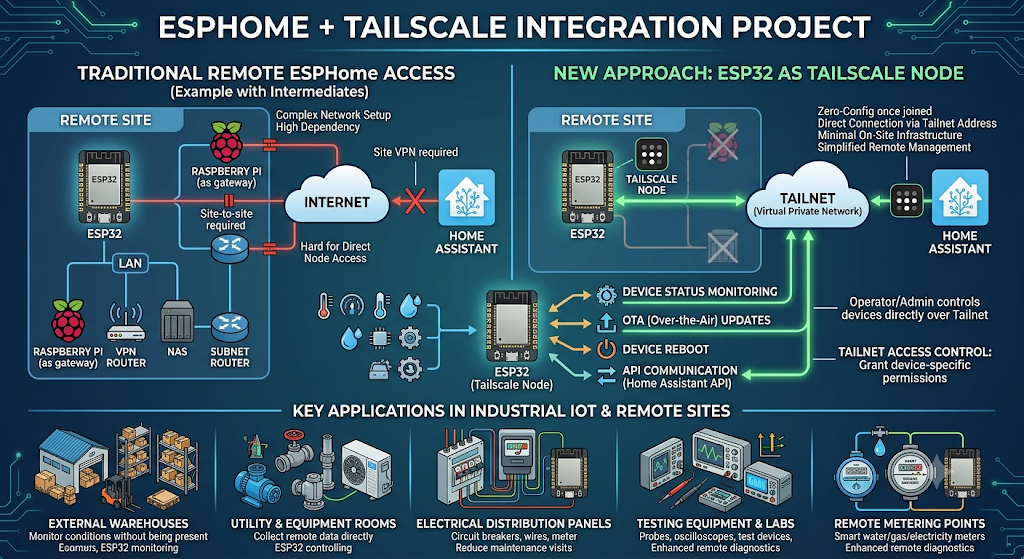
이미지 출처 : AI 생성

이미지 출처 : https://github.com/Csontikka/esphome-tailscale
Where WIZnet Fits
원본 프로젝트는 Wi-Fi뿐 아니라 Ethernet 구성도 지원합니다. 예시 YAML에는 W5500 기반 Ethernet 설정이 포함되어 있습니다. Tailscale 컴포넌트는 Wi-Fi 전용이 아니라 네트워크 연결 자체를 요구하며, wifi: 또는 ethernet: 블록이 없으면 동작하지 않도록 설계되어 있습니다.
W5500은 Tailscale 암호화를 처리하는 부품이 아닙니다. 보안 터널은 ESP32-S3에서 동작하는 Tailscale/WireGuard 계층이 담당합니다. W5500의 역할은 ESP32-S3가 네트워크에 안정적으로 연결되도록 유선 Ethernet 인터페이스를 제공하는 것입니다.
W5500은 SPI 기반 Ethernet 컨트롤러이며, 하드웨어 TCP/IP 스택, 내부 버퍼, 다중 소켓 구조를 제공합니다. 이 특성은 MCU 기반 장치에서 네트워크 연결을 단순하고 예측 가능한 방식으로 구성하는 데 유리합니다.
Implementation Notes
원본 저장소의 example.yaml에는 W5500 Ethernet 설정 예시가 포함되어 있습니다.
# example.yaml

ethernet:
  type: W5500
  clk_pin: GPIO13
  mosi_pin: GPIO11
  miso_pin: GPIO12
  cs_pin: GPIO14
  interrupt_pin: GPIO10
  reset_pin: GPIO9
  # use_address: "100.x.x.x"
이 설정은 ESP32-S3와 W5500을 SPI로 연결하는 구성을 나타냅니다. use_address는 첫 연결 후 확인한 Tailnet IP를 고정할 때 사용합니다. Ethernet 보드에서는 이 값을 wifi:가 아니라 ethernet: 아래에 두는 것이 핵심입니다.
Tailscale 컴포넌트는 네트워크 인터페이스가 없으면 동작하지 않도록 검증합니다.
# components/tailscale/__init__.py

def _validate_network(config):
    """Validate that either wifi or ethernet is configured."""
이 구조에서 W5500용 별도 Tailscale 구현이 필요한 것은 아닙니다. ESPHome Ethernet 인터페이스가 먼저 올라오고, 그 위에서 Tailscale 연결이 시작됩니다.
Related UCC Comparison: ESP-NOW Gateway for Home Assistant over W5500 Ethernet
유사점
두 프로젝트 모두 W5500을 사용해 Home Assistant와 연결되는 네트워크 경로를 유선화합니다. Wi-Fi 환경이 불안정한 산업 현장에서 Ethernet을 사용해 연결 상태를 더 예측 가능하게 만드는 점이 같습니다.
또한 두 프로젝트 모두 Home Assistant를 중심으로 장치 상태를 확인하고 제어합니다. ESP-NOW Gateway는 여러 하위 노드의 데이터를 게이트웨이가 모아 전달하고, esphome-tailscale은 ESPHome 장치가 직접 Home Assistant와 통신합니다.
차이점
ESP-NOW Gateway 프로젝트는 중앙 게이트웨이 구조입니다. 여러 ESP-NOW 노드는 짧은 제어 메시지만 주고받고, MQTT 연동, Home Assistant 통신, W5500 Ethernet 연결은 게이트웨이가 담당합니다. 여러 로컬 노드를 한 지점에서 묶어야 할 때 적합합니다.
esphome-tailscale은 각 ESP32-S3 장치가 Tailnet에 직접 참여하는 구조입니다. 별도 게이트웨이가 모든 노드를 대신하지 않고, 각 장치가 자신의 Tailnet 주소로 Home Assistant와 연결됩니다. 장치별 원격 OTA, 접근 제어, 상태 모니터링이 중요한 환경에 적합합니다.
VPN과 Router 관점에서도 차이가 있습니다. ESP-NOW Gateway 방식은 외부 접속을 위해 별도 VPN Router나 상위 네트워크 설정이 필요할 수 있습니다. 반면 esphome-tailscale은 ESP32 자체가 Tailscale 노드가 되므로 외부 VPN Router 의존성을 줄일 수 있습니다.
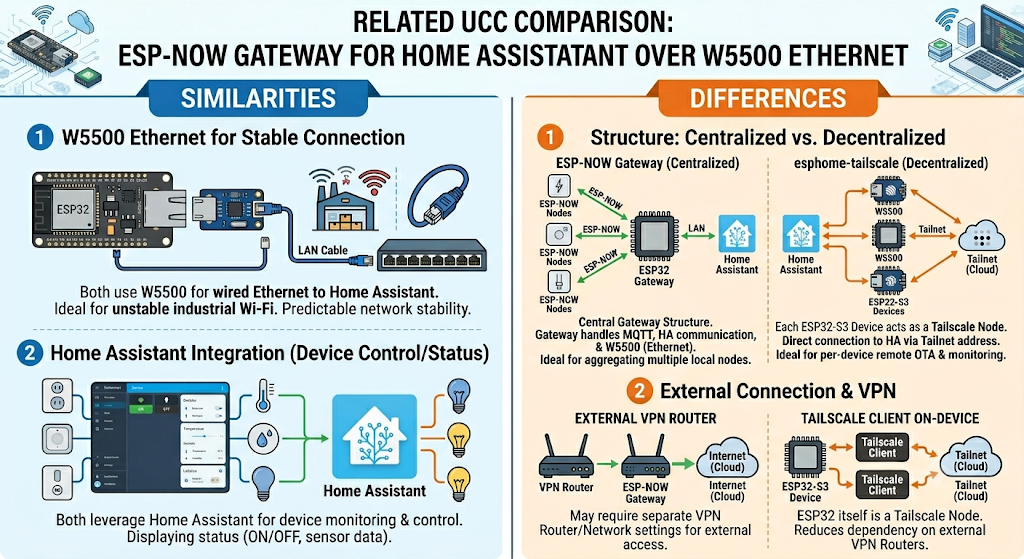
이미지 출처 : AI 생성
Practical Tips / Pitfalls
- 첫 플래시는 USB로 진행하고, Tailnet IP가 확인된 뒤
use_address를 고정합니다. - W5500 핀 설정은 예시를 그대로 복사하지 말고 실제 보드 회로에 맞춰 조정합니다.
- 장치에는 PSRAM이 필요합니다. Tailscale 제어 평면과 WireGuard 버퍼가 메모리를 사용하기 때문입니다.
- 장기 운영 노드는 Node Key 만료 정책을 확인해야 합니다.
- Home Assistant에서 연결 경로가 Direct인지 Relay인지 확인하면 네트워크 상태를 판단하기 쉽습니다.
- 공장망에서 UDP가 제한되면 직접 연결이 실패하고 릴레이 경로로 동작할 수 있습니다.
- 여러 로컬 노드를 하나로 묶는 구조가 필요하다면 ESP-NOW Gateway 방식이 더 적합할 수 있습니다.
FAQ
Q: 왜 이 프로젝트를 사용해야 하나요?
A: ESPHome 장치를 Tailnet에 직접 연결할 수 있기 때문입니다. 별도 VPN 게이트웨이, 서브넷 라우터, 포트 포워딩 없이 장치 단위로 접근·업데이트·모니터링할 수 있습니다.
Q: 왜 W5500을 함께 사용하나요?
A: W5500은 ESP32-S3에 유선 Ethernet 링크를 제공합니다. Tailscale 보안 구조는 유지하면서, 현장 접속부를 Wi-Fi보다 안정적인 유선 링크로 바꿀 수 있습니다.
Q: ESP32-S3와 W5500은 어떻게 연결하나요?
A: SPI로 연결합니다. ESPHome에서는 ethernet: 블록에 type: W5500을 지정하고 CLK, MOSI, MISO, CS, interrupt, reset 핀을 설정합니다.
Q: ESP-NOW Gateway 방식과 무엇이 다른가요?
A: ESP-NOW Gateway는 여러 하위 노드를 하나의 게이트웨이가 대표하는 구조입니다. esphome-tailscale은 각 ESP32 장치가 Tailnet에 직접 들어가는 구조입니다. 전자는 로컬 노드 집합 관리에 유리하고, 후자는 원격 장치 단위의 보안 운영에 유리합니다.
Q: Wi-Fi 구성과 비교하면 어떤 차이가 있나요?
A: Wi-Fi는 설치가 쉽지만 전파 환경과 AP 상태에 영향을 받습니다. W5500 Ethernet은 배선이 필요하지만 링크 상태가 더 예측 가능해 무인 설비나 장기 운영 노드에 적합합니다.
What the Project Does
This project is an external component for ESPHome. It registers an ESP32 device as a Tailscale node, allowing Home Assistant to access it directly through its Tailnet address.
In a typical remote ESPHome setup, additional on-site equipment is often required, such as a Raspberry Pi, VPN router, NAS, or subnet router. This project reduces that dependency. Since the ESP32 itself joins the Tailnet, operators can check device status, perform OTA updates, reboot the device, and use API communication without directly entering the local site network.
In Industrial IoT environments, this is useful for locations that are difficult to access frequently, such as remote warehouses, equipment rooms, electrical panels, test equipment, and remote measurement points. Device-level access control and remote maintenance can be managed around the Tailnet model.
Image source: AI-generated
Image source: https://github.com/Csontikka/esphome-tailscale
Where WIZnet Fits
The original project supports not only Wi-Fi but also Ethernet configurations. The example YAML includes a W5500-based Ethernet setup. The Tailscale component is not Wi-Fi-specific; it requires a network connection itself and is designed not to operate unless either a wifi: or ethernet: block is configured.
The W5500 does not handle Tailscale encryption. The secure tunnel is handled by the Tailscale/WireGuard layer running on the ESP32-S3. The role of the W5500 is to provide a wired Ethernet interface so the ESP32-S3 can connect to the network reliably.
The W5500 is an SPI-based Ethernet controller that provides a hardware TCP/IP stack, internal buffers, and multiple socket support. These characteristics make it useful for building a simpler and more predictable network connection on MCU-based devices.
Implementation Notes
The original repository’s example.yaml includes a W5500 Ethernet configuration example.
# example.yaml

ethernet:
  type: W5500
  clk_pin: GPIO13
  mosi_pin: GPIO11
  miso_pin: GPIO12
  cs_pin: GPIO14
  interrupt_pin: GPIO10
  reset_pin: GPIO9
  # use_address: "100.x.x.x"
This configuration shows an SPI connection between the ESP32-S3 and the W5500. use_address is used to fix the Tailnet IP address after the first successful connection. For Ethernet boards, the key point is to place this value under ethernet:, not under wifi:.
The Tailscale component validates that a network interface exists before it runs.
# components/tailscale/__init__.py

def _validate_network(config):
    """Validate that either wifi or ethernet is configured."""
With this structure, a separate Tailscale implementation for the W5500 is not required. The ESPHome Ethernet interface comes up first, and the Tailscale connection starts on top of it.
Related UCC Comparison: ESP-NOW Gateway for Home Assistant over W5500 Ethernet
Similarities
Both projects use the W5500 to provide a wired network path to Home Assistant. In industrial environments where Wi-Fi can be unstable, both approaches make the connection more predictable by using Ethernet.
Both projects also use Home Assistant as the central system for monitoring and controlling device status. The ESP-NOW Gateway collects data from multiple downstream nodes and forwards it through the gateway, while esphome-tailscale allows the ESPHome device to communicate directly with Home Assistant.
Differences
The ESP-NOW Gateway project uses a centralized gateway architecture. Multiple ESP-NOW nodes exchange short control messages, while the gateway handles MQTT integration, Home Assistant communication, and the W5500 Ethernet connection. This approach is suitable when multiple local nodes need to be grouped at a single point.
esphome-tailscale uses a structure where each ESP32-S3 device joins the Tailnet directly. A separate gateway does not represent all nodes. Each device connects to Home Assistant using its own Tailnet address. This approach is better suited for environments where per-device remote OTA updates, access control, and status monitoring are important.
There is also a difference from the VPN and router perspective. The ESP-NOW Gateway approach may require a separate VPN router or upper-level network configuration for external access. In contrast, esphome-tailscale reduces dependency on an external VPN router because the ESP32 itself becomes a Tailscale node.
Image source : AI-Generated
Practical Tips / Pitfalls
- Perform the first flash over USB, then fix
use_addressafter confirming the Tailnet IP. - Adjust the W5500 pin settings to match the actual board circuit instead of copying the example directly.
- The device requires PSRAM because the Tailscale control plane and WireGuard buffers use memory.
- Long-term nodes should be checked for Node Key expiration policy.
- Checking whether the Home Assistant connection path is Direct or Relay makes it easier to understand network status.
- If UDP is restricted in a factory network, direct connection may fail and the device may operate through a relay path.
- If multiple local nodes need to be grouped into one structure, the ESP-NOW Gateway approach may be more suitable.
FAQ
Q: Why should this project be used?
A: Because it allows ESPHome devices to connect directly to a Tailnet. Each device can be accessed, updated, and monitored without a separate VPN gateway, subnet router, or port forwarding.
Q: Why use the W5500 together with this project?
A: The W5500 provides a wired Ethernet link for the ESP32-S3. It keeps the Tailscale security model while replacing the on-site network connection with a more stable wired link than Wi-Fi.
Q: How does the ESP32-S3 connect to the W5500?
A: It connects over SPI. In ESPHome, set type: W5500 under the ethernet: block and configure the CLK, MOSI, MISO, CS, interrupt, and reset pins.
Q: How is this different from the ESP-NOW Gateway approach?
A: The ESP-NOW Gateway represents multiple downstream nodes through a single gateway. esphome-tailscale places each ESP32 device directly into the Tailnet. The former is useful for managing a group of local nodes, while the latter is better for secure remote operation of individual devices.
Q: How is this different from a Wi-Fi configuration?
A: Wi-Fi is easier to install but is affected by radio conditions and access point status. W5500 Ethernet requires cabling, but its link state is more predictable, making it suitable for unmanned equipment and long-term operating nodes.
-
github code


