


STM32-W5500-Embedded-WebServer: Embedded HTTP Web Server on Custom STM32F446RCTx Board
An end-to-end embedded web server built from scratch on a custom PCB — serving a login page and an Industrial IoT dashboard straight out of Flash memory, with z

WIZnet - W5500
x 1

Project Overview
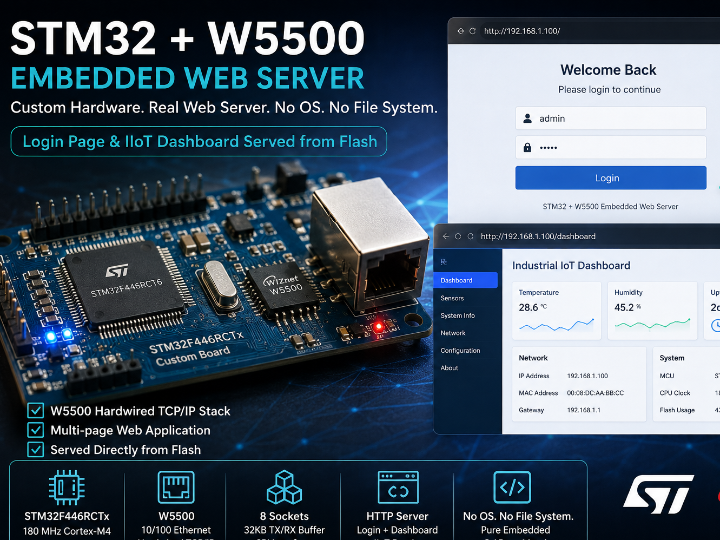
Most embedded web server tutorials hand you a devkit and an off-the-shelf Ethernet shield. This project takes a different route: it starts from a custom-designed STM32F446RCTx development board with the W5500 integrated directly on the PCB, and it delivers a multi-page, browser-accessible web application that lives entirely inside microcontroller Flash.

When a browser on the same network hits the board's static IP address, it first lands on a login page. After authentication, it is redirected to a polished Industrial IoT dashboard — all served by 180 MHz of Cortex-M4, over Ethernet, with no Linux, no SD card, and no file system.
What makes this stand out from similar "hello world webserver" builds is the care invested in every layer: a custom PCB, a full STM32CubeMX peripheral configuration, a documented HTML-to-C conversion workflow, and a clean UART debug output trail that confirms every initialization step. Each piece is photographed, screenshotted, and described in the README — making it a genuinely reproducible reference, not just a proof of concept.


Why W5500? — The Reasoning Behind the Hardware Choice
Serving HTTP from a bare-metal microcontroller requires two things to coexist without an OS: a working TCP/IP stack and a firmware loop that handles web requests. The W5500's hardwired TCP/IP engine is precisely what makes that combination viable on an STM32.
With a software TCP/IP stack (lwIP, for example), the MCU must run all protocol logic itself — ARP, IP, TCP — which consumes significant CPU time and RAM, and often requires an RTOS to manage timing reliably. The W5500 eliminates that entire burden.
Why the W5500 is the right chip for this project:
The W5500 integrates a full 10/100 Ethernet MAC and PHY with a hardwired TCP/IP stack into a single SPI-connected package. The STM32 firmware only needs to call the WIZnet ioLibrary's httpServer_run() in a loop; the W5500 handles TCP connection management, packet framing, ARP resolution, and buffering autonomously. The CPU is free to process HTTP requests, parse URIs, and build responses — which is exactly what an application-level web server needs.
The 32 KB on-chip TX/RX buffer memory (configurable per socket) is particularly important here. HTML pages with embedded CSS and placeholder data can easily exceed 2–4 KB. The W5500's generous buffer ensures pages are transmitted without fragmentation issues that smaller-buffer chips struggle with.
Key technical reasons for choosing W5500:
| Criterion | Why it matters for this project |
|---|---|
| Hardwired TCP/IP stack | No lwIP, no RTOS required — bare-metal HTTP server is feasible |
| 8 independent sockets | httpServer library uses multiple sockets for concurrent connections |
| 32 KB TX/RX buffer | Serves full HTML pages without segmentation |
| SPI interface (up to 80 MHz) | Clean integration with STM32 SPI2 peripheral |
| WIZnet ioLibrary support | httpServer, socket, wizchip_conf — production-ready, well-documented |
| Single-chip Ethernet (MAC+PHY) | Reduces PCB component count on the custom board |
Why W5500-EVB-Pico was not chosen and what that reveals: This project uses a custom STM32F446RCTx board rather than a development kit. That decision itself reflects the project's ambition — designing a board, routing the W5500 next to the MCU, and validating the SPI connection through firmware is a meaningfully harder undertaking than plugging in a module. It demonstrates that the W5500 is viable not just on reference platforms but in custom hardware contexts, which is exactly where industrial and commercial products live.
Hardware Configuration
The project runs on a custom STM32F446RCTx development board with the W5500 Ethernet controller integrated directly on the PCB. No external shields or breakout modules are used.

MCU specification:
- STM32F446RCTx, LQFP64 package
- ARM Cortex-M4 at 176 MHz (PLL from 8 MHz HSE)
- 256 KB Flash, 128 KB RAM
- STM32Cube FW_F4 V1.28.3
Peripheral assignment (from .ioc configuration):
| Peripheral | Function | Pins |
|---|---|---|
| SPI2 | W5500 communication | SCK: PB13, MISO: PB14, MOSI: PB15 |
| GPIO (ETH_CS) | W5500 chip select | PB12 |
| GPIO (ETH_RST) | W5500 hardware reset | PA6 |
| USART3 | Debug output (async) | TX: PB10, RX: PC5 |
| SPI2 IRQ | SPI2 interrupt enabled | NVIC priority group 4 |
SPI2 configuration:
- Master mode, Full Duplex
- Baud rate prescaler: /32 → 1.375 Mbps
- CPOL: Low, CPHA: First Edge (Mode 0)
- 8-bit data, MSB first
- Software NSS
The SPI clock is deliberately conservative at 1.375 Mbps, which is well within the W5500's 80 MHz SPI maximum. This ensures reliable communication during development and initial bring-up, and can be increased for performance optimization.
How It Works
User opens browser  →  enters board's static IP
        ↓
HTTP GET request arrives over Ethernet cable
        ↓
W5500 receives frame, buffers it in internal RX memory
        ↓
STM32 calls httpServer_run() — ioLibrary parses HTTP request
        ↓
URI matched: "/"  →  serve login page (from Flash)
        ↓
User authenticates  →  redirect to "/dashboard"
        ↓
Dashboard HTML served from Flash (webpage.c / webpage.h)
        ↓
Browser renders Industrial IoT dashboard
The HTML-to-C conversion workflow is one of this project's most instructive design decisions. Rather than storing pages on an SD card or SPIFFS, the author converted HTML files into C byte arrays using a Perl-based utility. The generated webpage.c and webpage.h are compiled directly into firmware and placed in Flash. This means:
- No file system overhead
- No storage hardware to fail
- Page content is read-only and protected
- The binary is completely self-contained

This approach is standard practice in industrial embedded products, and seeing it implemented cleanly on a student project — including the conversion step and the resulting file structure — makes it a valuable educational artifact.
Network initialization sequence (from UART output):
1. W5500 version check  → confirms chip identity (0x04)
2. Static network config → MAC, IP, Subnet, Gateway, DNS applied
3. httpServer_init()    → sockets allocated, RX/TX buffers assigned
4. Ethernet link status → link confirmed
5. httpServer_run()     → server loop begins, waiting for HTTP requests
Each of these steps is confirmed on the UART debug terminal, making the bring-up sequence fully observable without a logic analyzer.
Software Structure
| File / Folder | Role |
|---|---|
Core/Src/main.c | SPI2 init, W5500 reset, network config, httpServer loop |
Core/Src/webpage.c | HTML pages as C byte arrays (compiled into Flash) |
Core/Inc/webpage.h | Page registration declarations |
Core/Src/w5500/ | WIZnet ioLibrary: socket, httpServer, wizchip_conf, SPI HAL bridge |
stm32webserver.ioc | STM32CubeMX configuration (full peripheral, clock, pin assignment) |
STM32F446RCTX_FLASH.ld | Linker script for Flash execution |
STM32F446RCTX_RAM.ld | Linker script for RAM execution |
images/ | Hardware photos, SPI config screenshots, UART output, dashboard |
Project Workflow — Step by Step
The README documents seven distinct implementation stages, each with a screenshot or photo. This level of documentation completeness is rare for a student project and makes it genuinely reproducible.
Stage 1 — Custom board bring-up A custom STM32F446RCTx board with integrated W5500, RJ45 port, UART debug header, and power supply section. Hardware photos are included.
Stage 2 — SPI2 configuration in CubeMX Full peripheral configuration exported as .ioc, including baud rate, polarity, phase, interrupt routing, and pin assignment. Screenshot of the CubeMX SPI configuration panel is included.
Stage 3 — W5500 network initialization Static IP, MAC, gateway, subnet, and DNS configured through the WIZnet ioLibrary wiz_NetInfo struct. W5500 version register verified before network parameters are applied. Screenshot of network config code is included.
Stage 4 — HTML-to-C conversion HTML pages converted to C arrays with a Perl utility. webpage.c and webpage.h added to the STM32CubeIDE project and registered with reg_httpServer_webContent(). Screenshot of the integration step is included.
Stage 5 — Login page Custom login page served at /. Authenticates user before granting access to the dashboard. Screenshot of the browser login page is included.
Stage 6 — Industrial IoT dashboard Post-login dashboard demonstrating how industrial monitoring data can be presented from an embedded server. Screenshot of the rendered dashboard is included.
Stage 7 — UART debug validation UART terminal output confirming: W5500 detection, network config, assigned IP, Ethernet connection status. Screenshot of UART output is included.
What Makes This Project Stand Out
Custom PCB, not a devkit. The W5500 is integrated directly on a custom-designed STM32F446RCTx board. Designing and validating a custom board with integrated Ethernet is a significantly harder engineering task than using a module, and it demonstrates that the W5500 integrates cleanly into real hardware design.
Flash-resident web content. Converting HTML to C arrays and serving directly from microcontroller Flash is the architecture used in production industrial devices. This project demonstrates that pattern end-to-end, including the conversion toolchain.
Multi-page application with authentication. Rather than serving a single static page, the project implements a login flow followed by a dashboard — closer to a real embedded web application than most "hello world" webserver examples.
Step-by-step documentation with screenshots at every stage. Seven documented stages, each with photographic or screenshot evidence. This reproducibility is what separates a well-crafted project from a demo.
Complete .ioc file included. Anyone can open the project in STM32CubeIDE and immediately see the exact clock tree, SPI parameters, GPIO assignments, and interrupt configuration used. No guesswork about peripheral settings.
Comparison with Similar Projects on WIZnet Maker
Comparison 1: How to Synchronize RTC Time with WIZnet W5500 on STM32? (by gavinchang)
WIZnet Maker: maker.wiznet.io — RTC Time Sync with W5500 on STM32
This project uses W5500 + STM32 to implement NTP-based RTC time synchronization via UDP. It is an excellent educational reference for network-layer data exchange — the STM32 builds NTP packets, sends them via W5500's UDP socket, and applies the received timestamp to the on-chip RTC.
| Comparison Point | STM32 Embedded WebServer (this project) | RTC Time Sync with W5500 |
|---|---|---|
| Primary goal | Serve multi-page HTTP web application from Flash | Synchronize STM32 RTC via NTP over UDP |
| Protocol used | HTTP (TCP, port 80) | NTP (UDP, port 123) |
| W5500 socket mode | TCP — httpServer sockets | UDP — NTP query/response |
| Output direction | Browser → MCU (inbound HTTP requests) | MCU → Internet (outbound NTP query) |
| User interaction | Browser-based login + dashboard | No UI — background time sync |
| Hardware | Custom STM32F446RCTx PCB with integrated W5500 | STM32 devkit + W5500 module |
| Web content | Multi-page HTML served from Flash | None |
| Complexity level | Intermediate-Advanced (custom board + HTTP server) | Intermediate (UDP + NTP protocol) |
| Educational value | HTTP server architecture, Flash web content, custom PCB | NTP protocol, UDP sockets, RTC calibration |
Key distinction: The RTC sync project treats W5500 as an outbound data channel — the MCU reaches out to an NTP server and consumes data. This web server project treats W5500 as an inbound service endpoint — external clients connect to the MCU and consume content. Both directions are essential patterns in embedded networking, and together they illustrate the full duplex nature of W5500's socket model.
Comparison 2: How to Build FreeRTOS MQTT Networking with WIZnet W5500 on STM32F103? (by gavinchang)
WIZnet Maker: maker.wiznet.io — FreeRTOS MQTT with W5500 on STM32
This project uses W5500 + STM32F103 + FreeRTOS to implement MQTT communication over wired Ethernet — publishing sensor data or control messages to a broker. It is a natural complement to the web server approach, targeting M2M (machine-to-machine) messaging rather than browser interaction.
| Comparison Point | STM32 Embedded WebServer (this project) | FreeRTOS MQTT with W5500 |
|---|---|---|
| Primary goal | Browser-accessible embedded web application | MQTT publish/subscribe for IoT messaging |
| Protocol used | HTTP (TCP) | MQTT (TCP, broker-based) |
| Interaction model | Human via browser | Machine-to-machine via broker |
| RTOS dependency | ❌ Bare-metal (no RTOS) | ✅ FreeRTOS required |
| MCU | STM32F446RCTx (176 MHz, Cortex-M4) | STM32F103 (72 MHz, Cortex-M3) |
| Hardware | Custom PCB with integrated W5500 | Devkit + W5500 module |
| Web interface | ✅ Multi-page login + dashboard | ❌ None |
| Scalability | Single-device local access | Cloud/broker scale, many devices |
| Use case | Local device monitoring and control via browser | Fleet telemetry, remote control, IoT cloud |
Key distinction: The MQTT project needs FreeRTOS to manage the MQTT keepalive task alongside other application tasks — the protocol demands more scheduling complexity. The web server project achieves its goal in a bare-metal while(1) loop, demonstrating that W5500's httpServer library is robust enough to run without an RTOS. For teams starting with embedded Ethernet, the bare-metal web server is the lower-barrier entry point.
Significance for WIZnet & Application Potential
W5500 ioLibrary httpServer — A Validated Reference Implementation
The WIZnet ioLibrary includes an httpServer module, but documentation on integrating it with a custom STM32F4 board — particularly with HTML content served from Flash — is sparse. This project validates the complete integration path: SPI2 peripheral initialization on STM32F446, ioLibrary driver porting, HTML-to-C conversion, reg_httpServer_webContent() usage, and the httpServer_run() loop. That makes it a concrete reference that developers porting the ioLibrary to new hardware can follow directly.
Demonstrating W5500 Fitness for Custom Hardware Design
Because the W5500 is placed on a custom PCB rather than a breakout module, this project implicitly demonstrates the chip's suitability for production board design — correct SPI routing, reset circuitry, RJ45 magnetics integration, and power supply requirements. This is a data point WIZnet benefits from: the chip works cleanly in custom silicon contexts, not just on evaluation boards.
Expanding the Industrial IoT Web Interface Reference Set
The "Industrial IoT Dashboard" framing is deliberate and accurate. Embedded web servers running on MCUs with W5500 are a common architecture for industrial HMI (Human-Machine Interface) panels, PLC status pages, building automation controllers, and test equipment web interfaces. This project provides a clean, reproducible template for exactly that pattern.
Concrete Application Scenarios
Industrial HMI and device dashboards:
- PLC or controller status pages accessible from any browser on the plant floor LAN
- Machine parameter viewing and adjustment without dedicated display hardware
- Alarm status and event log pages served from the controller itself
Building automation and facility management:
- HVAC, lighting, or access control units serving a local web interface
- Energy meter or sub-panel monitoring with browser-accessible dashboard
- Multi-zone configuration via embedded forms (extending this project's login pattern)
Test and measurement equipment:
- Bench instruments serving calibration data, measurement history, or configuration pages
- Production line testers with web-accessible pass/fail logs and statistics
Education and training:
- End-to-end embedded networking curriculum: custom board design → SPI bring-up → ioLibrary porting → HTTP server → browser interaction
- Demonstrates the HTML-to-C workflow that underpins many real-world embedded web products
- Shows students what happens at each layer when a browser request meets a microcontroller
Upgrade paths from this base:
- Replace static HTML with CGI handlers → send real sensor data to the browser dynamically
- Add form-based control → write to GPIO or UART from browser input
- Add basic auth token or session cookie → harden the login mechanism
- Port to W5500-EVB-Pico + MicroPython → lower-barrier replication of the same architectureTroubleshooting Notes


