



Driving WIZnet W5100S Without an SDK on a Custom RP2354B
Custom RP2354B computer runs its own OS and drives WIZnet W5100S directly over SPI, implementing hardware sockets, blocking I/O, and a TCP server.
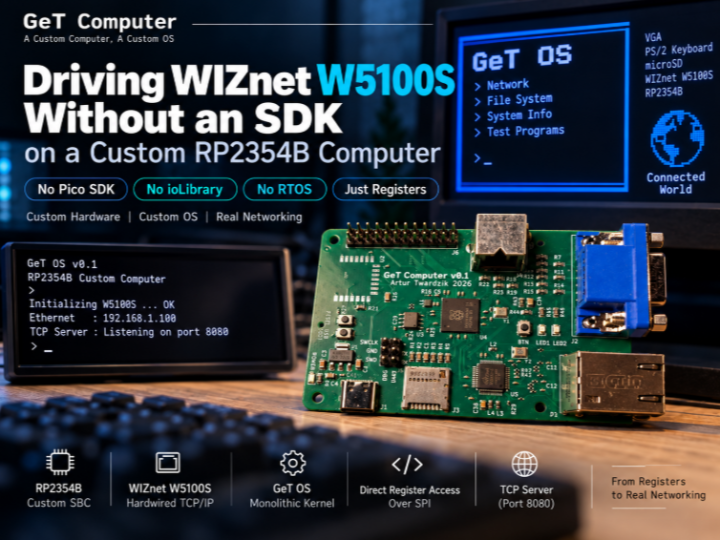
📌 직접 만든 컴퓨터에서 직접 만든 OS를 실행하다
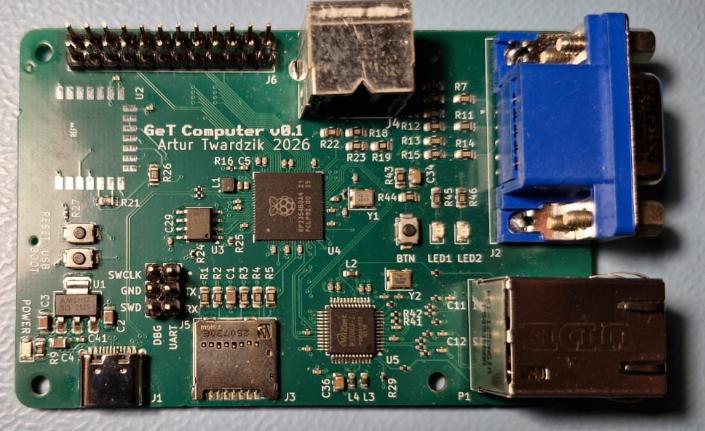
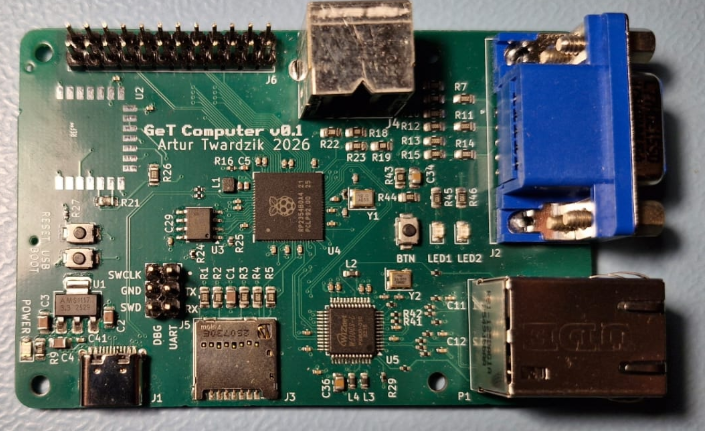
GeT Computer는 RP2354B 기반의 커스텀 싱글보드 컴퓨터입니다. VGA, PS/2 keyboard, microSD와 함께 유선 Ethernet을 위한 WIZnet W5100S를 사용하며, KiCad 회로도와 PCB layout, BOM, Gerber 등의 하드웨어 설계 자료가 공개되어 있습니다.
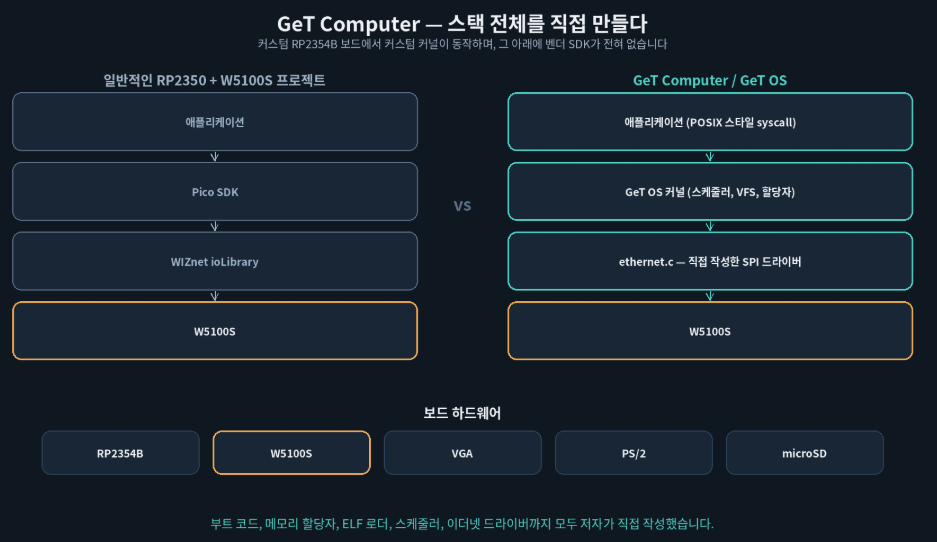
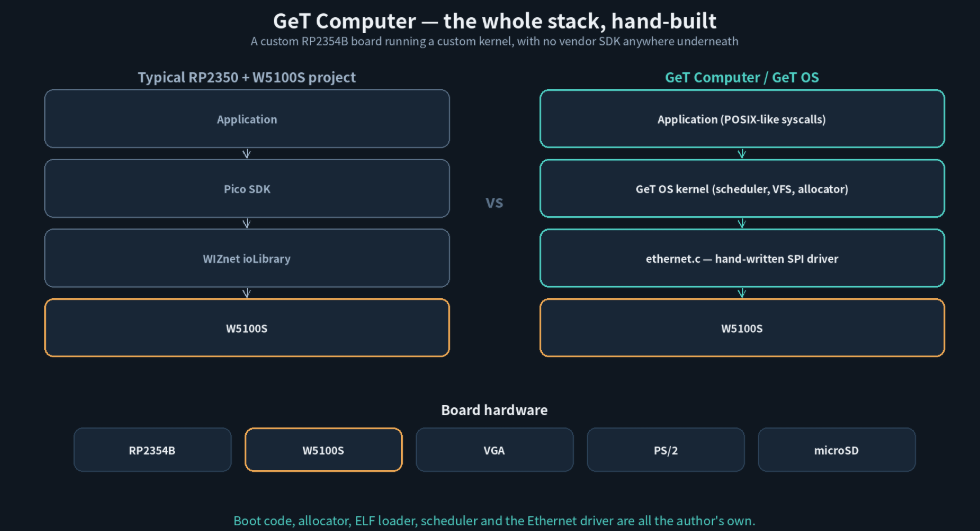
이 프로젝트의 특징은 하드웨어뿐 아니라 GeT OS까지 직접 구현했다는 점입니다. GeT OS는 ARM Assembly와 C 기반의 monolithic kernel이며, Pico SDK나 RTOS, WIZnet ioLibrary 없이 W5100S Ethernet driver까지 직접 구현합니다.
No Pico SDK · No ioLibrary · No RTOS
🔍 W5100S를 SPI Register로 직접 제어
GeT OS는 SPI0를 통해 W5100S와 직접 통신합니다.
| Signal | GPIO |
|---|---|
| MISO | GPIO 16 |
| CS | GPIO 17 |
| SCK | GPIO 18 |
| MOSI | GPIO 19 |
| INT | GPIO 21 |
Write에는 0xF0, Read에는 0x0F opcode를 사용하고, 이후 16-bit register address와 data를 전달합니다.
GeT OS → Custom SPI Driver → W5100S Register
Driver는 software reset, retransmission 설정, socket TX/RX buffer 설정도 직접 처리하며, VERR를 읽어 0x51을 확인하는 방식으로 W5100S를 식별합니다.
🌐 W5100S Hardware Socket을 OS Socket으로 연결
GeT OS는 W5100S의 hardware socket을 자체 socket/file abstraction과 연결합니다.
open_socket(), bind_socket(), listen_socket(), accept_socket(), connect_socket()은 SN_CR, SN_SR 등의 W5100S socket register를 이용해 동작합니다.
| Direction | Flow |
|---|---|
| TX | SN_TX_FSR → TX Buffer → SN_TX_WR → CMD_SEND |
| RX | SN_RX_RSR → RX Buffer → SN_RX_RD → CMD_RECV |
Application에서는 일반적인 read()와 write()를 사용하지만, 그 아래에서는 W5100S hardware socket이 직접 동작합니다.
Test code에는 port 8080에서 connection을 accept하고 HTTP/1.1 200 OK와 간단한 HTML을 반환하는 TCP server가 포함되어 있습니다.
⏱️ RTOS 없이 구현한 Blocking I/O
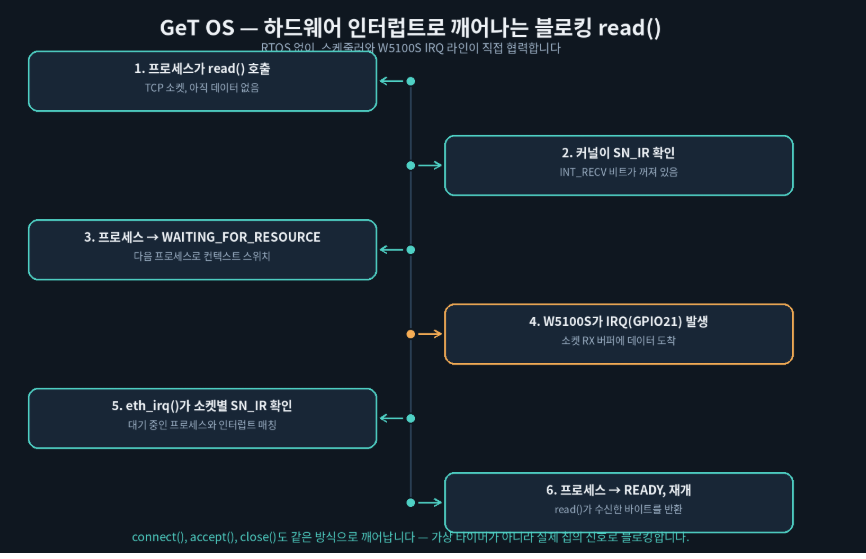
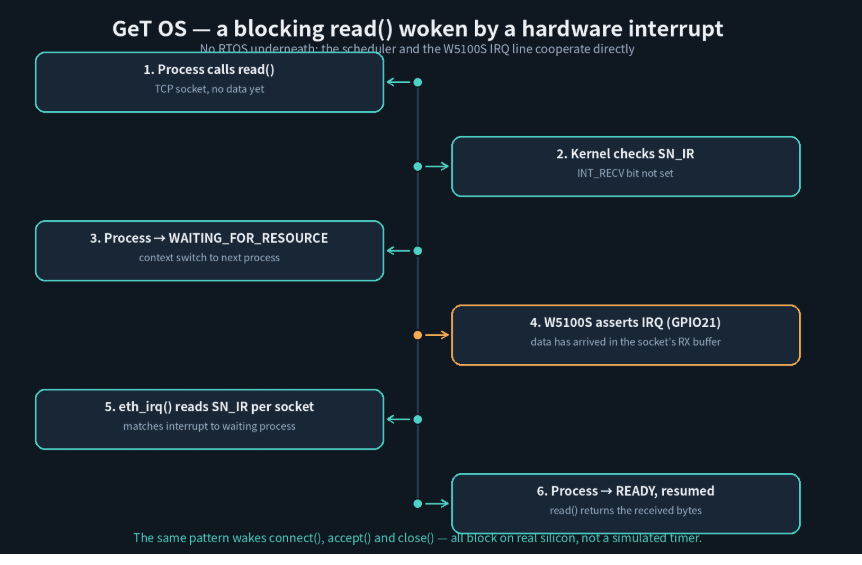
TCP socket에서 read()를 호출했지만 데이터가 아직 없다면 process를 WAITING_FOR_RESOURCE 상태로 변경하고 다른 process로 context switch합니다.
이후 W5100S의 INT가 발생하면 eth_irq()가 SN_IR을 확인하고 해당 socket을 기다리던 process를 다시 READY 상태로 변경합니다.
Blocking read() → WAITING → W5100S INT → READY
W5100S의 hardware socket event를 직접 만든 OS scheduler와 연결했다는 점이 이 프로젝트의 핵심적인 특징입니다.
🧩 이 프로젝트에서 W5100S의 역할
W5100S는 단순 Ethernet MAC/PHY가 아니라 Hardwired TCP/IP Ethernet Controller로 사용됩니다.
TCP client/server는 W5100S의 hardware TCP/IP socket을 이용하고, RP2354B에서는 SPI register access와 OS-level socket abstraction을 담당합니다.
SDK나 ioLibrary abstraction이 없기 때문에 W5100S의 register와 hardware socket이 실제 OS API까지 어떻게 연결되는지를 코드 수준에서 확인할 수 있습니다.
⚠️ 현재 상태
GeT OS는 아직 experimental 단계입니다.
W5100S는 4개의 hardware socket을 제공하며, 현재 구현에서는 하나를 raw/MACRAW 용도로 사용하는 구조입니다. Source comment에는 향후 MACRAW 기반 software TCP/IP stack과 Modbus 구현도 언급되어 있습니다.
Standalone bootloader는 아직 없으며 현재 Raspberry Pi Debug Probe를 통해 code를 load합니다.
🔗 비슷한 WIZnet Maker 프로젝트와 비교
| Project | Platform / SW | W5100S 사용 방식 | GeT Computer와의 차이 |
|---|---|---|---|
| GeT Computer | RP2354B + GeT OS | Direct SPI register + Hardware Socket | No SDK / No RTOS / 자체 OS |
| Zephyr용 W5100S-EVB-Pico 커스텀 보드 정의 | RP2040 + Zephyr RTOS | Zephyr 보드 정의를 만들어 Zephyr 자체 네트워크 스택에 연결 | 처음부터 만든 OS가 아니라, 기존 RTOS(Zephyr) 안에 보드 지원만 추가 |
| Modbus TCP Server Example | RP2040 + Pico SDK (RTOS 없음) | WIZnet 공식 ioLibrary_Driver로 소켓 상태(Sn_SR)를 폴링 | Pico SDK와 ioLibrary를 그대로 사용 — GeT OS는 이 계층 자체를 걷어내고 직접 구현 |
| W5100S-EVB-Pico Ethernet Communication Basics with Arduino IDE | RP2040 + Arduino IDE | Arduino Ethernet.h 라이브러리 (Ethernet.begin() 한 줄 호출) | 가장 높은 수준의 추상화 — GeT OS의 레지스터 직접 제어와 정반대 극단 |
| Ultra Small Ethernet + RP2040 Board Production Record | RP2040(XIAO) 커스텀 PCB | 표준 Pico SDK / ioLibrary 펌웨어 | 하드웨어는 GeT Computer처럼 처음부터 설계했지만, 소프트웨어는 표준 스택 그대로 사용 |
Zephyr용 W5100S-EVB-Pico 커스텀 보드 정의
W5100S-EVB-Pico를 Zephyr RTOS에서 인식시키기 위해 boards/arm/w5100s_evb_pico/ 아래에 board.cmake, devicetree(.dts), Kconfig 등을 직접 작성한 사례입니다.
GeT Computer와 마찬가지로 "보드를 새 소프트웨어 환경에 편입시키는" 작업이지만, Zephyr라는 기존 RTOS와 그 네트워크 스택 위에 얹는다는 점이 다릅니다. GeT OS는 그 RTOS 자체가 없고 스케줄러·VFS·소켓 계층까지 전부 자체 구현합니다.
Modbus TCP Server Example
RP2040 + W5100S(또는 W5500)로 Modbus TCP 서버를 구현한 튜토리얼입니다. WIZnet 공식 ioLibrary_Driver를 사용해 wizchip_initialize(), getSn_SR(), listen(), send() 같은 함수로 소켓을 다룹니다.
Pico SDK 기반 bare-metal(RTOS 없음)이라는 점은 GeT OS와 비슷하지만, W5100S 레지스터 접근을 ioLibrary가 대신 처리해준다는 점이 가장 큰 차이입니다. GeT OS는 이 라이브러리 계층을 없애고 SPI 레지스터를 직접 두드립니다.
W5100S-EVB-Pico Ethernet Communication Basics with Arduino IDE
Arduino IDE와 Ethernet.h 라이브러리로 Ethernet 초기화, TCP/UDP 클라이언트·서버, 웹 서버 등 11가지 예제를 제공하는 튜토리얼 저장소입니다. Ethernet.init(csPin), Ethernet.begin(mac) 같은 한두 줄의 함수 호출로 네트워킹이 끝납니다.
이 프로젝트가 스펙트럼의 한쪽 끝(최대 추상화)이라면, GeT Computer는 반대쪽 끝(추상화 없음)입니다. 같은 W5100S를 다루면서도 개발자가 보게 되는 코드의 깊이가 완전히 다릅니다.
Ultra Small Ethernet + RP2040 Board Production Record
W5100S를 Seeed XIAO RP2040 보드와 결합해 초소형 Ethernet 보드를 직접 설계·제작한 기록입니다.
GeT Computer 보드와 마찬가지로 하드웨어를 처음부터 설계했다는 점은 같지만, 그 위에서 도는 소프트웨어는 표준 Pico SDK/ioLibrary 펌웨어입니다. GeT Computer는 하드웨어뿐 아니라 그 위의 OS와 드라이버까지 전부 자체 제작했다는 점에서 한 단계 더 나아갑니다.
❓ FAQ
Q. WIZnet ioLibrary나 Pico SDK를 사용하나요?
아니요. W5100S register를 SPI로 직접 읽고 쓰는 Ethernet driver를 직접 구현했습니다.
Q. TCP/IP stack도 RP2354B에서 직접 구현했나요?
현재 TCP client/server는 W5100S Hardwired TCP/IP socket을 사용합니다. MACRAW 기반 software TCP/IP stack은 향후 작업으로 언급되어 있습니다.
Q. 실제 TCP Server가 동작하나요?
네. Port 8080에서 connection을 accept하고 HTTP response와 HTML body를 반환하는 test server가 포함되어 있습니다.
Q. Wi-Fi도 사용하나요?
PCB에는 Raspberry Pi Radio Module 2용 footprint가 있지만 기본적으로 실장되어 있지 않으며, 현재 GeT OS에서 구현된 networking path는 W5100S wired Ethernet입니다.
English
📌 A Custom Computer Running a Custom OS
GeT Computer is a custom single-board computer based on the RP2354B MCU. It combines VGA, PS/2 keyboard, microSD, and a WIZnet W5100S for wired Ethernet.
The unusual part is GeT OS, a custom monolithic kernel written primarily in ARM assembly and C. Instead of using the Pico SDK, an RTOS, or WIZnet ioLibrary, the project implements its own W5100S Ethernet driver and accesses the controller directly through SPI registers.
No Pico SDK · No ioLibrary · No RTOS
🔍 Direct SPI Control of W5100S
The driver connects SPI0 directly to W5100S.
| Signal | GPIO |
|---|---|
| MISO | GPIO 16 |
| CS | GPIO 17 |
| SCK | GPIO 18 |
| MOSI | GPIO 19 |
| INT | GPIO 21 |
Writes use opcode 0xF0, while reads use 0x0F.
GeT OS → Custom SPI Driver → W5100S Registers
The driver also handles software reset, retransmission configuration, socket-buffer setup, and checks VERR for the expected 0x51 value.
🌐 Hardware Sockets as OS Sockets
GeT OS maps W5100S hardware sockets into its own socket/file abstraction.
Functions such as open_socket(), bind_socket(), listen_socket(), accept_socket(), and connect_socket() operate directly on registers including SN_CR and SN_SR.
| Direction | Flow |
|---|---|
| TX | SN_TX_FSR → TX Buffer → SN_TX_WR → CMD_SEND |
| RX | SN_RX_RSR → RX Buffer → SN_RX_RD → CMD_RECV |
Applications can use read() and write() while the kernel maps those operations to W5100S hardware sockets.
The repository also contains a port 8080 TCP server that accepts a connection and returns HTTP/1.1 200 OK with a small HTML body.
⏱️ Blocking I/O Without an RTOS
When a blocking read() has no data available, GeT OS places the process into WAITING_FOR_RESOURCE and schedules another process.
When W5100S asserts INT, eth_irq() checks the socket interrupt registers and returns the corresponding process to READY.
Blocking read() → WAITING → W5100S INT → READY
This directly connects W5100S hardware socket events with the custom OS scheduler.
🧩 Why W5100S Matters
W5100S is used as a Hardwired TCP/IP Ethernet Controller, not simply as an Ethernet MAC or PHY.
Its hardware TCP/IP sockets handle the current TCP client/server networking while the RP2354B implements SPI access and the OS-level socket abstraction.
This makes the project a useful reference for seeing how a WIZnet hardware TCP/IP controller can be integrated into a custom OS without an existing networking SDK.
⚠️ Current Status
GeT OS is still experimental.
The W5100S provides four hardware sockets, with one currently used for raw/MACRAW operation. Source comments also mention future work on a software TCP/IP stack over MACRAW and possible Modbus support.
There is no standalone bootloader yet, and code is currently loaded through a Raspberry Pi Debug Probe.
🔗 Comparison with Related WIZnet Maker Projects
| Project | Platform / Software | W5100S Approach | Difference from GeT Computer |
|---|---|---|---|
| GeT Computer | RP2354B + custom GeT OS | Direct SPI register + hardware socket | No SDK / No RTOS / custom OS |
| Custom W5100S-EVB-Pico Board for Zephyr | RP2040 + Zephyr RTOS | Custom Zephyr board definition wired into Zephyr's own network stack | Adds board support to an existing RTOS rather than writing an OS from scratch |
| Modbus TCP Server Example | RP2040 + Pico SDK (no RTOS) | WIZnet's official ioLibrary_Driver polling socket status (Sn_SR) | Uses the Pico SDK and ioLibrary as-is; GeT OS removes that layer entirely and talks to registers directly |
| W5100S-EVB-Pico Ethernet Communication Basics with Arduino IDE | RP2040 + Arduino IDE | Arduino Ethernet.h library (Ethernet.begin()) | The most abstracted end of the spectrum \u2014 the opposite extreme from GeT OS's direct register access |
| Ultra Small Ethernet + RP2040 Board Production Record | RP2040 (XIAO) custom PCB | Standard Pico SDK / ioLibrary firmware | Hardware designed from scratch like GeT Computer, but the software stays on the standard SDK |
Custom W5100S-EVB-Pico Board for Zephyr
This project hand-writes Zephyr board files (board.cmake, devicetree, Kconfig) under boards/arm/w5100s_evb_pico/ so the RTOS recognizes the W5100S-EVB-Pico board.
Like GeT Computer, it's about bringing a board into a new software environment \u2014 but here that environment is an existing RTOS (Zephyr) and its own network stack. GeT OS has no underlying RTOS at all; its scheduler, VFS, and socket layer are all custom.
Modbus TCP Server Example
A tutorial implementing a Modbus TCP server on RP2040 with W5100S (or W5500), using WIZnet's official ioLibrary_Driver \u2014 functions like wizchip_initialize(), getSn_SR(), listen(), and send() handle the sockets.
Like GeT OS, it's bare-metal on the Pico SDK with no RTOS, but ioLibrary does the W5100S register work here. GeT OS removes that library layer and drives the SPI registers itself.
W5100S-EVB-Pico Ethernet Communication Basics with Arduino IDE
A tutorial repository of eleven Arduino IDE examples (Ethernet init, TCP/UDP client and server, web server, and more) built on the Ethernet.h library, where networking comes down to a line or two like Ethernet.init(csPin) and Ethernet.begin(mac).
If this project sits at the most-abstracted end of the spectrum, GeT Computer sits at the opposite end. Both drive the same chip, but the amount of code a developer actually sees is completely different.
Ultra Small Ethernet + RP2040 Board Production Record
A build log for a custom, ultra-compact Ethernet board pairing a W5100S with a Seeed XIAO RP2040.
Like the GeT Computer board, the hardware is designed from scratch \u2014 but the firmware on top of it is standard Pico SDK / ioLibrary. GeT Computer goes a step further by also writing its own OS and driver instead of the standard stack.
❓ FAQ
Does it use WIZnet ioLibrary or the Pico SDK?
No. The Ethernet driver directly accesses W5100S registers over SPI.
Is TCP/IP implemented in software on the RP2354B?
The current TCP client/server uses W5100S Hardwired TCP/IP sockets. A software stack over MACRAW is future work.
Does the TCP server actually run?
Yes. The repository contains a port 8080 server that accepts connections and returns an HTTP response.
Does it use Wi-Fi?
The PCB includes an unpopulated Raspberry Pi Radio Module 2 footprint, but the networking path currently implemented by GeT OS is W5100S wired Ethernet.
-
Hardware

-
OS 커널