ETHERNET SHIELD FOR ARDUINO - W5200(webserver)
ETHERNET SHIELD FOR ARDUINO - W5200(webserver)
0
Components
Hardware components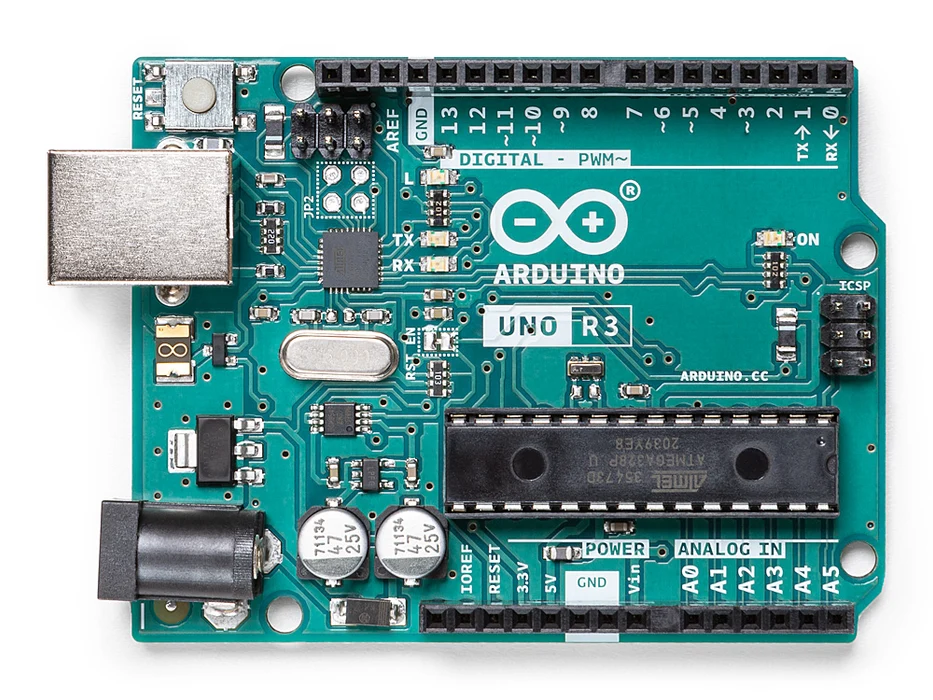
Arduino - Arduino UNO
x 1

Analog input sensor
x 5
Arduino ethernet shield w5200
x 1
Project description
- Analog inputs attached to pins A0 through A5
- Source Code
/*
??Web?Server
??
?A?simple?web?server?that?shows?the?value?of?the?analog?input?pins.
?using?an?Arduino?Wiznet?Ethernet?shield.?
??
?Circuit:
?*?Ethernet?shield?attached?to?pins?10,?11,?12,?13
?*?Analog?inputs?attached?to?pins?A0?through?A5?(optional)
??
?created?18?Dec?2009
?by?David?A.?Mellis
?modified?9?Apr?2012
?by?Tom?Igoe
??
?*/
?
#include?<SPI.h>
#include?<Ethernet.h>
?
//Attention:?Official?SPI?port?use?"D10"?as?SS?interface.You?need?to?define?SS?pin?acording?to?the?actual?SS?wire?connection
?
////define?the?interface:?Dreamer?MEGA??X1?PORT
//#define?SS??53???//Gadgeteer?PIN?6
//#define?nRST??46??//Gadgeteer?PIN?4
//#define?nPWDN?45??//Gadgeteer?PIN?5
//#define?nINT?2??//Gadgeteer?PIN?3
?
//define?the?interface:?Dreamer?MEGA?X2?PORT
#define?SS????10???//Gadgeteer PIN 6
#define?nRST??8??//Gadgeteer PIN 4
#define?nPWDN?9??//Gadgeteer PIN 5
#define?nINT?3??//Gadgeteer PIN 3
?
//?Enter?a?MAC?address?and?IP?address?for?your?controller?below.
//?The?IP?address?will?be?dependent?on?your?local?network:
byte mac[] = {
??0xDE,?0xAD,?0xBE,?0xEF,?0xFE,?0xED?};
IPAddress ip(192,168,0,217);
?
//?Initialize?the?Ethernet?server?library
//?with?the?IP?address?and?port?you?want?to?use?
//?(port?80?is?default?for?HTTP):
EthernetServer server(80);
?
void setup() {
?//Next setting parameter is very important!!!! If you don't have reliable reset setting, W5200 maybe will not work!!!!! //
???
??pinMode(SS,OUTPUT);  //Define the interfave :Dreamer MEGA X2 PORT Gadgeteer PIN 6 use SS
??pinMode(nRST,OUTPUT);
??pinMode(nPWDN,OUTPUT);
??pinMode(nINT,INPUT);
??digitalWrite(nPWDN,LOW);  //enable power
??
??digitalWrite(nRST,LOW);  //Reset W5200
??delay(10);
??digitalWrite(nRST,HIGH);
?delay(200);       // wait W5200 work
?/////////////////////////////////////////////////////////////
?// Open serial communications and wait for port to open:
??Serial.begin(9600);
???while (!Serial) {
????;?// wait for serial port to connect. Needed for Leonardo only
??}
?
?
??// start the Ethernet connection and the server:
??Ethernet.begin(mac, ip);
??server.begin();
??Serial.print("server is at ");
??Serial.println(Ethernet.localIP());
}
?
?
void loop() {
??// listen for incoming clients
??EthernetClient client = server.available();
??if (client) {
????Serial.println("new client");
????// an http request ends with a blank line
????boolean currentLineIsBlank = true;
????while (client.connected()) {
??????if (client.available()) {
????????char c = client.read();
????????Serial.write(c);
????????// if you've gotten to the end of the line (received a newline
????????// character) and the line is blank, the http request has ended,
????????// so you can send a reply
????????if (c == 'n' && currentLineIsBlank) {
??????????// send a standard http response header
??????????client.println("HTTP/1.1 200 OK");
??????????client.println("Content-Type: text/html");
??????????client.println("Connnection: close");
??????????client.println();
??????????client.println("<!DOCTYPE HTML>");
??????????client.println("<html>");
????????????????????// add a meta refresh tag, so the browser pulls again every 5 seconds:
??????????client.println("<meta http-equiv="refresh" content="5">");
??????????// output the value of each analog input pin
??????????for (int analogChannel = 0; analogChannel < 6; analogChannel++) {
????????????int sensorReading = analogRead(analogChannel);
????????????client.print("analog input ");
????????????client.print(analogChannel);
????????????client.print(" is ");
????????????client.print(sensorReading);
????????????client.println("<br />");
??????????}
??????????client.println("</html>");
??????????break;
????????}
????????if (c == 'n') {
??????????// you're starting a new line
??????????currentLineIsBlank?=?true;
????????}?
????????else if (c != 'r') {
??????????// you've gotten a character on the current line
??????????currentLineIsBlank?=?false;
????????}
??????}
????}
????// give the web browser time to receive the data
????delay(1);
????// close the connection:
????client.stop();
????Serial.println("client disonnected");
??}
}

