WIZVSP not working properly
General
No replies yet. Be the first to reply.
Join the discussion.
General
No replies yet. Be the first to reply.
Join the discussion.
Share projects and connect with makers.
Joined before the site update? first.
New to WIZnet Makers?
We sent a verification link to your address. Open it to activate your account, then log in.
Accounts from this email provider are reviewed by an administrator after verification. Approval usually takes one business day.
Already have an account?
Enter your email address. If it belongs to an account, we'll send a link to set a new password. Members who joined before the site update use this to set their password.
If an account uses that address, we sent a link to set a new password. The link works once and expires in 30 minutes.
Know your password?
Need an account?
RE: WIZVSP not working properly
by Hannah ·
Hello. First, please answer the questions below.
Also, please capture the entire error screen.
RE: RE: WIZVSP not working properly
by AlFrost ·
Hello,
Im using Windows 11
I tried all the old versions and the same error keep appearing when I enter the serial number
The screenshot is the following (is in spanish)
Thanks.
RE: WIZVSP not working properly
by Hannah ·
Try reinstalling VSP by following the process below.
RE: WIZVSP not working properly
by AlFrost ·
I tried that steps, and keeps without working.
RE: WIZVSP not working properly
by Hannah ·
We have tried the same steps on a new PC but we have never encountered this error.
What happens if you click on Details or Continue in the error window?
Also, Microsoft .NET Framework 4.5.2 or a later update is required to run the WIZVSP program on Windows. Please check if you have the latest version.
RE: WIZVSP not working properly
by AlFrost ·
Hello, if I click continue, the error keeps appearing.
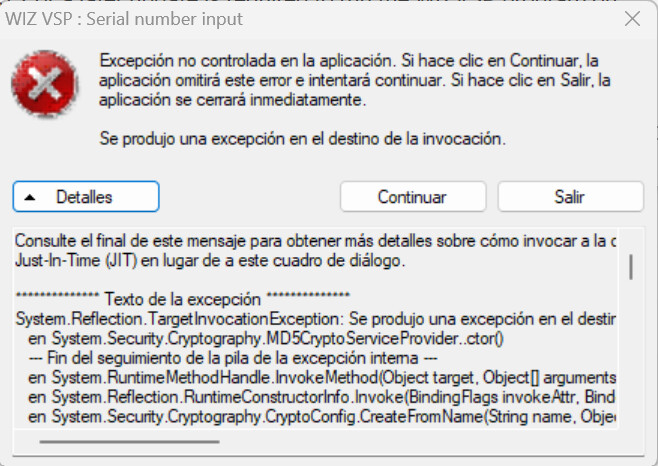
If I click details, the following appears:
I have the latest version of .NET Framework installed, and I tried to repair the installation too.
Thanks.