WIZ750SR and DHCP enabled
Serial-to-Ethernet & ConfigTool
No replies yet. Be the first to reply.
Join the discussion.
Serial-to-Ethernet & ConfigTool
No replies yet. Be the first to reply.
Join the discussion.
Share projects and connect with makers.
Joined before the site update? first.
New to WIZnet Makers?
We sent a verification link to your address. Open it to activate your account, then log in.
Accounts from this email provider are reviewed by an administrator after verification. Approval usually takes one business day.
Already have an account?
Enter your email address. If it belongs to an account, we'll send a link to set a new password. Members who joined before the site update use this to set their password.
If an account uses that address, we sent a link to set a new password. The link works once and expires in 30 minutes.
Know your password?
Need an account?
RE: WIZ750SR and DHCP enabled
by becky ·
I’ll give it a try as your condition in our side and let you know the result.
Please wait some time~
RE: WIZ750SR and DHCP enabled
by Nagarajan V ·
Dear becky
There is wrong data conversion after starting data transfer randomly.
Actual data sent on RS232 side is 66 03 00 00 97 ff but on ethernet side with wireshark is 02 01 06 00 81 4a when DHCP is enabled.
V.Nagarajan
RE: WIZ750SR and DHCP enabled
by Nagarajan V ·
Dear Becky
Any feedback for the problem mentioned?
V.Nagarajan
RE: RE: WIZ750SR and DHCP enabled
by becky ·
Sorry I’m late
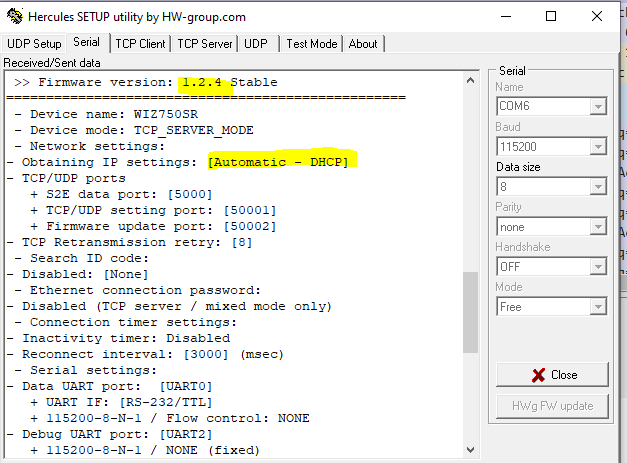
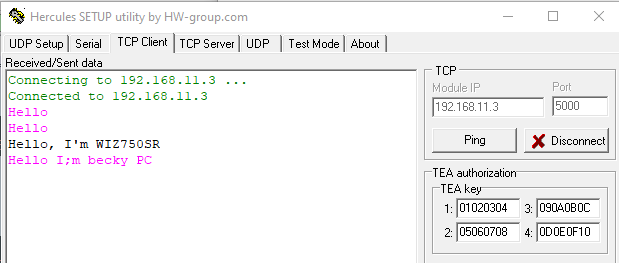
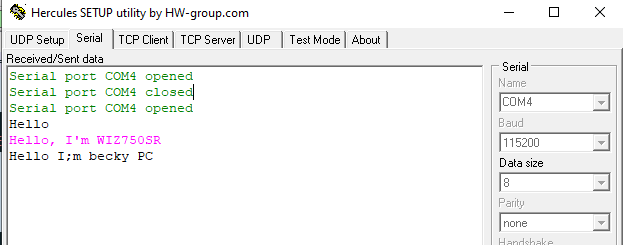
I tested it, but it worked.
So I want to know your network environment or other information.
I also think that if you update the firmware to version 1.2.9 it might be helpful.
RE: WIZ750SR and DHCP enabled
by Nagarajan V ·
Thank you for the feedback
I have updated the firmware to 1.2.9. The problem persists.
Please find wireshark capture and config snapshot.
Use dispaly filter in wireshark as “tcp.port==4321” without quotes for viewing tcp transfers.
Wiz DHCP problem.rar - FileTransfer.io
Please note before closing tcp connection last received data is wrong.
actual data is 66 01 00 02 97 ff
wrong data is 02 01 00 02 97 ff
If i disable DHCP, there is no issue with other settings kept same.
Kindly check and give feedback.
Thank you for your time.
V.Nagarajan
RE: WIZ750SR and DHCP enabled
by Nagarajan V ·
Dear Becky
Any feedback for the input provided?
V.Nagarajan
RE: WIZ750SR and DHCP enabled
by Nagarajan V ·
Dear Bong
I have tested more than one module. The problem repeats with all modules.
I think there is some issue when DHCP is enabled. It randomly corrupts one or two bytes of data.
We can demostrate the problem with team viewer if possible for you check.
V.Nagarajan
RE: WIZ750SR and DHCP enabled
by Nagarajan V ·
Dear Bong
Thank you for your attention. Regarding testing at my side, i would to like point out that i am using protocol as below:
[PC Software] SOT packet 6 bytes (11 01 00 00 ee ff) ----------->
<----------- [Wiz Serial Device]ACK packet 6 bytes (66 01 00 02 97 ff)
[PC Software] CMD packet 9 bytes (33 02 01 00 ca ff 14 ec ff) ---------->
<----------- [Wiz Serial Device] ACK packet 6 bytes (66 02 00 00 98 ff)
[PC Software] DATA packet 285 bytes (22 03 15 01 c5 ff …) ---------->
<----------- [Wiz Serial Device] ACK packet 6 bytes (66 03 00 00 97 ff)
Above sequence repeats until all product(1000) is updated to embedded system.
Totally 6000 packets sent and received for 1000 products.
I am facing problem in this condition. For timing and actual data kindly refer wireshark .pcap file given earlier.
Thanks for your time.
V.Nagarajan
RE: RE: WIZ750SR and DHCP enabled
by becky ·
I tested it for 2day.
But we don’t see data broken.
We have difficult to debug because can’t reenact your situation.
So I want to know your serial program, data transfer period time and data.
Also, I imaged your situation as you said.
There are problem in situation 3 or situation 4.
I think the use of dhcp does not affect data communication.
So could you please check the situation 3 as bong said.
Alternatively, please check the data sent by the serial device.
I attach firmware which can check serial data from WIZ750SR to Debugging port.
This firmware recvs serial data and sends it to the debugging port before sending it to ethernet.
W7500x_S2E_App.bin (38.8 KB)
You said 1000 products are updated.
Do you have a problem with only one product?
If you possible, could you please check it.
And I wonder you DHCP server.
please say me your DHCP server information and setting such as leasetime.
RE: WIZ750SR and DHCP enabled
by Nagarajan V ·
Dear Becky
Please find my testing logs.
LOG.zip (3.9 KB)
Please note with DHCP Enabled condition, data broke at 79 and 48. See the last data in each is wrongly received. Failure happens randomly.
Without DHCP, all 423 product sent successfully.
Please see below image for failure condition:
Please see below image for pass condition:
For your information, we are sure that our sending data is correct(double checked using hardware monitor). It seems, data receiving problem in Wiz750 when DHCP is enabled.
With lower baud rate 9600 also, this problem happens.
When DHCP is enabled, data is breaking.
Waiting for your reply.
V.Nagarajan
RE: WIZ750SR and DHCP enabled
by becky ·
So we will test with baud 4800 and enable DHCP and find out exact reason of the problem
And let you know asap.
we are afraid that can’t immediately find out exact reason in the source code.
RE: WIZ750SR and DHCP enabled
by irina WIZnet ·
I checked your log file and according to the log file, the uart baudrate is set to 115200
If so, the baud rate of PLU manager have to set to 115200, is it right?
If you are possible,Could you please draw the connect schematic?