Wiz750sr EVB TTL not working...please help
Serial-to-Ethernet & ConfigTool
No replies yet. Be the first to reply.
Join the discussion.
Serial-to-Ethernet & ConfigTool
No replies yet. Be the first to reply.
Join the discussion.
Share projects and connect with makers.
Joined before the site update? first.
New to WIZnet Makers?
We sent a verification link to your address. Open it to activate your account, then log in.
Accounts from this email provider are reviewed by an administrator after verification. Approval usually takes one business day.
Already have an account?
Enter your email address. If it belongs to an account, we'll send a link to set a new password. Members who joined before the site update use this to set their password.
If an account uses that address, we sent a link to set a new password. The link works once and expires in 30 minutes.
Know your password?
Need an account?
RE: Wiz750sr EVB TTL not working...please help
by rena ·
Hi, @rathesh.
The two LEDs blinking means that entered the App boot mode.
It seems to have stopped in App boot mode due to a problem during the firmware update.
First, please let me know which version of the firmware and configuration tool did you use.
And there is the Wiki about how to recovery WIZ750SR. Refer to below link.
Thank you.
RE: Wiz750sr EVB TTL not working...please help
by rathesh ·
Hi, @rena
The version of the tool is 0.5.1 Beta, firmware version 1.0.4.
I have tried every method to make a connection with the modeule and the PC, but it is being a failure. i tried to write the mac address nd all.
Tried writing the firmware. It is still not been recognized by the configuration tool. Can you tell me a solution for it.
RE: RE: Wiz750sr EVB TTL not working...please help
by rena ·
Hi, @rathesh.
I recommend that use the latest firmware.
Now WIZ750SR Firmware version 1.2.3 is released, please update with ISP Tool and test.
You can get ‘WIZ750SRv123_incl_Boot.bin’ file from below link. (When using ISP Tool, you must use Boot+App F/W file.)
And refer to the ‘Flash Programming using WIZISP Tool’ section of the below link.
If you have a capture file or other material, please attach it.
RE: Wiz750sr EVB TTL not working...please help
by rathesh ·
Hi, @rena
Thankyou for your help. You are really a lifesaver. Finally the device was recognized by the PC. It is now in OPEN state.
It will be a help if you tell me how to connect to arduino and wiz750sr evb ttl for sending data to internet. I have a senor output value “3” from arduino which is a serial value, and i need to sent the value to internet.
Regards,
Rathesh
RE: RE: Wiz750sr EVB TTL not working...please help
by rena ·
Hi, @rathesh
I don’t know which sensor is connected to which Arduino board,
Maybe I think you need to connect Arduino-WIZ750SR through serial(uart) for send to sensor data.
If WIZ750SR is received sensor data, it will send to ethernet according to serial to ethernet operation.
RE: RE: Wiz750sr EVB TTL not working...please help
by Keshav Shah ·
Hi @rathesh
Arduino is connected to WIZ750SR-TTL in following way:
Pins 3.3V,Ground, TX,RX of the Arduino are connected to the Vdd, ground, RX, TX pins of the WIZ750SR-TTL in a respective manner using UART protocol as WIZ750 only accepts UART communication protocol(no I2C or SPI).
RE: Wiz750sr EVB TTL not working...please help
by Keshav Shah ·
Hi
I downloaded the wizconfig-V1.3.0 software and when I was connected the WIZ750SR-TTL to the PC(via Rj45 cable) to edit the local IP of the WIZ board, 3 times the software was able to detect the hardware, its MAC address and also was successful in editing the local IP of the WIZ board and also the blue LED was blinking(indicating Ethernet connection successful) . However when today I tried to connect the board, the blue LED was blinking but the WIZ750 board was not getting detected nor its MAC address, and I was unable to edit the local IP. Can somebody please help me in resolving this issue?
I am attaching here the screenshot of the wizconfig-V1.3.0.
Thank you,
Best Regards,
Keshav
RE: RE: Wiz750sr EVB TTL not working...please help
by rena ·
Hi @Keshav_Shah,
What is the network setting of the PC running wizconfig?
In a snapshot, I think that the PC did not receive normal IP from AP while it is set to DHCP. (IPs starting with 169.)
Please try setting the IP of the wired Internet of PC as follows.
(Example)
And if there are multiple network adapters, it may not be possible to search. Because the packet can be sent on a path other than the device.
I recommended to proceed after setting disable for network adapters not in use.
RE: Wiz750sr EVB TTL not working...please help
by Keshav Shah ·
Hi @rena
Thank you for you message.
I was able to figure this mistake a day after I messaged .
However, there is another issue which I am facing since 3 weeks(when I was able to change LocalIP of WZ750) when I was sending the data from the Arduino MEGA2560 board to the WIZ750SR-TTL board and further connecting the PC with WIZ750 using Router(and checking using ping “IP Address” on command prompt). I was shown this message whose screenshot I am attaching here.
If it is comfortable with you, can you please guide me with this issue?
Thank you,
Best Regards,
Keshav Shah
RE: RE: Wiz750sr EVB TTL not working...please help
by irina WIZnet ·
First, 192.168.1.131 isn’t the web page address and you can’t show the receive data.
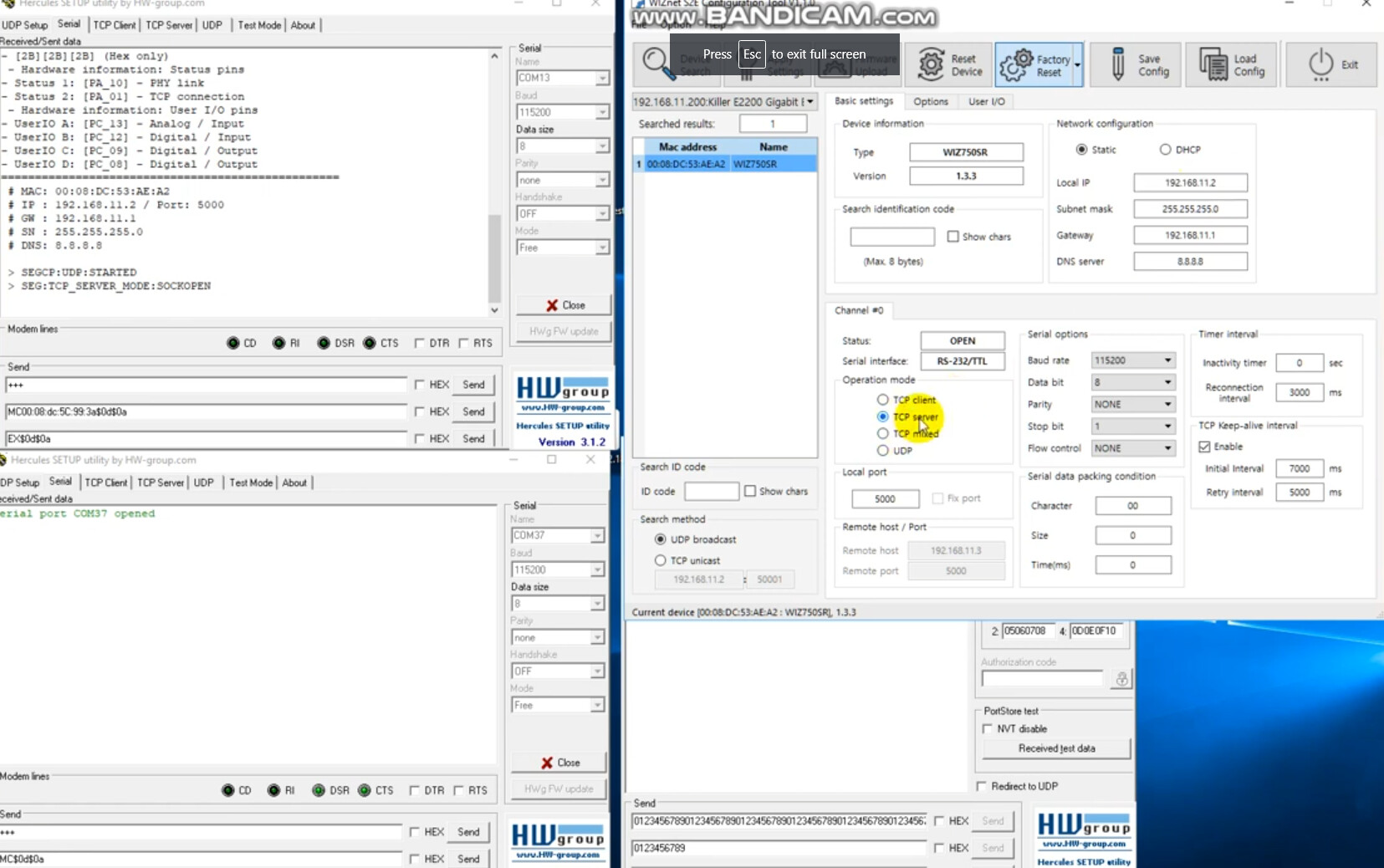
This is a video of the operation when WIZ750SR is used as a TCP server.
↓↓↓↓↓↓↓↓↓↓ Click the image ↓↓↓↓↓↓↓↓↓↓↓↓