WIZ108SR-EVB Issue
Serial-to-Ethernet & ConfigTool
No replies yet. Be the first to reply.
Join the discussion.
Serial-to-Ethernet & ConfigTool
No replies yet. Be the first to reply.
Join the discussion.
Share projects and connect with makers.
Joined before the site update? first.
New to WIZnet Makers?
We sent a verification link to your address. Open it to activate your account, then log in.
Accounts from this email provider are reviewed by an administrator after verification. Approval usually takes one business day.
Already have an account?
Enter your email address. If it belongs to an account, we'll send a link to set a new password. Members who joined before the site update use this to set their password.
If an account uses that address, we sent a link to set a new password. The link works once and expires in 30 minutes.
Know your password?
Need an account?
RE: WIZ108SR-EVB Issue
by Kei ·
Hello,
What exactly does “after a proper setting” mean?
Does that mean you have made a few changes in the Configuration Tool?
if so, What did you change if you changed it?
And, I do not know exactly what it means to say “the device is not visible in Terminal.”
Does it mean that Serial Port can not be recognized on your PC ?
If so, this is not a problem with the module, but a problem with your RS485 transceiver.
I need some more clear and detailed information to help you.
If you would like to re-upload firmware with ISP, please refer to the link below.
[url]http://old.wiznet.co.kr/sub_modules/en/library/Download_View.asp?PK_Num=458&page=1&SF_Part=subject&SF_KeyWord=ISP[/url]
You can get Tool and Guide documents.
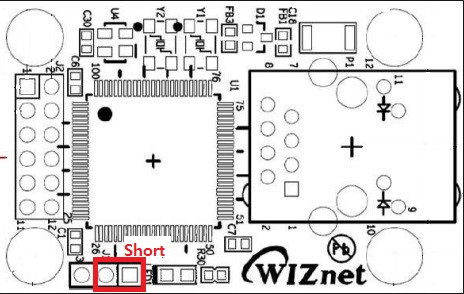
If you follow the Link’s instructions to upload the firmware, you must enter Boot mode by shorting pins 1,2 as shown in the figure below.
In this case, however, a BOOT binary file is required. This file is not officially provided, so if you do not have this file, this method is meaningless and you should send an RMA request.
best regard,
Kei