#PICOmputer – World first Raspberry RP2040 PICO – QWERTY & IPS devkit(Work In Progress)
A mini computer to minimize external components, use maximum features integrated on PICO board: Power switch use enable input on PICO, ON
4
Project description
#PICOmputer – World first Raspberry RP2040 PICO – QWERTY & IPS devkit
I will permanently update features and description
by current development status ... now
12.11.2021
+ updated to last revison Picomputer MAX
+ 2inch IPS display? 320x240 ST7789 for retro computer emulation?

25.4.2021
+ gerbers
+ extra project - Top front panel
+ schematic
+ shoot PCB
+ github repository "https://github.com/bobricius/PICOmputer"
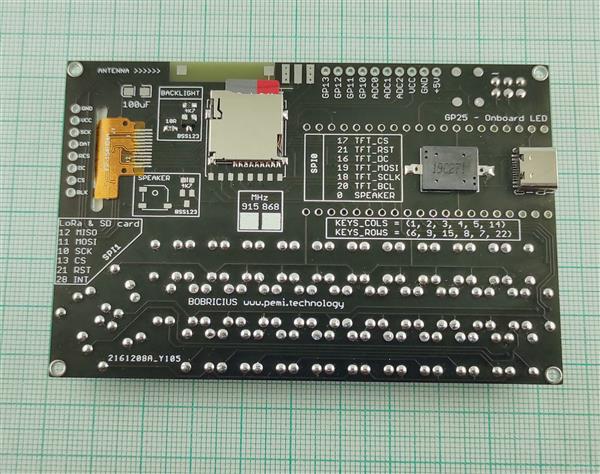
+ display, keyboard GPIO definitions

12.5.2021
+ updated gerbers
+ fixed unconnected DEL button
+ much more labels
+ micro SD card "micro SD sharing postion and GPIO with RFM95"
??
19.5.2021
+ components list
??
TODO SW:
- RFM95 definitions
- KEYBOARD cursors keys
25.5.2021
+ some code examples on GITHUB?
12.6.2021
+ rounded PCB coners for less pocket destroy

TODO HW:
- add micro sd card -DONE
- add ethernet module header ... etc wiznet or anotner
- adjust frame position for display on module - DONE
???
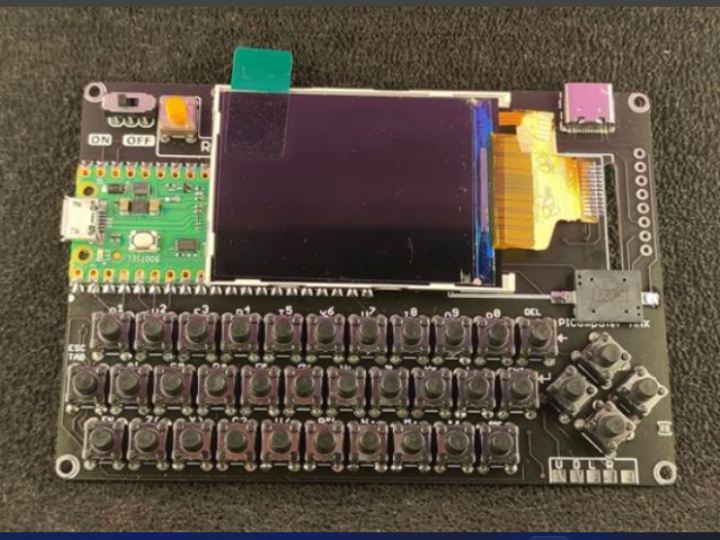
I am take care to minimize external components, use maximum features integrated on PICO board: Power switch use enable input on PICO, ON-BOARD LED is visible thanks to missing solder mask, PICO boot button hole. Overall dimensions are smallest as possible.
Front panel is as separated project
https://www.pcbway.com/project/shareproject/PICOmputer___front_panel.html
SWOT analysis
Strengths:
-no competition
-simple as possible
-cheap
-beautiful design (I’m shameless)
–qwerty keyboard
-HD IPS display – onboard
-any display, iPS, TFT, OLED, eInk by wires, need just redesign front panel
-circuitpython
-micropython
-arduino core
Weaknesses:
-my programing knowledge is basic
Opportunities:
-GUI learning tool
-native USB
-ETHENRNET possibility, there is big opportunity in application where is needed something like
networking plug and play … quick connect to LAN with DHCP configuration, etc. simple terminal
-standalone computer programmable in basic or micropython
Threats:
-please write in comments, I am blinded by my enthusiasm
FEATURES:
-Smallest as possible 100x65x8mm
-Absolute minimum components.
-Auxiliary USB-C for power only.
-Access to boot button
-bonus flashing eyes with internal led.
-IPS 240*240 display. 3 types or more
-Speaker
-free GPIO header
-Reset button
-power switch controlling internal buck-boost
-optional RFM95 LoRa radio
TODO**:
–add adapter for wiznet or another ethernet module (waiting for module)
-more examples
Working software features (demo codes):
-circuitpython display example
-micropython display example
-arduino display example
-arduino keyboard example
Supported displays:
-12pin st7789 IPS 240×240 via flex cable 1.3″ inch
-12pin st7789 IPS 240×240 via flex cable 1.54″ inch
-12pin st7789 IPS 320×240 via flex cable 2″ inch
-8pin st7789 IPS 240×240 via header
-any display with popular china module pinout GND,VCC,SCK,DAT,RES,DC,CS,BACKLIT
CODE EXAMPLES and DEFINITIONS
  #define TFT_CS        17
  #define TFT_RST       21
  #define TFT_DC        16
  #define TFT_MOSI      19
  #define TFT_SCLK      18
  #define TFT_BACKLIGHT 20 //Display backlight pin

  #define speaker       0

byte colPins[COLS] = {1, 2, 3, 4, 5}; //connect to the column pinouts of the keypad extra cursor keys 14
byte rowPins[ROWS] = {6, 9, 15, 8, 7, 22}; //row pinouts of the keypad

char directKeys[ROWS][COLS] = {
  {KEY_RETURN, ' ', 'm', 'n', 'b',},
  {KEY_DELETE, 'l', 'k', 'j', 'h',},
  {'p', 'o', 'i', 'u', 'y',},
  {KEY_SHIFT, 'z', 'x', 'c', 'v',},
  {'a', 's', 'd', 'f', 'g',},
  {'q', 'w', 'e', 'r', 't',}
};
Features video presentation …