


Why Does the GEVINO TFT HMI Pair a Touchscreen with Optional W5500 Ethernet?
GEVA combines a SAMD21 touchscreen PLC, isolated I/O and optional W5500 Ethernet with public Arduino code and a dedicated guide for AI coding assistants.

WIZnet - W5500
x 1

Optional W5500 Ethernet module for GEVINO TFT. The vendor self-test uses Arduino Ethernet.h with ETH_CS = 5; the module is ordered separately from the base panel.
A Touchscreen That Also Reads the Machine
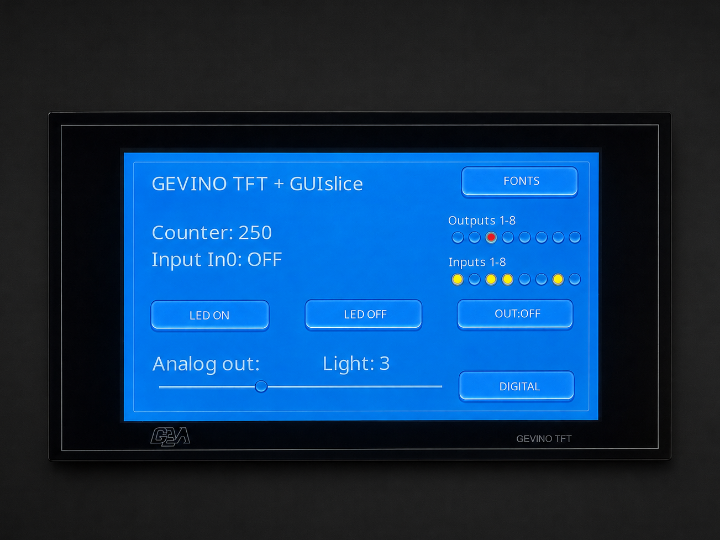
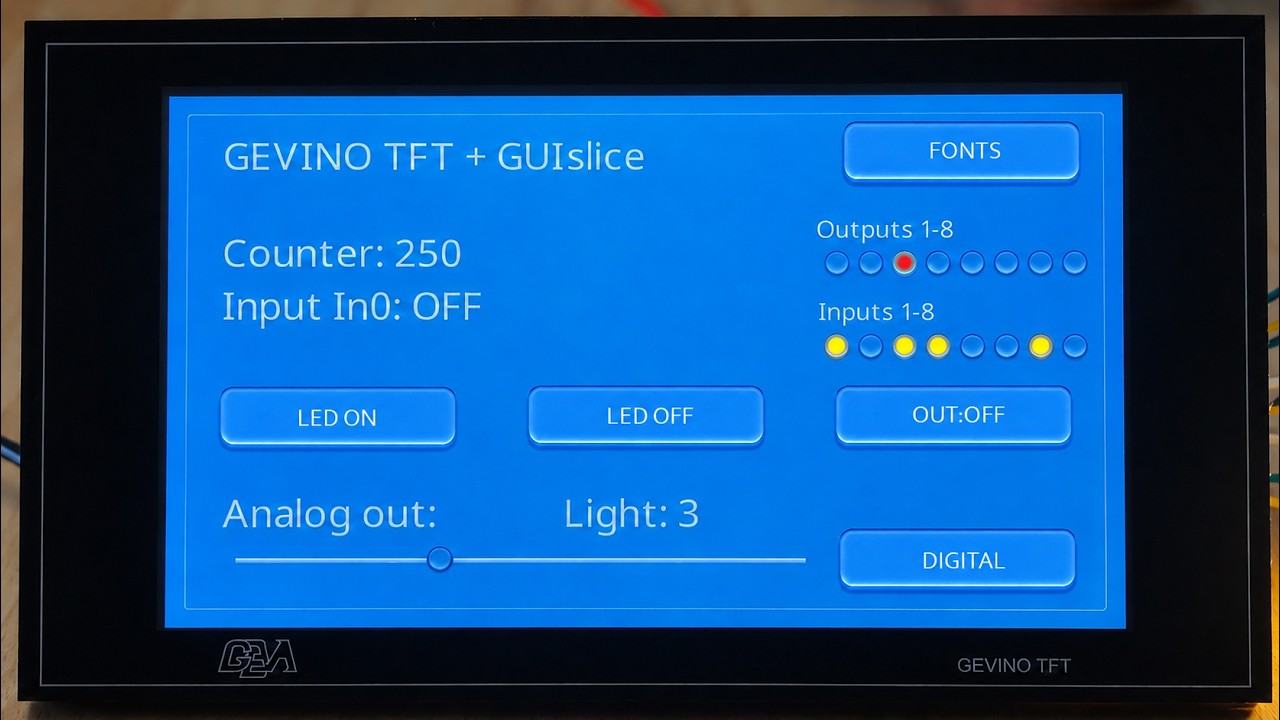
The GEVINO TFT puts a local operator interface and programmable I/O on the same board. A button can change an output, a sensor can update a gauge, and an optional W5500 module can connect that application to Ethernet. The useful distinction is where each job runs: the SAMD21 executes the control program, the RA8876 handles the display, and the W5500 provides the wired network interface.
GEVA Elettronica designs and manufactures the GEVINO family in Almese, near Torino, Italy. Its TFT models combine Arduino Zero compatibility with removable terminal blocks and a capacitive touchscreen. The current vendor repository adds a particularly useful layer: actual board code, examples, manuals and instructions written for coding assistants. Buyers can inspect how the product is programmed before choosing the Ethernet option.
Vendor, Availability, and Price
On 7 September 2026, the rendered official store showed €220 excluding tax for GEVA-TFT-7, with 40 items listed in stock. GEVA-TFT-10 was €300 excluding tax, with 10 items listed. These are the displayed base-product prices. Ethernet appears in the optional-module list, so neither number should be read as a confirmed Ethernet-equipped bundle price.
The purchasing route is the GEVA online store, with product questions directed to info@gevaelettronica.it. The store identifies the manufacturer at Via Navili 1, Almese. Its shipping and warranty pages provide the general sales conditions; delivery cost and timing depend on the destination and order. For a networked panel, the order should identify the display size, Ethernet module, enclosure pieces and required power configuration together.
Ethernet is an option. Confirm the W5500 module and mounting configuration with GEVA when ordering the panel.
The shop also sells an Ethernet accessory titled for the GEVINO Opto and Civile. That listing is useful family context, but its name alone does not establish the correct TFT bundle. The live product pages also list panel frames, rear covers and several communications options. This makes the supplied configuration an important part of the order, especially when an existing cabinet or connector layout constrains installation.
What Changes Between the 7-Inch and 10-Inch Models?
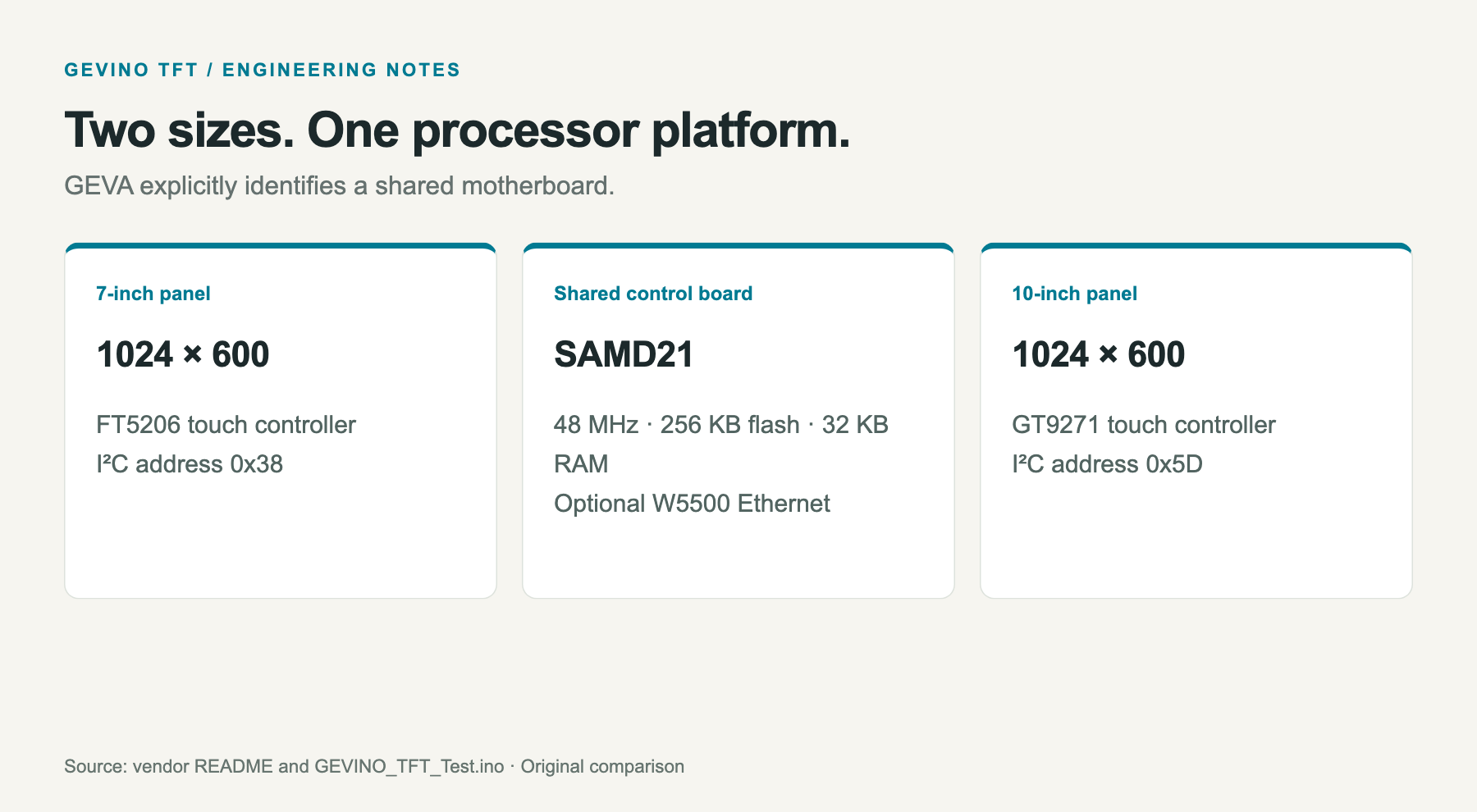
GEVA explicitly describes the TFT 7 and TFT 10 as using the same motherboard with different display glass. Both provide 1024 × 600 pixels. The larger model therefore changes the physical presentation and touch hardware, rather than adding processor memory or increasing the pixel count. This is a meaningful choice for a cabinet door where viewing distance and available panel area matter.
| Item | GEVINO TFT 7 | GEVINO TFT 10 |
|---|---|---|
| Store reference | GEVA-TFT-7 | GEVA-TFT-10 |
| Display | 7-inch capacitive touch | 10-inch capacitive touch |
| Current touch controller | FT5206 | GT9271 |
| Resolution | 1024 × 600 | 1024 × 600 |
| Processor platform | SAMD21, Arduino Zero compatible | Same motherboard |
| W5500 | Optional Ethernet module | Optional Ethernet module |
The current self-test probes the FT5206 and GT9271 controllers and reports the detected panel. This startup check ties the supported firmware to the panel fitted on the shared board. Earlier documentation contains different touch-controller details, so firmware work should start with the current repository and the hardware revision actually supplied.
The TFT is also distinct from the GEVINO Motor controller. Motor concentrates on a motor-drive function; TFT concentrates on an operator display with control I/O. Their shared brand and Arduino programming approach make them useful comparisons, but do not imply interchangeable wiring or identical Ethernet chip-select pins.
Where the W5500 Sits
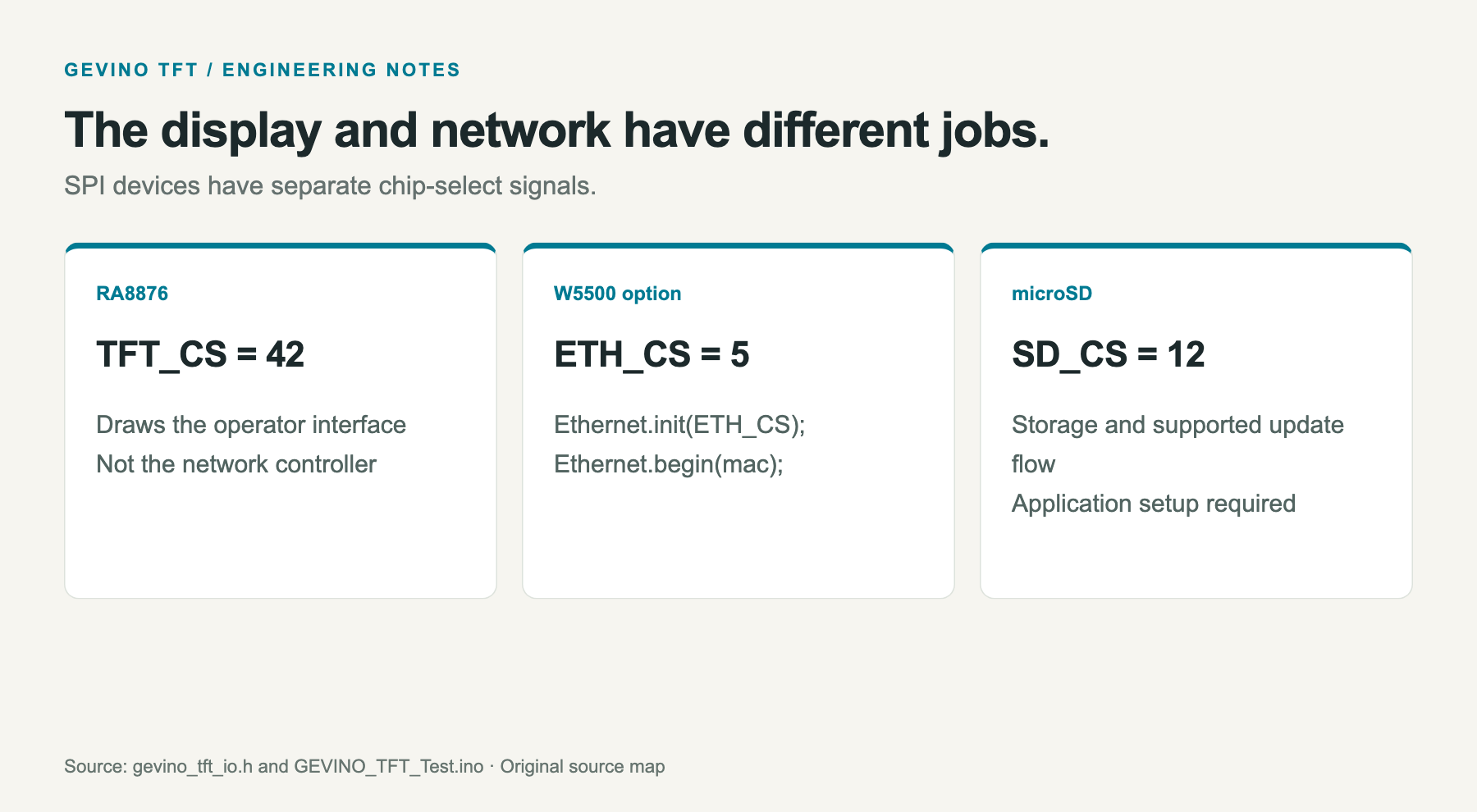
The board uses a 48 MHz SAMD21 with 256 KB of flash and 32 KB of RAM. Its display controller and optional network controller are separate peripherals. In the source pin map, the RA8876 uses chip-select 42, the microSD card uses 12, and the Ethernet module uses ETH_CS = 5. These values matter when several SPI devices share the application.
The full hardware self-test includes Arduino Ethernet, calls Ethernet.init(ETH_CS), then attempts address configuration with Ethernet.begin(mac). A successful call prints Ethernet status to both the display and USB console. That provides an observable startup check before a developer adds a server, client or application protocol to the sketch.
The W5500 documentation describes a 10/100 Ethernet MAC and PHY, hardware TCP/IP processing, eight sockets and packet memory accessed over SPI. Here those network resources complement the small host MCU. Screen drawing remains the RA8876 task, while the application still decides what values to exchange and how to react when communication is unavailable.
Local I/O Still Needs a Responsive Loop
The detailed specification lists 12 optoisolated digital inputs and eight optoisolated outputs rated at 1 A, 30 V. Four inputs have a direct, interrupt-capable path. The analog side provides four configurable inputs for voltage or current signals; enabling the analog output consumes one input channel. RS485 supplies another communication interface for an application using field devices.
A small implementation detail explains why these features need coordinated firmware. Most digital I/O passes through shift registers. The source keeps their state in registers and uses updateIO() to exchange it with the hardware. Setting an output variable is therefore part of a refresh cycle, not a promise that every channel is an independent MCU pin. Out0 has its own direct path.
GEVA recommends nonblocking, state-based application logic. That advice connects the product features: a long wait inside a network request or display routine can postpone sensor handling and screen interaction. The application should keep servicing I/O and define what happens during network loss. This is an integration consideration derived from the shared host architecture, rather than a claimed scan-time guarantee.
The Development Package Has More Than a README
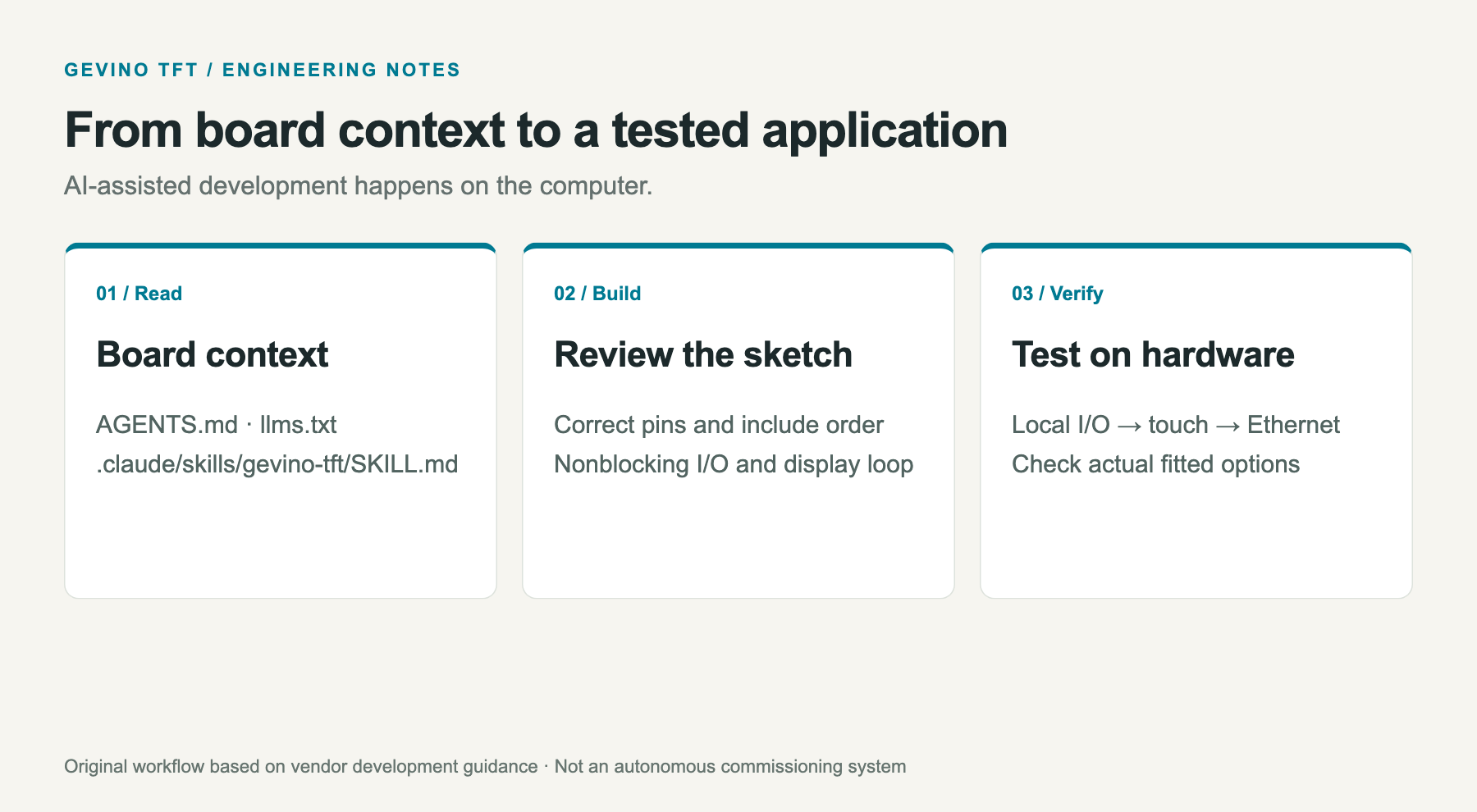
The software package includes AGENTS.md, llms.txt and a dedicated .claude/skills/gevino-tft/SKILL.md. These files describe board-specific programming rules and help an assistant locate the correct APIs. The I/O header, for example, must be included in one translation unit because it instantiates shared objects. Initialization order and regular I/O polling also have practical consequences for a generated sketch.
The AI-related files support firmware development on the computer. The resulting firmware then executes on the SAMD21.
The repository supplies display, touch, analog, USB-stick and Modbus examples. Its software is published under MIT with third-party notices retained. Buyers still need to review the relevant dependencies and example requirements; installing the core board library does not turn every listed protocol or peripheral into an enabled service.
There is also useful evidence outside the new repository. The upstream GUIslice project contains a GEVINO TFT configuration. That connects the board to an established GUI framework. Developers should select the display driver and touch configuration that match the panel being programmed.
A 2020 LVGL discussion, started by the manufacturer, explored a different graphics approach. Maintainers explained the mismatch between rendering into MCU memory and drawing through the external controller. Their explanation connects GUI selection to memory and display-controller access, giving developers a reason to examine the rendering model before choosing a framework.
Network Maintenance and Deployment Scope
The front USB-stick reader, rear USB-C connection and microSD slot also have different purposes. The front port uses a CH376 host controller for removable storage, while rear USB-C handles programming and debug output. The SD card can hold logs, configuration and image data. Choosing a file location is therefore part of the application design; a USB programming cable should not be confused with the front storage interface.
Match each connector to its documented role before building the maintenance workflow.
GEVA documents Telnet debugging and FTP-based programming over Ethernet; the latter requires the dedicated SD bootloader. These are specific maintenance arrangements. Fitting a W5500 module does not by itself establish that the bootloader, storage and application services have been configured.
A practical first build is therefore modest: establish local I/O, verify the display and touch controller, then run the Ethernet self-test before adding application traffic. The USB console gives a second view of startup results. This order makes a missing option or pin conflict easier to distinguish from a screen or sensor problem.
The TFT brings local interaction, sensor handling and wired communication into one programmable panel. A machine builder can use the same displayed state for an operator and an Ethernet application, while deciding which changes remain local and which are accepted remotely. The final response time and maintenance behavior depend on that application and its integration with the machine.
Related Projects
GEVINO Motor with W5500 shows the same vendor applying optional Ethernet to a motor-focused controller. GEVINO Civile provides another family comparison for building-control applications. The TFT adds the local touchscreen to that discussion.
FAQ
Q. Is W5500 Ethernet included in the base TFT price? Ethernet is listed as an option. Confirm the module and complete configuration with GEVA before ordering.
Q. Does the 10-inch model have more pixels? Both documented models use 1024 × 600 pixels; the glass size and touch controller differ.
Q. Which chip-select does the Ethernet example use? The current source defines ETH_CS as Arduino pin 5 and passes it to Ethernet.init().
Q. Does AI-programmable mean an onboard language model? The evidence is a development guide and assistant skill files used while writing firmware on a computer.
Q. Can firmware be updated over Ethernet? GEVA documents FTP programming with the dedicated SD bootloader. The module alone does not supply that complete setup.
-
GEVINO TFT 7 official store
Current SKU and optional configurations; observed EUR 220 excluding tax; 40 listed in stock on 7 September 2026.

-
GEVINO TFT 10 official store
Same-board larger-glass family model; observed EUR 300 excluding tax; 10 listed in stock on 7 September 2026.
-
GEVINO TFT source repository
Vendor Arduino library 1.1.0, examples, manuals, AI development guide and MIT LICENSE.
-
Full hardware self-test
Ethernet.h, ETH_CS initialization and 7/10 touch auto-detection.
-
Board programming guide
Board-specific development guidance, separate from runtime functionality.
-
TFT manual
Hardware map and optional W5500 module; use current source for touch-controller details.
-
Official product demonstration
Real working display demonstration linked by GEVA.
-
Upstream GUIslice board configuration
Independent framework repository includes a board-specific configuration.
-
LVGL graphics architecture discussion
2020 manufacturer question and maintainer responses; discussion of framebuffer and display-controller architecture.
-
W5500 documentation
Chip-level network resources.


