


How Does CANLAB Bring the Same I/O Bank to USB and W5500 Ethernet Hosts?
CANLAB combines isolated inputs, relays, analog sensing and PWM with USB HID and W5500 TCP access, plus C++ host code for Windows and Linux.

WIZnet - W5500
x 1

Onboard Ethernet controller for the CANLAB IO BOARD USB/ETHERNET TCP connection
One I/O bank, two ways to reach it
CANLAB IO BOARD USB/ETHERNET puts physical inputs and outputs under the control of a computer, using USB locally and WIZnet W5500 Ethernet remotely. CANLAB s.r.o., a manufacturer in Brno, Czech Republic, sells the board for simple automation and household monitoring or control. Both communication interfaces can operate simultaneously, so a local application and a network client can reach the same I/O hardware. CANLAB product page
The mixed I/O bank includes 24 isolated digital inputs, 10 analog inputs, eight relays, eight transistor outputs and two pulse-width modulation outputs. CANLAB supplies a desktop test application and C++ host source for Windows and Linux, giving an integrator a starting point for connecting application logic to real switches, signals and loads. The product is listed at EUR 137 or CZK 3,300 excluding VAT for one unit, checked on September 7, 2026. Vendor price list
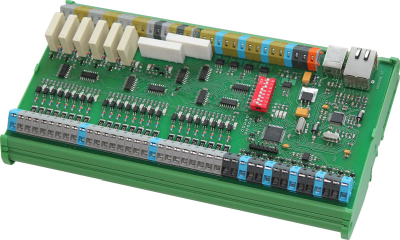
The populated IO BOARD USB/ETHERNET in its green mounting holder. Photo: CANLAB.
CANLAB develops its own hardware and software, with a wider catalog covering CAN interfaces, vehicle data acquisition and custom electronics. The company dates its work in CAN equipment to 2008; the USB/Ethernet board extends that I/O business to computer applications using familiar peripheral and network connections. Company background
Matching field signals to the right output
Digital inputs report an on/off condition. CANLAB specifies a logical high from 4.5 to 28 V and galvanic isolation for the 24 digital inputs: the field signal crosses an electrical isolation barrier before the board reads its state. This is a different requirement from a bare microcontroller input, which normally expects logic-level signals referenced directly to its own circuit ground.
Analog inputs preserve a changing level rather than reducing it to an on/off decision. CANLAB provides ten 0-10 V channels with 12-bit conversion, while onboard LEDs make digital input states visible during wiring checks. Together, the two input types suit an application that must both detect discrete events and read a variable signal. The actual sensor and its output range still determine which input is appropriate. I/O specifications
A relay changes a physical contact connection. Two of the eight relays expose normally open and normally closed contacts; the remaining six provide normally open contacts. Normally open means the connection is open before the relay operates. The eight transistor outputs instead switch the load return toward ground, with a listed rating of 30 V and 1.5 A per output.
The two PWM channels also use transistor ground switching. Pulse-width modulation varies how much of each cycle an output spends on, allowing the receiving load to respond to a changing duty cycle. Relay contacts, digital transistor switching and PWM therefore serve different control needs, even though the host software presents them together as outputs. CANLAB also offers solid-state relay fitting and custom I/O configurations by arrangement.
Where the W5500 sits between the host and the terminals
CANLAB describes the network interface as “Ethernet 100Mb/s through TCP (Wiznet W5500), supports multiple clients connected.” The W5500 is the board-side Ethernet device carrying I/O transactions between the embedded controller and remote host software. WIZnet documents the chip with an integrated Ethernet media-access controller and physical interface, plus an SPI host interface, the serial connection used by embedded controllers to exchange data with the chip. W5500 documentation
The host application has a different job. CANLAB supplies CIOBoardTCP to communicate with the board using Transmission Control Protocol, or TCP, a connection-based network transport. In CIOboardTCP.cpp, the host creates an IPv4 TCP socket and connects to the configured board address. Sensor state travels back to the computer; output requests travel toward the board. C++ source archive
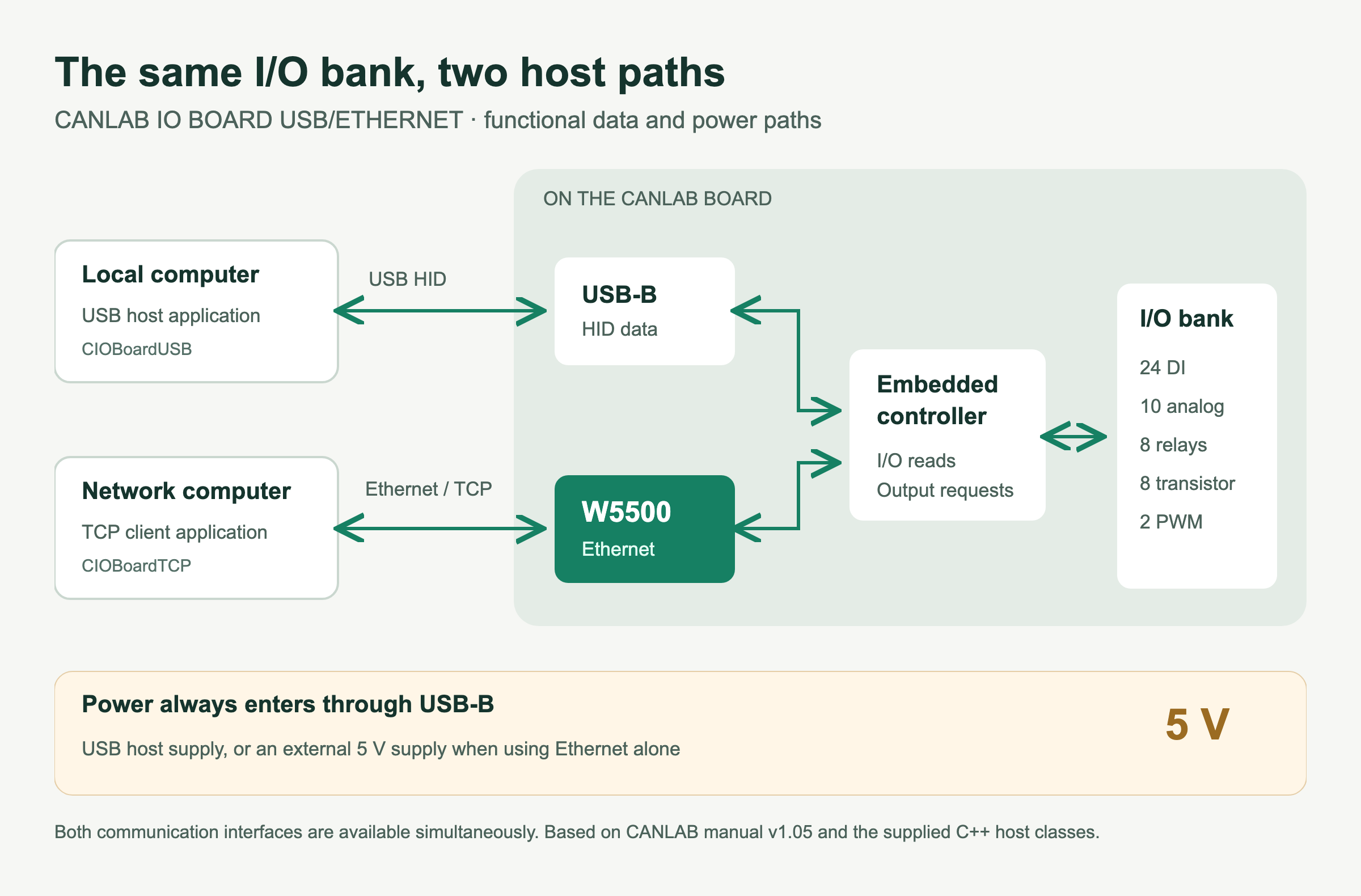
Authored technical diagram: the two host paths and the separate power requirement.
| Connection | Main function | Access path |
|---|---|---|
| USB HID | Host I/O control and monitoring | Direct USB connection |
| Ethernet TCP | Host I/O transactions | Configured TCP port, default 5000 |
| Browser monitor | I/O status display | Onboard web server, port 80 |
| Ethernet bootloader | Firmware update | Separate startup mode |
The board defaults to 192.168.110.77, TCP port 5000, and the manual specifies support for at least four simultaneous clients. The second interface uses USB Human Interface Device, or HID, a standard USB device class, so CANLAB does not require a special device driver. Firmware updates use Ethernet. Even with Ethernet as the only data connection, the board still takes 5 V through USB-B. Manual, page 3
The host decides what should happen; the board reads or drives the physical I/O. A network connection lets the computer sit elsewhere on the wired network, while USB offers a direct local connection to the same product. Neither connection changes the electrical capabilities of a terminal.
What the supplied C++ code lets an application control
The shared CIOBoard class provides the I/O interface; CIOBoardTCP and CIOBoardUSB implement its network and USB connections. The stock model in CIOboard.h defines 24 digital inputs, 16 digital outputs, 10 analog inputs and two PWM outputs. The 16 digital outputs correspond to the relay and transistor groups; PWM is counted separately.
The Raspberry Pi console example makes the transport choice easy to inspect. Its active constructor creates a USB connection, with a TCP constructor offered as a commented alternative, and keyboard input changes a digital output through the common board object. The example shows how application commands reach hardware without requiring a separate application interface for each transport.
The library can create its own communication thread, or an application can call Timer() itself. That choice matters when one program manages several boards: communication scheduling can live in a shared application loop. An OnlyMonitoring option selects the read path, and the API distinguishes requested output state from actual output state, useful when an output is blinking. Host implementation and example
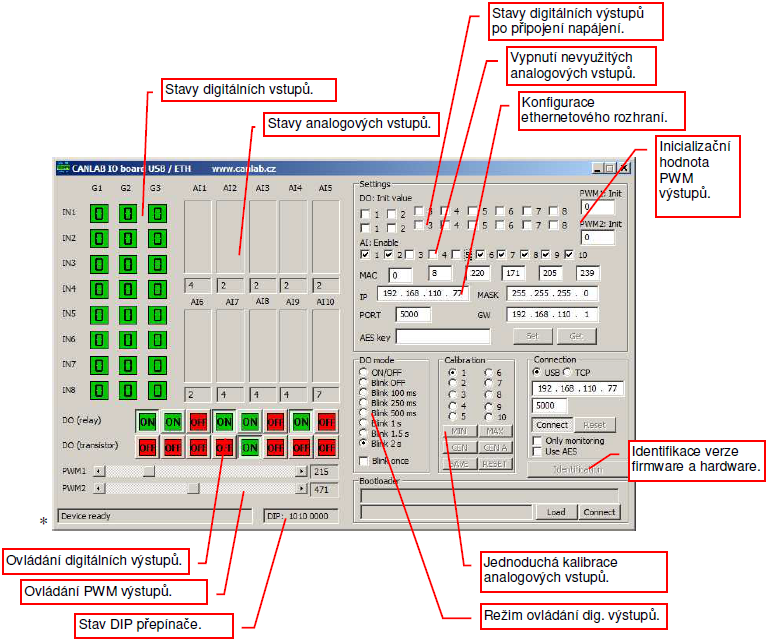
CANLAB test application with the vendor annotations retained. Screenshot: CANLAB.
The desktop interface brings those functions together for initial inspection. Input indicators occupy the left side, output controls sit underneath, and network settings, calibration and connection choices sit on the right. A reader can compare the visible controls with the class structure before deciding how much of the supplied host application to reuse.
Startup, reconnects and watching the board
The first connection reads current output states into the host object. After an interruption, output changes queued during the interruption are sent when communication returns. This makes initial connection and reconnection different application events: a controller should establish its initial state before issuing commands and decide which pending commands should remain meaningful after a pause. Manual, page 7
The board supports timed digital-output modes named BLINK and BLINK_ONCE. These let the device repeat a switching pattern or finish a single timed pulse after the host starts the operation. Higher-level application decisions remain in the host program, while these small timing actions run at the I/O board.
The built-in web server provides I/O monitoring on port 80. CANLAB publishes a browser view showing three groups of digital inputs, relay and transistor states, analog values and PWM values. The browser view is useful alongside a controlling application because it presents a compact status page without reproducing the desktop configuration interface. Official browser view
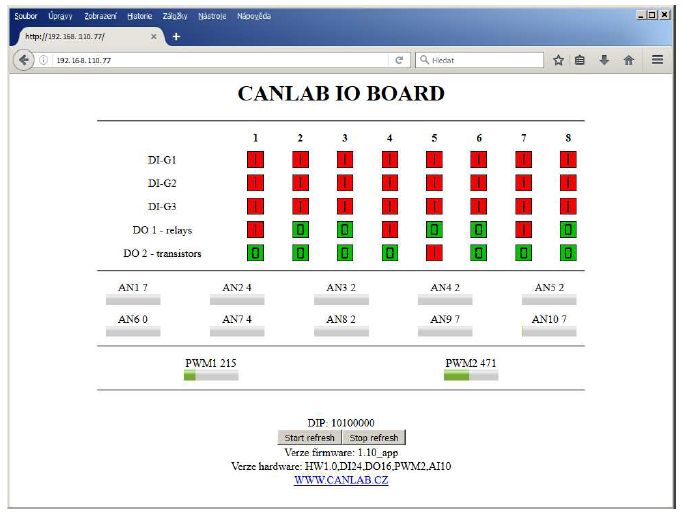
The onboard status page with refresh controls. Screenshot: CANLAB.
Commissioning also includes DIP-switch addressing and analog calibration. The manual explains how DIP positions 1-4 distinguish USB devices and, with position 5 enabled, add an offset to the configured Ethernet address. Calibration must be saved to survive a power cycle. Optional AES-128 mode restricts TCP operation to I/O data exchange, disabling other functions in that mode. Manual, pages 5-6
Vendor, Availability, and Price
CANLAB accepts orders by email and publishes separate Czech koruna and euro prices. The EUR 137 listing excludes VAT; the price list also states EUR 12 shipping within the European Union. Inventory quantity and delivery time are not published, so those are details to establish through the vendor order contact. Ordering and contact
The correct product name matters. The CANLAB selection guide separates IO BOARD USB/ETHERNET from IO BOARD 6621, the CAN-bus model. The USB/Ethernet product includes its W5500 connection as standard. CAN capability from the 6621 should not be carried into the specification of this board, while custom I/O combinations are a separate vendor service.
The strongest fit is an application that already makes decisions on a computer and needs a mix of physical inputs and outputs. Public material includes host code, a test application and a manual, but the board MCU model, schematic and device firmware source are not disclosed. CANLAB reports historical Raspberry Pi testing with Raspbian and GCC 4.9; integration on a current system remains an engineering task.
Two useful comparisons on WIZnet Maker
The Ethernet 16-Relay Board offers a relay-focused comparison using W5500 and UDP commands. Reading it beside CANLAB helps separate the choice of transport from the choice of I/O mix: CANLAB combines TCP and USB host access with analog inputs and PWM.
For readers who want to study and modify board hardware, BASIX Board with W5500 is another useful path. Its published hardware design provides a different learning route from integrating the supplied CANLAB host classes with a purchased I/O board.
FAQ
Q. Does the CANLAB USB/Ethernet board use a W5500? Yes. CANLAB explicitly identifies W5500 as the Ethernet device in the product specifications and manual.
Q. Can USB and Ethernet operate at the same time? Yes. CANLAB specifies simultaneous availability, with at least four TCP clients documented for Ethernet.
Q. Can the board run from Ethernet power alone? The documented supply is 5 V through USB-B, including when Ethernet is the only data connection.
Q. Is the browser page the control application? The built-in web page monitors I/O states. CANLAB supplies a separate desktop test application and C++ classes for control and configuration.
Q. Is CAN bus included on this Ethernet model? The vendor lists CAN IO BOARD 6621 as a separate product. Choose IO BOARD USB/ETHERNET for the W5500 and USB host interfaces.
한국어 (Korean)
체코 브르노에 있는 CANLAB s.r.o.가 만드는 산업용 입출력 보드입니다. 컴퓨터가 실제 스위치나 센서, 부하를 직접 다루게 해주는 물건인데, 접근 경로를 USB와 이더넷 두 가지로 열어둔 게 특징입니다. 두 경로는 동시에 살아 있어서 로컬 PC 프로그램이 USB로 붙어 있는 동안 네트워크 반대편의 다른 프로그램이 같은 보드의 입출력 상태를 읽어갈 수 있습니다.
입출력 구성은 절연 디지털 입력 24개, 0에서 10V 아날로그 입력 10개, 릴레이 8개, 트랜지스터 출력 8개, PWM 2채널입니다. 디지털 입력은 4.5V에서 28V 사이를 하이로 읽고 절연 장벽을 거치기 때문에, 마이크로컨트롤러 핀에 신호를 바로 물리는 것과는 다릅니다. 릴레이 여덟 개 중 둘은 a접점과 b접점을 모두 내주고 나머지 여섯은 a접점만 냅니다.
이더넷 쪽은 W5500이 맡습니다. 제조사 스펙에 Ethernet 100Mb/s through TCP (Wiznet W5500)이라고 적혀 있고 기본 주소는 192.168.110.77, TCP 5000번 포트입니다. 매뉴얼에는 동시 접속 클라이언트를 최소 4개까지 지원한다고 나와 있습니다. 포트 80으로는 내장 웹서버가 떠서 브라우저로 입출력 상태를 볼 수 있는데 이건 모니터링 전용이고, 실제 제어는 제조사가 배포하는 C++ 클래스로 합니다. USB용과 TCP용 클래스가 같은 베이스 클래스를 상속받아서 어느 경로로 붙든 호출부는 거의 같습니다.
이더넷만 써도 전원은 USB-B로 5V를 넣어야 합니다. 가격은 부가세 별도 137유로, 체코 코루나로는 3,300코루나이고 EU 내 배송비가 12유로입니다. 주문은 이메일로 받습니다.
보드에 올라간 MCU 모델과 회로도, 장치 펌웨어 소스는 공개돼 있지 않습니다. 호스트 쪽 코드와 매뉴얼, 테스트 프로그램까지는 받을 수 있습니다.
-
CANLAB IO BOARD USB/ETHERNET
Official product specifications and W5500 statement

-
CANLAB I/O board manual v1.05
Czech manual: power, TCP clients, DIP switches, calibration and host classes
-
Windows and Linux C++ host source
Vendor source archive including USB, TCP and Raspberry Pi console examples
-
CANLAB price list
EUR 137 / CZK 3300 excluding VAT, one piece; observed September 7, 2026
-
CANLAB ordering and contact
Czech company address, orders and support contact
-
CANLAB product selection guide
Distinguishes USB/Ethernet I/O from the separate CAN-bus model
-
Official CANLAB I/O application screenshots
Source of product photograph, desktop test UI and web monitoring view
-
WIZnet W5500 documentation
Official chip context; board-specific firmware implementation is not published


