


W5500 Raspberry Pi Pico Audio ML Fire Alarm with WhatsApp Alerts
A Raspberry Pi Pico, W5500, INMP441, TFLite Micro, and CallMeBot path detects fire alarm audio locally and sends WhatsApp alerts over Ethernet.

WIZnet - W5500
x 1

W5500 Ethernet controller used by the Raspberry Pi Pico audio ML node for the wired CallMeBot/WhatsApp alert path.
Overview
Team Professional, the GitHub maker behind the teamprof account, describes its work as embedded firmware development and AI research. This repository is a compact AIoT build: a Raspberry Pi Pico listens to an INMP441 microphone, runs local audio inference, and uses a WIZnet W5500 Ethernet path to send WhatsApp alerts through CallMeBot.
The important WIZnet detail is not just that a W5500 appears in the parts list. The code initializes Ethernet in src/thread/ThreadNet.cpp, maps the W5500 chip select and interrupt pins in src/pins.h, and sends the alert through EventEthernetClient in src/util/Callmebot.cpp. In other words, W5500 is the wired network boundary between local audio ML and the external alert service.
Key takeaway: The W5500 is not the audio classifier. RP2040 handles I2S audio, DSP preprocessing, and TFLite Micro inference; W5500 handles the wired Ethernet path that carries the alert request out to the network.
Evidence Snapshot
| Checkpoint | Source-backed fact | Why it matters |
|---|---|---|
| Hardware list | README names Raspberry Pi Pico, W5500, and TDK InvenSense INMP441. | The WIZnet part and audio sensor are explicit in the original source. |
| Wiring | README maps W5500 CS/SCK/MISO/MOSI and INT to Pico GPIO pins. | The Ethernet path is a real SPI wiring path, not a vague network claim. |
| Ethernet init | ThreadNet.cpp calls Ethernet.init(PIN_ETH_CS, PIN_ETH_INTN) and Ethernet.begin(...). | The firmware brings up W5500-class Ethernet before starting the audio thread. |
| Alert transport | Callmebot.cpp uses EventEthernetClient.connect(), HTTP request writes, reads, and socket interrupt flags. | The detected alarm state becomes an Ethernet-carried HTTP alert. |
| Audio ML path | ThreadAudio.cpp, PreProcessor.cpp, and audio_model.cpp run I2S DMA, spectrogram preprocessing, and TFLite Micro inference. | The project is an actual local audio ML pipeline, not only a network notification demo. |
System Architecture and Data Flow
The source diagram shows the whole path in one view: fire-alarm sound enters the INMP441 microphone, the Pico processes the audio, W5500 provides Ethernet, and the alert reaches a phone through the Internet and CallMeBot.
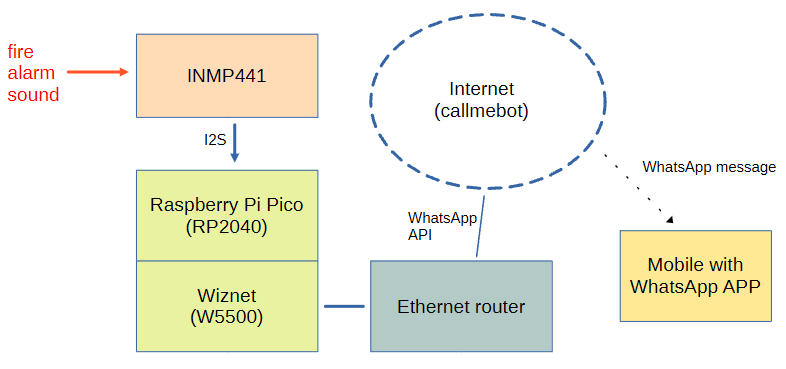
The software flow is event-driven. On boot, ThreadApp starts ThreadNet. When Ethernet is ready, ThreadNet posts an AppEthUp event back to the application thread. Only then does the firmware launch ThreadAudio, so the audio inference loop starts after the wired network path is available.
After that, ThreadAudio captures I2S audio, updates the spectrogram buffer, invokes the model, and posts the prediction value to ThreadApp. ThreadApp applies a Kalman filter and a threshold of 0.3 before changing the alarm state. When the alarm state changes, ThreadNet sends either alarm sound detected or no alarm through the CallMeBot HTTP path.
Hardware and Wiring Evidence
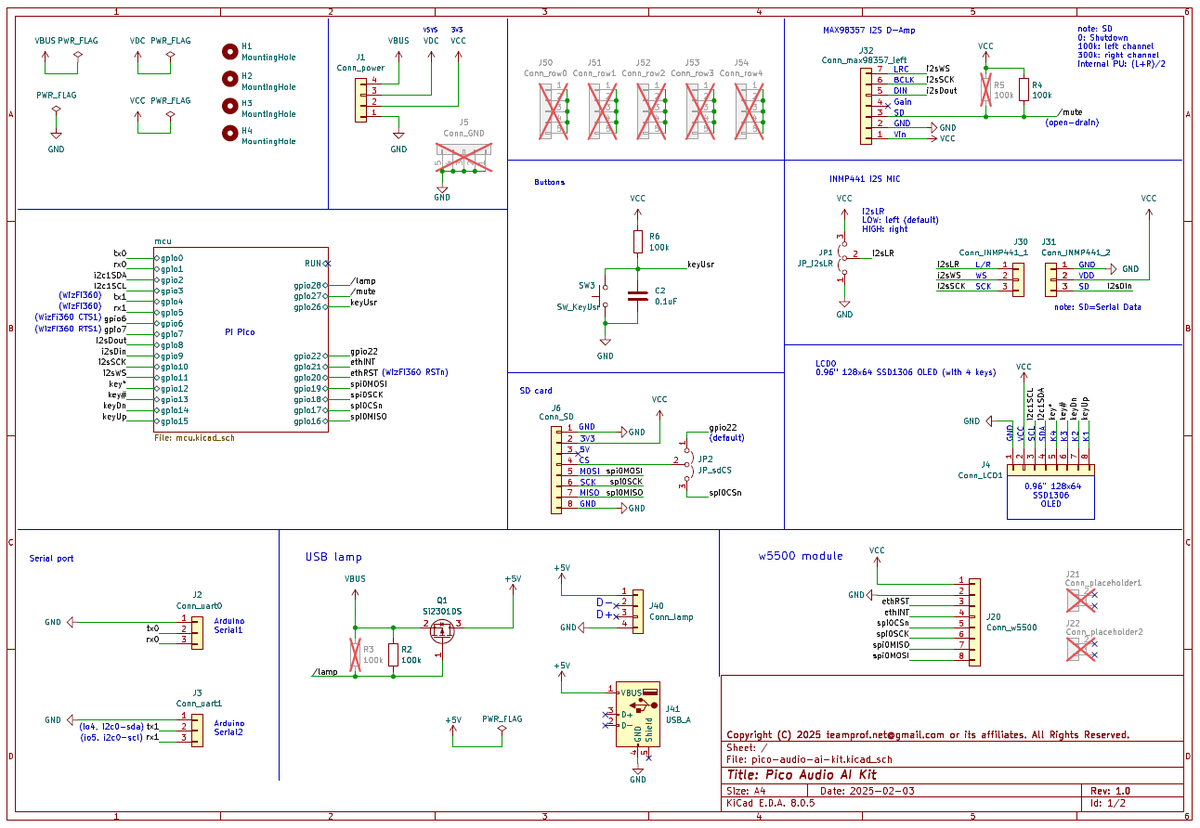
The README wiring table maps W5500 and INMP441 signals to the Pico. The W5500 side uses 3.3 V power, reset, interrupt, SPI chip select, SPI clock, MISO, and MOSI. The microphone side uses INMP441 left-channel I2S with WS, SCK, and SD connected to Pico pins.
src/pins.h makes the same design concrete in firmware:
#define PIN_I2S_DI 9u
#define PIN_I2S_BCLK 10u
#define PIN_I2S_WS 11u
#define PIN_SPI0_MISO 16u
#define PIN_SPI0_CSn 17u
#define PIN_SPI0_SCK 18u
#define PIN_SPI0_MOSI 19u
#define PIN_ETH_CS 17u
#define PIN_ETH_INTN 21u
The schematic reinforces the same point. The source image labels the w5500 module connector and the Pico-side SPI nets, while the INMP441 microphone connector is shown as a separate I2S path.
Firmware Path: Audio ML First, Ethernet Alert Second
The firmware splits work into threads. ThreadNet owns Ethernet initialization and CallMeBot send events. ThreadAudio owns I2S input and inference. ThreadApp sits between them and decides whether the inference output changes the alarm state.
On the ML side, audio_const.h sets a 16 kHz sampling rate, 512-sample frame length, 128-sample frame step, and 256-point FFT. PreProcessor.cpp builds a Hanning window, shifts the spectrogram, and fills the model input tensor. audio_model.cpp creates a 64 KB tensor arena, registers TFLite Micro operators such as Conv2D, MaxPool2D, FullyConnected, Softmax, and Logistic, then invokes the embedded model.
On the network side, ThreadNet.cpp subscribes to W5500/W5100-class interrupt sources such as conflict, unreachable, wake-on-LAN, timeout, ARP, and ping. It calls DHCP through Ethernet.begin(...) and posts AppEthUp only after the local IP is valid. Callmebot.cpp then opens a TCP connection, writes an HTTP GET request, reads the response, and treats HTTP 200 as send success.
WIZnet role: W5500 provides the wired Ethernet and socket-backed HTTP path, while the Pico stays focused on audio sampling, DSP preprocessing, model inference, and alarm-state logic.
Runtime Evidence
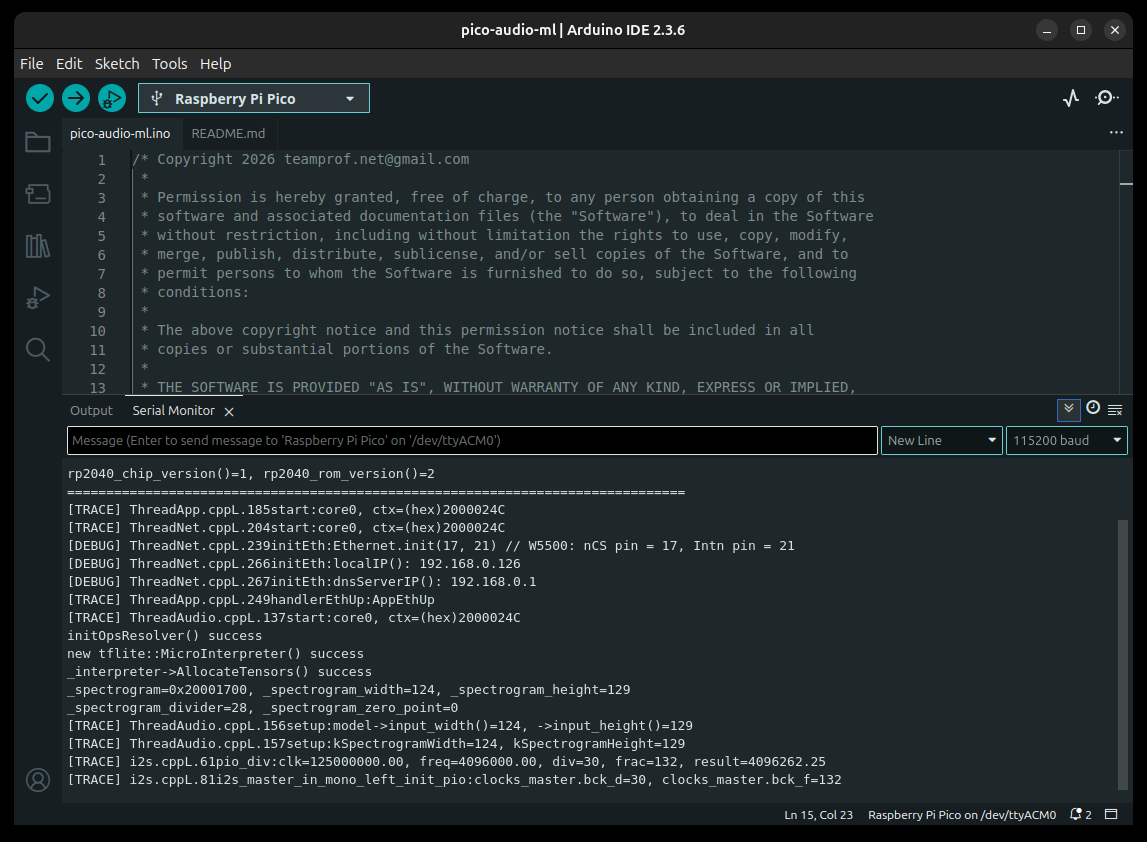
The repository includes Arduino IDE screenshots that act as practical run evidence. The Ethernet-up screenshot shows Ethernet.init(17, 21), a local IP address, a DNS server address, and the transition into ThreadAudio.
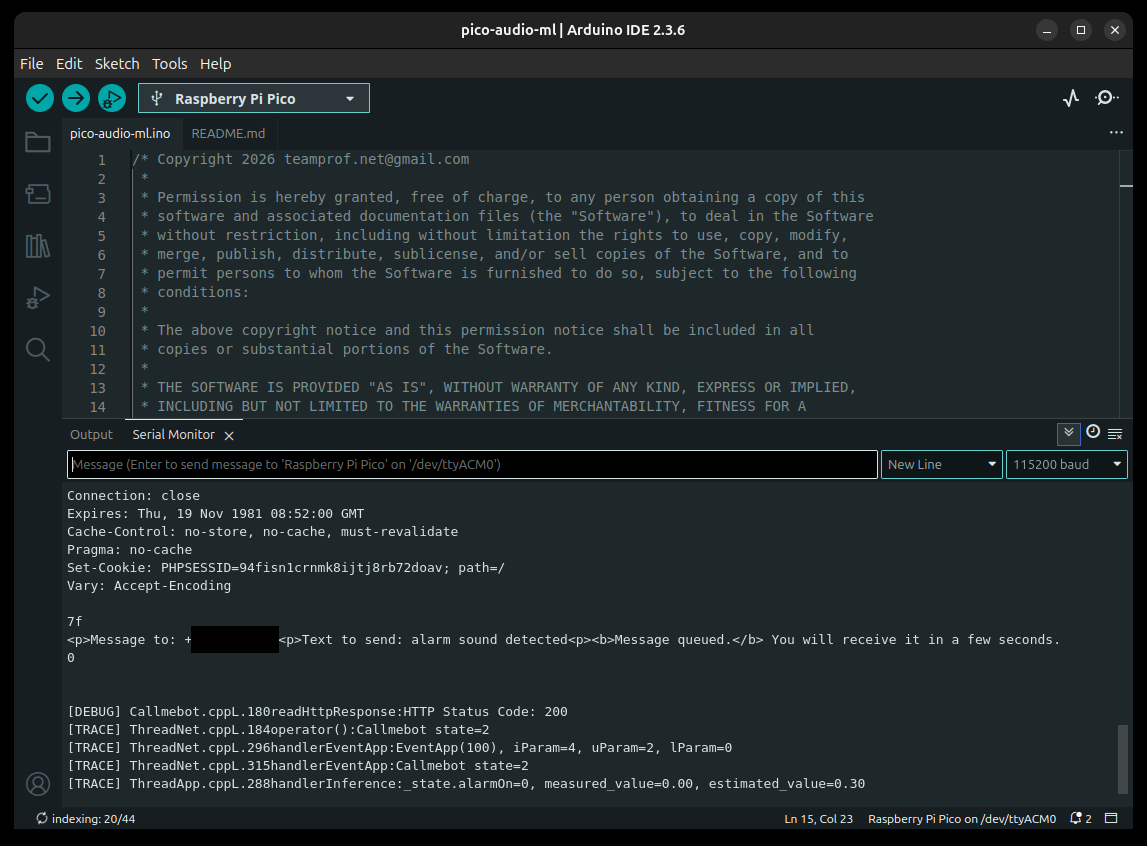
The alert screenshot shows the HTTP response path after an alarm sound is detected. The Serial Monitor includes an HTTP 200 response and a CallMeBot success state, followed by the application returning to a no-alarm estimate.
Relationship to the Existing W5100S Pico Version
There is already a related Maker post by the same maker: Pi Pico Fire alarm sound detector running on W5100S Pico EVB. That existing article covers a W5100S-EVB-Pico version of the same general audio-alarm idea.
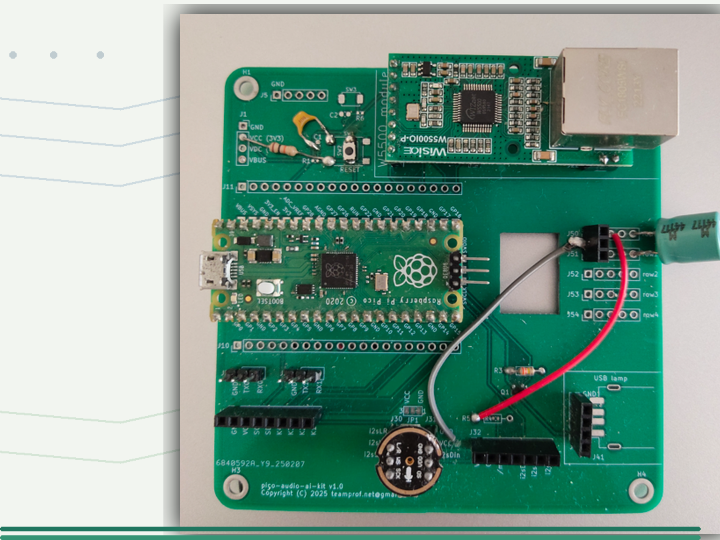
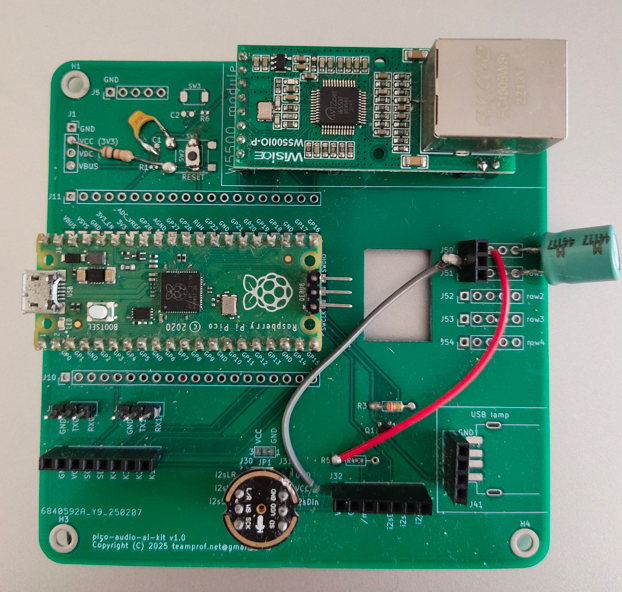
This repository is not treated as an exact duplicate because the hardware evidence is different. The existing post centers on W5100S-EVB-Pico. This source centers on a Raspberry Pi Pico plus W5500 module/PCBA path, with the W5500 module visible in the photo and schematic and initialized in ThreadNet.cpp.
Reading both versions is useful because it separates the application from the WIZnet hardware choice. The application pattern is local audio ML plus network alerting. The WIZnet implementation can be board-integrated through W5100S-EVB-Pico or module-based through W5500.
Where It Fits - Value and Limits
This project fits educational AIoT, lab safety demonstrations, accessibility prototypes, maker alarm nodes, and experiments where a local audio classifier should trigger a network alert without relying on Wi-Fi on the microcontroller. The source is especially helpful because it includes the firmware flow, PCBA photo, schematic, runtime screenshots, and a short video demo.
The limits are just as important. The public repository embeds a TFLite model, but it does not publish a training notebook, dataset description, model card, accuracy, false-positive rate, latency report, or certification evidence. It should be read as a maker and engineering reference, not as a certified fire-safety device.
The license also needs care. The README says GNU GPL v3, but the repository does not include a separate LICENSE file and the source headers use permissive MIT-style permission text. Anyone reusing the code should check the repository's current license text directly before redistribution.
Related WIZnet Maker Reading Path
After this article, the closest comparison is the W5100S Pico fire-alarm detector. It shows the same maker's board-integrated W5100S version, while this post explains the W5500 module/PCBA version. Together, they make a useful WIZnet audio-AIoT hardware comparison.
For another alert-oriented ML example, read Alarm for deaf with Surf5, WIZPoE-P1 and Edge ML module. That project approaches alerting with different WIZnet hardware and an edge ML module, so it is a good companion when comparing AI-triggered notifications.
For the wider W5500 connectivity angle, Extending nRF52840 BLE SoC with W5500 Ethernet Connectivity is the better next read. It is not an audio project, but it shows the same engineering pattern of adding W5500 Ethernet as a stable network boundary around a constrained MCU application.
Source-backed Summary
teamprof/arduino-pico-audio-ml is a source-rich WIZnet Maker example because it ties W5500 to a full data path: INMP441 audio, RP2040 local inference, event-driven application logic, W5500 Ethernet, HTTP CallMeBot request, and WhatsApp alert delivery. The repository provides real build images, schematic evidence, runtime screenshots, and code paths for both the audio and Ethernet sides.
The strongest Maker lesson is simple: W5500 lets a small Pico audio ML node keep wired alert delivery separate from the local inference workload. The source does not prove production readiness or model accuracy, but it does provide enough evidence to study a practical W5500 AIoT alert architecture.
FAQ
Q. What does this project use the W5500 for? It uses W5500 as the wired Ethernet controller for the alert path. The firmware initializes Ethernet, obtains an IP address, opens a TCP connection, and sends an HTTP request to CallMeBot when the alarm state changes.
Q. Does W5500 run the machine-learning model? No. The Raspberry Pi Pico/RP2040 runs the I2S audio capture, spectrogram preprocessing, and TFLite Micro inference. W5500 handles the Ethernet connection used to send the alert.
Q. What audio sensor is used? The README and schematic name the TDK InvenSense INMP441 24-bit I2S microphone. The firmware maps I2S data, bit clock, and word-select pins in src/pins.h.
Q. Is this different from the existing W5100S-EVB-Pico fire-alarm post? Yes. The earlier Maker post covers a W5100S-EVB-Pico version. This repository uses Raspberry Pi Pico plus W5500 module/PCBA evidence, so it is best read as a W5500 hardware variant of the audio-AIoT alarm idea.
Q. Can this be treated as a certified fire alarm? No. The repository is a maker/engineering reference. It does not publish certification evidence, dataset details, accuracy metrics, false-positive testing, or a safety validation report.
Further source links, including the repository, schematic PDF, release, demo video, EventEthernet library, and CallMeBot reference, are included in the Documents panel.
한국어 (Korean)
개요
GitHub teamprof 계정의 Team Professional은 임베디드 펌웨어 개발과 AI 연구를 공개 프로필에 적어 둔 제작자입니다. 이 저장소는 작은 AIoT 빌드입니다. Raspberry Pi Pico가 INMP441 마이크 소리를 듣고, 로컬 오디오 추론을 수행한 뒤, WIZnet W5500 Ethernet 경로로 CallMeBot을 통해 WhatsApp 알림을 보냅니다.
중요한 WIZnet 포인트는 W5500이 부품 목록에만 등장하는 것이 아니라는 점입니다. src/thread/ThreadNet.cpp는 Ethernet을 초기화하고, src/pins.h는 W5500 CS/INT 핀을 정의하며, src/util/Callmebot.cpp는 EventEthernetClient로 알림을 보냅니다. 즉 W5500은 로컬 오디오 ML과 외부 알림 서비스 사이의 유선 네트워크 경계입니다.
핵심 요약: W5500이 오디오 분류기를 실행하는 것은 아닙니다. RP2040이 I2S 오디오, DSP 전처리, TFLite Micro 추론을 맡고, W5500은 알림 요청을 외부 네트워크로 보내는 유선 Ethernet 경로를 맡습니다.
근거 요약
| 확인 항목 | 원본 근거 | 의미 |
|---|---|---|
| 하드웨어 목록 | README가 Raspberry Pi Pico, W5500, TDK InvenSense INMP441을 명시합니다. | WIZnet 부품과 오디오 센서가 원본에 직접 나옵니다. |
| 배선 | README가 W5500 CS/SCK/MISO/MOSI와 INT를 Pico GPIO에 매핑합니다. | Ethernet 경로가 실제 SPI 배선으로 설명됩니다. |
| Ethernet 초기화 | ThreadNet.cpp가 Ethernet.init(PIN_ETH_CS, PIN_ETH_INTN)와 Ethernet.begin(...)을 호출합니다. | 오디오 스레드를 시작하기 전에 W5500 계열 Ethernet을 올립니다. |
| 알림 전송 | Callmebot.cpp가 EventEthernetClient.connect(), HTTP 쓰기/읽기, 소켓 인터럽트 플래그를 사용합니다. | 감지된 알람 상태가 Ethernet 기반 HTTP 알림으로 이어집니다. |
| 오디오 ML 경로 | ThreadAudio.cpp, PreProcessor.cpp, audio_model.cpp가 I2S DMA, spectrogram 전처리, TFLite Micro 추론을 수행합니다. | 단순 알림 데모가 아니라 로컬 오디오 ML 파이프라인입니다. |
시스템 구조와 데이터 흐름
원본 시스템 다이어그램은 전체 경로를 한 번에 보여줍니다. 화재 알람 소리가 INMP441 마이크로 들어오고, Pico가 오디오를 처리하며, W5500이 Ethernet을 제공하고, CallMeBot을 통해 전화기로 알림이 전달됩니다.
소프트웨어 흐름은 이벤트 기반입니다. 부팅 후 ThreadApp이 ThreadNet을 시작합니다. Ethernet이 준비되면 ThreadNet이 AppEthUp 이벤트를 애플리케이션 스레드로 보냅니다. 그 뒤에야 ThreadAudio가 시작되므로, 유선 네트워크 경로가 준비된 다음 오디오 추론 루프가 시작됩니다.
이후 ThreadAudio는 I2S 오디오를 캡처하고 spectrogram 버퍼를 갱신하며 모델을 실행한 뒤 예측값을 ThreadApp으로 보냅니다. ThreadApp은 Kalman filter와 0.3 threshold로 알람 상태 변화를 판단합니다. 알람 상태가 바뀌면 ThreadNet이 CallMeBot HTTP 경로로 alarm sound detected 또는 no alarm 메시지를 보냅니다.
하드웨어와 배선 근거
README 배선 표는 W5500과 INMP441 신호를 Pico에 매핑합니다. W5500 쪽은 3.3 V 전원, reset, interrupt, SPI chip select, SPI clock, MISO, MOSI를 사용합니다. 마이크 쪽은 INMP441 left-channel I2S이며 WS, SCK, SD가 Pico 핀에 연결됩니다.
src/pins.h도 같은 설계를 펌웨어에서 구체화합니다.
#define PIN_I2S_DI 9u
#define PIN_I2S_BCLK 10u
#define PIN_I2S_WS 11u
#define PIN_SPI0_MISO 16u
#define PIN_SPI0_CSn 17u
#define PIN_SPI0_SCK 18u
#define PIN_SPI0_MOSI 19u
#define PIN_ETH_CS 17u
#define PIN_ETH_INTN 21u
회로도 역시 같은 점을 보강합니다. 원본 이미지에는 w5500 module 커넥터와 Pico 쪽 SPI net, 그리고 별도 I2S 경로의 INMP441 마이크 커넥터가 표시됩니다.
펌웨어 경로: 오디오 ML 이후 Ethernet 알림
펌웨어는 역할을 스레드로 나눕니다. ThreadNet은 Ethernet 초기화와 CallMeBot 전송 이벤트를 맡고, ThreadAudio는 I2S 입력과 추론을 맡습니다. ThreadApp은 둘 사이에서 추론 출력이 알람 상태를 바꿔야 하는지 판단합니다.
ML 쪽에서는 audio_const.h가 16 kHz 샘플링, 512 샘플 프레임, 128 샘플 step, 256-point FFT를 설정합니다. PreProcessor.cpp는 Hanning window를 만들고 spectrogram을 갱신해 모델 입력 텐서를 채웁니다. audio_model.cpp는 64 KB tensor arena를 만들고 Conv2D, MaxPool2D, FullyConnected, Softmax, Logistic 같은 TFLite Micro operator를 등록한 뒤 내장 모델을 실행합니다.
네트워크 쪽에서는 ThreadNet.cpp가 conflict, unreachable, wake-on-LAN, timeout, ARP, ping 같은 W5500/W5100 계열 interrupt source를 구독합니다. Ethernet.begin(...)으로 DHCP를 수행하고, 유효한 local IP가 있을 때만 AppEthUp을 보냅니다. Callmebot.cpp는 TCP 연결을 열고 HTTP GET 요청을 쓰며 응답을 읽고, HTTP 200을 전송 성공으로 처리합니다.
WIZnet 역할: W5500은 유선 Ethernet과 socket 기반 HTTP 경로를 제공하고, Pico는 오디오 샘플링, DSP 전처리, 모델 추론, 알람 상태 로직에 집중합니다.
실행 근거
저장소에는 Arduino IDE 실행 캡처가 포함되어 있습니다. Ethernet-up 캡처에는 Ethernet.init(17, 21), local IP, DNS server IP, 그리고 ThreadAudio로 넘어가는 흐름이 보입니다.
알림 전송 캡처에는 화재 알람 소리 감지 후 HTTP 응답 경로가 보입니다. Serial Monitor에는 HTTP 200 응답과 CallMeBot 성공 상태가 표시되고, 이후 애플리케이션은 no-alarm 추정값으로 돌아갑니다.
기존 W5100S Pico 버전과의 관계
같은 제작자의 관련 Maker 글로 Pi Pico Fire alarm sound detector running on W5100S Pico EVB가 이미 있습니다. 그 글은 같은 오디오 알람 아이디어의 W5100S-EVB-Pico 버전을 다룹니다.
이번 저장소는 하드웨어 근거가 다르기 때문에 정확한 중복으로 보지 않았습니다. 기존 글은 W5100S-EVB-Pico 중심이고, 이번 원본은 Raspberry Pi Pico와 W5500 모듈/PCBA 경로를 중심으로 합니다. W5500 모듈은 사진과 회로도에 보이고, ThreadNet.cpp에서도 초기화됩니다.
두 버전을 함께 읽으면 애플리케이션과 WIZnet 하드웨어 선택을 분리해서 볼 수 있습니다. 애플리케이션 패턴은 로컬 오디오 ML과 네트워크 알림입니다. WIZnet 구현은 W5100S-EVB-Pico처럼 보드 통합형일 수도 있고, W5500처럼 모듈 기반일 수도 있습니다.
활용 가치와 한계
이 프로젝트는 교육용 AIoT, 실험실 안전 데모, 접근성 프로토타입, 메이커 알람 노드, 그리고 마이크로컨트롤러에서 Wi-Fi에 의존하지 않고 로컬 오디오 분류 결과를 네트워크 알림으로 보내고 싶은 실험에 잘 맞습니다. 원본에는 펌웨어 흐름, PCBA 사진, 회로도, 실행 캡처, 짧은 데모 영상까지 있어 학습 가치가 높습니다.
한계도 명확합니다. 공개 저장소에는 TFLite 모델이 포함되어 있지만, training notebook, dataset 설명, model card, accuracy, false-positive rate, latency report, certification evidence는 없습니다. 이 프로젝트는 메이커/엔지니어링 참고 사례로 읽어야 하며, 인증된 화재 안전 장치로 보아서는 안 됩니다.
라이선스도 확인이 필요합니다. README는 GNU GPL v3라고 적지만, 별도 LICENSE 파일은 없고 소스 헤더는 MIT-style permission 문구를 사용합니다. 코드를 재사용하려면 현재 저장소의 라이선스 문구를 직접 확인하는 것이 좋습니다.
관련 WIZnet Maker 읽기 경로
이 글 다음으로 가장 가까운 비교 대상은 W5100S Pico fire-alarm detector입니다. 같은 제작자의 W5100S 보드 통합 버전을 보여주고, 이번 글은 W5500 모듈/PCBA 버전을 설명합니다. 두 글을 함께 보면 WIZnet 오디오 AIoT 하드웨어 비교가 됩니다.
또 다른 알림 중심 ML 사례로는 Alarm for deaf with Surf5, WIZPoE-P1 and Edge ML module을 볼 수 있습니다. 이 프로젝트는 다른 WIZnet 하드웨어와 edge ML module을 사용하므로, AI-triggered notification 구조를 비교하기 좋습니다.
W5500 연결성 자체를 더 넓게 보려면 Extending nRF52840 BLE SoC with W5500 Ethernet Connectivity가 좋은 다음 글입니다. 오디오 프로젝트는 아니지만, 제한된 MCU 애플리케이션 주변에 W5500 Ethernet을 안정적인 네트워크 경계로 추가하는 같은 설계 패턴을 보여줍니다.
근거 기반 요약
teamprof/arduino-pico-audio-ml은 INMP441 오디오, RP2040 로컬 추론, 이벤트 기반 애플리케이션 로직, W5500 Ethernet, HTTP CallMeBot 요청, WhatsApp 알림 전달까지 하나의 데이터 경로로 연결하기 때문에 WIZnet Maker에 적합한 예제입니다. 저장소는 오디오 쪽과 Ethernet 쪽을 모두 확인할 수 있는 실제 빌드 이미지, 회로도, 실행 캡처, 코드 경로를 제공합니다.
가장 중요한 Maker 관점은 간단합니다. W5500은 작은 Pico 오디오 ML 노드에서 유선 알림 전달을 로컬 추론 작업과 분리해 줍니다. 원본은 production readiness나 모델 정확도를 증명하지는 않지만, 실용적인 W5500 AIoT 알림 구조를 공부하기에는 충분한 근거를 제공합니다.
FAQ
이 프로젝트는 W5500을 어디에 사용하나요? W5500은 알림 경로의 유선 Ethernet 컨트롤러로 사용됩니다. 펌웨어는 Ethernet을 초기화하고 IP 주소를 받은 뒤 TCP 연결을 열어 알람 상태가 바뀔 때 CallMeBot으로 HTTP 요청을 보냅니다.
W5500이 machine-learning model을 실행하나요? 아닙니다. Raspberry Pi Pico/RP2040이 I2S 오디오 캡처, spectrogram 전처리, TFLite Micro 추론을 수행합니다. W5500은 알림 전송에 필요한 Ethernet 연결을 담당합니다.
어떤 오디오 센서를 사용하나요? README와 회로도는 TDK InvenSense INMP441 24-bit I2S microphone을 명시합니다. 펌웨어는 src/pins.h에서 I2S data, bit clock, word-select 핀을 매핑합니다.
기존 W5100S-EVB-Pico 화재 알람 글과 다른가요? 네. 기존 Maker 글은 W5100S-EVB-Pico 버전입니다. 이번 저장소는 Raspberry Pi Pico와 W5500 모듈/PCBA 근거를 사용하므로, 같은 오디오 AIoT 알람 아이디어의 W5500 하드웨어 버전으로 보는 것이 맞습니다.
인증된 화재 알람으로 볼 수 있나요? 아닙니다. 이 저장소는 메이커/엔지니어링 참고 사례입니다. 인증, dataset, accuracy, false-positive test, safety validation report가 공개되어 있지 않습니다.
원본 저장소, 회로도 PDF, release, demo video, EventEthernet library, CallMeBot reference는 Documents 패널에 포함했습니다.
-
Original GitHub repository
Original source repository for the Raspberry Pi Pico, W5500, INMP441, TFLite Micro, and CallMeBot audio ML project.

-
Repository release v1.0.0
GitHub release published on 2026-01-26.
-
Schematic PDF
Source schematic PDF for the Pico audio AI kit and W5500 module connector.
-
Demo video
Demo linked from the README showing Ethernet up, alarm detection, and WhatsApp alert behavior.
-
arduino-eventethernet library
Event-driven Arduino Ethernet library used by the project for the WIZnet Ethernet path.
-
ArduCMSIS-DSP library
CMSIS-DSP library referenced by the README for RP2040 audio preprocessing.
-
ArduTFLite library
TensorFlow Lite Micro Arduino library referenced by the README.
-
CallMeBot WhatsApp API reference
Service reference used by the project to send WhatsApp messages over the W5500 Ethernet path.
-
Related W5100S Pico Maker post
Existing related Maker post by the same maker for the W5100S-EVB-Pico version.


