


Voice-Controlled-System
A PC-based voice control system that uses Python speech recognition and a W5500-enabled MCU to receive commands over Ethernet and control external devices.
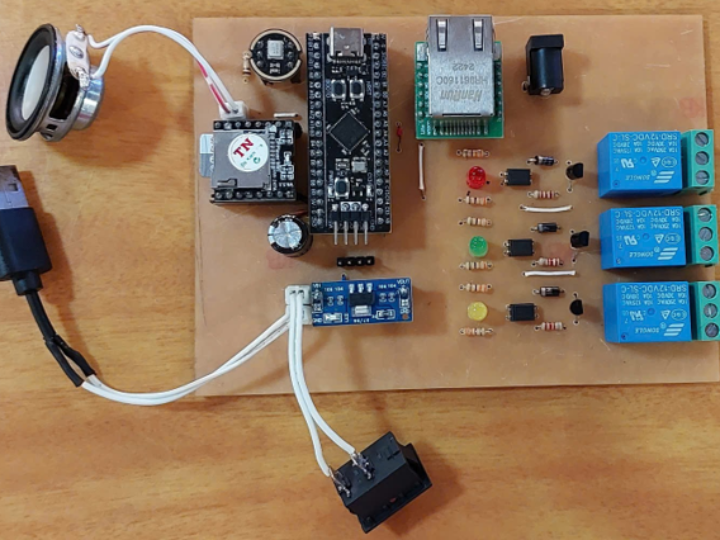

WIZnet - W5500
x 1

STMicroelectronics - STM32F103RCT6
x 1

Python - Python
x 1
google - Assistant SDK
x 1
Source Mention
Original Project by HoangLong69 on GitHub This project was developed by HoangLong69, a maker from Vietnam. Originally published in September 2025, it demonstrates a practical end-to-end AIoT solution, combining a modern Python GUI with robust embedded firmware.
1. Introduction: Project Overview
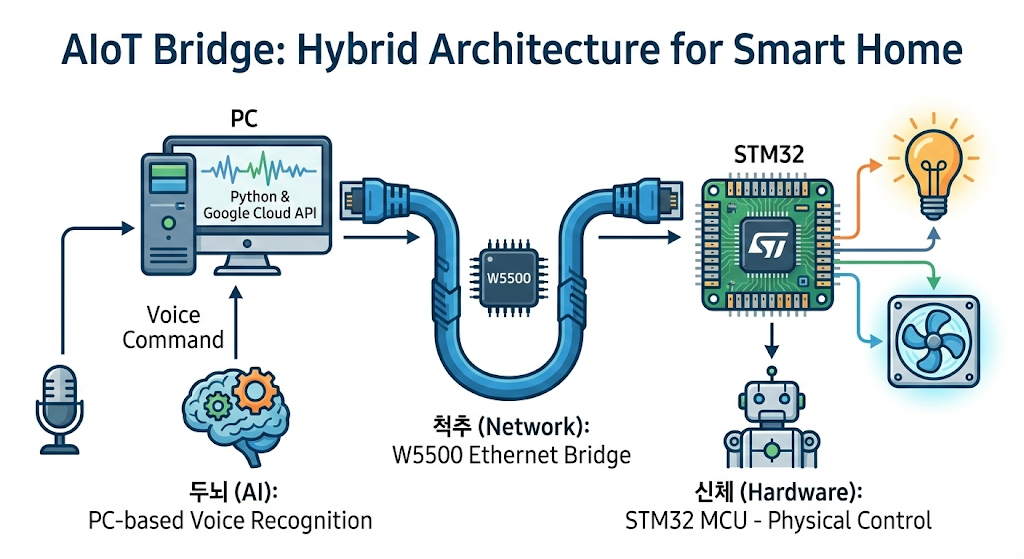
- Concept: This project presents a robust Voice Controlled System designed for smart home applications. Unlike typical commercial solutions that rely on unstable wireless connections, this system utilizes a Hybrid Architecture combining PC-based AI processing with reliable embedded hardware control.
- AI Processing: A PC application running Python leverages the Google Speech API for accurate voice recognition.
- Hardware Control: An STM32 microcontroller directly manages physical appliances such as lights and fans.
- Stable Communication: The W5500 Ethernet module establishes a dedicated TCP/IP connection, ensuring stable and instant data transmission between the PC and the microcontroller. This approach offloads heavy processing to the PC while ensuring real-time device actuation.
2. Why WIZnet? (The Reliability Factor)
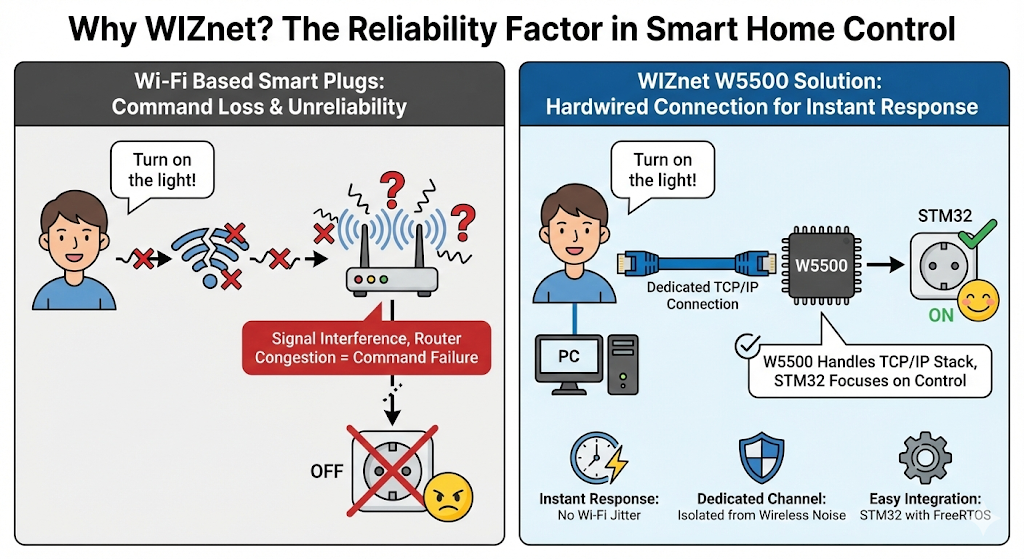
- The "Lost Command" Problem: In typical Wi-Fi-based smart plugs, voice commands often fail due to signal interference or router congestion. A user says "Turn on the light," but nothing happens for seconds, or not at all.
- The W5500 Solution: By using W5500, this project establishes a Hardwired TCP/IP Connection.
- Instant Response: Ethernet eliminates the negotiation overhead and jitter of Wi-Fi. When the Python app sends "On1", the STM32 receives it immediately.
- Dedicated Channel: The control traffic is isolated from the noisy wireless spectrum, ensuring 100% command delivery rate.
- Simple Integration: The W5500 handles the TCP/IP stack, allowing the STM32 to focus on FreeRTOS tasks and device control.
3. Technical Deep Dive (Code Analysis)
- Python Client (
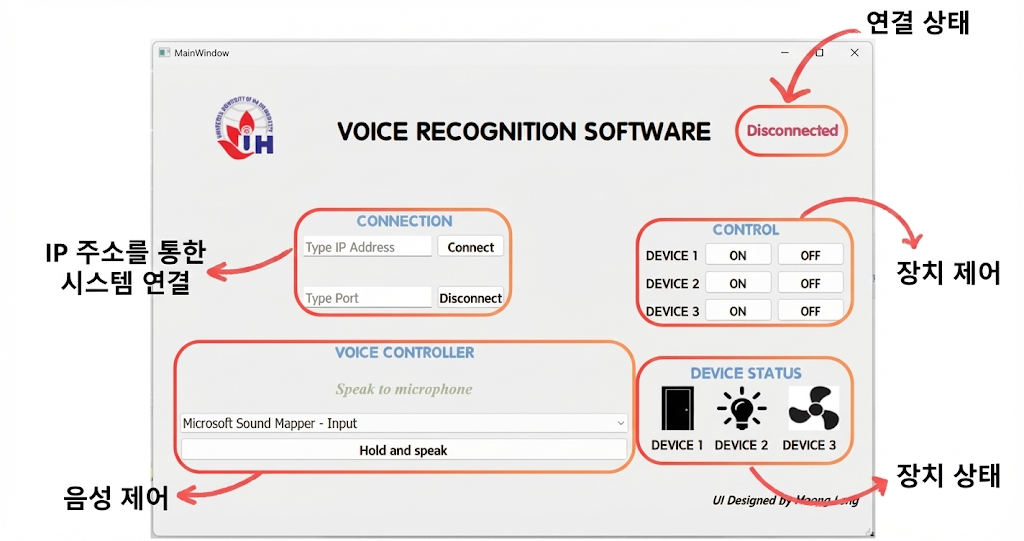
ver1.py): The GUI is built with PyQt5 and uses thespeech_recognitionlibrary. It features a multi-threaded design where the UI remains responsive while listening for voice input.
# Voice Recognition & Command Sending
command = recognizer.recognize_google(audio, language="vi-VN")
if "turn on device 1" in command:
    self.send_data("On1")  # Sends directly via TCP Socket
- STM32 Firmware (
main.c): The firmware is robustly designed using FreeRTOS. TheTask_EthernetServerruns as a high-priority thread.
// FreeRTOS Task for TCP Server
void Task_EthernetServer(void const * argument) {
    socket(sock, Sn_MR_TCP, SERVER_PORT, 0); // Create Socket
    listen(sock);                            // Wait for Python App
    while(1) {
        len = recv(sock, buffer, sizeof(buffer)); // Receive Command
        if (len > 0) handle_command(buffer, sock); // Toggle GPIO
        osDelay(10);
    }
}
- This structure ensures that the network handling doesn't block other potential sensor readings or tasks.
4. How to Run
- Hardware: Connect W5500 to STM32 (SPI) and wire LEDs/Relays to GPIO PA0, PA1, PA2.


- Firmware: Compile and flash the code. Ensure the IP is set to
192.168.0.137(or match your network). - Software:
- Install Python dependencies:
pip install PyQt5 SpeechRecognition pyaudio. - Run
ver1.py. - Enter IP
192.168.0.137and Port5000. Click Connect. - Hold the "Speak" button and say a command (e.g., "Bật thiết비 1" for Vietnamese, or modify code for English).
- Install Python dependencies:
[Korean Version]
원문 출처 (Source Mention)
Original Project by HoangLong69 on GitHub 이 프로젝트는 베트남의 메이커 HoangLong69에 의해 개발되었습니다. 2025년 9월에 처음 공개되었으며, 최신 Python GUI와 견고한 임베디드 펌웨어를 결합한 실용적인 종단간(End-to-End) AIoT 솔루션을 보여줍니다.
1. 소개: 프로젝트 개요 (Introduction)
- 컨셉: 이 프로젝트는 스마트 홈 애플리케이션을 위해 설계된 견고한 음성 제어 시스템을 제시합니다. 불안정한 무선 연결에 의존하는 일반적인 상용 솔루션과 달리, 이 시스템은 PC 기반의 AI 처리와 신뢰성 있는 임베디드 하드웨어 제어를 결합한 하이브리드 아키텍처를 활용합니다.
- AI 처리: Python을 실행하는 PC 애플리케이션이 Google Speech API를 활용하여 정확한 음성 인식을 수행합니다.
- 하드웨어 제어: STM32 마이크로컨트롤러가 전등이나 팬과 같은 물리적 장치를 직접 제어합니다.
- 안정적인 통신: W5500 이더넷 모듈이 전용 TCP/IP 연결을 수립하여, PC와 마이크로컨트롤러 간의 안정적이고 즉각적인 데이터 전송을 보장합니다. 이러한 방식은 무거운 처리 부하를 PC로 분산시키면서도 실시간 장치 작동을 보장합니다.
2. 왜 WIZnet인가? (신뢰성 요소)
- "명령 손실" 문제: 일반적인 Wi-Fi 기반 스마트 플러그에서는 신호 간섭이나 라우터 혼잡으로 인해 음성 명령이 실패하는 경우가 잦습니다. 사용자가 "불 켜"라고 말해도 몇 초 동안 반응이 없거나 아예 무시되기도 합니다.
- W5500 솔루션: W5500을 사용함으로써 이 프로젝트는 유선 TCP/IP 연결(Hardwired Connection)을 구축했습니다.
- 즉각적인 반응: 이더넷은 Wi-Fi의 협상 오버헤드나 지터가 없습니다. Python 앱이 "On1"을 보내면 STM32는 즉시 수신합니다.
- 전용 채널: 제어 트래픽이 노이즈가 많은 무선 스펙트럼과 격리되어, 100%의 명령 전달률을 보장합니다.
- 간편한 통합: W5500이 TCP/IP 스택을 전담하므로, STM32는 FreeRTOS 태스크와 장치 제어에만 집중할 수 있습니다.
3. 기술적 심층 분석 (Code Analysis)
- Python 클라이언트 (
ver1.py): GUI는 PyQt5로 제작되었으며speech_recognition라이브러리를 사용합니다. UI가 음성 입력을 듣는 동안에도 멈추지 않도록 멀티스레딩 구조로 설계되었습니다.
# 음성 인식 및 명령 전송
command = recognizer.recognize_google(audio, language="vi-VN")
if "turn on device 1" in command:
    self.send_data("On1")  # TCP 소켓을 통해 직접 전송
- STM32 펌웨어 (
main.c): 펌웨어는 FreeRTOS를 사용하여 견고하게 설계되었습니다.Task_EthernetServer는 높은 우선순위의 스레드로 실행됩니다.
// TCP 서버를 위한 FreeRTOS 태스크
void Task_EthernetServer(void const * argument) {
    socket(sock, Sn_MR_TCP, SERVER_PORT, 0); // 소켓 생성
    listen(sock);                            // Python 앱 연결 대기
    while(1) {
        len = recv(sock, buffer, sizeof(buffer)); // 명령 수신
        if (len > 0) handle_command(buffer, sock); // GPIO 제어
        osDelay(10);
    }
}- 이러한 구조는 네트워크 처리가 다른 센서 판독이나 작업을 차단하지 않도록 보장합니다.
4. 실행 방법 (How to Run)
- 하드웨어: W5500을 STM32(SPI)에 연결하고, LED/릴레이를 GPIO PA0, PA1, PA2에 배선합니다.
- 펌웨어: 코드를 컴파일하고 플래싱합니다. IP가
192.168.0.137로 설정되어 있는지 확인합니다(네트워크 환경에 맞게 수정). - 소프트웨어:
- Python 의존성 설치:
pip install PyQt5 SpeechRecognition pyaudio. ver1.py실행.- IP
192.168.0.137, Port5000입력 후 연결(Connect) 클릭. - "Speak" 버튼을 누르고 명령 말하기 (기본 코드는 베트남어 설정이므로 필요 시 영어/한국어로 수정).
- Python 의존성 설치:


