


How to Build an ESPHome PoE TOTP Door Lock with W5500 Ethernet?
An ESP32-S3 smart lock uses W5500 wired Ethernet, TOTP keypad codes, UDP door-state checks, and MQTT face-recognition events for Home Assistant.


WIZnet - W5500
x 1

SPI Ethernet controller configured in the ESPHome YAML for the ESP32-S3 PoE door lock.
📌 Overview
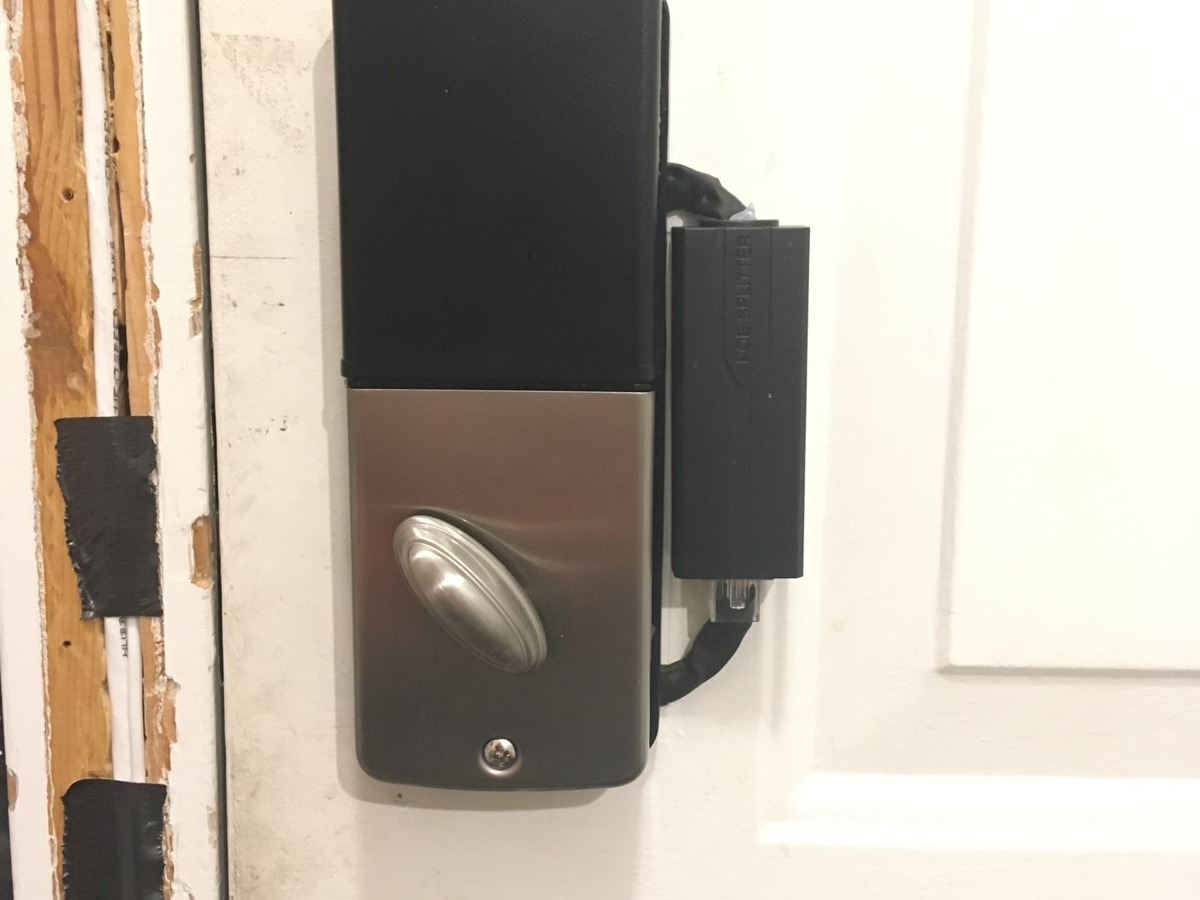
NonaSuomy is a Home Assistant community user and GitHub maker who publishes ESPHome, Linux infrastructure, networking, and home-automation projects. This project turns a keypad deadbolt into a PoE smart lock by placing an ESP32-S3 controller and a small W5500 Ethernet module inside the lock assembly, then linking it to Home Assistant through wired Ethernet.
The result is not just a simple keypad lock. The public ESPHome configuration combines TOTP keypad codes, Home Assistant service calls for static user-code updates, UDP door-state checks from a remote sensor panel, MQTT events from face-recognition tooling, motor control, limit-switch feedback, and LED or buzzer status feedback. From a WIZnet perspective, the interesting part is that the lock is designed around a W5500 wired path instead of depending on Wi-Fi for a fixed security device.
System Configuration
The main controller is an ESP32-S3 DevKitC-1 running ESPHome on ESP-IDF. The firmware YAML sets framework: esp-idf, uses ESP-IDF 5.4.2, enables PSRAM, and configures the device name as ezhacklock. The active network path is:
ethernet: type: W5500- CLK on GPIO42
- MOSI on GPIO44
- MISO on GPIO40
- CS on GPIO39
- interrupt on GPIO41
- reset on GPIO43
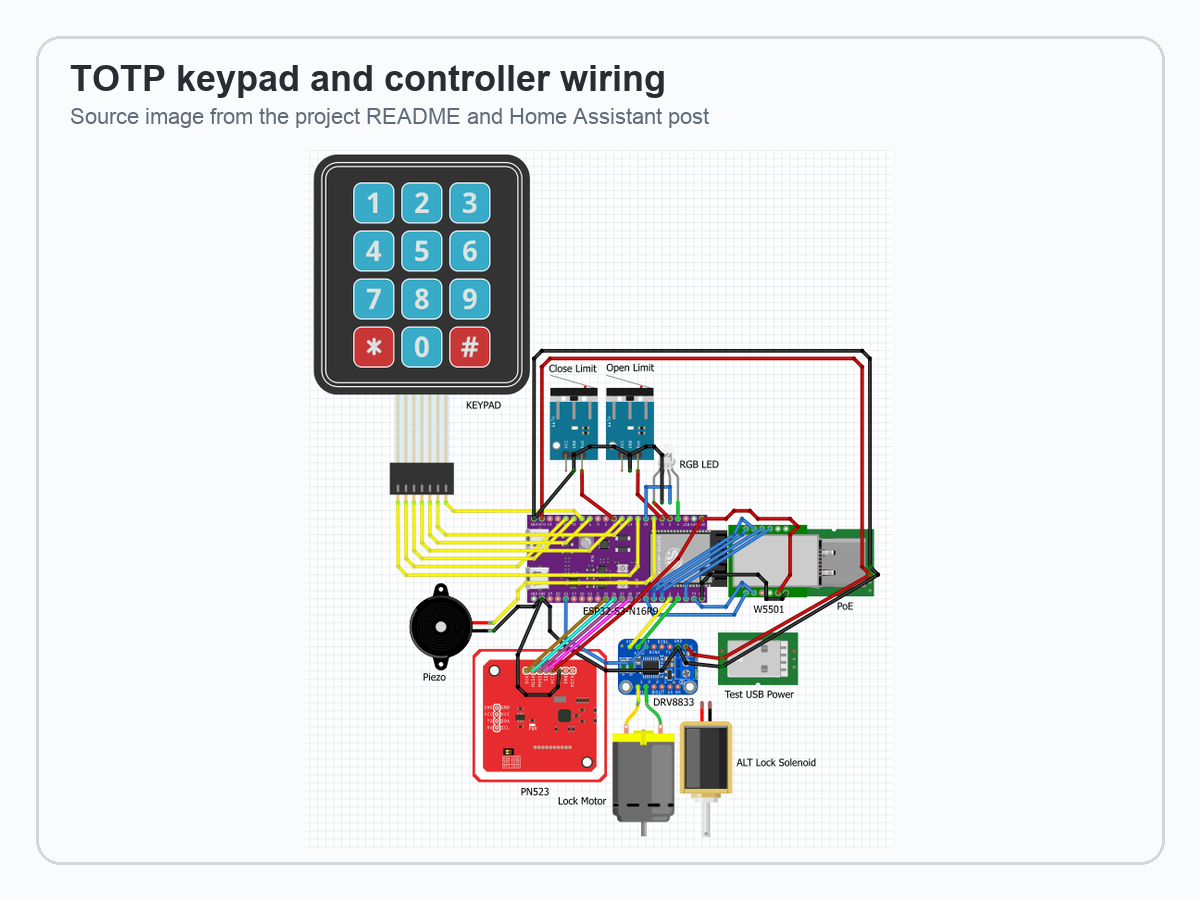
Around that controller, the YAML defines a keypad matrix, key collector, lock template, limit switches, LEDC motor outputs, RTTTL buzzer output, status LEDs, encrypted Home Assistant API, OTA updates, SNTP time, MQTT, UDP packet transport, and a TOTP component. The README also shows a project wiring image with a keypad, ESP32-S3, W5500/PoE path, motor driver, limit switches, RGB LED, piezo buzzer, and a PN532-style NFC option.
System Architecture and Data Flow
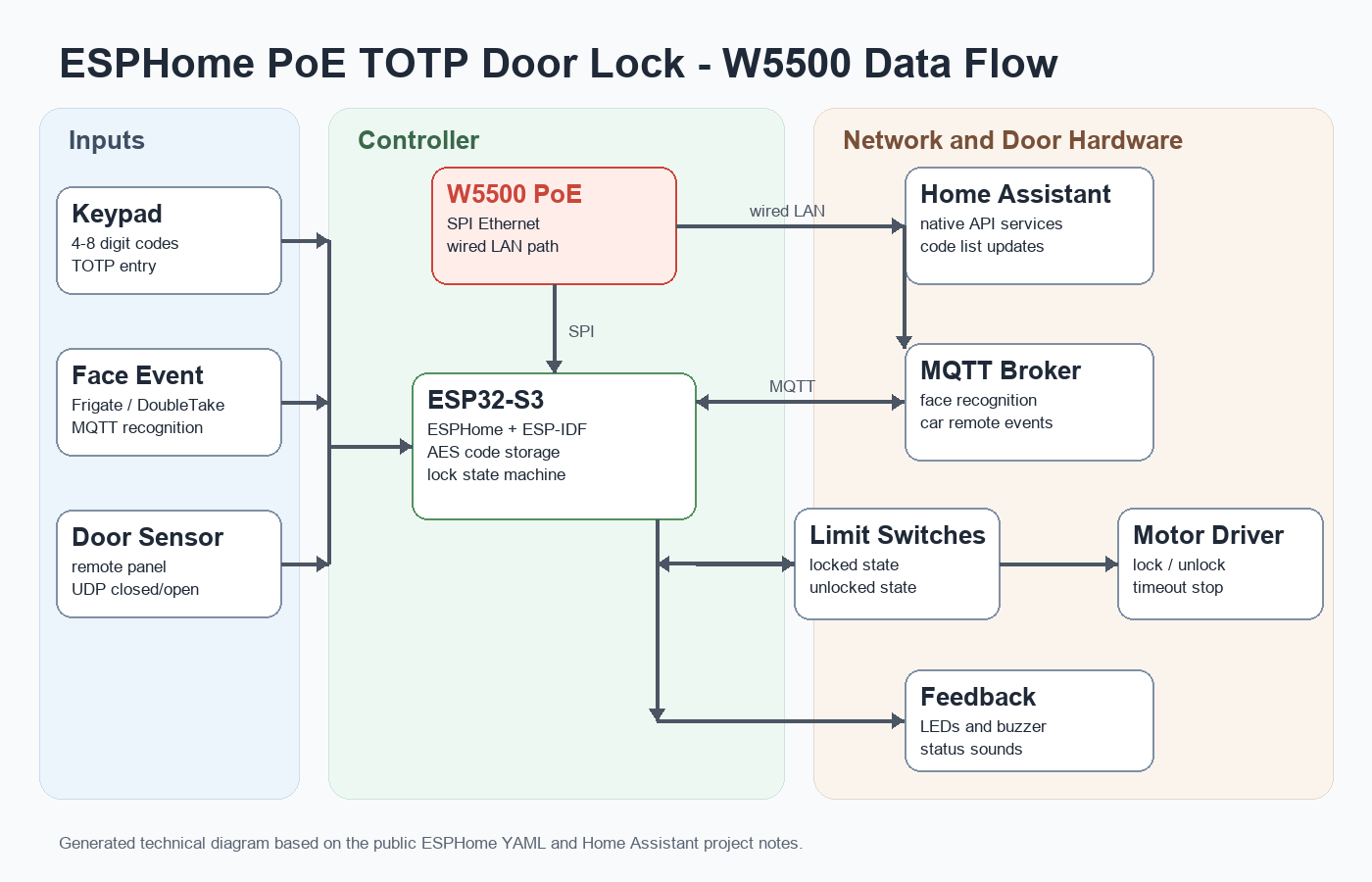
The lock can be understood as three layers. First, local inputs enter the ESP32-S3: keypad digits, lock-position limit switches, and the local motor-control state. Second, the W5500 gives the ESPHome node a wired Ethernet path to Home Assistant, MQTT, SNTP, OTA, and UDP packet transport. Third, the door hardware is driven through motor outputs and confirmed through limit-switch feedback.
The UDP path is used for a remote door contact sensor module. The YAML listens through packet_transport over UDP and marks the door state as valid only when updates are recent. That matters because the lock logic tries to auto-lock only when the door is confirmed closed. The MQTT path listens for face-recognition results and car remote events, then treats a known-person event as temporary context for unlocking through the keypad button.
Authentication and Lock Logic
The keypad accepts 4 to 8 digit entries and uses the ESPHome key_collector component to collect digits until the end key is pressed. The code path first checks encrypted static user codes. Those codes can be updated from Home Assistant through the update_user_codes API service, and the YAML encrypts the comma-separated code list with AES before storing it in flash.
If the entered code is not in the stored list, the firmware checks the current TOTP value from the custom TOTP component. The README includes a small web tool that generates Base32 and QR-code data so a user can add the same secret to an authenticator app. This gives the door lock a rotating keypad code instead of one permanent shared PIN.
The face-recognition path is different. It does not run computer vision on the ESP32-S3. Instead, MQTT messages from tools such as Frigate, CompreFace, or DoubleTake can indicate that a known person has been detected. In the inspected YAML, a match above the configured confidence threshold sets a known-person state, lights the green indicator, and starts a timeout. The keypad button can then act on that context.
⚙️ Role of the WIZnet Chip
The W5500 is the lock controller's wired Ethernet interface. In the source YAML, the Wi-Fi section is commented out, while W5500 Ethernet is active. That makes the network design simple: the door lock uses a fixed wired connection for Home Assistant API, MQTT, OTA, SNTP, and UDP door-sensor traffic.
For a door lock, this is a practical W5500 use case. A fixed device near a door benefits from stable connectivity, predictable power, and less dependence on crowded Wi-Fi. The Home Assistant post also shows that PoE is part of the maker's design direction. The current build uses a side-mounted or modified PoE adapter while the maker continues experimenting with a more integrated board.
The technical claim should stay precise. W5500 is a hardwired TCP/IP Ethernet controller, but this ESPHome project uses the ESPHome / ESP-IDF Ethernet abstraction. The public source does not show direct WIZnet socket API, WIZnet ioLibrary, or register-level W5500 code. So this article treats W5500 as the source-backed wired Ethernet controller, not as a verified socket-API reference implementation.
Installation Details
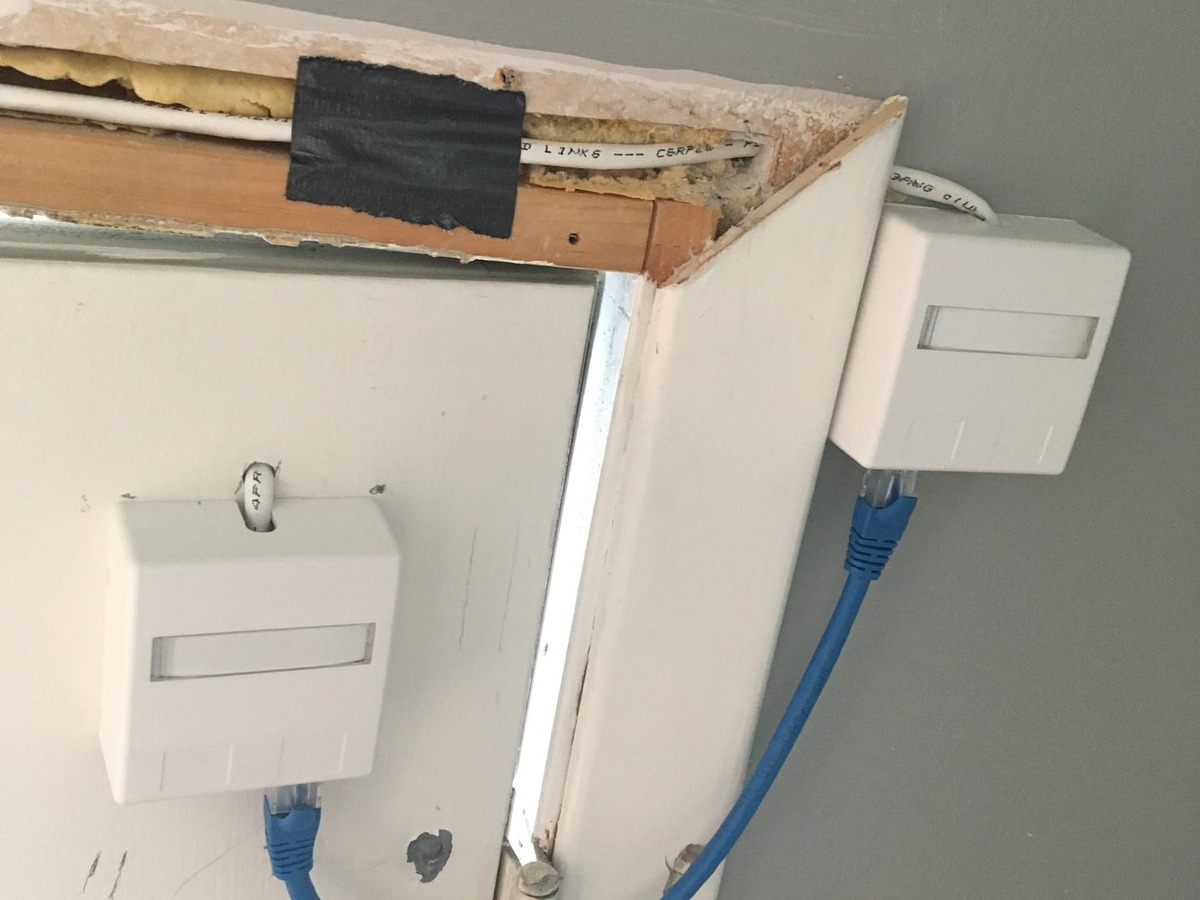
The Home Assistant post includes useful build context. The maker gutted a low-cost keypad deadbolt and routed wiring through a metal door with a foam core. The project currently uses an external or side-mounted PoE arrangement, while the long-term goal is to integrate PoE more tightly into the main ESP32 board. The photos make it clear that this is an experimental maker build rather than a commercial certified lock product.
The YAML also reflects that experimental scope. PN532/HomeKey sections are present as comments, palm vein and fingerprint scanning are listed as possible future directions, and the repository references local components/ and aes.hpp files that are not included in the public clone. Anyone reusing the work should treat it as a serious implementation reference, not a one-click installation package.
Where It Fits - Value and Limits
This project fits Home Assistant users who want a local-first smart lock experiment with wired networking. It is also useful for ESPHome builders who want to see how TOTP, Home Assistant services, MQTT events, UDP door-state validation, and motor-control state machines can live in one YAML configuration.
The value for WIZnet is clear: W5500 is not limited to industrial gateways or basic sensor nodes. It can also support smart-home security devices where a reliable wired path is attractive. A PoE smart lock, access panel, or gate controller is installed in a fixed place, often needs stable uptime, and may sit in a location where Wi-Fi quality is not ideal.
The limits are just as important. This is not a certified access-control product. It should preserve mechanical key operation, safe manual egress, power-failure behavior, and local building-code requirements. The public repo has no license file, the exact deadbolt model is not specified, and some referenced build files are not present. Face recognition should also be treated as a convenience signal, not as a complete security boundary by itself.
Related WIZnet Maker Projects
A PoE Smart Access Panel Powered by W5500 is the closest smart-home access-control comparison. It also uses ESPHome, PoE, W5500 Ethernet, and face-recognition or biometric input. The difference is that the access panel controls authorization from outside, while this project modifies the lock mechanism itself.
RP2350 RFID TCP Controller with W6300 Ethernet is related from the access-control side. Both projects combine physical identity input with wired Ethernet and lock-related control logic. The difference is platform and network device: RP2350 plus W6300 for RFID TCP control versus ESP32-S3 plus W5500 inside an ESPHome smart lock.
IntelliDrive - ESP32 + W5500 Gate Controller Suite is related because it also frames W5500 Ethernet around access, gate, MQTT, BLE, OTA, and fingerprint-style control. This door-lock project is more Home Assistant / ESPHome focused and adds TOTP keypad codes plus UDP door-state validation.
❓ FAQ
Q. What does this project use the W5500 for? It uses W5500 as the ESP32-S3 lock controller's wired Ethernet interface. The YAML configures W5500 pins directly in ESPHome and routes Home Assistant API, MQTT, SNTP, OTA, and UDP traffic over that wired path.
Q. Is this a complete smart-lock product? No. It is a maker project and public implementation reference. It includes real firmware logic and build photos, but it is not a certified lock system and the public repository appears to omit some local files needed for a clean build.
Q. How does TOTP work in this lock? The lock uses SNTP time and a shared TOTP secret. A user enters the rotating code on the keypad, and the firmware compares it with the current TOTP value from the custom ESPHome component.
Q. Does face recognition run on the ESP32-S3? No. The ESP32-S3 receives MQTT events from external recognition tools such as Frigate, CompreFace, or DoubleTake. The lock uses those events as context for a temporary unlock action.
Q. Why prefer wired Ethernet for a door lock? A fixed lock controller benefits from stable connectivity and predictable power. W5500 Ethernet with PoE is a good fit when the installer can route a cable and wants less dependence on Wi-Fi quality.
Document links for the source thread, GitHub repository, ESPHome YAML, TOTP component branch, ESPHome Ethernet docs, and W5500 docs are attached in the Documents panel.
한국어 (Korean)
개요
NonaSuomy는 Home Assistant 커뮤니티 사용자이자 GitHub 메이커로, ESPHome, Linux infrastructure, networking, home automation 관련 공개 프로젝트를 올리고 있습니다. 이 프로젝트는 일반 keypad deadbolt를 PoE smart lock으로 바꾼 사례이며, ESP32-S3 controller와 작은 W5500 Ethernet module을 lock assembly 안에 넣고 Home Assistant와 유선 Ethernet으로 연결합니다.
결과물은 단순한 keypad lock이 아닙니다. 공개된 ESPHome 설정은 TOTP keypad code, Home Assistant service call을 통한 정적 user code 업데이트, remote sensor panel의 UDP door-state check, face-recognition tool에서 오는 MQTT event, motor control, limit-switch feedback, LED와 buzzer 상태 피드백을 한 구성 안에 묶습니다. WIZnet 관점에서 중요한 점은 고정형 보안 장치가 Wi-Fi 대신 W5500 유선 경로를 중심으로 설계되었다는 것입니다.
시스템 구성
메인 컨트롤러는 ESPHome on ESP-IDF로 동작하는 ESP32-S3 DevKitC-1입니다. firmware YAML은 framework: esp-idf, ESP-IDF 5.4.2, PSRAM을 설정하고 device name을 ezhacklock으로 둡니다. 활성 네트워크 경로는 다음과 같습니다.
ethernet: type: W5500- CLK on GPIO42
- MOSI on GPIO44
- MISO on GPIO40
- CS on GPIO39
- interrupt on GPIO41
- reset on GPIO43
그 주변에는 keypad matrix, key collector, lock template, limit switch, LEDC motor output, RTTTL buzzer output, status LED, encrypted Home Assistant API, OTA update, SNTP time, MQTT, UDP packet transport, TOTP component가 정의되어 있습니다. README의 wiring image에는 keypad, ESP32-S3, W5500/PoE path, motor driver, limit switch, RGB LED, piezo buzzer, PN532-style NFC option도 함께 보입니다.
시스템 아키텍처와 데이터 흐름
이 lock은 세 계층으로 볼 수 있습니다. 첫째, keypad digit, lock-position limit switch, local motor-control state 같은 local input이 ESP32-S3로 들어갑니다. 둘째, W5500이 ESPHome node에 Home Assistant, MQTT, SNTP, OTA, UDP packet transport용 유선 Ethernet 경로를 제공합니다. 셋째, door hardware는 motor output으로 구동되고 limit-switch feedback으로 확인됩니다.
UDP 경로는 remote door contact sensor module에 사용됩니다. YAML은 UDP 위의 packet_transport를 통해 상태를 수신하고, 최근 update가 있을 때만 door state를 valid로 표시합니다. 이 점이 중요한 이유는 lock logic이 door가 닫힌 것으로 확인될 때만 auto-lock을 시도하기 때문입니다. MQTT 경로는 face-recognition result와 car remote event를 받고, known-person event를 임시 unlock context로 사용합니다.
인증과 락 동작 로직
Keypad는 4자리에서 8자리 입력을 받으며, ESPHome key_collector component가 end key가 눌릴 때까지 숫자를 모읍니다. 코드 경로는 먼저 암호화되어 저장된 static user code를 확인합니다. 이 코드는 Home Assistant의 update_user_codes API service로 업데이트할 수 있고, YAML은 comma-separated code list를 AES로 암호화해 flash에 저장합니다.
입력한 코드가 저장된 목록에 없으면 firmware는 custom TOTP component의 현재 TOTP 값을 확인합니다. README에는 Base32와 QR-code data를 생성하는 작은 web tool도 포함되어 있어, 같은 secret을 authenticator app에 넣을 수 있습니다. 이 구조 덕분에 고정된 공유 PIN 하나가 아니라 주기적으로 바뀌는 keypad code를 사용할 수 있습니다.
Face-recognition 경로는 다릅니다. Computer vision은 ESP32-S3에서 실행되지 않습니다. 대신 Frigate, CompreFace, DoubleTake 같은 외부 도구의 MQTT message가 known person detection을 알려줍니다. 확인한 YAML에서는 설정된 confidence threshold를 넘은 match가 들어오면 known-person state를 설정하고, green indicator를 켜고, timeout을 시작합니다. 이후 keypad button이 그 context를 이용해 unlock 동작을 수행할 수 있습니다.
⚙️ WIZnet 칩의 역할
W5500은 lock controller의 유선 Ethernet interface입니다. 소스 YAML에서는 Wi-Fi 섹션이 주석 처리되어 있고, W5500 Ethernet이 활성화되어 있습니다. 따라서 network design은 단순합니다. Door lock은 Home Assistant API, MQTT, OTA, SNTP, UDP door-sensor traffic을 고정 유선 연결로 처리합니다.
Door lock에서는 이 구성이 실용적입니다. 문 근처에 고정 설치되는 장치는 stable connectivity, predictable power, crowded Wi-Fi에 덜 의존하는 구조가 유리합니다. Home Assistant 글에서도 PoE가 제작자의 설계 방향임을 확인할 수 있습니다. 현재 build는 side-mounted 또는 modified PoE adapter를 사용하고 있고, 제작자는 더 integrated board를 계속 실험 중입니다.
기술적 표현은 정확해야 합니다. W5500은 hardwired TCP/IP Ethernet controller이지만, 이 ESPHome 프로젝트는 ESPHome / ESP-IDF Ethernet abstraction을 사용합니다. 공개 소스에는 직접적인 WIZnet socket API, WIZnet ioLibrary, register-level W5500 code가 보이지 않습니다. 그래서 이 글에서는 W5500을 source-backed wired Ethernet controller로 다루고, 검증된 socket-API reference implementation이라고 표현하지 않습니다.
설치 세부
Home Assistant 글에는 build context가 잘 남아 있습니다. 제작자는 저렴한 keypad deadbolt를 분해하고, foam core가 있는 metal door를 통해 배선을 통과시켰습니다. 현재 프로젝트는 external 또는 side-mounted PoE 구성을 사용하고 있으며, 장기적으로는 PoE를 main ESP32 board에 더 단단히 통합하는 것이 목표입니다. 사진을 보면 이 프로젝트가 상용 certified lock product가 아니라 실험적인 maker build라는 점도 분명합니다.
YAML도 이런 실험 범위를 보여줍니다. PN532/HomeKey 섹션은 주석으로 남아 있고, palm vein과 fingerprint scanning은 future direction으로 적혀 있으며, 저장소는 공개 clone에 포함되지 않은 local components/와 aes.hpp를 참조합니다. 따라서 이 작업을 재사용하려는 사람은 one-click installation package가 아니라 구현 참고 자료로 보는 것이 맞습니다.
적용 위치, 가치와 한계
이 프로젝트는 유선 네트워크를 쓰는 local-first smart lock 실험을 원하는 Home Assistant 사용자에게 잘 맞습니다. 또한 ESPHome 사용자가 TOTP, Home Assistant service, MQTT event, UDP door-state validation, motor-control state machine을 하나의 YAML 구성에 어떻게 묶을 수 있는지 보여주는 참고 자료로도 유용합니다.
WIZnet 관점의 가치는 분명합니다. W5500은 산업용 gateway나 단순 sensor node에만 쓰이는 것이 아닙니다. Reliable wired path가 중요한 smart-home security device에도 들어갈 수 있습니다. PoE smart lock, access panel, gate controller는 고정 위치에 설치되고 stable uptime이 중요하며, Wi-Fi 품질이 좋지 않은 위치에 놓일 수도 있습니다.
한계도 중요합니다. 이 프로젝트는 certified access-control product가 아닙니다. Mechanical key operation, safe manual egress, power-failure behavior, local building-code requirement를 반드시 유지해야 합니다. 공개 repo에는 license file이 없고, 정확한 deadbolt model도 공개 글에서 확인되지 않으며, 일부 build file은 포함되어 있지 않습니다. Face recognition 역시 complete security boundary가 아니라 convenience signal로 다뤄야 합니다.
관련 WIZnet Maker 프로젝트
A PoE Smart Access Panel Powered by W5500 는 가장 가까운 smart-home access-control 비교 사례입니다. 이 프로젝트도 ESPHome, PoE, W5500 Ethernet, face-recognition 또는 biometric input을 사용합니다. 차이는 access panel이 외부 authorization panel에 가깝고, 이번 door-lock 프로젝트는 lock mechanism 자체를 개조한다는 점입니다.
RP2350 RFID TCP Controller with W6300 Ethernet 는 access-control 관점에서 관련이 있습니다. 두 프로젝트 모두 physical identity input, wired Ethernet, lock-related control logic을 결합합니다. 차이는 platform과 network device입니다. 한쪽은 RFID TCP control용 RP2350 + W6300이고, 이번 프로젝트는 ESPHome smart lock 안의 ESP32-S3 + W5500입니다.
IntelliDrive - ESP32 + W5500 Gate Controller Suite 는 W5500 Ethernet을 access, gate, MQTT, BLE, OTA, fingerprint-style control과 함께 다룬다는 점에서 관련이 있습니다. 이번 door-lock 프로젝트는 Home Assistant / ESPHome 중심성이 더 강하고, TOTP keypad code와 UDP door-state validation을 추가합니다.
❓ FAQ
이 프로젝트에서 W5500은 무엇에 쓰이나요? W5500은 ESP32-S3 lock controller의 wired Ethernet interface로 쓰입니다. YAML은 ESPHome 안에서 W5500 핀을 직접 설정하고, Home Assistant API, MQTT, SNTP, OTA, UDP traffic을 그 유선 경로로 보냅니다.
완성된 smart-lock 제품인가요? 아닙니다. Maker project이자 public implementation reference에 가깝습니다. 실제 firmware logic과 build photo가 있지만 certified lock system은 아니며, 공개 repository에는 clean build에 필요한 일부 local file이 빠져 있는 것으로 보입니다.
TOTP는 어떻게 동작하나요? Lock은 SNTP time과 shared TOTP secret을 사용합니다. 사용자가 keypad에 rotating code를 입력하면 firmware가 custom ESPHome component의 현재 TOTP 값과 비교합니다.
Face recognition은 ESP32-S3에서 실행되나요? 아닙니다. ESP32-S3는 Frigate, CompreFace, DoubleTake 같은 외부 recognition tool의 MQTT event를 받습니다. Lock은 이 event를 temporary unlock action을 위한 context로 사용합니다.
Door lock에 왜 wired Ethernet을 쓰나요? 고정 설치되는 lock controller는 stable connectivity와 predictable power가 중요합니다. Installer가 cable을 뽑을 수 있다면 W5500 Ethernet + PoE는 Wi-Fi 품질 의존도를 줄이는 좋은 선택입니다.
Source thread, GitHub repository, ESPHome YAML, TOTP component branch, ESPHome Ethernet docs, W5500 docs는 Documents panel에 첨부했습니다.
-
Home Assistant Community Thread
Original project post describing the PoE door lock, W5500 module, TOTP codes, UDP door-state check, and face-recognition path.

-
GitHub Repository
Public ESPHome PoE TOTP door lock repository with README, firmware YAML, media, and helper script.
-
ESPHome Door Lock YAML
Main ESPHome configuration showing ESP32-S3, W5500 Ethernet pins, TOTP, UDP packet transport, MQTT, motor control, and lock logic.
-
Custom TOTP Component Branch
Custom ESPHome TOTP component referenced by the project README.
-
ESPHome Ethernet Component
ESPHome documentation for wired Ethernet configuration, including W5500-style Ethernet setups.
-
W5500 Documentation
WIZnet W5500 documentation for the SPI Ethernet controller used by the project.


