


How Does W55RP20 Ethernet Control Ocupoint RF Frontends?
Ocupoint rf-control uses W55RP20 Ethernet and Go protobuf tools to configure Black Canyon, STRAPS, and Whalepod RF frontends.
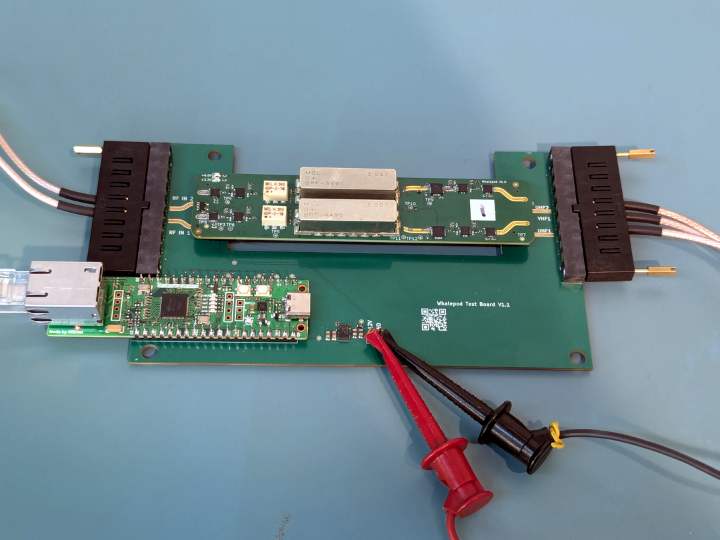
WIZnet - W55RP20
x 1

W55RP20-EVB-Pico control board named in the repository firmware guide; RP2040 plus W5500 Ethernet path
📌 Overview
Ocupoint Inc is a US RF engineering company whose public site describes work around high-performance Electronic Warfare systems and RF front-end/tuner hardware. Its public GitHub repository rf-control was created on May 12, 2026 and was still active in early July 2026.
Direct answer:
rf-controlis a Go command-line tool and Go client library for configuring Ocupoint Ethernet-controlled RF frontends: Black Canyon, STRAPS, Whalepod, and related RF switch hardware.
The WIZnet point is unusually concrete. The repository's firmware guide states that the Ocupoint eval boards run on a WIZnet W55RP20-EVB-Pico, described there as RP2040 plus W5500 Ethernet. The host tool can talk to that board over TCP port 5000, or over the second USB CDC interface when the network side is not reachable yet.
In plain terms, a PC can send typed control messages to a small WIZnet-based board, and that board acts as the control plane for RF hardware settings such as attenuation, calibration source, channels, switches, PLL frequency, RF band presets, and network configuration.
Project Context and Key Terms
An RF frontend is the hardware near the antenna or RF signal path: filters, switches, attenuators, mixers, amplifiers, calibration paths, and local oscillator circuits. In this repository, the host software does not process RF samples. It configures the RF path.
rf-control uses Protocol Buffers, or protobuf, as the message format. Instead of sending loose strings, the host sends typed packets such as SetAttenuationRequest, SetCalSourceRequest, SetPllFrequencyRequest, SetRfBandRequest, and GetStatusRequest. That makes the tool useful both as a human CLI and as a scriptable automation interface.
What the Host Tool Controls
The README presents rf-control as a single-binary CLI with no runtime dependencies. Release assets are provided for Linux, macOS, and Windows on both amd64 and arm64. The latest public release observed on July 9, 2026 was v0.2.0, published on June 16, 2026, while commits after that release add more STRAPS host-side controls.
The tool has three important operating modes:
- USB discovery and USB control, useful when a fresh board has an unknown address.
- TCP control over port 5000, used when the W55RP20 board is reachable over Ethernet.
- JSON batch apply, designed so Python or other automation scripts can call one binary and parse clean JSON from stdout.
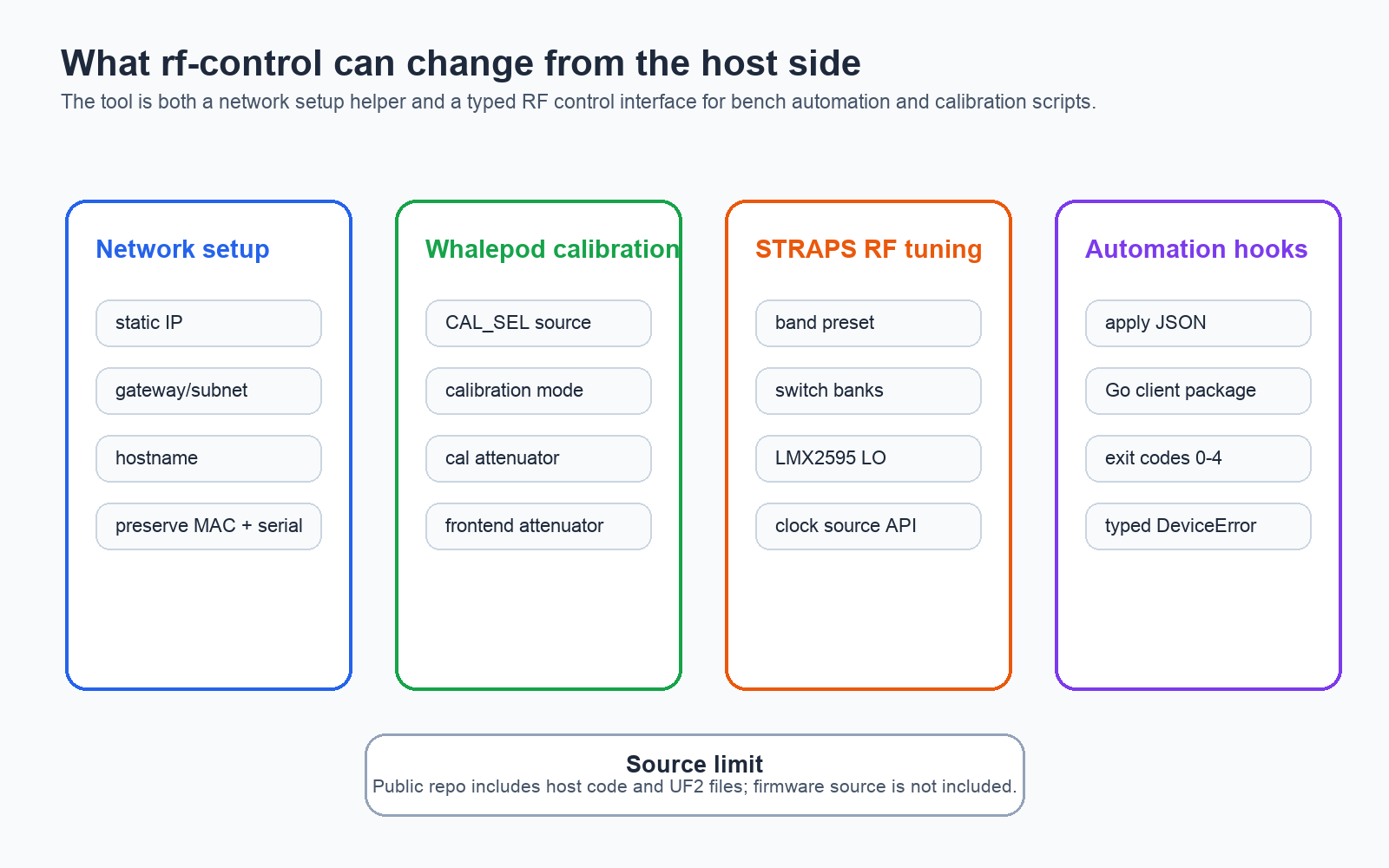
The RF-specific commands are not just cosmetic toggles. The README and source code show Whalepod calibration source selection, calibration mode, frontend and calibration-path attenuation, STRAPS PLL frequency, RF band presets, and SP8T RF switch channel control. The Whalepod helper in client/whalepod.go also shows a higher-level pattern: read current state, change a few fields, then write the sequence back safely.
Architecture and Data Flow
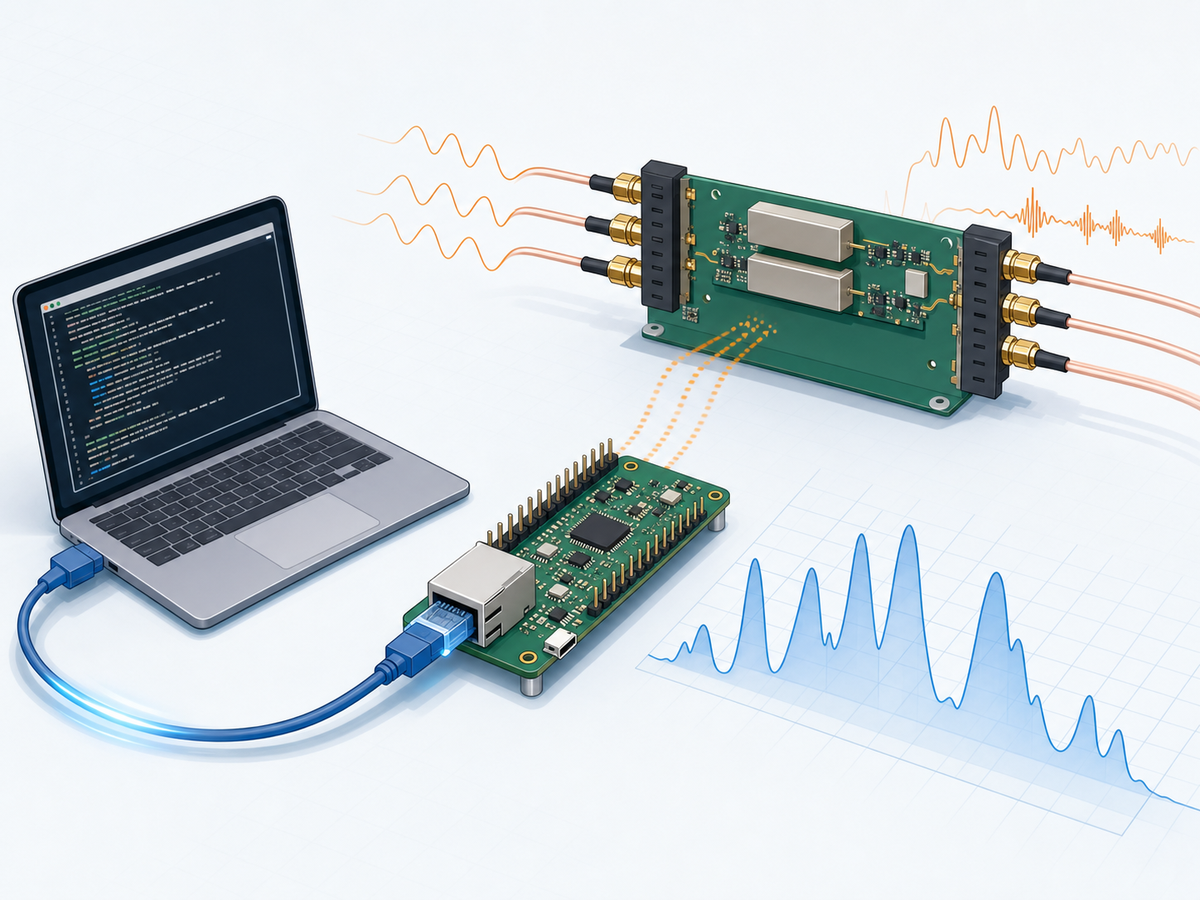
The system is easiest to read as a host-to-control-board-to-RF-front-end chain:
- A host computer runs
rf-controlor imports the Goclientpackage. - The host chooses TCP or USB.
- The transport carries protobuf
Packetmessages. - The W55RP20-EVB-Pico control board receives the request.
- Firmware applies the request to the appropriate RF board behavior.
- The host receives a typed status, config, or error response.
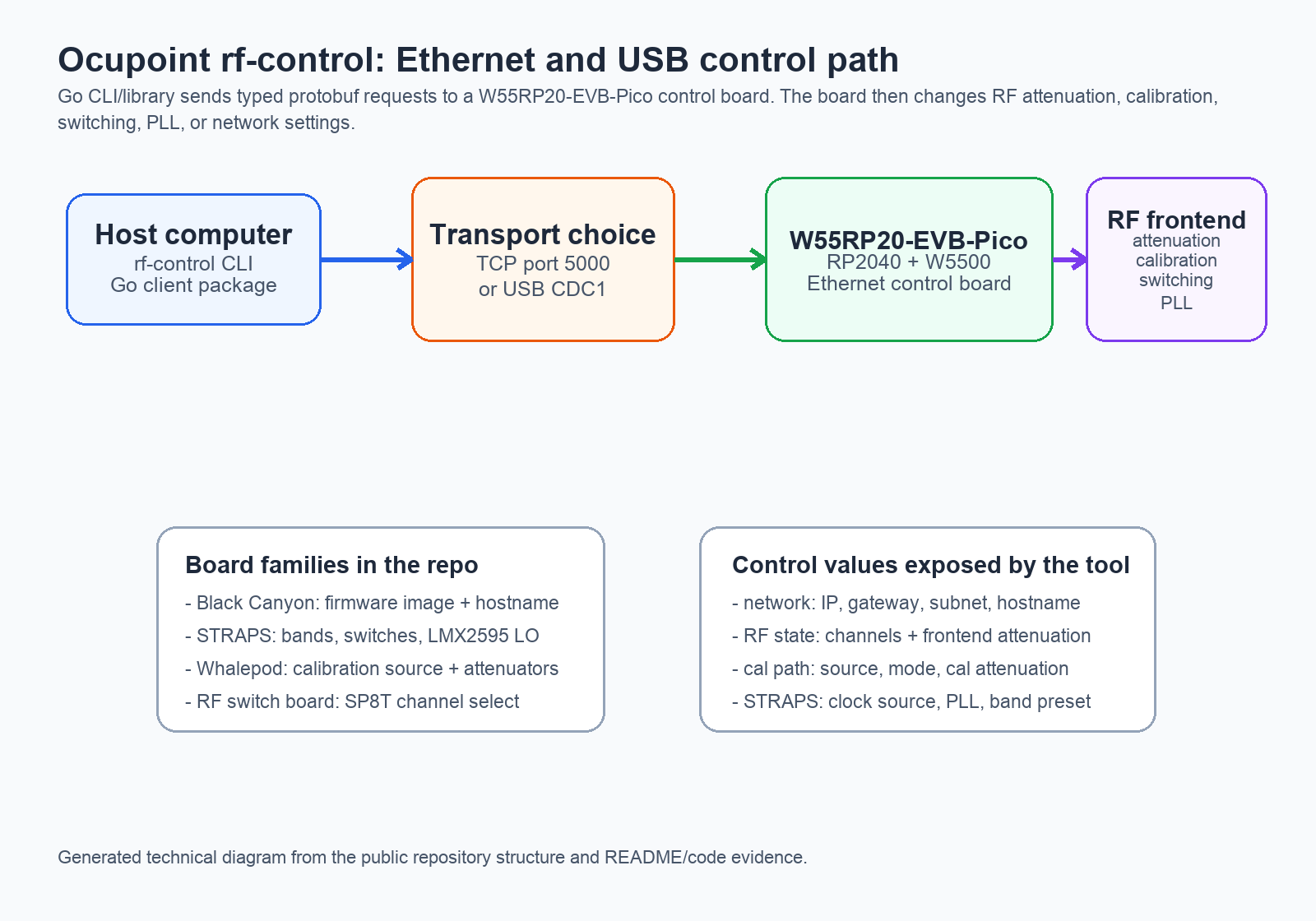
rf-control connects a host tool to Ocupoint RF frontend hardware through the W55RP20-EVB-Pico control board.
The repository supports multiple board personalities. docs/firmware/README.md lists Black Canyon, STRAPS, and Whalepod UF2 files, each with an mDNS hostname. The protocol adds status fields such as board_type so tools can know which values are meaningful for a given hardware variant.
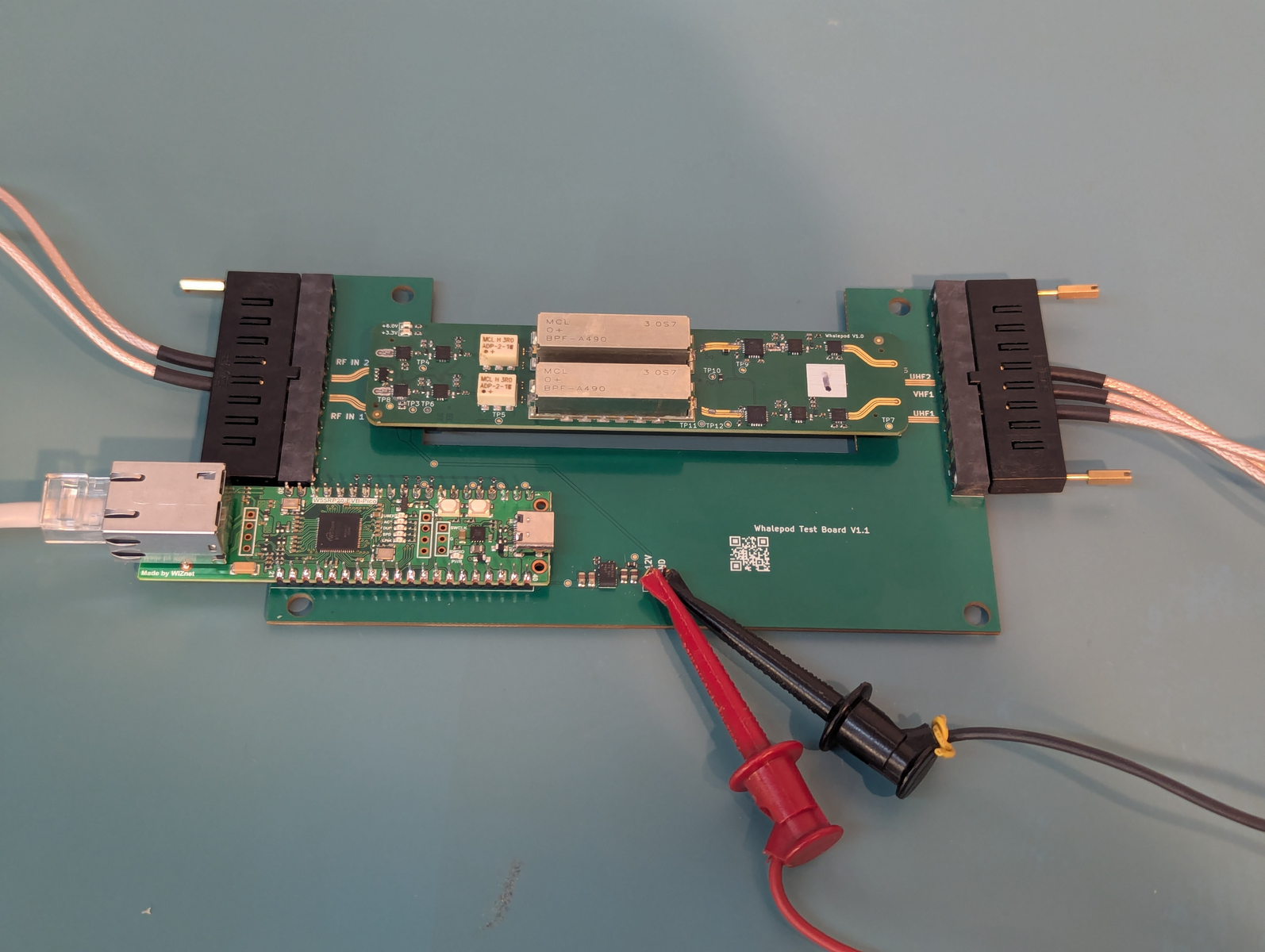
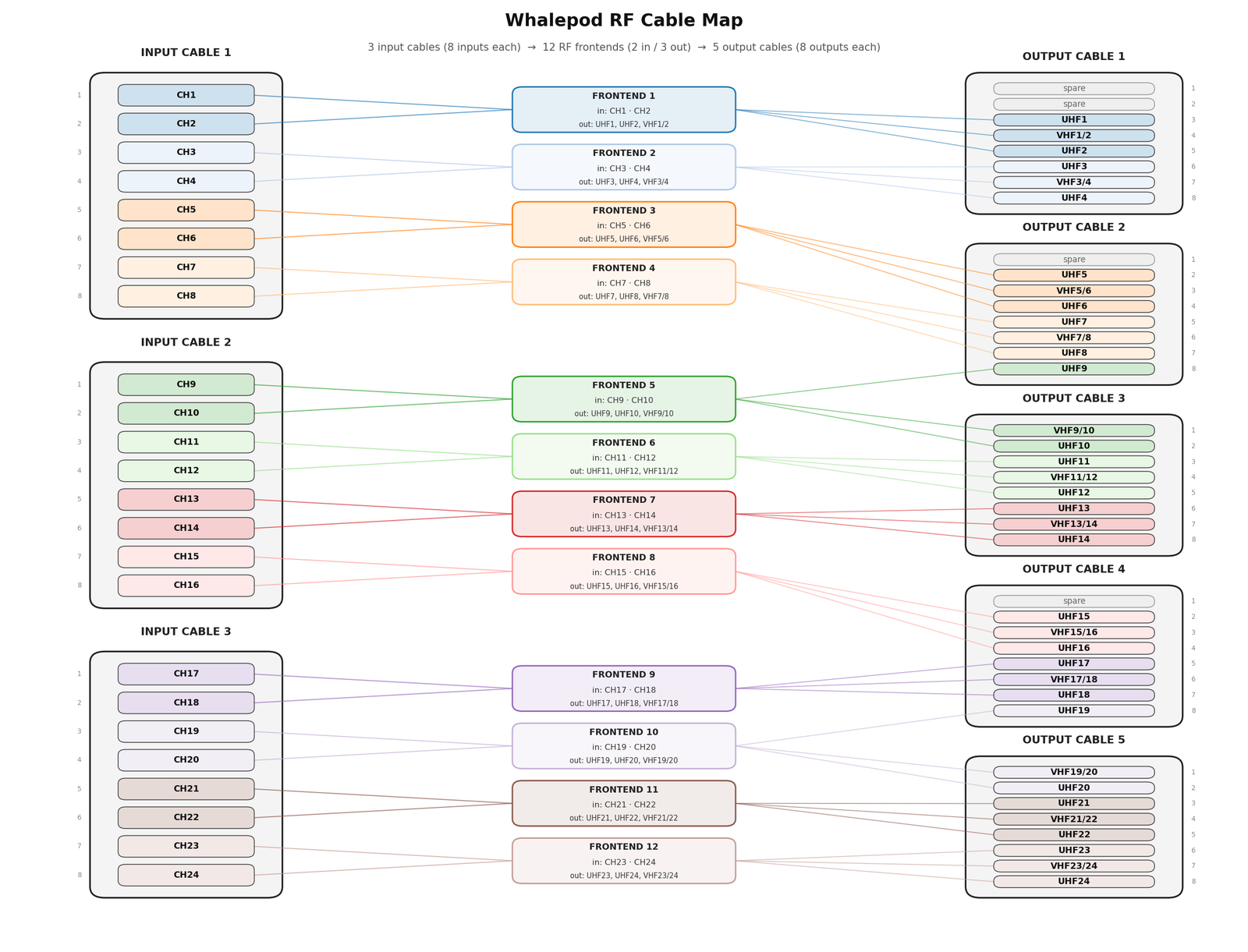
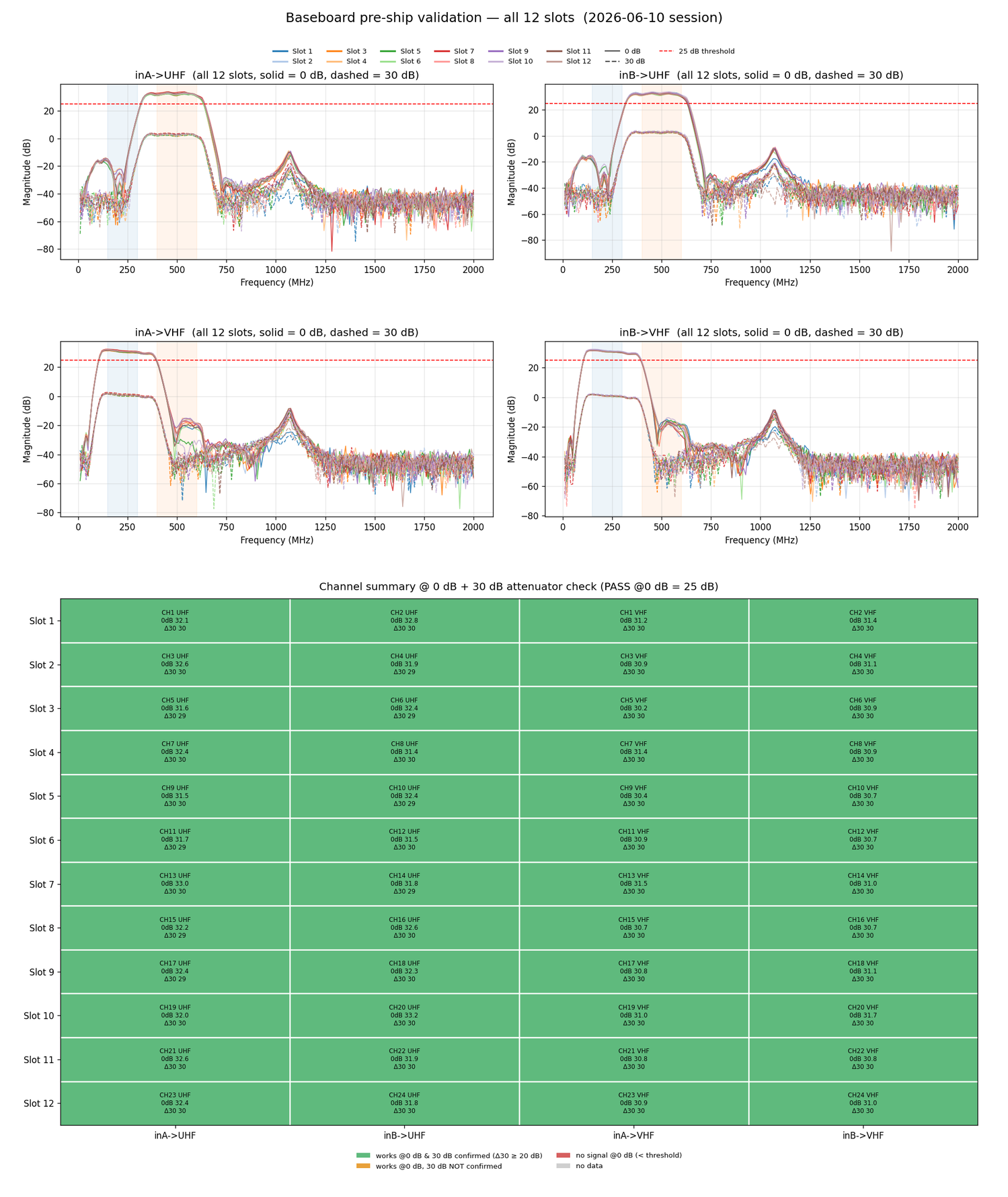
For Whalepod specifically, the setup guide shows a physical Ethernet cable, 12 V bench power, RF cable assemblies, and TCP port 5000. The RF cable map below shows why a structured host-side control path matters: the board is not a tiny demo circuit, but part of a multi-channel RF signal path.
⚙️ Role of the WIZnet Chip
WIZnet role: The W55RP20-EVB-Pico is the shared Ethernet control board for Ocupoint eval boards, and the W5500 Ethernet path carries raw protobuf packets over TCP port 5000.
The repository gives three independent pieces of WIZnet evidence:
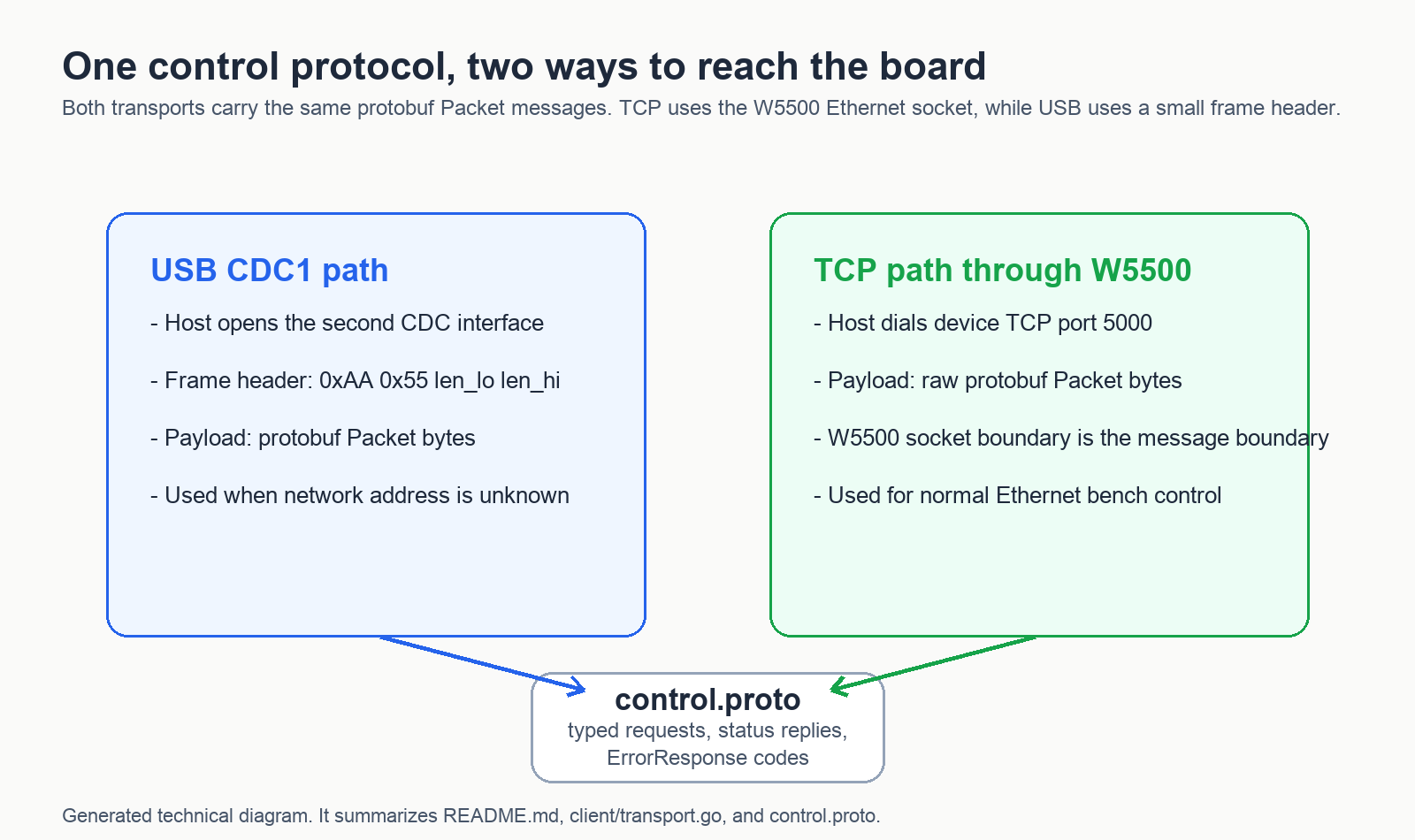
docs/firmware/README.mdnames the control board as WIZnet W55RP20-EVB-Pico and describes it as RP2040 plus W5500 Ethernet.README.mdsays TCP transport uses raw protobuf without the USB frame header, with the W5500 TCP socket boundary acting as the message boundary.main.godescribes the program as a WIZnet Pico RF control tool, andclient/transport.goimplements the TCP and USB transport choices.
This is more interesting than a generic Ethernet example because the WIZnet device is not just serving a web page. It is the network boundary for a test and control instrument. The host can set IP configuration, ask for status, change RF attenuation, select calibration paths, and drive STRAPS tuning commands through a typed API.
Evidence from the Repository Timeline
The commit history shows the project moving from a unified control library into a more reusable host-side tool:
- May 12, 2026: initial unified control library, Whalepod setup docs, firmware reflash guide, and Whalepod test images.
- May 19, 2026: the project was converted into a single-binary Go control tool and v0.1.0 was published.
- June 16, 2026: v0.2.0 was published, with calibration-source work and Whalepod RF diagram/test artifacts in the same period.
- July 1-2, 2026: an importable Go client package, Whalepod library example, EEPROM/RF-switch methods, typed
ErrorResponse, and JSONapplycommand were added. - July 7, 2026: STRAPS PLL/band controls and host-side clock-source selection were added.
The latest clock-source feature is a useful example of source boundaries. control.proto and the README say the host-side SetClockSource API exists, but the firmware handler is still pending. Until the firmware supports it, the device can return an unsupported error.
Source limit: This public repository includes host-side code, documentation, images, and UF2 firmware binaries. It does not include the firmware source, and at least one newest host-side command is documented as pending firmware support.
Where It Fits: Value and Limits
For WIZnet readers, the reusable pattern is Ethernet as the control plane for RF test hardware. A compact W55RP20 board sits between a host application and the RF frontend, so the RF board can be controlled from a bench PC, an automated test script, or another lab system without building a custom network stack in each host application.
The Go library angle is also valuable. A future test harness can import github.com/OcupointInc/rf-control/client, choose NewTCPTransport(host, 5000), call typed methods, and distinguish transport failure from a device-level error. That is the kind of structure that turns a board demo into a repeatable engineering workflow.
The limits are important. This is not a general consumer product page, and the repository does not prove field deployment, production certification, or complete RF specifications. It is best read as a public host-control reference for Ocupoint RF evaluation hardware, with strong WIZnet evidence and a clear W55RP20/W5500 data path.
Related WIZnet Maker Reading Path
If you want another W55RP20 control example, start with How W55RP20 Can Add Industrial Ethernet Control to an Automated Variac and Stepper System. That article is about motorized voltage-control hardware, not RF frontends, but it shares the same idea of using W55RP20 as the Ethernet control point for bench or industrial equipment.
For the TCP-server side of the story, How to Build a Reliable Industrial TCP Server with WIZnet W5500 on an MCU Platform? pairs well with this post. The Ocupoint repo focuses on a specific RF command protocol, while that post helps readers think about robust W5500 TCP behavior on MCU hardware.
For a different RF-domain use of W5500, see How Does W5500 Stream 8-Channel RF Data for Drone Detection?. That patent-oriented article uses W5500 for RF data movement into an AI detection flow. This Ocupoint post uses W55RP20/W5500 for command and control of RF frontends, so the two articles show different roles for wired Ethernet in RF systems.
Source-backed Summary
rf-control is a current Ocupoint host-control repository for Ethernet-controlled RF frontends. Its most important Maker value is that the source directly connects the WIZnet W55RP20-EVB-Pico and W5500 TCP path to a real RF control workflow: protobuf packets, TCP port 5000, USB fallback, Go client methods, JSON automation, and Whalepod/STRAPS-specific commands. The public limits are also clear: firmware source is not included, and some latest host APIs are ahead of firmware support.
❓ FAQ
Q. What is Ocupoint rf-control? rf-control is a Go CLI and Go client library for configuring Ocupoint Ethernet-controlled RF frontends such as Black Canyon, STRAPS, and Whalepod.
Q. Which WIZnet product is used? The repository's firmware guide names the shared control board as WIZnet W55RP20-EVB-Pico, described there as RP2040 plus W5500 Ethernet.
Q. What does W5500 do in this project? The W5500 Ethernet path carries raw protobuf control messages over TCP port 5000. USB CDC1 is available as a local fallback when Ethernet is not reachable.
Q. Is this only a command-line utility? No. The CLI wraps an importable Go client package, so test tools can use typed methods such as GetConfig, GetStatus, SetAttenuation, SetCalSource, SetPllFrequency, and SetRfBand.
Q. What should readers be careful about? The public repo includes host code, docs, images, and UF2 firmware binaries, but not the firmware source. The newest STRAPS clock-source command is documented as host-side only until firmware support lands.
한국어 (Korean)
📌 개요
Ocupoint Inc는 미국의 RF 엔지니어링 회사로, 공식 사이트에서 고성능 Electronic Warfare 시스템과 RF front-end/tuner 하드웨어를 다룬다고 설명합니다. 공개 GitHub 저장소 rf-control은 2026년 5월 12일 생성되었고, 2026년 7월 초까지도 커밋이 이어진 프로젝트입니다.
한 줄로 말하면:
rf-control은 Black Canyon, STRAPS, Whalepod 같은 Ocupoint RF 프론트엔드를 설정하기 위한 Go 기반 CLI이자 Go client library입니다.
WIZnet 관점의 근거는 꽤 직접적입니다. 저장소의 firmware guide는 Ocupoint eval board들이 WIZnet W55RP20-EVB-Pico, 즉 RP2040 + W5500 Ethernet 구조를 사용한다고 설명합니다. 호스트 도구는 이 보드와 TCP 5000번 포트로 통신하거나, 네트워크가 아직 잡히지 않았을 때 두 번째 USB CDC 인터페이스로 통신할 수 있습니다.
쉽게 말해 PC가 WIZnet 기반 소형 제어 보드에 정형화된 control message를 보내고, 이 보드가 RF 하드웨어의 attenuation, calibration source, channel, switch, PLL frequency, RF band preset, network configuration 같은 설정을 바꾸는 구조입니다.
프로젝트 맥락과 핵심 용어
RF frontend는 안테나나 RF 신호 경로 가까이에 있는 하드웨어를 말합니다. 필터, 스위치, attenuator, mixer, amplifier, calibration path, local oscillator 같은 부품들이 여기에 들어갑니다. 이 저장소는 RF 샘플을 처리하는 프로젝트가 아니라, RF 경로를 설정하는 프로젝트입니다.
rf-control은 메시지 포맷으로 Protocol Buffers, 즉 protobuf를 사용합니다. 단순 문자열 명령을 보내는 대신 SetAttenuationRequest, SetCalSourceRequest, SetPllFrequencyRequest, SetRfBandRequest, GetStatusRequest 같은 typed packet을 보냅니다. 그래서 사람이 쓰는 CLI이면서 동시에 자동화 스크립트에서 쓰기 좋은 제어 인터페이스가 됩니다.
호스트 도구가 제어하는 것
README는 rf-control을 런타임 의존성이 없는 single-binary CLI로 설명합니다. Linux, macOS, Windows용 amd64/arm64 바이너리가 릴리즈 자산으로 제공됩니다. 2026년 7월 9일 확인 기준 최신 공개 릴리즈는 2026년 6월 16일 공개된 v0.2.0이고, 그 이후 커밋에서는 STRAPS 관련 host-side 제어 기능이 더 추가되었습니다.
동작 모드는 크게 세 가지입니다.
- USB discovery와 USB 제어: 새 보드의 주소를 모를 때 유용합니다.
- TCP 5000번 포트 제어: W55RP20 보드가 Ethernet으로 접근 가능할 때 사용합니다.
- JSON batch apply: Python 등 자동화 스크립트가 하나의 바이너리를 호출하고 stdout의 JSON만 안정적으로 파싱할 수 있게 합니다.
RF 관련 명령은 단순 토글 수준이 아닙니다. README와 소스 코드는 Whalepod calibration source, calibration mode, frontend 및 calibration-path attenuation, STRAPS PLL frequency, RF band preset, SP8T RF switch channel 제어를 보여줍니다. client/whalepod.go의 helper는 현재 상태를 읽고, 필요한 필드만 바꾼 뒤, 안전한 순서로 다시 쓰는 패턴도 보여줍니다.
구조와 데이터 흐름
전체 구조는 host-to-control-board-to-RF-front-end 체인으로 이해하면 쉽습니다.
- PC에서
rf-control을 실행하거나 Goclientpackage를 import합니다. - 호스트가 TCP 또는 USB 전송 방식을 선택합니다.
- 전송 경로는 protobuf
Packet메시지를 운반합니다. - W55RP20-EVB-Pico 제어 보드가 요청을 받습니다.
- firmware가 보드 종류에 맞는 RF 설정을 적용합니다.
- 호스트는 typed status, config, error response를 받습니다.
rf-control이 W55RP20-EVB-Pico 제어 보드를 통해 Ocupoint RF frontend와 연결되는 구조.
저장소는 여러 board personality를 지원합니다. docs/firmware/README.md는 Black Canyon, STRAPS, Whalepod UF2 파일과 각각의 mDNS hostname을 나열합니다. protocol에는 board_type 같은 status field가 있어, host tool이 현재 보드에서 어떤 값이 의미 있는지 판단할 수 있습니다.
Whalepod 기준으로 보면 setup guide에는 실제 Ethernet cable, 12 V bench power, RF cable assembly, TCP 5000번 포트가 등장합니다. 아래 RF cable map을 보면 구조화된 host-side control path가 왜 중요한지 더 잘 보입니다. 이 보드는 작은 데모 회로가 아니라 multi-channel RF signal path의 일부입니다.
⚙️ WIZnet 칩의 역할
WIZnet 역할: W55RP20-EVB-Pico는 Ocupoint eval board들의 공통 Ethernet control board이며, W5500 Ethernet 경로는 TCP 5000번 포트로 raw protobuf packet을 운반합니다.
저장소에는 WIZnet 근거가 세 가지로 확인됩니다.
docs/firmware/README.md는 control board를 WIZnet W55RP20-EVB-Pico라고 부르고, RP2040 + W5500 Ethernet 구조라고 설명합니다.README.md는 TCP transport가 USB frame header 없이 raw protobuf를 사용하며, W5500 TCP socket boundary가 message boundary라고 설명합니다.main.go는 이 프로그램을 WIZnet Pico RF control tool로 설명하고,client/transport.go는 TCP와 USB 전송 방식을 구현합니다.
이 점이 일반 Ethernet 예제보다 더 흥미롭습니다. WIZnet 장치가 단순히 웹 페이지를 띄우는 것이 아니라, 테스트 장비와 RF 제어 장비의 network boundary가 됩니다. 호스트는 IP 설정, 상태 조회, RF attenuation 변경, calibration path 선택, STRAPS tuning 명령을 typed API로 처리할 수 있습니다.
저장소 타임라인에서 확인되는 근거
커밋 흐름을 보면 이 프로젝트는 단순한 초안에서 reusable host-side tool로 발전하고 있습니다.
- 2026년 5월 12일: 초기 unified control library, Whalepod setup docs, firmware reflash guide, Whalepod test image가 추가되었습니다.
- 2026년 5월 19일: single-binary Go control tool로 전환되었고 v0.1.0이 공개되었습니다.
- 2026년 6월 16일: v0.2.0이 공개되었고, 같은 시기 calibration-source 작업과 Whalepod RF diagram/test artifact가 추가되었습니다.
- 2026년 7월 1-2일: import 가능한 Go client package, Whalepod library example, EEPROM/RF-switch method, typed
ErrorResponse, JSONapplycommand가 추가되었습니다. - 2026년 7월 7일: STRAPS PLL/band 제어와 host-side clock-source selection이 추가되었습니다.
최신 clock-source 기능은 source boundary를 설명하기 좋은 사례입니다. control.proto와 README에는 host-side SetClockSource API가 있지만, firmware handler는 아직 pending이라고 기록되어 있습니다. 따라서 firmware가 지원하기 전에는 device가 unsupported error를 반환할 수 있습니다.
자료 한계: 이 공개 저장소에는 host-side code, 문서, 이미지, UF2 firmware binary가 포함되어 있습니다. 하지만 firmware source는 포함되어 있지 않고, 일부 최신 host-side 명령은 아직 firmware support pending으로 표시되어 있습니다.
적용 가치와 한계
WIZnet 독자에게 이 프로젝트의 재사용 가능한 패턴은 RF test hardware를 위한 Ethernet control plane입니다. 작은 W55RP20 보드가 host application과 RF frontend 사이에 있기 때문에, bench PC, 자동화 test script, lab system이 별도의 네트워크 스택을 매번 만들지 않고 RF 장비를 제어할 수 있습니다.
Go library 관점도 의미가 있습니다. 향후 test harness는 github.com/OcupointInc/rf-control/client를 import하고, NewTCPTransport(host, 5000)을 선택한 뒤, typed method를 호출하고, transport failure와 device-level error를 구분할 수 있습니다. 이 구조는 보드 데모를 반복 가능한 engineering workflow로 바꾸는 데 유용합니다.
다만 한계도 분명합니다. 이 저장소는 일반 소비자용 제품 페이지가 아니며, field deployment, production certification, 완전한 RF specification을 증명하지는 않습니다. 가장 적절한 해석은 Ocupoint RF evaluation hardware를 위한 공개 host-control reference이며, W55RP20/W5500 data path가 명확한 사례라는 점입니다.
관련 WIZnet Maker 읽기 경로
다른 W55RP20 제어 사례를 보고 싶다면 How W55RP20 Can Add Industrial Ethernet Control to an Automated Variac and Stepper System을 먼저 보면 좋습니다. 그 글은 RF frontend가 아니라 전압 제어 장비를 다루지만, W55RP20을 bench 또는 industrial equipment의 Ethernet control point로 쓰는 관점은 비슷합니다.
TCP server 측면을 더 보고 싶다면 How to Build a Reliable Industrial TCP Server with WIZnet W5500 on an MCU Platform?가 잘 맞습니다. Ocupoint 저장소는 특정 RF command protocol에 집중하고, 이 글은 MCU에서 W5500 TCP 동작을 안정적으로 구성하는 관점으로 읽을 수 있습니다.
RF 도메인에서 W5500이 다른 역할을 하는 사례로는 How Does W5500 Stream 8-Channel RF Data for Drone Detection?을 연결할 수 있습니다. 그 글은 RF data를 AI detection flow로 이동시키는 구조이고, 이번 Ocupoint 글은 RF frontend를 command/control하는 구조입니다. 둘 다 RF 시스템에서 wired Ethernet이 맡을 수 있는 역할을 보여줍니다.
근거 기반 요약
rf-control은 Ocupoint의 Ethernet-controlled RF frontend를 위한 최신 host-control 저장소입니다. Maker 관점에서 가장 중요한 점은 WIZnet W55RP20-EVB-Pico와 W5500 TCP 경로가 실제 RF control workflow에 직접 연결된다는 것입니다. protobuf packet, TCP 5000번 포트, USB fallback, Go client method, JSON automation, Whalepod/STRAPS-specific command가 모두 공개 소스에서 확인됩니다. 동시에 firmware source 미공개와 일부 host API의 firmware support pending이라는 한계도 명확합니다.
❓ FAQ
Ocupoint rf-control은 무엇인가요? Black Canyon, STRAPS, Whalepod 같은 Ocupoint Ethernet-controlled RF frontend를 설정하기 위한 Go CLI이자 Go client library입니다.
어떤 WIZnet 제품을 쓰나요? 저장소의 firmware guide는 공통 control board를 WIZnet W55RP20-EVB-Pico라고 명시하며, 이를 RP2040 + W5500 Ethernet 구조로 설명합니다.
이 프로젝트에서 W5500은 무엇을 하나요? W5500 Ethernet 경로는 TCP 5000번 포트로 raw protobuf control message를 전달합니다. Ethernet이 잡히지 않을 때는 USB CDC1이 local fallback으로 사용됩니다.
단순 command-line utility인가요? 아닙니다. CLI는 import 가능한 Go client package를 감싸고 있으며, test tool은 GetConfig, GetStatus, SetAttenuation, SetCalSource, SetPllFrequency, SetRfBand 같은 typed method를 직접 호출할 수 있습니다.
읽을 때 주의할 점은 무엇인가요? 공개 저장소에는 host code, 문서, 이미지, UF2 firmware binary가 있지만 firmware source는 없습니다. 최신 STRAPS clock-source command도 firmware support가 들어가기 전까지는 host-side 기능으로 표시되어 있습니다.
-
Ocupoint rf-control GitHub repository
Original source repository

-
rf-control latest release
Prebuilt CLI assets for Linux, macOS, and Windows
-
rf-control firmware guide
Names WIZnet W55RP20-EVB-Pico as the shared control board
-
Whalepod eval board setup guide
Ethernet TCP port 5000 and Whalepod setup details
-
rf-control control.proto
Protobuf control schema for RF requests and responses
-
Whalepod Go library example
Example of using the Go client package directly
-
Ocupoint About
Company context
-
WIZnet W55RP20 product page
WIZnet product reference


