


How Does Senbrino Turn AI-Edited Ladder Logic Into an Arduino Sketch on a W5500 PLC Board?
Going's Senbrino ladder IDE has an MCP server inside, so an AI edits the ladder itself. Senbrino then builds Arduino C++ for a W5500 Modbus TCP board.

WIZnet - W5500
x 1

Ethernet controller on Going's GO-RP2040-CB08 main board, named in the Senbrino supported-boards table as "Ethernet (W5500)". It carries the Modbus TCP slave that the sample project binds to local por
A Ladder Editor That Hands the Program Over to an AI
GOING Co., Ltd. is a Seoul control-systems company with three product lines on goingiot.co.kr: SEN devices, the GCON modular Arduino PLC hardware, and QCON stage control. Senbrino PLC is Going's Windows toolchain for the GCON side, described in its own README as "a ladder-logic development environment that turns Arduino-compatible boards into a PLC". The interesting part is not that Senbrino talks to an AI, but what the AI is given to work on: the ladder diagram itself, rather than firmware or registers.
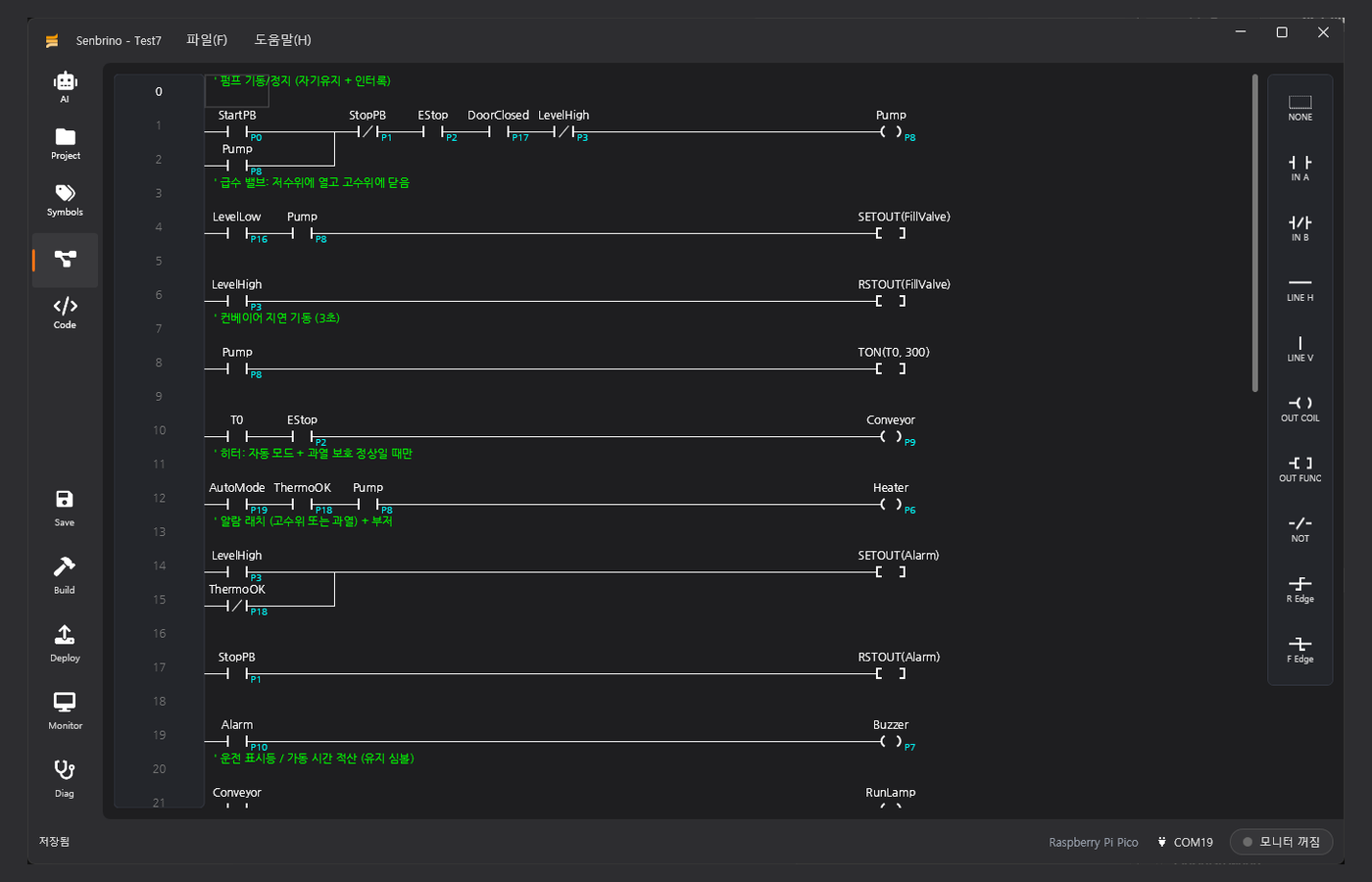
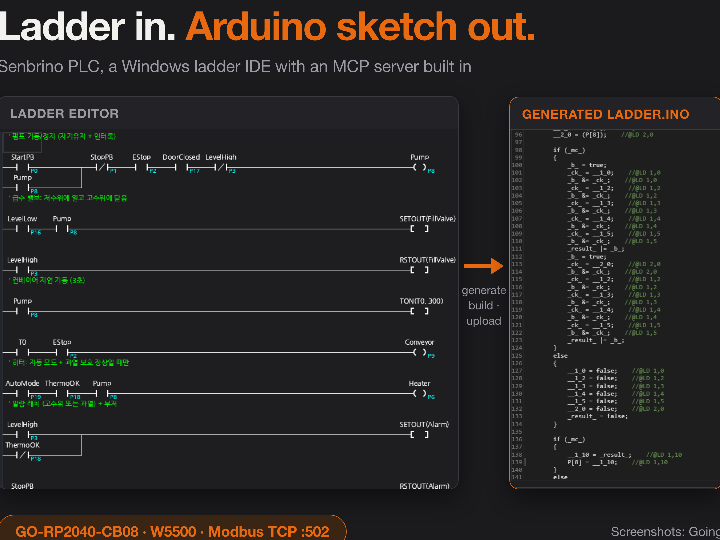
Ladder logic, written LD, is the notation used across industrial controls: each rung reads left to right, contacts on the left are the conditions, and the coil on the right is what happens. In the example Going ships, the first rung starts a pump on StartPB, holds it through the pump's own contact, and drops it if StopPB, EStop, DoorClosed or LevelHigh says otherwise. A TON(T0, 300) block three rungs down carries a Korean comment that reads "conveyor delayed start (3 seconds)", which puts the timer base at 10 ms per count.
Release.Senbrino was created on 2026-08-19 at 03:06 UTC and last pushed on 2026-08-20 at 06:15 UTC, with v0.9.0 published 2026-08-19 and v0.9.1 published 2026-08-20. Checked on 2026-08-21, the repository carried 0 stars, 0 forks, 0 watchers and no open issues, and it holds no source code. The NOTICE file states the position plainly: "No source code is distributed from this repository. Source code is maintained privately by Going."
From Ladder Rungs to a Plain Arduino Sketch
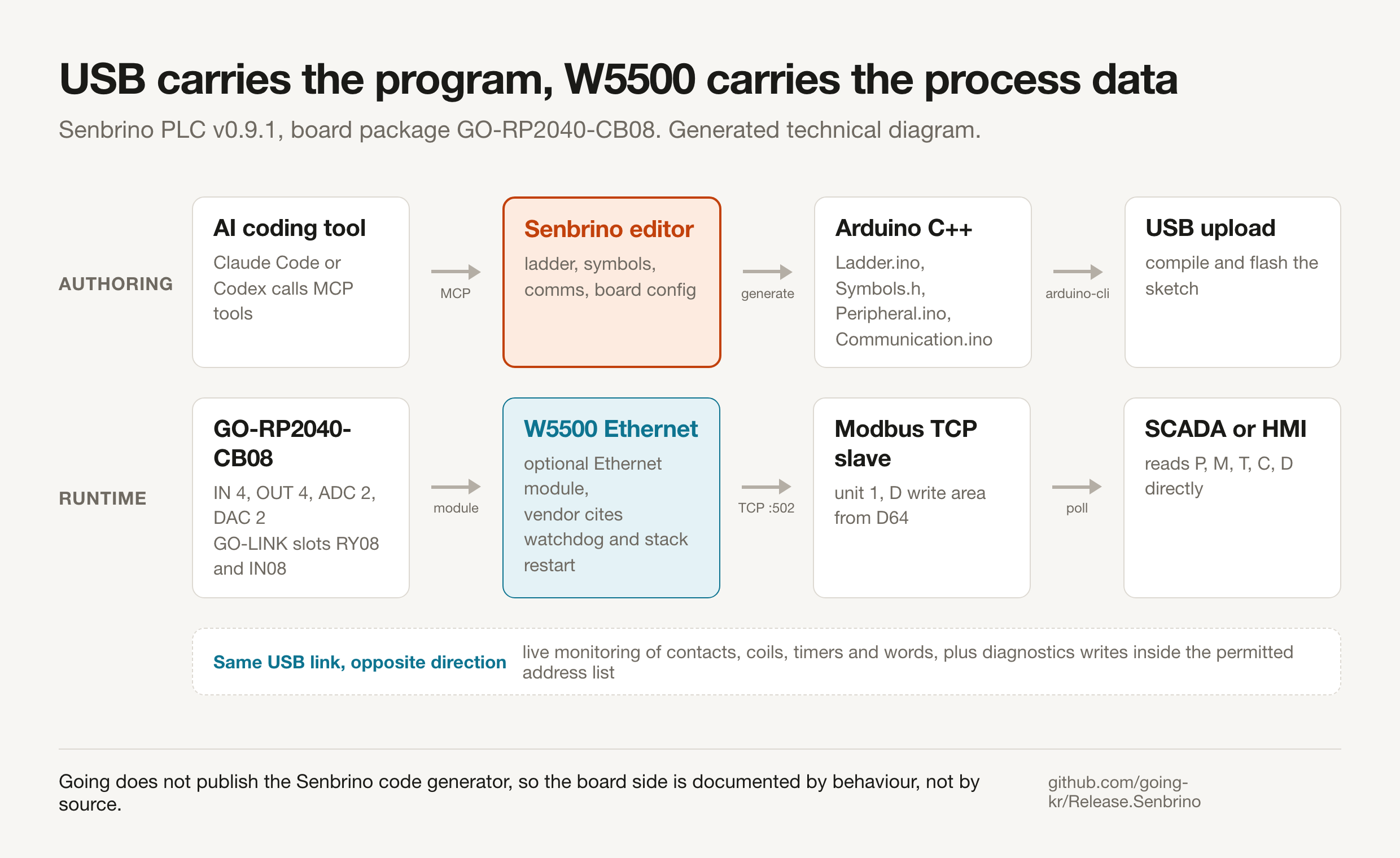
The compile step is what separates Senbrino from most soft-PLC runtimes. Instead of downloading bytecode into a virtual machine, Senbrino writes ordinary Arduino source and hands it to a compiler: "Every build regenerates Ladder.ino, Symbols.h, Peripheral.ino and Communication.ino from the ladder, symbols, pin definitions and communication settings, then compiles and uploads with the bundled arduino-cli. The output is a plain Arduino sketch."
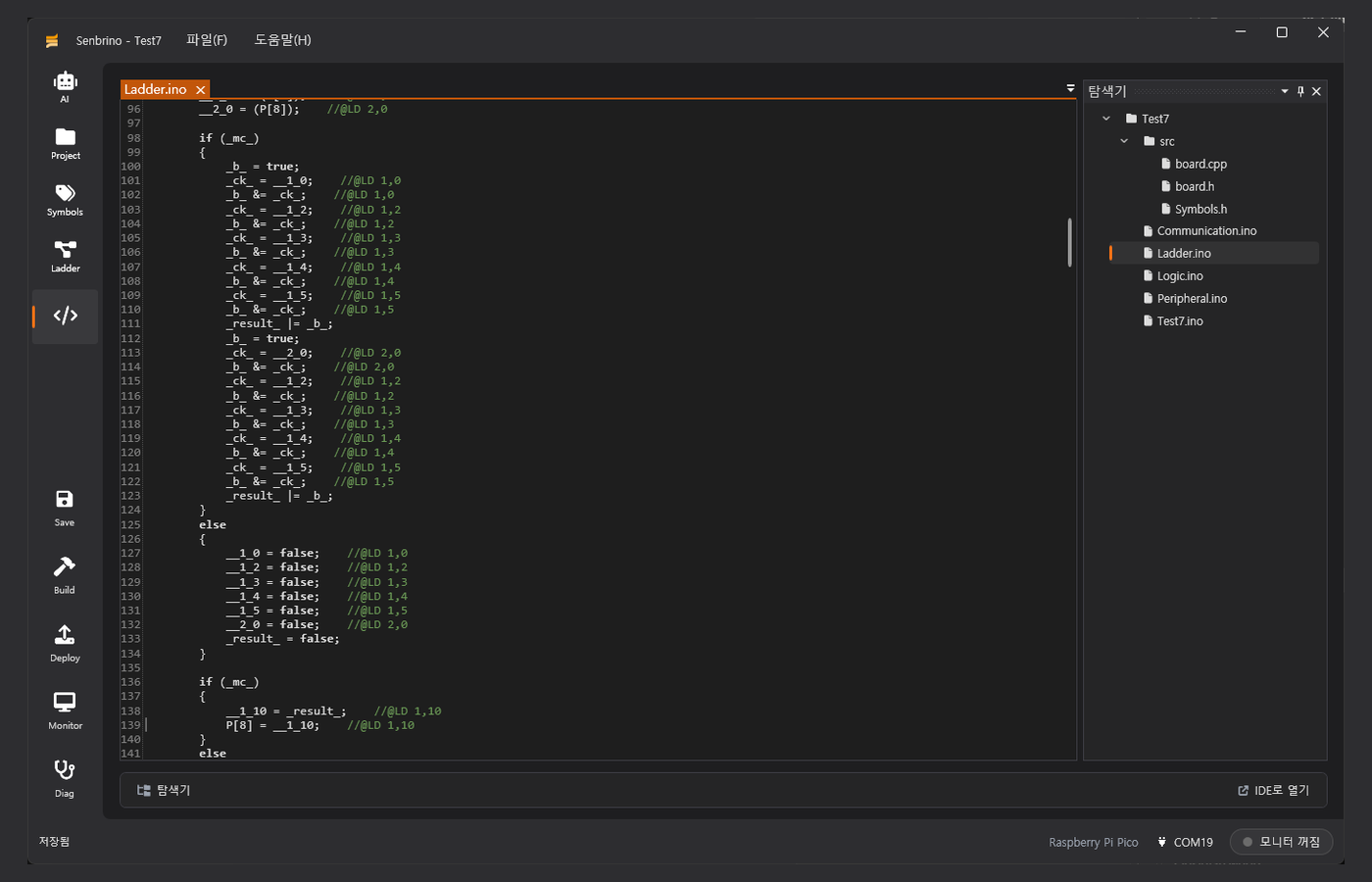
//@LD row,col comments pointing back at the ladder cell each line came from. Screenshot: Going, Release.Senbrino repository.
Two details in that generated code carry the design. Each statement that came from a ladder cell ends with a comment of the form //@LD 1,10 naming the row and column it was emitted from, which is how the README's promise that "compile errors are traced back to the ladder cell they came from" is implemented, and PLC bit addresses appear as plain array writes such as P[8] = __1_10;. Hand-written code gets one reserved home, because "if you need hand-written code, it goes in a single file, Logic.ino, which the build never overwrites".
Going's board manager shows the GO-RP2040-CB08 package compiling against the Arduino target rp2040:rp2040:rpipico, with its expansion catalogue set to GO-PCF8574A-RY08 and GO-PCF8574-IN08 and its ports declared as ETH, CH1 and CH2. Before any of that runs, each save triggers a static linter, which the README says catches:
- double coils, where one output is driven from two places
- broken rungs that never reach a coil
- latches that are never released
- counters with no reset
- undefined symbol names
- preset values outside the allowed range
What the MCP Server Actually Exposes
Model Context Protocol, or MCP, is the interface an AI coding tool uses to call functions living outside the model. In Senbrino the MCP server runs inside the Windows editor rather than on the controller: "Senbrino has a built-in MCP server, which lets AI coding tools such as Claude Code and Codex read and edit ladder, symbols, communication and board configuration through tool calls."
Going's v0.9.1 changelog gives away one more piece of that tool surface. It moved the three generic reference boards, Arduino Due, Arduino Mega2560 and Raspberry Pi Pico, to the end of the board list because alphabetical order made Arduino-* look like the default, and applied the change to the board selection dialog, the board manager and the MCP list. The board catalogue is therefore something an AI client enumerates, not just a human dropdown.
The dependency list confirms the plumbing. Going's NOTICE file names the third-party components as ".NET runtime, WPF-UI, AvalonEdit, AvalonDock, SkiaSharp, Markdig, ModelContextProtocol, Velopack, arduino-cli, and others", where ModelContextProtocol is the official C# MCP SDK, Velopack drives the auto-update packages, and arduino-cli is the compiler front end.
Fail-Closed Permission Before an AI Writes to a Live Machine
Letting a language model force values on a running machine is the part of this design that deserves scrutiny, and Going put the boundary in the tool rather than in a prompt. For diagnostics mode the README states: "you choose exactly which addresses may be forced or written; the board rejects everything else (fail-closed). Safety-related symbols such as E-stops and interlocks are flagged in the permission dialog." The same rule covers the agent, because "in diagnostics mode the AI can read device values and experiment, but only within the range you have allowed".
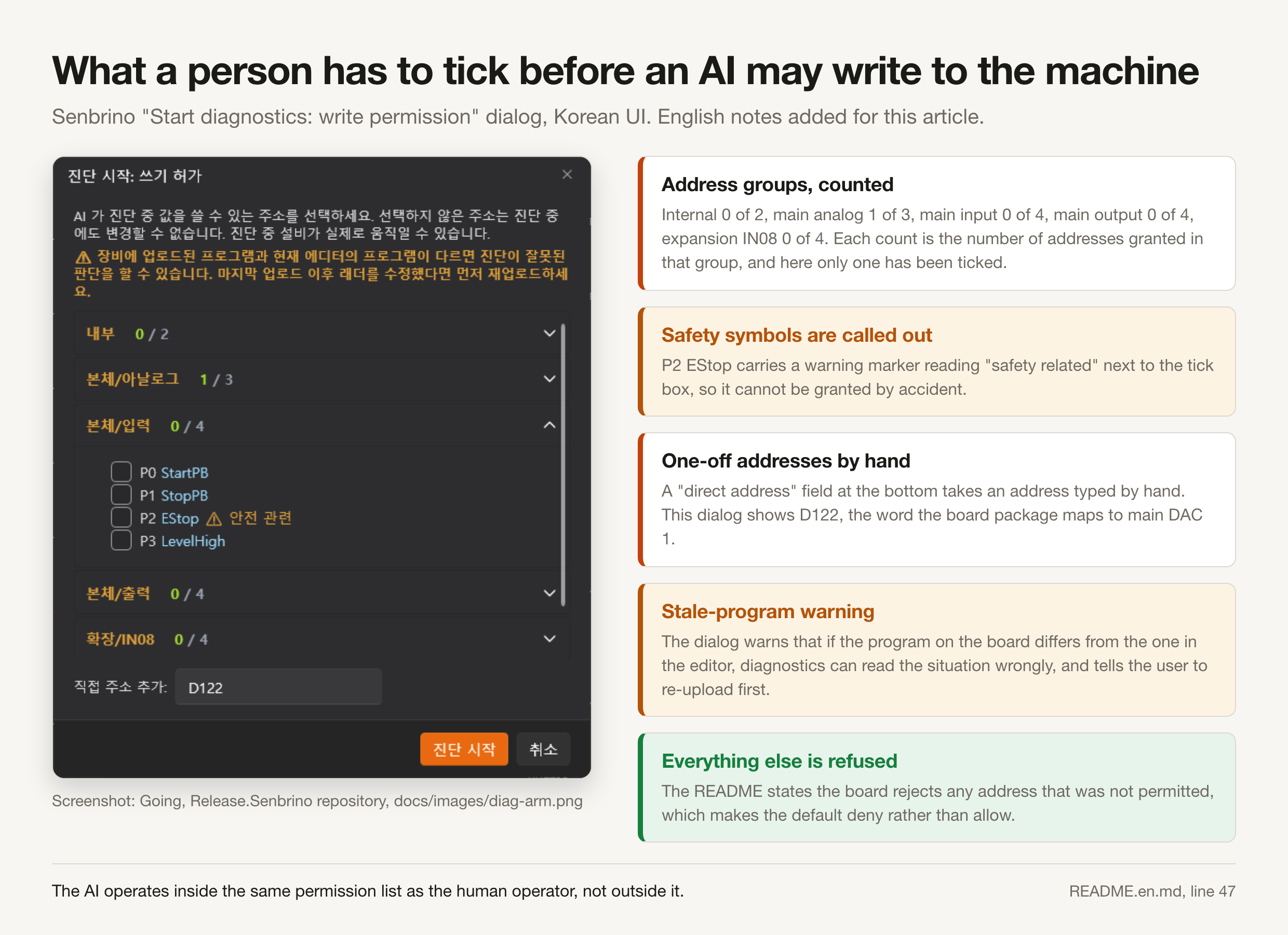
The dialog shows how granular that list is. Addresses are grouped by physical origin, internal, main analog, main input, main output and expansion IN08, and each group header shows how many of its addresses have been granted, one of three in the main analog group and zero everywhere else in the pictured dialog. P2 EStop sits in the main input group with a warning triangle and a Korean tag translating as "safety related" beside its tick box. A direct-address field at the bottom of the dialog takes an address typed by hand, and it holds D122 here, the word the board package maps to main DAC 1.
One warning in that dialog names a failure mode automation tends to hide. Senbrino tells the operator that if the program running on the board differs from the one open in the editor, diagnostics can reach the wrong conclusion, and that the ladder should be re-uploaded first. An agent reading live values against a stale program is exactly where a confident wrong answer costs the most.
The W5500 Path on the GO-RP2040-CB08 Board
Going names the Ethernet part in one place only. The supported-boards table in the Senbrino README lists "GO-RP2040-CB08 (Going)" as "Going's main board. IN 4 · OUT 4 · ADC 2 · DAC 2, Ethernet (W5500), CH1/CH2 serial, ID rotary switch, EEPROM retentive memory, GO-LINK expansion modules (RY08 relay output, IN08 input, and more)", and gives "Raspberry Pi Pico" the note "W5500 module". The one behavioural claim Going makes about it sits in the communication section: "The W5500 Ethernet stack includes a watchdog and stack restart, so it recovers on its own when something goes wrong."
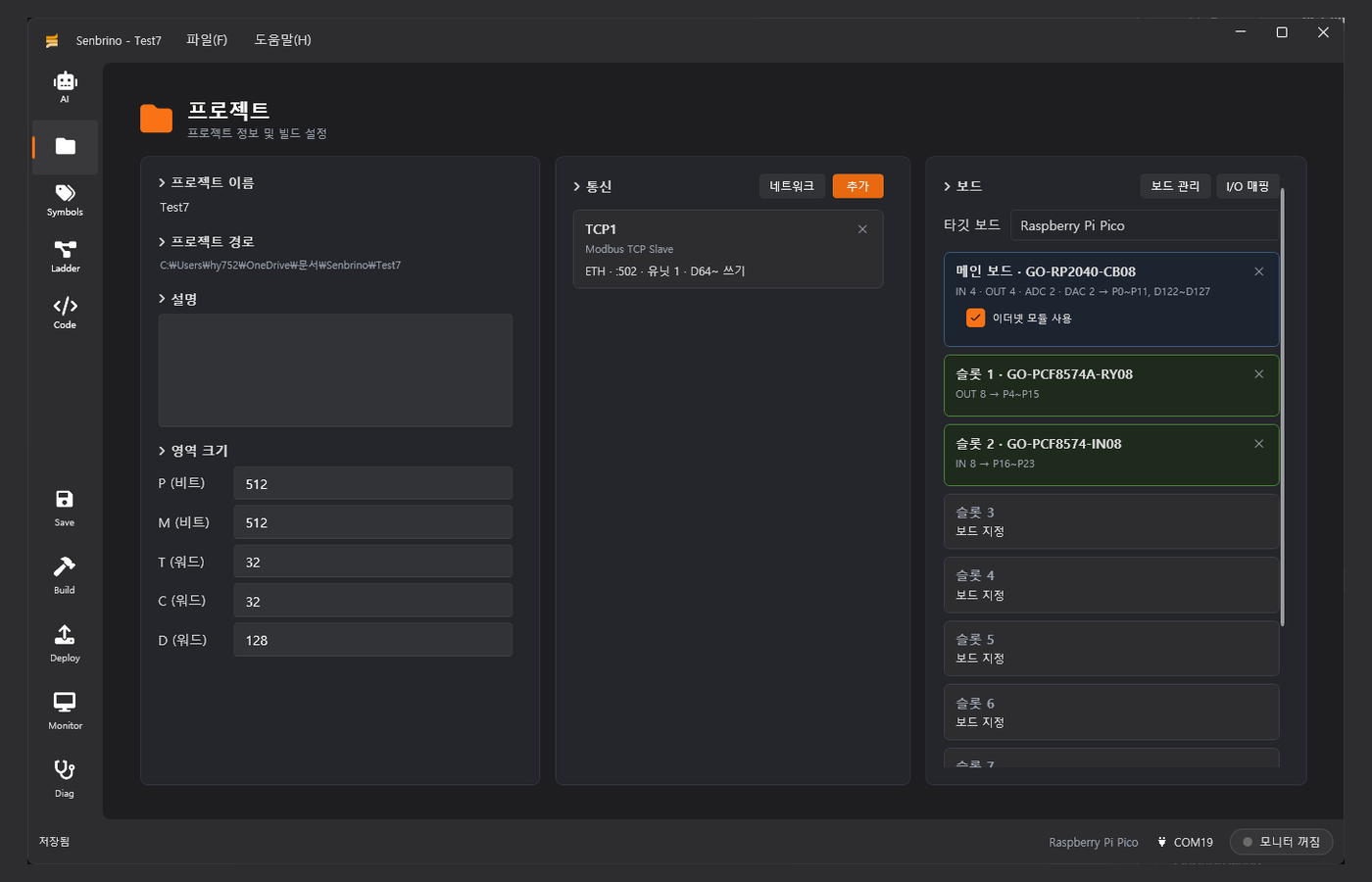
Wired Ethernet here is an option a user turns on, and the product page reads the same way. The GCON lineup on goingiot.co.kr sells five modules and gives Ethernet its own entry, module 02, specified there as Ethernet 10/100 Mbps with TCP/IP and Modbus TCP, separate from the MAIN controller that carries RS485 2 CH, 4 digital inputs and 4 relay outputs. Inside Senbrino the main board card carries a "use Ethernet module" checkbox, ticked in the sample project.
The scope of the W5500 evidence should be stated exactly. Checked on 2026-08-21, the strings W5500 and WIZnet appear nowhere on goingiot.co.kr, goinglabs.co.kr or the intosen.com shop, so the Senbrino README on GitHub is the only document in which Going names the controller. No schematic, pin map or SPI configuration is published, and because the Senbrino code generator is closed, the Ethernet library it emits cannot be read.
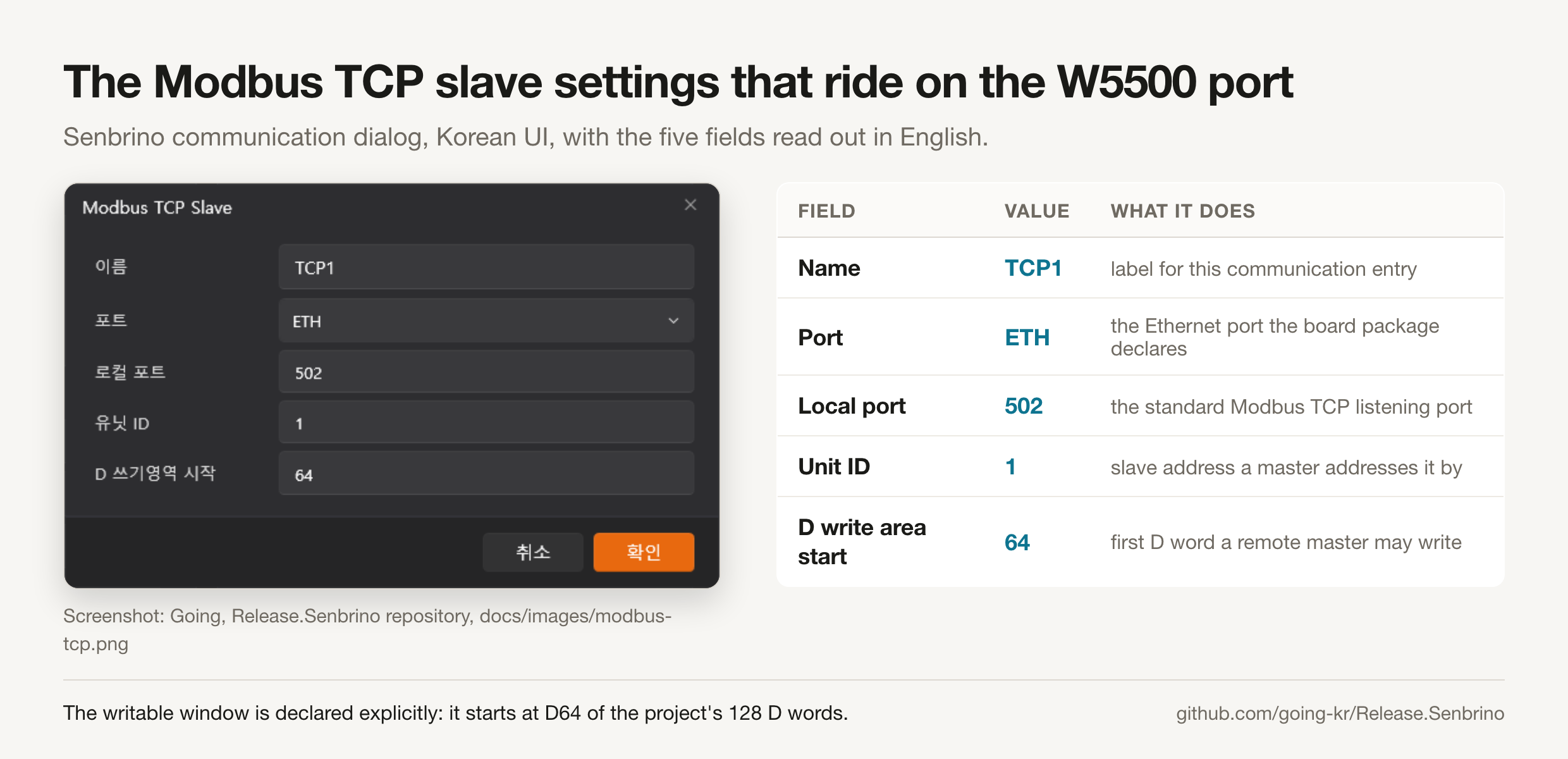
What the port carries is concrete. A Modbus TCP slave named TCP1 binds to the port the board package calls ETH, listens on local port 502, answers as unit ID 1, and opens a write window into the D area from D64 of the project's 128 D words. Address assignment for physical points is automatic once expansion cards are attached:
| Point | PLC address | Where it lives |
|---|---|---|
| Main IN 0 to IN 3 | P0 to P3 | GO-RP2040-CB08 digital inputs |
| Main OUT 0 to OUT 3 | P8 to P11 | GO-RP2040-CB08 digital outputs |
| Slot 1 OUT 0 to OUT 7 | P4 to P7, P12 to P15 | GO-PCF8574A-RY08 relay card |
| Slot 2 IN 0 to IN 7 | P16 to P23 | GO-PCF8574-IN08 input card |
| Main ADC 0, ADC 1 | D127, D126 | GO-RP2040-CB08 analog inputs |
| Main DAC 0, DAC 1 | D123, D122 | GO-RP2040-CB08 analog outputs |
| Modbus TCP write window | D64 upward | what a remote master may write |
The Part of This Toolchain That Is Already Three Years Old
The repository dates say August 2026, but the toolchain is not new. Going's separate GoingArduinoPlcManual repository holds a 24-page Korean user manual for a product called Going PLC, version 1.0 with a cover dated 2023.02, whose setup page tells the reader to download the ladder program from github.com/devinno-kr/ArduinoLadder/releases. That manual already documents a symbol table, a communication screen offering Modbus RTU and TCP in master and slave roles plus MQTT, and an export step whose Arduino IDE screenshot shows the tabs PLC.ino, Comm.ino and syms.h.
The predecessor repository is public and its C# is readable. devinno-kr/ArduinoLadder was created 2023-07-16 and last pushed 2024-06-17, across five releases from v0.0.0.1 to v0.0.0.5. Its generator in Tools/LadderTool.cs writes a Comm.ino that includes <Ethernet.h>, declares a ModbusTCPSlave and calls Ethernet.begin(mac, ip), and the Modbus library bundled with it constructs its listener as new EthernetServer(502).
The ArduinoLadder code is evidence about the earlier product, not proof about Senbrino, and the distinction matters. What the older generator establishes is a house pattern: a Going-documented ladder toolchain has reached WIZnet Ethernet through the standard Arduino Ethernet library since 2023, three years before Senbrino appeared. Port 502 is common to both, though 502 is the registered Modbus TCP port and carries no weight on its own.
Vendor, Availability, and Price
GOING Co., Ltd. is registered in South Korea under business number 360-81-02044 with Lee Chang-won as representative director, at Ace NS Tower room 1209, Mullaebuk-ro 8, Yeongdeungpo-gu, Seoul, and reachable at goingiot@naver.com. The company serves goingiot.co.kr and goinglabs.co.kr as mirrors of one site, and its GitHub organisation going-kr was created 2024-05-24 and holds seven public repositories.
The GCON hardware line is listed on the Korean product page as five modules, on sale, with no price attached. Checked on 2026-08-21, no Going page states a price or links a store for the MAIN controller, the Ethernet expansion or the GO-RP2040-CB08 board, so buyers go through the email address above. The only shop the site links, intosen.com, sells a different family entirely, the Senvas SV070 7 inch touch HMI at 396,000 KRW and the SV101 10.1 inch at 484,000 KRW, both built on a Broadcom BCM2711 with no W5500 in the path.
The software is free and immediately downloadable, with the caveats of a pre-1.0 release. Senbrino-win-Setup.exe in v0.9.1 is 24,552,190 bytes, targets Windows 10 and 11 x64, and installs per-user under %LocalAppData%\Senbrino without administrator rights. Going states the installer is not code-signed, so SmartScreen will warn, and that the .NET 9 desktop runtime is fetched automatically if missing; the latest release is the download point and Issues the stated feedback channel.
Related WIZnet Maker Projects
How to Implement OpenPLC on STM32 with W5500 Ethernet and Modbus TCP is the closest neighbour on the programming model, because it also puts ladder-authored logic on a microcontroller and exposes it as Modbus TCP over a W5500. The difference is what reaches the chip: OpenPLC compiles IEC 61131-3 through its own runtime, while Senbrino emits a sketch a user can open in the Arduino IDE, which shows how differently the same job splits between a runtime and a code generator.
VovkPLCRuntime takes the third route, a portable virtual machine with its own bytecode that runs on the MCU and speaks raw TCP and UDP through a W5500. A bytecode VM swaps a program without recompiling, while Senbrino reflashes the whole sketch every time, framing a real trade between field updates and plain readable firmware.
NEXTuino BASE, an RP2040 entry-level industrial Arduino PLC is the hardware-side counterpart, an RP2040 industrial controller with W5500 Ethernet sold to be programmed from the Arduino IDE. Going's GO-RP2040-CB08 is the same class of part, but Going sells the authoring tool as the product and treats its own board as one catalogue entry beside the Arduino Due, the Mega2560 and a bare Raspberry Pi Pico.
How Does an ESP32-S3 Modbus Gateway Serve Field Points as MCP Tools over W5500 Ethernet? is the comparison that sharpens the MCP question, because it puts the MCP server on the device and turns named field points into tools an agent reads and writes at runtime. Senbrino inverts the arrangement, keeping the MCP server in a Windows editor where the tools act on the source program before it is ever compiled: one agent supervises a running plant, the other writes the program that will run it.
FAQ
Q. What does Senbrino use the W5500 for? The W5500 is the part Going names for the Ethernet path of its GO-RP2040-CB08 main board, an option the project screen switches on with a "use Ethernet module" checkbox, and that path carries the Modbus TCP traffic. The sample project binds a slave to local port 502 as unit ID 1, and Going also lists a Raspberry Pi Pico with a W5500 module as a supported board package.
Q. Can an AI change a running machine through Senbrino? Only inside a list a person ticked first. Diagnostics mode requires the operator to select which addresses may be written, the board rejects every other address, and E-stops and interlocks are flagged separately in that permission dialog.
Q. Is the Senbrino source code available? No. Release.Senbrino distributes only the installer and auto-update artifacts, the NOTICE file states that source is maintained privately by Going, and there is no licence file. The earlier devinno-kr/ArduinoLadder editor that Going's 2023 manual pointed to is public and readable.
Q. Do I need Going's own hardware to use it? No. Board packages ship for the Arduino Due, the Arduino Mega2560 and the Raspberry Pi Pico alongside Going's GO-RP2040-CB08 and GO-Pico-IO8R, and the README says new hardware is added by writing a board.xml plus a board.cpp driver rather than by changing the application.
Q. How mature is this release? It is early. v0.9.0 appeared on 2026-08-19 and v0.9.1 on 2026-08-20, the installer is unsigned, and as of 2026-08-21 the repository shows 0 stars, 0 forks and no issues, so no independent user report exists to weigh against the vendor's own description.
-
Senbrino PLC release repository
Going's distribution repository for the Senbrino installer and auto-update artifacts. Created 2026-08-19, last pushed 2026-08-20. Binaries only, no source.

-
Senbrino README (English)
The only Going document that names the W5500. Carries the supported-boards table, the fail-closed diagnostics rule, the MCP paragraph and the code-generation description.
-
Senbrino latest release
Download point for Senbrino-win-Setup.exe. v0.9.1 published 2026-08-20, 24,552,190 bytes, Windows 10/11 x64, unsigned installer.
-
GCON modular industrial PLC (product page)
Going's GCON hardware line: five modules listed as on sale, with Ethernet 10/100 Mbps and Modbus TCP sold as a separate expansion module. No price published.
-
GOING organisation on GitHub
Seven public repositories including the sibling Senvas HMI and Senbrix Raspberry Pi PLC toolchains, which share the same MCP-driven workflow.
-
Going PLC user manual (2023 predecessor)
24-page PDF manual for Going's earlier ladder editor, cover dated 2023.02. Its setup page points readers to the devinno-kr/ArduinoLadder releases.
-
devinno-kr/ArduinoLadder (open predecessor editor)
The earlier, source-visible ladder editor. Tools/LadderTool.cs emits a Comm.ino that includes Ethernet.h and calls Ethernet.begin(mac, ip); its bundled Modbus library opens EthernetServer(502).
-
Arduino Ethernet library reference
The standard library that drives WIZnet controllers through their hardware sockets, used by the predecessor's generated communication code.
-
Model Context Protocol
The protocol Senbrino's built-in server speaks. Going's NOTICE file lists ModelContextProtocol, the official C# SDK, among the bundled components.
-
WIZnet W5500
Hardwired TCP/IP Ethernet controller named in the Senbrino supported-boards table for the GO-RP2040-CB08 and for the Raspberry Pi Pico board package.


