STM Lesson 95. LAN. W5500. FTP Server. Part 1
STM Lesson 95. LAN. W5500. FTP Server. Part 1
0
Project description
After we learned to organize using our chip W5500 several simultaneously open connections, you might think about the next protocol, which is intended for transferring files, as well as managing the file system over the network — this protocol FTP ( File Transfer Protocol — file transfer protocol ).
This protocol, although it has some security problems, since the username and password are transmitted in open form here, is also popular in our time. For example, at home, when transferring data, we do not need to hide our credentials from ourselves, and it is also quite possible to use another protocol for encryption on top of this protocol.
But along with the fact that the FTP protocol seems simple at first glance, in fact this is not so at all. The client with the server constantly exchanges messages, in addition, for data transfer it is necessary to open another connection on time, and, therefore, close it on time. Of course, this protocol is simpler than, for example, protocols based on the NetBios protocol, which, together with data transfer, also provide support for encryption, assignment of names to nodes and other charms. But, nevertheless, I will have to tinker with him, which I, in fact, did. There were many problems that I met on the way to master this protocol. For example, we have long learned to transfer large amounts of data from our LAN modules, but we have not yet learned to accept. It turned out not so simple. But, we will not be afraid of difficulties, otherwise we will not learn anything,and let's go along the path I have drawn, bypassing these difficulties somehow.
Talk a little about the protocles themselves. Although we will not particularly chew it, since then we will still have to do this again when writing the program algorithm and writing the code that will implement this algorithm.
Therefore, we will get acquainted with the FTP protocol somehow briefly.
As I said, the exchange between the client and the server in order to later transfer some data will occur through messages. These messages are textual, however, they begin with a figure that carries basic information.
I also repeat once again that for the full operation of the protocol we will need two connections. One — manager and the other — for data transfer.
For the FTP control connection, it was accepted on the server to use the port 21. On the client side, the port is assigned automatically, that is, its number is not so important.
There are two types of port destination for data transfer, since there are two client and server operating modes via FTP — active and passive.
In the active mode of connecting FTP for data transfer, the initiator of the connection is the server. Then the port is used to connect data transfer on the server twenty, and on the client side there is a port with a number large 1024. But in this case, if there is some kind of ( ) firewall <TAG1> or NAT translator on the client’s side, then the server will not be able to establish a connection with the client.
There is also a passive mode for this. Then, for transferring client data with the server, the client will act as the initiator of the connection. In this case, random port numbers are assigned to both the server side and the client side when creating the connection, with only a larger number than 1024. This connection is created as follows. The client tells the server that he wants to use passive mode by passing a specific command, and the server answers him with the number of his IP address, as well as the port number, with which the client will create a connection for data transfer.
Well, I propose to comprehend the rest of the currents of the duct when writing our source code.
To do this, we will create a project based on a project from lesson 93 W5500_HTTPS_SOCKETS let's call him W5500_FTPS.
Launch our project at Cube MX.
Let's go to the project settings and select there as a programming environment System workbench, since our firmware file size today risks increasing to more than 32 kilobytes, which is unacceptable for the free version of Keil

Generate the project and connect it to System Workbench.
Let's go to the project settings and set the optimization level eleven

Let's try to assemble the aisle and start working with it.
Create a new FTP library consisting of two — files ftpd.h and ftpd.c with the following content
ftpd.h:
#ifndef FTPD_H_
#define FTPD_H_
//--------------------------------------------------
#include "stm32f4xx_hal.h"
#include <string.h>
#include <stdlib.h>
#include <stdint.h>
#include <ctype.h>
#include "fatfs.h"
#include "w5500.h"
//--------------------------------------------------
//--------------------------------------------------
#endif /* FTPD_H_ */
ftpd.c:
#include "ftpd.h"
//-----------------------------------------------
extern UART_HandleTypeDef huart2;
//-----------------------------------------------
extern char str1[60];
extern uint8_t sect[515];
extern uint8_t ipaddr[4];
extern volatile uint16_t tcp_size_wnd;
//-----------------------------------------------
In the title file we connected a new file for us ctype.h, which carries several functions for working not specifically with strings, but with individual lowercase characters. This will come in handy later.
Also connect our library to the file w5500.h below
#include "httpd.h"
#include "ftpd.h"
We will work with the protocol only in passive mode. But we will still add the port number for the active connection.
Therefore, go to the file net.h and add macros for port numbers
#define LOCAL_PORT 80
#define LOCAL_PORT_FTP_CONTROL 21
#define LOCAL_PORT_FTP_DATA 20
#define LOCAL_PORT_FTP_DATA_PASSIV 35500
And in the file net.c add global variables using these macros
uint16_t local_port = LOCAL_PORT;
uint16_t local_port_ftp_control = LOCAL_PORT_FTP_CONTROL;
uint16_t local_port_ftp_data = LOCAL_PORT_FTP_DATA;
uint16_t local_port_ftp_data_passiv = LOCAL_PORT_FTP_DATA_PASSIV;
Also connect the data variables in the file w5500.c
extern uint16_t local_port;
extern uint16_t local_port_ftp_control;
extern uint16_t local_port_ftp_data;
extern uint16_t local_port_ftp_data_passiv;
In file w5500.h add macros for sockets
#define MAC_ADDR {0x00,0x15,0x42,0xBF,0xF0,0x51}
//--------------------------------------------------
#define SOCKET_MAX 8
#define FTP_SOCKET_MAX 2
#define FTP_SOCKET_CTRL 0
#define FTP_SOCKET_DATA 1
//--------------------------------------------------
I think the purpose of macros is clear from their names.
In file net.c in function packet_receive change the parameter in the loop
for( i =0;i <SOCKET_MAX;i + + )
In the function in the w5500.c file between the comment « // configure the sockets » and now such a code will be a delay
//Настраиваем сокеты
//Для FTP
//Открываем управляющий сокет
SetSockPort(0, local_port_ftp_control);
OpenSocket(0,Mode_TCP);
SocketInitWait(0);
//Начинаем слушать сокет
ListenSocket(0);
SocketListenWait(0);
//Открываем сокет для данных
SetSockPort(1, local_port_ftp_data_passiv);
OpenSocket(1,Mode_TCP);
SocketInitWait(1);
//Начинаем слушать сокет
ListenSocket(1);
SocketListenWait(1);
//Для HTTP
for(i=FTP_SOCKET_MAX;i<SOCKET_MAX;i++)
{
SetSockPort(i, local_port);
//Открываем сокет
OpenSocket(i,Mode_TCP);
SocketInitWait(i);
//Начинаем слушать сокет
ListenSocket(i);
SocketListenWait(i);
}
HAL_Delay(500);
That is, as can be seen from the code, for the FTP control connection we use socket 0 to connect the FTP — socket 1 data, and the remaining 6 sockets remain for HTTP purposes. Therefore, we set up sockets for FTP separately each due to the difference in their ports, and we use a cycle for HTTP sockets.
Further in the state view cycle we will slightly fix the parameters
for(i=0;i<SOCKET_MAX;i++)
In the w5500.h file, create prototypes of some functions
void SendSocket(uint8_t sock_num);
uint16_t GetSizeRX(uint8_t sock_num);
void w5500_readSockBuf(uint8_t sock_num, uint16_t point, uint8_t *buf, uint16_t len);
Now let's do a little improvement of the code regarding the HTTP protocol.
In file httpd.c create a function at the bottom of the page for processing HTTP packages, transferring almost the entire package processing code from the general function of receiving and processing file packages to it w5500.c
//-----------------------------------------------
void http_receive(uint8_t sn)
{
uint16_t point;
uint16_t len;
if(httpsockprop[sn].data_stat == DATA_COMPLETED)
{
len = GetSizeRX(sn);
//Если пришел пустой пакет, то уходим из функции
if(!len) return;
//Отобразим размер принятых данных
sprintf(str1,"S%d len buf:0x%04Xrn",sn,len);
HAL_UART_Transmit(&huart2,(uint8_t*)str1,strlen(str1),0x1000);
//здесь обмениваемся информацией: на запрос документа от клиента отправляем ему запрошенный документ
//указатель на начало чтения приёмного буфера
point = GetReadPointer(sn);
w5500_readSockBuf(sn, point, (uint8_t*)tmpbuf, 5);
if (strncmp(tmpbuf,"GET /", 5) == 0)
{
httpsockprop[sn].prt_tp = PRT_TCP_HTTP;
http_request(sn);
}
}
else if(httpsockprop[sn].data_stat==DATA_MIDDLE)
{
if(httpsockprop[sn].prt_tp == PRT_TCP_HTTP)
{
tcp_send_http_middle(sn);
}
}
else if(httpsockprop[sn].data_stat==DATA_LAST)
{
if(httpsockprop[sn].prt_tp == PRT_TCP_HTTP)
{
tcp_send_http_last(sn);
DisconnectSocket(sn); //Разъединяемся
SocketClosedWait(sn);
sprintf(str1,"S%d closedrn",sn);
HAL_UART_Transmit(&huart2,(uint8_t*)str1,strlen(str1),0x1000);
OpenSocket(sn,Mode_TCP);
//Ждём инициализации сокета (статус SOCK_INIT)
SocketInitWait(sn);
//Продолжаем слушать сокет
ListenSocket(sn);
SocketListenWait(sn);
}
}
}
//-----------------------------------------------
We will also add a prototype in the title file to this function, and a prototype function http_request you can now remove from there.
After now we remove from the function w5500_packetReceive in file w5500.c all that we have endured, she will take this short look
//-----------------------------------------------
void w5500_packetReceive(uint8_t sn)
{
if(GetSocketStatus(sn)==SOCK_ESTABLISHED)
{
//сокет для FTP
if(sn<FTP_SOCKET_MAX)
{
}
//сокет для HTTP
else if(sn>=FTP_SOCKET_MAX)
{
http_receive(sn);
}
}
}
//-----------------------------------------------
We collect the code and sew the controller in order to check that the HTTP server is still working normally with us by requesting some page from it from the browser.
Now let's start dealing with FTP.
In file ftpd.c add the function of receiving and processing FTP packages, in which for now we just measure the size of the data in the package
//-----------------------------------------------
void ftp_receive(uint8_t sn)
{
uint16_t len;
uint16_t point;
len = GetSizeRX(sn);
}
//-----------------------------------------------
We create a prototype for this function and call it a function w5500_packetReceive in file w5500.c
if(sn<FTP_SOCKET_MAX)
{
ftp_receive(sn);
}
Now back to the function ftp_receive to file ftpd.c and write the following double condition there
len = GetSizeRX(sn);
if(sn == FTP_SOCKET_CTRL)
{
}
else if(sn == FTP_SOCKET_DATA)
{
}
}
In the title file ftpd.h create a listing of possible FTP command options
#include "w5500.h"
//--------------------------------------------------
// FTP commands
enum ftp_cmd {
USER_CMD,
ACCT_CMD,
PASS_CMD,
TYPE_CMD,
LIST_CMD,
CWD_CMD,
DELE_CMD,
NAME_CMD,
QUIT_CMD,
RETR_CMD,
STOR_CMD,
PORT_CMD,
NLST_CMD,
PWD_CMD,
XPWD_CMD,
MKD_CMD,
XMKD_CMD,
XRMD_CMD,
RMD_CMD,
STRU_CMD,
MODE_CMD,
SYST_CMD,
XMD5_CMD,
XCWD_CMD,
FEAT_CMD,
PASV_CMD,
SIZE_CMD,
MLSD_CMD,
APPE_CMD,
NO_CMD,
};
//--------------------------------------------------
I envied this listing from the WIZNET example.
Add FTP Properties Structure Below
//--------------------------------------------------
typedef struct ftp_prop {
volatile uint8_t connect_stat;//статус состояния управляющего соеднинения FTP
volatile uint8_t connect_stat_data;//статус состояния соеднинения для данных FTP
volatile uint8_t login_stat;//статус авторизации FTP
volatile uint8_t ftp_type;// Transfer type
volatile uint8_t datasock_mode;// режим соединения
volatile uint8_t datasock_state;// состояние соединения для данных
volatile uint8_t data_stat;//статус передачи данных
volatile uint16_t rem_bytes_dirinfo;//кличество непереданных байтов информации о каталоге
volatile uint32_t rem_filesize;//количество непереданных байтов файла
enum ftp_cmd current_cmd;
char username[100];
char work_dir[100];
char filename[100];
FIL my_fil;
} ftp_prop_ptr;
//--------------------------------------------------
Here, I hope, the purpose of the fields is also clear. What could be incomprehensible, on the contrary, I wrote comments. Also, if something is not clear with this, then we will figure it out when using these fields.
After the announcement of the structure, we will add several service macros that will come in handy for us later
} ftp_prop_ptr;
//--------------------------------------------------
#define FTP_DISCONNECT 0
#define FTP_CONNECT 1
//--------------------------------------------------
#define FTPS_NOT_LOGIN 0
#define FTPS_LOGIN 1
//--------------------------------------------------
#define ASCII_TYPE 0
#define IMAGE_TYPE 1
#define LOGICAL_TYPE 2
//--------------------------------------------------
#define DATASOCK_IDLE 0
#define DATASOCK_READY 1
#define DATASOCK_START 2
//--------------------------------------------------
#define PASSIVE_MODE 0
#define ACTIVE_MODE 1
//--------------------------------------------------
In file ftpd.c create a variable like our structure
extern uint8_t ipaddr[4];
ftp_prop_ptr ftpprop;
Let's get back to function ftp_receive and create a sector variable there to write to the buffer in the body conditions
if(sn == FTP_SOCKET_CTRL)
{
data_sect_ptr *datasect = (void*)sect;
}
Also in the same body we will create another condition for checking the fact of the created connection
data_sect_ptr *datasect = (void*)sect;
if(!ftpprop.connect_stat)
{
}
else
{
}
Mostly the ( body if the connection has not yet occurred ) we initiate the current directory. While it will be the root directory
if(!ftpprop.connect_stat)
{
strcpy(ftpprop.work_dir, "/");
}
Let's go to the file ftpd.h and add there two macros — server version numbers and server name
#include "w5500.h"
//--------------------------------------------------
#define HOSTNAME "w5500Chip"
#define VERSION "1.0"
//--------------------------------------------------
Let's get back to function ftp_receive file ftpd.c and in the same body, the conditions for the absence of a connection will be entered in the buffer message along with the name and version of the server, which our server must respond to the client by trying to connect to port 21
strcpy(ftpprop.work_dir, "/");
sprintf((char*)datasect->data, "220 %s FTP version %s ready.rn", HOSTNAME, VERSION);
Next, we must send this message to the server. For this, we do not yet have a function. Let's create it a little higher
extern volatile uint16_t tcp_size_wnd;
//-----------------------------------------------
void tcp_send_ftp_one(uint8_t sn, uint8_t * buf, uint16_t len)
{
uint16_t end_point;
end_point = GetWritePointer(sn);
end_point+=len;
//Заполним данными буфер для отправки пакета
SetWritePointer(sn, end_point);
end_point = GetWritePointer(sn);
w5500_writeSockBuf(sn, end_point, buf, len);
//отправим данные
RecvSocket(sn);
SendSocket(sn);
}
//-----------------------------------------------
This function is very similar to the function of sending a single-buffer HTTP package, so there is nothing to tell, it is even much simpler. We don’t read anything from the map here.
Let's get back to function ftp_receive in the same body where we just were, and we will send the message to the client, and then set the state « connected »
sprintf((char*)datasect->data, "220 %s FTP version %s ready.rn", HOSTNAME, VERSION);
tcp_send_ftp_one(sn, (uint8_t *)sect, strlen((char*)datasect->data));
ftpprop.connect_stat = FTP_CONNECT;
Let's collect our code, send a controller and see if our message returns when trying to connect to our client server, and see which team the client will then send us.
As an FTP server, I used the Total Commander file manager, which I have been using for a long time for various file operations on a PC. We will use the username and password for an anonymous connection, there is a special username for this, and any email address is used as a password. Total Commander I have versions 6.51. This is a pretty old version, but it suits me.
Also launch WireShark.
In Total Commander, call the menu item FTP - > Connect to FTP Server, in the dialog that opens, select « Add » and fill in the following fields, not forgetting also the checkmark for passive mode, since we use just such a mode

We also click on the « Anonymous connection ... » button and fill out some email address ( I filled out the address that has not existed for a long time )

We agree, and in the dialogue with accounting data we also agree ( click « OK » ).
We will have an FTP account. We press to connect, and then press « Interrupt », since we will not wait for the connection, it is still far from it. The process is important to us.

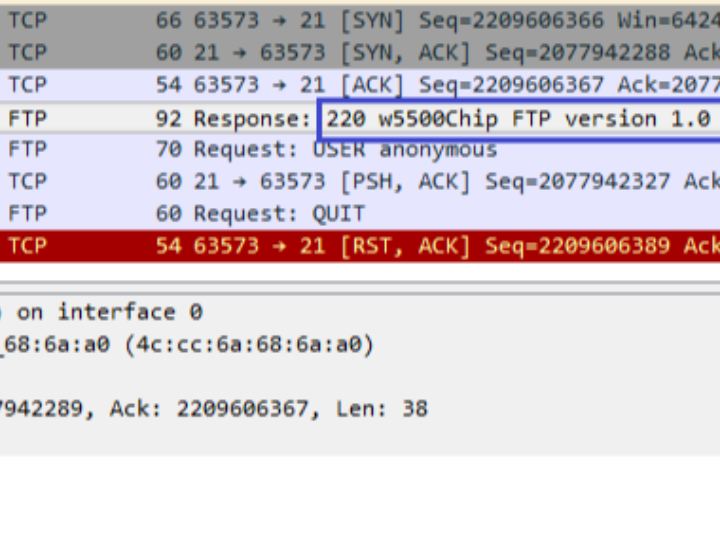
We go to Wireshark and see what happens there ( on FTP we don’t filter there, otherwise we will only see FTP packages, and we won’t see packages for creating connections and other service packages ) ( click on the picture to enlarge the image )

We see that our message about the server to the client came, that it was recognized as FTP and the client sent us the USER command with the username, to which we must now form an answer.
B next part classes we will write the function of parsing the FTP command line, and we will also process several commands for an adhesive response to them by the client.
https://youtu.be/ENfG1d3F1oU

