


LoRaWAN-to-Ethernet Automation Gateway with W5500 and RFM95
lab@home: An Open-Source Automation Learning Platform Supporting W5500 Ethernet and RFM95 LoRaWAN

WIZnet - W5500
x 1

W5500 Ethernet과 RFM95 LoRaWAN을 지원하는 오픈소스 자동화 교육 플랫폼, lab@home
요약
lab@home은 ESP32-S3와 STM32G431을 결합한 듀얼 프로세서 기반의 오픈소스 자동화 교육 플랫폼입니다.
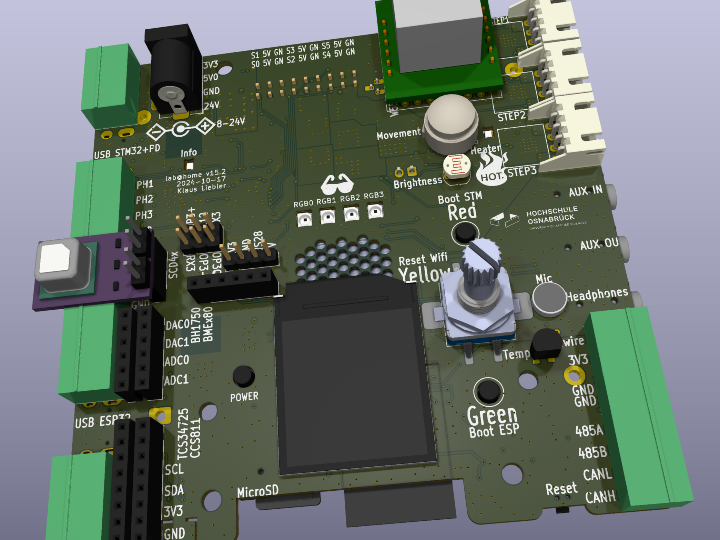
100 × 100 mm 크기의 PCB에 센서 측정, 실시간 제어, 모터 구동, 브라우저 기반 Function Block 프로그래밍 기능을 통합했으며, 선택형 통신 모듈로 WIZnet W5500 Ethernet, RFM95 LoRaWAN, SIM7080G Cellular, NRF24L01을 지원합니다.
이 프로젝트는 완성된 LoRaWAN Gateway가 아니라, Ethernet, LoRaWAN, Wi-Fi, Bluetooth, RS485, CAN과 같은 유·무선 통신 기술을 하나의 플랫폼에서 실험할 수 있도록 설계된 교육 및 프로토타이핑 시스템입니다.
원본 프로젝트
GitHub: klaus-liebler/labathome
집에서도 자동화 실험을 할 수 있을까?
lab@home은 코로나19 팬데믹 초기, 학생들이 대학 실험실에 접근하기 어려워진 상황에서 시작됐습니다.
개발자는 제어공학, 자동제어 및 정보통신 분야의 실험을 학생들이 집에서도 수행할 수 있도록, 작고 비교적 저렴하며 재현 가능한 실험 플랫폼을 설계했습니다.
lab@home은 단순한 마이크로컨트롤러 개발 보드가 아닙니다. 하나의 시스템에 다음 기능을 통합합니다.
- 애플리케이션 및 네트워크 처리
- 실시간 센서 데이터 수집
- 모터 및 액추에이터 제어
- 산업용 유·무선 통신
- 브라우저 기반 Function Block 프로그래밍
- 제어 시스템 시뮬레이션 및 디버깅
하드웨어 설계, 펌웨어, 웹 애플리케이션, enclosure 및 관련 문서는 오픈소스로 공개돼 있습니다.
ESP32-S3와 STM32G431의 듀얼 프로세서 구조
lab@home은 애플리케이션과 네트워크 처리를 담당하는 프로세서와 실시간 I/O 및 제어를 담당하는 프로세서를 분리했습니다.
ESP32-S3
ESP32-S3는 다음 기능을 담당합니다.
- 웹 애플리케이션
- Wi-Fi 및 Bluetooth
- 사용자 인터페이스
- 애플리케이션 로직
- 네트워크 연결
- 시스템 설정
원본 프로젝트에는 ESP32-S3에 8 MB Flash와 약 2.5 MB RAM이 구성돼 있다고 설명돼 있습니다.
STM32G431
STM32G431은 시간에 민감한 I/O와 제어 기능을 담당합니다.
- 센서 데이터 수집
- ADC 및 DAC 처리
- PWM 출력
- 모터 제어
- 전압 및 전류 측정
- 실시간 제어 루프
STM32G431은 128 KB Flash와 32 KB RAM을 사용합니다.
이 구조에서는 ESP32-S3가 웹 및 네트워크 작업을 처리하는 동안 STM32G431이 정밀한 I/O와 제어 작업을 담당할 수 있습니다.
WIZnet W5500은 어디에 사용되는가?
lab@home은 기본 통신 인터페이스로 Wi-Fi, Bluetooth, RS485 및 CAN을 제공합니다.
추가 통신 방식은 플러그인 모듈 형태로 확장됩니다.
원본 README에는 다음 선택형 모듈이 명시돼 있습니다.
- Ethernet: WIZnet W5500
- GSM/Cellular: SIM7080G
- LoRaWAN: RFM95
- 2.4 GHz: NRF24L01
W5500은 lab@home에 유선 Ethernet 연결을 추가하는 역할을 합니다.
이를 통해 Wi-Fi 신호 품질이나 무선 간섭에 의존하지 않고, 교육기관 내부망, 로컬 서버 또는 고정형 자동화 네트워크에 장치를 연결할 수 있습니다.
왜 W5500이 필요한가?
Wi-Fi는 설치가 간편하지만 다음과 같은 영향을 받을 수 있습니다.
- 무선 간섭
- 신호 세기
- 다수 사용자의 동시 접속
- 교육기관의 네트워크 정책
- 장치 설치 위치
- 장시간 연결 안정성
W5500 Ethernet을 사용하면 고정형 실험 장비나 자동화 장치를 유선 IP 네트워크에 연결할 수 있습니다.
특히 센서 데이터를 장시간 수집하거나 로컬 서버와 지속적으로 통신해야 하는 실험에서는 유선 Ethernet이 실용적인 선택이 될 수 있습니다.
W5500은 TCP/IP 통신을 하드웨어로 처리하는 Hardwired TCP/IP Controller입니다. MCU 기반 시스템에서 TCP/IP Stack을 전부 소프트웨어로 처리하는 방식보다 Ethernet 기능을 비교적 간결하게 구성할 수 있습니다.
다만 lab@home 프로젝트는 W5500의 처리량이나 TCP/IP Offload 효과를 별도로 측정하거나 비교한 프로젝트는 아닙니다.
RFM95 LoRaWAN 확장
RFM95는 lab@home에 장거리 저전력 무선 통신 기능을 추가하기 위한 선택형 모듈입니다.
다음과 같은 실험을 구성할 수 있습니다.
- 원격 온도 및 습도 센서 연결
- 건물 내 분산 센서 네트워크
- 장거리 저전력 무선 통신 실험
- LoRaWAN과 Wi-Fi 비교
- LoRaWAN과 Ethernet의 역할 비교
- 원격 설비 상태 모니터링
- 무선 센서 네트워크 프로토타이핑
RFM95는 SX127x 계열 기반의 LoRa 트랜시버 모듈입니다.
여러 채널과 여러 Spreading Factor를 동시에 수신하는 SX1302 또는 SX1303 기반 LoRaWAN Concentrator와는 역할이 다릅니다.
따라서 RFM95를 지원한다고 해서 lab@home이 자동으로 정식 멀티채널 LoRaWAN Gateway가 되는 것은 아닙니다.
W5500과 RFM95를 함께 활용할 수 있을까?
lab@home의 모듈형 구조는 LoRa와 Ethernet을 결합한 응용 시스템을 개발할 수 있는 기반을 제공합니다.
예상 가능한 데이터 흐름은 다음과 같습니다.
LoRa Sensor Node
→ RFM95 LoRa Receiver
→ ESP32-S3 Data Processing
→ W5500 Ethernet
→ Local Server or Cloud Application
RFM95로 원격 센서 데이터를 수신하고, ESP32-S3가 데이터를 처리한 뒤 W5500 Ethernet을 통해 로컬 서버나 상위 IP 네트워크로 전달하는 구조입니다.
다만 원본 저장소에서는 다음 기능이 완성됐다고 명시하지 않습니다.
- W5500과 RFM95의 동시 운용 결과
- LoRaWAN Packet Forwarder
- LoRaWAN Network Server 연동
- Gateway ID 관리
- 멀티채널 LoRa 수신
- LoRaWAN Uplink 및 Downlink 처리
따라서 이는 프로젝트에 이미 구현된 기능이 아니라, 공개된 확장 인터페이스를 이용해 개발할 수 있는 활용 시나리오입니다.
하나의 플랫폼에서 유·무선 통신을 비교하다
lab@home은 다양한 통신 방식을 하나의 플랫폼에서 실험할 수 있습니다.
유선 통신
- W5500 Ethernet
- RS485
- CAN
- I²C
- 1-Wire
무선 통신
- Wi-Fi
- Bluetooth
- RFM95 LoRaWAN
- SIM7080G Cellular
- NRF24L01 2.4 GHz
RS485는 Modbus와 같은 산업용 직렬 통신에 활용할 수 있고, CAN은 CANopen이나 OBD-II 관련 실습에 활용할 수 있습니다.
W5500은 IP 기반 유선 통신을 담당하며, RFM95는 장거리 저전력 무선 통신을 담당합니다.
학생과 개발자는 동일한 플랫폼에서 통신 거리, 소비전력, 설치 환경, 네트워크 안정성 및 데이터 전송 구조의 차이를 비교할 수 있습니다.
주요 하드웨어 사양
프로세서
- ESP32-S3
- 8 MB Flash
- 약 2.5 MB RAM
- Wi-Fi
- Bluetooth
- STM32G431
- 128 KB Flash
- 32 KB RAM
통신
- I²C
- 1-Wire
- Wi-Fi
- Bluetooth
- RS485
- CAN
- W5500 Ethernet 확장
- RFM95 LoRaWAN 확장
- SIM7080G Cellular 확장
- NRF24L01 2.4 GHz 확장
- microSD
사용자 인터페이스
- 버튼
- Rotary Encoder
- 240 × 240 Pixel, 1.3-inch IPS Display
- WS2812 RGB LED 4개
- Speaker
- Microphone
- Aux-In
- Line-Out
- Headphone Interface
센서
- DS18B20 온도 센서 2개
- SHT20 온·습도 센서
- LDR 조도 센서
- LSM6DS3 가속도 및 자세 센서
- PIR Motion Sensor
- 범용 ADC 입력 3개
- 전압 및 전류 측정
- Hall Encoder 입력
- 선택형 CO₂, 공기질, 거리 및 컬러 센서
액추에이터
- Heater
- Fan
- High-Power White LED
- PWM 제어
- DAC 출력 2개
- 0–10 V 출력
- DRV8313 3상 모터 드라이버
- TMC2209 스테퍼 모터 드라이버 3개
- 기본 4개, 선택형 최대 6개 Servo 연결
전원
- USB
- USB PD 또는 PPS
- 최대 20 V, 5 A
- 5.5 mm DC Jack
- Terminal Input
- 18650 Battery
이러한 기능은 100 × 100 mm 크기의 PCB에 통합돼 있습니다.
브라우저 기반 Function Block 프로그래밍
lab@home은 별도의 전용 데스크톱 프로그램 없이 웹 브라우저에서 사용할 수 있습니다.
웹 애플리케이션은 IEC 61131과 VDI 3814의 개념을 참고한 Function Block 방식의 프로그래밍 환경을 제공합니다.
사용자가 브라우저에서 작성한 Function Block Diagram은 JavaScript Compiler를 통해 바이너리 코드로 변환되고, 마이크로컨트롤러로 전송돼 즉시 실행됩니다.
주요 기능은 다음과 같습니다.
- Function Block 기반 프로그래밍
- 프로그램 저장 및 불러오기
- 시작 애플리케이션 설정
- 통합 Debugger
- 통합 Simulator
- Step Response 기반 시스템 식별 실험
- PID Controller 설정 실험
- Wi-Fi 및 시스템 설정
웹 브라우저 기반이므로 Windows뿐 아니라 macOS, Chromebook 및 Android Tablet에서도 활용할 수 있도록 설계됐습니다.
활용 사례 1: LoRa 기반 환경 모니터링
원격 LoRa 센서가 온도, 습도 또는 설비 상태 데이터를 전송하도록 구성할 수 있습니다.
lab@home의 RFM95 모듈이 데이터를 수신하고 ESP32-S3가 데이터를 처리하거나 시각화합니다.
W5500 Ethernet 모듈을 추가하면 처리된 데이터를 로컬 서버나 교육기관 내부 네트워크로 전송하는 LoRa-to-Ethernet 응용 시스템을 개발할 수 있습니다.
이 구성은 장거리 무선 센서 네트워크와 유선 IP 네트워크의 역할을 함께 학습하는 데 활용할 수 있습니다.
활용 사례 2: 건물 자동화 실험
SHT20, DS18B20, PIR 및 조도 센서를 이용해 실내 환경을 측정할 수 있습니다.
측정 결과에 따라 히터, 팬 또는 LED를 제어하고, Function Block과 PID Controller로 자동화 로직을 구성할 수 있습니다.
RS485 Modbus와 W5500 Ethernet을 활용하면 기존 Fieldbus와 Ethernet 기반 자동화 네트워크의 차이를 비교할 수 있습니다.
활용 사례 3: Hybrid Network 실험
lab@home은 유선과 무선 통신을 조합할 수 있는 구조를 갖습니다.
예를 들면 다음과 같은 구성을 연구할 수 있습니다.
- LoRaWAN 센서와 Ethernet Server 연결
- Wi-Fi와 Ethernet 경로 비교
- RS485 장비의 Ethernet 연계
- CAN 장치 데이터의 IP 네트워크 전달
- Cellular와 Ethernet의 백홀 비교
- 무선 센서 데이터의 로컬 서버 저장
원본 프로젝트에서 모든 조합의 동시 운용을 검증한 것은 아니지만, 다양한 통신 모듈을 선택적으로 지원한다는 점에서 Hybrid Network 실험 플랫폼으로 확장할 수 있습니다.
이 프로젝트에서 W5500이 중요한 이유
lab@home에서 W5500은 단순히 Ethernet 포트를 추가하는 부품을 넘어, 실험 장비를 고정형 IP 네트워크에 연결하는 역할을 합니다.
이 플랫폼은 Wi-Fi, Bluetooth, LoRaWAN, Cellular, RS485 및 CAN을 지원합니다. 이 가운데 W5500은 무선 통신에 의존하지 않는 유선 경로를 제공합니다.
이를 통해 학생과 개발자는 다음 내용을 실험할 수 있습니다.
- 유선과 무선 네트워크의 차이
- 장거리 무선 센서 데이터의 IP 네트워크 연계
- Fieldbus와 Ethernet의 역할 비교
- 고정형 자동화 장비의 네트워크 구성
- TCP/IP 기반 센서 데이터 전달
이 프로젝트는 W5500이 전용 Gateway나 산업용 Controller뿐 아니라, ESP32-S3와 STM32를 결합한 오픈소스 교육 플랫폼에도 적용될 수 있음을 보여줍니다.
프로젝트의 차별점
lab@home은 단순한 센서 키트나 MCU 개발 보드와 구분되는 특징을 갖습니다.
- ESP32-S3와 STM32G431의 듀얼 프로세서 구조
- 네트워크 처리와 실시간 제어의 역할 분리
- W5500 Ethernet 확장 지원
- RFM95 LoRaWAN 확장 지원
- Wi-Fi, Bluetooth, Cellular, RS485 및 CAN 지원
- 센서 입력과 모터 제어를 하나의 PCB에 통합
- 브라우저 기반 Function Block 프로그래밍
- 통합 Debugger 및 Simulator
- KiCad PCB, 펌웨어 및 enclosure 공개
- MIT License 기반 오픈소스
- 건물 자동화와 제어공학 교육에 활용 가능
저장소에는 PCB, 펌웨어, Modbus 관련 구현, enclosure 및 바이너리 자료가 공개돼 있으며, 278개의 커밋이 축적돼 있습니다. 현재 GitHub 반응은 Star 5개와 Fork 6개로 대규모 커뮤니티 프로젝트는 아니지만, 실제 설계 파일과 소프트웨어를 공개한 완성도 높은 교육 플랫폼이라는 데 가치가 있습니다.
유사 콘텐츠 비교
| 콘텐츠 | Maker URL | WIZnet 제품 | LoRa 관련 구성 | 주요 목적 | lab@home과의 공통점 | lab@home과의 차이점 |
|---|---|---|---|---|---|---|
| LoRa Datalogger with W5500 Host | https://maker.wiznet.io/sophia/projects/lora-datalogger-with-w5500-host/ | W5500 | LoRa 센서 데이터 수집 후 Ethernet 전송 | LoRa 데이터 로깅 및 상위 시스템 전달 | LoRa 계열 무선 통신과 W5500 Ethernet을 함께 활용 | LoRa와 W5500이 실제 데이터 경로에서 동작하는 전용 애플리케이션이며, lab@home은 다양한 제어·통신 실험을 위한 범용 교육 플랫폼 |
| Unified IIoT Monitoring Platform | https://maker.wiznet.io/sophia/projects/unified-iiot-monitoring-platform/ | W5500 | 별도의 LoRaWAN 센서 노드와 W5500 유선 노드 통합 | 산업 현장의 유·무선 센서망 통합 | W5500, LoRaWAN, Modbus 등 산업용 유·무선 통신을 하나의 시스템 개념에서 활용 | LoRaWAN 노드와 W5500 노드가 분리된 분산형 구조이며, lab@home은 하나의 보드에서 W5500, RFM95, RS485, CAN 등을 선택적으로 확장 |
| LoRaWAN Sports Scoring System | https://maker.wiznet.io/bruno/projects/lorawan-sports-scoring-system/ | W5500 | LoRaWAN 점수 데이터 전송과 Ethernet 연결 | 대형 스포츠 시설의 안정적인 데이터 통신 | LoRaWAN과 W5500을 함께 지원하고 Wi-Fi와 Ethernet을 보완적으로 활용 | 실제 경기장 환경에 적용된 특정 목적의 완성형 시스템이며, lab@home은 교육·실험·프로토타이핑 목적의 다목적 플랫폼 |
| lab@home | https://github.com/klaus-liebler/labathome | W5500 | RFM95 LoRaWAN 선택형 확장 | 자동화·제어·통신 교육 및 프로토타이핑 | W5500과 LoRa 계열 통신을 함께 지원하고 Hybrid Network로 확장 가능 | ESP32-S3와 STM32G431 듀얼 프로세서, Function Block 프로그래밍, Debugger, Simulator, 센서·모터·PID 제어를 하나의 플랫폼에 통합 |
결론
lab@home은 제어공학, 자동화 및 정보통신 교육을 위해 개발된 오픈소스 플랫폼입니다.
ESP32-S3는 애플리케이션과 네트워크를 처리하고, STM32G431은 실시간 I/O와 제어를 담당합니다. 여기에 W5500 Ethernet, RFM95 LoRaWAN, SIM7080G Cellular 및 NRF24L01 모듈을 선택적으로 추가할 수 있습니다.
이 프로젝트는 완성된 LoRaWAN Gateway는 아니지만, LoRaWAN, Ethernet, Wi-Fi, Cellular, RS485 및 CAN을 하나의 하드웨어에서 비교하고 확장할 수 있는 멀티프로토콜 환경을 제공합니다.
특히 W5500은 Wi-Fi에 의존하지 않는 유선 네트워크 연결을 제공함으로써, lab@home을 개인용 교육 장비에서 네트워크 기반 자동화 프로토타입으로 확장할 수 있게 합니다.
FAQ
Q1. lab@home은 완성된 LoRaWAN Gateway인가요?
아닙니다.
lab@home은 W5500 Ethernet과 RFM95 LoRaWAN 모듈을 선택적으로 지원하는 자동화 교육 플랫폼입니다.
원본 프로젝트에서 LoRaWAN Packet Forwarder, Network Server 연결, Gateway ID 또는 멀티채널 수신 기능은 확인되지 않습니다.
Q2. LoRa와 LoRaWAN의 차이는 무엇인가요?
LoRa는 장거리 저전력 무선 통신에 사용되는 물리계층 변조 기술입니다.
LoRaWAN은 LoRa를 사용하는 End Device, Gateway, Network Server 및 Application Server 사이의 통신 구조와 규칙을 정의한 네트워크 프로토콜입니다.
Q3. LoRaWAN이 Gateway보다 더 넓은 개념인가요?
네. 네트워크 구조 관점에서는 LoRaWAN이 더 넓은 개념입니다.
일반적인 구조는 다음과 같습니다.
LoRaWAN End Device
→ LoRaWAN Gateway
→ Network Server
→ Application Server
Gateway는 LoRaWAN 네트워크를 구성하는 요소 중 하나입니다.
Q4. lab@home에서 W5500은 어디에 사용되나요?
W5500은 유선 Ethernet 연결을 추가하는 선택형 플러그인 모듈입니다.
원본 README에는 Ethernet용 W5500, Cellular용 SIM7080G, LoRaWAN용 RFM95 및 2.4 GHz용 NRF24L01이 명시돼 있습니다.
Q5. RFM95는 정식 LoRaWAN Gateway용 모듈인가요?
RFM95는 SX127x 계열 기반 LoRa 트랜시버 모듈입니다.
정식 멀티채널 LoRaWAN Gateway에는 일반적으로 SX1301, SX1302 또는 SX1303 계열 Concentrator가 사용됩니다.
Q6. W5500과 RFM95를 함께 사용하면 Gateway를 만들 수 있나요?
기본적인 LoRa-to-Ethernet Bridge는 구현할 수 있습니다.
그러나 정식 LoRaWAN Gateway를 만들려면 Packet Forwarder, Network Server 연동, 채널 관리, Uplink 및 Downlink 처리와 멀티채널 Concentrator 등이 추가로 필요합니다.
Q7. W5500과 RFM95가 실제로 동시에 사용됐나요?
원본 README에는 두 모듈이 각각 선택형 확장 모듈로 명시돼 있습니다.
하지만 두 모듈을 동시에 사용해 LoRa 데이터를 Ethernet으로 전달한 완성 애플리케이션은 확인되지 않습니다.
따라서 동시 운용은 구현된 결과가 아니라 확장 가능성으로 설명해야 합니다.
Q8. 이 프로젝트는 Hybrid Network 사례인가요?
여러 유·무선 인터페이스를 지원하므로 Hybrid Network 실험 플랫폼으로 확장할 수 있습니다.
다만 원본 프로젝트에서 W5500, RFM95, Cellular 등의 동시 운용을 모두 검증한 것은 아닙니다.
Q9. W5500은 ESP32-S3의 Wi-Fi를 대체하나요?
완전히 대체하기보다는 보완합니다.
Wi-Fi는 이동성과 설치 편의성이 높고, W5500은 고정형 장치와 안정적인 유선 연결에 적합합니다.
Q10. W5500의 TOE 기능을 활용한 프로젝트인가요?
W5500은 Hardwired TCP/IP Controller이므로 TOE 제품에 해당합니다.
다만 lab@home에서는 TOE 성능, CPU 부하 감소 또는 TCP/IP 처리량을 별도로 측정하거나 검증하지 않았습니다.
Q11. 왜 두 개의 MCU를 사용하나요?
ESP32-S3는 웹 애플리케이션과 네트워크를 처리하고, STM32G431은 센서, PWM, ADC, DAC 및 모터 제어처럼 실시간성이 필요한 작업을 처리합니다.
Q12. 별도의 프로그램을 설치해야 하나요?
기본적인 사용자 작업은 웹 브라우저에서 수행할 수 있습니다.
Function Block 프로그래밍, 프로그램 저장, Debugger, Simulator와 시스템 설정 기능이 웹 애플리케이션으로 제공됩니다.
Q13. 하드웨어와 소프트웨어가 공개돼 있나요?
네.
KiCad PCB, 여러 펌웨어, Modbus 관련 코드, enclosure, 바이너리 및 문서가 GitHub에 공개돼 있으며 MIT License를 사용합니다.
Q14. 이 프로젝트의 핵심 가치는 무엇인가요?
센서, 액추에이터, 실시간 제어, 유선 네트워크 및 무선 통신을 하나의 플랫폼에서 함께 실험할 수 있다는 점입니다.
특히 W5500 Ethernet과 RFM95 LoRaWAN을 선택적으로 추가할 수 있어, 장거리 저전력 무선망과 유선 IP 네트워크의 역할을 비교하고 응용 시스템으로 확장할 수 있습니다.
lab@home: An Open-Source Automation Learning Platform Supporting W5500 Ethernet and RFM95 LoRaWAN
Summary
lab@home is an open-source automation learning platform based on a dual-processor architecture combining the ESP32-S3 and STM32G431.
The 100 × 100 mm PCB integrates sensing, real-time control, motor driving, and browser-based function-block programming. Optional communication modules include the WIZnet W5500 for Ethernet, RFM95 for LoRaWAN, SIM7080G for cellular connectivity, and NRF24L01 for 2.4 GHz wireless communication.
The project is not presented as a complete LoRaWAN gateway. It is a multiprotocol education and prototyping platform for experimenting with Ethernet, LoRaWAN, Wi-Fi, Bluetooth, RS485, CAN, and cellular communication.
Original Project
GitHub: klaus-liebler/labathome
Can Automation Experiments Be Performed at Home?
lab@home was initiated during the early stages of the COVID-19 pandemic, when students could no longer access university laboratories.
The developer wanted students to continue conducting experiments in control engineering, automation, and information technology. Instead of reproducing a full laboratory for every student, the project focused on a compact, affordable, and reproducible platform.
lab@home integrates:
- Application and network processing
- Real-time sensor acquisition
- Motor and actuator control
- Industrial wired and wireless communication
- Browser-based function-block programming
- Control-system simulation and debugging
The hardware design, firmware, web application, enclosure files, and related documentation are publicly available as open-source resources.
Dual-Processor Architecture
lab@home separates application and network processing from real-time I/O and control.
ESP32-S3
The ESP32-S3 handles:
- Web applications
- Wi-Fi and Bluetooth
- User interfaces
- Application logic
- Network connectivity
- System configuration
The original project specifies 8 MB of Flash and approximately 2.5 MB of RAM for the ESP32-S3.
STM32G431
The STM32G431 handles time-sensitive tasks, including:
- Sensor acquisition
- ADC and DAC processing
- PWM generation
- Motor control
- Voltage and current measurement
- Real-time control loops
The STM32G431 provides 128 KB of Flash and 32 KB of RAM.
This architecture allows the ESP32-S3 to manage web and network tasks while the STM32G431 maintains real-time I/O and control behavior.
Where Is the WIZnet W5500 Used?
lab@home includes Wi-Fi, Bluetooth, RS485, and CAN as its main communication interfaces.
Additional connectivity can be added through plug-in modules.
The official README lists:
- Ethernet: WIZnet W5500
- GSM/Cellular: SIM7080G
- LoRaWAN: RFM95
- 2.4 GHz: NRF24L01
The W5500 adds wired Ethernet connectivity to the platform.
This allows lab@home to connect to an institutional network, local server, or fixed automation network without relying entirely on Wi-Fi signal quality or wireless availability.
Why Add the W5500?
Wi-Fi is convenient but can be affected by:
- Radio interference
- Signal strength
- Network congestion
- Institutional network policies
- Device location
- Long-term connection stability
The W5500 provides a wired IP connection suitable for fixed laboratory equipment and automation devices.
This may be useful for long-duration sensor monitoring, repeatable experiments, and continuous communication with a local server.
The W5500 is a Hardwired TCP/IP Controller that handles TCP/IP communication in hardware. It can simplify Ethernet implementation compared with processing an entire TCP/IP stack in application software.
However, lab@home does not separately benchmark W5500 throughput, MCU load reduction, or TCP/IP offloading performance.
RFM95 LoRaWAN Expansion
The optional RFM95 module adds long-range, low-power wireless communication.
Possible experiments include:
- Remote temperature and humidity sensing
- Distributed building sensor networks
- Long-range low-power wireless communication
- Comparing LoRaWAN with Wi-Fi
- Comparing LoRaWAN and Ethernet roles
- Remote equipment monitoring
- Wireless sensor network prototyping
The RFM95 is a LoRa transceiver based on the SX127x family.
It does not provide the same functionality as an SX1302- or SX1303-based LoRaWAN concentrator capable of receiving multiple channels and spreading factors simultaneously.
Therefore, supporting the RFM95 does not automatically make lab@home a full multichannel LoRaWAN gateway.
Can the W5500 and RFM95 Be Used Together?
The modular architecture provides a foundation for developing applications that combine LoRa and Ethernet.
A possible data flow is:
LoRa Sensor Node
→ RFM95 LoRa Receiver
→ ESP32-S3 Data Processing
→ W5500 Ethernet
→ Local Server or Cloud Application
The RFM95 can receive remote sensor data, the ESP32-S3 can process it, and the W5500 can forward the processed data to a local server or an upstream IP network.
However, the repository does not explicitly demonstrate:
- Simultaneous operation of the W5500 and RFM95
- A LoRaWAN packet forwarder
- LoRaWAN Network Server integration
- Gateway ID management
- Multichannel LoRa reception
- LoRaWAN uplink and downlink handling
This should therefore be described as an application scenario enabled by the expansion architecture, rather than a completed function of the original project.
Comparing Wired and Wireless Communication on One Platform
lab@home supports multiple communication technologies.
Wired Communication
- W5500 Ethernet
- RS485
- CAN
- I²C
- 1-Wire
Wireless Communication
- Wi-Fi
- Bluetooth
- RFM95 LoRaWAN
- SIM7080G Cellular
- NRF24L01 2.4 GHz
RS485 can be used for industrial protocols such as Modbus, while CAN can support experiments involving CANopen or OBD-II.
The W5500 provides wired IP connectivity, while the RFM95 provides long-range, low-power wireless connectivity.
Students and developers can compare communication range, energy requirements, deployment conditions, network reliability, and data-flow architecture on a common platform.
Main Hardware Specifications
Processing
- ESP32-S3
- 8 MB Flash
- Approximately 2.5 MB RAM
- Wi-Fi
- Bluetooth
- STM32G431
- 128 KB Flash
- 32 KB RAM
Communication
- I²C
- 1-Wire
- Wi-Fi
- Bluetooth
- RS485
- CAN
- W5500 Ethernet expansion
- RFM95 LoRaWAN expansion
- SIM7080G cellular expansion
- NRF24L01 2.4 GHz expansion
- microSD
User Interface
- Buttons
- Rotary encoder
- 240 × 240 pixel, 1.3-inch IPS display
- Four WS2812 RGB LEDs
- Speaker
- Microphone
- Aux input
- Line output
- Headphone interface
Sensors
- Two DS18B20 temperature sensors
- SHT20 temperature and humidity sensor
- LDR ambient-light sensor
- LSM6DS3 motion and orientation sensor
- PIR motion sensor
- Three universal ADC inputs
- Voltage and current measurement
- Hall encoder inputs
- Optional CO₂, air-quality, distance, and color sensors
Actuators
- Heater
- Fan
- High-power white LEDs
- PWM control
- Two DAC outputs
- 0–10 V output
- DRV8313 three-phase motor driver
- Three TMC2209 stepper motor drivers
- Four standard and up to six optional servo connections
Power
- USB
- USB PD or PPS
- Up to 20 V and 5 A
- 5.5 mm DC jack
- Terminal input
- 18650 battery
These functions are integrated on a 100 × 100 mm PCB.
Browser-Based Function-Block Programming
lab@home can be operated through a web browser without a dedicated desktop application.
The web application provides a function-block programming environment inspired by IEC 61131 and VDI 3814.
A JavaScript compiler converts the function-block diagram into binary code inside the browser. The code is then transferred to the microcontroller and executed immediately.
Features include:
- Function-block programming
- Saving and loading programs
- Startup application configuration
- Integrated debugger
- Integrated simulator
- Step-response system-identification experiments
- PID controller configuration
- Wi-Fi and system configuration
Because the tools run in a browser, the platform was designed for use with Windows, macOS, Chromebooks, and Android tablets.
Application 1: LoRa-Based Environmental Monitoring
A remote LoRa sensor can transmit temperature, humidity, or equipment-condition data.
The RFM95 module can receive the data, and the ESP32-S3 can process or visualize it.
Adding the W5500 enables the development of a LoRa-to-Ethernet application that sends processed data to a local server or institutional network.
This configuration can be used to study the different roles of long-range wireless sensor networks and wired IP networks.
Application 2: Building-Automation Training
The SHT20, DS18B20, PIR, and light sensors can monitor indoor conditions.
The heater, fan, or LEDs can then be controlled with function blocks and PID logic.
RS485 Modbus and W5500 Ethernet can also be used to compare traditional fieldbus communication with Ethernet-based automation networking.
Application 3: Hybrid Network Experiments
The platform can serve as a foundation for combinations such as:
- LoRaWAN sensors connected to an Ethernet server
- Wi-Fi and Ethernet path comparison
- RS485 device integration with Ethernet
- CAN data forwarding to an IP network
- Cellular and Ethernet backhaul comparison
- Local storage of wireless sensor data
The original project does not verify every combination in simultaneous operation. Its value lies in the modular architecture and the range of supported wired and wireless interfaces.
Why the W5500 Matters
The W5500 does more than add an Ethernet port.
lab@home supports Wi-Fi, Bluetooth, LoRaWAN, cellular, RS485, and CAN. Within this multiprotocol architecture, the W5500 provides a wired path that does not depend on radio connectivity.
This enables experiments involving:
- Wired versus wireless networking
- Connecting long-range sensor data to IP networks
- Comparing fieldbus and Ethernet
- Networking fixed automation equipment
- TCP/IP-based sensor-data delivery
The project demonstrates that the W5500 can be applied not only to dedicated gateways or industrial controllers, but also to an open-source learning platform combining the ESP32-S3 and STM32.
Key Differentiators
lab@home combines:
- ESP32-S3 and STM32G431 dual processors
- Separation of networking and real-time control
- Optional W5500 Ethernet
- Optional RFM95 LoRaWAN
- Wi-Fi, Bluetooth, cellular, RS485, and CAN
- Sensors and motor control on a single PCB
- Browser-based function-block programming
- Integrated debugger and simulator
- Open KiCad PCB files, firmware, and enclosure designs
- MIT License
- Applications in building automation and control education
The repository includes PCB files, firmware, Modbus-related implementations, enclosure files, and binaries, with 278 commits. Its current GitHub response is modest, with five stars and six forks, but the availability of actual hardware and software resources gives the project practical educational value.
Comparison of Similar Projects
| Content | Maker URL | WIZnet Product | LoRa-Related Configuration | Main Purpose | Similarities with lab@home | Differences from lab@home |
|---|---|---|---|---|---|---|
| LoRa Datalogger with W5500 Host | https://maker.wiznet.io/sophia/projects/lora-datalogger-with-w5500-host/ | W5500 | Collects LoRa sensor data and forwards it over Ethernet | LoRa data logging and upstream transmission | Combines LoRa-based wireless communication with W5500 Ethernet | Demonstrates an actual LoRa-to-Ethernet data path in a dedicated application, while lab@home is a general-purpose learning platform |
| Unified IIoT Monitoring Platform | https://maker.wiznet.io/sophia/projects/unified-iiot-monitoring-platform/ | W5500 | Integrates separate LoRaWAN sensor nodes and W5500 wired nodes | Integration of industrial wired and wireless sensor networks | Uses W5500, LoRaWAN, and industrial protocols such as Modbus within one system concept | Uses a distributed architecture with separate nodes, while lab@home supports multiple interfaces on a single modular platform |
| LoRaWAN Sports Scoring System | https://maker.wiznet.io/bruno/projects/lorawan-sports-scoring-system/ | W5500 | LoRaWAN scoring-data transmission with Ethernet connectivity | Reliable communication in large sports venues | Supports both LoRaWAN and W5500 and uses Ethernet as a complement to Wi-Fi | A completed application for a specific venue, while lab@home is a multipurpose education and prototyping platform |
| lab@home | https://github.com/klaus-liebler/labathome | W5500 | Optional RFM95 LoRaWAN expansion | Automation, control, and communication education | Supports both W5500 and LoRa-related communication and can be extended for Hybrid Networking | Integrates dual processors, function-block programming, debugging, simulation, sensing, motor control, and PID experiments |
Conclusion
lab@home is an open-source platform for teaching control engineering, automation, and information technology.
The ESP32-S3 manages applications and networking, while the STM32G431 handles real-time I/O and control. Optional modules add W5500 Ethernet, RFM95 LoRaWAN, SIM7080G cellular connectivity, and NRF24L01 communication.
The project is not a complete LoRaWAN gateway, but it provides a multiprotocol environment for comparing and extending LoRaWAN, Ethernet, Wi-Fi, cellular, RS485, and CAN.
The W5500 adds a stable wired network path, helping transform lab@home from a standalone educational device into a network-connected automation prototype.
FAQ
Q1. Is lab@home a complete LoRaWAN gateway?
No.
It is an automation learning platform that supports optional W5500 Ethernet and RFM95 LoRaWAN modules.
The repository does not demonstrate a LoRaWAN packet forwarder, Network Server integration, gateway ID management, or multichannel reception.
Q2. What is the difference between LoRa and LoRaWAN?
LoRa is a physical-layer modulation technology for long-range, low-power wireless communication.
LoRaWAN defines the network architecture and communication rules connecting end devices, gateways, network servers, and application servers.
Q3. Is LoRaWAN broader than a gateway?
Yes, from a network-architecture perspective.
A typical architecture is:
LoRaWAN End Device
→ LoRaWAN Gateway
→ Network Server
→ Application Server
The gateway is one component of a LoRaWAN network.
Q4. Where is the W5500 used?
The W5500 is an optional plug-in module that adds wired Ethernet connectivity.
The README explicitly lists the W5500 for Ethernet, SIM7080G for cellular, RFM95 for LoRaWAN, and NRF24L01 for 2.4 GHz communication.
Q5. Is the RFM95 a full LoRaWAN gateway module?
No.
The RFM95 is an SX127x-based LoRa transceiver. Full multichannel LoRaWAN gateways generally use SX1301-, SX1302-, or SX1303-based concentrators.
Q6. Can the W5500 and RFM95 be used to build a gateway?
They can support a basic LoRa-to-Ethernet bridge.
A complete LoRaWAN gateway would require additional packet-forwarding software, Network Server integration, channel management, uplink and downlink handling, and a multichannel concentrator.
Q7. Were the W5500 and RFM95 demonstrated in simultaneous operation?
The README identifies both as optional modules.
However, the repository does not clearly demonstrate a completed application forwarding LoRa data through the W5500.
Simultaneous operation should therefore be described as an expansion possibility.
Q8. Is this a Hybrid Network project?
It can be extended into a Hybrid Network learning platform because it supports multiple wired and wireless interfaces.
However, the original project does not verify all interfaces in simultaneous operation.
Q9. Does the W5500 replace ESP32-S3 Wi-Fi?
It complements Wi-Fi rather than completely replacing it.
Wi-Fi provides mobility and installation convenience, while W5500 Ethernet is suitable for stable wired connections and fixed equipment.
Q10. Does the project use the W5500 TOE capability?
The W5500 is a Hardwired TCP/IP Controller and therefore belongs to WIZnet’s TOE product category.
However, lab@home does not separately benchmark TCP/IP offloading, throughput, or MCU-load reduction.
Q11. Why does the project use two processors?
The ESP32-S3 handles web applications and networking.
The STM32G431 handles real-time tasks such as sensing, PWM, ADC, DAC, and motor control.
Q12. Is dedicated desktop software required?
Basic user interaction is available through a web browser.
The web application includes function-block programming, program storage, a debugger, a simulator, and system configuration.
Q13. Are the hardware and software open source?
Yes.
KiCad PCB files, firmware, Modbus-related code, enclosure files, binaries, and documentation are published under the MIT License.
Q14. What is the key value of the project?
Its main value is the ability to combine sensing, actuation, real-time control, wired networking, and wireless communication on one learning platform.
Optional W5500 Ethernet and RFM95 LoRaWAN modules allow users to compare the roles of long-range wireless networks and wired IP connectivity and to develop new automation prototypes.