Skip to content

πŸš€ Building Stable Ethernet MQTT Communication with ESP32 and W5500

Let's try MQTT communication with ESP32 ( Arduino core for the ESP32) using WIZnet's W5500 .

scott

Published November 01, 2022

Original author: Hiko Β· JapanOriginal source (new tab)

πŸš€ Building Stable Ethernet MQTT Communication with ESP32 and W5500

Components

Hardware components
Software Apps and online services

WIZnet parts

Project description

If you're developing an embedded application with the ESP32 and need more stable network connectivity than Wi-Fi can offer, using the WIZnet W5500 Ethernet chip is a smart choice. In a detailed blog post by Hikoleaf, the author walks through how to implement MQTT communication over Ethernet using ESP32 + W5500, powered by the Arduino development environment.


πŸ”§ Project Overview

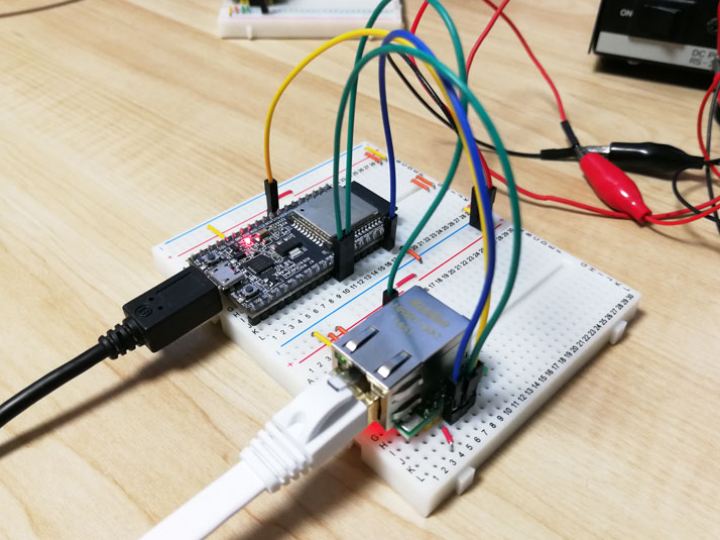
The tutorial demonstrates how to connect the ESP32 microcontroller to a W5500 Ethernet module via SPI, then use MQTT to send and receive messages through a local broker.

πŸ› οΈ Core Components

  • ESP32: Wi-Fi-enabled microcontroller with SPI support
  • W5500: SPI-based Ethernet controller with built-in TCP/IP stack
  • Arduino IDE: Used for code development
  • Mosquitto (on Raspberry Pi): Acts as a local MQTT broker

πŸ“¦ Step-by-Step Implementation

1. Hardware Wiring
Connect the W5500 module to the ESP32 using SPI pins (MOSI, MISO, SCLK, CS).

2. Arduino Library Setup
Install the following libraries:

3. Code Implementation

  • Initialize Ethernet using Ethernet.begin()
  • Connect to the MQTT broker with PubSubClient
  • Send and receive messages on subscribed topics

4. MQTT Broker Setup
Install and configure Mosquitto on a Raspberry Pi to act as your MQTT server.


πŸ§ͺ Example Code Snippet

#include <Ethernet.h>
#include <PubSubClient.h>

byte mac[] = { 0x70, 0x69, 0x69, 0x2D, 0x30, 0x31 };
byte server[] = { 10, 0, 1, 5 };

void callback(char* topic, byte* payload, unsigned int length) {
  payload[length] = '\0';
  String msg = String((char*) payload);
  Serial.println(msg);
}

EthernetClient ethClient;
PubSubClient client(server, 1883, callback, ethClient);

This code initializes Ethernet, connects to the MQTT server, and listens for incoming messages.


βœ… Why Use Ethernet on ESP32?

While ESP32 is known for its Wi-Fi capability, there are many reasons to choose Ethernet with W5500:

  • 🚫 Avoid unstable or congested wireless networks
  • πŸ” Improve security and isolation
  • πŸ“ˆ Ensure real-time data delivery in industrial environments

πŸ“˜ Read the Full Tutorial

For complete wiring diagrams, full source code, and detailed setup instructions, check out the original blog post:

πŸ‘‰ W5500を使ってESP32でEthernet MQTTι€šδΏ‘γ™γ‚‹

This guide is a must-read if you're building an IoT system with stable wired network communication using ESP32 and Rust or Arduino.

Comments

Similar projects you might like

Comments