



Raspberry Pi Pico MicroPython: RTC Configuration & NTP Time Sync
RTC control and NTP time synchronization practice on Raspberry Pi Pico with MicroPython.

- Software control methods
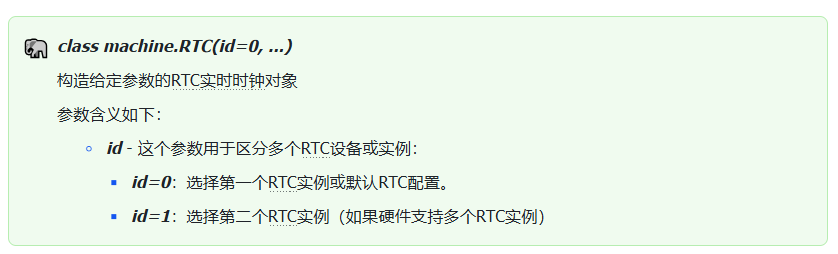
1.1 Constructor method of machine.RTC class
The constructor of the machine.RTC class is shown below:
1.2 Other methods of machine.RTC class
The machine.RTC class also provides other methods:
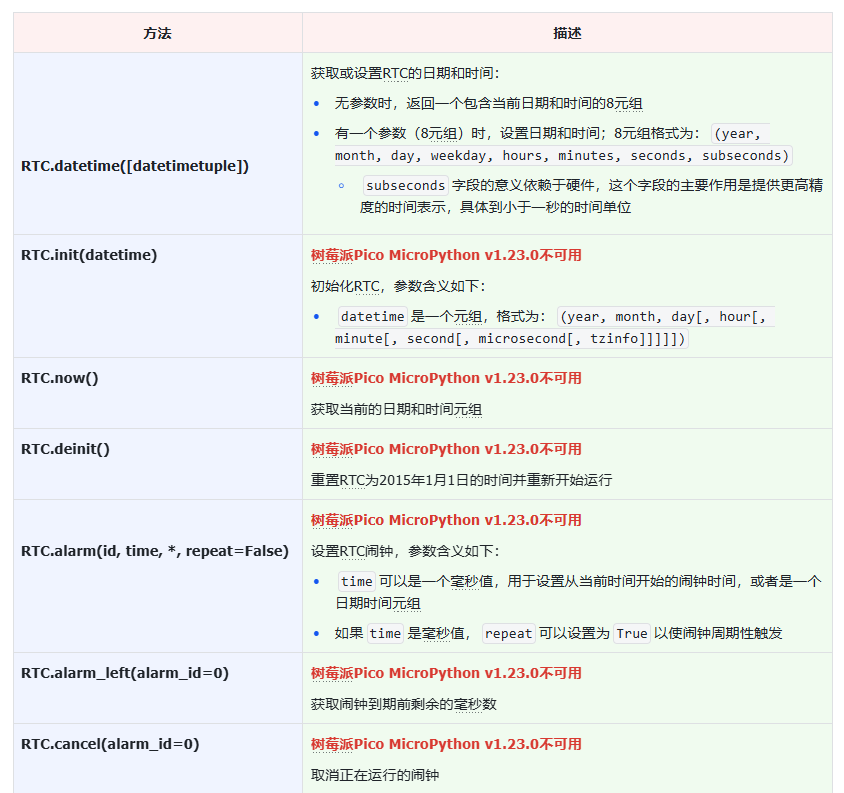
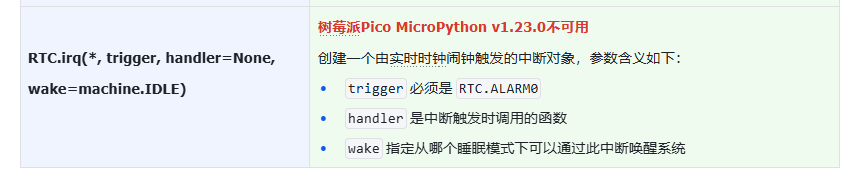
Connect to Raspberry Pi Pico and run the dir command. You can observe that most built‑in RTC functions are unavailable. If your project requires RTC wake‑up and alarm capabilities, you can only implement them with the Pico‑SDK or use an external RTC chip.

- Application example: Acquire network time and set the RTC real‑time clock
First connect your PC to the Elegance‑One Board Ethernet & SD‑Card Expansion Board. Refer to the Ethernet chapter in our teaching material for detailed connection procedures. Note: For this experiment, connect the Ethernet port on the Elegance‑One Board Ethernet & SD‑Card Expansion Board to your router.
NTP (Network Time Protocol) servers provide precise time‑synchronization services. NTP servers synchronize network time against standard time sources so that device time stays consistent with UTC (Coordinated Universal Time).
Common public NTP server addresses:
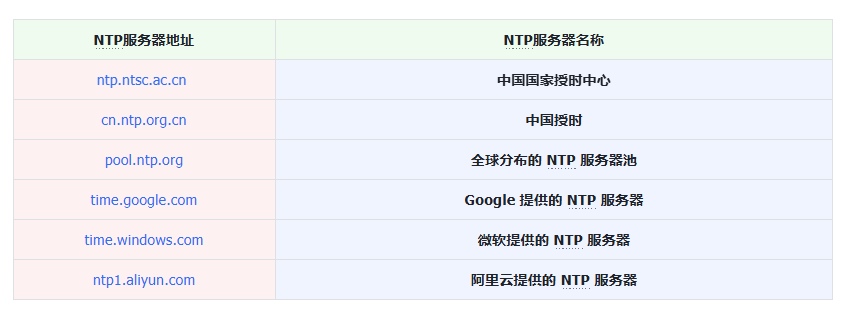
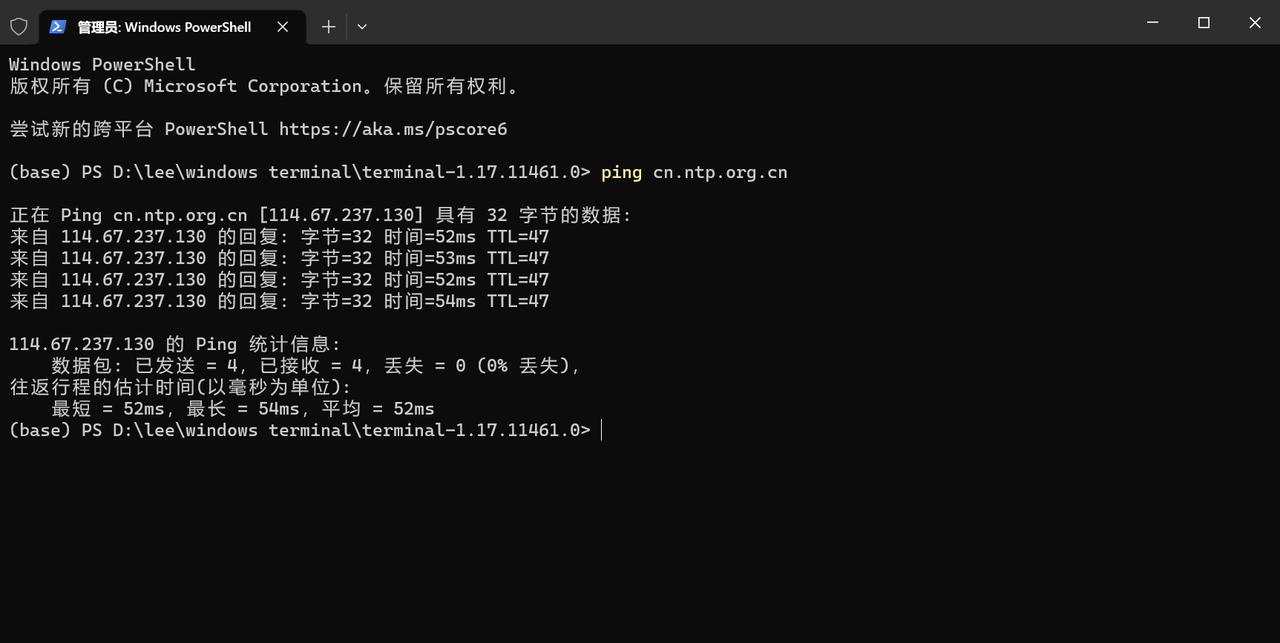
Our primary NTP server choice is the Chinese public time‑service NTP server cn.ntp.org.cn. Before selecting an NTP server, perform a ping test on the address to verify connectivity.
You can find the source code inside the provided resource package under elegance‑devkit v1\Demo\50 RTC_NTP.
The sample code below fetches time from an NTP server and configures the RTC real‑time clock. Inside the main loop it prints the current RTC time every second.
# Python env   : MicroPython v1.23.0 on Wiznet W5500
# -*- coding: utf-8 -*-
# @Time    : 2024/8/14 2:30 PM
# @Author  : Li Qingshui
# @File    : main.py
# @Description : RTC class usage, get NTP server time and set RTC real‑time clock
# ======================================== Import related modules ========================================
# Import hardware‑related modules
from machine import Pin,SPI,RTC
# Import time‑related modules
import time
# Import network‑related modules
import network
import socket
# Import module for accessing and setting system time
import ntptime
# ======================================== Global variables ============================================
# Device IP address
ip = '192.168.1.20'
sn = '255.255.255.0'
gw = '192.168.1.1'
dns = '114.114.114.114'
# Tuple object for network configuration
netinfo = (ip, sn, gw, dns)
# Multiple fallback NTP servers
ntp_servers = [
    'cn.ntp.org.cn',
    'ntp.aliyun.com',
    'time1.cloud.tencent.com',
    'pool.ntp.org'
]
# Currently selected NTP server
current_ntp_server = 0
# ======================================== Function definitions ============================================
# Initialize network connection
def w5x00_init() -> network.WIZNET5K:
    """
    Initialize WIZNET5K Ethernet module via SPI interface and assign static IP address.
    Args:
        None
    Returns:
        network.WIZNET5K: Initialized WIZNET5K Ethernet instance.
    Raises:
        OSError: Raised if network interface fails to connect.
    """
    global netinfo
    # Initialize SPI object
    spi = SPI(0, 2_000_000, mosi=Pin(19), miso=Pin(16), sck=Pin(18))
    # Instantiate network.WIZNET5K, pass chip‑select pin CS and reset pin RST
    nic = network.WIZNET5K(spi, Pin(17), Pin(20))
    # Activate network interface
    nic.active(True)
    try:
        print("\r\nConfiguring DHCP")
        # Try to acquire IP, subnet mask, gateway, DNS via DHCP
        nic.ifconfig('dhcp')
    except:
        print("\r\nDHCP fails, use static configuration")
        # Fallback to static IP configuration on DHCP failure
        nic.ifconfig(netinfo)
    # Wait for network connection
    max_attempts = 10
    attempt = 0
    while not nic.isconnected() and attempt < max_attempts:
        attempt += 1
        print(f"Waiting for network connection... Attempt {attempt}/{max_attempts}")
        time.sleep(1)
        # Print register debug information
        print(nic.regs())
    if not nic.isconnected():
        raise OSError("Failed to establish network connection")
    # Print applied network parameters
    print('ip :', nic.ifconfig()[0])
    print('sn :', nic.ifconfig()[1])
    print('gw :', nic.ifconfig()[2])
    print('dns:', nic.ifconfig()[3])
    # Test DNS resolution
    try:
        addr = socket.getaddrinfo(ntp_servers[0], 80)[0][-1]
        print(f"DNS resolution test successful: {ntp_servers[0]} -> {addr[0]}")
    except Exception as e:
        print(f"DNS resolution test failed: {e}")
    return nic

# Modify ntptime timeout setting
def set_ntptime_timeout(timeout_ms: int) -> None:
    """
    Modify ntptime module timeout setting to handle network‑delay scenarios.
    Args:
        timeout_ms: Timeout value in milliseconds.
    Returns:
        None
    """
    # Set timeout attribute directly if available
    if hasattr(ntptime, 'timeout'):
        ntptime.timeout = timeout_ms
    else:
        # Rewrite internal implementation
        import usocket as socket
        def _ntp_time(host):
            NTP_DELTA = 2208988800
            NTP_QUERY = bytearray(48)
            NTP_QUERY[0] = 0x1B
            addr = socket.getaddrinfo(host, 123)[0][-1]
            s = socket.socket(socket.AF_INET, socket.SOCK_DGRAM)
            try:
                s.settimeout(timeout_ms / 1000)
                s.sendto(NTP_QUERY, addr)
                msg = s.recv(48)
            finally:
                s.close()
            val = int.from_bytes(msg[40:44], 'big')
            return val - NTP_DELTA
        # Replace ntptime.time function
        ntptime.time = _ntp_time

# Fetch network time
def get_network_time() -> time.struct_time:
    """
    Fetch network time from NTP server and set system clock.
    Convert result to Beijing time (UTC+8).
    Args:
        None
    Returns:
        time.struct_time: Local time tuple.
    Raises:
        Exception: Re‑tries internally when NTP fetch fails, raises after exhausting attempts.
    """
    global current_ntp_server, ntp_servers
    # Set NTP timeout to 5 seconds
    set_ntptime_timeout(5000)
    max_retries = 5
    retry_count = 0
    while retry_count < max_retries:
        try:
            # Switch to selected NTP server
            ntptime.host = ntp_servers[current_ntp_server]
            print(f"Trying to sync time with {ntptime.host}...")
            # Fetch NTP time and set system clock (this returns UTC time)
            ntptime.settime()
            # Read local time
            nowtime = time.localtime()
            # Convert to Beijing time UTC+8
            beijing_time = convert_to_beijing_time(nowtime)
            # Print synced time
            print(f'Successfully synced with {ntptime.host}. Current time: {beijing_time}')
            # Assign time to RTC peripheral
            rtc.datetime((
                beijing_time[0], beijing_time[1], beijing_time[2],
                beijing_time[6], beijing_time[3], beijing_time[4],
                beijing_time[5], 0
            ))
            print("RTC time set successfully")
            return beijing_time
        except Exception as e:
            print(f'Failed to get time from {ntptime.host}: {e}')
            retry_count += 1
            # Select next NTP server in round‑robin fashion
            current_ntp_server = (current_ntp_server + 1) % len(ntp_servers)
            # Pause before retry
            time.sleep(2)
    # Raise exception after all servers fail
    raise Exception("All NTP servers failed to respond after multiple attempts")

# Convert UTC time to Beijing time (UTC+8)
def convert_to_beijing_time(utc_time: time.struct_time) -> time.struct_time:
    """
    Convert UTC time tuple to Beijing time (UTC+8).
    Args:
        utc_time (time.struct_time): UTC time tuple.
    Returns:
        time.struct_time: Beijing time tuple.
    """
    # Convert time tuple to timestamp in seconds
    utc_timestamp = time.mktime(utc_time)
    # Add 8 hours (8 * 3600 seconds)
    beijing_timestamp = utc_timestamp + 8 * 3600
    # Convert timestamp back to time tuple
    return time.localtime(beijing_timestamp)

# Convert RTC time tuple to time.localtime compatible format
def rtc_to_localtime(rtc_time: tuple) -> tuple:
    """
    Convert the 8‑element tuple returned by RTC.datetime() into format compatible with time.localtime().
    Args:
        rtc_time (tuple): 8‑tuple from RTC.datetime() (year, month, day, weekday, hour, minute, second, subseconds).
    Returns:
        tuple: 8‑tuple formatted as (year, month, day, hour, minute, second, weekday, yearday).
    """
    # Discard subseconds field
    year, month, day, weekday, hour, minute, second, _ = rtc_time
    # Compute timestamp
    yearday = time.mktime((year, month, day, hour, minute, second, 0, 0, 0))
    # Get yearday (day‑of‑year)
    yearday = time.localtime(yearday)[7]
    return (year, month, day, hour, minute, second, weekday, yearday, -1)
# ======================================== Custom classes ============================================
# ======================================== Initialization ==========================================
# 2‑second power‑on stabilization delay
time.sleep(2)
# Print debug banner
print("FreakStudio: Using NTP to set RTC Timer")
# Initialize W5500 module
nic = w5x00_init()
# Create RTC instance
rtc = RTC()
# ======================================== Main program ===========================================
# Fetch network‑synced time
get_network_time()
# Main infinite loop
while True:
    # Read RTC time and convert to time.localtime‑compatible format
    rtc_time = rtc_to_localtime(rtc.datetime())
    # Convert to Beijing time (RTC already holds local time, no extra +8h needed)
    beijing_time = convert_to_beijing_time(rtc_time)
    # Print RTC time and sleep 1 second
    print("RTC time:", beijing_time)
    time.sleep(1)
Inside get_network_time(), set_ntptime_timeout(5000) is called to set ntptime module timeout to 5 seconds:
- If the ntptime module exposes a
timeoutattribute, assign value directly. - If the attribute does not exist, rewrite
ntptime.time()and configures.settimeout(5)for UDP communication, preventing program freeze caused by slow NTP‑server responses.
# Modify ntptime timeout setting
def set_ntptime_timeout(timeout_ms: int) -> None:
    """
    Modify ntptime module timeout setting to handle network‑delay scenarios.
    Args:
        timeout_ms: Timeout value in milliseconds.
    Returns:
        None
    """
    # Set timeout attribute directly if available
    if hasattr(ntptime, 'timeout'):
        ntptime.timeout = timeout_ms
    else:
        # Rewrite internal implementation
        import usocket as socket
        def _ntp_time(host):
            NTP_DELTA = 2208988800
            NTP_QUERY = bytearray(48)
            NTP_QUERY[0] = 0x1B
            addr = socket.getaddrinfo(host, 123)[0][-1]
            s = socket.socket(socket.AF_INET, socket.SOCK_DGRAM)
            try:
                s.settimeout(timeout_ms / 1000)
                s.sendto(NTP_QUERY, addr)
                msg = s.recv(48)
            finally:
                s.close()
            val = int.from_bytes(msg[40:44], 'big')
            return val - NTP_DELTA
        # Replace ntptime.time function
        ntptime.time = _ntp_time

# Fetch network time
def get_network_time() -> time.struct_time:
    """
    Fetch network time from NTP server and set system clock.
    Convert result to Beijing time (UTC+8).
    Args:
        None
    Returns:
        time.struct_time: Local time tuple.
    Raises:
        Exception: Re‑tries internally when NTP fetch fails, raises after exhausting attempts.
    """
    global current_ntp_server, ntp_servers
    # Set NTP timeout to 5 seconds
    set_ntptime_timeout(5000)
The get_network_time() function uses retry logic plus server rotation to maximize NTP synchronization success rate:
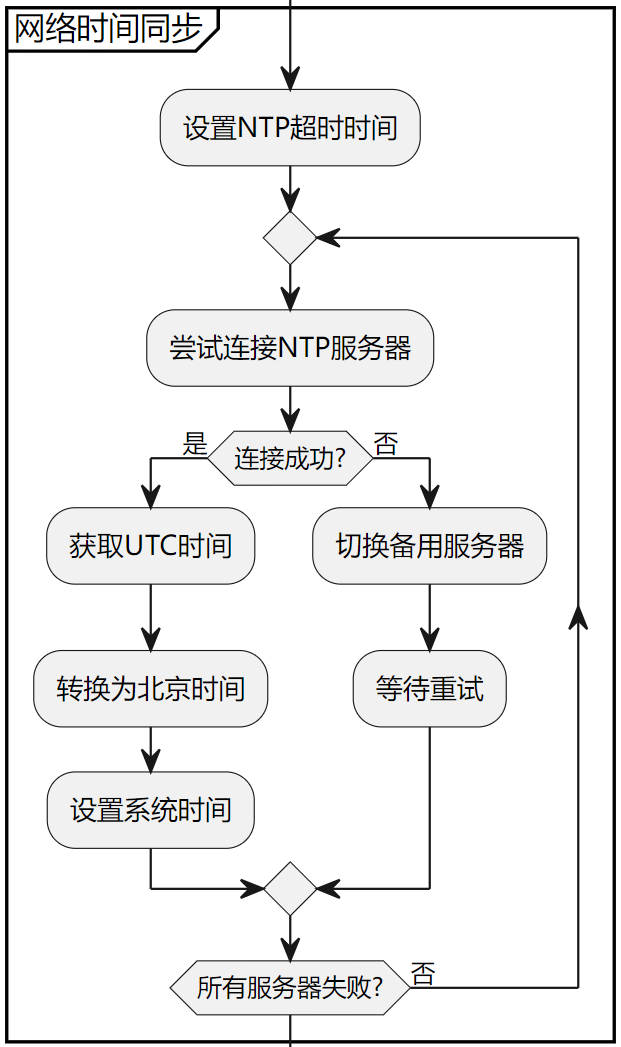
- Retry limit: maximum 5 retries (
max_retries=5) to avoid infinite loops. - Server rotation: upon each failure,
current_ntp_server = (current_ntp_server + 1) % len(ntp_servers)selects next NTP server in round‑robin across the four‑server list. - Retry delay:
time.sleep(2)after each failure, to avoid rate‑limiting from frequent rapid requests.
max_retries = 5
retry_count = 0
while retry_count < max_retries:
    try:
        # Switch to selected NTP server
        ntptime.host = ntp_servers[current_ntp_server]
        print(f"Trying to sync time with {ntptime.host}...")
        ... ...

    except Exception as e:
        print(f'Failed to get time from {ntptime.host}: {e}')
        retry_count += 1
        # Select next NTP server in round‑robin fashion
        current_ntp_server = (current_ntp_server + 1) % len(ntp_servers)
        # Pause before retry
        time.sleep(2)
# Raise exception after all servers fail
raise Exception("All NTP servers failed to respond after multiple attempts")
Next step: fetch NTP time and convert UTC to Beijing time. Call ntptime.settime(): this obtains UTC (Coordinated Universal Time) from the active NTP server and automatically configures the MicroPython system clock.
# Fetch NTP time and set system clock (this returns UTC time)
ntptime.settime()
# Read local time
nowtime = time.localtime()
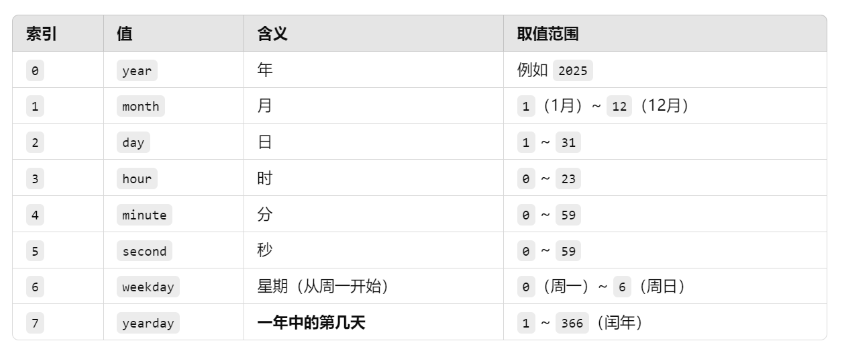
time.localtime() returns a time tuple structured as shown below:
(year, month, day, hour, minute, second, weekday, yearday)
Field explanations are given in this table:
There is an 8‑hour offset between UTC and Beijing local time. After acquiring UTC time you must add 8 hours to obtain Beijing time, implemented inside function convert_to_beijing_time():
# Convert UTC time to Beijing time (UTC+8)
def convert_to_beijing_time(utc_time: time.struct_time) -> time.struct_time:
    """
    Convert UTC time tuple to Beijing time (UTC+8).
    Args:
        utc_time (time.struct_time): UTC time tuple.
    Returns:
        time.struct_time: Beijing time tuple.
    """
    # Convert time tuple to timestamp in seconds
    utc_timestamp = time.mktime(utc_time)
    # Add 8 hours (8 * 3600 seconds)
    beijing_timestamp = utc_timestamp + 8 * 3600
    # Convert timestamp back to time tuple
    return time.localtime(beijing_timestamp)
convert_to_beijing_time() first calls time.mktime() to transform the (year, month, day, hour, minute, second, ...) tuple into a Unix timestamp (total seconds elapsed since 1970‑01‑01 00:00:00 UTC). It adds 8 hours offset for Beijing time, then calls time.localtime() to convert timestamp back to standard time‑tuple format.
Inside the main loop we read RTC time, then rtc_to_localtime() converts the RTC.datetime() output tuple to match time.localtime() format:
# Convert RTC time tuple to time.localtime compatible format
def rtc_to_localtime(rtc_time: tuple) -> tuple:
    """
    Convert the 8‑element tuple returned by RTC.datetime() into format compatible with time.localtime().
    Args:
        rtc_time (tuple): 8‑tuple from RTC.datetime() (year, month, day, weekday, hour, minute, second, subseconds).
    Returns:
        tuple: 8‑tuple formatted as (year, month, day, hour, minute, second, weekday, yearday).
    """
    # Discard subseconds field
    year, month, day, weekday, hour, minute, second, _ = rtc_time
    # Compute timestamp
    yearday = time.mktime((year, month, day, hour, minute, second, 0, 0, 0))
    # Get yearday (day‑of‑year)
    yearday = time.localtime(yearday)[7]
    return (year, month, day, hour, minute, second, weekday, yearday, -1)
MicroPython API documentation explicitly shows that RTC.datetime() and time.localtime() return differently‑structured date‑time tuples.
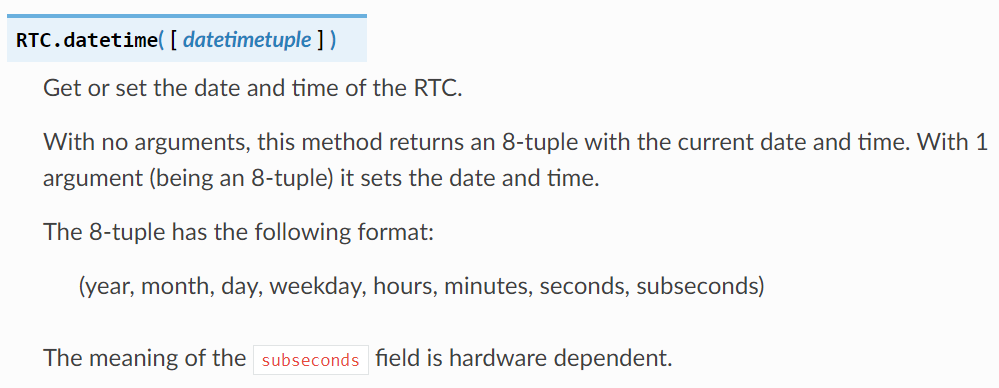
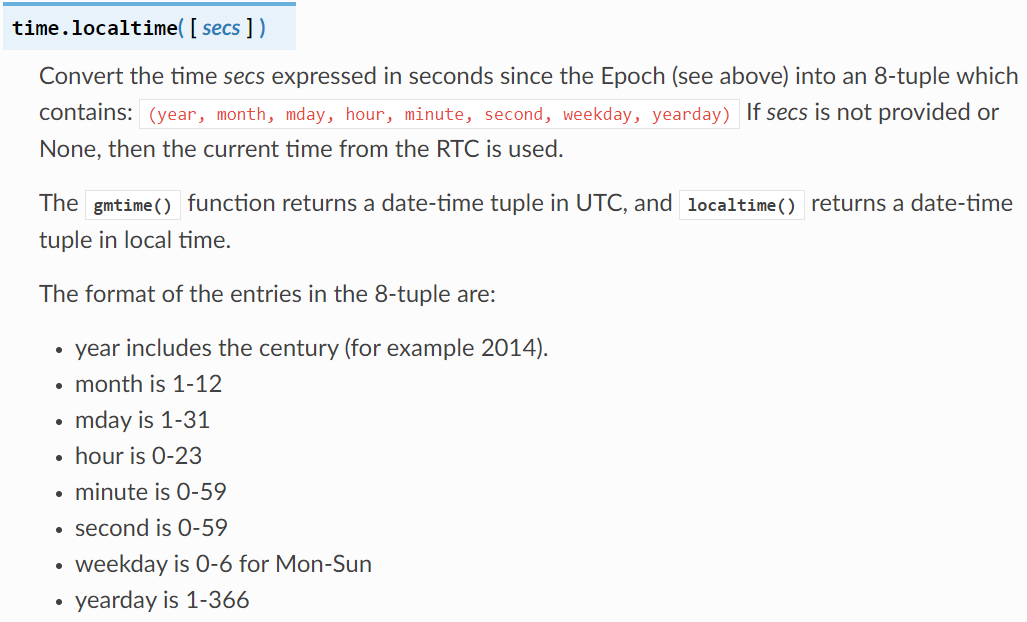
Side‑by‑side comparison table:
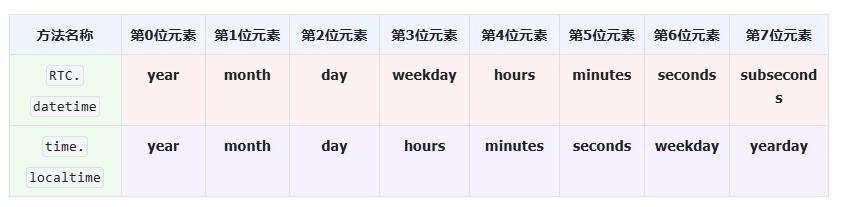
The rtc_to_localtime() function unpacks the 8 values from RTC.datetime(), builds a 9‑element intermediate tuple, uses time.localtime() to convert timestamp back to standard time‑tuple structure. Afterwards convert_to_beijing_time() computes Beijing time for terminal printout.
Flash firmware and open serial terminal:
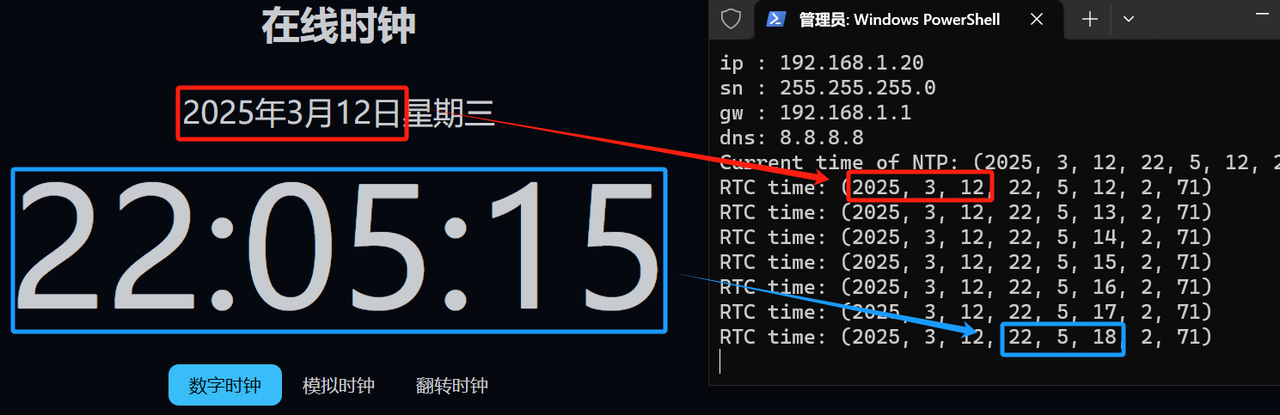
You will observe time values printed in a loop. Compare output against an online web clock at: https://onlinealarmkur.com/clock/zh‑cn/
You can see RTC time differs from web clock by only a few seconds, within acceptable error margin.