



Pico MicroPython MQTT Client: Subscription & Message‑Handling Explained
MQTT subscribe implementation and message handling on Pico.
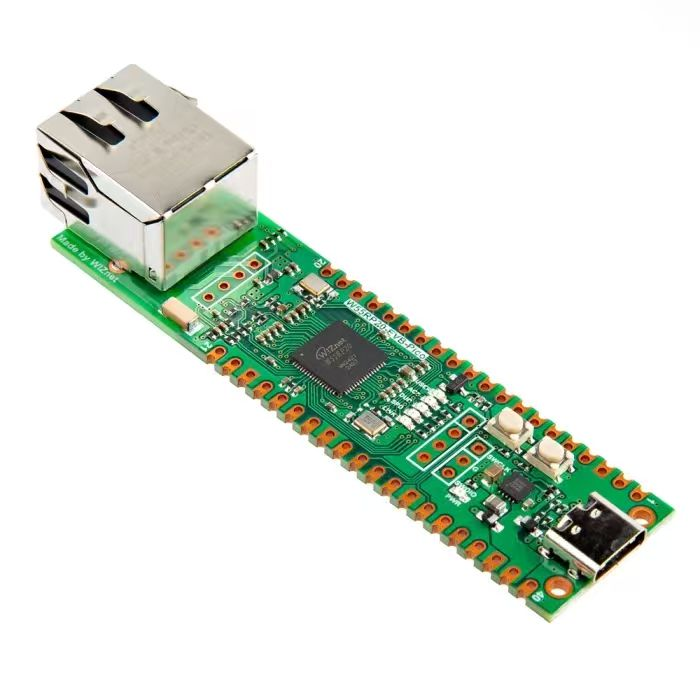
In the following code, we connect to the network via the W5500 module and implement MQTT‑client functionality with MicroPython. The program initializes the network, connects to the MQTT server, sets a timer to maintain the connection, subscribes to topics and receives incoming messages. When messages published from the PC client arrive at the topic (messages sent by PC client are distributed to the Pico client by the MQTT broker), the callback function is triggered to process the payload, and the received message is republished to another topic. This workflow keeps running. After receiving 10 messages in total, the client disconnects and stops the timer.
The source code below can be found in the provided resource package under elegance‑devkit v1\Demo\49 ETH_MQTT_Subscribe.
Sample code:
# Python env   : MicroPython v1.23.0 on Wiznet W5500
# -*- coding: utf-8 -*-
# @Time    : 2024/8/10 10:22 PM
# @Author  : Li Qingshui
# @File    : main.py
# @Description : Implement subscribe function for MQTT client
# ======================================== Import related modules ========================================
# Import hardware‑related modules
from machine import Pin,SPI,reset,Timer
# Import time‑related modules
import time
# Import network‑related modules
import network
# Import socket module for creating and managing network connections
from usocket import socket
# Import MQTT client
from umqttrobust import MQTTClient
# Import json encoding library
import json
# ======================================== Global variables ============================================
# Device IP address
ip = '192.168.1.20'
sn = '255.255.255.0'
gw = '192.168.1.1'
dns= '8.8.8.8'
# Tuple object for network configuration
netinfo=(ip, sn, gw, dns)
# MQTT configuration
mqtt_params = {
    'url': 'broker.emqx.io',           # MQTT server address
    'port': 1883,                      # MQTT server port
    'clientid': 'FreakStudioDevice',   # Local MQTT client ID
    'pubtopic': '/FreakStudio/pub',    # Publish topic
    'subtopic': '/FreakStudio/sub',    # Subscribe topic
    'pubqos': 0,                       # Publish QoS level
    'subqos': 0,                       # Subscribe QoS level
    }
# Record timer execution count
timer_count = 0
# MQTT client instance
client = None
# MQTT received message counter
msg_recv_count = 0
# ======================================== Function definitions ============================================
def w5x00_init() -> network.WIZNET5K:
    '''
    Initialize network.WIZNET5K instance, set static IP and bring‑up network connection.
    Returns:
        network.WIZNET5K: Initialized and connected network interface instance.
    '''
    # Declare global variable
    global netinfo
    # Initialize SPI object
    spi = SPI(0, 2_000_000, mosi=Pin(19), miso=Pin(16), sck=Pin(18))
    # Instantiate network.WIZNET5K, pass chip‑select pin CS and reset pin RST
    nic = network.WIZNET5K(spi, Pin(17), Pin(20))
    # Activate network interface
    nic.active(True)
    try:
        print("\r\nConfiguring DHCP")
        # Try to acquire IP, subnet mask, gateway, DNS via DHCP
        nic.ifconfig('dhcp')
    except:
        print("\r\nDHCP fails, use static configuration")
        # Fallback to static IP configuration on DHCP failure
        nic.ifconfig(netinfo)
    # Block until network link becomes available
    while not nic.isconnected():
        time.sleep(1)
        # Print register debug information
        print(nic.regs())
    # Print applied network parameters
    print('ip :', nic.ifconfig()[0])
    print('sn :', nic.ifconfig()[1])
    print('gw :', nic.ifconfig()[2])
    print('dns:', nic.ifconfig()[3])
    # Return WIZNET5K instance
    return nic

def mqtt_connect() -> MQTTClient:
    '''
    Connect to MQTT server.
    Returns:
        MQTTClient: Successfully connected MQTT client instance.
    '''
    global client_id, mqtt_server
    # Create MQTT client instance, keep‑alive time set to 60 seconds
    client = MQTTClient(mqtt_params['clientid'], mqtt_params['url'], mqtt_params['port'],keepalive=60)
    # Connect to MQTT server
    client.connect()
    # Print connection success message
    print('Connected to %s MQTT Broker'%(mqtt_params['url']))
    # Return MQTT client instance
    return client

def timer_callback(t: Timer) -> None:
    '''
    Timer callback function for sending ping keep‑alive packets.
    Args:
        t (Timer): Timer instance.
    Returns:
        None
    '''
    # Declare global variable
    global timer_count, client
    # Increment timer counter
    timer_count = timer_count + 1
    # Trigger when counter reaches or exceeds 30
    if timer_count >= 30:
        # Reset timer counter
        timer_count = 0
        # Send MQTT ping packet
        client.ping()

def sub_callback(topic: bytes, msg: bytes) -> None:
    '''
    Callback function for subscribed‑topic message processing.
    Args:
        topic (bytes): Subscribed topic.
        msg (bytes): Received message payload from the topic.
    Returns:
        None
    '''
    # Declare global variables: MQTT client instance + receive counter
    global client, msg_recv_count
    # Decode topic and message(raw byte stream in MQTT) to UTF‑8 string
    topic = topic.decode('utf-8')
    msg = msg.decode('utf-8')
    # Judge whether incoming topic matches configured subscribe topic
    if topic == mqtt_params['subtopic']:
        # Increment receive counter upon receiving target‑topic message
        msg_recv_count += 1
        # Print received topic, message content and current receive count
        print(f"\r\ntopic: {topic} \r\nrecv: {msg} \r\ncurrent receive count: {msg_recv_count}")
        # Assemble publish message including receive count
        publish_msg = f'recv: {msg} | total receive count: {msg_recv_count}'
        client.publish(mqtt_params['pubtopic'], publish_msg, qos=mqtt_params['pubqos'])
        # Print published topic and message with counter
        print(f'\r\ntopic: {mqtt_params["pubtopic"]} \r\nsend: {publish_msg}')
# ======================================== Custom classes ============================================
# ======================================== Initialization ==========================================
# 3‑second power‑on delay for hardware stabilization
time.sleep(3)
# Print debug banner
print("FreakStudio : Using WIZNET5K Ethernet Device to connect to MQTT Broker as a Subscriber")
# Initialize W5500 module
nic = w5x00_init()
try:
    # Try connecting to MQTT server
    client = mqtt_connect()
except OSError as e:
    # Print exception information
    print('raise exception : {}'.format(e))
    # Reconnect and reset upon connection failure
    client.reconnect()
# Create timer instance for periodic MQTT ping packets
timer = Timer(-1)
# Call timer_callback every 1 second
timer.init(freq=1, mode=Timer.PERIODIC, callback=timer_callback)
# ======================================== Main program ===========================================
# Assign callback function, sub_callback will be triggered when subscribed‑topic messages arrive
client.set_callback(sub_callback)
# Infinite loop, exit only after successful subscription
while True:
    try:
        # Subscribe to specified topic with assigned QoS level for incoming‑message reception
        client.subscribe(mqtt_params['subtopic'],mqtt_params['subqos'])
        # Print subscription success with target topic
        print('subscribed to %s'%mqtt_params['subtopic'])
        # Break out of loop after successful subscription
        break
    except OSError as e:
        # Print exception information
        print('raise exception : {}'.format(e))
        # Reconnect and retry subscription upon failure
        client.reconnect()
# Keep receiving messages until 10 messages are collected
while msg_recv_count<10:
    # Block to wait for incoming message
    msg = client.wait_msg()
# Disconnect from MQTT server
client.disconnect()
# Stop timer
timer.deinit()
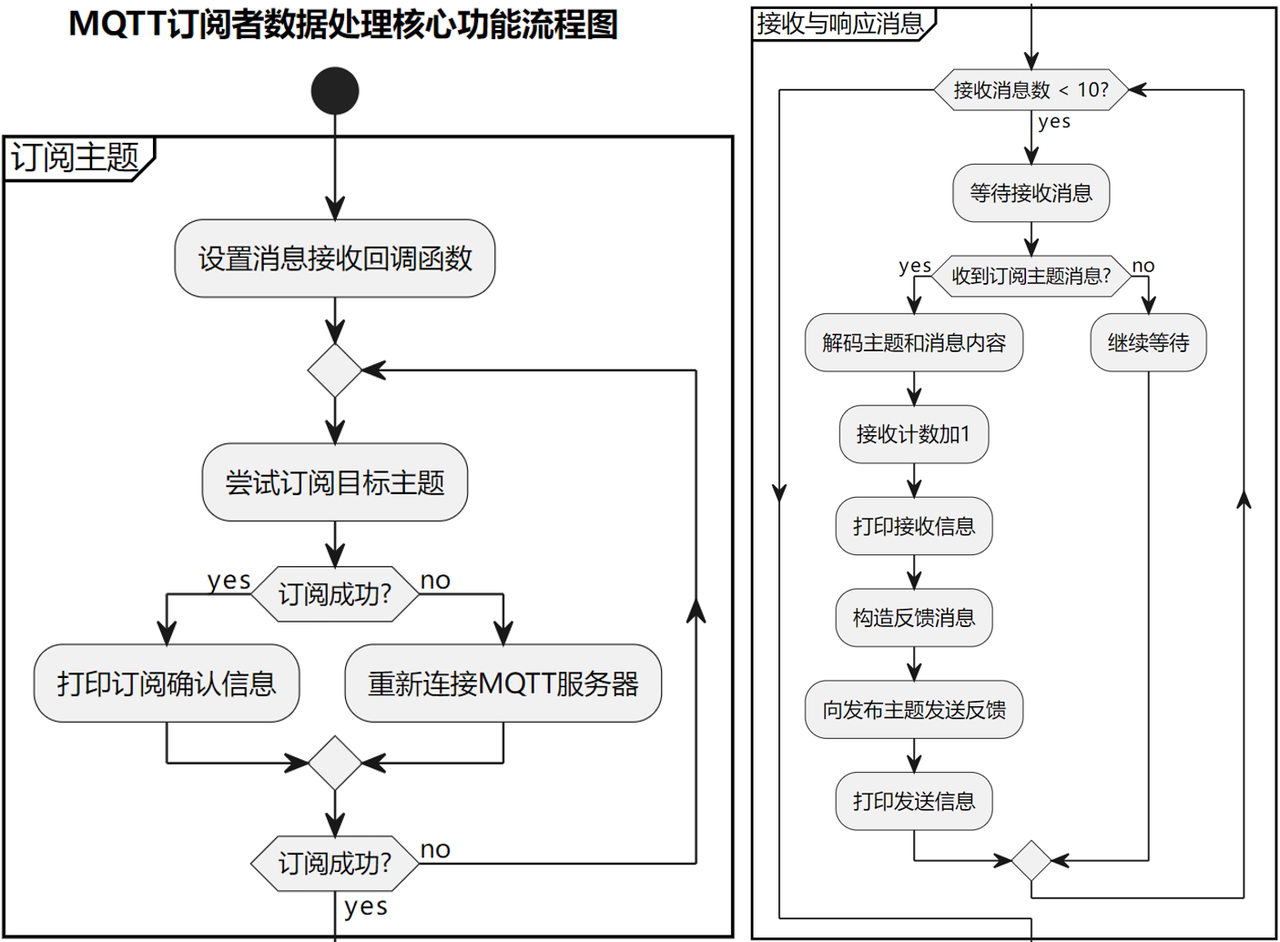
Core data‑processing functions are shown below:
- Subscribe to topic
- Assign message‑receive callback function (
client.set_callback(sub_callback)) to define processing logic for incoming subscribed‑topic messages. - Enter loop to attempt target‑topic subscription (
client.subscribe()). Reconnect (client.reconnect()) on failure, until subscription succeeds and confirmation message prints.
- Assign message‑receive callback function (
- Receive and respond to messages: enter loop to wait for messages (
while msg_recv_count < 10) until 10 messages are received.- When message arrives from subscribed topic (
/FreakStudio/sub),sub_callbackis triggered:- Decode topic and message: convert byte stream to UTF‑8 string.
- Increment receive counter (
msg_recv_count), print incoming topic, message content and counter value. - Send feedback message containing receive counter to publish topic (
/FreakStudio/pub), for example"recv: xxx | total receive count: 1", and print published information.
- When message arrives from subscribed topic (
After receiving 10 messages:
- Disconnect from MQTT server (
client.disconnect()). - Stop timer (
timer.deinit()) and terminate keep‑alive heartbeat.
Meanwhile configure MQTTX software to subscribe to topic '/FreakStudio/sub':
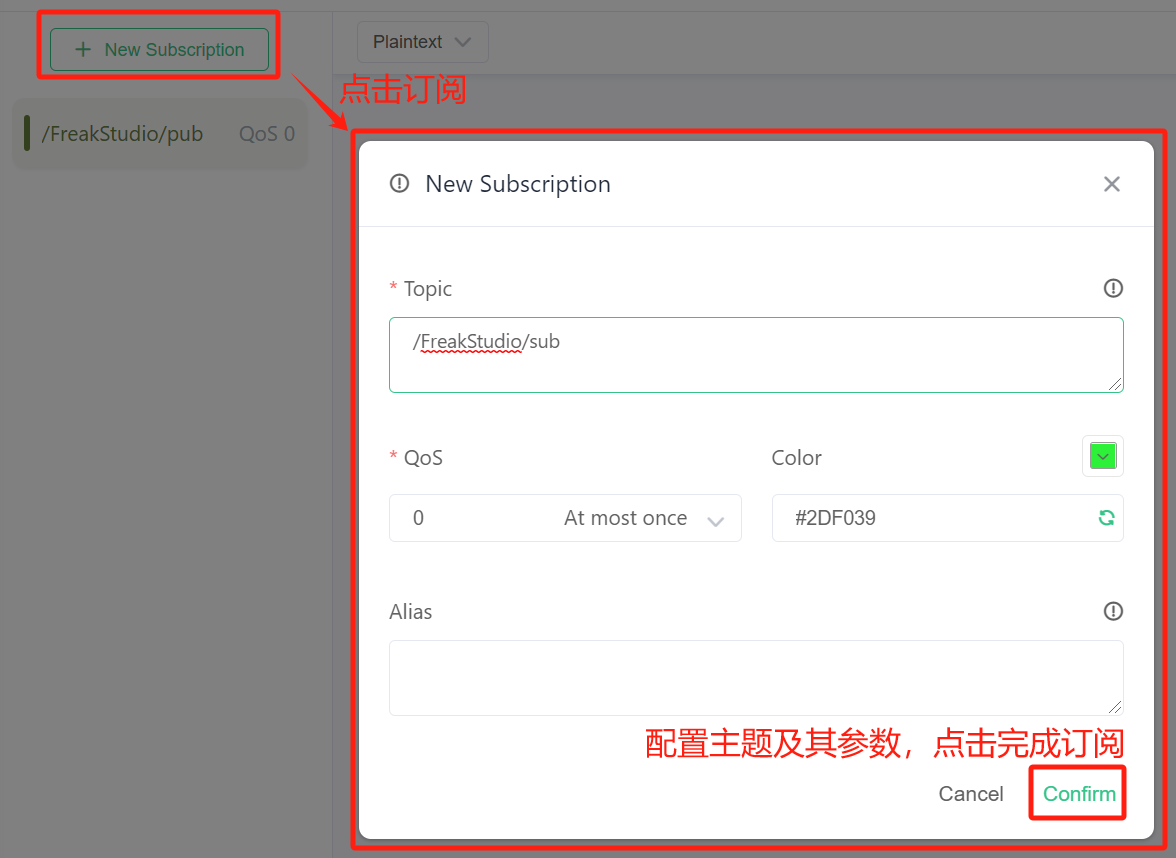
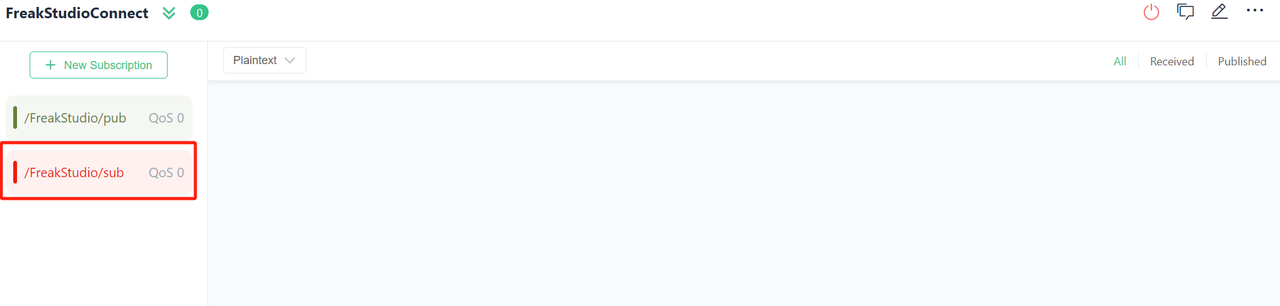
Data sent and received for both topics are plain‑text strings, so set publish‑subscribe message‑display format to Plaintext:
Then input the PC‑side publish topic '/FreakStudio/sub' inside the input box at lower part of main connection page:

Fill in payload content and press the bottom‑right arrow button to finish sending. Here the published string is FreakStudio MQTT Sub Test.
Flash firmware and open serial terminal. Output is as shown below:
Now publish string FreakStudio MQTT Sub Test from PC‑side client. The terminal prints received messages:
Messages displayed inside MQTTX software:
After sending ten messages, the Pico client terminates connection and exits program.
For more related examples, interested readers can refer to these two links:
Wiznet official documentation https://docs.wiznet.io/Product/iEthernet/W5500/w5500-evb-pico
Wiznet official sample code repository https://github.com/Wiznet/RP2040-HAT-MicroPython/tree/main/examples