Start Home Automation : W7500 Web Server
Start Home Automation : W7500 Web Server
0
Components
Hardware components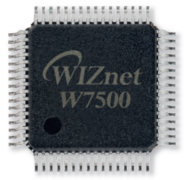
WIZnet - W7500
x 1

Project description
Overview
WIZnet WIZwiki Platform based on WIZnet's MCU. WIZnet WIZwiki-W7500 is a WIZwiki platform board based on W7500. The IOP4IoT W7500 chip is a one-chip solution that integrates an ARM Cortex-M0, 128KB Flash, and hardwired TCP/IP core for various embedded application platforms especially the internet of things. If you use WIZwiki-W7500, you will be able to easily develop a prototype. It is compatible with Arduino Shields. This is using the CMSIS-DAP USB and ISP Header easily available firmware writing.
Features
WIZnet W7500
ARM Cortex-M0 Core
48MHz, 128KB Flash
16KB RAM
32KB RAM for TCP/IP - Can be extended to system RAM
Hardwired TCP/IP Core
MII Interface
External Ethernet PHY
CMSIS-DAP
For more information about?WIZwiki-W7500 please also refer to the Wiki page
Step 1: Parts


First, There is the WIZwiki-W7500 Board to two develop environments.
1.?KEIL
2. mbed compiler
How to use KEIL and mbed configuration -> Click this URL
So, You will need the following to build a controller:
1.WIZwiki-W7500 Platform - from WIZnet
- Also You will need the KEIL Tool and mbed compiler
Configuration from ARM Cortex-M0 in WIZwiki-W7500 Platform
Step 2: Flow Chart


First, You Look for Desription Sequential Flow chart (Block Diagram)
Sequence = HTTP Request Parser -> HTTP GET/POST Method -> GET/POST CGI Request -> Correspond CGI file found? -> GET/POST CGI Handler -> HTTP Response HTTP/1.1 200 OK + HTTP body -> Send HTTP Response.
Second, This project Use to HTTP Protocol-based and HTTP header GET/POST Method. But Not Used PUT, HEAD, etc.. header
Third, HTTP is Configuration to Server / Client.
? HTTP Server: Embedded device(WIZwiki-W7500 Board)
? HTTP Client: Web browser (Internet Explorer, Chrome, etc..)
Web server is operating for HTTP based.
Request to Web server from Web browser -> Web server is Transport to response message to a web browser(web page)
This project is Using Javascript & JSON and AJAX.
And this content is using CGI(Common gateway interface). CGI is found GET/POST method and analysis for GET/POST method. Then Send a response to the client(Web browser)
Step 3: Web Server Operate

This Content is Web Server LED Control and Web Server ADC Monitoring examples
It is WIZnet Ethernet Loopback based. and It's uploaded to Github.
Follow this URL?WIZnet Ethernet Loopback Code in github

