


waveshare_lct_industrial_server
waveshare_lct_industrial_server
Espressif - ESP32
x 1


WIZnet - W5500
x 1
Summary
이 프로젝트는 Waveshare ESP32-S3-POE-ETH-8DI-8DO 보드를 산업용 I/O 서버로 동작시키는 Arduino 기반 펌웨어입니다.
보드의 8개 디지털 입력, 8개 디지털 출력, RS485, SD 카드, RTC, CAN, Wi-Fi, W5500 Ethernet을 하나의 제어 시스템으로 통합합니다.
주요 기능은 다음과 같습니다.
- 웹 기반 장치 관리
- API 기반 디지털 출력 제어
- Modbus TCP/RTU 통신
- MQTT 상태 발행
- SD 카드 CSV 로깅
- NTP 기반 시간 동기화
WIZnet W5500은 ESP32-S3에 유선 Ethernet 인터페이스를 제공하며, 웹 관리 페이지, Modbus TCP 서버, MQTT 전송, NTP 동기화의 네트워크 경로로 사용됩니다.
전체 구조는 단순한 웹 서버 예제가 아니라, 현장 I/O 제어, 산업용 통신, 로그 저장, 원격 관리를 함께 처리하는 통합 산업용 펌웨어에 가깝습니다.
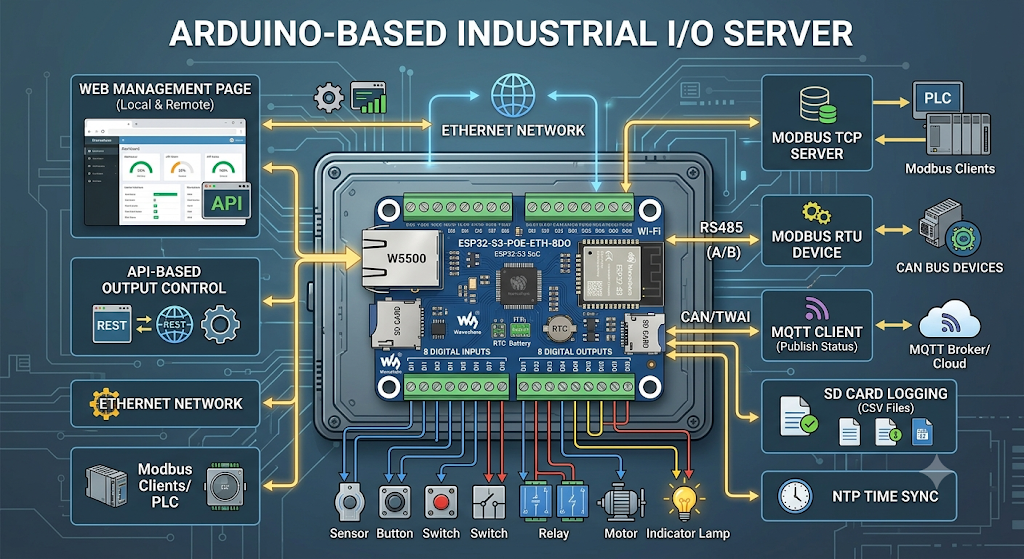
이미지 출처 : AI 생성

이미지 출처 : https://www.waveshare.com/esp32-s3-poe-eth-8di-8do.htm
Where WIZnet Fits
이 프로젝트에서 사용되는 WIZnet 제품은 W5500 Ethernet controller입니다. W5500은 ESP32-S3와 SPI로 연결되며, 펌웨어의 유선 네트워크 인터페이스 역할을 담당합니다.
W5500을 통해 제공되는 기능은 Ethernet 웹 인터페이스, Modbus TCP 서버, MQTT over Ethernet, NTP over Ethernet입니다. 즉 W5500은 단순히 IP 주소를 얻기 위한 부품이 아니라, 이 산업용 I/O 서버가 외부 네트워크와 통신하는 핵심 경로입니다.
W5500은 하드웨어 TCP/IP 스택을 내장한 Ethernet 컨트롤러입니다. ESP32-S3가 디지털 I/O 처리, RS485 통신, SD 로깅, RTC 관리, CAN/TWAI 처리까지 동시에 수행해야 하는 구조에서, W5500은 TCP/IP 처리를 전담해 네트워크 기능을 안정적으로 분리합니다.
Implementation Notes
W5500 핀 매핑
파일: lct_industrial_server.ino
역할: ESP32-S3와 W5500 사이의 SPI 및 제어 핀을 정의합니다.
#define W5500_MOSI 13
#define W5500_MISO 14
#define W5500_SCLK 15
#define W5500_CS   16
#define W5500_RST  39
이 핀 정의는 W5500 초기화의 기준입니다. SPI 기반 Ethernet 컨트롤러이므로 MOSI, MISO, SCLK, CS 연결이 정확해야 하며, RST 핀은 부팅 시 W5500을 안정적으로 초기화하는 데 사용됩니다.
W5500 초기화
파일: lct_industrial_server.ino
역할: SPI 버스를 시작하고 W5500을 Arduino Ethernet 라이브러리에 연결합니다.
SPI.begin(W5500_SCLK, W5500_MISO, W5500_MOSI, W5500_CS);
Ethernet.init(W5500_CS);
ethernetStarted = Ethernet.begin(mac) != 0;
펌웨어는 먼저 W5500 리셋 핀을 제어한 뒤 SPI를 시작합니다. 이후 Ethernet.init()으로 W5500의 CS 핀을 지정하고, DHCP 모드에서는 Ethernet.begin(mac)으로 IP 주소를 요청합니다.
Static IP 모드에서는 저장된 IP, DNS, gateway, subnet mask 값을 사용해 Ethernet을 시작합니다. Ethernet이 정상적으로 올라오면 Modbus TCP 서버와 W5500용 HTTP 서버가 함께 실행됩니다.
Ethernet 전용 HTTP 처리
파일: lct_industrial_server.ino
역할: W5500 EthernetClient 기반의 lightweight HTTP router를 제공합니다.
이 프로젝트는 Wi-Fi용 Arduino WebServer와 W5500용 Ethernet HTTP 처리를 분리합니다. Wi-Fi 쪽 WebServer 객체가 W5500의 EthernetClient 소켓을 직접 처리하지 못하기 때문입니다.
이를 위해 코드에는 다음과 같은 서버 객체가 선언됩니다.
EthernetServer ethHttpServer(80);
EthernetServer modbusTcpServer(502);
ethHttpServer는 W5500 Ethernet을 통한 웹 요청을 처리하고, modbusTcpServer는 Modbus TCP 통신을 담당합니다. 이 분리 구조 덕분에 같은 장치 안에서 Wi-Fi 관리 인터페이스와 유선 Ethernet 기반 산업용 통신을 함께 운영할 수 있습니다.
MQTT와 NTP에서의 W5500 사용
파일: lct_industrial_server.ino
역할: MQTT와 NTP가 설정에 따라 Ethernet 경로를 사용하도록 구성합니다.
MQTT 설정에서 Ethernet이 선택되면 펌웨어는 W5500 기반 EthernetClient를 MQTT 클라이언트에 연결합니다. NTP 역시 Ethernet 경로를 사용할 수 있으며, 이 경우 W5500 쪽 UDP 통신을 통해 시간 서버에 접근하고 RTC를 갱신합니다.
이 구조는 장치의 시간 동기화, 상태 발행, 원격 모니터링을 유선 네트워크 기반으로 운영할 수 있게 합니다.
Practical Tips / Pitfalls
W5500의 MOSI, MISO, SCLK, CS 핀은 보드 회로와 코드 정의가 반드시 일치해야 합니다.
부팅 시 W5500 RST 핀을 확실히 제어해야 Ethernet 초기화 실패를 줄일 수 있습니다.
DHCP 환경이 불안정한 현장에서는 static IP 설정을 사용하는 편이 운영에 유리합니다.
Modbus TCP는 기본적으로 포트 502를 사용하므로 네트워크 장비의 방화벽과 포트 정책을 확인해야 합니다.
W5500용 HTTP 서버와 Wi-Fi용 WebServer는 내부적으로 다른 방식으로 처리되므로, 기능을 추가할 때 양쪽 라우팅을 별도로 고려해야 합니다.
OTA 업데이트는 W5500 경로가 아니라 Wi-Fi WebServer 경로에 집중되어 있으므로, 원격 업데이트 방식은 배포 전에 확인해야 합니다.
SD 로깅, MQTT 발행, Modbus polling, 웹 요청이 동시에 실행되므로 장시간 운전에서는 heap 상태와 watchdog 동작을 함께 점검해야 합니다.
Similar Project
ESP32-shield-module-W5500-RS485
유사점
| 항목 | 내용 |
|---|---|
| MCU 기반 | 두 프로젝트 모두 ESP32 계열 MCU를 중심으로 구성됩니다. |
| WIZnet 사용 | 두 프로젝트 모두 W5500을 사용해 유선 Ethernet 통신을 제공합니다. |
| RS485 연동 | RS485 기반 산업용 장비와의 통신을 고려합니다. |
| Modbus 지원 | Modbus TCP와 Modbus RTU 구조를 다룹니다. |
| 산업용 목적 | 설비 모니터링, 원격 제어, 데이터 수집 같은 Industrial IoT 용도에 적합합니다. |
차이점
| 항목 | ESP32-shield-module-W5500-RS485 | Waveshare LCT Industrial Server |
|---|---|---|
| 프로젝트 성격 | W5500, RS485, Modbus 기능을 검증하는 모듈/게이트웨이 예제입니다. | 산업용 I/O 서버로 동작하는 통합 펌웨어입니다. |
| 하드웨어 범위 | ESP32 + W5500 + RS485 + microSD 중심입니다. | ESP32-S3 보드의 8DI, 8DO, RS485, SD, RTC, CAN/TWAI, W5500을 함께 사용합니다. |
| 주요 기능 | Ethernet, Modbus TCP, RS485 브리지 기능 검증에 집중합니다. | 웹 관리, I/O 제어, Modbus, MQTT, SD 로깅, NTP, OTA까지 포함합니다. |
| 활용 단계 | 기능 테스트와 게이트웨이 개발의 출발점에 적합합니다. | 실제 산업용 원격 I/O 서버나 데이터 로거로 확장하기 적합합니다. |
| 완성도 | 기능별 예제 성격이 강합니다. | 하나의 완성형 애플리케이션에 가깝습니다. |
FAQ
Q: 왜 이 프로젝트에서 W5500을 사용하나요?
A: W5500은 ESP32-S3 보드에 유선 Ethernet 경로를 제공합니다. 이 펌웨어에서는 웹 관리, Modbus TCP, MQTT, NTP가 Ethernet을 사용할 수 있으므로, W5500은 산업용 네트워크 기능의 중심 인터페이스입니다.
Q: W5500은 ESP32-S3와 어떻게 연결되나요?
A: SPI로 연결됩니다. 이 프로젝트에서는 MOSI GPIO13, MISO GPIO14, SCLK GPIO15, CS GPIO16, RST GPIO39를 사용합니다. INT 핀도 보드 핀 요약에 포함되어 있으며, Ethernet 상태 감지나 확장 처리에 활용될 수 있습니다.
Q: 이 프로젝트에서 W5500은 구체적으로 무엇을 담당하나요?
A: W5500은 DHCP 또는 static IP 기반 Ethernet 연결을 만들고, Ethernet 웹 서버와 Modbus TCP 서버가 동작할 수 있는 네트워크 기반을 제공합니다. MQTT와 NTP도 설정에 따라 W5500 경로를 사용할 수 있습니다.
Q: 초보자도 이 펌웨어를 따라 사용할 수 있나요?
A: 기본적인 Arduino 개발 경험만으로 단순 업로드는 가능하지만, 구조를 수정하려면 ESP32 보드 설정, SPI, IP 주소 설정, Modbus TCP/RTU, MQTT에 대한 이해가 필요합니다. 산업용 보드 통합 예제에 가까우므로 중급자 이상에게 적합합니다.
Q: W5500용 웹 서버가 별도로 구현된 이유는 무엇인가요?
A: Wi-Fi용 Arduino WebServer 객체가 W5500의 EthernetClient 소켓을 직접 처리하지 못하기 때문입니다. 그래서 이 프로젝트는 W5500용 lightweight HTTP router를 별도로 두고, Ethernet 요청을 독립적으로 처리합니다.
Source
Original Project: logictechs/waveshare_lct_industrial_server
Main Firmware: lct_industrial_server.ino
Target Hardware: Waveshare ESP32-S3-POE-ETH-8DI-8DO
WIZnet Product: W5500 Ethernet Controller
License: GPL-3.0
Tags
#W5500 #WIZnet #ESP32S3 #Waveshare #IndustrialIoT #ModbusTCP #RS485 #MQTT #Ethernet #Arduino #SDLogging #RemoteIO
Summary
This project is Arduino-based firmware that turns the Waveshare ESP32-S3-POE-ETH-8DI-8DO board into an industrial I/O server.
It integrates the board’s eight digital inputs, eight digital outputs, RS485, SD card, RTC, CAN, Wi-Fi, and W5500 Ethernet into a single control system.
The main features are as follows:
Web-based device management
API-based digital output control
Modbus TCP/RTU communication
MQTT status publishing
SD card CSV logging
NTP-based time synchronization
The WIZnet W5500 provides a wired Ethernet interface for the ESP32-S3 and is used as the network path for the web management page, Modbus TCP server, MQTT transmission, and NTP synchronization.
The overall structure is closer to integrated industrial firmware that handles field I/O control, industrial communication, log storage, and remote management together, rather than a simple web server example.
Image source: AI-generated
Image source: https://www.waveshare.com/esp32-s3-poe-eth-8di-8do.htm
Where WIZnet Fits
The WIZnet product used in this project is the W5500 Ethernet controller. The W5500 is connected to the ESP32-S3 over SPI and serves as the firmware’s wired network interface.
The functions provided through the W5500 include the Ethernet web interface, Modbus TCP server, MQTT over Ethernet, and NTP over Ethernet. In other words, the W5500 is not just a component used to obtain an IP address. It is the core communication path that allows this industrial I/O server to connect to external networks.
The W5500 is an Ethernet controller with a built-in hardware TCP/IP stack. In this architecture, the ESP32-S3 must handle digital I/O processing, RS485 communication, SD logging, RTC management, and CAN/TWAI processing at the same time. The W5500 separates the network function in a stable way by taking responsibility for TCP/IP processing.
Implementation Notes
W5500 Pin Mapping
File: lct_industrial_server.ino
Role: Defines the SPI and control pins between the ESP32-S3 and the W5500.
#define W5500_MOSI 13
#define W5500_MISO 14
#define W5500_SCLK 15
#define W5500_CS   16
#define W5500_RST  39
These pin definitions are the basis for W5500 initialization. Since the W5500 is an SPI-based Ethernet controller, the MOSI, MISO, SCLK, and CS connections must be correct. The RST pin is used to initialize the W5500 reliably during boot.
W5500 Initialization
File: lct_industrial_server.ino
Role: Starts the SPI bus and connects the W5500 to the Arduino Ethernet library.
SPI.begin(W5500_SCLK, W5500_MISO, W5500_MOSI, W5500_CS);
Ethernet.init(W5500_CS);
ethernetStarted = Ethernet.begin(mac) != 0;
The firmware first controls the W5500 reset pin and then starts SPI. After that, Ethernet.init() specifies the CS pin for the W5500, and in DHCP mode, Ethernet.begin(mac) requests an IP address.
In static IP mode, Ethernet is started using the stored IP, DNS, gateway, and subnet mask values. Once Ethernet comes up successfully, the Modbus TCP server and the HTTP server for the W5500 run together.
Ethernet-Dedicated HTTP Handling
File: lct_industrial_server.ino
Role: Provides a lightweight HTTP router based on the W5500 EthernetClient.
This project separates the Arduino WebServer used for Wi-Fi from the Ethernet HTTP handling used for the W5500. This is because the Wi-Fi-side WebServer object cannot directly handle the W5500’s EthernetClient sockets.
For this purpose, the following server objects are declared in the code:
EthernetServer ethHttpServer(80);
EthernetServer modbusTcpServer(502);
ethHttpServer handles web requests through W5500 Ethernet, while modbusTcpServer handles Modbus TCP communication. This separation allows the same device to operate both a Wi-Fi management interface and wired Ethernet-based industrial communication.
Using the W5500 for MQTT and NTP
File: lct_industrial_server.ino
Role: Configures MQTT and NTP to use the Ethernet path depending on the settings.
When Ethernet is selected in the MQTT settings, the firmware connects a W5500-based EthernetClient to the MQTT client. NTP can also use the Ethernet path. In that case, the device accesses the time server through UDP communication on the W5500 side and updates the RTC.
This structure allows time synchronization, status publishing, and remote monitoring to operate over a wired network.
Practical Tips / Pitfalls
The W5500 MOSI, MISO, SCLK, and CS pins must match the board circuit and the pin definitions in the code.
The W5500 RST pin should be controlled properly during boot to reduce Ethernet initialization failures.
In field environments where DHCP is unstable, using a static IP configuration is usually better for operation.
Modbus TCP uses port 502 by default, so firewall and port policies on network equipment should be checked.
The HTTP server for the W5500 and the Wi-Fi WebServer are handled differently internally, so routing for both sides should be considered separately when adding features.
OTA updates are focused on the Wi-Fi WebServer path rather than the W5500 path, so the remote update method should be checked before deployment.
Since SD logging, MQTT publishing, Modbus polling, and web requests can run at the same time, heap status and watchdog behavior should be monitored during long-term operation.
Similar Project
ESP32-shield-module-W5500-RS485
Similarities
| Item | Description |
|---|---|
| MCU-based structure | Both projects are built around an ESP32-series MCU. |
| WIZnet usage | Both projects use the W5500 to provide wired Ethernet communication. |
| RS485 integration | Both projects consider communication with RS485-based industrial equipment. |
| Modbus support | Both projects deal with Modbus TCP and Modbus RTU structures. |
| Industrial purpose | Both projects are suitable for Industrial IoT use cases such as facility monitoring, remote control, and data collection. |
Differences
| Item | ESP32-shield-module-W5500-RS485 | Waveshare LCT Industrial Server |
|---|---|---|
| Project type | A module/gateway example for validating W5500, RS485, and Modbus functions. | Integrated firmware that operates as an industrial I/O server. |
| Hardware scope | Focused on ESP32 + W5500 + RS485 + microSD. | Uses the ESP32-S3 board’s 8DI, 8DO, RS485, SD, RTC, CAN/TWAI, and W5500 together. |
| Main features | Focuses on validating Ethernet, Modbus TCP, and RS485 bridge functions. | Includes web management, I/O control, Modbus, MQTT, SD logging, NTP, and OTA. |
| Usage stage | Suitable as a starting point for feature testing and gateway development. | Suitable for expansion into an actual industrial remote I/O server or data logger. |
| Completion level | Strongly resembles a set of function-specific examples. | Closer to a complete application. |
FAQ
Q: Why is the W5500 used in this project?
A: The W5500 provides a wired Ethernet path for the ESP32-S3 board. In this firmware, web management, Modbus TCP, MQTT, and NTP can all use Ethernet, so the W5500 serves as the central interface for industrial network functions.
Q: How is the W5500 connected to the ESP32-S3?
A: It is connected over SPI. This project uses MOSI GPIO13, MISO GPIO14, SCLK GPIO15, CS GPIO16, and RST GPIO39. The INT pin is also included in the board pin summary and can be used for Ethernet status detection or extended handling.
Q: What exactly does the W5500 handle in this project?
A: The W5500 establishes an Ethernet connection based on either DHCP or static IP configuration and provides the network foundation for the Ethernet web server and Modbus TCP server. MQTT and NTP can also use the W5500 path depending on the settings.
Q: Can beginners follow this firmware?
A: A simple upload is possible with basic Arduino development experience, but modifying the structure requires an understanding of ESP32 board settings, SPI, IP address configuration, Modbus TCP/RTU, and MQTT. Since this is closer to an industrial board integration example, it is better suited for intermediate users or above.
Q: Why is a separate web server implemented for the W5500?
A: The Arduino WebServer object used for Wi-Fi cannot directly handle the W5500’s EthernetClient sockets. Therefore, this project uses a separate lightweight HTTP router for the W5500 and handles Ethernet requests independently.
Source
Original Project: logictechs/waveshare_lct_industrial_server
Main Firmware: lct_industrial_server.ino
Target Hardware: Waveshare ESP32-S3-POE-ETH-8DI-8DO
WIZnet Product: W5500 Ethernet Controller
License: GPL-3.0
Tags
#W5500 #WIZnet #ESP32S3 #Waveshare #IndustrialIoT #ModbusTCP #RS485 #MQTT #Ethernet #Arduino #SDLogging #RemoteIO
-
Github Code


