


Wake-on-LAN-Button
Wake-on-LAN-Button

WIZnet - W5500
x 1


Espressif - ESP32
x 1
Arduino - Arduino IDE
x 1
1) 배경 스토리
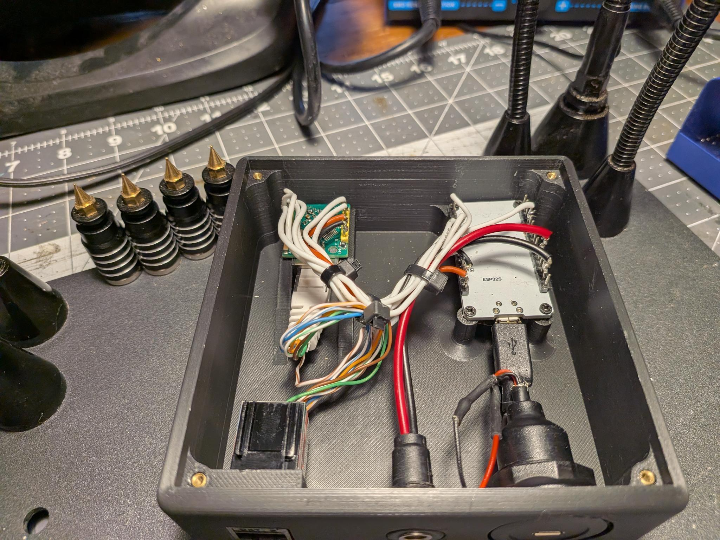
이 장치는 엄마를 위해 만들었습니다. 엄마는 허리/거동 문제가 있어 소파에서 노트북을 쓰는데, 본인이 “잘 쏟는 사람(spiller)”이라 노트북을 액체로부터 안전한 곳(멀리)으로 옮겨두게 됐습니다. 하지만 그 결과 전원 버튼이 손 닿기 어려워졌고, 몸을 숙이다 넘어질 위험이 생겼습니다. 그래서 버튼 하나로 PC를 켤 수 있는 외부 유선 WoL 버튼 박스를 만들었습니다.

이미지 출처 : https://github.com/Matthew-Beare/Wake-on-LAN-Button
2) 프로젝트 개요
ESP32 + WIZnet W5500(SPI) 기반의 유선 WoL 버튼
학습 모드(부팅 중 버튼 누름): W5500 MACRAW로 프레임을 스니핑해 대상 PC MAC을 저장
일반 모드: 버튼 누르면 **UDP 브로드캐스트(255.255.255.255:9)**로 **WoL 매직 패킷(102바이트)**을 3회 전송
DHCP 지연을 피하려고 링크-로컬 고정 IP(169.254.10.10/16) 사용
전원 안정성을 위해 부팅 시 ESP32 Wi-Fi/BT OFF
3) 준비물
- ESP32 Dev Module
- W5500 모듈(SPI)
- 모멘터리 버튼
- 점퍼선/납땜도구
- Ethernet 케이블
- 안정적 USB 전원
4) 배선
W5500 ↔ ESP32 (VSPI)
VCC → 3V3
GND → GND
RST → GPIO4
MISO → GPIO19
MOSI → GPIO23
SCK → GPIO18
CS → GPIO5
INT → 미사용
버튼
GPIO27 ↔ 버튼 ↔ GND (INPUT_PULLUP, 눌리면 LOW)5) 사용 방법
5-1) 학습 모드(대상 PC MAC 저장)
전원 OFF → 버튼 누른 채 전원 ON
시리얼에 === LEARN MODE === 확인
30초 안에 PC가 프레임을 내보내면 MAC 출력 → 저장 → 재부팅

이미지 출처 : https://github.com/Matthew-Beare/Wake-on-LAN-Button
5-2) 일반 모드(버튼으로 깨우기)
=== NORMAL MODE === 및 IP 출력.
버튼 누르면 WoL 3회 전송 후 WOL SENT.

이미지 출처 : https://github.com/Matthew-Beare/Wake-on-LAN-Button
6) WOL Demo Video
https://www.youtube.com/shorts/b-f_h_neymU?feature=share
7) 한계/단점(환경에 따라 실패할 수 있는 포인트)
단점 1) 학습 모드에서 PC가 프레임을 안 보내면 MAC을 못 배움
학습은 “처음 보이는 프레임의 SRC MAC”을 저장하는 구조라, 대상 PC가 트래픽을 전혀 안 내면 타임아웃이 반복됩니다.
→ 학습 시엔 케이블 재연결/NIC 토글/웹 접속 등으로 트래픽을 강제로 발생시키세요.
단점 2) 공유기/스위치에 여러 기기가 붙어 있으면 “오학습” 위험
학습 순간에 다른 장치가 먼저 프레임을 보내면, 그 MAC을 PC MAC으로 저장해 엉뚱한 대상에게 WoL을 보내는 상황이 생길 수 있습니다.
→ 학습할 때는 가능하면 대상 PC만 연결하거나, 대상 PC가 먼저 트래픽을 내도록 유도하고, 저장된 MAC이 맞는지 확인하세요.
단점 3) 브로드캐스트 도메인/VLAN 분리 환경에서는 WoL이 안 갈 수 있음
WoL 브로드캐스트는 보통 같은 L2/VLAN 내에서만 잘 동작합니다. PC와 버튼박스가 다른 서브넷/VLAN이면 라우터가 브로드캐스트를 넘겨주지 않아 실패할 수 있습니다.
→ 둘을 같은 VLAN/스위치에 두는 구성이 가장 안전합니다.
8) FAQ
Q1. 왜 Wi-Fi 대신 WIZnet W5500(유선)을 선택했나요?
이 프로젝트 목표는 “버튼 누르면 항상 켜진다”에 가깝기 때문에, 가장 큰 변수인 무선 환경(신호 약화, 재연결, 공유기 상태)을 제거하는 게 유리합니다. W5500은 SPI로 붙는 유선 이더넷 컨트롤러이고, UDP 같은 전송을 단순하고 재현 가능하게 만들기 좋습니다. 특히 가족용/보조기기처럼 실패 비용이 큰 상황에서 유선이 주는 안정성이 장점입니다.
Q2. ESP32와 W5500은 어떤 방식으로 연결되고, 왜 이 핀 구성을 쓰나요?
펌웨어는 ESP32의 VSPI를 사용합니다(SCK=18, MISO=19, MOSI=23, CS=5). RST를 GPIO4로 별도 제어해 하드 리셋을 줄 수 있게 했고, 버튼은 GPIO27을 INPUT_PULLUP으로 써서 외부 저항 없이도 안정적으로 입력을 받습니다. 또한 SPI 클럭을 1MHz로 낮춰 초기 bring-up(배선/신호 품질)에서 실패 확률을 낮추는 쪽으로 설계했습니다.
Q3. 학습 모드(MACRAW)는 정확히 왜 필요한가요?
WoL은 결국 “대상 PC의 MAC 주소”로 매직 패킷을 만들어야 합니다. 이 프로젝트는 사용자가 MAC을 찾아 입력하는 번거로움을 없애려고, W5500의 MACRAW로 실제 이더넷 프레임을 스니핑해 SRC MAC을 자동으로 저장합니다. 다만 이 방식은 “첫 프레임을 누가 보내느냐”에 영향을 받으므로, 학습 시에는 대상 PC에서 확실히 트래픽을 발생시키는 절차가 필요합니다.
Q4. 라우터에 여러 기기가 물려 있으면 왜 문제가 생기고, 어떻게 피하나요?
문제는 ‘일반 모드’가 아니라 학습 단계의 오학습입니다. 학습은 “처음 보이는 프레임의 SRC MAC”을 저장하는데, 네트워크에 기기가 많으면 TV/NAS/다른 PC가 먼저 프레임을 보내 엉뚱한 MAC이 저장될 수 있습니다. 해결책은 학습 순간에 대상 PC만 연결하거나, 대상 PC가 케이블 재연결/NIC 토글로 가장 먼저 트래픽을 내도록 유도하고, 학습된 MAC이 맞는지 확인하는 것입니다.
1) Background Story
I built this device for my mom.
She has some mobility and back issues and usually uses her laptop from the couch. She’s also a self-professed “spiller,” so we moved the laptop to a safer, more remote spot to keep it out of harm’s way.
That protected the laptop, but it made the power button hard to reach. This little box is the result: a simple external wired Wake-on-LAN (WoL) button that lets her turn the computer on without having to lean and risk a fall.
Image source: https://github.com/Matthew-Beare/Wake-on-LAN-Button
2) Project Overview
A wired WoL button based on an ESP32 + WIZnet W5500 (SPI).
Learn Mode (hold the button during boot): Uses the W5500 MACRAW mode to sniff an Ethernet frame and store the target PC’s MAC address.
Normal Mode: Pressing the button sends a WoL magic packet (102 bytes) three times via UDP broadcast (255.255.255.255:9).
Uses a static link-local IP (169.254.10.10/16) to avoid DHCP delays/hangs.
Disables ESP32 Wi-Fi/Bluetooth at boot to improve wired Ethernet stability.
3) Parts List
ESP32 Dev Module
W5500 module (SPI)
Momentary push button
Jumper wires / soldering tools
Ethernet cable
Stable USB power supply
4) Wiring
W5500 ↔ ESP32 (VSPI)
VCC → 3V3
GND → GND
RST → GPIO4
MISO → GPIO19
MOSI → GPIO23
SCK → GPIO18
CS → GPIO5
INT → Not used
Button
GPIO27 ↔ Button ↔ GND
Configured as INPUT_PULLUP (pressed = LOW)

Image source: https://github.com/Matthew-Beare/Wake-on-LAN-Button
5) How to Use
5-1) Learn Mode (Store Target PC MAC)
Power OFF the device.
Hold the button, then power ON.
Confirm === LEARN MODE === on Serial.
If the PC sends a frame within ~30 seconds, the device prints the MAC, saves it, and reboots.
Image source: https://github.com/Matthew-Beare/Wake-on-LAN-Button
5-2) Normal Mode (Wake the PC)
The device prints === NORMAL MODE === and its IP address.
Press the button to send the WoL packet 3 times, then WOL SENT.
Image source: https://github.com/Matthew-Beare/Wake-on-LAN-Button
6) WOL Demo Video
https://www.youtube.com/shorts/b-f_h_neymU?feature=share
7) Limitations / Downsides (Where It Can Fail)
Limitation 1) If the PC doesn’t transmit any frames in Learn Mode, the MAC can’t be learned
Learn Mode stores the source MAC of the first Ethernet frame it sees. If the target PC generates no traffic at all, the device will keep timing out.
Workaround: Force traffic during learning—replug the cable, toggle the NIC, open a webpage, or generate ping/ARP activity.
Limitation 2) With many devices on the router/switch, Learn Mode can “learn the wrong MAC”
Because the firmware grabs the first source MAC it sees, another device (TV/NAS/another PC) may transmit first, causing the box to store the wrong MAC and send WoL to the wrong target later.
Workaround: During learning, connect only the target PC if possible, or make sure the target PC generates traffic first. After learning, verify the stored MAC matches the PC’s actual MAC.
Limitation 3) WoL broadcast may not reach the PC across subnets/VLANs
WoL broadcast typically works best within the same L2 broadcast domain / VLAN. If the PC and the button box are on different subnets/VLANs, routers usually won’t forward broadcasts, and WoL may fail.
Workaround: Place the PC and the WoL button on the same VLAN/switch segment whenever possible.
8) FAQ
Q1. Why choose a wired WIZnet W5500 instead of Wi-Fi?
The goal is “press the button and it always works,” so removing the biggest variable—Wi-Fi reliability (signal quality, reconnection behavior, router conditions)—helps a lot. The W5500 is a wired Ethernet controller over SPI, which makes UDP sending simple and repeatable. For family/assistive setups where failures are costly, wired stability is often the better trade-off.
Q2. How are the ESP32 and W5500 connected, and why this pinout?
The firmware uses the ESP32’s VSPI pins (SCK=18, MISO=19, MOSI=23, CS=5). RST is controlled on GPIO4 so the code can apply a hard reset to the W5500. The button is on GPIO27 with INPUT_PULLUP, giving stable input without an external resistor. The SPI clock is set to 1 MHz to reduce bring-up failures due to wiring or signal integrity.
Q3. Why is MACRAW Learn Mode needed?
WoL requires the target’s MAC address to build the magic packet. This project avoids manual MAC lookup by using the W5500’s MACRAW mode to sniff a real Ethernet frame and automatically capture the source MAC. The trade-off is that learning depends on which device sends a frame first, so you must ensure the target PC generates traffic during the learning step.
Q4. Why do multiple devices on the network cause problems, and how do you avoid it?
The risk is not Normal Mode—it’s mis-learning during Learn Mode. The device stores the first source MAC it sees; on a busy network, another device (TV/NAS/other PC) may transmit first and get captured. To avoid this, learn while only the target PC is connected (best), or force the target PC to generate traffic first by replugging the cable or toggling the NIC, then confirm the learned MAC is correct.
-
Github Code


