


W55RP20-EVB-PicoでVCP(仮想シリアル)を作る
W55RP20-EVB-PicoでVCP(仮想シリアル)を作る

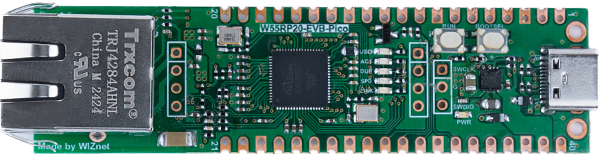
WIZnet - W55RP20-EVB-Pico
x 1

원문은 W55RP20-EVB-Pico 보드를 W55RP20-S2E(Serial-to-Ethernet) 펌웨어로 구동해 VCP(가상 시리얼, Virtual COM Port) 환경을 만드는 운용 절차를 다룹니다. 핵심 단계는 다음입니다.
BOOTSEL/RUN으로 보드를 UF2 플래시 모드로 전환 후 App_linker.uf2, Boot.uf2를 순서대로 드래그&드롭하여 펌웨어 기록

이미지 출처 : https://qiita.com/usashirou/items/01af9e0ffc6258045a66
UART(GPIO4/5)로 MAC Address를 입력/기록(WIZMacTool 사용)
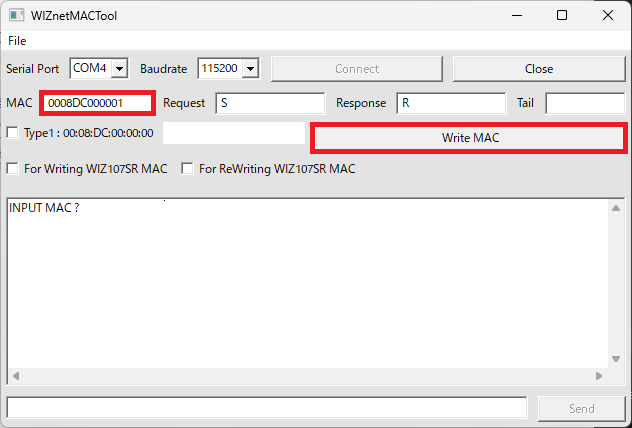
이미지 출처 : https://qiita.com/usashirou/items/01af9e0ffc6258045a66
WIZnet S2E Configuration Tool로 네트워크/시리얼 파라미터를 변경하고 Apply

이미지 출처 : https://qiita.com/usashirou/items/01af9e0ffc6258045a66
PC에서 WIZVSP로 원격 호스트(IP)를 등록해 가상 COM 포트를 생성하고 TeraTerm으로 통신 테스트


이미지 출처 : https://qiita.com/usashirou/items/01af9e0ffc6258045a66
즉, 이 콘텐츠는 “WIZnet S2E 생태계(펌웨어 + 설정툴 + VSP)”를 묶어 RS-232만 있는 장비를 LAN 기반 원격 관리(IoT화) 하는 방법을 보여줍니다.
Technical Analysis
이 구성의 기술적 포인트는 W55RP20이 “MCU + Ethernet(TCP/IP) 오프로딩”을 한 패키지로 제공한다는 점입니다. W55RP20은 Raspberry Pi의 RP2040 MCU와 WIZnet의 W5500 Ethernet 컨트롤러를 통합한 SiP 입니다.
특히 VCP/S2E는 “시리얼 바이트 스트림”을 “네트워크 세션”으로 안정적으로 매핑해야 합니다. 이때 W5500은 8개 하드웨어 소켓과 내부 버퍼 메모리(32KB) 기반으로 소켓 I/O를 처리하는 구조를 제공하고, SPI 기반 호스트 인터페이스는 최대 80MHz SPI 클록을 지원합니다.
즉, UART에서 들어온 데이터를 네트워크로 밀어 넣거나(TX), 네트워크에서 받은 데이터를 UART로 내려보낼 때(RX) MCU 펌웨어는 “패킷 스택 구현”보다 “브리징 로직(버퍼링/타이밍/설정 저장)”에 집중할 수 있습니다.
Qiita 글에서 중요한 운영 포인트로 MAC Address 기록 과정이 등장합니다. 장치를 네트워크 상에서 식별/관리하려면 MAC이 필요하고, 글은 GPIO4/5 UART를 통해 INPUTMAC? 프롬프트에 MAC을 입력한 뒤 WriteMAC으로 기록하는 실전 절차를 제공합니다. 또한 실제 RS-232 환경에서는 TTL UART와 전기적 레벨이 달라 트랜시버(레벨 변환) 가 필요하며, RX/TX뿐 아니라 DSR/RTS/CTS/DTR 같은 제어선을 함께 고려해야 한다고 강조합니다.
산업용 제품 예로 W232N을 언급하며, 절연(아이솔레이션) 같은 신뢰성 설계를 포함한 방향을 제시합니다.
Architecture / Flow
구성 요소
현장(Edge): RS-232 장비 ↔ (필요 시 RS-232 트랜시버) ↔ W55RP20-EVB-Pico(W55RP20-S2E 펌웨어)
네트워크: Ethernet 스위치/라우터 (L2/L3)
PC(Host): WIZVSP(가상 COM 포트 드라이버/매니저) + TeraTerm(터미널)
설정툴: WIZnet S2E Configuration Tool (IP/포트/시리얼 설정 적용)
데이터 흐름(런타임)
PC 애플리케이션(TeraTerm 등)이 가상 COM 포트로 바이트 스트림 송신
WIZVSP가 해당 스트림을 원격 호스트(IP/포트) 로 터널링/전송
W55RP20-S2E 장치가 네트워크 세션을 수신 → 내부 버퍼링 → UART로 출력
RS-232 장비 응답이 UART로 들어오면 역방향으로 PC COM 포트까지 전달
프로비저닝(초기 세팅) 흐름
UF2 플래시(App_linker.uf2, Boot.uf2) → UART로 MAC 기록 → S2E 설정툴로 네트워크/시리얼 파라미터 적용 → WIZVSP에서 호스트 등록/연결 생성
FAQ (WIZnet 제품 중심, 각 50–75 words)
Q1. 왜 Wi-Fi가 아니라 W55RP20/W5500 기반 유선 Ethernet S2E를 쓰나요?
W55RP20은 W5500의 Hardwired TCP/IP로 소프트웨어 스택 부담을 줄이고, 유선 Ethernet의 고정 지연/간섭 내성이 장점이라 VCP처럼 “끊김이 곧 장애”인 시리얼 원격 운용에 유리합니다. W5500은 8 소켓, 32KB 버퍼, 최대 80MHz SPI 같은 명시 스펙을 제공해 브리징 설계를 단순화합니다.
Q2. PC(Windows)에서 W55RP20-S2E 장치를 어떻게 “COM 포트”로 연결하나요?
원문 절차는 WIZVSP를 설치한 뒤, 이메일로 받은 시리얼 키를 등록하고(Remote IP/Host name에 장치 IP 입력), 연결을 생성(Create connection)해 장치관리자에 가상 시리얼로 나타나게 합니다. 이후 TeraTerm 같은 터미널 프로그램에서 해당 COM 포트를 열어 통신을 검증합니다. 즉 “드라이버/매니저(WIZVSP) + 터미널” 조합으로 PC 애플리케이션 호환성을 확보합니다.
Q3. 이 글의 구성에서 W55RP20-S2E는 정확히 어떤 역할을 하나요?
W55RP20-S2E는 W55RP20-EVB-Pico를 Serial-to-Ethernet 장치로 동작시키는 사전 제작 펌웨어/프로파일입니다. 사용자는 UF2로 펌웨어를 기록하고, UART로 MAC을 설정한 뒤, S2E 설정툴로 IP/시리얼 파라미터를 적용해 “시리얼 스트림 ↔ 네트워크 세션” 변환 기능을 즉시 사용합니다. 즉 코딩보다 “프로비저닝과 연결 관리”가 핵심 역할입니다.
Q4. 초보자도 따라 할 수 있나요? 실패 포인트는 어디인가요?
절차 자체는 버튼 조작(BOOTSEL/RUN), UF2 드래그&드롭, MAC 입력, 툴로 IP 설정 등으로 구성돼 초보자도 가능합니다. 다만 실패가 잦은 구간은 (1) UF2 플래시 모드 진입 타이밍, (2) UART 핀(GPIO4/5) 교차 연결과 보드레이트, (3) PC와 장치의 IP 대역 불일치, (4) RS-232 레벨 변환 누락입니다. 글에서도 RS-232 실사용 시 트랜시버와 제어선 고려를 강조합니다.
Q5. LwIP 같은 소프트웨어 TCP/IP + 별도 PHY(또는 ENC28J60) 구성과 비교하면요?
소프트웨어 스택(LwIP)은 유연하지만, TCP 재전송/윈도우/버퍼 관리가 MCU 자원과 개발 난이도를 올립니다. 반면 W5500은 하드웨어 TCP/IP와 소켓/버퍼 구조를 제공해 “시리얼 브리지”처럼 요구 기능이 명확한 경우 구현을 단순화할 수 있습니다. 특히 8 소켓, 32KB 버퍼, 80MHz SPI 같은 스펙 기반으로 처리량/지연을 예측하기 쉬워 운영 안정성 측면에서 이점이 있습니다.
The original post focuses on the operational procedure for creating a VCP (Virtual Serial / Virtual COM Port) environment by running the W55RP20-EVB-Pico board with the W55RP20-S2E (Serial-to-Ethernet) firmware. The key steps are as follows.
1) Flash the firmware via UF2
Switch the board to UF2 flashing mode using BOOTSEL/RUN, then drag and drop App_linker.uf2 and Boot.uf2 in order to program the firmware.
Image source: https://qiita.com/usashirou/items/01af9e0ffc6258045a66
2) Write the MAC address over UART (GPIO4/5)
Enter and write the MAC address via UART using GPIO4/5 (WIZMacTool is used in the post).
Image source: https://qiita.com/usashirou/items/01af9e0ffc6258045a66
3) Configure network/serial parameters with WIZnet’s S2E Configuration Tool
Change the network and serial parameters using the WIZnet S2E Configuration Tool, then apply the settings.
Image source: https://qiita.com/usashirou/items/01af9e0ffc6258045a66
4) Create a Virtual COM port on the PC with WIZVSP and validate using TeraTerm
Register the remote host (IP) in WIZVSP to create a Virtual COM port, then verify communication using TeraTerm.
Image source: https://qiita.com/usashirou/items/01af9e0ffc6258045a66
In short, the content demonstrates how to combine the WIZnet S2E ecosystem (firmware + configuration tool + VSP) to enable LAN-based remote management (IoT-enablement) of legacy equipment that only provides RS-232.
Technical Analysis
A key technical point of this setup is that W55RP20 provides “MCU + Ethernet (TCP/IP) offload” in a single package. W55RP20 is an SiP that integrates Raspberry Pi’s RP2040 MCU with WIZnet’s W5500 Ethernet controller.
In particular, VCP/S2E must reliably map a serial byte stream to a network session. For this, the W5500 provides a socket I/O architecture based on 8 hardware sockets and internal buffer memory (32 KB), and its SPI host interface supports up to an 80 MHz SPI clock.
As a result, when pushing UART data to the network (TX) or delivering network data back to UART (RX), the MCU firmware can focus more on bridging logic (buffering, timing, and configuration persistence) rather than implementing and maintaining a full software packet stack.
The Qiita post also highlights MAC address programming as an important operational step. A MAC address is required to identify and manage the device on a network, and the post provides a practical procedure: via UART on GPIO4/5, enter the MAC at the INPUTMAC? prompt and write it using WriteMAC. In real RS-232 deployments, a transceiver (level shifter) is needed because TTL UART and RS-232 use different electrical levels, and the post emphasizes that you must consider not only RX/TX but also control signals such as DSR/RTS/CTS/DTR.
It additionally mentions W232N as an industrial product reference and suggests a direction that includes reliability design elements such as isolation.
Architecture / Flow
Components
Edge (Field): RS-232 equipment ↔ (RS-232 transceiver, if needed) ↔ W55RP20-EVB-Pico (W55RP20-S2E firmware)
Network: Ethernet switch/router (L2/L3)
PC (Host): WIZVSP (Virtual COM port driver/manager) + TeraTerm (terminal)
Configuration Tool: WIZnet S2E Configuration Tool (applies IP/port/serial settings)
Data Flow (Runtime)
A PC application (e.g., TeraTerm) sends a byte stream to the Virtual COM port.
WIZVSP tunnels/transmits the stream to the remote host (IP/port).
The W55RP20-S2E device receives the network session → buffers internally → outputs via UART.
Responses from the RS-232 device enter via UART and are delivered back in reverse to the PC COM port.
Provisioning Flow (Initial Setup)
UF2 flash (App_linker.uf2, Boot.uf2) → write MAC via UART → apply network/serial parameters via S2E Configuration Tool → register host/create connection in WIZVSP
FAQ (WIZnet product-focused, 50–75 words each)
Q1. Why use wired Ethernet S2E based on W55RP20/W5500 instead of Wi-Fi?
W55RP20 reduces the burden of a software TCP/IP stack via the W5500’s hardwired TCP/IP, and wired Ethernet typically offers more predictable latency and better immunity to interference. That matters for VCP-style remote serial operations where a drop can become an operational failure. The W5500 also provides explicit capabilities—8 sockets, 32 KB buffer, up to 80 MHz SPI—that simplify and stabilize bridge design.
Q2. How do I connect a W55RP20-S2E device as a “COM port” on Windows?
The procedure installs WIZVSP, registers the serial key received via email, then adds the device by entering its IP under Remote IP/Host name and creating a connection (Create connection). Windows Device Manager then shows the device as a Virtual Serial Port, and you can validate it by opening the assigned COM port in a terminal program such as TeraTerm. This “WIZVSP + terminal” approach preserves PC application compatibility.
Q3. What is the exact role of W55RP20-S2E in this setup?
W55RP20-S2E is a pre-built firmware/profile that makes the W55RP20-EVB-Pico operate as a Serial-to-Ethernet device. Users flash the firmware via UF2, set the MAC address via UART, then apply IP/serial parameters using the S2E configuration tool to immediately enable serial stream ↔ network session conversion. The core work is provisioning and connection management rather than application coding.
Q4. Can beginners follow this? What are the most common failure points?
Yes—because it mainly involves button operations (BOOTSEL/RUN), UF2 drag-and-drop flashing, MAC entry, and tool-based IP configuration. Common pitfalls are: (1) timing when entering UF2 flash mode, (2) crossed UART wiring and baud rate mismatch on GPIO4/5, (3) PC and device being on different IP subnets, and (4) missing RS-232 level shifting. The post also stresses control-line considerations for real RS-232 deployments.
Q5. How does this compare to software TCP/IP (e.g., LwIP) with an external PHY (or ENC28J60)?
A software stack like LwIP is flexible, but TCP retransmission, windowing, and buffer management can increase MCU resource usage and development complexity. By contrast, the W5500 provides a hardware TCP/IP engine and a socket/buffer architecture, which can simplify implementation when requirements are clear—like a serial bridge. With 8 sockets, 32 KB buffer, and 80 MHz SPI, throughput and latency are easier to model and operational stability can improve.


