


W5500LinuxDriver
W5500LinuxDriver

WIZnet - W5500
x 1

프로젝트 개요
이 프로젝트는 Raspberry Pi 5에서 WIZnet W5500 Ethernet module을 SPI 기반 Linux 네트워크 인터페이스로 등록하는 커널 드라이버 예제입니다. 대상 환경은 64-bit Raspberry Pi OS와 Linux kernel 6.6.51이며, 설치 후 w5500 인터페이스가 생성되어 ifconfig 또는 ip addr로 확인할 수 있습니다.
작성자는 이 드라이버가 production 용도에 적합하지 않다고 명시하고 있습니다. 따라서 실사용 드라이버라기보다 Linux 네트워크 드라이버 구조를 학습하기 위한 구현으로 보는 것이 정확합니다.
드라이버는 크게 두 부분으로 구성됩니다. w5500_controller.c는 W5500 레지스터 접근, SPI transfer, Socket 0 설정, MACRAW 송수신을 담당합니다. w5500_netdev.c는 Linux net_device 구조체와 연결되어 open, stop, transmit, statistics, link 상태 처리를 맡습니다.
결과적으로 Linux kernel network stack은 TCP/IP 처리를 계속 담당하고, W5500은 raw Ethernet frame을 주고받는 SPI Ethernet controller처럼 동작합니다.
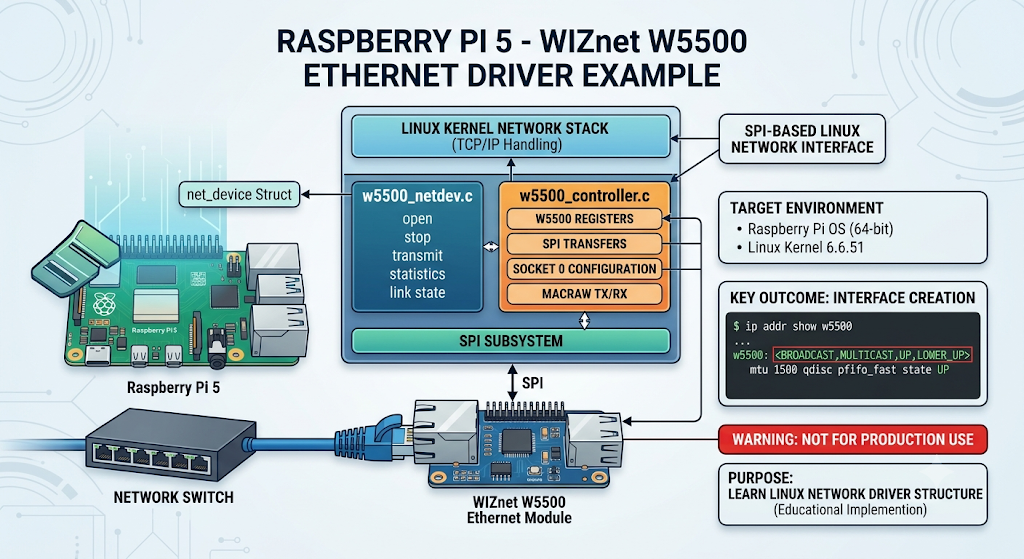
이미지 출처 : AI 생성
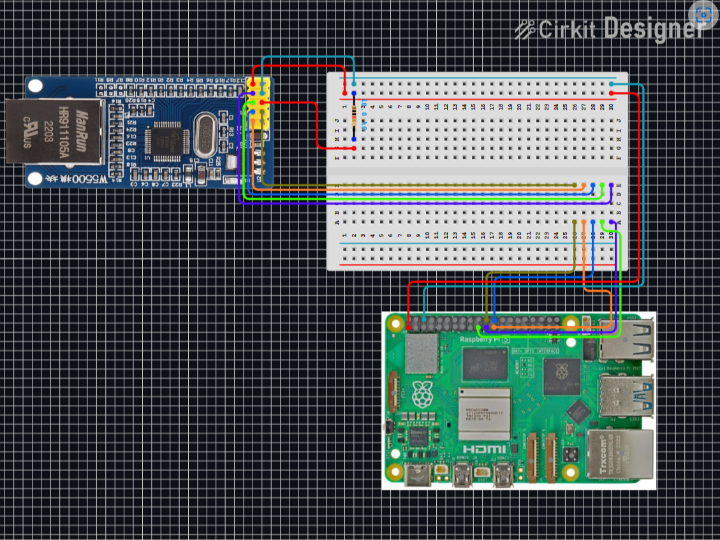
이미지 출처 : https://github.com/JeroenMampaey/W5500LinuxDriver
WIZnet이 들어가는 위치
이 프로젝트에서 사용하는 WIZnet 제품은 W5500입니다.
일반적인 MCU 프로젝트에서는 W5500의 하드웨어 TCP/IP 스택을 활용해 TCP, UDP socket을 직접 다루는 경우가 많습니다. 하지만 이 드라이버는 다른 방식으로 접근합니다. Linux가 이미 네트워크 스택을 가지고 있기 때문에, W5500은 Socket 0의 MACRAW mode를 통해 Ethernet frame 입출력 장치로 사용됩니다.
핵심 설정은 Socket 0에 집중되어 있습니다. 드라이버는 W5500의 chip version register를 읽어 0x04인지 확인하고, Socket 0을 MACRAW mode로 열며, 나머지 socket은 닫습니다. 또한 Socket 0에 RX/TX buffer를 집중 배정해 Linux net_device 계층에서 내려온 frame을 W5500 TX buffer로 보내고, W5500 RX buffer에서 받은 frame을 다시 kernel로 올립니다.
구현 참고 사항
1. W5500 칩 확인
w5500_controller.c는 초기화 과정에서 W5500 chip version을 확인합니다.
// file: w5500_controller.c
unsigned char chip_version[1] = {0x00};
W5500_CTRL_ABORT_ON_ERR(read_common_register(controller, 0x0039, chip_version, 1));

if(chip_version[0] != 0x04){
    w5500_ctrl_check_err_code = W5500_CTRL_ERR_INCORRECT_CHIP_VERSION;
    return -1;
}
이 코드는 SPI 통신, chip select, 전원, W5500 식별이 정상인지 확인하는 초기 방어선입니다. 이 단계에서 실패하면 Linux 네트워크 장치로 등록하기 전에 문제를 잡을 수 있습니다.
2. Socket 0을 MACRAW mode로 설정
드라이버는 Socket 0만 사용합니다. 0x84는 MAC filter와 MACRAW mode를 함께 켜기 위한 설정값으로 사용됩니다.
// file: w5500_controller.c
mode[0] = 0x84;
W5500_CTRL_ABORT_ON_ERR(write_socket_n_register(controller, 0, 0x0000, mode, 1));

mode[0] = 0x00;
for(int i=1; i<8; i++){
    W5500_CTRL_ABORT_ON_ERR(write_socket_n_register(controller, i, 0x0000, mode, 1));
}
이 구조에서는 W5500의 여러 socket을 TCP/UDP 용도로 나누어 쓰지 않습니다. Linux 네트워크 스택과 연결할 raw Ethernet 경로 하나를 만들기 위해 Socket 0만 열고, 나머지 socket은 비활성화합니다.
3. Linux net_device에 연결
w5500_netdev.c는 W5500 제어 코드를 Linux 네트워크 장치 모델에 연결합니다.
// file: w5500_netdev.c
ether_setup(dev);
eth_hw_addr_random(dev);

priv->my_netdev_ops.ndo_open = w5500_netdev_open;
priv->my_netdev_ops.ndo_stop = w5500_netdev_release;
priv->my_netdev_ops.ndo_start_xmit = w5500_netdev_xmit;
priv->my_netdev_ops.ndo_get_stats = w5500_netdev_stats;
dev->netdev_ops = &priv->my_netdev_ops;
이 부분 때문에 사용자는 W5500을 별도 SPI 장치가 아니라 Linux Ethernet interface처럼 다룰 수 있습니다. ndo_start_xmit은 kernel에서 내려온 packet을 W5500 전송 경로로 넘기고, link 상태 변경은 netif_carrier_on()과 netif_carrier_off()로 kernel에 반영됩니다.
Linux 기본 드라이버와 비교
Linux mainline에는 WIZnet W5100/W5200/W5500 계열을 위한 기본 드라이버가 이미 있습니다. 기본 드라이버는 W5100 계열 공통 Ethernet driver와 SPI mode driver로 구성되어 있으며, W5500도 지원 대상에 포함됩니다.
두 드라이버 모두 W5500을 MACRAW 기반 Ethernet interface로 사용한다는 점은 같습니다. 차이는 코드의 목적과 완성도입니다. 이 프로젝트의 커스텀 드라이버는 W5500 레지스터와 packet 흐름을 직접 보여주는 학습용 구현에 가깝고, Linux 기본 드라이버는 실제 커널 네트워크 서브시스템에 맞춰 정리된 범용 드라이버입니다.
| 항목 | 커스텀 W5500 드라이버 | Linux 기본 WIZnet 드라이버 |
|---|---|---|
| 목적 | Raspberry Pi 5에서 W5500 동작을 직접 실험하는 학습용 구현 | W5100/W5200/W5500 계열을 지원하는 범용 Linux 커널 드라이버 |
| 코드 구조 | W5500 레지스터 접근, MACRAW 설정, TX/RX 처리가 비교적 직접적으로 보임 | SPI 처리와 공통 Ethernet 로직이 분리된 구조 |
| 지원 칩 | 사실상 W5500 중심 | W5100, W5200, W5500 계열 지원 |
| W5500 사용 방식 | Socket 0을 MACRAW mode로 열고 raw Ethernet frame 송수신 | 동일하게 MACRAW 기반 Ethernet interface로 동작 |
| 장점 | 코드 흐름이 단순하고 W5500 내부 동작을 이해하기 쉬움 | Linux network subsystem과 잘 통합되어 안정성과 유지보수성이 높음 |
| 단점 | production 용도로 쓰기에는 기능과 검증이 부족함 | 구조가 추상화되어 있어 처음 읽을 때 흐름을 따라가기 어려움 |
| 송신 처리 | 자체 queue와 workqueue로 packet 송신 처리 | Linux 표준 netdev_tx_t, queue stop/wake, timeout 처리 사용 |
| 수신 처리 | interrupt 후 workqueue에서 W5500 RX buffer를 직접 읽음 | NAPI 또는 workqueue 기반으로 kernel network stack에 맞춰 처리 |
| 관리 기능 | 기본적인 open, stop, transmit, stats 중심 | MAC address 처리, ethtool, tx timeout, receive mode 등 포함 |
| 적합한 용도 | W5500 Linux 드라이버 구조 학습, 실험, 코드 분석 | 실제 시스템 통합, 장기 운용, 유지보수 가능한 Linux Ethernet driver |
| 최종 판단 | “어떻게 동작하는지 보기 좋은 코드” | “실제로 쓰기 좋은 드라이버 구조” |
정리하면, 이 프로젝트의 드라이버는 W5500이 Linux network interface로 연결될 때 내부에서 어떤 일이 일어나는지 이해하기 좋습니다. 반면 실제 제품이나 장기 운용 환경에서는 Linux 기본 WIZnet 드라이버를 먼저 검토하는 편이 안전합니다.
실전 팁 / 주의점
- W5500 배선은 3.3 V, GND, MISO, MOSI, CS, SCLK, INT를 기준으로 확인합니다.
- SPI 장치가 보이지 않으면 device tree overlay, chip select, SPI enable 상태를 먼저 확인합니다.
- 이 프로젝트는 production driver가 아니므로 장애 복구, race condition, long-term stability를 별도로 검증해야 합니다.
- MACRAW mode에서는 Linux가 TCP/IP를 처리합니다. W5500 socket API로 TCP server를 여는 MCU 예제와 구조가 다릅니다.
- TX queue가 가득 차면
netif_stop_queue()로 송신을 멈추고, 여유가 생기면 다시 깨우는 흐름이 필요합니다. - SPI-DMA buffer를 다룰 때는 buffer lifetime, alignment, cache coherency를 주의해야 합니다.
FAQ
Q: 왜 W5500을 사용하나요?
A: Raspberry Pi 5에 SPI 기반 유선 Ethernet 인터페이스를 추가하기 위해 사용합니다. 이 프로젝트에서는 W5500의 TCP/IP socket 기능보다 MACRAW mode를 활용해 Linux net_device 계층과 Ethernet frame 송수신 경로를 연결합니다.
Q: Raspberry Pi 5에는 어떻게 연결하나요?
A: SPI로 연결합니다. 기본적으로 MISO, MOSI, SCLK, CS와 전원, GND가 필요하며, 이 프로젝트는 INT 핀도 사용합니다. Linux 쪽에서는 device tree overlay와 kernel module build 과정이 함께 필요합니다.
Q: 이 프로젝트에서 W5500은 정확히 어떤 역할을 하나요?
A: W5500은 Linux network stack과 Ethernet cable 사이의 SPI Ethernet controller 역할을 합니다. Socket 0의 MACRAW mode로 frame을 받고 보내며, TCP/IP 처리는 Linux kernel이 담당합니다.
Q: 초보자도 따라할 수 있나요?
A: 단순 설치와 인터페이스 확인은 비교적 단순하지만, 코드를 수정하려면 Linux kernel module, SPI driver, net_device_ops, interrupt, workqueue에 대한 이해가 필요합니다. 커널 드라이버 학습자에게 적합한 난이도입니다.
Q: Linux 기본 W5500 드라이버와 비교하면 어떤가요?
A: 기본 드라이버는 W5100/W5200/W5500 계열을 공식 Linux driver 구조로 지원합니다. 이 프로젝트는 코드 흐름이 단순해 학습용으로 읽기 좋지만, 실제 제품이나 장기 운용 환경에서는 mainline driver 기반 접근이 더 적합합니다.
Project Overview
This project is an example kernel driver that registers the WIZnet W5500 Ethernet module as an SPI-based Linux network interface on Raspberry Pi 5. The target environment is 64-bit Raspberry Pi OS with Linux kernel 6.6.51. After installation, a w5500 interface is created and can be checked with ifconfig or ip addr.
The author clearly states that this driver is not suitable for production use. Therefore, it is more accurate to view it as an implementation for learning the structure of a Linux network driver rather than as a practical production-ready driver.
The driver is largely composed of two parts. w5500_controller.c handles W5500 register access, SPI transfers, Socket 0 configuration, and MACRAW transmit/receive operations. w5500_netdev.c connects the driver to the Linux net_device structure and handles open, stop, transmit, statistics, and link status processing.
As a result, the Linux kernel network stack continues to handle TCP/IP processing, while the W5500 behaves like an SPI Ethernet controller that sends and receives raw Ethernet frames.
Image source: AI-generated
Image source: https://github.com/JeroenMampaey/W5500LinuxDriver
Where WIZnet Fits
The WIZnet product used in this project is the W5500.
In typical MCU projects, the W5500 hardware TCP/IP stack is often used to directly handle TCP and UDP sockets. However, this driver takes a different approach. Since Linux already has its own network stack, the W5500 is used as an Ethernet frame input/output device through MACRAW mode on Socket 0.
The key configuration is focused on Socket 0. The driver reads the W5500 chip version register and checks whether it is 0x04, opens Socket 0 in MACRAW mode, and closes the remaining sockets. It also assigns the RX/TX buffers primarily to Socket 0, sending frames from the Linux net_device layer to the W5500 TX buffer and passing frames received from the W5500 RX buffer back up to the kernel.
Implementation Notes
1. Checking the W5500 Chip
w5500_controller.c checks the W5500 chip version during initialization.
// file: w5500_controller.c
unsigned char chip_version[1] = {0x00};
W5500_CTRL_ABORT_ON_ERR(read_common_register(controller, 0x0039, chip_version, 1));

if(chip_version[0] != 0x04){
    w5500_ctrl_check_err_code = W5500_CTRL_ERR_INCORRECT_CHIP_VERSION;
    return -1;
}
This code acts as an early safeguard to verify that SPI communication, chip select, power, and W5500 identification are working correctly. If this step fails, the problem can be caught before the device is registered as a Linux network interface.
2. Configuring Socket 0 in MACRAW Mode
The driver uses only Socket 0. The value 0x84 is used to enable both the MAC filter and MACRAW mode.
// file: w5500_controller.c
mode[0] = 0x84;
W5500_CTRL_ABORT_ON_ERR(write_socket_n_register(controller, 0, 0x0000, mode, 1));

mode[0] = 0x00;
for(int i=1; i<8; i++){
    W5500_CTRL_ABORT_ON_ERR(write_socket_n_register(controller, i, 0x0000, mode, 1));
}
In this structure, the W5500 sockets are not divided for TCP or UDP use. Instead, only Socket 0 is opened to create a single raw Ethernet path connected to the Linux network stack, while the remaining sockets are disabled.
3. Connecting to Linux net_device
w5500_netdev.c connects the W5500 control code to the Linux network device model.
// file: w5500_netdev.c
ether_setup(dev);
eth_hw_addr_random(dev);

priv->my_netdev_ops.ndo_open = w5500_netdev_open;
priv->my_netdev_ops.ndo_stop = w5500_netdev_release;
priv->my_netdev_ops.ndo_start_xmit = w5500_netdev_xmit;
priv->my_netdev_ops.ndo_get_stats = w5500_netdev_stats;
dev->netdev_ops = &priv->my_netdev_ops;
This allows the user to handle the W5500 as a Linux Ethernet interface rather than as a separate SPI device. ndo_start_xmit passes packets from the kernel into the W5500 transmit path, while link status changes are reflected back to the kernel using netif_carrier_on() and netif_carrier_off().
Comparison with the Linux Built-in Driver
The Linux mainline kernel already includes a built-in driver for the WIZnet W5100/W5200/W5500 family. The built-in driver consists of a common Ethernet driver for the W5100 family and an SPI mode driver, and the W5500 is included as one of the supported devices.
Both drivers use the W5500 as a MACRAW-based Ethernet interface. The difference lies in their purpose and completeness. The custom driver in this project is closer to an educational implementation that directly exposes W5500 registers and packet flow, while the Linux built-in driver is a general-purpose driver structured for the actual kernel networking subsystem.
| Item | Custom W5500 Driver | Linux Built-in WIZnet Driver |
|---|---|---|
| Purpose | Educational implementation for directly experimenting with W5500 behavior on Raspberry Pi 5 | General-purpose Linux kernel driver supporting the W5100/W5200/W5500 family |
| Code structure | W5500 register access, MACRAW configuration, and TX/RX handling are relatively direct and visible | SPI handling and common Ethernet logic are separated |
| Supported chips | Effectively focused on W5500 | Supports W5100, W5200, and W5500 family devices |
| W5500 usage model | Opens Socket 0 in MACRAW mode and sends/receives raw Ethernet frames | Also operates as a MACRAW-based Ethernet interface |
| Strength | Simple code flow, easy to understand W5500 internal behavior | Well integrated with the Linux network subsystem, with better stability and maintainability |
| Weakness | Lacks the features and verification needed for production use | More abstract structure, harder to follow at first |
| Transmit handling | Uses its own queue and workqueue to transmit packets | Uses standard Linux netdev_tx_t, queue stop/wake, and timeout handling |
| Receive handling | Reads the W5500 RX buffer directly from a workqueue after an interrupt | Uses NAPI or workqueue-based handling aligned with the kernel network stack |
| Management features | Focused on basic open, stop, transmit, and statistics handling | Includes MAC address handling, ethtool, TX timeout, receive mode handling, and more |
| Suitable use case | Learning, experimentation, and code analysis of the W5500 Linux driver structure | Real system integration, long-term operation, and maintainable Linux Ethernet driver development |
| Final assessment | “Good code for understanding how it works” | “A better driver structure for real use” |
In summary, this project’s driver is useful for understanding what happens internally when the W5500 is connected as a Linux network interface. However, for real products or long-term operation, it is safer to first review the Linux built-in WIZnet driver.
Practical Tips / Pitfalls
- Check W5500 wiring based on 3.3 V, GND, MISO, MOSI, CS, SCLK, and INT.
- If the SPI device does not appear, first check the device tree overlay, chip select, and SPI enable status.
- Since this project is not a production driver, fault recovery, race conditions, and long-term stability must be verified separately.
- In MACRAW mode, Linux handles TCP/IP processing. This is structurally different from MCU examples that open a TCP server using the W5500 socket API.
- When the TX queue is full, transmission should be stopped with
netif_stop_queue()and resumed when space becomes available. - When working with SPI-DMA buffers, pay attention to buffer lifetime, alignment, and cache coherency.
FAQ
Q: Why use the W5500?
A: It is used to add an SPI-based wired Ethernet interface to Raspberry Pi 5. In this project, the W5500’s MACRAW mode is used to connect the Linux net_device layer with the Ethernet frame transmit/receive path, rather than using the W5500’s TCP/IP socket functions.
Q: How is it connected to Raspberry Pi 5?
A: It connects over SPI. In general, MISO, MOSI, SCLK, CS, power, and GND are required, and this project also uses the INT pin. On the Linux side, device tree overlay configuration and kernel module build steps are also required.
Q: What exactly does the W5500 do in this project?
A: The W5500 acts as an SPI Ethernet controller between the Linux network stack and the Ethernet cable. It sends and receives frames through Socket 0 in MACRAW mode, while TCP/IP processing is handled by the Linux kernel.
Q: Can beginners follow this project?
A: Basic installation and interface checking are relatively simple, but modifying the code requires knowledge of Linux kernel modules, SPI drivers, net_device_ops, interrupts, and workqueues. It is suitable for learners studying kernel driver development.
Q: How does it compare with the Linux built-in W5500 driver?
A: The built-in driver supports the W5100/W5200/W5500 family using the official Linux driver structure. This project has a simpler code flow and is easier to read for learning purposes, but for real products or long-term operation, a mainline driver-based approach is more appropriate.
-
Github Code


