Wiznet makers

mason

Published May 19, 2026 ©

166 UCC

21 WCC

33 VAR

0 Contests

0 Followers

0 Following

Original Link

node-redscape

node-redscape
COMPONENTS Hardware components

Espressif - ESP32

x 1


WIZnet - W5500

x 1


PROJECT DESCRIPTION

프로젝트가 하는 일

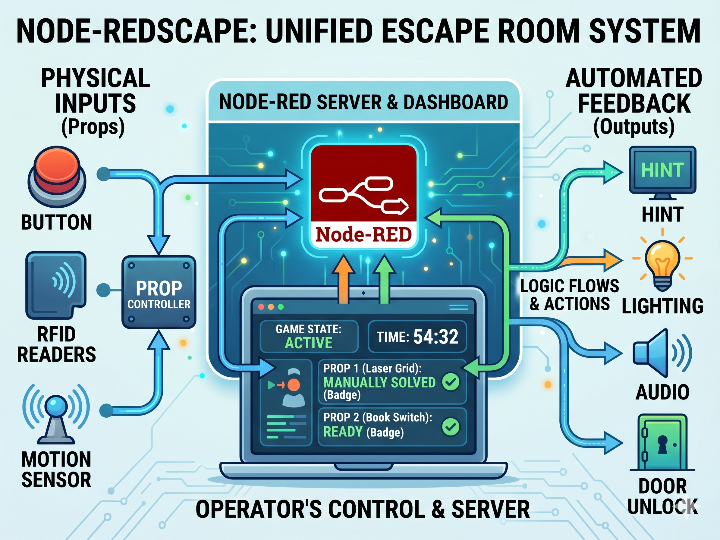
Node-REDscape는 방탈출 룸의 여러 퍼즐 장치를 하나의 운영 시스템으로 묶습니다. 버튼, RFID, 스위치, 센서, 릴레이 같은 물리 장치는 prop controller에 연결되고, 각 controller는 Node-RED 서버와 메시지를 주고받습니다.

운영자는 Node-RED 대시보드에서 게임을 시작하거나 정지하고, 타이머를 관리하며, 특정 prop을 수동으로 해결 처리하거나 리셋할 수 있습니다. 게임 중에는 prop에서 발생한 이벤트가 Node-RED 플로우로 들어오고, 플로우는 다음 퍼즐, 힌트 출력, 조명, 사운드 같은 동작을 실행합니다.

상업용 방탈출 룸에서는 이 구조가 특히 유용합니다. 한 번 동작하는 데모가 아니라 여러 회차를 반복 운영해야 하므로, prop 상태 확인, 강제 리셋, 수동 개입, 네트워크 상태 확인이 운영 품질에 직접 영향을 줍니다.
이미지 출처 : AI 생성

Dashboard

"Example GM Dashboard"

In-Room Display

"Example In-Room Display"

Flow

"Example Flow"

이미지 출처 : https://github.com/playfultechnology/node-redscape

WIZnet이 들어가는 위치

이 프로젝트에서 확인되는 WIZnet 관련 제품은 W5500입니다. 저장소에는 ESP32와 W5500을 유선 Ethernet으로 연결하는 배선 문서가 포함되어 있으며, ESP32 Ethernet 예제는 UDP 기반 버튼 prop controller 구조를 사용합니다.

W5500은 prop controller와 방탈출 룸 내부 LAN 사이에 위치합니다. MCU는 버튼 입력이나 퍼즐 상태를 처리하고, W5500은 SPI를 통해 Ethernet 통신을 담당합니다. Node-RED 서버는 이 네트워크 메시지를 받아 대시보드와 게임 플로우에 반영합니다.

상업용 설치에서는 Wi-Fi보다 유선 Ethernet이 더 안정적인 선택이 될 수 있습니다. 방 구조, 금속 소품, 방문객 스마트폰, 여러 무선 AP가 섞이면 Wi-Fi 품질이 일정하지 않을 수 있습니다. W5500은 하드웨어 TCP/IP 오프로드, 32 KB 내부 버퍼, 8개 소켓을 제공하므로 작은 MCU에서도 안정적인 네트워크 prop을 구성하기 쉽습니다.

구현 메모

이 저장소의 예제 코드는 W5500 저수준 드라이버를 직접 호출하지 않습니다. 대신 Arduino 계열 Ethernet API를 사용하고, W5500은 유선 네트워크를 제공하는 하드웨어 계층으로 동작합니다.

파일 경로: ESP32/Ethernet/PropControl_UDP_Button/PropControl_UDP_Button.ino
역할: 버튼 prop의 네트워크 ID, IP 주소, UDP 서버, 포트, 버튼 핀, Ethernet CS 핀을 설정합니다.

 
const char* deviceID = "Button-1";
byte mac[] = {0xDE, 0xAD, 0xBE, 0xEF, 0xFE, 0xED};

const IPAddress localIPAddress(192, 168, 1, 177);
const char* remoteUDPServer = "192.168.0.114";

const int remoteUDPPort = 161;
const int localUDPPort = 161;

const byte buttonPin = 16;
const byte ssPin = 5;
 

이 설정은 하나의 버튼 prop을 네트워크에서 식별 가능한 장치로 만듭니다. deviceID는 Node-RED에서 prop을 구분하는 이름이고, remoteUDPServer는 Node-RED 서버 주소입니다. ssPin은 ESP32와 W5500 Ethernet 모듈 사이의 SPI chip-select 핀입니다.

파일 경로: Node-RED/NodeREDscape_Prop_Button_flow.json
역할: prop에서 들어오는 MQTT/UDP 메시지를 받고, 운영자 대시보드에서 RESET 또는 SOLVE 명령을 다시 prop으로 보냅니다.

 
"topic": "FromDevice/Button-1",
"type": "mqtt in",
"name": "MQTT FromDevice"

"port": "161",
"type": "udp in"

"payload": "{\"command\":\"RESET\"}"
"payload": "{\"command\":\"SOLVE\"}"
 

이 플로우는 실제 방탈출 운영에 필요한 기본 패턴을 보여줍니다. prop은 자신의 상태를 Node-RED로 보내고, 운영자는 대시보드에서 해당 prop을 리셋하거나 수동 해결 처리할 수 있습니다.

실전 팁 / 주의점

  • 상업용 룸에서는 prop마다 고정 IP 또는 DHCP reservation을 사용하는 것이 좋습니다.
  • W5500 SPI 배선은 짧고 단순하게 구성해야 합니다. SCK, MISO, MOSI, CS, 3.3 V, GND 연결을 먼저 확인해야 합니다.
  • 잠금장치, 게임 진행 핵심 버튼, 세션 리셋 장치에는 Wi-Fi보다 유선 Ethernet을 우선 고려하는 것이 안전합니다.
  • Node-RED 대시보드에는 prop별 online 상태나 heartbeat 표시를 추가하는 것이 좋습니다.
  • UDP는 가볍지만 전달 보장이 없으므로 중요한 명령에는 ACK 또는 상태 재확인 로직을 넣는 것이 좋습니다.
  • MQTT는 토픽 관리가 편리하지만 broker 장애가 전체 통신에 영향을 줄 수 있으므로 broker 상태 감시가 필요합니다.
  • W5500은 8개 소켓을 지원하므로, 다수 prop을 구성할 때는 장치당 연결 수를 단순하게 유지해야 합니다.

FAQ

Q: 왜 Node-REDscape에 W5500을 사용하는 것이 적합한가요?
A: W5500은 작은 MCU에 안정적인 유선 Ethernet을 추가할 수 있습니다. 방탈출 prop은 세션마다 반복적으로 동작해야 하므로, 무선 품질에 덜 의존하는 유선 연결이 운영 안정성에 유리합니다.

Q: W5500은 ESP32 또는 Arduino에 어떻게 연결하나요?
A: SPI로 연결합니다. 기본적으로 SCK, MISO, MOSI, CS, 전원, GND가 필요합니다. ESP32 예제에서는 Ethernet 모듈의 chip-select 핀으로 ssPin = 5를 사용합니다.

Q: 이 프로젝트에서 W5500은 정확히 어떤 역할을 하나요?
A: W5500은 prop controller의 유선 네트워크 인터페이스입니다. MCU가 버튼 입력과 퍼즐 상태를 처리하면, W5500이 그 데이터를 Node-RED 서버로 전달하고 서버의 제어 명령을 다시 prop으로 받습니다.

Q: 초보자도 따라할 수 있나요?
A: 단순 버튼 prop부터 시작하면 가능합니다. 다만 Node-RED, Arduino 또는 ESP32, IP 주소 설정, SPI 배선에 대한 기본 지식은 필요합니다. 상업용 설치에서는 전원, 케이블 고정, 장애 복구까지 함께 고려해야 합니다.

Q: Wi-Fi 기반 ESP32 prop과 비교하면 어떤 차이가 있나요?
A: Wi-Fi는 설치가 빠르고 배선이 적지만, 방 구조와 무선 간섭의 영향을 받습니다. W5500 기반 유선 Ethernet은 케이블이 필요하지만, 반복 운영되는 상업용 룸에서는 연결 안정성과 문제 추적성이 더 좋습니다.


What the Project Does

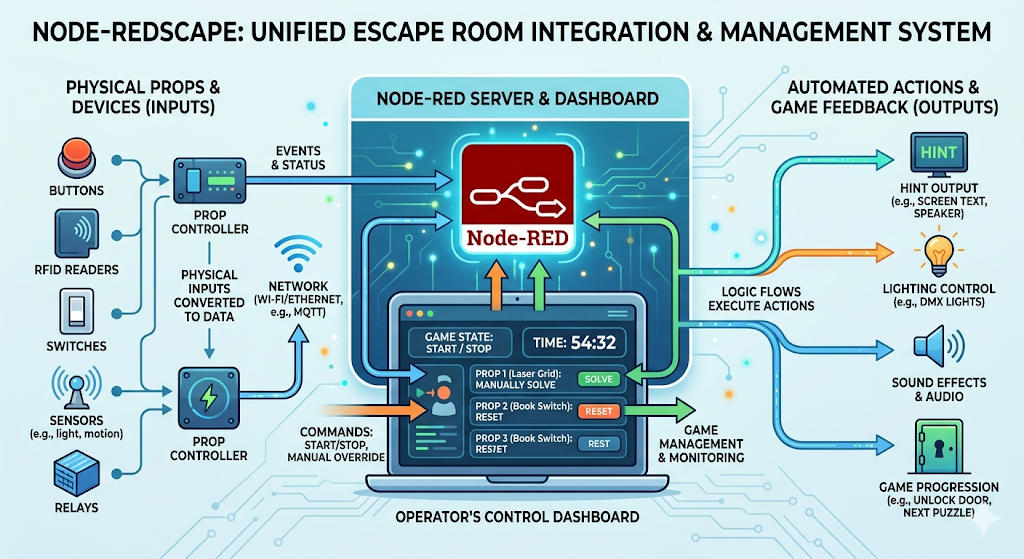
Node-REDscape brings multiple puzzle devices in an escape room into a single operating system. Physical devices such as buttons, RFID readers, switches, sensors, and relays are connected to prop controllers, and each controller exchanges messages with the Node-RED server.

The operator can start or stop the game from the Node-RED dashboard, manage the timer, manually mark a specific prop as solved, or reset it. During the game, events generated by props enter the Node-RED flow, and the flow triggers actions such as the next puzzle, hint output, lighting, or sound.

This structure is especially useful for commercial escape rooms. The system is not just a one-time demo; it must support repeated game sessions throughout the day. Prop status monitoring, forced reset, manual intervention, and network status checks directly affect operational quality.

Image source: AI-generated

Dashboard

"Example GM Dashboard"

In-Room Display

"Example In-Room Display"

Flow

"Example Flow"

Image source: https://github.com/playfultechnology/node-redscape

Where WIZnet Fits

The WIZnet product identified in this project is the W5500. The repository includes a wiring document for connecting an ESP32 and W5500 over wired Ethernet, and the ESP32 Ethernet example uses a UDP-based button prop controller structure.

The W5500 sits between the prop controller and the escape room’s internal LAN. The MCU handles button input or puzzle state, while the W5500 handles Ethernet communication over SPI. The Node-RED server receives these network messages and reflects them in the dashboard and game flow.

For commercial installations, wired Ethernet can be a more stable choice than Wi-Fi. Room structure, metal props, visitors’ smartphones, and multiple wireless access points can make Wi-Fi quality inconsistent. The W5500 provides hardware TCP/IP offload, a 32 KB internal buffer, and 8 sockets, making it easier to build reliable networked props even with small MCUs.

Implementation Notes

The example code in this repository does not directly call a low-level W5500 driver. Instead, it uses Arduino-style Ethernet APIs, while the W5500 operates as the hardware layer that provides wired network connectivity.

File path: ESP32/Ethernet/PropControl_UDP_Button/PropControl_UDP_Button.ino
Role: Configures the button prop’s network ID, IP address, UDP server, port, button pin, and Ethernet CS pin.

 
const char* deviceID = "Button-1";
byte mac[] = {0xDE, 0xAD, 0xBE, 0xEF, 0xFE, 0xED};

const IPAddress localIPAddress(192, 168, 1, 177);
const char* remoteUDPServer = "192.168.0.114";

const int remoteUDPPort = 161;
const int localUDPPort = 161;

const byte buttonPin = 16;
const byte ssPin = 5;
 

This configuration makes a single button prop identifiable as a network device. deviceID is the name used to distinguish the prop in Node-RED, and remoteUDPServer is the address of the Node-RED server. ssPin is the SPI chip-select pin between the ESP32 and the W5500 Ethernet module.

File path: Node-RED/NodeREDscape_Prop_Button_flow.json
Role: Receives MQTT/UDP messages from the prop and sends RESET or SOLVE commands back to the prop from the operator dashboard.

 
"topic": "FromDevice/Button-1",
"type": "mqtt in",
"name": "MQTT FromDevice"

"port": "161",
"type": "udp in"

"payload": "{\"command\":\"RESET\"}"
"payload": "{\"command\":\"SOLVE\"}"
 

This flow shows the basic pattern required for real escape room operation. The prop sends its status to Node-RED, and the operator can reset that prop or manually mark it as solved from the dashboard.

Practical Tips / Pitfalls

For commercial rooms, it is better to use a fixed IP address or DHCP reservation for each prop.

W5500 SPI wiring should be short and simple. Check SCK, MISO, MOSI, CS, 3.3 V, and GND first.

For locks, game-critical buttons, and session reset devices, wired Ethernet should be considered before Wi-Fi.

It is useful to add per-prop online status or heartbeat indicators to the Node-RED dashboard.

UDP is lightweight, but it does not guarantee delivery. For important commands, add ACK or state verification logic.

MQTT is convenient for topic management, but broker failure can affect the entire communication system, so broker status should be monitored.

The W5500 supports 8 sockets, so when building many props, keep the number of connections per device simple.

FAQ

Q: Why is W5500 suitable for Node-REDscape?
A: The W5500 can add stable wired Ethernet to a small MCU. Escape room props must operate repeatedly across many game sessions, so a wired connection that depends less on wireless quality is beneficial for operational reliability.

Q: How does the W5500 connect to an ESP32 or Arduino?
A: It connects over SPI. The basic required signals are SCK, MISO, MOSI, CS, power, and GND. In the ESP32 example, ssPin = 5 is used as the chip-select pin for the Ethernet module.

Q: What exactly does the W5500 do in this project?
A: The W5500 acts as the wired network interface for the prop controller. When the MCU processes button input or puzzle state, the W5500 sends that data to the Node-RED server and receives control commands from the server.

Q: Can beginners follow this project?
A: Yes, starting with a simple button prop is manageable. However, basic knowledge of Node-RED, Arduino or ESP32, IP address configuration, and SPI wiring is required. For commercial installation, power, cable mounting, and failure recovery also need to be considered.

Q: How is this different from a Wi-Fi-based ESP32 prop?
A: Wi-Fi is quick to install and requires less wiring, but it is affected by room structure and wireless interference. W5500-based wired Ethernet requires cabling, but in commercial rooms with repeated operation, it provides better connection stability and easier troubleshooting.

 
Documents
  • Github Code

Comments Write


