


MqttTemplates
MqttTemplates

WIZnet - W5500
x 1

M5Stack - BTC Standing Base for M5 Core with DHT12
x 1
프로젝트 개요
MqttTemplates는 ESP32 및 M5Stack 기반 장치를 MQTT 센서 노드로 만들기 위한 Arduino 템플릿 프로젝트입니다. 기본 예제는 장치 MAC 주소와 카운터 값을 TLS 연결로 MQTT 브로커에 게시하며, 사용자는 이 구조를 온도, 전압, 압력, 접점 상태 같은 실제 센서 데이터 전송 로직으로 바꿀 수 있습니다. 프로젝트는 Wi-Fi 템플릿과 Ethernet 템플릿을 함께 제공하며, 그중 M5Core W5500과 Atom W5500은 WIZnet W5500 기반 유선 Ethernet 구성을 전제로 합니다.
Industrial IoT 관점에서 이 프로젝트의 핵심은 “센서 로직”과 “네트워크 유지 로직”을 분리한 구조입니다. 사용자는 MQTT 연결이 살아 있을 때 실행되는 connectedLoop()에 센서 읽기와 publish 코드를 넣으면 됩니다. 공통 템플릿은 Ethernet 링크 확인, MQTT over TLS 설정, OTA 업데이트, Last Will and Testament, watchdog 갱신 흐름을 담당합니다.
2026년 5월 README에는 이 프로젝트가 작성자의 신규 프로젝트인 NetClient의 predecessor이며, 새 프로젝트가 더 많은 기능과 개선된 구조를 제공한다고 안내되어 있습니다. 따라서 MqttTemplates는 “최신 권장 프레임워크”라기보다, W5500 기반 MQTT 센서 템플릿의 구조를 이해하고 재사용하기 좋은 기준 예제로 보는 것이 적절합니다.
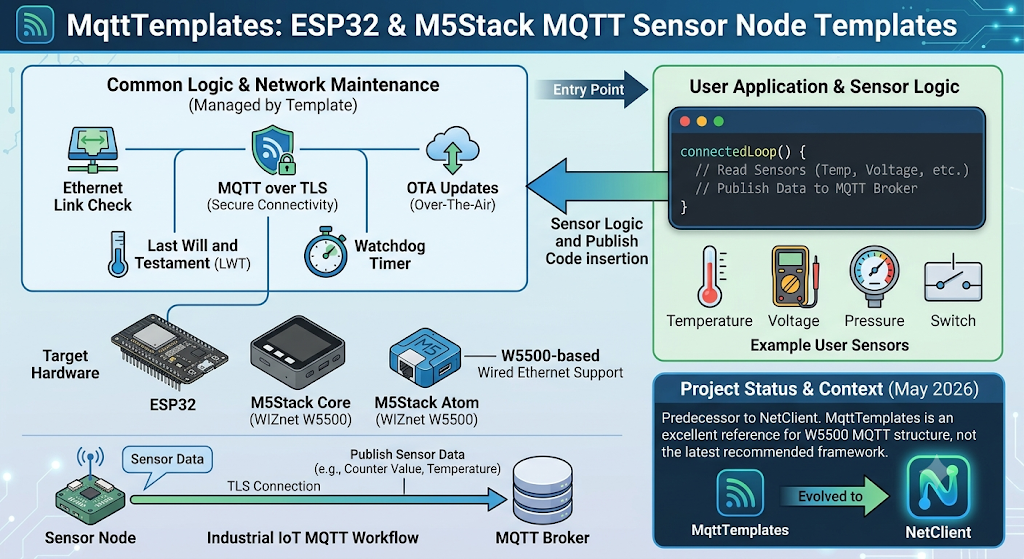
이미지 출처 : AI 생성
Where WIZnet Fits
이 프로젝트에서 사용되는 WIZnet 제품은 W5500 Ethernet controller입니다. W5500은 ESP32와 SPI로 연결되는 유선 Ethernet 칩이며, 템플릿 코드에서는 Arduino ESP32의 ETH 계층을 통해 초기화됩니다. WIZnet 공식 문서 기준으로 W5500은 하드웨어 TCP/IP 스택, SPI 최대 80 MHz, 10/100 Ethernet MAC/PHY, 32 KB 내부 TX/RX 버퍼, 8개 독립 소켓을 제공합니다.
W5500의 역할은 MQTT 센서 노드의 네트워크 경로를 Wi-Fi가 아닌 RJ45 기반 유선 Ethernet으로 고정하는 것입니다. 산업 현장에서는 무선 간섭, AP 장애, 금속 구조물, 설비실 음영 구간이 장시간 연결 유지에 영향을 줄 수 있습니다. W5500 Ethernet 템플릿은 케이블 기반 링크를 사용하므로 고정형 센서, PoE 노드, 제어반 내부 모니터링 장치처럼 이동성이 낮고 연결 안정성이 중요한 장치에 적합합니다.
Implementation Notes
W5500_M5Core_Mqtt.hpp는 M5Stack Core와 W5500 Ethernet Base 조합을 위한 보드 정의 파일입니다. 여기서 W5500 PHY 타입과 SPI 핀을 지정하고, 공통 Ethernet MQTT 템플릿인 comETH_MqttT.hpp를 불러옵니다.
// File: W5500_M5Core_Mqtt.hpp

#define ETH_PHY_ADDR 1
#define ETH_PHY_TYPE ETH_PHY_W5500
#define ETH_PHY_CS 26
#define ETH_PHY_IRQ 34
#define ETH_PHY_RST 13
#define ETH_PHY_SPI_FREQ_MHZ 1

#define ETH_SPI_SCK 18
#define ETH_SPI_MISO 19
#define ETH_SPI_MOSI 23

#include "comETH_MqttT.hpp"
이 파일은 센서 애플리케이션 코드와 보드별 하드웨어 설정을 분리합니다. 같은 MQTT 로직을 유지하면서 M5Core W5500, Atom W5500, PoESP32처럼 서로 다른 Ethernet 보드 구성을 선택할 수 있습니다.
comETH_MqttT.hpp는 W5500을 SPI Ethernet 장치로 시작하고, 링크가 올라온 뒤 IP 주소를 확인합니다. 링크가 준비되기 전에는 MQTT 연결 단계로 넘어가지 않기 때문에, 물리 링크 문제와 브로커 접속 문제를 구분하기 쉽습니다.
// File: comETH_MqttT.hpp

#ifdef ETH_SPI_SCK
// W5500 Ethernet over SPI
SPI.begin(ETH_SPI_SCK, ETH_SPI_MISO, ETH_SPI_MOSI);
ETH.begin(ETH_PHY_TYPE, ETH_PHY_ADDR, ETH_PHY_CS,
          ETH_PHY_IRQ, ETH_PHY_RST, SPI, ETH_PHY_SPI_FREQ_MHZ);
#else
ETH.begin();
#endif

while (ETH.linkUp() == 0) {
  Serial.print(".");
  delay(500);
}
TLS MQTT 설정은 WiFiClientSecure와 PubSubClient 조합으로 처리됩니다. 코드에는 MQTT 기본 포트가 8883으로 설정되어 있고, CA 인증서를 적용한 뒤 MQTT 서버와 callback을 지정합니다.
// File: comETH_MqttT.hpp

espClient.setCACert(ca_cert);
mqttClient.setServer(mqtt_server, mqtt_port);
mqttClient.setCallback(callback);
OTA 업데이트는 Ethernet 연결이 확인된 뒤 활성화됩니다. 호스트명에는 MAC 주소를 반영할 수 있고, OTA 비밀번호가 설정된 경우에만 ArduinoOTA.begin()이 호출됩니다. README도 OTA는 비밀번호를 설정해야 활성화되며, 운영 환경에서는 강한 OTA 비밀번호를 사용해야 한다고 설명합니다.
// File: comETH_MqttT.hpp

snprintf(fullHostname, 64, ARDUINO_OTA_HOSTNAME,
         ETH.macAddress().c_str());

ArduinoOTA.setHostname(fullHostname);
ArduinoOTA.setPassword(ARDUINO_OTA_PASSWORD);

if (*ARDUINO_OTA_PASSWORD) ArduinoOTA.begin();
Practical Tips / Pitfalls
W5500 SPI 핀은 보드마다 다릅니다. M5Core W5500은 CS 26, IRQ 34, RST 13, SCK 18, MISO 19, MOSI 23을 사용하지만, Atom W5500은 다른 핀맵을 사용합니다. 보드를 바꾸면 헤더 파일부터 확인해야 합니다.
운영 환경에서는 README의 테스트용 브로커 설정을 그대로 쓰지 않는 것이 좋습니다. 사설 MQTT 브로커, 자체 CA 인증서, 장치별 client ID, 계정, Last Will 토픽을 현장 정책에 맞게 설정해야 합니다.
OTA는 비밀번호가 비어 있으면 비활성화됩니다. 현장 설치 후 Ethernet OTA를 사용할 계획이라면, 최초 Serial/USB 플래싱 단계에서 OTA hostname과 password를 확정해야 합니다.
connectedLoop()에는 센서 읽기와 MQTT publish처럼 짧은 작업만 넣는 편이 안전합니다. 긴 delay, 블로킹 센서 드라이버, 파일 작업이 들어가면 MQTT loop와 OTA 처리가 늦어질 수 있습니다.
Watchdog은 MQTT 수신 또는 publish 흐름과 연결되어 있습니다. 센서 주기가 길거나 브로커에서 주기 메시지를 받지 않는 구조라면 feed_watchdog() 호출 위치를 프로젝트에 맞게 조정해야 합니다.
W5500은 네트워크 인터페이스 안정성을 높여주지만, 산업 현장에서는 케이블 고정, 스위치 포트 설정, PoE 전원 품질, 접지, EMI 대책도 함께 검토해야 합니다.
유사프로젝트
유사점
| 항목 | 유사점 |
|---|---|
| 기본 조합 | 둘 다 ESP32 + WIZnet W5500 + Arduino 기반 MQTT 구조입니다. |
| W5500 역할 | 둘 다 W5500을 Wi-Fi 대신 유선 Ethernet 네트워크 인터페이스로 사용합니다. |
| MQTT 목적 | 둘 다 센서 또는 장치 데이터를 MQTT 브로커로 전송하는 IoT 노드 구성을 목표로 합니다. |
| Arduino 생태계 | 둘 다 Arduino IDE 또는 Arduino 라이브러리 기반으로 접근할 수 있는 예제입니다. |
| LWT 사용 | 둘 다 MQTT의 Last Will and Testament 개념을 다룹니다. 장치 접속 손실을 브로커가 감지할 수 있도록 하는 구조입니다. |
차이점
| 항목 | ESP32 Ethernet W5500 MQTT | MqttTemplates 콘텐츠 |
|---|---|---|
| 콘텐츠 성격 | 단일 예제 중심입니다. ESP32와 W5500으로 MQTT 브로커에 연결하고 uptime을 주기적으로 publish하는 기본 구조입니다. | 여러 보드용 템플릿 모음입니다. AtomS3, M5Core, M5Core W5500, Atom W5500, PoESP32 등 하드웨어별 스케치를 제공합니다. |
| 보안 연결 | 일반 MQTT 예제에 가깝습니다. TLS 중심 설명은 없습니다. | secure MQTT connection을 전제로 하며, CA 인증서를 설정해 MQTT 브로커에 연결하는 구조를 설명합니다. |
| OTA | OTA 업데이트 기능은 핵심 범위가 아닙니다. | Ethernet 기반 OTA를 포함합니다. 최초 플래싱 후 이후 업데이트를 Ethernet OTA로 수행할 수 있는 구조입니다. |
| 센서 코드 구조 | loop() 안에서 MQTT 연결 확인, MQTT loop 처리, 주기 publish를 수행하는 기본 예제 흐름입니다. | 사용자가 connectedLoop()만 수정해 센서 로직을 넣는 구조입니다. MQTT가 연결된 상태에서만 센서 읽기와 publish가 실행됩니다. |
| Industrial IoT 관점 | 간단한 IoT device communication 예제 성격이 강합니다. | TLS, OTA, LWT, watchdog, 보드별 Ethernet 템플릿을 함께 다루므로 현장 배포형 Industrial IoT 센서 노드 콘텐츠로 확장하기 좋습니다. |
| 차별화 포인트 | “ESP32 + W5500으로 MQTT publish하기”가 핵심입니다. | “W5500 기반 유선 MQTT 센서 템플릿에 TLS, OTA, 운영 안정성까지 포함하기”가 핵심입니다. |
FAQ
Q: 왜 W5500을 사용하나요?
A: W5500은 ESP32 센서 노드를 유선 Ethernet에 연결하는 역할을 합니다. MQTT 센서 노드는 장시간 브로커 연결을 유지해야 하므로, Wi-Fi 간섭이나 AP 상태 변화가 부담인 산업 환경에서는 W5500 기반 Ethernet 구성이 더 예측 가능합니다.
Q: ESP32 또는 M5Stack 보드에 어떻게 연결되나요?
A: 이 프로젝트의 W5500 템플릿은 SPI로 연결됩니다. M5Core W5500 예제는 ETH_PHY_W5500을 지정하고, CS/IRQ/RST 및 SCK/MISO/MOSI 핀을 정의한 뒤 SPI.begin()과 ETH.begin()으로 Ethernet을 초기화합니다.
Q: 이 프로젝트에서 W5500은 구체적으로 무엇을 담당하나요?
A: W5500은 MQTT over TLS 트래픽이 이동하는 유선 Ethernet 경로를 제공합니다. 센서 애플리케이션은 connectedLoop()에서 데이터를 읽고 publish하며, 공통 템플릿은 W5500 기반 링크 확인, IP 획득, MQTT 연결, OTA 처리를 관리합니다.
Q: 초보자도 사용할 수 있나요?
A: Arduino IDE, ESP32 보드 설정, MQTT 브로커, TLS 인증서 개념을 알고 있다면 예제를 따라갈 수 있습니다. 다만 Industrial IoT 용도로 쓰려면 인증서 교체, OTA 비밀번호 설정, watchdog 정책, Ethernet 장애 처리까지 검토해야 합니다.
Q: Wi-Fi MQTT 템플릿과 비교하면 어떤 차이가 있나요?
A: Wi-Fi 템플릿은 배선이 간단하지만 무선 환경에 의존합니다. W5500 Ethernet 템플릿은 케이블과 스위치 포트가 필요하지만, 고정 설비나 제어반 내부 센서처럼 이동성이 낮고 장시간 연결 유지가 중요한 장치에 더 적합합니다. 이 프로젝트도 Wi-Fi용 템플릿과 W5500 Ethernet용 템플릿을 분리해서 제공합니다.
Project Overview
MqttTemplates is an Arduino template project for turning ESP32- and M5Stack-based devices into MQTT sensor nodes. The basic example publishes the device MAC address and a counter value to an MQTT broker over a TLS connection. Users can replace this structure with real sensor data transmission logic, such as temperature, voltage, pressure, or contact status. The project provides both Wi-Fi templates and Ethernet templates. Among them, M5Core W5500 and Atom W5500 assume a wired Ethernet configuration based on the WIZnet W5500.
From an Industrial IoT perspective, the key point of this project is its separation of “sensor logic” and “network maintenance logic.” Users only need to place sensor reading and publish code inside connectedLoop(), which runs while the MQTT connection is alive. The common template handles Ethernet link checking, MQTT over TLS setup, OTA updates, Last Will and Testament, and watchdog refresh flow.
The README from May 2026 states that this project is the predecessor of the author’s newer project, NetClient, and that the new project provides more features and an improved structure. Therefore, MqttTemplates is better understood not as the latest recommended framework, but as a useful reference example for understanding and reusing the structure of a W5500-based MQTT sensor template.
Image source: AI-generated
Where WIZnet Fits
The WIZnet product used in this project is the W5500 Ethernet controller. The W5500 is a wired Ethernet chip connected to the ESP32 over SPI, and in the template code it is initialized through the Arduino ESP32 ETH layer. According to WIZnet’s official documentation, the W5500 provides a hardware TCP/IP stack, SPI up to 80 MHz, a 10/100 Ethernet MAC/PHY, a 32 KB internal TX/RX buffer, and 8 independent sockets.
The role of the W5500 is to fix the MQTT sensor node’s network path to RJ45-based wired Ethernet instead of Wi-Fi. In industrial environments, wireless interference, AP failures, metal structures, and signal shadow zones in equipment rooms can affect long-term connection stability. The W5500 Ethernet template uses a cable-based link, making it suitable for fixed sensors, PoE nodes, and control-panel monitoring devices where mobility is low and connection stability is important.
Implementation Notes
W5500_M5Core_Mqtt.hpp is the board definition file for the M5Stack Core and W5500 Ethernet Base combination. It specifies the W5500 PHY type and SPI pins, then includes the common Ethernet MQTT template, comETH_MqttT.hpp.
// File: W5500_M5Core_Mqtt.hpp

#define ETH_PHY_ADDR 1
#define ETH_PHY_TYPE ETH_PHY_W5500
#define ETH_PHY_CS 26
#define ETH_PHY_IRQ 34
#define ETH_PHY_RST 13
#define ETH_PHY_SPI_FREQ_MHZ 1

#define ETH_SPI_SCK 18
#define ETH_SPI_MISO 19
#define ETH_SPI_MOSI 23

#include "comETH_MqttT.hpp"
This file separates the sensor application code from board-specific hardware configuration. The same MQTT logic can be maintained while selecting different Ethernet board configurations, such as M5Core W5500, Atom W5500, or PoESP32.
comETH_MqttT.hpp starts the W5500 as an SPI Ethernet device and checks the IP address after the link is up. Because the code does not proceed to the MQTT connection stage before the link is ready, it becomes easier to distinguish physical link issues from broker connection issues.
// File: comETH_MqttT.hpp

#ifdef ETH_SPI_SCK
// W5500 Ethernet over SPI
SPI.begin(ETH_SPI_SCK, ETH_SPI_MISO, ETH_SPI_MOSI);
ETH.begin(ETH_PHY_TYPE, ETH_PHY_ADDR, ETH_PHY_CS,
          ETH_PHY_IRQ, ETH_PHY_RST, SPI, ETH_PHY_SPI_FREQ_MHZ);
#else
ETH.begin();
#endif

while (ETH.linkUp() == 0) {
  Serial.print(".");
  delay(500);
}
The TLS MQTT setup is handled using a combination of WiFiClientSecure and PubSubClient. The code sets the default MQTT port to 8883, applies the CA certificate, and then configures the MQTT server and callback.
// File: comETH_MqttT.hpp

espClient.setCACert(ca_cert);
mqttClient.setServer(mqtt_server, mqtt_port);
mqttClient.setCallback(callback);
OTA updates are enabled after the Ethernet connection is confirmed. The hostname can include the MAC address, and ArduinoOTA.begin() is called only when an OTA password is configured. The README also explains that OTA is enabled only when a password is set, and that a strong OTA password should be used in production environments.
// File: comETH_MqttT.hpp

snprintf(fullHostname, 64, ARDUINO_OTA_HOSTNAME,
         ETH.macAddress().c_str());

ArduinoOTA.setHostname(fullHostname);
ArduinoOTA.setPassword(ARDUINO_OTA_PASSWORD);

if (*ARDUINO_OTA_PASSWORD) ArduinoOTA.begin();
Practical Tips / Pitfalls
W5500 SPI pins differ by board. M5Core W5500 uses CS 26, IRQ 34, RST 13, SCK 18, MISO 19, and MOSI 23, while Atom W5500 uses a different pin map. When changing boards, the header file should be checked first.
In production environments, it is not recommended to use the README’s test broker settings as they are. A private MQTT broker, custom CA certificate, device-specific client ID, account credentials, and Last Will topic should be configured according to the site’s operating policy.
OTA is disabled when the password is empty. If Ethernet OTA will be used after field installation, the OTA hostname and password should be finalized during the initial Serial/USB flashing stage.
It is safer to keep only short operations inside connectedLoop(), such as sensor reading and MQTT publish. Long delays, blocking sensor drivers, or file operations can slow down MQTT loop handling and OTA processing.
The watchdog is tied to the MQTT receive or publish flow. If the sensor interval is long or the structure does not receive periodic messages from the broker, the location of the feed_watchdog() call should be adjusted to match the project.
The W5500 improves network interface stability, but in industrial environments, cable fastening, switch port configuration, PoE power quality, grounding, and EMI countermeasures should also be reviewed.
Similar Project
ESP32 Ethernet W5500 MQTT
Similarities
| Item | Similarity |
|---|---|
| Basic combination | Both use an ESP32 + WIZnet W5500 + Arduino-based MQTT structure. |
| Role of W5500 | Both use the W5500 as a wired Ethernet network interface instead of Wi-Fi. |
| MQTT purpose | Both aim to build an IoT node that sends sensor or device data to an MQTT broker. |
| Arduino ecosystem | Both are examples that can be approached through the Arduino IDE or Arduino libraries. |
| LWT usage | Both cover the MQTT Last Will and Testament concept. This structure allows the broker to detect device connection loss. |
Differences
| Item | ESP32 Ethernet W5500 MQTT | MqttTemplates Content |
|---|---|---|
| Content type | Focuses on a single example. It provides a basic structure where the ESP32 and W5500 connect to an MQTT broker and periodically publish uptime. | Provides a collection of templates for multiple boards. It includes hardware-specific sketches for AtomS3, M5Core, M5Core W5500, Atom W5500, PoESP32, and others. |
| Secure connection | Closer to a general MQTT example. TLS is not the main focus. | Assumes a secure MQTT connection and explains a structure where a CA certificate is configured before connecting to the MQTT broker. |
| OTA | OTA update functionality is not a core scope. | Includes Ethernet-based OTA. After the initial flashing, subsequent updates can be performed through Ethernet OTA. |
| Sensor code structure | Uses a basic example flow where MQTT connection checking, MQTT loop handling, and periodic publishing are performed inside loop(). | Uses a structure where users only need to modify connectedLoop() to add sensor logic. Sensor reading and publishing run only while MQTT is connected. |
| Industrial IoT perspective | Has the character of a simple IoT device communication example. | Covers TLS, OTA, LWT, watchdog, and board-specific Ethernet templates, making it easier to expand into a field-deployable Industrial IoT sensor node. |
| Differentiation point | The core idea is “publishing MQTT data with ESP32 + W5500.” | The core idea is “adding TLS, OTA, and operational stability to a W5500-based wired MQTT sensor template.” |
FAQ
Q: Why use the W5500?
A: The W5500 connects an ESP32 sensor node to wired Ethernet. Since MQTT sensor nodes must maintain long-term broker connections, a W5500-based Ethernet configuration is more predictable in industrial environments where Wi-Fi interference or AP state changes can be a concern.
Q: How is it connected to an ESP32 or M5Stack board?
A: The W5500 template in this project connects over SPI. The M5Core W5500 example specifies ETH_PHY_W5500, defines the CS/IRQ/RST and SCK/MISO/MOSI pins, and initializes Ethernet using SPI.begin() and ETH.begin().
Q: What exactly does the W5500 do in this project?
A: The W5500 provides the wired Ethernet path through which MQTT over TLS traffic flows. The sensor application reads and publishes data inside connectedLoop(), while the common template manages W5500-based link checking, IP acquisition, MQTT connection, and OTA processing.
Q: Can beginners use this project?
A: Users can follow the example if they are familiar with the Arduino IDE, ESP32 board setup, MQTT brokers, and TLS certificate concepts. However, for Industrial IoT use, they should also review certificate replacement, OTA password settings, watchdog policy, and Ethernet failure handling.
Q: How is it different from a Wi-Fi MQTT template?
A: A Wi-Fi template has simpler wiring, but it depends on the wireless environment. The W5500 Ethernet template requires a cable and switch port, but it is more suitable for fixed equipment, control-panel sensors, and other devices with low mobility where long-term connection stability is important. This project also separates Wi-Fi templates and W5500 Ethernet templates.
Source
Original Project: chipguyhere/MqttTemplates
Relevant Files: README.md, W5500_M5Core_Mqtt.hpp, W5500_AtomPoE_Mqtt.hpp, comETH_MqttT.hpp
License: GPL-3.0
Tags
#W5500 #WIZnet #ESP32 #M5Stack #MQTT #TLS #OTA #IndustrialIoT #Ethernet #Arduino #SensorNode
-
Github Code


