


MODBUS_TCP_IP_with_Arduino_STM32_W5500
MODBUS_TCP_IP_with_Arduino_STM32_W5500

WIZnet - W5500
x 1


Arduino - Arduino IDE
x 1
What the Project Does
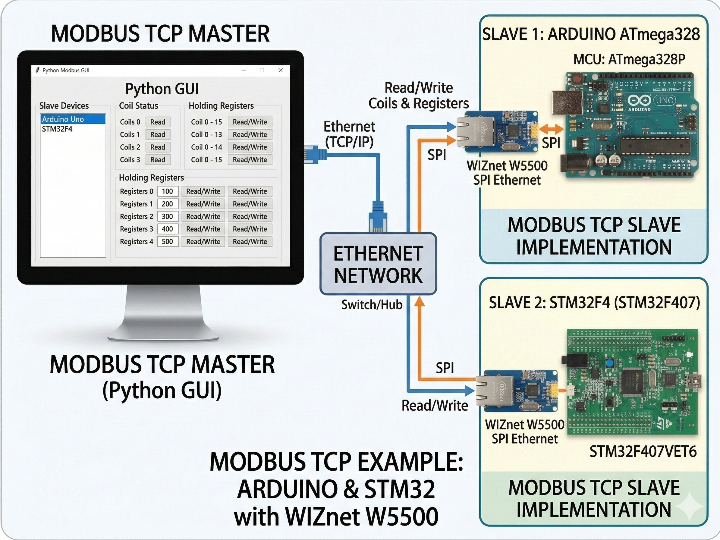
이 프로젝트는 Arduino ATmega328과 STM32F4 계열 MCU를 Modbus TCP 슬레이브로 구현하고, Python GUI를 마스터로 사용해 코일과 레지스터를 읽고 쓸 수 있도록 구성한 예제입니다. WIZnet W5500은 MCU 측의 유선 Ethernet 통신을 담당하고, Python GUI는 상위 PC에서 Modbus TCP 요청을 생성하고 전송하는 테스트 및 제어 도구 역할을 합니다. 저장소 설명에 따르면 이 프로젝트는 외부 Modbus 라이브러리 없이 프로토콜 문서를 바탕으로 직접 구현되었습니다.
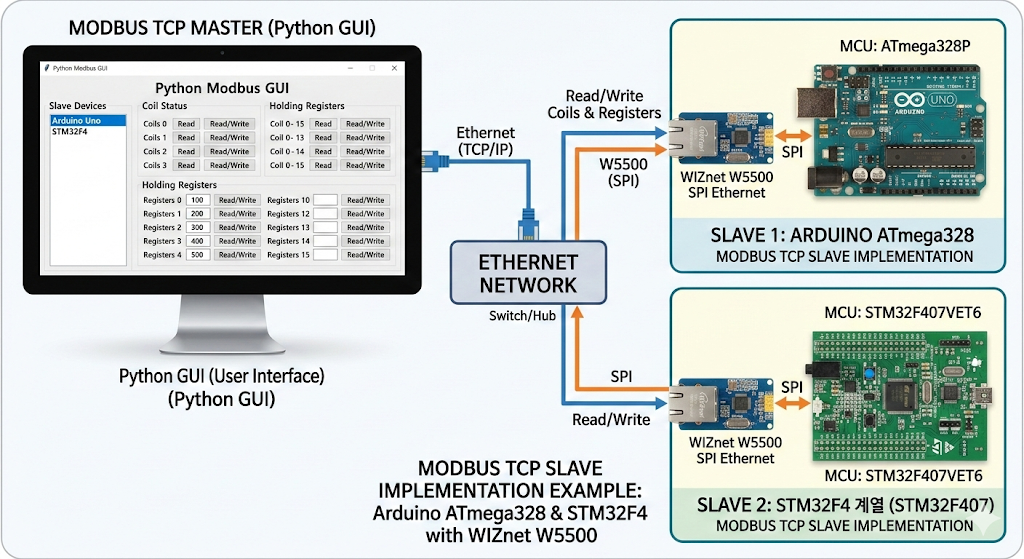
이미지 출처 : AI 생성
GUI Role in This Project
이 프로젝트에서 GUI의 의미는 상당히 큽니다. MCU 펌웨어만으로는 슬레이브 동작을 검증하기 어렵기 때문에, Python GUI가 상위 테스트 마스터 역할을 맡아 기능 코드별 요청을 반복적으로 보내고 응답을 확인하는 인터페이스가 됩니다. 특히 tkinter 기반 구조라는 점에서 실험 중에 주소, 수량, 유닛 ID 같은 파라미터를 빠르게 바꿔가며 테스트하기 좋고, 잘못된 입력에 대해서는 messagebox로 즉시 오류를 표시하도록 되어 있어 디버깅 편의성도 높습니다. 파일 주석에는 “TCP/IP Client with tkinter GUI”라고 적혀 있으며, 이는 이 GUI가 단순 보조 스크립트가 아니라 프로젝트의 마스터 측 구현이라는 점을 보여줍니다.
산업용 IoT 관점에서 보면 이 GUI는 현장 HMI라기보다 개발 및 검증용 마스터 시뮬레이터에 가깝습니다. 다시 말해, 실제 설비 운영 화면이라기보다는 슬레이브 장치가 Modbus TCP 요청에 정상 응답하는지 확인하고, 함수 코드별 동작과 주소 맵을 시험하는 도구로 이해하는 편이 더 정확합니다. 저장소 설명도 GUI를 “master device”로 소개하고 있습니다.
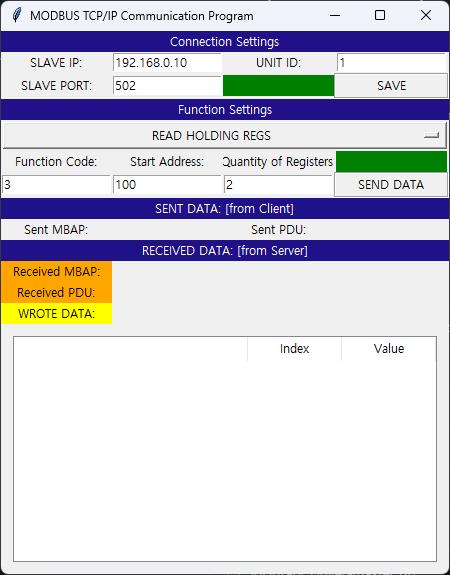
이미지 출처 : https://github.com/yahyaEkin/MODBUS_TCP_IP_with_Arduino_STM32_W5500
Where WIZnet Fits
이 프로젝트에 사용된 WIZnet 제품은 W5500입니다. 저장소의 readme.txt는 최신 Arduino 슬레이브 코드가 EE492_W5500_SELF_LIB_29May 폴더에 있고, W5500 관련 라이브러리를 Arduino에 추가해야 한다고 설명합니다. 따라서 이 구조에서 W5500은 MCU가 Modbus TCP 슬레이브로 동작하기 위한 유선 Ethernet 인터페이스를 담당하고, Python GUI는 그 슬레이브에 접속하는 상위 마스터 역할을 맡는 것으로 정리할 수 있습니다.
산업용 IoT 관점에서 이 선택은 타당합니다. Modbus TCP는 주기적 폴링과 단순한 요청/응답 패턴이 중심이기 때문에, 소형 MCU에서 MBAP/PDU를 직접 처리하는 방식이 제어 측면에서 유리합니다. 또한 W5500 기반 유선 Ethernet은 Wi-Fi보다 연결 상태를 예측하기 쉽고, 배선 기반 설비 환경에 더 잘 맞습니다. 코드에 고정 IP 192.168.0.10과 SPI 제어 함수 csSelect(), csDeselect(), spiTransfer()가 직접 들어 있는 점도 장치형 슬레이브 설계를 잘 보여줍니다.
Practical Tips / Pitfalls
현재 코드는 고정 IP 방식이므로 초기 테스트에는 편하지만, 실제 현장에서는 IP 충돌과 주소 관리가 필요합니다.
recv(..., 12)처럼 고정 길이 수신에 의존하는 구조는 단순한 테스트에는 괜찮지만, 실제 운용에서는 길이 검증과 패킷 분할 상황까지 고려하는 편이 더 안전합니다.
함수 코드별 응답에 malloc()을 사용하는 부분이 있어, 장시간 운전 장비라면 메모리 단편화와 해제 누락 여부를 점검하시는 것이 좋습니다.
코일과 레지스터 수가 매크로로 고정돼 있으므로, PLC·SCADA 연동 전에는 주소 맵 문서화가 필요합니다.
W5500은 유선 Ethernet 기반이라 링크는 안정적이지만, 현장에서는 SPI 배선 길이, 접지, 전원 노이즈, RJ45 주변 EMI가 먼저 문제를 일으킬 수 있습니다.
산업용 IoT에서는 최고 처리량보다 예측 가능한 응답 시간이 더 중요합니다. 이 프로젝트는 구조가 단순해 튜닝 포인트를 찾기 쉽지만, 예외 응답과 타임아웃 처리까지 보강해야 실사용 안정성이 높아집니다.
FAQ
이 프로젝트의 GUI는 어떤 역할을 하나요?
이 GUI는 Python으로 작성된 Modbus TCP 마스터 도구입니다. 사용자가 슬레이브 IP, 포트, 주소, 수량 등을 입력하면 이를 바탕으로 요청 프레임을 만들고 MCU 슬레이브에 TCP로 전송합니다.
GUI는 단순 모니터링 화면인가요?
아닙니다. EE492_MBUS_TCPIP_GUI.py에는 주소 범위 검사, struct.pack(...) 기반 PDU 생성, TCP 연결 처리 코드가 포함돼 있어, 단순 표시용이 아니라 실제 통신 요청을 만들어 보내는 클라이언트 역할을 합니다.
GUI가 있으면 이 프로젝트에서 어떤 점이 좋아지나요?
펌웨어만 따로 시험할 때보다 훨씬 빠르게 기능 코드, 주소, 수량을 바꿔가며 응답을 확인할 수 있어 디버깅이 쉬워집니다. 특히 잘못된 주소 범위를 사전에 검사하는 구조라서, 프로토콜 테스트 과정에서 입력 오류를 줄이는 데도 도움이 됩니다.
왜 이 프로젝트에서 W5500을 사용하는가요?
이 프로젝트는 MCU를 Modbus TCP 슬레이브로 만들기 때문에 UART 기반 RTU가 아니라 Ethernet TCP 연결이 필요합니다. 저장소는 W5500 전용 라이브러리(w5500.h, socket.h, wizchip_conf.h)를 포함하도록 구성되어 있고, 폴더명도 EE492_W5500_SELF_LIB_29May로 분리돼 있습니다. 따라서 W5500은 Modbus TCP용 유선 네트워크 인터페이스를 제공하는 핵심 하드웨어입니다.
Modbus RTU와 비교하면 어떤 차이가 있나요?
이 프로젝트는 UART와 RS-485 타이밍에 의존하는 Modbus RTU가 아니라, Ethernet 위에서 동작하는 Modbus TCP 구조를 사용합니다. 따라서 PC GUI와 직접 IP 기반 통신을 붙이기 쉽고, 상위 네트워크 시스템과의 연동도 수월합니다. 반면 RTU는 배선과 노드 구성 면에서 여전히 장점이 있고, 소규모 직렬 네트워크에서는 더 단순할 수 있습니다. 이 저장소는 Python GUI 마스터와 W5500 기반 슬레이브 구성으로 되어 있으므로, RTU보다 상위 네트워크 통합에 더 초점을 둔 구현이라고 볼 수 있습니다.
What the Project Does
This project demonstrates how to implement Arduino ATmega328 and STM32F4-series MCUs as Modbus TCP slaves, while using a Python GUI as the master to read and write coils and registers. The WIZnet W5500 handles wired Ethernet communication on the MCU side, and the Python GUI serves as a test and control tool that generates and sends Modbus TCP requests from a host PC. According to the repository description, the project was implemented directly from the protocol documentation without relying on an external Modbus library.
Image source: AI-generated
GUI Role in This Project
The GUI plays an important role in this project. It is difficult to verify slave behavior using MCU firmware alone, so the Python GUI acts as an upper-level test master that repeatedly sends requests for different function codes and checks the responses. Because it is built with tkinter, it is convenient for quickly changing parameters such as address, quantity, and unit ID during testing. It also improves debugging by displaying input errors immediately through messagebox. The file comments describe it as a “TCP/IP Client with tkinter GUI,” which shows that this GUI is not just a helper script, but the master-side implementation of the project.
From an Industrial IoT perspective, this GUI is closer to a development and validation master simulator than to a field HMI. In other words, it is more accurate to understand it as a tool for checking whether the slave device responds correctly to Modbus TCP requests and for testing function-code behavior and address maps, rather than as an actual equipment operation screen. The repository description also introduces the GUI as a “master device.”
Image source: https://github.com/yahyaEkin/MODBUS_TCP_IP_with_Arduino_STM32_W5500
Where WIZnet Fits
The WIZnet product used in this project is the W5500. The repository’s readme.txt explains that the latest Arduino slave code is located in the EE492_W5500_SELF_LIB_29May folder and that W5500-related libraries must be added to Arduino. In this structure, the W5500 provides the wired Ethernet interface that allows the MCU to operate as a Modbus TCP slave, while the Python GUI acts as the upper-level master that connects to that slave.
This is a reasonable choice from an Industrial IoT perspective. Since Modbus TCP mainly uses periodic polling and a simple request/response pattern, directly handling MBAP/PDU processing on a small MCU is advantageous from a control standpoint. In addition, wired Ethernet based on the W5500 makes connection behavior easier to predict than Wi-Fi and is better suited to wired equipment environments. The fact that the code directly includes the fixed IP address 192.168.0.10 and SPI control functions such as csSelect(), csDeselect(), and spiTransfer() also shows that the design is intended for a device-type slave implementation.
Practical Tips / Pitfalls
The current code uses a fixed IP configuration, which is convenient for initial testing, but in a real deployment, IP conflict prevention and address management are necessary.
A structure that depends on fixed-length reception such as recv(..., 12) may be acceptable for simple testing, but in actual operation, it is safer to also consider length validation and packet fragmentation.
The code uses malloc() for function-code-specific responses, so for long-running equipment, it is worth checking for memory fragmentation and possible missing deallocation.
Because the number of coils and registers is fixed by macros, the address map should be documented before connecting the system to PLC or SCADA environments.
The W5500 is based on wired Ethernet, so link stability is generally good. However, in field environments, SPI wiring length, grounding, power noise, and EMI around the RJ45 connector can become problems first.
In Industrial IoT, predictable response time is often more important than maximum throughput. This project has a simple structure, which makes tuning points easier to identify, but exception responses and timeout handling should be strengthened to improve real-world reliability.
FAQ
What is the role of the GUI in this project?
This GUI is a Modbus TCP master tool written in Python. The user enters the slave IP, port, address, and quantity, and based on that input, the GUI builds request frames and sends them to the MCU slave over TCP.
Is the GUI just a monitoring screen?
No. EE492_MBUS_TCPIP_GUI.py includes address range validation, PDU generation based on struct.pack(...), and TCP connection handling code. That means it is not just for display, but actually acts as a client that creates and sends communication requests.
What are the advantages of having the GUI in this project?
It makes debugging much easier because you can change function codes, addresses, and quantities far more quickly than when testing firmware alone. In particular, its structure checks invalid address ranges in advance, which also helps reduce input errors during protocol testing.
Why does this project use the W5500?
Because the project implements the MCU as a Modbus TCP slave, it requires an Ethernet TCP connection rather than UART-based RTU communication. The repository is structured to include W5500-specific libraries such as w5500.h, socket.h, and wizchip_conf.h, and the folder itself is separated as EE492_W5500_SELF_LIB_29May. For that reason, the W5500 is the key hardware component that provides the wired network interface for Modbus TCP.
How is this different from Modbus RTU?
This project uses Modbus TCP over Ethernet rather than Modbus RTU, which depends on UART and RS-485 timing. As a result, it is easier to connect directly to a PC GUI over IP and to integrate with higher-level networked systems. On the other hand, RTU still has advantages in wiring and node configuration, and it can be simpler in small serial networks. Since this repository uses a Python GUI master and a W5500-based slave, it is better understood as an implementation focused more on higher-level network integration than on RTU.
-
github code


