


matter-esp32-modbus-tcp-bridge
matter-esp32-modbus-tcp-bridge

Espressif - ESP32
x 1


WIZnet - W5500
x 1
프로젝트 개요
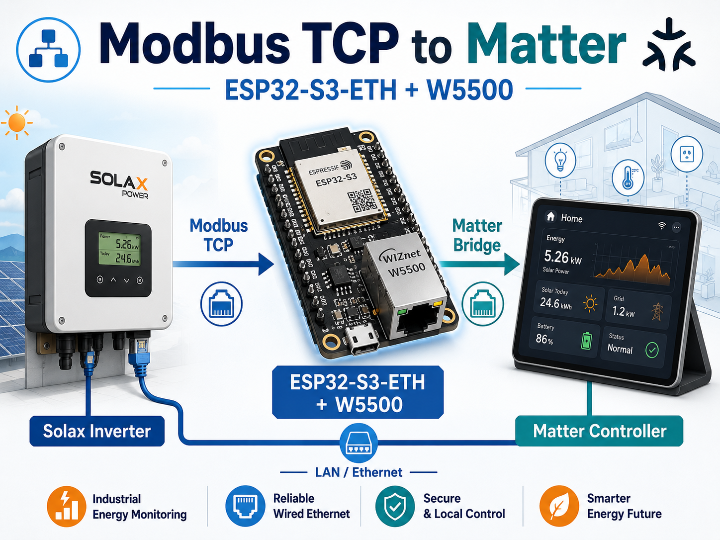
matter-esp32-modbus-tcp-bridge는 Modbus TCP 장비와 Matter controller 사이에서 동작하는 브리지 펌웨어입니다. 현재 구현은 Solax X1-G4 인버터를 대상으로 하며, ESP32-S3-ETH 보드가 인버터의 데이터를 주기적으로 읽어 Matter 기반 스마트홈 또는 산업용 모니터링 환경에서 사용할 수 있도록 연결합니다.
전체 흐름은 다음과 같습니다.
Solax Inverter
  → Modbus TCP
  → ESP32-S3-ETH + W5500
  → Matter Bridge
  → Matter Controller / Home Assistant
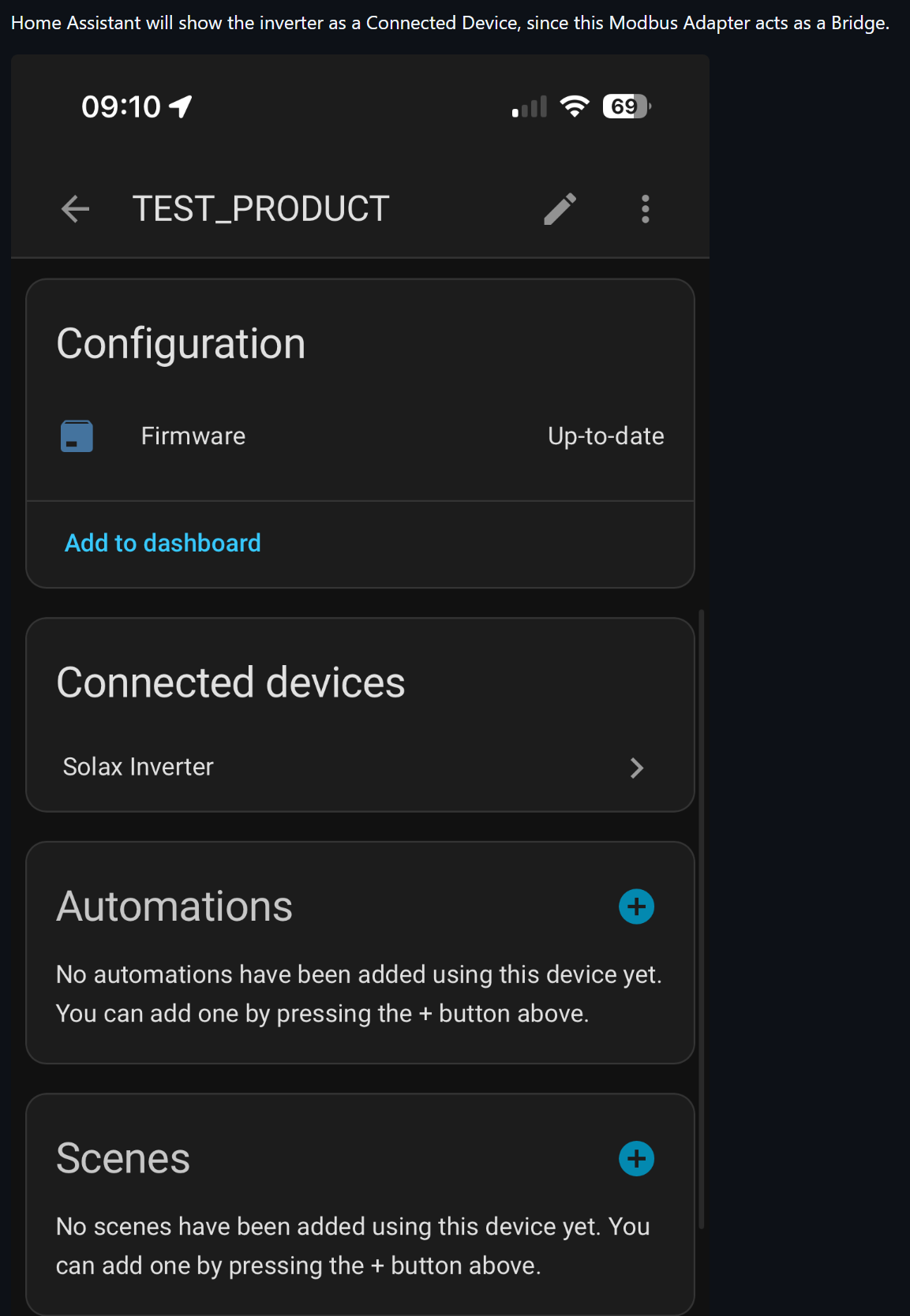
ESP32-S3는 Modbus TCP client로 동작합니다. 인버터의 IP 주소로 접속해 필요한 register 값을 읽고, 읽은 값을 Matter 장치 모델에 맞게 반영합니다. 사용자는 웹 설정 화면에서 Modbus 장비 정보를 등록하고, Matter pairing code 또는 QR code를 사용해 Home Assistant 같은 Matter controller에 장치를 추가할 수 있습니다.
Industrial IoT 관점에서는 기존 설비망에 있는 Modbus TCP 장비를 Matter 기반 관리 시스템과 연결하는 로컬 게이트웨이 예제로 볼 수 있습니다. 별도 클라우드 서버를 거치지 않고 현장 LAN 안에서 데이터 수집, 설정, 장치 등록이 이루어지는 구조입니다.
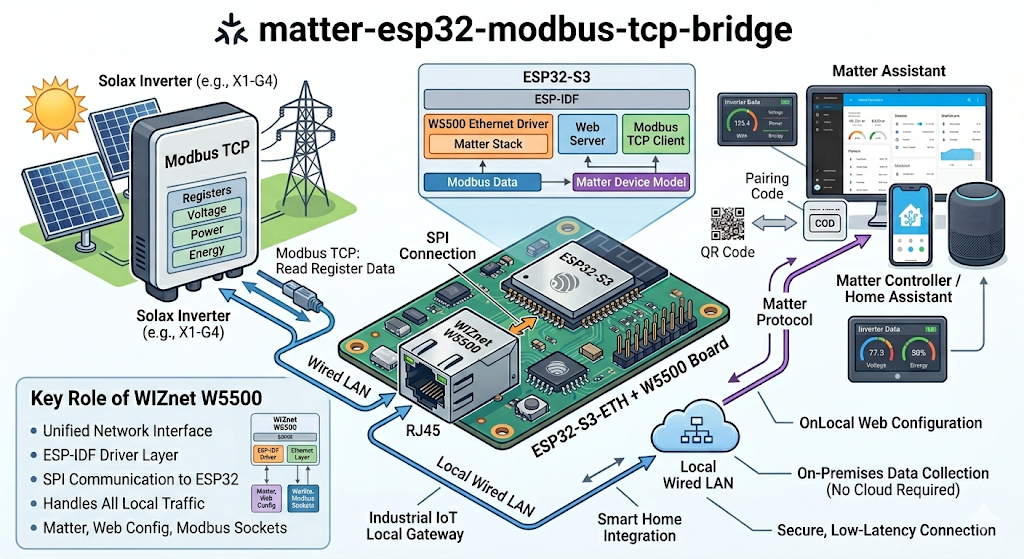
이미지 출처 : AI 생성
WIZnet이 들어가는 위치
이 프로젝트에서 사용되는 WIZnet 제품은 W5500입니다.
W5500은 ESP32-S3에 SPI로 연결되는 Ethernet 컨트롤러입니다. 이 프로젝트에서는 ESP-IDF의 Ethernet driver를 통해 W5500을 네트워크 인터페이스로 등록하고, 그 위에서 Matter stack, 웹 서버, Modbus TCP socket을 실행합니다.
즉, W5500은 단순히 “인터넷에 연결하는 부품”이 아니라 프로젝트의 네트워크 기반을 만드는 장치입니다. Matter controller와의 페어링, 브라우저 기반 설정 화면, 인버터와의 Modbus TCP 연결이 모두 W5500을 통해 같은 유선 LAN에서 처리됩니다.
이 저장소는 WIZnet ioLibrary의 socket API를 직접 호출하지 않습니다. 대신 ESP-IDF의 esp_eth_mac_new_w5500()와 esp_eth_phy_new_w5500()를 사용해 W5500을 Ethernet 장치로 초기화하고, Modbus TCP 통신은 일반 BSD socket API로 구현합니다.
Industrial IoT 환경에서는 이 구성이 자연스럽습니다. 인버터, 전력 계측기, PLC 주변 장비는 대부분 고정 위치에 설치되고, 유선 LAN에 연결되는 경우가 많습니다. W5500 기반 Ethernet을 사용하면 Wi-Fi 신호 품질이나 재연결 문제에 덜 의존하면서 Modbus TCP 장비와 같은 네트워크에 안정적으로 붙을 수 있습니다.
구현 노트
W5500 Ethernet 초기화
firmware/main/matter_ethernet_driver.cpp는 W5500을 SPI Ethernet 장치로 초기화합니다. 이 단계가 끝나야 ESP32-S3가 LAN에 연결되고, 이후 Matter, 웹 UI, Modbus TCP 통신이 같은 네트워크 인터페이스를 사용할 수 있습니다.
#define ETH_SPI_HOST SPI2_HOST
#define ETH_SPI_SCLK_GPIO 13
#define ETH_SPI_MOSI_GPIO 11
#define ETH_SPI_MISO_GPIO 12
#define ETH_SPI_CS_GPIO 14
#define ETH_SPI_INT_GPIO 10
#define ETH_SPI_RST_GPIO 9
#define ETH_SPI_CLOCK_MHZ 25
eth_w5500_config_t w5500_config =
ETH_W5500_DEFAULT_CONFIG(ETH_SPI_HOST, &spi_devcfg);
w5500_config.int_gpio_num = ETH_SPI_INT_GPIO;
esp_eth_mac_t *mac = esp_eth_mac_new_w5500(&w5500_config, &mac_config);
esp_eth_phy_t *phy = esp_eth_phy_new_w5500(&phy_config);
ESP_ERROR_CHECK(esp_eth_driver_install(ð_cfg, ð_handle));
ESP_ERROR_CHECK(esp_eth_start(eth_handle));이 코드는 W5500에 연결된 SPI 핀과 interrupt/reset 핀을 지정하고, ESP-IDF Ethernet driver에 W5500 MAC/PHY를 등록합니다. 마지막으로 esp_eth_start()를 호출하면 Ethernet 연결 절차가 시작됩니다.
Modbus TCP 데이터 수집
firmware/main/modbus_device.cpp는 인버터의 register 값을 주기적으로 읽습니다. 현재 코드에서는 5초 간격으로 전압, 전류, 전력 관련 register를 읽는 구조입니다.
#define POLL_INTERVAL_MS 5000
#define REG_GRID_VOLTAGE 0x0000
#define REG_GRID_CURRENT 0x0001
#define REG_AC_POWER 0x0002

if (self->read_input_registers(REG_GRID_VOLTAGE, REG_READ_COUNT, regs) == ESP_OK) {
    Readings r;
    r.voltage_raw = regs[REG_GRID_VOLTAGE];
    r.current_raw = static_cast<int16_t>(regs[REG_GRID_CURRENT]);
    r.power_raw = static_cast<int16_t>(regs[REG_AC_POWER]);

    if (self->m_readings_cb) {
        self->m_readings_cb(r, self->m_readings_cb_arg);
    }
}
여기서 ESP32-S3는 Modbus TCP client입니다. 인버터의 IP 주소로 TCP 연결을 만들고, Modbus function code를 사용해 input register를 읽습니다. 읽은 raw 데이터는 callback을 통해 상위 로직으로 전달될 수 있으며, 이 경로를 통해 Matter 장치 값으로 반영되는 구조를 만들 수 있습니다.
현재 main branch 기준으로 firmware/main/modbus_manager.cpp의 readings callback 연결부는 주석 처리되어 있습니다. 따라서 Modbus polling 자체와 Matter attribute 업데이트까지의 연결이 실제로 활성화되어 있는지는 빌드 전에 확인해야 합니다.
Matter 커미셔닝 흐름
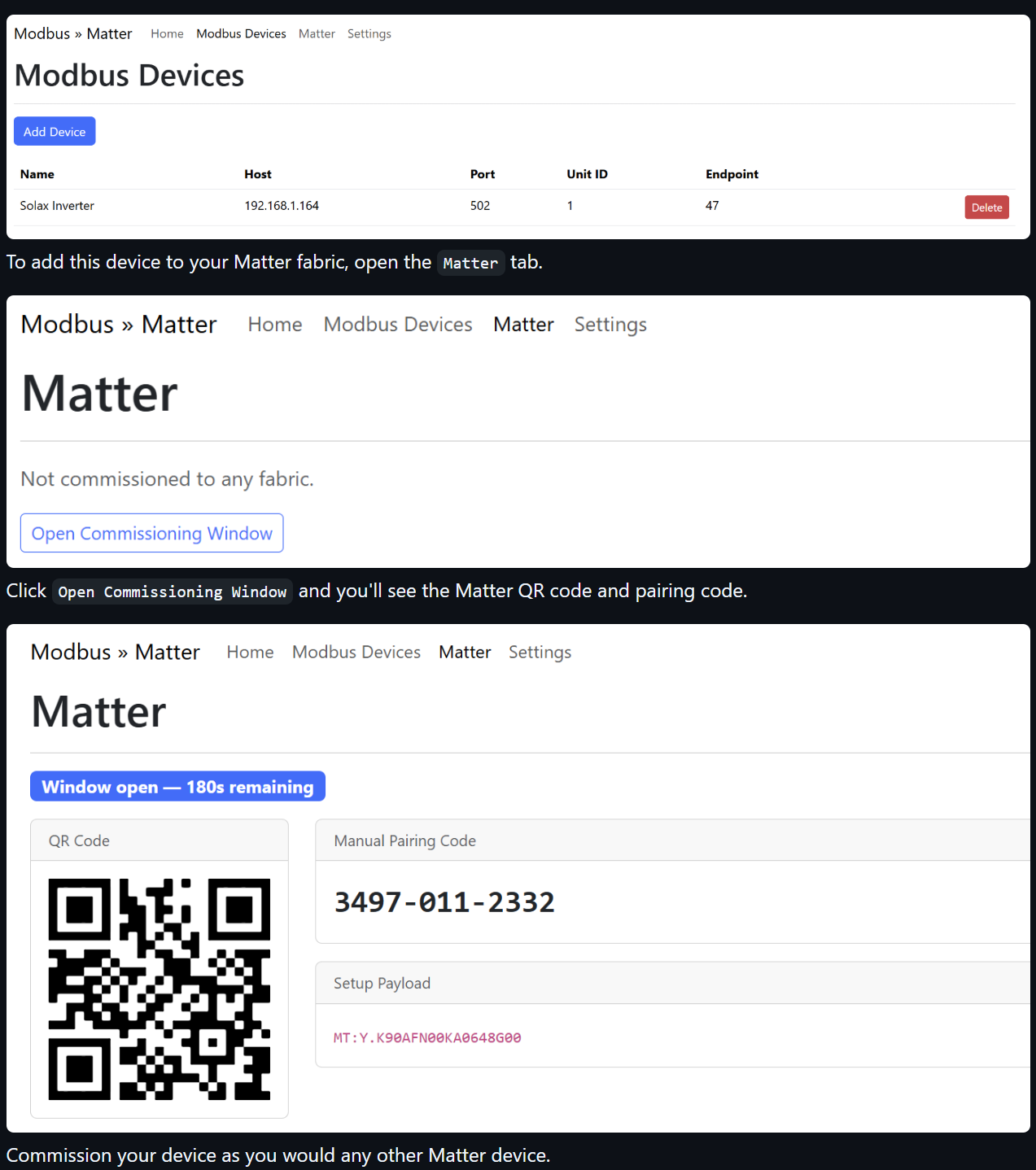
Ethernet 연결이 완료되면 펌웨어는 웹 설정 화면과 mDNS 서비스를 준비합니다. 사용자는 브라우저에서 장치 설정 화면에 접속해 Modbus 장비 정보를 입력하고, Matter commissioning window를 열어 Matter controller에 브리지를 추가합니다.
실제 동작 흐름은 다음과 같이 정리할 수 있습니다.
1. ESP32-S3-ETH 부팅
2. W5500 Ethernet 초기화
3. LAN에서 IP 주소 획득
4. mDNS 및 웹 설정 화면 활성화
5. 웹 UI에서 Modbus 장비 정보 입력
6. Matter commissioning window 열기
7. QR code 또는 pairing code로 Matter controller에 등록
8. Modbus 데이터를 Matter 장치 값으로 반영
이 구조의 장점은 설정과 장치 등록을 모두 LAN 안에서 처리할 수 있다는 점입니다. 시리얼 콘솔에 계속 의존하지 않아도 되고, 설치 이후에는 브라우저와 Matter controller를 통해 장비를 관리할 수 있습니다.
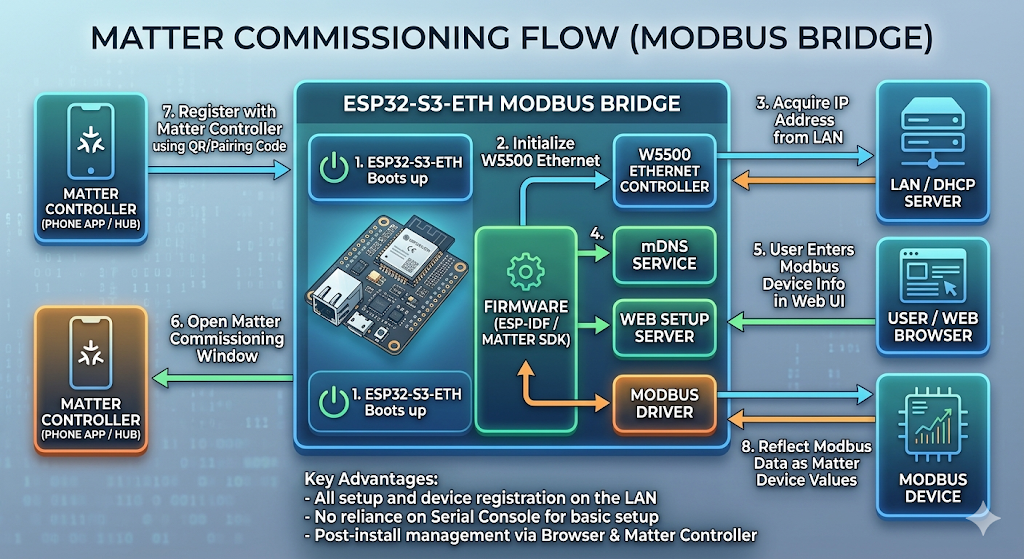
이미지 출처 : AI 생성
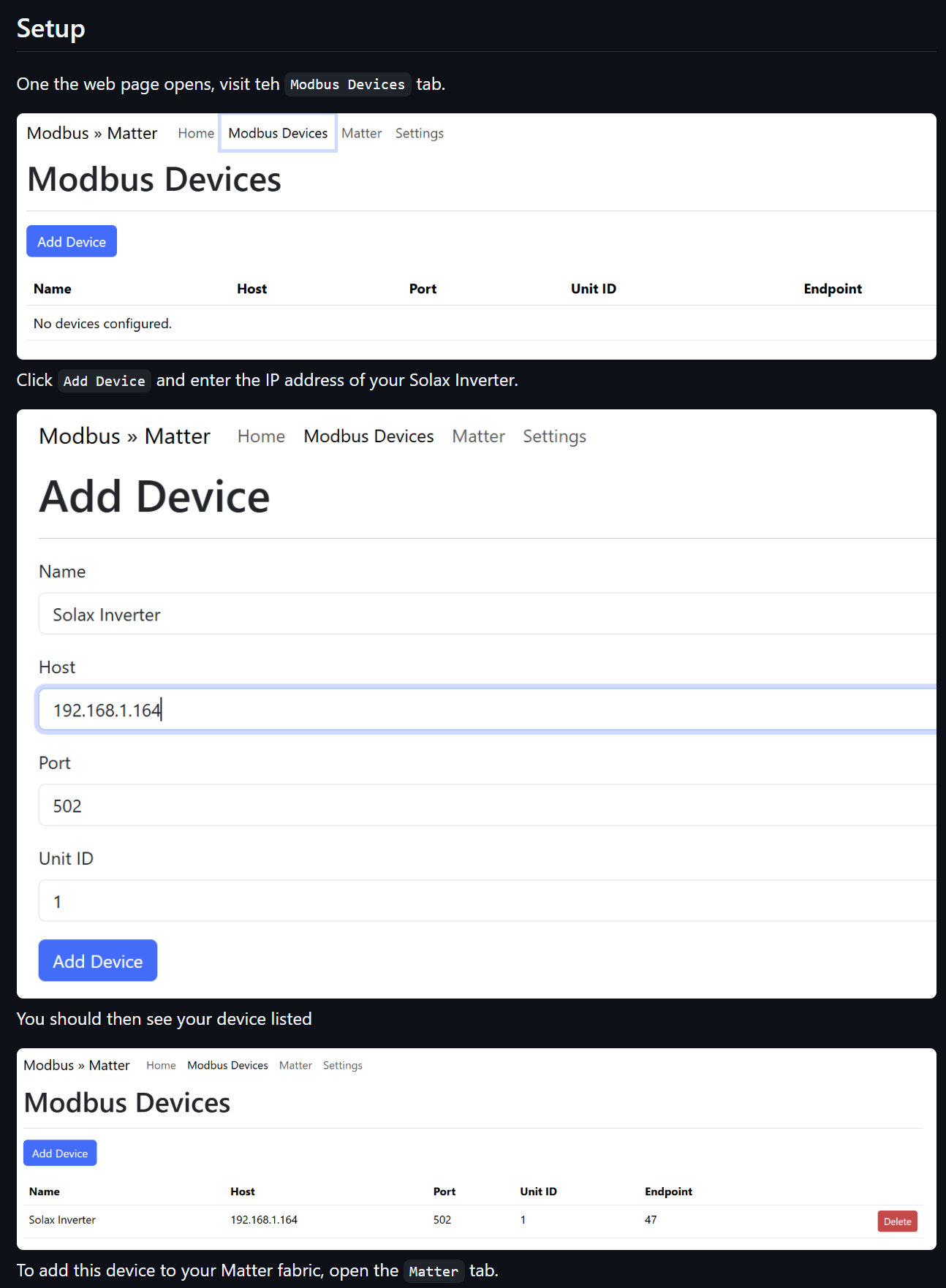
이미지 출처 : https://github.com/tomasmcguinness/matter-esp32-modbus-tcp-bridge
실무 팁과 주의점
- W5500 핀 설정은 Waveshare ESP32-S3-ETH 보드 기준입니다. 다른 보드로 옮길 때는 SPI, interrupt, reset 핀을 먼저 확인해야 합니다.
- SPI clock은 25 MHz로 설정되어 있습니다. 긴 점퍼선이나 노이즈가 많은 환경에서는 배선 길이와 신호 품질을 점검하는 것이 좋습니다.
- Matter 장치 검색은 mDNS에 의존합니다. ESP32-S3-ETH와 Matter controller가 같은 LAN에서 서로 찾을 수 있어야 합니다.
- Modbus TCP 장비의 IP 주소가 바뀌면 연결이 실패합니다. 인버터나 계측기에는 static IP 또는 DHCP reservation을 사용하는 편이 안정적입니다.
- 현재 polling interval은 5초입니다. 에너지 모니터링에는 적합하지만, 빠른 제어 루프에는 별도 조정이 필요합니다.
- Modbus polling log가 정상이어도 Matter 값 갱신이 자동으로 된다고 단정하면 안 됩니다. callback 연결부와 attribute 업데이트 경로를 함께 확인해야 합니다.
- 산업 현장에서는 Ethernet 케이블, 접지, 전원 안정성, EMI가 통신 품질에 직접 영향을 줍니다. 소프트웨어 문제를 보기 전에 물리 계층을 먼저 확인하는 것이 좋습니다.
FAQ
Q: 왜 W5500을 사용하나요?
A: 이 프로젝트는 Matter, 웹 설정 화면, Modbus TCP 통신이 모두 IP 네트워크를 필요로 합니다. W5500은 ESP32-S3에 유선 Ethernet을 추가해 고정 설비 환경에서 안정적인 LAN 연결을 제공합니다.
Q: ESP32-S3-ETH와 W5500은 어떻게 연결되나요?
A: 코드 기준으로 W5500은 SPI2에 연결됩니다. SCLK는 GPIO13, MOSI는 GPIO11, MISO는 GPIO12, CS는 GPIO14, INT는 GPIO10, RST는 GPIO9로 정의되어 있습니다.
Q: W5500은 이 프로젝트에서 어떤 역할을 하나요?
A: W5500은 ESP32-S3의 Ethernet 인터페이스입니다. Matter controller와의 등록 절차, 웹 기반 설정, 인버터와의 Modbus TCP 연결이 모두 이 유선 네트워크를 통해 이루어집니다.
Q: 초보자도 따라 할 수 있나요?
A: ESP-IDF, ESP-Matter, Modbus TCP, Matter commissioning을 함께 다뤄야 하므로 완전 초급보다는 중급 개발자에게 적합합니다. 단순 Ethernet 예제보다 범위가 넓기 때문에 빌드 환경과 네트워크 흐름을 먼저 이해하는 것이 좋습니다.
Q: Wi-Fi와 비교하면 어떤 차이가 있나요?
A: Wi-Fi는 배선이 줄어드는 대신 신호 세기, AP 상태, 무선 간섭, 재연결 정책의 영향을 받습니다. W5500 Ethernet은 케이블이 필요하지만, 고정 설치된 인버터나 계측 장비와 같은 LAN에 안정적으로 연결하기 쉽습니다.
How to Connect a Modbus TCP Device to Matter with W5500 on ESP32-S3-ETH?
Project Overview
matter-esp32-modbus-tcp-bridge is bridge firmware that connects a Modbus TCP device to a Matter controller. The current implementation targets a Solax X1-G4 inverter, with the ESP32-S3-ETH board periodically reading inverter data and making it available in a Matter-based smart home or industrial monitoring environment.
The overall flow is:
Solax Inverter
  → Modbus TCP
  → ESP32-S3-ETH + W5500
  → Matter Bridge
  → Matter Controller / Home Assistant
The ESP32-S3 operates as a Modbus TCP client. It connects to the inverter’s IP address, reads the required register values, and maps the collected data into the Matter device model. The user can register the Modbus device through the web configuration page, then add the bridge to a Matter controller such as Home Assistant using a Matter pairing code or QR code.
From an Industrial IoT perspective, this project is a local gateway example that connects existing Modbus TCP equipment on a facility network to a Matter-based management environment. Data collection, configuration, and device registration are handled inside the local LAN without requiring a separate cloud server.
Image source: AI-generated
Where WIZnet Fits
The WIZnet product used in this project is the W5500.
The W5500 is an Ethernet controller connected to the ESP32-S3 over SPI. In this project, it is registered as a network interface through the ESP-IDF Ethernet driver. The Matter stack, web server, and Modbus TCP sockets all run on top of this Ethernet interface.
In other words, the W5500 is not just a component for “Internet access.” It forms the network foundation of the project. Pairing with the Matter controller, browser-based configuration, and Modbus TCP communication with the inverter are all handled over the same wired LAN through the W5500.
This repository does not directly use the WIZnet ioLibrary socket API. Instead, it initializes the W5500 as an Ethernet device using esp_eth_mac_new_w5500() and esp_eth_phy_new_w5500(), while Modbus TCP communication is implemented with the standard BSD socket API.
This architecture fits naturally in Industrial IoT environments. Inverters, power meters, and PLC-related devices are usually installed in fixed locations and are often connected to wired LANs. By using W5500-based Ethernet, the system can connect to Modbus TCP equipment on the same network while depending less on Wi-Fi signal quality or reconnection behavior.
Implementation Notes
W5500 Ethernet Initialization
firmware/main/matter_ethernet_driver.cpp initializes the W5500 as an SPI Ethernet device. This step must complete before the ESP32-S3 can join the LAN and before Matter, the web UI, and Modbus TCP communication can share the same network interface.
#define ETH_SPI_HOST SPI2_HOST
#define ETH_SPI_SCLK_GPIO 13
#define ETH_SPI_MOSI_GPIO 11
#define ETH_SPI_MISO_GPIO 12
#define ETH_SPI_CS_GPIO 14
#define ETH_SPI_INT_GPIO 10
#define ETH_SPI_RST_GPIO 9
#define ETH_SPI_CLOCK_MHZ 25
eth_w5500_config_t w5500_config =
ETH_W5500_DEFAULT_CONFIG(ETH_SPI_HOST, &spi_devcfg);
w5500_config.int_gpio_num = ETH_SPI_INT_GPIO;
esp_eth_mac_t *mac = esp_eth_mac_new_w5500(&w5500_config, &mac_config);
esp_eth_phy_t *phy = esp_eth_phy_new_w5500(&phy_config);
ESP_ERROR_CHECK(esp_eth_driver_install(ð_cfg, ð_handle));
ESP_ERROR_CHECK(esp_eth_start(eth_handle));This code defines the SPI pins, interrupt pin, reset pin, and SPI clock connected to the W5500. It then registers the W5500 MAC and PHY with the ESP-IDF Ethernet driver. Finally, esp_eth_start() starts the Ethernet connection process.
Modbus TCP Data Collection
firmware/main/modbus_device.cpp periodically reads register values from the inverter. In the current code, voltage, current, and power-related registers are read every 5 seconds.
#define POLL_INTERVAL_MS 5000
#define REG_GRID_VOLTAGE 0x0000
#define REG_GRID_CURRENT 0x0001
#define REG_AC_POWER 0x0002

if (self->read_input_registers(REG_GRID_VOLTAGE, REG_READ_COUNT, regs) == ESP_OK) {
    Readings r;
    r.voltage_raw = regs[REG_GRID_VOLTAGE];
    r.current_raw = static_cast<int16_t>(regs[REG_GRID_CURRENT]);
    r.power_raw = static_cast<int16_t>(regs[REG_AC_POWER]);

    if (self->m_readings_cb) {
        self->m_readings_cb(r, self->m_readings_cb_arg);
    }
}
Here, the ESP32-S3 acts as a Modbus TCP client. It opens a TCP connection to the inverter’s IP address and reads input registers using the Modbus function code. The raw data can then be passed to higher-level logic through a callback, creating a path for the values to be applied to the Matter device model.
In the current main branch, the readings callback connection in firmware/main/modbus_manager.cpp is commented out. This means the Modbus polling path is present, but the connection from the collected values to the Matter attribute update path should be checked before building or deploying the firmware.
Matter Commissioning Flow
After the Ethernet connection is ready, the firmware prepares the web configuration page and mDNS service. The user accesses the device configuration page from a browser, enters the Modbus device information, opens the Matter commissioning window, and then adds the bridge to a Matter controller.
The runtime flow can be summarized as follows:
1. ESP32-S3-ETH boots
2. W5500 Ethernet is initialized
3. The device obtains an IP address from the LAN
4. mDNS and the web configuration page become available
5. The user enters Modbus device information through the web UI
6. The Matter commissioning window is opened
7. The bridge is added to a Matter controller using a QR code or pairing code
8. Modbus data is applied to the Matter device values
The advantage of this structure is that both configuration and device registration can be handled inside the LAN. The user does not need to keep relying on a serial console, and after installation the device can be managed through a browser and a Matter controller.
Image source: AI-generated
Image source: https://github.com/tomasmcguinness/matter-esp32-modbus-tcp-bridge
Practical Tips and Pitfalls
- The W5500 pin configuration is based on the Waveshare ESP32-S3-ETH board. When porting to another ESP32-S3 + W5500 board, verify the SPI, interrupt, and reset pins first.
- The SPI clock is configured at 25 MHz. In environments with long jumper wires or electrical noise, check wiring length and signal quality.
- Matter device discovery depends on mDNS. The ESP32-S3-ETH and the Matter controller must be able to discover each other on the same LAN.
- If the Modbus TCP device IP address changes, the connection will fail. For inverters or meters, a static IP address or DHCP reservation is recommended.
- The current polling interval is 5 seconds. This is suitable for energy monitoring, but faster control loops may require separate tuning.
- Normal Modbus polling logs do not automatically guarantee that Matter values are being updated. Check both the callback connection and the Matter attribute update path.
- In industrial environments, Ethernet cabling, grounding, power stability, and EMI directly affect communication quality. Check the physical layer before treating the issue as a firmware problem.
FAQ
Q: Why use the W5500 in this project?
A: This project requires IP networking for Matter, the web configuration page, and Modbus TCP communication. The W5500 adds wired Ethernet to the ESP32-S3, providing a stable LAN connection for fixed equipment environments.
Q: How is the W5500 connected to the ESP32-S3-ETH?
A: In the code, the W5500 is connected through SPI2. SCLK is GPIO13, MOSI is GPIO11, MISO is GPIO12, CS is GPIO14, INT is GPIO10, and RST is GPIO9.
Q: What role does the W5500 play in this project?
A: The W5500 acts as the Ethernet interface for the ESP32-S3. Matter controller registration, web-based configuration, and Modbus TCP communication with the inverter all run through this wired network connection.
Q: Can beginners follow this project?
A: This project is better suited for intermediate developers because it combines ESP-IDF, ESP-Matter, Modbus TCP, and Matter commissioning. It is broader than a simple Ethernet example, so understanding the build environment and network flow first is important.
Q: How does this compare with Wi-Fi?
A: Wi-Fi reduces cabling, but it is affected by signal strength, access point condition, wireless interference, and reconnection behavior. W5500 Ethernet requires a cable, but it is easier to use reliably with fixed equipment such as inverters or power meters on the same LAN.
-
Github Code


