Wiznet makers

mason

Published February 10, 2026 ©

133 UCC

21 WCC

32 VAR

0 Contests

0 Followers

0 Following

Original Link

KSP-Controller

KSP-Controller
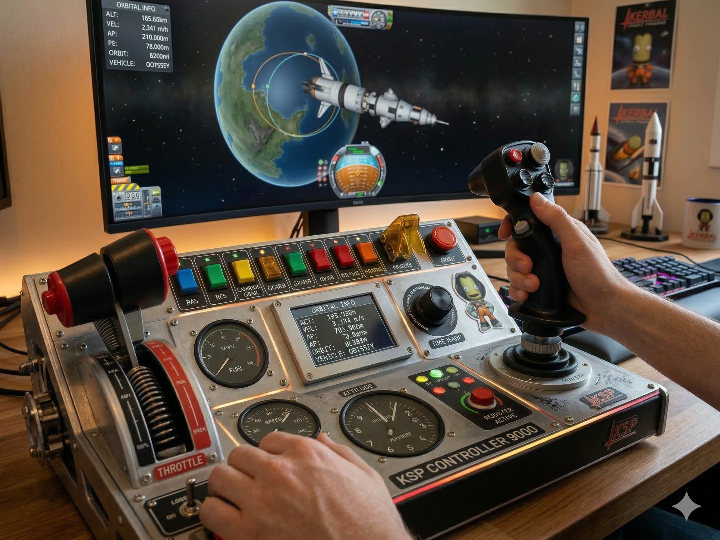
COMPONENTS Hardware components

WIZnet - W5500

x 1


Espressif - ESP32

x 1


PROJECT DESCRIPTION

Summary

KSP-Controller는 Kerbal Space Program용 커스텀 조종 패널을 만드는 프로젝트로, 현재는 Adafruit ESP32-S3 Reverse TFT Feather를 중심으로 UI, 입력 장치, USB HID, 유선 네트워크를 함께 실험하는 구조로 정리되어 있습니다. 여기서 WIZnet W5500은 보조 네트워크 인터페이스 역할을 맡아, 부팅 시 이더넷 초기화, DHCP 또는 고정 IP 설정, 그리고 ksp-controller.local 형태의 mDNS 노출까지 담당하도록 설계되어 있습니다.
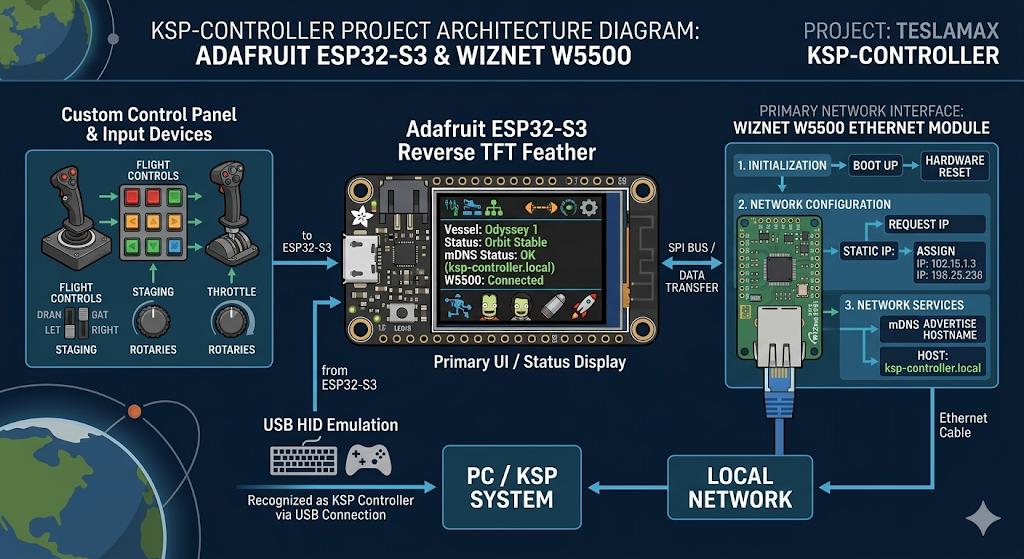
이미지 출처 : AI 생성

What the Project Does

Kerbal Space Program(KSP)은 우주선, 항공기, 로버 등을 직접 설계하고 조종하면서 궤도 진입, 도킹, 착륙, 탐사 같은 임무를 수행하는 우주 비행 시뮬레이션 게임입니다. 단순한 아케이드 조작이 아니라 추진력, 연료 소비, 질량 변화, 중력권, 궤도 역학 같은 요소가 플레이 전반에 반영되기 때문에, 비행 전 설계와 비행 중 제어를 모두 세밀하게 다뤄야 합니다. 이런 특성 때문에 KSP는 일반 게임패드만으로는 부족한 경우가 많고, 다수의 스위치, 모드 전환, 상태 표시, 보조 입력 장치를 갖춘 별도 제어 패널이 특히 잘 어울립니다.

Kerbal Controller 예시 : https://www.instructables.com/Kerbal-Controller-the-Basics/

이 프로젝트의 핵심 목적도 바로 여기에 있습니다. 게임 조작을 범용 입력 장치 하나로 끝내지 않고, KSP 조작을 별도의 임베디드 패널로 분리해 물리 인터페이스로 확장하는 것입니다. 저장소 설명상 현재 실험 단계에서는 ESP32-S3 Feather 계열 보드를 기반으로 TFT 메뉴 UI, I²C NeoKey 키패드, 향후 확장 가능한 USB HID, 그리고 선택적 이더넷 연결을 함께 검증하고 있습니다. 즉, 입력은 버튼·키패드·엔코더 쪽에서 들어오고, 출력은 화면 표시와 LED 피드백으로 나가며, 네트워크는 진단·설정·이름 기반 접근 같은 보조 채널로 배치된 구조입니다.
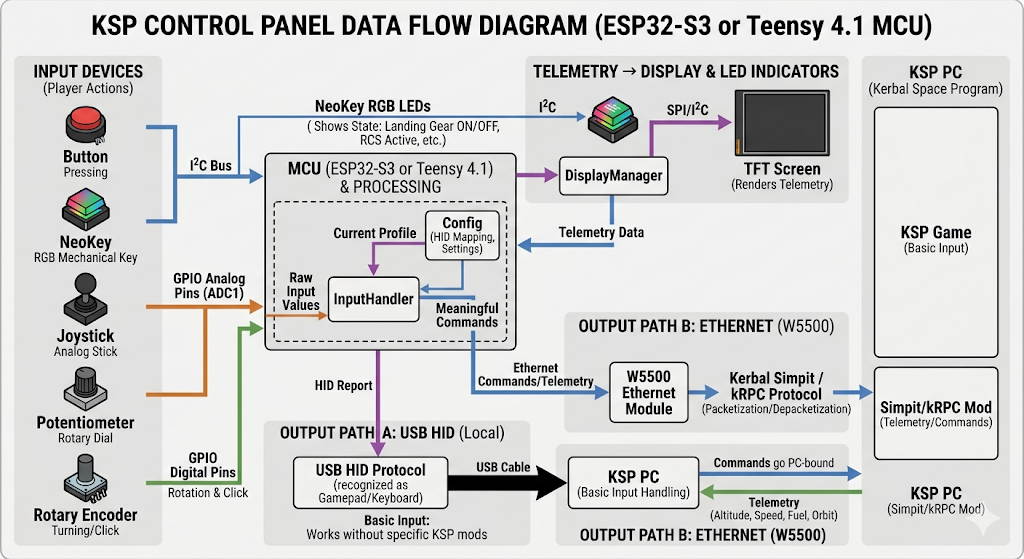
이미지 출처 : AI 생성

아키텍처 관점에서 보면 이 저장소는 “최종 완성품”보다는 “기능 블록을 분리해 검증하는 실험용 백플레인”에 가깝습니다. README는 현재 플랫폼을 ESP32-S3 Feather 기반 실험 단계로 두고, 최종 빌드는 Teensy 4.1로 이동할 수 있다고 밝히고 있습니다. 다시 말해 지금의 구조는 UI, 입력 처리, 저장장치, 네트워크를 모듈별로 시험한 뒤, 필요하면 더 많은 GPIO와 성능 여유가 있는 최종 플랫폼으로 이식하는 전개를 전제로 합니다.

Why Use W5500 Instead of ESP32 Wi-Fi?

이 프로젝트에서 주목할 만한 설계 선택 중 하나는, 네트워크 연결을 단순히 “ESP32에 Wi-Fi가 있으니 그 기능을 그대로 쓰면 된다”는 방식으로 처리하지 않았다는 점입니다. 이 컨트롤러는 손으로 직접 조작하는 물리 패널을 목표로 하기 때문에, 무선 연결의 편의성보다 입력 반응의 일관성과 통신 지연의 예측 가능성이 더 중요할 수 있습니다. Wi-Fi는 배선을 줄일 수 있다는 장점이 있지만, 실제 사용 환경에서는 액세스 포인트 상태, 전파 간섭, 재연결 동작, 절전 전환 같은 변수로 인해 응답 타이밍이 흔들릴 수 있습니다. 반면 W5500 기반 Ethernet은 물리 링크가 고정되어 있고 통신 상태를 더 명확하게 관리할 수 있어, 사용자 입력과 시스템 반응의 안정성이 중요한 KSP용 컨트롤 패널에서는 더 적합한 선택으로 해석할 수 있습니다.

Where WIZnet Fits

이 프로젝트에서 확인되는 정확한 WIZnet 부품은 W5500입니다. 하드웨어 문서와 BOM에는 Adafruit Ethernet FeatherWing이 W5500 기반 보드로 명시되어 있고, 상위 PlatformIO 설정에는 -DUSE_ETHERNET, -DETHERNET_CS=10, 그리고 WIZnet의 WIZ_Ethernet_Library 저장소가 의존성으로 포함되어 있습니다. 문서상 역할은 단순 “인터넷 연결 가능” 수준이 아니라, SPI 기반 유선 네트워크 블록을 Feather 스택에 추가하는 것입니다.

이 선택이 임베디드 실험에 맞는 이유도 분명합니다. W5500은 하드와이어드 TCP/IP 구조를 사용하고, 최대 80MHz SPI, 32KB 내부 버퍼, 8개의 하드웨어 소켓을 제공하므로 MCU 쪽 네트워크 스택 부담을 줄이기 쉽습니다. 이 프로젝트처럼 ESP32-S3에서 화면, 입력, USB 기능을 동시에 시험하는 경우, 네트워크를 별도 칩으로 분리하면 펌웨어 구조를 단순하게 유지하기 좋습니다. 특히 이 저장소는 최종적으로 더 큰 I/O 구성을 염두에 두고 있기 때문에, 네트워크를 독립 블록으로 다루는 접근이 전체 아키텍처를 모듈화하는 데 유리합니다.

다만 현재 검증 가능한 범위에서는 W5500이 KSP 실시간 텔레메트리 전송 경로로 이미 완성되어 있다고 말할 수는 없습니다. README와 개발 로그에는 “Ethernet-based diagnostics”, “optional HTTP config”, “HID + Ethernet telemetry for KSP mods” 같은 목표가 적혀 있지만, 실제로 확인되는 펌웨어 코드는 우선 이더넷 초기화와 mDNS 응답기 구동까지입니다. 따라서 현 시점의 W5500 역할은 “완성된 게임 연동 통신”보다 “실험용 유선 네트워크 계층”으로 보는 편이 정확합니다.

Implementation Notes

저장소에는 W5500 사용 흔적이 문서 수준을 넘어 실제 빌드 설정과 펌웨어 코드에 남아 있습니다.

첫 번째로, 최상위 platformio.ini에는 다음과 같은 설정이 들어 있습니다.

-DUSE_ETHERNET
-DETHERNET_CS=10
https://github.com/Wiznet/WIZ_Ethernet_Library.git

파일 경로: platformio.ini
이 설정은 이 프로젝트가 SPI 칩 셀렉트 핀을 명시적으로 잡고, WIZnet용 이더넷 라이브러리를 빌드에 포함하도록 구성되어 있음을 보여줍니다. 즉, W5500은 선택 부품이 아니라 펌웨어 레벨에서 전처리 매크로와 라이브러리 의존성으로 연결된 네트워크 장치입니다.

두 번째로, firmware/src/main.cppfirmware/src/net_config.h에는 실제 초기화 흐름이 확인됩니다.

setupEthernet(useDHCP, mac, localIP, gateway, subnet, dns);
if (EthernetBonjour.begin(hostname.c_str()))

파일 경로: firmware/src/main.cpp

또한 네트워크 설정 함수 내부에는 다음 호출이 있습니다.

Ethernet.begin(mac);
Ethernet.begin(mac, localIP, dns, gateway, subnet);

파일 경로: firmware/src/net_config.h

이 코드는 부팅 시 SD 카드에서 설정을 읽고, DHCP 또는 고정 IP 방식으로 이더넷을 올린 뒤, mDNS 호스트명을 등록하는 구조를 의미합니다. 왜 중요한가 하면, 이 프로젝트의 네트워크 계층이 단순 링크 업 수준이 아니라 “설정 파일 기반 부팅 + 주소 할당 + 이름 기반 접근”까지 포함한 운영 흐름으로 설계되어 있기 때문입니다. KSP 컨트롤러 같은 실험 장비에서 이런 방식은 USB 직결 없이도 장치를 찾고 설정을 분리 관리하는 데 유리합니다.

Practical Tips / Pitfalls

W5500과 SD를 같은 SPI 버스에 올릴 계획이라면 CS 충돌부터 정리해야 합니다. 하드웨어 문서는 Ethernet CS를 기본 GPIO10으로 두되, 다른 FeatherWing과 충돌 시 GPIO9로 변경하는 시나리오를 적어 두고 있습니다.

이 프로젝트는 SD 카드 설정 파일을 읽은 뒤 이더넷을 초기화하므로, config.json 또는 mac.txt가 없을 때의 기본값 동작을 먼저 검증하는 것이 좋습니다. 현재 코드는 파일이 없으면 기본 MAC과 DHCP로 폴백합니다.

전원은 가볍게 보면 안 됩니다. 하드웨어 문서에는 전류 소모가 큰 상황에서 외부 3.3V 레귤레이터가 필요할 수 있다고 적혀 있습니다. TFT, NeoPixel, Ethernet, SD를 한 스택에 올리면 전원 안정성이 먼저 흔들릴 수 있습니다.

이 저장소는 실험 플랫폼으로 ESP32-S3를 쓰지만, 대형 패널로 갈수록 GPIO 수와 성능 여유가 부족해질 수 있습니다. 문서도 최종 단계에서 Teensy 4.1 전환 가능성을 따로 정리합니다.

KSP 연동을 이더넷으로 확장하려면 먼저 “현재 구현된 네트워크 기능”과 “향후 텔레메트리 목표”를 분리해서 보는 편이 좋습니다. 지금 확인되는 것은 이더넷 초기화와 mDNS이고, 실제 KSP 텔레메트리 루프는 개발 로그에 개념 스케치 수준으로 적혀 있습니다.

EMI와 배선 안정성 측면에서는 USB, TFT, NeoPixel, SPI Ethernet을 같은 섀시에 넣을 때 점퍼선 실험 배선보다 짧고 고정된 하네스로 넘어가는 시점을 빨리 잡는 것이 좋습니다. 이 프로젝트도 현재는 FeatherWing 적층과 브레드보드 실험 구성을 전제로 합니다.

FAQ

Q1. 왜 이 프로젝트에 WIZnet W5500을 쓰는 것이 맞나요?
A. 현재 구조는 ESP32-S3에서 TFT UI, I²C 입력, USB HID 확장을 함께 실험하는 형태입니다. 이런 조건에서는 네트워크를 MCU 내부 소프트웨어 스택에 더 얹기보다, W5500처럼 하드와이어드 TCP/IP 칩으로 분리하는 편이 구조가 단순합니다. W5500은 SPI 연결만으로 붙고, 8개 하드웨어 소켓과 32KB 내부 버퍼를 제공하므로 네트워크 계층을 독립 블록처럼 다루기 쉽습니다. 저장소도 바로 그 방향으로 W5500 FeatherWing과 전용 라이브러리를 포함하고 있습니다.

Q2. 이 프로젝트에서 W5500은 플랫폼에 어떻게 연결되나요?
A. 문서 기준으로 W5500 FeatherWing은 SPI를 사용하며, ESP32-S3 Feather의 MOSI/MISO/SCK를 공유하고 전용 CS를 둡니다. 제안된 기본 CS는 GPIO10이고, 충돌 시 GPIO9로 재할당할 수 있게 설명되어 있습니다. 다시 말해 연결 방식은 “공유 SPI + 분리된 CS” 구조이며, SD 같은 다른 SPI 장치가 있으면 CS 관리가 필수입니다.

Q3. 이 프로젝트에서 W5500이 하는 일은 정확히 무엇인가요?
A. 현재 검증 가능한 역할은 유선 네트워크 초기화, IP 설정, 그리고 mDNS 이름 광고입니다. 펌웨어는 SD 카드에서 네트워크 설정을 읽고 setupEthernet(...)으로 DHCP 또는 고정 IP를 적용한 뒤, EthernetBonjour.begin(...)으로 호스트명을 노출합니다. 따라서 지금 시점에서 W5500은 KSP 컨트롤 패널의 “네트워크 운영 레이어”를 담당한다고 보는 것이 정확합니다.

Q4. 초보자도 따라 할 수 있나요?
A. 완전 초보자에게는 약간 어렵습니다. 이유는 이 프로젝트가 단일 보드 예제가 아니라 TFT, 키패드, SD, Ethernet FeatherWing, 설정 파일, PlatformIO 빌드를 함께 다루기 때문입니다. 다만 임베디드 실험용으로는 좋은 구조입니다. 먼저 ESP32-S3 단독 부팅과 화면 확인, 그다음 NeoKey, 그다음 W5500 링크 업과 DHCP 확인 순으로 단계 분리하면 접근성이 올라갑니다.

Q5. Wi-Fi 대신 W5500 Ethernet을 쓰는 차이는 무엇인가요?
A. 이 저장소 문서만 놓고 보면 ESP32-S3는 Wi-Fi/BLE를 내장하지만, 프로젝트는 별도로 W5500 기반 유선 이더넷도 실험 대상으로 둡니다. 유선 Ethernet은 IP 확보와 물리 링크 상태가 더 예측 가능하고, 패널형 장비처럼 고정 설치되는 장치에 잘 맞습니다. 반면 Wi-Fi는 배선은 줄어들지만 RF 환경과 전원·절전 상태, 연결 재수립 같은 변수가 늘어납니다. 특히 이 프로젝트처럼 실험 장비를 책상 위에서 안정적으로 디버깅하려면 W5500이 더 통제하기 쉬운 선택입니다.


Summary

Teslamax’s KSP-Controller is a project for building a custom control panel for Kerbal Space Program. At its current stage, it is organized as an experimental platform centered on the Adafruit ESP32-S3 Reverse TFT Feather, combining UI, input devices, USB HID, and wired networking. In this setup, the WIZnet W5500 serves as an auxiliary network interface, designed to handle Ethernet initialization at boot, DHCP or static IP configuration, and mDNS exposure in the form of ksp-controller.local.

Image source: AI-generated

What the Project Does

Kerbal Space Program (KSP) is a spaceflight simulation game in which players design and control spacecraft, aircraft, and rovers to carry out missions such as orbit insertion, docking, landing, and exploration. It is not a simple arcade-style control scheme. Elements such as thrust, fuel consumption, mass changes, gravity wells, and orbital mechanics affect the entire gameplay experience, which means both pre-flight design and in-flight control require careful handling. Because of this, KSP often benefits from more than a standard gamepad, and a dedicated control panel with multiple switches, mode changes, status indicators, and auxiliary input devices is especially well suited to the game.

That is exactly the core purpose of this project. Rather than limiting gameplay to a single general-purpose input device, it extends KSP control into a separate embedded panel with a physical interface. According to the repository, the current experimental phase validates a TFT menu UI, an I2C NeoKey keypad, expandable USB HID support, and optional Ethernet connectivity on an ESP32-S3 Feather-class board. In other words, inputs come from buttons, keypads, and encoders, outputs go to the display and LED feedback, and networking is positioned as a secondary channel for diagnostics, configuration, and name-based access.

Image source: AI-generated

From an architectural perspective, this repository is closer to an experimental backplane for validating separated functional blocks than to a final finished product. The README states that the current platform is an ESP32-S3 Feather-based experimental stage, while the final build may move to a Teensy 4.1. In other words, the present structure is intended to test UI, input handling, storage, and networking as individual modules first, and then migrate them to a final platform with more GPIO and performance headroom if needed.

Where WIZnet Fits

The exact WIZnet part identified in this project is the W5500. The hardware documents and BOM specify the Adafruit Ethernet FeatherWing as a W5500-based board, and the top-level PlatformIO configuration includes -DUSE_ETHERNET, -DETHERNET_CS=10, and the WIZ_Ethernet_Library repository as a dependency. In the documentation, its role is not just “internet connectivity” in a generic sense, but the addition of an SPI-based wired networking block to the Feather stack.

This choice also makes clear sense for embedded experimentation. The W5500 uses a hardwired TCP/IP architecture and provides up to 80 MHz SPI, a 32 KB internal buffer, and 8 hardware sockets, making it easier to reduce the networking burden on the MCU side. In a project like this, where the ESP32-S3 is simultaneously being used to test the display, inputs, and USB functions, separating the network function into a dedicated chip helps keep the firmware structure simpler. Since the repository also anticipates a larger I/O configuration in the final design, treating networking as an independent block is beneficial for modularizing the overall architecture.

That said, based on what can currently be verified, it would not be accurate to claim that the W5500 has already been fully implemented as the real-time telemetry path for KSP. The README and development notes mention goals such as “Ethernet-based diagnostics,” “optional HTTP config,” and “HID + Ethernet telemetry for KSP mods,” but the firmware code that can actually be confirmed currently stops at Ethernet initialization and mDNS responder startup. At this stage, the W5500 is therefore more accurately described as an experimental wired networking layer than as a finished game-integration communication path.

Implementation Notes

Evidence of W5500 usage exists in this repository not only at the documentation level, but also in the actual build configuration and firmware code.

First, the top-level platformio.ini includes the following settings:

 
-DUSE_ETHERNET
-DETHERNET_CS=10
https://github.com/Wiznet/WIZ_Ethernet_Library.git
 

File path: platformio.ini
These settings show that the project explicitly defines the SPI chip select pin and includes the WIZnet Ethernet library in the build. In other words, the W5500 is not just an optional hardware part; it is a network device tied into the firmware through preprocessor macros and library dependencies.

Second, firmware/src/main.cpp and firmware/src/net_config.h show the actual initialization flow:

 
setupEthernet(useDHCP, mac, localIP, gateway, subnet, dns);
if (EthernetBonjour.begin(hostname.c_str()))
 

File path: firmware/src/main.cpp

The network configuration function also contains the following calls:

 
Ethernet.begin(mac);
Ethernet.begin(mac, localIP, dns, gateway, subnet);
 

File path: firmware/src/net_config.h

This code indicates a boot sequence in which the system reads settings from the SD card, brings up Ethernet using either DHCP or a static IP configuration, and then registers an mDNS hostname. That matters because it shows the network layer in this project is designed not just for basic link-up, but for an operational flow that includes configuration-file-based boot, address assignment, and name-based access. For an experimental device such as a KSP controller, this approach is useful because it allows the device to be located and configured without relying solely on direct USB access.

Practical Tips / Pitfalls

If you plan to place the W5500 and the SD card on the same SPI bus, chip select conflicts should be resolved first. The hardware documentation uses GPIO10 as the default Ethernet CS and notes that it can be moved to GPIO9 if another FeatherWing causes a conflict.

Because this project reads SD card configuration files before initializing Ethernet, it is worth verifying the fallback behavior when config.json or mac.txt is missing. The current code falls back to a default MAC address and DHCP in that case.

Power should not be treated lightly. The hardware documentation notes that an external 3.3 V regulator may be required under heavier current consumption. When stacking TFT, NeoPixel, Ethernet, and SD in one build, power stability may become the first real issue.

Although this repository uses the ESP32-S3 as an experimental platform, GPIO count and performance headroom may become limiting factors as the panel grows in size. The documentation separately discusses the possibility of moving to a Teensy 4.1 in the final stage.

If you want to extend KSP integration over Ethernet, it is better to separate the currently implemented networking features from the future telemetry goals. What is confirmed now is Ethernet initialization and mDNS; the actual KSP telemetry loop appears only at the level of a conceptual sketch in the development notes.

From an EMI and wiring stability perspective, once USB, TFT, NeoPixel, and SPI Ethernet are placed in the same enclosure, it is better to move sooner rather than later from loose jumper-wire experimentation to shorter, fixed harnesses. The project currently assumes FeatherWing stacking and breadboard-style experimental assembly.

FAQ

Q1. Why is the WIZnet W5500 a good fit for this project?
A. The current structure experiments with TFT UI, I2C input, and USB HID expansion on the ESP32-S3. Under those conditions, it is simpler to offload networking into a dedicated hardwired TCP/IP chip like the W5500 rather than piling more network functionality onto the MCU’s internal software stack. The W5500 connects over SPI and provides 8 hardware sockets and a 32 KB internal buffer, making it easier to treat the networking layer as an independent block. The repository follows exactly that direction by including a W5500 FeatherWing and its dedicated library.

Q2. How does the W5500 connect to the platform in this project?
A. According to the documentation, the W5500 FeatherWing uses SPI, sharing the ESP32-S3 Feather’s MOSI, MISO, and SCK lines while using a dedicated CS pin. The proposed default CS is GPIO10, with GPIO9 available as an alternative if there is a conflict. In other words, the connection method is a shared SPI bus with a separate CS line, and that makes CS management essential when other SPI devices such as an SD card are present.

Q3. What exactly does the W5500 do in this project?
A. The verifiable role at this point is wired network initialization, IP configuration, and mDNS hostname advertisement. The firmware reads the network settings from the SD card, applies DHCP or static IP through setupEthernet(...), and exposes a hostname through EthernetBonjour.begin(...). At this stage, the W5500 is best understood as the network operations layer of the KSP control panel.

Q4. Can beginners follow this project?
A. It is somewhat difficult for complete beginners, because this is not a single-board example. It combines a TFT, keypad, SD card, Ethernet FeatherWing, configuration files, and a PlatformIO build environment. Even so, it is still a good structure for embedded experimentation. The best way to approach it is step by step: first confirm standalone ESP32-S3 boot and display output, then add the NeoKey, and then bring up the W5500 link and DHCP.

Q5. What is the difference between using W5500 Ethernet and Wi-Fi here?
A. Based on the repository documentation, the ESP32-S3 has built-in Wi-Fi and BLE, but the project also treats W5500-based wired Ethernet as an experimental option. Wired Ethernet offers more predictable IP acquisition and physical link state, which suits a panel-style device intended for fixed installation. Wi-Fi reduces cabling, but it also introduces more variables such as RF conditions, power behavior, and reconnect handling. In a project like this, where stable bench-top debugging matters, the W5500 is easier to control.


Documents
  • Github Code

Comments Write


