


Greenhouse-Automation-Waveshare-ESP32-S3
Greenhouse-Automation-Waveshare-ESP32-S3

WIZnet - W5500
x 1

프로젝트 개요
이 프로젝트는 Waveshare ESP32-S3-ETH-8DI-8RO 보드로 온실 환경을 측정하고 창문, 환기 팬, 관수 펌프를 자동으로 제어하는 시스템입니다. WIZnet W5500은 Home Assistant, MQTT, 로컬 웹 화면을 연결하는 유선 네트워크 인터페이스로 사용됩니다.
전체 동작 흐름은 다음과 같습니다.
센서 측정 → ESP32-S3 조건 판단 → 릴레이 제어 → 창문·팬·펌프 동작
DHT22는 온실 상단과 하단의 온도와 습도를 측정하고, DS18B20은 흡기 온도를 확인합니다. 토양 수분 센서는 관수가 필요한지를 판단하며, 유량 센서는 펌프 작동 시 실제로 물이 흐르는지를 감시합니다. 리드 스위치는 도어 상태를 감지합니다.
ESP32-S3는 측정값을 설정 기준과 비교하여 출력을 제어합니다. 온도가 높아지면 팬을 켜고 창문을 열며, 온도가 낮아지면 팬을 끄고 창문을 닫습니다. 토양 수분이 기준 이하로 떨어지면 재관수 대기시간과 오류 상태를 확인한 뒤 펌프를 작동합니다.
펌프가 켜졌는데도 유량이 감지되지 않거나 최대 운전시간을 초과하면 출력을 차단하고 오류를 기록합니다. 이를 통해 물탱크 고갈, 호스 막힘, 펌프 고장으로 인한 공회전을 줄일 수 있습니다.
Home Assistant는 상태 확인, 설정 변경, 알림에 사용됩니다. 그러나 자동화 판단은 ESP32-S3 내부에서 수행되므로 Home Assistant나 MQTT가 중단되어도 마지막 설정값을 기준으로 기본 제어를 계속할 수 있습니다.
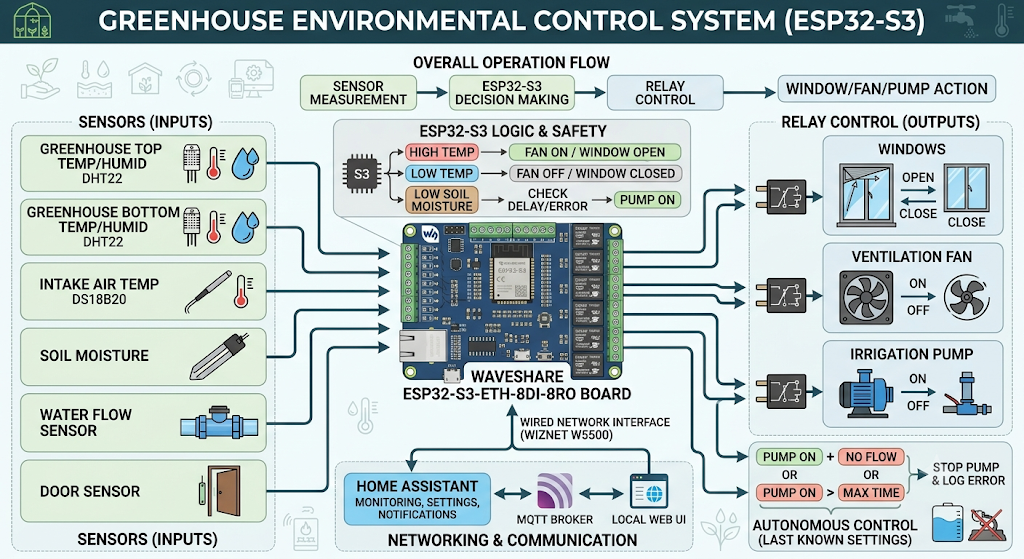
이미지 출처 : AI 생성
사용 센서
| 센서 | 수량 | 역할 | 연결 방식 | 제품 정보 |
|---|---|---|---|---|
| DHT22 | 2개 | 온실 상단과 하단의 온도·습도를 각각 측정합니다. | 단일 데이터 핀 | Waveshare DHT22 센서 |
| DS18B20 | 1개 | 외부에서 들어오는 흡기 온도를 측정합니다. | 1-Wire | Analog Devices DS18B20 |
| 아날로그 토양 수분 센서 | 1개 | 토양의 건조 상태를 측정해 관수 시작 여부를 판단합니다. | ADC | 호환 제품 예시: DFRobot SEN0193 |
| 펄스 출력 유량 센서 | 1개 | 펌프 작동 중 실제 물의 흐름을 확인합니다. | 디지털 펄스 | 호환 제품 예시: DFRobot YF-S201 |
| 마그네틱 리드 스위치 | 1개 | 온실 도어의 열림과 닫힘 상태를 감지합니다. | 디지털 입력 | 호환 제품 예시: Magnetic Door Switch |
WIZnet이 들어가는 위치
이 프로젝트는 Waveshare 보드에 내장된 WIZnet W5500을 사용합니다.
W5500은 ESP32-S3와 SPI로 연결되며 다음 기능에 필요한 네트워크 경로를 제공합니다.
ESPHome API를 통한 Home Assistant 연결
MQTT 텔레메트리 전송
로컬 웹 인터페이스 접속
이벤트 로그와 장치 상태 확인
| 기능 | ESP32-S3 핀 |
|---|---|
| W5500 Interrupt | GPIO12 |
| MOSI | GPIO13 |
| MISO | GPIO14 |
| SPI Clock | GPIO15 |
| Chip Select | GPIO16 |
이 핀들은 W5500 통신에 사용되므로 다른 센서나 출력에 할당하면 안 됩니다.
W5500은 하드웨어 TCP/IP 스택을 내장하고 있지만, 이 프로젝트가 사용하는 ESP용 드라이버에서는 해당 하드웨어 소켓 기능을 직접 사용하지 않습니다. W5500이 Ethernet MAC·PHY와 프레임 송수신을 담당하고, DHCP, TCP, MQTT, HTTP 같은 상위 처리는 ESP32-S3의 네트워크 스택에서 수행됩니다.
따라서 이 시스템에서 W5500의 핵심 역할은 TCP/IP 처리를 모두 오프로딩하는 것이 아니라, 온실 컨트롤러에 유선 Ethernet 통신 경로를 제공하는 것입니다.
네트워크 연결이 끊기면 원격 모니터링과 설정 변경은 제한되지만, 센서 판단과 릴레이 제어는 계속 실행됩니다.
유사 프로젝트: SmartGarden
WIZnet Maker의 SmartGarden도 W5500 Ethernet을 이용해 재배 환경을 감시하고 관수를 제어한다는 점에서 유사한 프로젝트입니다. 두 프로젝트 모두 센서 데이터를 기준으로 물 공급 장치를 제어하고, 유선 네트워크를 통해 사용자가 상태를 확인할 수 있도록 설계되었습니다.
다만 이 프로젝트는 ESP32-S3 한 대에서 온실의 환기와 관수를 통합하여 처리하는 구조입니다. 반면 SmartGarden은 Arduino 기반 Master Station과 RF Remote Station을 조합하여 여러 관수 구역을 확장하는 데 초점을 두고 있습니다.
유사점
| 항목 | 공통점 |
|---|---|
| 적용 분야 | 정원과 온실의 환경 측정 및 관수 자동화 |
| 네트워크 | W5500 기반 유선 Ethernet 사용 |
| 센서 | 온도, 습도, 토양 또는 유량 데이터 활용 |
| 제어 방식 | 센서값과 설정값에 따라 펌프나 밸브 작동 |
차이점
| 항목 | ESP32-S3 온실 제어기 | SmartGarden |
|---|---|---|
| 중심 장치 | Waveshare ESP32-S3 보드 | Arduino Master Station |
| 주요 제어 대상 | 창문, 환기 팬, 관수 펌프 | 여러 관수 구역과 밸브 |
| 원격 확장 방식 | Home Assistant와 MQTT 연동 | RF Remote Station 추가 |
| 데이터 관리 | 로컬 로그와 외부 시스템 연동 | MicroSD 로그와 Web UI |
| W5500 구성 | 보드에 내장된 Ethernet 인터페이스 | SPI Ethernet Shield |
SmartGarden은 서로 떨어져 있는 여러 관수 구역의 밸브를 분산 제어해야 할 때 적합합니다. 반면 ESP32-S3 프로젝트는 하나의 온실 안에서 환기, 관수, 안전 상태를 통합 관리해야 할 때 더 적합합니다.
구현 노트
W5500 Ethernet 설정
파일: firmware/esphome/packages/network-ethernet.yaml
ethernet:
  type: W5500
  interrupt_pin: GPIO12
  mosi_pin: GPIO13
  miso_pin: GPIO14
  clk_pin: GPIO15
  cs_pin: GPIO16
이 설정은 ESPHome에 Ethernet 칩의 종류와 SPI 핀 구성을 알려줍니다.
MOSI, MISO, Clock, Chip Select는 ESP32-S3와 W5500 사이의 데이터 통신에 사용됩니다. Interrupt 핀은 수신 데이터나 네트워크 이벤트가 발생했음을 ESP32-S3에 전달합니다.
해당 연결은 Waveshare 보드의 PCB에 이미 구성되어 있으므로 외부 W5500 모듈을 추가로 배선할 필요가 없습니다.
관수 시작 조건
파일: firmware/esphome/packages/control.yaml
id(soil_moisture_percent).state < id(soil_moisture_min_threshold).state &&
id(irrigation_cooldown_remaining_seconds) == 0 &&
id(irrigation_settle_remaining_seconds) == 0 &&
!id(irrigation_fault_active);
펌프는 토양 수분이 낮다는 이유만으로 즉시 작동하지 않습니다. 다음 조건을 모두 만족해야 합니다.
토양 수분이 최소 기준 이하인 상태
직전 관수 이후 대기시간 종료
수분 센서 안정화 시간 종료
활성화된 관수 오류 없음
재관수 대기시간은 펌프가 짧은 간격으로 반복 작동하는 것을 방지합니다. 안정화 시간은 물을 공급한 직후 센서값이 실제 토양 상태를 반영할 때까지 기다리기 위한 것입니다.
릴레이 안전 설정
창문 모터, 팬, 펌프 릴레이에는 restore_mode: ALWAYS_OFF가 적용되어 있습니다. 전원이 복구되거나 장치가 재부팅되면 이전 출력 상태를 복원하지 않고 모두 꺼진 상태로 시작합니다.
수동 정비 모드가 활성화되거나 자동화가 비활성화되면 모든 출력을 끄는 안전 스크립트가 실행됩니다. OTA 업데이트 중에도 창문 모터와 펌프가 예기치 않게 동작하지 않도록 별도의 상태값을 확인합니다.
유량 기반 펌프 보호
펌프 작동 중 유량이 최소 기준 이하로 유지되면 시스템은 irrigation_no_flow 오류를 기록하고 펌프를 정지합니다. 최대 관수 시간이 지나도 같은 방식으로 출력을 차단합니다.
이 기능은 다음과 같은 문제를 감지하는 데 도움이 됩니다.
물탱크 고갈
호스 막힘 또는 분리
펌프 고장
유량 센서 이상
실전 팁 / 주의사항
GPIO12~GPIO16은 W5500 전용 핀으로 유지해야 합니다.
토양 수분 센서는 실제 건조 상태와 습윤 상태를 측정하여 보정해야 합니다.
유량 센서의 펄스/리터 값은 설치된 펌프와 배관을 기준으로 확인해야 합니다.
펌프와 창문 모터에는 퓨즈, 역기전력 보호 회로, 별도 전원을 적용하는 것이 좋습니다.
센서 배선과 모터 또는 고전압 배선을 분리하여 전기적 노이즈를 줄여야 합니다.
Ethernet과 Wi-Fi는 별도 빌드 프로필이므로 실행 중 자동 전환되는 구조로 해석하면 안 됩니다.
외부 센서용 GPIO는 보드 리비전과 실제 커넥터 배치를 확인한 뒤 연결해야 합니다.
FAQ
Q: 이 프로젝트에서 왜 W5500을 사용하나요?
A: ESP32-S3가 Home Assistant, MQTT, 로컬 웹 화면과 통신할 수 있도록 유선 네트워크를 제공하기 위해 사용합니다. 온실의 거리, 벽, 금속 구조물로 인해 Wi-Fi 신호가 불안정한 환경에서도 케이블 기반 연결을 사용할 수 있습니다.
Q: W5500은 ESP32-S3에 어떻게 연결되나요?
A: SPI 인터페이스로 연결됩니다. GPIO13은 MOSI, GPIO14는 MISO, GPIO15는 Clock, GPIO16은 Chip Select에 사용되며 GPIO12는 Interrupt 신호를 전달합니다.
Q: W5500이 온실 자동화 판단도 수행하나요?
A: 아닙니다. 온도, 토양 수분, 유량을 판단하고 릴레이를 제어하는 작업은 ESP32-S3가 수행합니다. W5500은 외부 시스템과 데이터를 주고받기 위한 유선 통신 경로를 제공합니다.
Q: 초보자도 따라 할 수 있나요?
A: ESPHome YAML, GPIO, 기본적인 IP 네트워크 개념을 알고 있다면 소프트웨어 구조를 이해할 수 있습니다. 다만 펌프, 모터, 고전압 부하를 연결할 때는 전원 분리와 보호 회로에 관한 추가 지식이 필요합니다.
Q: SmartGarden과 비교하면 어떤 프로젝트가 더 적합한가요?
A: 하나의 온실에서 환기와 관수를 통합 관리하려면 ESP32-S3 프로젝트가 더 단순합니다. 여러 관수 구역을 서로 떨어진 위치까지 확장해야 한다면 Master Station과 RF Remote Station으로 구성된 SmartGarden 방식이 더 적합합니다.
Project Overview
This project is a greenhouse automation system built with the Waveshare ESP32-S3-ETH-8DI-8RO board. It monitors greenhouse conditions and automatically controls windows, ventilation fans, and an irrigation pump. The WIZnet W5500 serves as the wired network interface for connecting the controller to Home Assistant, MQTT, and the local web interface.
The overall operating flow is as follows:
Sensor measurement → ESP32-S3 condition evaluation → Relay control → Window, fan, and pump operation
The DHT22 sensors measure temperature and humidity at the upper and lower sections of the greenhouse, while the DS18B20 measures the incoming air temperature. The soil moisture sensor determines whether irrigation is required, and the flow sensor verifies that water is actually flowing while the pump is running. A reed switch detects whether the greenhouse door is open or closed.
The ESP32-S3 compares the measured values with configured thresholds and controls the outputs accordingly. When the temperature rises, it turns on the fans and opens the windows. When the temperature falls, it turns off the fans and closes the windows. If the soil moisture level drops below the configured threshold, the controller checks the irrigation cooldown period and fault status before activating the pump.
If the pump is running but no water flow is detected, or if the maximum operating time is exceeded, the controller disables the output and records an error. This helps reduce dry running caused by an empty water tank, a blocked hose, or a pump failure.
Home Assistant is used for status monitoring, configuration changes, and notifications. However, automation decisions are processed locally on the ESP32-S3. This allows the controller to continue basic operation using the most recently stored settings even if Home Assistant or MQTT becomes unavailable.
Image source: AI-generated
Sensors Used
| Sensor | Quantity | Purpose | Interface | Product Information |
|---|---|---|---|---|
| DHT22 | 2 | Measures temperature and humidity at the upper and lower sections of the greenhouse. | Single data pin | Waveshare DHT22 Sensor |
| DS18B20 | 1 | Measures the temperature of incoming outside air. | 1-Wire | Analog Devices DS18B20 |
| Analog soil moisture sensor | 1 | Measures soil dryness to determine when irrigation should begin. | ADC | Compatible product example: DFRobot SEN0193 |
| Pulse-output flow sensor | 1 | Verifies that water is actually flowing while the pump is operating. | Digital pulse | Compatible product example: DFRobot YF-S201 |
| Magnetic reed switch | 1 | Detects whether the greenhouse door is open or closed. | Digital input | Compatible product example: Magnetic Door Switch |
Where WIZnet Fits
This project uses the WIZnet W5500 integrated into the Waveshare board.
The W5500 connects to the ESP32-S3 over SPI and provides the network path required for the following functions:
Home Assistant connectivity through the ESPHome API
MQTT telemetry transmission
Access to the local web interface
Event log and device status monitoring
| Function | ESP32-S3 Pin |
|---|---|
| W5500 Interrupt | GPIO12 |
| MOSI | GPIO13 |
| MISO | GPIO14 |
| SPI Clock | GPIO15 |
| Chip Select | GPIO16 |
These pins are reserved for W5500 communication and should not be assigned to other sensors or outputs.
Although the W5500 includes a hardware TCP/IP stack, the ESP driver used in this project does not directly use the chip’s hardware socket functions. The W5500 handles the Ethernet MAC, PHY, and frame transmission, while higher-level functions such as DHCP, TCP, MQTT, and HTTP are processed by the ESP32-S3 network stack.
Therefore, the main role of the W5500 in this system is not to offload all TCP/IP processing. Instead, it provides a wired Ethernet communication path for the greenhouse controller.
If the network connection is lost, remote monitoring and configuration changes become unavailable. However, sensor evaluation and relay control continue to operate locally.
Similar Project: SmartGarden
WIZnet Maker’s SmartGarden is a similar project because it also uses W5500 Ethernet to monitor growing conditions and control irrigation. Both projects use sensor data to control water delivery equipment and allow users to check system status through a wired network.
However, this project uses a single ESP32-S3 controller to integrate greenhouse ventilation and irrigation. SmartGarden, by comparison, focuses on expanding irrigation across multiple zones by combining an Arduino-based Master Station with RF Remote Stations.
Similarities
| Category | Shared Feature |
|---|---|
| Application | Environmental monitoring and irrigation automation for gardens and greenhouses |
| Network | W5500-based wired Ethernet |
| Sensors | Temperature, humidity, soil, or water-flow data |
| Control method | Pumps or valves operate according to sensor readings and configured thresholds |
Differences
| Category | ESP32-S3 Greenhouse Controller | SmartGarden |
|---|---|---|
| Main controller | Waveshare ESP32-S3 board | Arduino Master Station |
| Main control targets | Windows, ventilation fans, irrigation pump | Multiple irrigation zones and valves |
| Remote expansion | Home Assistant and MQTT integration | Additional RF Remote Stations |
| Data management | Local logs and external system integration | MicroSD logging and web UI |
| W5500 configuration | Integrated Ethernet interface | SPI Ethernet Shield |
SmartGarden is suitable for distributed control of valves across multiple irrigation zones. The ESP32-S3 project is better suited to integrated management of ventilation, irrigation, and safety conditions within a single greenhouse.
Implementation Notes
W5500 Ethernet Configuration
File: firmware/esphome/packages/network-ethernet.yaml
ethernet:
  type: W5500
  interrupt_pin: GPIO12
  mosi_pin: GPIO13
  miso_pin: GPIO14
  clk_pin: GPIO15
  cs_pin: GPIO16
This configuration tells ESPHome which Ethernet controller is being used and defines the SPI pin assignments.
MOSI, MISO, Clock, and Chip Select are used for communication between the ESP32-S3 and W5500. The Interrupt pin notifies the ESP32-S3 when incoming data or a network event is detected.
Because this connection is already implemented on the Waveshare board PCB, an external W5500 module does not need to be wired separately.
Irrigation Start Conditions
File: firmware/esphome/packages/control.yaml
id(soil_moisture_percent).state < id(soil_moisture_min_threshold).state &&
id(irrigation_cooldown_remaining_seconds) == 0 &&
id(irrigation_settle_remaining_seconds) == 0 &&
!id(irrigation_fault_active);
The pump does not start immediately based only on a low soil moisture reading. All of the following conditions must be met:
Soil moisture is below the minimum threshold.
The cooldown period after the previous irrigation cycle has ended.
The soil moisture sensor stabilization period has ended.
No irrigation fault is active.
The irrigation cooldown period prevents the pump from running repeatedly at short intervals. The stabilization period allows time for the sensor reading to reflect the actual soil condition after water has been supplied.
Relay Safety Configuration
The window motor, fan, and pump relays use restore_mode: ALWAYS_OFF. When power is restored or the controller reboots, the previous output states are not restored. Instead, all relays start in the OFF state.
If maintenance mode is enabled or automation is disabled, a safety script turns off all outputs. Separate state checks are also used during OTA updates to prevent unexpected operation of the window motor or pump.
Flow-Based Pump Protection
If the detected flow remains below the minimum threshold while the pump is running, the system records an irrigation_no_flow fault and stops the pump. The output is also disabled when the maximum irrigation time is exceeded.
This function helps detect the following problems:
Empty water tank
Blocked or disconnected hose
Pump failure
Flow sensor fault
Practical Tips and Precautions
Keep GPIO12 through GPIO16 reserved for the W5500.
Calibrate the soil moisture sensor using actual dry and wet soil conditions.
Verify the flow sensor’s pulses-per-liter value with the installed pump and piping.
Use fuses, back-EMF protection, and separate power supplies for the pump and window motor.
Separate sensor wiring from motor and high-voltage wiring to reduce electrical noise.
Ethernet and Wi-Fi use separate build profiles and should not be interpreted as an automatic runtime failover configuration.
Confirm the board revision and physical connector layout before connecting external sensor GPIO pins.
FAQ
Q: Why is the W5500 used in this project?
A: It provides a wired network connection that allows the ESP32-S3 to communicate with Home Assistant, MQTT, and the local web interface. A cable-based connection can also be used in greenhouse environments where Wi-Fi may be unreliable because of distance, walls, or metal structures.
Q: How is the W5500 connected to the ESP32-S3?
A: It is connected through SPI. GPIO13 is used for MOSI, GPIO14 for MISO, GPIO15 for Clock, and GPIO16 for Chip Select. GPIO12 carries the Interrupt signal.
Q: Does the W5500 also make greenhouse automation decisions?
A: No. The ESP32-S3 evaluates temperature, soil moisture, and flow data and controls the relays. The W5500 provides the wired communication path used to exchange data with external systems.
Q: Can beginners follow this project?
A: The software architecture can be understood with basic knowledge of ESPHome YAML, GPIO, and IP networking. However, additional knowledge of power isolation and protection circuits is required when connecting pumps, motors, or high-voltage loads.
Q: Which project is more suitable when compared with SmartGarden?
A: The ESP32-S3 project is simpler for integrated ventilation and irrigation control within a single greenhouse. SmartGarden is more suitable when multiple irrigation zones must be expanded across separate locations using a Master Station and RF Remote Stations.
-
Github Code


