


esphome-teslable-poe
esphome-teslable-poe
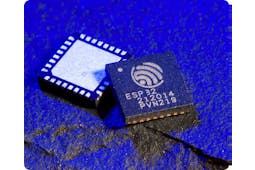
Espressif - ESP32
x 1


WIZnet - W5500
x 1
What the Project Does
이 프로젝트는 로컬 Tesla BLE 제어를 위한 ESPHome 펌웨어 구성입니다. Tesla BLE ESPHome 프로젝트를 PoE 지원 ESP32-S3 보드에 맞게 적용한 구성으로, Tesla 차량과 Bluetooth Low Energy로 통신하고 차량 및 충전 관련 엔티티를 Home Assistant에 노출합니다. EVCC와 연동하면 클라우드 제어 경로에 의존하지 않고 태양광 잉여 전력 기반 충전이나 동적 전기요금 기반 충전 자동화에 활용할 수 있습니다.
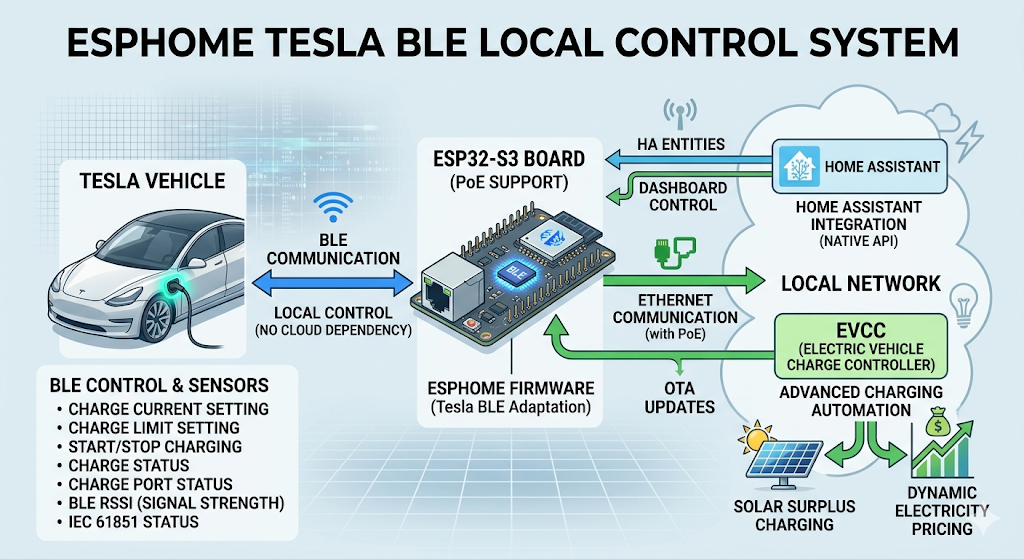
데이터 흐름은 명확합니다. Tesla 차량 상태와 충전 명령은 차량과 ESP32-S3 사이에서 BLE로 이동합니다. ESPHome API, OTA 업데이트, Home Assistant 연동 트래픽은 Ethernet으로 이동합니다. Home Assistant 또는 EVCC는 상위 자동화 계층으로 동작합니다. Tesla BLE 쪽에서는 충전 전류 설정, 충전 한도 설정, 충전 시작과 중지 같은 기능을 다루고, 충전 상태, 충전 포트 상태, BLE 신호 세기, IEC 61851 상태 같은 값을 센서로 노출할 수 있습니다.
이미지 출처 : AI 생성
Where WIZnet Fits
이 프로젝트에서 사용되는 WIZnet 제품은 W5500입니다. W5500은 ESP32-S3 노드의 SPI Ethernet 컨트롤러로 설정됩니다. 저장소의 README는 Waveshare ESP32-S3-PoE 보드에서 W5500을 통해 유선 Ethernet을 사용한다고 설명하며, YAML 구성은 W5500의 SPI 클럭, MOSI, MISO, 칩 셀렉트, 인터럽트, 리셋 핀을 지정합니다.

이미지 출처 : https://www.waveshare.com/esp32-s3-eth.htm?sku=28771
W5500을 사용하는 실질적인 이유는 무선 리소스 분리입니다. Tesla BLE는 안정적인 스캔과 연결 동작이 중요합니다. 이 프로젝트는 네트워크 연결을 Wi-Fi에서 PoE Ethernet으로 옮겨 ESP32의 무선 리소스를 BLE에 더 집중시키고, Tesla BLE 페어링 과정에서 발생할 수 있는 버퍼 오버플로우와 스캔 불안정성을 줄이는 방향으로 구성되어 있습니다.
또한 W5500은 충전 설비 주변에 배치되는 노드에 적합합니다. W5500은 하드웨어 TCP/IP 오프로딩, SPI 인터페이스, 내부 버퍼, 다중 소켓 구조를 제공하므로 MCU가 네트워크 스택 처리에 쓰는 부담을 줄일 수 있습니다. PoE를 사용하면 전원과 데이터가 하나의 Ethernet 케이블로 공급되므로, 충전기 주변에 별도의 USB 전원 어댑터를 둘 필요도 줄어듭니다.
Implementation Notes
이 저장소는 ESPHome YAML에서 WIZnet W5500을 직접 사용합니다.
File path: esphome/tesla-ble-ethernet.yaml
What it configures: W5500 SPI Ethernet 핀 설정
Why it matters: 이 설정은 Home Assistant API, OTA, ESPHome 네트워크 통신을 Wi-Fi가 아니라 유선 Ethernet으로 이동시킵니다.
ethernet:
  type: W5500
  clk_pin: GPIO13
  mosi_pin: GPIO11
  miso_pin: GPIO12
  cs_pin: GPIO14
  interrupt_pin: GPIO10
  reset_pin: GPIO9
이 블록이 WIZnet 통합의 핵심입니다. ESPHome은 W5500을 Ethernet 장치로 사용하고, ESP32-S3는 Tesla 차량과의 BLE 통신을 담당합니다.
File path: esphome/tesla-ble-ethernet.yaml
What it configures: Tesla BLE 외부 컴포넌트, BLE 스캐너 타이밍, BLE 프록시, 차량 BLE 클라이언트
Why it matters: 스캔 윈도우가 Ethernet 환경을 기준으로 설정되어 있으며, 이는 ESP32 무선 리소스를 Wi-Fi가 아니라 BLE에 집중시키려는 프로젝트 목적과 일치합니다.
external_components:
  source: github://PedroKTFC/esphome-tesla-ble

esp32_ble_tracker:
  scan_parameters:
    # only use these values on Ethernet not WIFI
    interval: 1100ms
    window: 1100ms
    active: true
이후 ble_client는 Tesla 차량의 BLE MAC 주소에 노드를 바인딩하고, tesla_ble_vehicle은 해당 BLE 클라이언트를 차량 인터페이스로 사용합니다.
Practical Tips / Pitfalls
- W5500이 보드에 통합되어 있거나 신호선이 올바르게 라우팅된 보드를 사용하는 것이 좋습니다. SPI Ethernet은 점퍼선으로 길게 연결하면 고주파 신호 품질 문제로 불안정해질 수 있습니다.
- W5500 SPI 핀을 다른 SPI 장치와 무리하게 공유하지 않는 것이 안전합니다. ESPHome의 SPI Ethernet 구성은 일반적인 공유 SPI 부품 연결과 다르게 취급될 수 있습니다.
- BLE 스캔 설정은 Ethernet 환경 기준으로 유지해야 합니다. YAML 주석에서도
1100msinterval/window 설정은 Wi-Fi가 아니라 Ethernet 사용 시에만 적용하라고 명시합니다. - BLE 문제를 디버깅하기 전에 PoE 전원 안정성을 먼저 확인해야 합니다. 충전 자동화 실패처럼 보이는 문제가 실제로는 PoE 스위치 포트, 전원 협상, 브라운아웃 문제일 수 있습니다.
- EVCC나 Home Assistant 자동화가 이 노드에 의존한다면 DHCP 예약 또는 고정 IP 구성을 권장합니다.
- 정상 운용 중에는 로그 레벨을
INFO수준으로 낮추는 것이 좋습니다. 이 프로젝트의 YAML도 성능을 위해INFO복귀를 권장합니다.
FAQ
Q: 왜 이 Tesla BLE 충전 노드에 W5500을 사용하나요?
A: W5500은 네트워크 경로를 유선 Ethernet으로 옮겨 ESP32-S3의 무선 리소스를 BLE에 집중시킵니다. 이 프로젝트에서는 Tesla BLE 스캔과 명령 안정성을 유지하면서 Home Assistant 또는 EVCC와 계속 연결되어야 하므로, Wi-Fi보다 PoE Ethernet 구조가 더 적합합니다.
Q: W5500은 ESP32-S3에 어떻게 연결되나요?
A: 이 저장소에서는 W5500을 SPI Ethernet 컨트롤러로 사용합니다. YAML 기준으로 GPIO13은 클럭, GPIO11은 MOSI, GPIO12는 MISO, GPIO14는 칩 셀렉트, GPIO10은 인터럽트, GPIO9는 리셋에 매핑됩니다.
Q: 이 프로젝트에서 W5500은 정확히 어떤 역할을 하나요?
A: W5500은 ESPHome 네트워크 인터페이스 역할을 합니다. Home Assistant API 연결, OTA 업데이트, ESPHome 네트워크 트래픽을 처리하며, Tesla BLE 자체를 대체하지는 않습니다. 핵심은 IP 네트워크와 BLE 차량 통신을 분리하는 것입니다.
Q: 초보자도 따라할 수 있나요?
A: ESPHome YAML에 익숙하다면 소프트웨어 구성은 따라갈 수 있습니다. 다만 Tesla VIN, Tesla BLE MAC 주소, OTA 비밀번호, Home Assistant API 암호화 키 같은 설정이 필요하고, 첫 플래시는 USB로 진행한 뒤 OTA를 사용하는 흐름을 이해해야 합니다. 하드웨어 측면에서는 일반 Wi-Fi ESP32 노드보다 PoE와 Ethernet 안정성 확인이 더 중요합니다.
Q: 일반 Wi-Fi ESP32 Tesla BLE Proxy와 비교하면 어떤 차이가 있나요?
A: Wi-Fi 기반 노드는 ESP32 무선 리소스를 IP 네트워크와 BLE 관련 동작에 함께 사용합니다. 이 프로젝트는 W5500을 통해 IP 네트워크를 유선 Ethernet으로 분리하므로, BLE 스캔과 Tesla 차량 통신에 더 안정적인 환경을 제공합니다. EV 충전 자동화처럼 장시간 동작과 연결 안정성이 중요한 경우 이 차이가 실질적인 이점이 됩니다.
What the Project Does
This project is an ESPHome firmware configuration for local Tesla BLE control. It adapts the Tesla BLE ESPHome project for a PoE-enabled ESP32-S3 board, communicates with a Tesla vehicle over Bluetooth Low Energy, and exposes vehicle and charging-related entities to Home Assistant. When integrated with EVCC, it can be used for charging automation based on surplus solar power or dynamic electricity tariffs without relying on a cloud-based control path.
The data flow is straightforward. Tesla vehicle status and charging commands are exchanged between the vehicle and the ESP32-S3 over BLE. ESPHome API traffic, OTA updates, and Home Assistant integration traffic move over Ethernet. Home Assistant or EVCC acts as the upper-level automation layer. On the Tesla BLE side, the system can handle functions such as setting charging current, setting the charge limit, and starting or stopping charging. It can also expose sensor values such as charging state, charge port status, BLE signal strength, and IEC 61851 state.
Image source: AI-generated
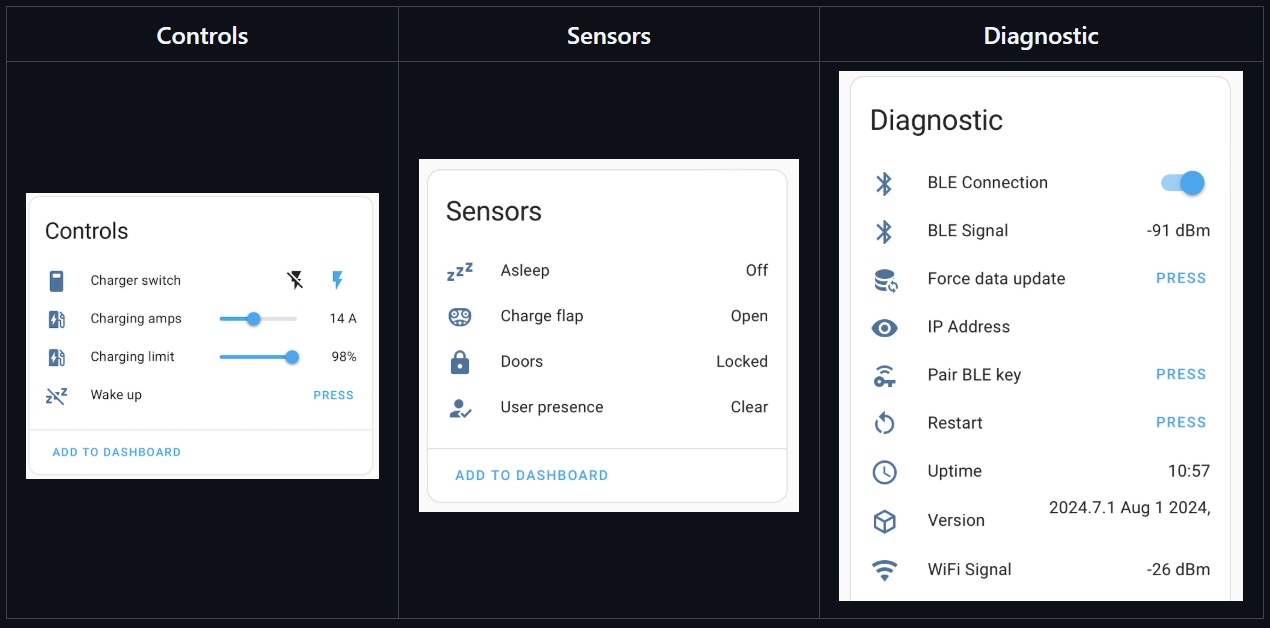
Image source: GitHub - yoziru/esphome-tesla-ble: Interact with Tesla vehicles over BLE using ESPHome and Home Assistant · GitHub
Where WIZnet Fits
The WIZnet product used in this project is the W5500. The W5500 is configured as the SPI Ethernet controller for the ESP32-S3 node. The repository README explains that the Waveshare ESP32-S3-PoE board uses wired Ethernet through the W5500, and the YAML configuration defines the W5500 SPI clock, MOSI, MISO, chip select, interrupt, and reset pins.
Image source: https://www.waveshare.com/esp32-s3-eth.htm?sku=28771
The practical reason for using the W5500 is wireless resource separation. Tesla BLE requires stable scanning and connection behavior. This project moves the network connection from Wi-Fi to PoE Ethernet, allowing the ESP32 wireless resources to focus more on BLE. This configuration helps reduce scan instability and buffer overflow issues that may occur during Tesla BLE pairing.
The W5500 is also well suited for nodes installed near EV charging equipment. It provides hardware TCP/IP offloading, an SPI interface, internal buffering, and multiple socket support, reducing the MCU workload required for network stack processing. With PoE, both power and data are delivered through a single Ethernet cable, reducing the need for a separate USB power adapter near the charger.
Implementation Notes
This repository directly uses the WIZnet W5500 in the ESPHome YAML configuration.
File path: esphome/tesla-ble-ethernet.yaml
What it configures: W5500 SPI Ethernet pin settings
Why it matters: This configuration moves Home Assistant API traffic, OTA updates, and ESPHome network communication from Wi-Fi to wired Ethernet.
ethernet:
  type: W5500
  clk_pin: GPIO13
  mosi_pin: GPIO11
  miso_pin: GPIO12
  cs_pin: GPIO14
  interrupt_pin: GPIO10
  reset_pin: GPIO9
This block is the core of the WIZnet integration. ESPHome uses the W5500 as the Ethernet device, while the ESP32-S3 handles BLE communication with the Tesla vehicle.
File path: esphome/tesla-ble-ethernet.yaml
What it configures: Tesla BLE external component, BLE scanner timing, BLE proxy, and vehicle BLE client
Why it matters: The scan window is configured based on an Ethernet environment, which matches the project’s goal of focusing ESP32 wireless resources on BLE rather than Wi-Fi.
external_components:
  source: github://PedroKTFC/esphome-tesla-ble

esp32_ble_tracker:
  scan_parameters:
    # only use these values on Ethernet not WIFI
    interval: 1100ms
    window: 1100ms
    active: true
After this, ble_client binds the node to the Tesla vehicle’s BLE MAC address, and tesla_ble_vehicle uses that BLE client as the vehicle interface.
Practical Tips / Pitfalls
Use a board where the W5500 is already integrated or where the signal lines are properly routed. SPI Ethernet can become unstable if connected with long jumper wires because of high-frequency signal integrity issues.
Avoid sharing the W5500 SPI pins with other SPI devices unless the hardware and ESPHome configuration are designed for it. ESPHome’s SPI Ethernet configuration may be handled differently from ordinary shared SPI peripheral connections.
Keep the BLE scan settings aligned with an Ethernet-based environment. The YAML comment explicitly states that the 1100ms interval/window setting should only be used with Ethernet, not Wi-Fi.
Before debugging BLE issues, verify PoE power stability first. What looks like a charging automation failure may actually be caused by a PoE switch port issue, power negotiation problem, or brownout.
If EVCC or Home Assistant automation depends on this node, a DHCP reservation or static IP configuration is recommended.
During normal operation, it is better to keep the log level at INFO. The project YAML also recommends returning to INFO for better performance.
FAQ
Q: Why use the W5500 for this Tesla BLE charging node?
A: The W5500 moves the network path to wired Ethernet, allowing the ESP32-S3 wireless resources to focus on BLE. In this project, the node must maintain reliable Tesla BLE scanning and command handling while staying connected to Home Assistant or EVCC, so a PoE Ethernet architecture is more suitable than Wi-Fi.
Q: How is the W5500 connected to the ESP32-S3?
A: In this repository, the W5500 is used as an SPI Ethernet controller. According to the YAML configuration, GPIO13 is mapped to clock, GPIO11 to MOSI, GPIO12 to MISO, GPIO14 to chip select, GPIO10 to interrupt, and GPIO9 to reset.
Q: What exactly does the W5500 do in this project?
A: The W5500 acts as the ESPHome network interface. It handles the Home Assistant API connection, OTA updates, and ESPHome network traffic. It does not replace Tesla BLE itself. The key purpose is to separate IP networking from BLE vehicle communication.
Q: Can beginners follow this project?
A: If you are familiar with ESPHome YAML, the software configuration is manageable. However, the setup requires values such as the Tesla VIN, Tesla BLE MAC address, OTA password, and Home Assistant API encryption key. You also need to understand the workflow of flashing the device over USB first and then using OTA updates. On the hardware side, verifying PoE and Ethernet stability is more important than with a typical Wi-Fi ESP32 node.
Q: How is this different from a normal Wi-Fi ESP32 Tesla BLE Proxy?
A: A Wi-Fi-based node uses the ESP32 wireless resources for both IP networking and BLE-related operation. This project separates IP networking onto wired Ethernet through the W5500, creating a more stable environment for BLE scanning and Tesla vehicle communication. For EV charging automation, where long-term operation and connection stability matter, this difference becomes a practical advantage.
-
Github Code


