


esphome-haierac-ethernet
esphome-haierac-ethernet
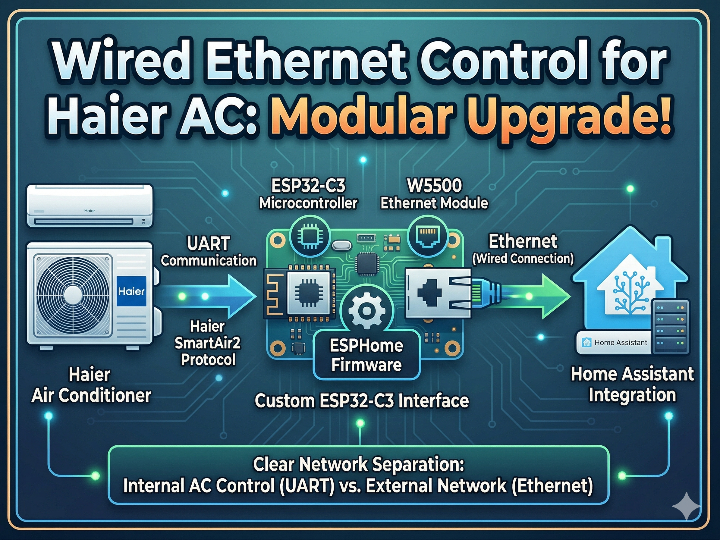

Espressif - ESP32
x 1


WIZnet - W5500
x 1
What the Project Does
이 저장소의 핵심 목적은 Haier 에어컨의 기존 무선 모듈을 제거하고, 이를 유선 Ethernet 기반 제어 보드로 대체하는 것입니다.
구성은 다음과 같이 나뉩니다.
- 에어컨 본체 ↔ ESP32-C3: UART 통신
- ESP32-C3 ↔ Home Assistant: W5500 기반 Ethernet
- 펌웨어: ESPHome
- 에어컨 제어 프로토콜: Haier SmartAir2
즉, 에어컨 제어는 UART에서 이뤄지고, Home Assistant 연동은 Ethernet으로 분리됩니다.
이 구조 덕분에 에어컨 내부 통신과 홈 네트워크 연결을 명확하게 나눌 수 있습니다.
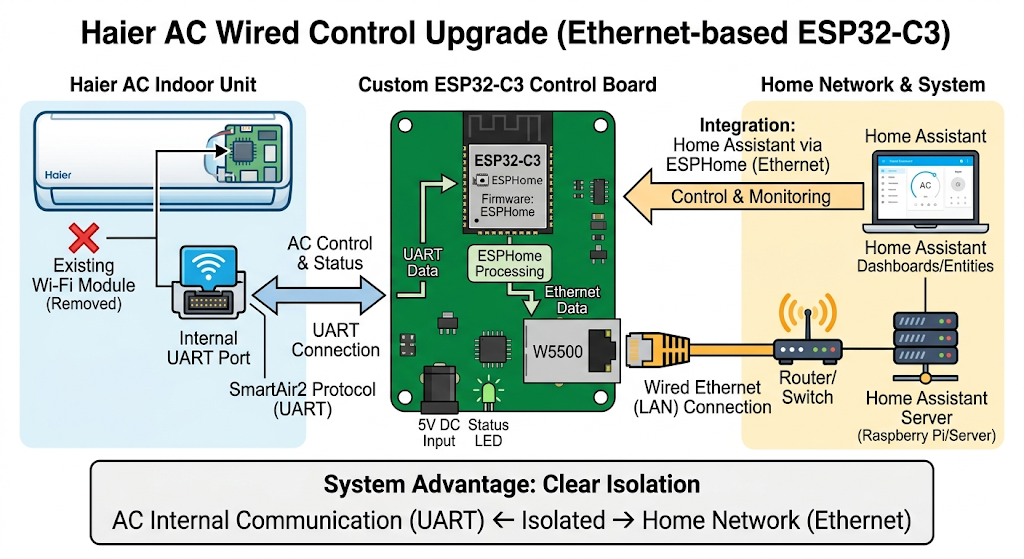
이미지 출처 : AI 생성
ESPHome과 SmartAir2는 어떻게 연결되나요?
이 프로젝트에서 SmartAir2는 에어컨과 통신하는 프로토콜이고, ESPHome은 그 프로토콜을 Home Assistant에서 사용할 수 있는 형태로 바꿔 주는 소프트웨어입니다.
조금 더 쉽게 말씀드리면, ESP32-C3는 UART를 통해 에어컨과 SmartAir2 방식으로 데이터를 주고받습니다. 그러면 ESPHome이 그 데이터를 해석해서 전원, 운전 모드, 목표 온도, 풍량 같은 제어 항목으로 정리해 줍니다. Home Assistant는 이 정보를 일반적인 climate 엔티티처럼 다루게 됩니다.
즉, 역할은 다음처럼 나뉩니다.
- SmartAir2: 에어컨과 주고받는 통신 규약
- ESPHome: SmartAir2 데이터를 해석하고 Home Assistant 형식으로 변환하는 계층
- W5500: 변환된 제어 정보와 상태를 유선 네트워크로 전달하는 인터페이스
정리하면, 이 프로젝트는 ESPHome이 SmartAir2를 이해해서 에어컨을 제어하고, W5500이 그 결과를 네트워크로 연결하는 구조라고 보시면 됩니다.
ESPHome이 지원하는 대표 가전 프로토콜 예시
| 구분 | ESPHome 컴포넌트 | 연결 방식 | 대표 대상 |
|---|---|---|---|
| Haier SmartAir2 / hOn | haier climate | UART | Haier 에어컨 |
| Midea 전용 제어 방식 | midea climate | UART | Midea 에어컨 |
| Tuya MCU 시리얼 방식 | tuya + tuya climate | UART | Tuya MCU 기반 가전 |
| 범용 IR 에어컨 제어 | climate_ir | 적외선(IR) | 여러 브랜드 에어컨 |
| Daikin IR 방식 | daikin climate | 적외선(IR) | Daikin 에어컨 |
| Mitsubishi IR 방식 | mitsubishi climate | 적외선(IR) | Mitsubishi 에어컨 |
Where WIZnet Fits
이 프로젝트에서 사용된 WIZnet 제품은 W5500입니다.
역할은 분명합니다.
W5500은 이 시스템에서 ESPHome 장치를 유선 네트워크에 연결하는 Ethernet 컨트롤러입니다.
에어컨을 직접 제어하는 칩이 아니라, 제어 결과와 상태 정보를 Home Assistant와 주고받을 수 있도록 LAN 종단 역할을 맡습니다.
이 선택이 실용적인 이유도 있습니다.
- 무선 대신 유선 연결을 사용하기 때문에 설치 환경에 따라 연결 안정성이 높아질 수 있습니다.
- ESP32-C3는 에어컨 UART 처리와 ESPHome 로직에 집중하고,
- 네트워크 연결은 W5500이 담당하므로 전체 구조가 단순해집니다.
- 특히 고정 설치형 가전 제어 보드에서는 무선보다 유선이 관리하기 쉬운 경우가 많습니다.
Implementation Notes
이 프로젝트는 README 설명 수준이 아니라, 실제 설정 파일에서 W5500 사용이 확인됩니다.
1) W5500 Ethernet 설정
파일: firmware/config.yml
ethernet:
  type: W5500
  clk_pin: GPIO08
  mosi_pin: GPIO10
  miso_pin: GPIO09
  cs_pin: GPIO5
  interrupt_pin: GPIO03
  reset_pin: GPIO04
  clock_speed: 25Mhz
이 설정은 이 보드가 SPI 방식으로 W5500을 연결하고 있음을 보여 줍니다.
특히 type: W5500이 명시되어 있어, 네트워크 인터페이스가 WIZnet W5500이라는 점을 코드 수준에서 확인할 수 있습니다.
여기서 중요한 항목은 다음과 같습니다.
clk_pin,mosi_pin,miso_pin: SPI 데이터 라인cs_pin: W5500 선택 신호interrupt_pin: Ethernet 이벤트 처리reset_pin: 칩 초기화clock_speed: SPI 동작 속도
즉, 이 프로젝트는 단순히 “W5500 모듈을 사용했다”는 수준이 아니라, ESPHome Ethernet 설정을 통해 실제로 W5500을 동작시키는 구조라고 보시면 됩니다.
2) Haier 에어컨 제어 설정
파일: firmware/config.yml
uart:
  tx_pin: GPIO21
  rx_pin: GPIO20
  baud_rate: 9600

climate:
  - platform: haier
    protocol: smartair2
이 부분은 에어컨 제어 계층입니다.
즉, 네트워크는 W5500이 담당하고, 에어컨 제어는 UART 기반 Haier 컴포넌트가 맡습니다.
정리하면 이 프로젝트의 구조는 아래와 같습니다.
- W5500: Home Assistant와 통신하는 유선 네트워크 인터페이스
- UART + Haier climate: 에어컨 본체와 통신하는 제어 인터페이스
이처럼 역할이 분리되어 있다는 점이 이 프로젝트의 핵심 설계 포인트입니다.
Practical Tips / Pitfalls
- SPI 배선은 짧고 단단하게 구성하시는 것이 좋습니다. W5500은 SPI 클록이 올라가면 점퍼선 길이와 품질에 민감해질 수 있습니다.
interrupt_pin사용 여부를 프레임워크 버전에 맞게 확인하셔야 합니다. ESPHome 버전에 따라 polling 방식과 혼용 시 문제가 생길 수 있습니다.- Wi-Fi와 Ethernet을 동시에 사용하는 전제로 설계하지 않는 편이 좋습니다. 이 프로젝트는 애초에 기존 Wi-Fi 모듈을 Ethernet으로 대체하는 구조입니다.
- UART TX/RX 방향을 반드시 확인하셔야 합니다. 에어컨 쪽 커넥터가 USB처럼 보여도 실제 USB 장치가 아니라 UART 배선일 수 있습니다.
- 고정 IP 또는 DHCP 예약을 고려하시는 편이 좋습니다. Home Assistant 연동 장치는 주소가 바뀌면 관리가 번거로워질 수 있습니다.
- 리셋 라인과 전원 안정성도 함께 확인하셔야 합니다. 에어컨 내부 전원 환경에서는 부팅 타이밍 문제로 초기화 실패가 발생할 수 있습니다.
FAQ
왜 이 프로젝트에서 W5500을 사용하나요?
이 프로젝트의 목표가 원래 무선 모듈을 제거하고 유선 Ethernet 기반 제어 보드로 바꾸는 것이기 때문입니다.
실제 설정 파일에도 ethernet: type: W5500이 직접 선언되어 있습니다.
즉, W5500은 여러 후보 중 하나가 아니라, 이 설계에서 실제로 채택된 Ethernet 인터페이스입니다.
W5500은 ESP32-C3에 어떻게 연결되나요?
SPI로 연결됩니다.
저장소 기준 핀 구성은 다음과 같습니다.
- CLK:
GPIO08 - MOSI:
GPIO10 - MISO:
GPIO09 - CS:
GPIO5 - INT:
GPIO03 - RESET:
GPIO04
따라서 이 프로젝트를 재현하시려면 단순히 모듈만 연결하실 것이 아니라, SPI 핀맵과 인터럽트/리셋 라인까지 포함해 동일하게 맞추는 것이 중요합니다.
이 프로젝트에서 W5500이 하는 일은 정확히 무엇인가요?
W5500은 에어컨을 직접 제어하지 않습니다.
에어컨 제어는 UART와 SmartAir2 프로토콜이 담당하고, W5500은 그 결과를 Home Assistant와 주고받는 유선 네트워크 통로 역할을 합니다.
즉, 이 프로젝트에서 W5500의 역할은 다음과 같이 정리할 수 있습니다.
“에어컨 제어 보드를 Home Assistant가 접근 가능한 Ethernet 노드로 만드는 것”입니다.
초보자도 따라 할 수 있나요?
완전 초보자에게는 다소 어려울 수 있습니다.
이 프로젝트는 다음 요소를 함께 다룹니다.
- ESPHome 설정
- UART 통신
- SPI Ethernet 배선
- 납땜 또는 PCB 조립
- Home Assistant 연동
따라서 처음 ESPHome를 접하시는 분보다는, ESP 보드 플래싱과 기본 배선 경험이 있으신 분께 더 적합합니다.
Wi-Fi 방식과 비교하면 어떤 차이가 있나요?
가장 큰 차이는 연결 방식입니다.
- Wi-Fi 방식: 배선은 간단하지만 무선 환경의 영향을 받을 수 있습니다.
- W5500 Ethernet 방식: 배선과 보드 구성이 더 필요하지만 유선 네트워크로 고정 설치에 적합합니다.
이 프로젝트는 편의성보다 대체 모듈로서의 안정적인 유선 연결에 초점을 둔 설계에 가깝습니다.
즉, “무선이 불편해서 유선으로 바꾼다”기보다는, 에어컨용 전용 Ethernet 제어 보드를 만드는 접근으로 보시는 편이 더 정확합니다.
What the Project Does
The core goal of this repository is to remove the original wireless module from a Haier air conditioner and replace it with a wired Ethernet-based control board.
The system is divided into the following parts:
- Air conditioner unit ↔ ESP32-C3: UART communication
- ESP32-C3 ↔ Home Assistant: W5500-based Ethernet
- Firmware: ESPHome
- Air conditioner control protocol: Haier SmartAir2
In other words, air conditioner control is handled over UART, while Home Assistant integration is handled over Ethernet.
This structure clearly separates the internal air conditioner communication path from the home network connection.
Image source: AI-generated
How Are ESPHome and SmartAir2 Connected?
In this project, SmartAir2 is the protocol used to communicate with the air conditioner, while ESPHome is the software layer that converts that protocol into a format Home Assistant can use.
To put it more simply, the ESP32-C3 exchanges data with the air conditioner over UART using the SmartAir2 protocol. ESPHome then interprets that data and maps it into control items such as power, operating mode, target temperature, and fan speed. Home Assistant can then handle this information as a standard climate entity.
In short, the roles are divided as follows:
- SmartAir2: The communication protocol used to talk to the air conditioner
- ESPHome: The layer that interprets SmartAir2 data and converts it into a Home Assistant-compatible format
- W5500: The interface that delivers the converted control data and status over wired Ethernet
In summary, this project uses ESPHome to understand SmartAir2 and control the air conditioner, while the W5500 connects the result to the network.
Examples of Home Appliance Protocols Supported by ESPHome
| Category | ESPHome Component | Connection Method | Typical Target |
|---|---|---|---|
| Haier SmartAir2 / hOn | haier climate | UART | Haier air conditioners |
| Midea proprietary control | midea climate | UART | Midea air conditioners |
| Tuya MCU serial protocol | tuya + tuya climate | UART | Tuya MCU-based appliances |
| Generic IR air conditioner control | climate_ir | Infrared (IR) | Air conditioners from various brands |
| Daikin IR protocol | daikin climate | Infrared (IR) | Daikin air conditioners |
| Mitsubishi IR protocol | mitsubishi climate | Infrared (IR) | Mitsubishi air conditioners |
Where WIZnet Fits
The WIZnet product used in this project is the W5500.
Its role is clear.
The W5500 is the Ethernet controller that connects the ESPHome device to the wired network. It does not directly control the air conditioner. Instead, it serves as the LAN endpoint that allows control results and status information to be exchanged with Home Assistant.
This choice is also practical for several reasons.
Because it uses a wired connection instead of wireless, network stability can improve depending on the installation environment. The ESP32-C3 can focus on UART handling for the air conditioner and ESPHome logic, while the W5500 takes care of the network connection. This makes the overall structure simpler. In fixed-installation appliance control boards, wired networking is often easier to manage than wireless.
Implementation Notes
This project goes beyond a README-level description. The use of the W5500 is confirmed directly in the actual configuration file.
1) W5500 Ethernet Configuration
File: firmware/config.yml
ethernet:
  type: W5500
  clk_pin: GPIO08
  mosi_pin: GPIO10
  miso_pin: GPIO09
  cs_pin: GPIO5
  interrupt_pin: GPIO03
  reset_pin: GPIO04
  clock_speed: 25Mhz
This configuration shows that the board connects the W5500 over SPI.
In particular, the line type: W5500 confirms at the code level that the network interface is a WIZnet W5500.
The important fields here are:
clk_pin,mosi_pin,miso_pin: SPI data linescs_pin: W5500 chip select signalinterrupt_pin: Ethernet event handlingreset_pin: Chip resetclock_speed: SPI operating speed
So this project does not simply “use a W5500 module.” It is structured to run the W5500 through ESPHome’s Ethernet configuration.
2) Haier Air Conditioner Control Configuration
File: firmware/config.yml
uart:
  tx_pin: GPIO21
  rx_pin: GPIO20
  baud_rate: 9600

climate:
  - platform: haier
    protocol: smartair2
This section is the air conditioner control layer.
In other words, the W5500 handles networking, while the UART-based Haier component handles air conditioner control.
To summarize the structure:
- W5500: Wired network interface for communication with Home Assistant
- UART + Haier climate: Control interface for communication with the air conditioner unit
This clear separation of roles is one of the key design points of the project.
Practical Tips / Pitfalls
- It is best to keep SPI wiring short and mechanically stable. The W5500 can become sensitive to jumper wire length and signal quality as the SPI clock increases.
- You should check whether
interrupt_pinshould be used based on the ESPHome framework version. Depending on the version, mixing it with polling-based behavior may cause issues. - It is better not to design this as a Wi-Fi and Ethernet dual-use setup. This project is fundamentally built to replace the original Wi-Fi module with Ethernet.
- Be sure to verify the UART TX/RX direction. Even if the air conditioner-side connector looks like USB, it may actually be carrying UART signals rather than USB protocol.
- It is a good idea to consider a static IP or DHCP reservation. If the address changes, Home Assistant integration can become inconvenient to manage.
- You should also check reset-line behavior and power stability. In an air conditioner’s internal power environment, initialization failures can happen due to boot timing issues.
FAQ
Why does this project use the W5500?
Because the original goal of the project is to remove the wireless module and replace it with a wired Ethernet-based control board.
The actual configuration file also explicitly declares ethernet: type: W5500. In other words, the W5500 is not just one possible option. It is the Ethernet interface actually chosen for this design.
How is the W5500 connected to the ESP32-C3?
It is connected over SPI.
According to the repository, the pin mapping is as follows:
- CLK:
GPIO08 - MOSI:
GPIO10 - MISO:
GPIO09 - CS:
GPIO5 - INT:
GPIO03 - RESET:
GPIO04
So if you want to reproduce this project, it is important to match not only the SPI pins, but also the interrupt and reset lines.
What exactly does the W5500 do in this project?
The W5500 does not directly control the air conditioner.
Air conditioner control is handled by UART and the SmartAir2 protocol, while the W5500 acts as the wired network path that exchanges the results with Home Assistant.
In other words, the role of the W5500 in this project can be summarized as follows:
It turns the air conditioner control board into an Ethernet node that Home Assistant can access.
Can beginners follow this project?
It may be somewhat difficult for complete beginners.
This project combines several elements:
- ESPHome configuration
- UART communication
- SPI Ethernet wiring
- Soldering or PCB assembly
- Home Assistant integration
So it is more suitable for users who already have experience with ESP board flashing and basic wiring than for people who are completely new to ESPHome.
How is this different from a Wi-Fi-based approach?
The biggest difference is the connection method.
- Wi-Fi-based approach: Simpler wiring, but can be affected by the wireless environment
- W5500 Ethernet-based approach: Requires more board-level work and wiring, but is better suited to fixed installations on a wired network
This project is closer to a design focused on stable wired connectivity as a replacement module than on convenience. So rather than thinking of it as “switching from wireless to wired because Wi-Fi is inconvenient,” it is more accurate to see it as building a dedicated Ethernet control board for an air conditioner.
-
Github Code


