


esp32-deskflow-client
esp32-deskflow-client
Espressif - ESP32
x 1


WIZnet - W5500
x 1
프로젝트 개요
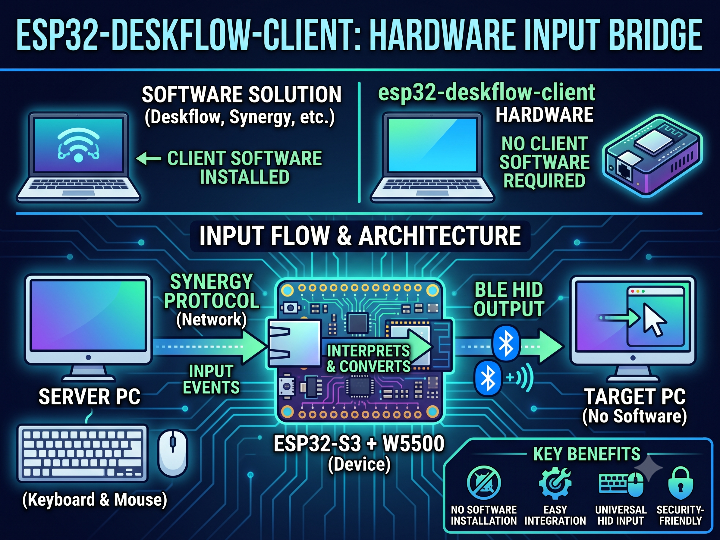
esp32-deskflow-client는 하나의 키보드와 마우스를 여러 컴퓨터에서 공유하기 위한 하드웨어 입력 브리지입니다. 일반적인 Deskflow 클라이언트처럼 대상 컴퓨터에 소프트웨어를 설치하는 방식이 아니라, ESP32-S3 보드가 클라이언트 역할을 대신 수행합니다.
여기서 Deskflow, Synergy, Barrier는 모두 키보드·마우스 공유 소프트웨어 계열입니다. 보통 한 컴퓨터가 서버가 되어 실제 입력 장치를 가지고 있고, 다른 컴퓨터는 클라이언트가 되어 네트워크로 입력 이벤트를 받습니다. 사용자는 마우스를 화면 가장자리로 이동해 다른 컴퓨터를 제어할 수 있습니다.
이 프로젝트의 입력 흐름은 다음과 같습니다.
Deskflow/Synergy/Barrier 서버 → W5500 Ethernet → ESP32-S3 → BLE HID → 대상 컴퓨터
메인 PC에서 발생한 키보드·마우스 이벤트는 Synergy 프로토콜을 통해 ESP32-S3로 전달됩니다. ESP32-S3는 이 이벤트를 해석한 뒤, 대상 컴퓨터에는 Bluetooth HID 키보드·마우스 입력으로 다시 보냅니다. 대상 컴퓨터 입장에서는 네트워크 클라이언트가 아니라 일반 블루투스 키보드와 마우스가 연결된 것처럼 보입니다. 저장소 README도 이 장치를 Deskflow 서버의 입력을 Bluetooth HID로 전달하는 하드웨어 클라이언트로 설명합니다.
이 구조는 상용 데스크톱 유틸리티나 KVM 스타일 입력 브리지에 가깝습니다. 대상 PC에 Deskflow 클라이언트를 설치할 수 없거나, 보안 정책상 네트워크 클라이언트 실행이 어려운 환경에서 유용합니다. 네트워크 연결과 TCP 처리, 입력 이벤트 변환은 ESP32-S3 장치가 맡고, 대상 컴퓨터는 BLE 페어링만 처리하면 됩니다.
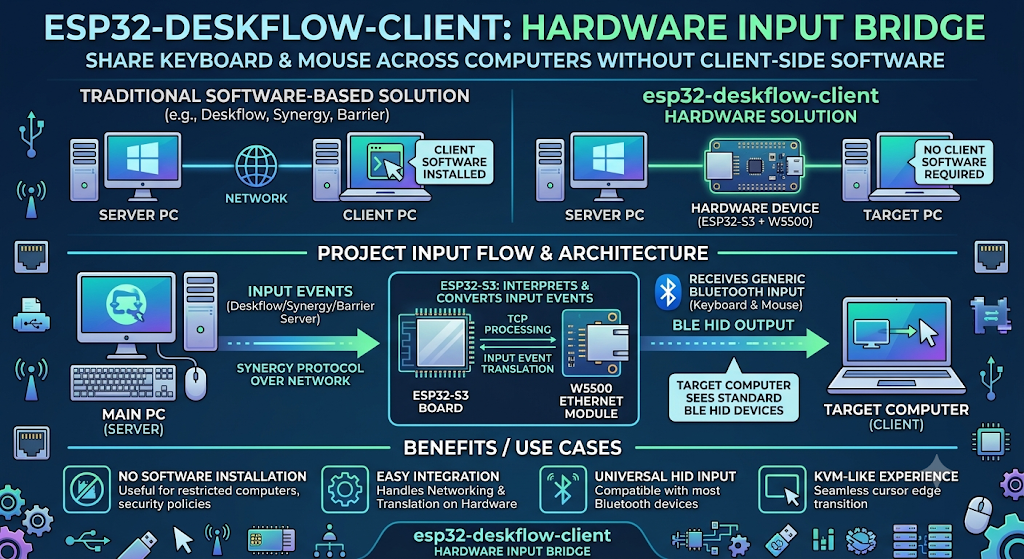
이미지 소스 : AI 생성
WIZnet이 들어가는 위치
이 프로젝트에서 사용하는 WIZnet 제품은 W5500입니다.
W5500은 ESP32-S3와 SPI로 연결되며, Deskflow 서버와 통신하는 유선 Ethernet 인터페이스 역할을 합니다. BLE는 대상 컴퓨터와의 입력 장치 연결을 담당하고, W5500은 Deskflow 서버와의 TCP 연결을 담당합니다.
구조를 나누면 다음과 같습니다.
- W5500: Deskflow 서버와 TCP 연결
- ESP32-S3: Synergy 프로토콜 처리 및 입력 이벤트 변환
- BLE HID: 대상 컴퓨터에 키보드·마우스 입력 전달
W5500이 적합한 이유는 입력 브리지의 특성과 관련이 있습니다. 키보드와 마우스 이벤트는 짧은 데이터이지만 끊김과 지연 변동에 민감합니다. Wi-Fi는 배선이 줄어드는 장점이 있지만, 입력 장치에서는 순간적인 재연결이나 지연 변화도 바로 체감됩니다. W5500 기반 유선 Ethernet은 Deskflow 서버와 ESP32-S3 사이의 입력 경로를 더 예측 가능하게 만듭니다.
또한 W5500은 하드웨어 TCP/IP 스택, 최대 80 MHz SPI, 10/100 Ethernet MAC/PHY, 8개 독립 소켓, 32 KB 내부 TX/RX 버퍼를 제공합니다. 이 덕분에 ESP32-S3는 네트워크 스택 자체보다 BLE HID 처리와 Synergy 이벤트 변환에 집중할 수 있습니다.
구현 노트
W5500 핀 설정은 include/config.h에 정의되어 있습니다. 다른 ESP32-S3 보드로 이식할 때 가장 먼저 확인해야 하는 파일입니다. 기본 설정은 SCK 13, MISO 12, MOSI 11, CS 14, INT 10, RST 9입니다.
// include/config.h
#define W5500_SCK_PIN 13
#define W5500_MISO_PIN 12
#define W5500_MOSI_PIN 11
#define W5500_CS_PIN 14
#define W5500_INT_PIN 10
#define W5500_RST_PIN 9
W5500 초기화는 src/ethernet_setup.cpp에서 처리합니다. 코드는 ESP32의 MAC 주소를 읽고, W5500용 SPI를 시작한 뒤 Ethernet.init()으로 CS 핀을 지정합니다. 이후 DHCP를 시도하고, 실패하면 fallback IP를 사용합니다.
// src/ethernet_setup.cpp
SPI.begin(W5500_SCK_PIN, W5500_MISO_PIN, W5500_MOSI_PIN, W5500_CS_PIN);
Ethernet.init(W5500_CS_PIN);
_started = Ethernet.begin(_mac, 15000, 4000) != 0;
Deskflow 서버와의 TCP 연결은 src/deskflow_server.cpp에서 EthernetClient로 처리됩니다. 기본 포트는 24800이며, tcp://, synergy://, deskflow:// 접두사를 제거한 뒤 host와 port를 파싱합니다. 연결된 TCP 스트림은 Synergy 프로토콜 처리기로 전달됩니다.
// src/deskflow_server.cpp
static EthernetClient _remoteClient;
static uint16_t _remotePort = 24800;

if (_remoteClient.connect(_remoteHost.c_str(), _remotePort)) {
  web_ui::log("TCP connected");
}
Synergy 프로토콜 계층은 src/synergy_protocol.cpp에서 TCP 스트림을 읽고, 초기 hello 메시지와 입력 패킷을 처리합니다. 이 계층은 Deskflow/Synergy/Barrier 서버에서 들어온 명령을 키보드와 마우스 이벤트로 해석하는 중간 계층입니다.
BLE HID 브리지는 src/ble_hid.cpp에 구현되어 있습니다. 키보드 입력은 Keyboard.press()와 Keyboard.release()로 처리되고, 마우스 버튼은 Mouse.press()와 Mouse.release()로 처리됩니다. 마우스 이동은 누적 후 일정 간격으로 전송해 BLE report가 과도하게 발생하지 않도록 되어 있습니다.
// src/ble_hid.cpp
if (down) Keyboard.press(key);
else Keyboard.release(key);
SimpleIPMI와의 비교
https://maker.wiznet.io/Lihan__/projects/simpleipmi/
esp32-deskflow-client와 SimpleIPMI는 모두 ESP32-S3와 W5500을 사용해 네트워크 입력을 대상 장치의 HID 입력으로 변환한다는 점에서 유사합니다. 하지만 목적과 연결 방식은 다릅니다. esp32-deskflow-client는 Deskflow 입력을 BLE HID로 전달하는 데스크톱 입력 공유 브리지이고, SimpleIPMI는 서버 관리를 위한 KVM-over-IP/IPMI 대체 장치에 가깝습니다.
유사점
| 항목 | 공통점 |
|---|---|
| 기본 구조 | 두 프로젝트 모두 네트워크로 입력 명령을 받고, 대상 장치에는 키보드·마우스 HID 입력으로 전달합니다. |
| MCU 플랫폼 | ESP32-S3를 중심으로 네트워크 처리, 입력 변환, 장치 제어 로직을 수행합니다. |
| WIZnet 제품 | W5500을 사용해 유선 Ethernet 연결을 제공합니다. |
| W5500의 역할 | Wi-Fi 대신 안정적인 LAN 연결을 제공하고, 입력 제어 경로의 지연 변동과 재연결 위험을 줄이는 역할을 합니다. |
| 대상 장치 요구사항 | 대상 컴퓨터에 별도 제어 클라이언트 소프트웨어를 설치하지 않아도 됩니다. |
| HID 개념 | 대상 장치는 입력을 일반 키보드·마우스 입력처럼 받아들입니다. |
| 활용 분야 | 원격 제어보다는 “입력 장치 브리지” 또는 “KVM 스타일 제어 장치”에 가깝습니다. |
차이점
| 항목 | esp32-deskflow-client | SimpleIPMI |
|---|---|---|
| 주 목적 | Deskflow/Synergy/Barrier 서버의 입력을 대상 PC에 전달하는 데스크톱 입력 공유 브리지 | 서버나 장비를 브라우저에서 제어하기 위한 KVM-over-IP/IPMI 대체 장치 |
| 입력 소스 | Deskflow 서버에서 발생한 키보드·마우스 이벤트 | 웹 UI 또는 브라우저 기반 제어 인터페이스 |
| 네트워크 프로토콜 | Deskflow/Synergy 계열 TCP 입력 이벤트 처리 | Web UI/WebSocket 기반 제어 명령 처리 |
| 대상 장치 연결 | Bluetooth HID | USB HID |
| 사용 상황 | 대상 PC에 Deskflow 클라이언트를 설치할 수 없을 때 입력만 전달 | 서버 장애 대응, BIOS 접근, 원격 전원·리셋 제어가 필요할 때 사용 |
| 화면 전송 | 없음. 사용자가 대상 화면을 직접 보고 있어야 함 | 구성에 따라 영상 캡처 기반 KVM 확장이 가능 |
| 전원 제어 | 없음 | 전원 버튼, 리셋 버튼 제어를 포함할 수 있음 |
| 사용자 인터페이스 | 상태 확인, 네트워크 설정, Deskflow 서버 설정 중심 | 원격 제어 콘솔에 가까운 관리 UI |
| 성격 | Commercial desktop utility / 입력 공유 장치 | 서버 관리용 KVM-over-IP 장치 |
| 핵심 장점 | 기존 Deskflow 입력 흐름을 BLE HID로 변환해 대상 PC 설치 부담을 줄임 | 저비용으로 서버 관리용 KVM/IPMI 기능을 구현할 수 있음 |
실전 팁 / 주의점
- W5500 핀맵은 보드마다 다를 수 있습니다. 다른 ESP32-S3 보드에서는
include/config.h의 SPI 핀부터 확인해야 합니다. - Deskflow 서버의 TLS/SSL 설정은 비활성화해야 합니다. README는 ESP32 W5500 구성이 TLS를 지원하지 않는다고 안내합니다.
- DHCP가 실패하면 fallback IP가 사용됩니다. 초기 테스트에서는 시리얼 로그로 실제 IP를 확인하는 것이 좋습니다.
- BLE HID 장치는 대상 컴퓨터와 별도로 페어링해야 합니다. 대상 PC에서는 일반 블루투스 키보드·마우스로 인식됩니다.
- “W5500: No hardware detected” 유형의 문제는 Deskflow 설정이 아니라 SPI 배선, CS 핀, 전원, 리셋 라인을 먼저 확인해야 합니다.
- 마우스 이동은 Synergy의 절대 좌표를 BLE HID의 상대 이동으로 변환하는 구조입니다. 첫 이동에서 위치가 튄다면 좌표 변환 로직과 마지막 마우스 위치 갱신 코드를 확인해야 합니다.
FAQ
Q: 왜 W5500을 사용하나요?
A: Deskflow 입력 브리지는 안정적인 TCP 연결이 중요합니다. W5500은 하드웨어 TCP/IP 스택과 유선 Ethernet PHY를 제공하므로, ESP32-S3가 BLE HID 처리와 입력 이벤트 변환에 더 집중할 수 있습니다.
Q: ESP32-S3와 W5500은 어떻게 연결되나요?
A: SPI로 연결됩니다. 이 프로젝트의 기본 설정은 SCK GPIO 13, MISO GPIO 12, MOSI GPIO 11, CS GPIO 14입니다. INT와 RST 핀도 보드 설정에 맞게 확인해야 합니다.
Q: W5500은 이 프로젝트에서 어떤 역할을 하나요?
A: Deskflow/Synergy/Barrier 서버와 연결되는 유선 TCP 네트워크 인터페이스입니다. W5500을 통해 받은 입력 이벤트는 ESP32-S3에서 처리된 뒤 BLE HID로 대상 컴퓨터에 전달됩니다.
Q: 초보자도 따라 할 수 있나요?
A: ESP32와 PlatformIO 사용 경험이 있다면 따라갈 수 있습니다. 다만 W5500 SPI 핀 설정, Deskflow 서버 설정, TLS/SSL 비활성화, BLE 페어링까지 함께 이해해야 하므로 단순 BLE 예제보다는 난도가 있습니다.
Q: Wi-Fi 기반 입력 브리지와 비교하면 어떤 차이가 있나요?
A: Wi-Fi는 설치가 간단하지만 입력 장치에서는 지연 변동과 재연결이 사용성에 바로 영향을 줍니다. W5500 기반 유선 Ethernet은 케이블이 필요하지만, KVM 스타일 입력 브리지처럼 안정적인 입력 경로가 중요한 구조에 더 적합합니다.
Project Overview
esp32-deskflow-client is a hardware input bridge for sharing a single keyboard and mouse across multiple computers. Instead of installing a typical Deskflow client on the target computer, an ESP32-S3 board performs the client role on its behalf.
Here, Deskflow, Synergy, and Barrier refer to a family of keyboard and mouse sharing software. Typically, one computer acts as the server and owns the physical input devices, while other computers act as clients and receive input events over the network. The user can control another computer by moving the mouse cursor to the edge of the screen.
The input flow of this project is as follows.
Deskflow/Synergy/Barrier server → W5500 Ethernet → ESP32-S3 → BLE HID → target computer
Keyboard and mouse events generated on the main PC are delivered to the ESP32-S3 through the Synergy protocol. The ESP32-S3 interprets these events and sends them again to the target computer as Bluetooth HID keyboard and mouse input. From the target computer’s perspective, it looks as if a normal Bluetooth keyboard and mouse are connected, not a network client. The repository README also describes this device as a hardware client that forwards input from a Deskflow server to Bluetooth HID.
This structure is closer to a commercial desktop utility or a KVM-style input bridge. It is useful when a Deskflow client cannot be installed on the target PC, or when security policies make it difficult to run a network client. Network connectivity, TCP processing, and input event conversion are handled by the ESP32-S3 device, while the target computer only needs to handle BLE pairing.
Image source: AI-generated
Where WIZnet Fits
The WIZnet product used in this project is the W5500.
The W5500 is connected to the ESP32-S3 over SPI and acts as the wired Ethernet interface for communication with the Deskflow server. BLE handles the input-device connection to the target computer, while the W5500 handles the TCP connection to the Deskflow server.
The structure can be divided as follows.
- W5500: TCP connection to the Deskflow server
- ESP32-S3: Synergy protocol handling and input event conversion
- BLE HID: Keyboard and mouse input delivery to the target computer
The reason the W5500 fits this project is related to the nature of an input bridge. Keyboard and mouse events are small data packets, but they are sensitive to interruptions and latency variation. Wi-Fi reduces wiring, but with input devices, even a short reconnection or latency change can be felt immediately. W5500-based wired Ethernet makes the input path between the Deskflow server and the ESP32-S3 more predictable.
The W5500 also provides a hardware TCP/IP stack, up to 80 MHz SPI, a 10/100 Ethernet MAC/PHY, 8 independent sockets, and a 32 KB internal TX/RX buffer. This allows the ESP32-S3 to focus more on BLE HID handling and Synergy event conversion instead of the network stack itself.
Implementation Notes
The W5500 pin configuration is defined in include/config.h. This is the first file to check when porting the project to another ESP32-S3 board. The default configuration is SCK 13, MISO 12, MOSI 11, CS 14, INT 10, and RST 9.
// include/config.h
#define W5500_SCK_PIN 13
#define W5500_MISO_PIN 12
#define W5500_MOSI_PIN 11
#define W5500_CS_PIN 14
#define W5500_INT_PIN 10
#define W5500_RST_PIN 9
W5500 initialization is handled in src/ethernet_setup.cpp. The code reads the ESP32 MAC address, starts SPI for the W5500, and assigns the CS pin with Ethernet.init(). It then attempts DHCP and uses a fallback IP if DHCP fails.
// src/ethernet_setup.cpp
SPI.begin(W5500_SCK_PIN, W5500_MISO_PIN, W5500_MOSI_PIN, W5500_CS_PIN);
Ethernet.init(W5500_CS_PIN);
_started = Ethernet.begin(_mac, 15000, 4000) != 0;
The TCP connection to the Deskflow server is handled with EthernetClient in src/deskflow_server.cpp. The default port is 24800. The code removes prefixes such as tcp://, synergy://, and deskflow://, then parses the host and port. The connected TCP stream is passed to the Synergy protocol handler.
// src/deskflow_server.cpp
static EthernetClient _remoteClient;
static uint16_t _remotePort = 24800;

if (_remoteClient.connect(_remoteHost.c_str(), _remotePort)) {
  web_ui::log("TCP connected");
}
The Synergy protocol layer reads the TCP stream in src/synergy_protocol.cpp and processes the initial hello message and input packets. This layer acts as an intermediate layer that interprets commands from the Deskflow/Synergy/Barrier server as keyboard and mouse events.
The BLE HID bridge is implemented in src/ble_hid.cpp. Keyboard input is handled with Keyboard.press() and Keyboard.release(), while mouse buttons are handled with Mouse.press() and Mouse.release(). Mouse movement is accumulated and sent at fixed intervals to prevent excessive BLE reports.
// src/ble_hid.cpp
if (down) Keyboard.press(key);
else Keyboard.release(key);
Comparison with SimpleIPMI
https://maker.wiznet.io/Lihan__/projects/simpleipmi/
esp32-deskflow-client and SimpleIPMI are similar in that both use the ESP32-S3 and W5500 to convert network input into HID input for a target device. However, their purpose and connection method are different. esp32-deskflow-client is a desktop input-sharing bridge that forwards Deskflow input to BLE HID, while SimpleIPMI is closer to a KVM-over-IP/IPMI replacement device for server management.
Similarities
| Item | Common Point |
|---|---|
| Basic structure | Both projects receive input commands over the network and deliver them to the target device as keyboard and mouse HID input. |
| MCU platform | Both use the ESP32-S3 to handle network processing, input conversion, and device control logic. |
| WIZnet product | Both use the W5500 to provide wired Ethernet connectivity. |
| Role of the W5500 | The W5500 provides a stable LAN connection instead of Wi-Fi and helps reduce latency variation and reconnection risk in the input control path. |
| Target device requirements | The target computer does not need a separate control client installed. |
| HID concept | The target device receives input as normal keyboard and mouse input. |
| Application area | Both are closer to an “input device bridge” or “KVM-style control device” than conventional remote control software. |
Differences
| Item | esp32-deskflow-client | SimpleIPMI |
|---|---|---|
| Main purpose | A desktop input-sharing bridge that delivers Deskflow/Synergy/Barrier server input to a target PC. | A KVM-over-IP/IPMI replacement device for controlling servers or equipment through a browser. |
| Input source | Keyboard and mouse events generated by the Deskflow server. | Web UI or browser-based control interface. |
| Network protocol | Deskflow/Synergy-style TCP input event handling. | Web UI/WebSocket-based control command handling. |
| Target device connection | Bluetooth HID. | USB HID. |
| Usage scenario | Used when only input needs to be delivered and a Deskflow client cannot be installed on the target PC. | Used for server failure response, BIOS access, and remote power/reset control. |
| Video transmission | None. The user must directly view the target screen. | Depending on the configuration, video-capture-based KVM expansion is possible. |
| Power control | None. | May include power button and reset button control. |
| User interface | Focused on status monitoring, network settings, and Deskflow server configuration. | A management UI closer to a remote control console. |
| Character | Commercial desktop utility / input-sharing device. | KVM-over-IP device for server management. |
| Key advantage | Converts the existing Deskflow input flow into BLE HID, reducing the installation burden on the target PC. | Enables low-cost KVM/IPMI functionality for server management. |
Practical Tips and Pitfalls
- The W5500 pin map may vary by board. On another ESP32-S3 board, check the SPI pins in
include/config.hfirst. - TLS/SSL must be disabled on the Deskflow server. The README states that the ESP32 W5500 configuration does not support TLS.
- If DHCP fails, a fallback IP is used. During initial testing, it is better to check the actual IP through the serial log.
- The BLE HID device must be paired separately with the target computer. On the target PC, it appears as a normal Bluetooth keyboard and mouse.
- A “W5500: No hardware detected” type of issue is not a Deskflow configuration problem. Check the SPI wiring, CS pin, power, and reset line first.
- Mouse movement converts Synergy absolute coordinates into BLE HID relative movement. If the cursor jumps on the first movement, check the coordinate conversion logic and the last mouse position update code.
FAQ
Q: Why use the W5500?
A: A Deskflow input bridge requires a stable TCP connection. The W5500 provides a hardware TCP/IP stack and wired Ethernet PHY, allowing the ESP32-S3 to focus more on BLE HID handling and input event conversion.
Q: How is the W5500 connected to the ESP32-S3?
A: It is connected over SPI. The default configuration in this project uses SCK GPIO 13, MISO GPIO 12, MOSI GPIO 11, and CS GPIO 14. The INT and RST pins should also be checked according to the board configuration.
Q: What role does the W5500 play in this project?
A: It acts as the wired TCP network interface connected to the Deskflow/Synergy/Barrier server. Input events received through the W5500 are processed by the ESP32-S3 and then delivered to the target computer through BLE HID.
Q: Can beginners follow this project?
A: It is manageable if you have experience with ESP32 and PlatformIO. However, it is more difficult than a simple BLE example because you need to understand W5500 SPI pin configuration, Deskflow server setup, TLS/SSL disabling, and BLE pairing.
Q: How is it different from a Wi-Fi-based input bridge?
A: Wi-Fi is easier to install, but with input devices, latency variation and reconnection directly affect usability. W5500-based wired Ethernet requires a cable, but it is more suitable for a KVM-style input bridge where a stable input path is important.
-
Github Code


