


esp32-12ch-eth
esp32-12ch-eth

WIZnet - W5500
x 1


Espressif - ESP32
x 1
What the Project Does
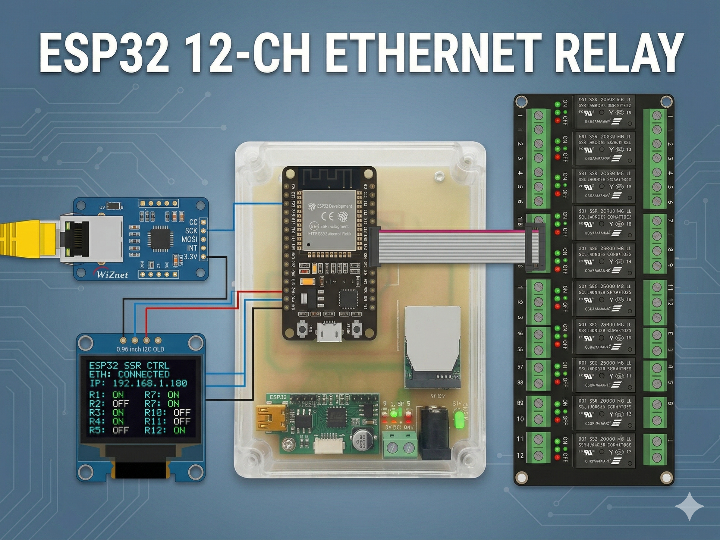
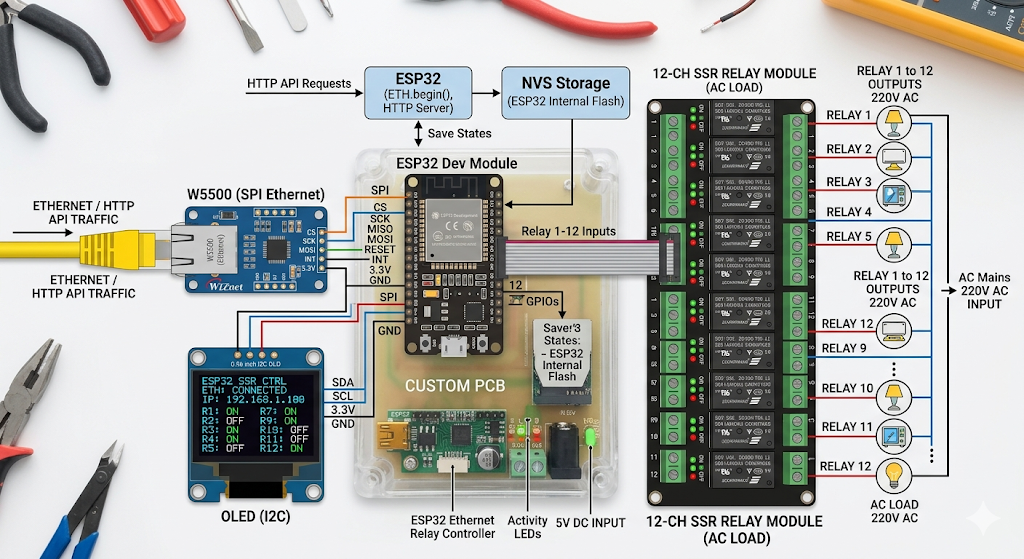
이 시스템은 산업용 패널이나 설비 제어 노드에 맞는 12채널 SSR 스위칭 장치입니다. 외부 HTTP 요청이 W5500 Ethernet 링크를 통해 ESP32로 들어오면, 펌웨어는 Bearer 키를 확인하고 특정 채널을 ON/OFF 하거나 전체 상태를 JSON으로 반환합니다. OLED는 네트워크 상태와 현재 릴레이 상태를 현장에서 바로 보여주는 로컬 HMI 역할을 합니다.
이미지 출처 : AI 생성
SSR과 일반 릴레이는 무엇이 다른가
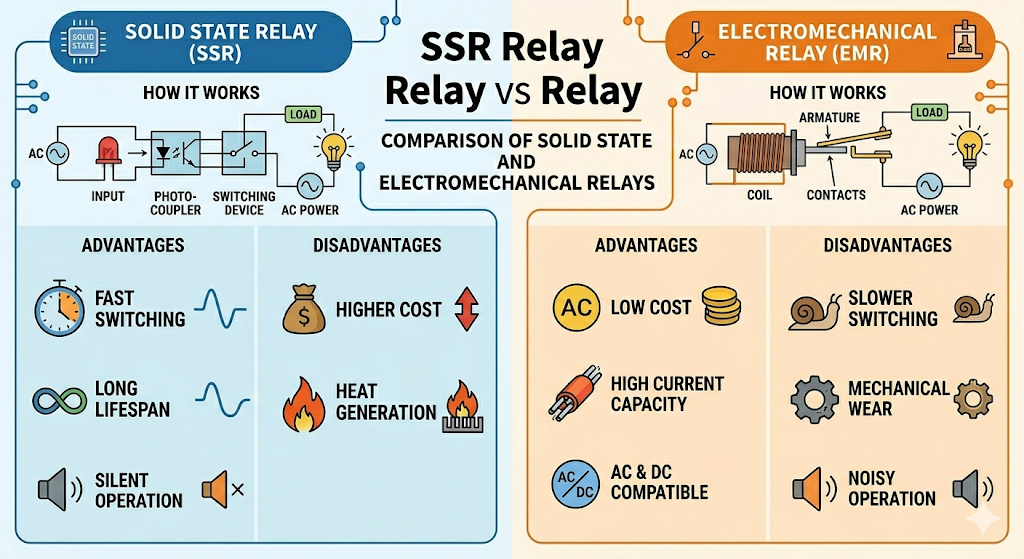
SSR은 기계식 접점 대신 반도체로 부하를 스위칭합니다. 그래서 소음이 거의 없고, 접점 마모가 없으며, 반복 제어에 유리합니다. 여러 채널을 자주 켜고 끄는 패널형 제어 시스템에 잘 맞습니다.
일반 릴레이는 물리 접점을 열고 닫는 방식이라 완전 차단에 유리하고 구조도 직관적입니다. 대신 접점 마모, 바운스, 소음, 수명 제한이 있습니다. 제어 횟수가 많아질수록 이런 차이가 커집니다.
이 프로젝트에서는 SSR이 더 자연스럽습니다. 12채널을 네트워크로 원격 제어하고, 장기간 반복 동작이 예상되기 때문입니다. 다만 SSR은 누설 전류와 발열을 고려해야 하고, AC용과 DC용을 구분해야 합니다.
이미지 출처 : AI 생성
Where WIZnet Fits
이 프로젝트에서 WIZnet 부품은 W5500입니다. ESP32의 GPIO19, GPIO23, GPIO18, GPIO5, GPIO4가 각각 W5500의 MISO, MOSI, SCK, CS, INT에 연결됩니다. W5500은 원격 API 제어를 위한 유선 Ethernet 경로를 담당합니다.
OLED는 상태 표시 장치입니다. 네트워크 연결 상태와 릴레이 상태를 현장에서 바로 확인할 수 있게 해 줍니다. 구조적으로 보면 W5500은 통신 경로이고, OLED는 상태 가시화 계층입니다. Industrial IoT 환경에서는 이 조합이 실용적입니다. 노트북 없이도 패널 앞에서 장치 상태를 바로 확인할 수 있기 때문입니다.
Implementation Notes
첫 번째 핵심은 OLED 초기화입니다. 이 프로젝트는 Adafruit_SSD1306를 사용하고, display.begin(SSD1306_SWITCHCAPVCC, 0x3C)로 0.96인치 I2C OLED를 초기화합니다. 초기화에 실패하면 for(;;);로 정지하므로, OLED는 선택 기능이 아니라 운영 상태 확인용 핵심 인터페이스에 가깝습니다. 부팅 후에는 로고를 표시하고, Ethernet 연결 대기, 연결 실패, 연결 성공 메시지를 순서대로 보여줍니다.
두 번째 핵심은 OLED 표시 방식입니다. updateOrelay(IPAddress ip) 함수는 화면 상단에 IP 주소를 표시하고, 하단에는 12개 릴레이를 6열 2행 그리드로 그립니다. ON은 채워진 사각형, OFF는 빈 사각형으로 표시합니다. 저장된 상태를 복원한 뒤에도 화면을 갱신하고, 릴레이 상태가 바뀔 때마다 다시 그립니다. 즉 OLED는 현재 운전 상태를 계속 반영하는 실시간 상태 패널입니다.
세 번째는 성능 트레이드오프입니다. 이 시스템의 체감 응답성은 W5500 자체보다 동기식 요청 처리, NVS 쓰기, OLED 전체 재그리기에 더 영향을 받습니다. 다만 OLED는 짧은 텍스트와 12개 사각형을 다시 그리는 수준이라 부담이 크지 않습니다. 실제로는 상태 변경 때마다 Preferences에 기록하는 쪽이 더 무겁습니다. 이 프로젝트에서 OLED는 병목이라기보다 유지보수성을 높이는 작은 비용의 표시 계층에 가깝습니다.
Practical Tips / Pitfalls
- OLED가
0x3C주소로 초기화되므로, 화면이 안 나오면 먼저 I2C 주소와 SDA/SCL 배선을 점검하는 편이 좋습니다. - OLED 초기화에 실패하면 시스템이 멈추므로, 현장 배포 전 표시부 연결 상태를 먼저 확인해야 합니다.
- 부팅 로고와 상태 메시지 덕분에 Serial 콘솔 없이도 링크 대기, 실패, 성공 상태를 바로 구분할 수 있습니다.
- 릴레이 상태는 OLED에 번호와 함께 표시되므로, 외함 라벨과 채널 번호를 맞춰 두는 편이 안전합니다.
- SSR은 반복 제어와 무음 동작에 유리하지만, 누설 전류와 발열은 반드시 고려해야 합니다.
- 상태 변경 때마다 OLED를 다시 그리므로, 빠른 연속 토글 시험에서는 저장 지연과 표시 지연이 함께 보일 수 있습니다.
- OLED 없이 배포하려면 코드 수정이 필요합니다. 현재 구현은 OLED 실패를 허용하지 않습니다.
FAQ
Q1. 왜 이 프로젝트에 W5500이 적합한가요?
W5500은 ESP32에 SPI로 쉽게 연결할 수 있는 유선 Ethernet 칩입니다. 이 프로젝트에서는 HTTP 기반 릴레이 제어 요청이 들어오는 안정적인 통신 경로를 제공합니다. 산업 제어 노드처럼 고정 설치되는 장비에 잘 맞습니다.
Q2. OLED는 이 프로젝트에서 어떤 역할을 하나요?
OLED는 로컬 상태 패널입니다. 부팅 로고, Ethernet 연결 상태, IP 주소, 12개 릴레이의 ON/OFF 상태를 표시합니다. 그래서 API를 직접 호출하지 않아도 장비 앞에서 현재 상태를 바로 확인할 수 있습니다.
Q3. OLED는 ESP32에 어떻게 연결되나요?
이 프로젝트는 0.96인치 I2C OLED를 사용합니다. 코드에서는 Adafruit_SSD1306와 Wire를 사용하고 주소 0x3C로 초기화합니다. 즉 OLED는 I2C로 연결되고, W5500은 SPI로 연결됩니다.
Q4. OLED가 성능에 미치는 영향은 큰가요?
크지 않습니다. 화면에 텍스트와 12개 사각형을 다시 그리는 정도이기 때문입니다. 더 큰 비용은 요청 파싱과 Preferences 저장입니다. OLED는 성능 병목보다 유지보수 편의성에 더 큰 의미가 있습니다.
Q5. 초보자도 OLED까지 포함해 따라 할 수 있나요?
완전 초보보다는 중급 입문자에게 더 적합합니다. W5500 SPI 배선, OLED I2C 연결, 정적 IP 설정, HTTP 요청 형식, NVS 저장, SSR 부하 제어를 함께 이해해야 하기 때문입니다. 다만 OLED 덕분에 조립 후 상태 확인은 더 쉬워집니다.
What the Project Does
This system is a 12-channel SSR switching unit designed for industrial panels or equipment control nodes. When an external HTTP request reaches the ESP32 through the W5500 Ethernet link, the firmware checks the Bearer key, turns a specific channel ON or OFF, or returns the full status in JSON format. Relay states and the authentication key are stored in Preferences, so they remain available after a reboot. The OLED acts as a local HMI that shows the network status and current relay states directly on site.
Image source: AI-generated
How Is SSR Different from a Mechanical Relay?
An SSR switches loads using semiconductor devices instead of mechanical contacts. As a result, it operates almost silently, has no contact wear, and is better suited for repeated switching. That makes it a good fit for panel-based control systems where multiple channels are turned on and off frequently.
A mechanical relay opens and closes physical contacts, so it is better suited for complete disconnection and is easier to understand structurally. However, it also comes with contact wear, bounce, noise, and limited service life. These differences become more noticeable as the switching frequency increases.
In this project, SSR is the more natural choice. The system remotely controls 12 channels over the network and is expected to run repetitive operations for long periods. That said, SSRs require attention to leakage current and heat dissipation, and AC and DC types must be selected correctly.
Image source: AI-generated
Where WIZnet Fits
The WIZnet component used in this project is the W5500. The ESP32’s GPIO19, GPIO23, GPIO18, GPIO5, and GPIO4 are connected to the W5500’s MISO, MOSI, SCK, CS, and INT pins, respectively. The W5500 provides the wired Ethernet path for remote API-based control.
The OLED serves as the status display. It allows users to check the network connection and relay states directly on site. Structurally, the W5500 is the communication path, while the OLED is the status visualization layer. This combination is practical in Industrial IoT environments because the device state can be checked right in front of the panel without a laptop.
Implementation Notes
The first key point is OLED initialization. This project uses Adafruit_SSD1306 and initializes the 0.96-inch I2C OLED with display.begin(SSD1306_SWITCHCAPVCC, 0x3C). If initialization fails, the system stops with for(;;);, which means the OLED is treated less as an optional feature and more as a core interface for operational visibility. After boot, it shows a logo first, then displays messages for Ethernet waiting, connection failure, and connection success in sequence.
The second key point is how the OLED presents information. The updateOrelay(IPAddress ip) function displays the IP address at the top of the screen and draws the 12 relays in a 6-column by 2-row grid at the bottom. ON states are shown as filled rectangles, while OFF states are shown as empty rectangles. The display is updated after restoring the saved relay states and redrawn whenever a relay state changes. In other words, the OLED works as a real-time status panel that continuously reflects the current operating state.
The third point is the performance trade-off. The perceived responsiveness of this system is affected more by synchronous request handling, NVS writes, and full OLED redraws than by the W5500 itself. Even so, the OLED workload is relatively small because it only redraws short text and 12 simple rectangles. In practice, writing to Preferences on every state change is the heavier cost. In this project, the OLED is less of a bottleneck and more of a low-cost visibility layer that improves maintainability.
Practical Tips / Pitfalls
- Since the OLED is initialized at address
0x3C, check the I2C address and SDA/SCL wiring first if the screen does not display anything. - If OLED initialization fails, the system stops, so the display connection should be verified before field deployment.
- The boot logo and status messages make it possible to distinguish waiting, failure, and success states without using the Serial console.
- Relay states are shown on the OLED with channel numbers, so it is safer to match the enclosure labels with the channel numbering.
- SSRs are well suited for repeated control and silent operation, but leakage current and heat must always be considered.
- Because the OLED is redrawn on every state change, fast repeated toggle tests may reveal both storage delay and display delay.
- Deploying the system without an OLED requires code changes. The current implementation does not tolerate OLED failure.
FAQ
Q1. Why is the W5500 a good fit for this project?
The W5500 is a wired Ethernet chip that can be connected to the ESP32 easily over SPI. In this project, it provides a stable communication path for HTTP-based relay control requests. That makes it well suited for fixed-installation devices such as industrial control nodes.
Q2. What role does the OLED play in this project?
The OLED is the local status panel. It displays the boot logo, Ethernet connection status, IP address, and the ON/OFF state of all 12 relays. This allows users to check the current state directly at the device without calling the API.
Q3. How is the OLED connected to the ESP32?
This project uses a 0.96-inch I2C OLED. In the code, it is initialized with Adafruit_SSD1306 and Wire at address 0x3C. In other words, the OLED is connected over I2C, while the W5500 is connected over SPI.
Q4. Does the OLED have a major impact on performance?
Not really. It only redraws text and 12 rectangles on the screen. The bigger cost comes from request parsing and saving data to Preferences. The OLED matters more for maintainability and operational visibility than for performance impact.
Q5. Can beginners follow this project, including the OLED part?
It is more suitable for intermediate beginners than complete beginners. That is because it requires understanding W5500 SPI wiring, OLED I2C connection, static IP setup, HTTP request format, NVS storage, and SSR load control together. Still, the OLED makes post-assembly status checking easier.
-
Github Code


