


DryNoMore
DryNoMore


WIZnet - W5500
x 1

What the Project Does
이 프로젝트는 Arduino Nano를 중심으로 토양 수분 센서 6채널, 물탱크 수위 센서 2채널, 펌프 출력, 시프트 레지스터 기반 전원 제어, 그리고 외부 서버 연동을 묶은 자동 관수 시스템이다. 저장소 설명 자체가 self hosted Telegram Bot을 통해 상태 업데이트를 받고 설정을 수정할 수 있다고 밝히고 있고, 실제 설정 파일에서도 Telegram Bot 쪽이 Arduino와 같은 TCP 포트를 공유하도록 설계되어 있다. 즉, 현장 노드는 센서를 읽고 관수를 수행하는 엣지 컨트롤러이고, 서버 측은 설정 저장과 사용자 알림을 맡는 분리형 구조다.
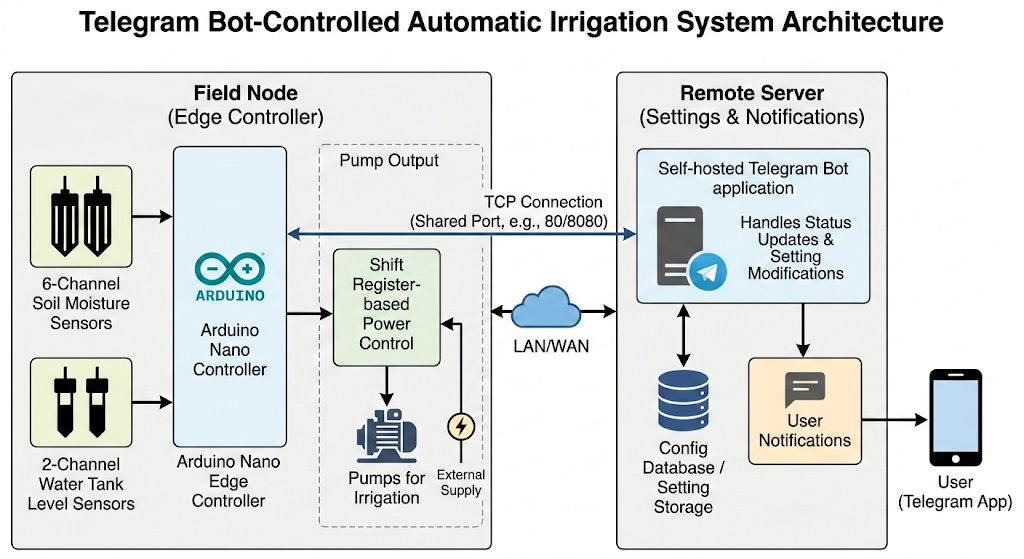
이미지 출처 : AI 생성
펌웨어 쪽에서는 생산 모드에서 먼저 Ethernet을 켜서 서버에서 설정을 가져오고, 이후 센서와 펌프를 순차적으로 구동해 각 식물의 건조 상태를 확인한 뒤 필요한 경우에만 관수를 수행한다. 관수 후 상태가 바뀌었거나 하드웨어 오류가 감지되면 다시 Ethernet을 켜서 상태, 경고, 오류 메시지를 서버로 전송하고 장시간 슬립으로 들어간다. 이 흐름은 통신을 상시 유지하지 않고 필요할 때만 깨워서 동기화하는 저전력 엣지 로봇 구조에 가깝다.
로보틱스 관점에서 보면, DryNoMore는 이동 로봇은 아니지만 분산 센서-액추에이터 노드가 네트워크를 통해 상태를 보고하고 원격으로 설정을 갱신받는 전형적인 필드 로봇 서브시스템과 유사하다. 센서 입력, 현장 의사결정, 액추에이터 구동, 상위 서버 보고가 명확히 계층화되어 있어, 소형 자동화 장치나 농업용 서비스 로봇의 주변 제어 모듈로 해석하기 좋다.
Where WIZnet Fits
이 프로젝트에서 WIZnet이 맡는 제품은 명확하게 W5500이다. 저장소의 하드웨어 섹션은 v0.2의 주요 전력 소모 원인이 W5500 Ethernet module이라고 적고 있고, v0.3에서는 이 모듈을 끄기 위한 MOSFET이 추가되었다고 기록한다. 또한 펌웨어는 USE_ETHERNET를 활성화하고 MAC, fallback IP, 서버 IP, TCP 포트를 정적으로 정의한다. 즉, W5500은 단순 부속 모듈이 아니라 시스템 아키텍처에서 원격 설정 동기화와 상태 보고를 담당하는 핵심 유선 통신 노드다.
구조적으로 보면 Arduino Nano는 센서 샘플링과 펌프 시퀀싱에 집중하고, W5500은 SPI 기반 Ethernet 인터페이스와 TCP 클라이언트 연결을 담당한다. lan.cpp에서는 DHCP를 먼저 시도하고 실패하면 fallback IP로 전환한 뒤 로컬 서버 192.168.0.42:42424에 접속한다. 이 설계는 현장 장치가 네트워크 인프라 변화에 어느 정도 대응하면서도, 서버 주소를 고정해 단순한 로컬 제어망에서 안정적으로 동작하도록 의도된 것이다.
W5500이 이 프로젝트에 잘 맞는 이유는 두 가지다. 첫째, Arduino Nano급 MCU에서는 센서 처리, 슬립 복귀, 펌프 제어, 상태 패킹만으로도 자원이 빠듯한데, W5500은 하드웨어 TCP/IP 오프로딩으로 MCU 쪽 부담을 줄여준다. 둘째, 이 프로젝트는 배터리 또는 제한된 전력 예산을 강하게 의식하고 있으며, 실제로 W5500의 전력 소모 때문에 전원 차단 MOSFET까지 추가했다. 즉, 상시 연결형 무선 장치보다 짧게 깨고, 유선으로 안정적으로 전송하고, 다시 끄는 운용 방식이 더 자연스럽다.
Implementation Notes
이 저장소는 실제로 WIZnet 사용 코드를 포함한다. 가장 중요한 부분은 네트워크 초기화와 PHY 모드 제어다. src/lan.cpp에서 W5500 PHY 설정을 직접 건드린 뒤 DHCP를 시도하고, 실패하면 fallback IP로 전환한다. 이 코드는 현장 네트워크 상황이 불안정해도 장치가 완전히 먹통이 되지 않도록 하기 위한 장치다.
W5100.writePHYCFGR_W5500(W5500_RST_LOW | W5500_OPMD | W5500_OPM_10_HALF);
if (Ethernet.begin(mac, 10 /* tries */) == 0) {
Ethernet.end();
Ethernet.begin(mac, fallbackIP, fallbackDns);
}
bool success = client.connect(serverIP, LOCAL_SERVER_PORT);
위 코드는 W5500을 10M half-duplex로 운용하도록 명시하고, DHCP 실패 시 정적 주소로 즉시 전환한 뒤 로컬 서버에 TCP 접속한다. 관수기처럼 데이터량이 낮고, 링크 품질보다 예측 가능한 동작이 더 중요한 장치에서는 이런 보수적 PHY 설정이 실용적이다. 특히 사용자용 클라우드가 아니라 로컬 서버에 붙는 구조라면 이 선택은 충분히 합리적이다.
두 번째로 중요한 부분은 W5500 전원 차단이다. README의 하드웨어 변경 이력과 config.hpp, main.cpp, lan.cpp를 같이 보면 v0.3에서 Ethernet 모듈 전원을 시프트 레지스터 비트로 제어하도록 바뀌었고, 필요할 때만 켰다가 다시 PHY power-down과 출력 차단을 수행한다. 이 코드는 W5500을 단순 통신 모듈이 아니라 필요 시에만 활성화되는 전력 도메인으로 취급한다는 점에서 의미가 크다.
#define ETH_PWR_MAPPING (static_cast<uint16_t>(1) << 8)
// src/lan.cpp
W5100.writePHYCFGR_W5500(W5500_RST_LOW | W5500_OPMD | W5500_OPM_POWER_DOWN);
shiftReg.disableOutput();
shiftReg.update(0);
shiftReg.enableOutput();
이 부분은 단순히 Ethernet.end()만 호출하는 수준이 아니라, W5500 PHY를 power-down 모드로 넣고, 시프트 레지스터를 통해 모듈 전원을 실제로 끊는 구조다. 센서 노드가 하루 종일 링크를 유지할 필요가 없는 경우, 이런 방식은 전체 에너지 예산을 줄이는 데 직접적으로 기여한다.
Practical Tips / Pitfalls
W5500을 항상 켜두는 구조로 바꾸면 이 프로젝트의 전력 설계 의도와 충돌할 수 있다. 저장소 자체가 W5500 전력 소모를 문제로 기록하고 있으므로, 저전력 운용이 목표라면 전원 차단 경로를 유지하는 편이 맞다.
SPI 배선은 단순 통신선이 아니라 전원 차단 후 핀 상태까지 고려해야 한다. lan.cpp는 전원 차단 전에 SCK, MISO, MOSI, CS를 입력 풀업으로 바꿔 역전류나 불안정 상태를 피하려고 한다.
DHCP만 믿지 말고 fallback IP를 같이 두는 편이 안전하다. 이 프로젝트도 DHCP 실패 시 정적 주소로 넘어가도록 되어 있어, 현장 로컬망에서 유지보수가 쉬워진다.
서버 포트는 Arduino 쪽 LOCAL_SERVER_PORT와 Telegram Bot 쪽 tcp_port가 반드시 맞아야 한다. 저장소 예제는 둘 다 42424를 사용한다.
센서 판독과 펌프 구동을 동시에 설계할 때는 수분 센서가 물에 직접 젖어 과도하게 높게 읽히는 순간값을 피해야 한다. main.cpp는 이를 고려해 burst 관수와 지연 후 재측정 구조를 사용한다.
로보틱스/필드 장치 관점에서는 링크가 잠깐 끊겨도 현장 제어가 멈추지 않아야 한다. 이 프로젝트도 설정 다운로드 실패와 통신 실패를 관수 루프와 분리해, 네트워크가 없어도 현장 로직은 계속 돌아가도록 구성되어 있다.
FAQ
왜 이 프로젝트에서 W5500을 써야 하나요?
Arduino Nano급 MCU에서 센서 측정, 펌프 제어, 슬립 관리, 상태 패킹을 하면서 안정적인 TCP 통신까지 모두 소프트웨어로 처리하면 설계 복잡도가 높아진다. 이 프로젝트는 실제로 Ethernet 기능을 별도 모듈로 분리하고, 필요할 때만 깨워 로컬 서버에 접속하는 구조를 택했다. W5500은 이런 구조에서 MCU 부담을 줄이면서 유선 링크를 안정적으로 제공하는 역할에 잘 맞는다.
플랫폼과는 어떻게 연결되나요?
연결 방식은 SPI다. 저장소에는 SPI가 Ethernet 연결에 필요하다고 명시되어 있고, 전원 차단 시에도 D13(SCK), D12(MISO), D11(MOSI), D10(CS)의 상태를 따로 제어한다. 즉, Arduino Nano와 W5500 사이의 핵심 인터페이스는 SPI이며, 여기에 별도의 전원 제어 비트 ETH_PWR_MAPPING가 추가되어 통신 모듈 자체를 끄고 켤 수 있게 설계됐다.
이 프로젝트 안에서 W5500은 정확히 무슨 일을 하나요?
W5500은 센서 데이터를 직접 처리하지 않는다. 그 대신 설정 동기화와 상태 보고를 위한 TCP 클라이언트 링크를 제공한다. 생산 모드에서 장치는 먼저 W5500을 켜고 서버에서 설정을 받아온 다음, 관수 루프를 수행하고, 상태가 바뀌었거나 오류가 생기면 다시 W5500을 켜서 상태·경고·오류 메시지를 전송한다. 역할이 명확하게 제어망 통신 계층으로 분리돼 있다.
초보자도 따라 할 수 있나요?
완전 초보자에게는 쉬운 편은 아니다. 이유는 단순 Ethernet 예제가 아니라, 시프트 레지스터 전원 제어, 다채널 센서 보정, 펌프 시퀀스, TCP 서버 연동, Telegram Bot 구성까지 포함하기 때문이다. 다만 PlatformIO 기반으로 빌드하고, 설정 포트가 명확히 분리돼 있어 Arduino와 SPI, 센서 캘리브레이션, 로컬 네트워크에 익숙한 사용자라면 단계적으로 따라갈 수 있다.
Wi-Fi 대신 W5500을 쓰는 것과 비교하면 어떤 차이가 있나요?
이 프로젝트 구조에서는 Wi-Fi보다 W5500이 더 자연스럽다. 이유는 현장 장치가 상시 인터넷 장치가 아니라, 짧게 깨어서 설정을 받고 상태만 밀어 넣는 저전력 유선 노드이기 때문이다. README가 W5500 전력 소모를 문제로 적을 정도로 전력 예산을 세밀하게 다루고 있지만, 그럼에도 v0.3에서 모듈 전원 차단 회로를 추가해 계속 W5500을 유지한 점은 링크 안정성과 단순한 로컬 서버 연동을 더 중요하게 봤다는 뜻으로 읽힌다. Wi-Fi는 배선은 줄일 수 있지만, 접속 복구와 무선 환경 편차를 별도로 다뤄야 한다. DryNoMore 같은 구조에서는 W5500이 더 결정론적인 선택이다.
What the Project Does
This project is an automated irrigation system built around an Arduino Nano, integrating six soil moisture sensor channels, two water tank level sensor channels, pump output control, shift-register-based power control, and external server connectivity. The repository description itself states that it uses a self-hosted Telegram Bot to receive status updates and modify settings, and the actual configuration files show that the Telegram Bot is designed to share the same TCP port as the Arduino. In other words, the field node acts as an edge controller that reads sensors and performs irrigation, while the server side handles configuration storage and user notifications in a separated architecture.
Image source: AI-generated
On the firmware side, in production mode the system first enables Ethernet and retrieves configuration data from the server. It then drives the sensors and pump in sequence, checks the dryness condition of each plant, and performs irrigation only when necessary. After watering, if the system state has changed or a hardware fault is detected, it enables Ethernet again, sends status, warning, and error messages to the server, and then enters a long sleep cycle. This flow is closer to a low-power edge robotics architecture that does not maintain communication continuously, but instead wakes the network interface only when synchronization is needed.
From a robotics perspective, DryNoMore is not a mobile robot, but it resembles a typical field robotics subsystem in which distributed sensor-actuator nodes report status over the network and receive remote configuration updates. Sensor input, on-site decision-making, actuator control, and upper-level server reporting are clearly layered, making it easy to interpret the system as a peripheral control module for compact automation devices or agricultural service robots.
Where WIZnet Fits
The WIZnet product used in this project is clearly the W5500. The hardware section of the repository notes that one of the major sources of power consumption in v0.2 was the W5500 Ethernet module, and that in v0.3 a MOSFET was added to turn that module off. The firmware also enables USE_ETHERNET and statically defines the MAC address, fallback IP, server IP, and TCP port. That means the W5500 is not just an accessory module, but a core wired communication node in the system architecture responsible for remote configuration synchronization and status reporting.
Structurally, the Arduino Nano focuses on sensor sampling and pump sequencing, while the W5500 handles the SPI-based Ethernet interface and TCP client connectivity. In lan.cpp, the firmware first attempts DHCP, and if that fails, it switches to a fallback IP before connecting to the local server at 192.168.0.42:42424. This design allows the field device to tolerate some variation in network infrastructure while still operating reliably in a simple local control network with a fixed server address.
There are two reasons why the W5500 fits this project particularly well. First, on an MCU in the Arduino Nano class, resources are already tight with sensor processing, wake-up recovery, pump control, and status packaging alone, and the W5500 reduces the burden on the MCU by offloading the TCP/IP stack in hardware. Second, this project is strongly designed around battery operation or a restricted power budget, and the developers went as far as adding a power-cutoff MOSFET because of the W5500’s power consumption. In other words, compared with an always-connected wireless device, a model that wakes briefly, transmits reliably over wired Ethernet, and then powers down again is a more natural fit here.
Implementation Notes
This repository includes actual WIZnet-related code. The most important part is the network initialization and PHY mode control. In src/lan.cpp, the code directly modifies the W5500 PHY configuration, then attempts DHCP, and falls back to a predefined IP address if DHCP fails. This is designed to keep the device from becoming completely unreachable even if the local network environment is unstable.
W5100.writePHYCFGR_W5500(W5500_RST_LOW | W5500_OPMD | W5500_OPM_10_HALF);
if (Ethernet.begin(mac, 10 /* tries */) == 0) {
Ethernet.end();
Ethernet.begin(mac, fallbackIP, fallbackDns);
}
bool success = client.connect(serverIP, LOCAL_SERVER_PORT);
This code explicitly configures the W5500 to operate in 10M half-duplex mode, then immediately switches to a static IP configuration if DHCP fails, and finally opens a TCP connection to the local server. For a device such as an irrigation controller, where the data rate is low and predictable behavior matters more than peak link performance, this conservative PHY configuration is practical. It is especially reasonable in a design that connects to a local server rather than a public cloud service.
The second important part is W5500 power shutdown. Looking at the hardware revision history in the README together with config.hpp, main.cpp, and lan.cpp, version 0.3 changed the design so that Ethernet module power is controlled through a shift-register bit, allowing the module to be enabled only when needed and then returned to PHY power-down with its output cut off afterward. This is significant because it treats the W5500 not simply as a communication peripheral, but as a power domain that is activated only on demand.
#define ETH_PWR_MAPPING (static_cast<uint16_t>(1) << 8)
// src/lan.cpp
W5100.writePHYCFGR_W5500(W5500_RST_LOW | W5500_OPMD | W5500_OPM_POWER_DOWN);
shiftReg.disableOutput();
shiftReg.update(0);
shiftReg.enableOutput();
This goes beyond simply calling Ethernet.end(). The design puts the W5500 PHY into power-down mode and physically cuts module power through the shift register. When a sensor node does not need to maintain a live link all day, this approach directly contributes to reducing the overall energy budget.
Practical Tips / Pitfalls
Changing the design so that the W5500 remains powered all the time may conflict with the project’s intended power architecture. Since the repository itself identifies W5500 power consumption as a problem, keeping the power-cutoff path is the better option when low-power operation is a goal.
SPI wiring should not be treated as simple communication lines alone. Pin states after power shutdown also matter. In lan.cpp, the firmware changes SCK, MISO, MOSI, and CS to input pull-up mode before cutting power in order to avoid reverse current or unstable behavior.
Do not rely entirely on DHCP. Keeping a fallback IP is safer. This project also switches to a static address when DHCP fails, which makes maintenance easier on a local field network.
The server port on the Arduino side, LOCAL_SERVER_PORT, must match the tcp_port used by the Telegram Bot side. The repository example uses 42424 for both.
When designing sensor reading and pump control together, avoid reacting to transient moisture values caused by the sensor being directly wetted during watering. main.cpp addresses this by using burst irrigation followed by a delay and re-measurement.
From a robotics or field-device perspective, temporary network loss should not stop local control. This project also separates configuration download and communication failures from the irrigation loop, so the field logic can continue operating even without network connectivity.
FAQ
Why use the W5500 in this project?
On an Arduino Nano class MCU, handling sensor measurement, pump control, sleep management, status packaging, and reliable TCP communication entirely in software would significantly increase design complexity. This project explicitly separates Ethernet into a dedicated module and only wakes it when it needs to connect to the local server. The W5500 is a good fit for that structure because it reduces the processing burden on the MCU while providing stable wired connectivity.
How does it connect to the platform?
The connection method is SPI. The repository explicitly states that SPI is required for Ethernet connectivity, and even during power shutdown it separately manages the states of D13 (SCK), D12 (MISO), D11 (MOSI), and D10 (CS). In other words, the core interface between the Arduino Nano and the W5500 is SPI, with an additional power-control bit, ETH_PWR_MAPPING, used to switch the communication module itself on and off.
What exactly does the W5500 do in this project?
The W5500 does not process sensor data directly. Instead, it provides the TCP client link used for configuration synchronization and status reporting. In production mode, the device first powers up the W5500 and retrieves configuration data from the server, then runs the irrigation loop, and if the system state changes or an error occurs, it powers up the W5500 again to send status, warning, and error messages. Its role is clearly separated as the communication layer of the control network.
Can beginners follow this project?
It is not especially easy for complete beginners. The reason is that this is not just a simple Ethernet example; it also includes shift-register-based power control, multi-channel sensor calibration, pump sequencing, TCP server integration, and Telegram Bot configuration. That said, because it is built with PlatformIO and the configuration ports are clearly separated, users who are already familiar with Arduino, SPI, sensor calibration, and local networking should be able to follow it step by step.
How does it compare with using Wi-Fi instead of the W5500?
In this project structure, the W5500 is a more natural fit than Wi-Fi. The reason is that the field device is not intended to behave like an always-connected internet appliance, but rather as a low-power wired node that wakes briefly, receives configuration, pushes status updates, and powers down again. The README discusses W5500 power consumption in enough detail that the power budget was clearly treated as a serious design issue, yet version 0.3 still kept the W5500 and added a module power-cutoff circuit. That suggests the designers valued link stability and straightforward local server integration more highly. Wi-Fi could reduce cabling, but it would also introduce additional work around reconnection handling and wireless variability. In a structure like DryNoMore, the W5500 is the more deterministic choice.
-
Github Code


